1
Manual
Teldat GmbH
Manual
bintec Rxxx2/RTxxx2
Reference
Copyright© Version 7.0, 2013 Teldat GmbH
bintec Rxxx2/RTxxx2
1
Manual
Teldat GmbH
Legal Notice
Aim and purpose
This document is part of the user manual for the installation and configuration of Teldat devices. For
the latest information and notes on the current software release, please also read our release notes,
particularly if you are updating your software to a higher release version. You will find the latest release
notes under www.teldat.de .
Liability
This manual has been put together with the greatest possible care. However, the information contained in this manual is not a guarantee of the properties of your product. Teldat GmbH is only liable
within the terms of its conditions of sale and supply and accepts no liability for technical inaccuracies
and/or omissions.
The information in this manual can be changed without notice. You will find additional information and
also release notes for Teldat devices under www.teldat.de .
Teldat devices make WAN connections as a possible function of the system configuration. You must
monitor the product in order to avoid unwanted charges. Teldat GmbH accepts no responsibility for
data loss, unwanted connection costs and damage caused by unintended operation of the product.
Trademarks
Teldat trademarks and the Teldat logo, bintec trademarks and the bintec logo, elmeg trademarks and
the elmeg logo are registered trademarks of Teldat GmbH.
Company and product names mentioned are usually trademarks of the companies or manufacturers
concerned.
Copyright
All rights reserved. No part of this manual may be reproduced or further processed in any way without
the written consent of Teldat GmbH. The documentation may not be processed and, in particular,
translated without the consent of Teldat GmbH.
You will find information on guidelines and standards in the declarations of conformity under
www.teldat.de .
How to reach Teldat GmbH
Teldat GmbH, Südwestpark 94, D-90449 Nuremberg, Germany, Phone: +49 911 9673 0, Fax: +49 911
688 07 25
Teldat France S.A.S., 6/8 Avenue de la Grande Lande, F-33174 Gradignan, France, Phone: +33 5 57
35 63 00, Fax: +33 5 56 89 14 05
Internet: www.teldat.de
2
bintec Rxxx2/RTxxx2
Table of Contents
Teldat GmbH
Table of Contents
bintec Rxxx2/RTxxx2
Chapter 1
Introduction . . . . . . . . . . . . . . . . . . . . . . . . . . . 1
Chapter 2
About this guide. . . . . . . . . . . . . . . . . . . . . . . . . 3
Chapter 3
Installation. . . . . . . . . . . . . . . . . . . . . . . . . . . . 6
3.1
Setting up and connecting . . . . . . . . . . . . . . . . . . . . . .
6
3.2
Cleaning. . . . . . . . . . . . . . . . . . . . . . . . . . . . . .
8
3.3
Support information . . . . . . . . . . . . . . . . . . . . . . . . .
9
Chapter 4
Reset . . . . . . . . . . . . . . . . . . . . . . . . . . . . . 10
Chapter 5
Technical data . . . . . . . . . . . . . . . . . . . . . . . . 11
5.1
Scope of supply . . . . . . . . . . . . . . . . . . . . . . . . .
11
5.2
General Product Features . . . . . . . . . . . . . . . . . . . . .
13
5.3
LEDs . . . . . . . . . . . . . . . . . . . . . . . . . . . . . .
23
5.4
Connectors . . . . . . . . . . . . . . . . . . . . . . . . . . .
25
5.5
Pin Assignments . . . . . . . . . . . . . . . . . . . . . . . . .
29
5.5.1
Serial interface . . . . . . . . . . . . . . . . . . . . . . . . . .
29
5.5.2
Ethernet interface . . . . . . . . . . . . . . . . . . . . . . . . .
29
5.5.3
ADSL interface
. . . . . . . . . . . . . . . . . . . . . . . . .
30
5.5.4
SHDSL interface . . . . . . . . . . . . . . . . . . . . . . . . .
31
5.5.5
VDSL2 interface . . . . . . . . . . . . . . . . . . . . . . . . .
32
5.5.6
ISDN-PRI interface . . . . . . . . . . . . . . . . . . . . . . . .
32
5.5.7
ISDN BRI interface . . . . . . . . . . . . . . . . . . . . . . . .
33
5.5.8
FXS interface . . . . . . . . . . . . . . . . . . . . . . . . . .
34
5.6
WEEE information . . . . . . . . . . . . . . . . . . . . . . . .
35
i
Table of Contents
ii
Teldat GmbH
Chapter 6
Variable switching of S0 interfaces . . . . . . . . . . . . . 37
6.1
Switching the S0 interfaces from external to internal
Chapter 7
Basic configuration . . . . . . . . . . . . . . . . . . . . . . 41
7.1
Presettings . . . . . . . . . . . . . . . . . . . . . . . . . . .
41
7.1.1
Preconfigured data . . . . . . . . . . . . . . . . . . . . . . . .
41
7.1.2
Software update . . . . . . . . . . . . . . . . . . . . . . . . .
41
7.2
System requirements . . . . . . . . . . . . . . . . . . . . . . .
42
7.3
Preparation . . . . . . . . . . . . . . . . . . . . . . . . . . .
42
7.3.1
Gathering data . . . . . . . . . . . . . . . . . . . . . . . . . .
42
7.3.2
Configuring a PC . . . . . . . . . . . . . . . . . . . . . . . . .
44
7.4
Modify system password. . . . . . . . . . . . . . . . . . . . . .
45
7.5
Setting up an internet connection . . . . . . . . . . . . . . . . . .
46
7.5.1
Internet connection over internal ADSL modem . . . . . . . . . . . .
46
7.5.2
Other internet connections . . . . . . . . . . . . . . . . . . . . .
47
7.5.3
Testing the configuration. . . . . . . . . . . . . . . . . . . . . .
47
7.6
Software Update . . . . . . . . . . . . . . . . . . . . . . . . .
47
Chapter 8
Access and configuration. . . . . . . . . . . . . . . . . . . 49
8.1
Access Options. . . . . . . . . . . . . . . . . . . . . . . . . .
49
8.1.1
Access via LAN . . . . . . . . . . . . . . . . . . . . . . . . .
49
8.1.2
Access via the Serial Interface . . . . . . . . . . . . . . . . . . .
52
8.1.3
Access over ISDN . . . . . . . . . . . . . . . . . . . . . . . .
54
8.2
Login . . . . . . . . . . . . . . . . . . . . . . . . . . . . . .
54
8.2.1
User names and passwords in ex works state . . . . . . . . . . . .
55
8.2.2
Logging in for Configuration . . . . . . . . . . . . . . . . . . . .
55
8.3
Configuration options . . . . . . . . . . . . . . . . . . . . . . .
56
. . . . . . . . .
37
bintec Rxxx2/RTxxx2
Table of Contents
Teldat GmbH
bintec Rxxx2/RTxxx2
8.3.1
GUI (Graphical User Interface) . . . . . . . . . . . . . . . . . . .
57
8.3.2
SNMP shell . . . . . . . . . . . . . . . . . . . . . . . . . . .
66
8.4
BOOTmonitor . . . . . . . . . . . . . . . . . . . . . . . . . .
66
Chapter 9
Assistants . . . . . . . . . . . . . . . . . . . . . . . . . . . 69
Chapter 10
System Management . . . . . . . . . . . . . . . . . . . . . 70
10.1
Status . . . . . . . . . . . . . . . . . . . . . . . . . . . . . .
70
10.2
Global Settings . . . . . . . . . . . . . . . . . . . . . . . . . .
73
10.2.1
System . . . . . . . . . . . . . . . . . . . . . . . . . . . . .
73
10.2.2
Passwords . . . . . . . . . . . . . . . . . . . . . . . . . . . .
75
10.2.3
Date and Time . . . . . . . . . . . . . . . . . . . . . . . . . .
77
10.2.4
System Licences . . . . . . . . . . . . . . . . . . . . . . . . .
82
10.3
Interface Mode / Bridge Groups
. . . . . . . . . . . . . . . . . .
84
10.3.1
Interfaces . . . . . . . . . . . . . . . . . . . . . . . . . . . .
86
10.4
Administrative Access . . . . . . . . . . . . . . . . . . . . . . .
89
10.4.1
Access . . . . . . . . . . . . . . . . . . . . . . . . . . . . .
89
10.4.2
SSH . . . . . . . . . . . . . . . . . . . . . . . . . . . . . .
91
10.4.3
SNMP . . . . . . . . . . . . . . . . . . . . . . . . . . . . . .
95
10.5
Remote Authentication . . . . . . . . . . . . . . . . . . . . . .
96
10.5.1
RADIUS . . . . . . . . . . . . . . . . . . . . . . . . . . . . .
96
10.5.2
TACACS+ . . . . . . . . . . . . . . . . . . . . . . . . . . . . 102
10.5.3
Options . . . . . . . . . . . . . . . . . . . . . . . . . . . . . 105
10.6
Certificates . . . . . . . . . . . . . . . . . . . . . . . . . . . 106
10.6.1
Certificate List . . . . . . . . . . . . . . . . . . . . . . . . . . 107
10.6.2
CRLs . . . . . . . . . . . . . . . . . . . . . . . . . . . . . . 116
10.6.3
Certificate Servers . . . . . . . . . . . . . . . . . . . . . . . . 118
Chapter 11
Physical Interfaces . . . . . . . . . . . . . . . . . . . . .
119
iii
Table of Contents
iv
Teldat GmbH
11.1
AUX . . . . . . . . . . . . . . . . . . . . . . . . . . . . . . 119
11.1.1
AUX . . . . . . . . . . . . . . . . . . . . . . . . . . . . . . 119
11.2
Ethernet Ports . . . . . . . . . . . . . . . . . . . . . . . . . . 122
11.2.1
Port Configuration . . . . . . . . . . . . . . . . . . . . . . . . 123
11.3
ISDN Ports . . . . . . . . . . . . . . . . . . . . . . . . . . . 125
11.3.1
ISDN Configuration . . . . . . . . . . . . . . . . . . . . . . . . 125
11.3.2
MSN Configuration . . . . . . . . . . . . . . . . . . . . . . . . 134
11.4
DSL Modem . . . . . . . . . . . . . . . . . . . . . . . . . . . 137
11.4.1
DSL Configuration . . . . . . . . . . . . . . . . . . . . . . . . 137
11.5
SHDSL . . . . . . . . . . . . . . . . . . . . . . . . . . . . . 141
11.5.1
SHDSL Configuration . . . . . . . . . . . . . . . . . . . . . . . 141
Chapter 12
LAN . . . . . . . . . . . . . . . . . . . . . . . . . . . . .
12.1
IP Configuration . . . . . . . . . . . . . . . . . . . . . . . . . 145
12.1.1
Interfaces . . . . . . . . . . . . . . . . . . . . . . . . . . . . 145
12.2
VLAN . . . . . . . . . . . . . . . . . . . . . . . . . . . . . . 149
12.2.1
VLANs . . . . . . . . . . . . . . . . . . . . . . . . . . . . . 151
12.2.2
Port Configuration . . . . . . . . . . . . . . . . . . . . . . . . 152
12.2.3
Administration . . . . . . . . . . . . . . . . . . . . . . . . . . 152
Chapter 13
Wireless LAN Controller . . . . . . . . . . . . . . . . . .
13.1
Wizard . . . . . . . . . . . . . . . . . . . . . . . . . . . . . 154
13.1.1
Basic Settings . . . . . . . . . . . . . . . . . . . . . . . . . . 155
13.1.2
Radio Profile . . . . . . . . . . . . . . . . . . . . . . . . . . . 156
13.1.3
Wireless Network . . . . . . . . . . . . . . . . . . . . . . . . . 156
13.1.4
Start automatic installation . . . . . . . . . . . . . . . . . . . . . 158
13.2
Controller Configuration . . . . . . . . . . . . . . . . . . . . . . 160
13.2.1
General . . . . . . . . . . . . . . . . . . . . . . . . . . . . . 160
13.3
Slave AP configuration . . . . . . . . . . . . . . . . . . . . . . 162
145
154
bintec Rxxx2/RTxxx2
Table of Contents
Teldat GmbH
bintec Rxxx2/RTxxx2
13.3.1
Slave Access Points . . . . . . . . . . . . . . . . . . . . . . . 163
13.3.2
Radio Profiles . . . . . . . . . . . . . . . . . . . . . . . . . . 167
13.3.3
Wireless Networks (VSS) . . . . . . . . . . . . . . . . . . . . . 174
13.4
Monitoring . . . . . . . . . . . . . . . . . . . . . . . . . . . . 181
13.4.1
Active Clients . . . . . . . . . . . . . . . . . . . . . . . . . . 181
13.4.2
Wireless Networks (VSS) . . . . . . . . . . . . . . . . . . . . . 182
13.4.3
Load Balancing
13.4.4
Neighbor APs . . . . . . . . . . . . . . . . . . . . . . . . . . 183
13.4.5
Rogue APs . . . . . . . . . . . . . . . . . . . . . . . . . . . 184
13.4.6
Rogue Clients . . . . . . . . . . . . . . . . . . . . . . . . . . 185
13.5
Maintenance . . . . . . . . . . . . . . . . . . . . . . . . . . . 186
13.5.1
Firmware Maintenance . . . . . . . . . . . . . . . . . . . . . . 186
Chapter 14
Networking . . . . . . . . . . . . . . . . . . . . . . . . .
14.1
Routes . . . . . . . . . . . . . . . . . . . . . . . . . . . . . 189
14.1.1
IPv4 Routes . . . . . . . . . . . . . . . . . . . . . . . . . . . 189
14.1.2
IPv4 Routing Table . . . . . . . . . . . . . . . . . . . . . . . . 195
14.1.3
Options . . . . . . . . . . . . . . . . . . . . . . . . . . . . . 196
14.2
NAT. . . . . . . . . . . . . . . . . . . . . . . . . . . . . . . 197
14.2.1
NAT Interfaces . . . . . . . . . . . . . . . . . . . . . . . . . . 197
14.2.2
NAT Configuration . . . . . . . . . . . . . . . . . . . . . . . . 199
14.3
Load Balancing . . . . . . . . . . . . . . . . . . . . . . . . . . 205
14.3.1
Load Balancing Groups . . . . . . . . . . . . . . . . . . . . . . 205
14.3.2
Special Session Handling . . . . . . . . . . . . . . . . . . . . . 209
14.4
QoS . . . . . . . . . . . . . . . . . . . . . . . . . . . . . . 213
14.4.1
QoS Filter . . . . . . . . . . . . . . . . . . . . . . . . . . . . 213
14.4.2
QoS Classification . . . . . . . . . . . . . . . . . . . . . . . . 216
14.4.3
QoS Interfaces/Policies . . . . . . . . . . . . . . . . . . . . . . 219
14.5
Access Rules . . . . . . . . . . . . . . . . . . . . . . . . . . 226
14.5.1
Access Filter
. . . . . . . . . . . . . . . . . . . . . . . . . 182
189
. . . . . . . . . . . . . . . . . . . . . . . . . . 228
v
Table of Contents
vi
Teldat GmbH
14.5.2
Rule Chains . . . . . . . . . . . . . . . . . . . . . . . . . . . 232
14.5.3
Interface Assignment . . . . . . . . . . . . . . . . . . . . . . . 233
14.6
Drop In . . . . . . . . . . . . . . . . . . . . . . . . . . . . . 235
14.6.1
Drop In Groups . . . . . . . . . . . . . . . . . . . . . . . . . . 235
Chapter 15
Routing Protocols . . . . . . . . . . . . . . . . . . . . . .
15.1
RIP . . . . . . . . . . . . . . . . . . . . . . . . . . . . . . . 239
15.1.1
RIP Interfaces . . . . . . . . . . . . . . . . . . . . . . . . . . 239
15.1.2
RIP Filter . . . . . . . . . . . . . . . . . . . . . . . . . . . . 241
15.1.3
RIP Options . . . . . . . . . . . . . . . . . . . . . . . . . . . 244
15.2
OSPF
15.2.1
Areas . . . . . . . . . . . . . . . . . . . . . . . . . . . . . . 248
15.2.2
Interfaces . . . . . . . . . . . . . . . . . . . . . . . . . . . . 250
15.2.3
Global Settings
Chapter 16
Multicast. . . . . . . . . . . . . . . . . . . . . . . . . . .
16.1
General . . . . . . . . . . . . . . . . . . . . . . . . . . . . . 255
16.1.1
General . . . . . . . . . . . . . . . . . . . . . . . . . . . . . 256
16.2
IGMP . . . . . . . . . . . . . . . . . . . . . . . . . . . . . . 256
16.2.1
IGMP . . . . . . . . . . . . . . . . . . . . . . . . . . . . . . 257
16.2.2
Options . . . . . . . . . . . . . . . . . . . . . . . . . . . . . 259
16.3
Forwarding . . . . . . . . . . . . . . . . . . . . . . . . . . . 261
16.3.1
Forwarding . . . . . . . . . . . . . . . . . . . . . . . . . . . 261
16.4
PIM
16.4.1
PIM Interfaces . . . . . . . . . . . . . . . . . . . . . . . . . . 262
16.4.2
PIM Rendezvous Points . . . . . . . . . . . . . . . . . . . . . . 266
16.4.3
PIM Options . . . . . . . . . . . . . . . . . . . . . . . . . . . 267
Chapter 17
WAN. . . . . . . . . . . . . . . . . . . . . . . . . . . . .
239
. . . . . . . . . . . . . . . . . . . . . . . . . . . . . 246
. . . . . . . . . . . . . . . . . . . . . . . . . 252
254
. . . . . . . . . . . . . . . . . . . . . . . . . . . . . . 262
269
bintec Rxxx2/RTxxx2
Table of Contents
Teldat GmbH
bintec Rxxx2/RTxxx2
17.1
Internet + Dialup . . . . . . . . . . . . . . . . . . . . . . . . . 269
17.1.1
PPPoE . . . . . . . . . . . . . . . . . . . . . . . . . . . . . 271
17.1.2
PPTP . . . . . . . . . . . . . . . . . . . . . . . . . . . . . . 277
17.1.3
PPPoA . . . . . . . . . . . . . . . . . . . . . . . . . . . . . 282
17.1.4
ISDN . . . . . . . . . . . . . . . . . . . . . . . . . . . . . . 286
17.1.5
AUX . . . . . . . . . . . . . . . . . . . . . . . . . . . . . . 295
17.1.6
IP Pools . . . . . . . . . . . . . . . . . . . . . . . . . . . . . 302
17.2
ATM . . . . . . . . . . . . . . . . . . . . . . . . . . . . . . 303
17.2.1
Profiles . . . . . . . . . . . . . . . . . . . . . . . . . . . . . 304
17.2.2
Service Categories . . . . . . . . . . . . . . . . . . . . . . . . 309
17.2.3
OAM Controlling . . . . . . . . . . . . . . . . . . . . . . . . . 311
17.3
Leased Line . . . . . . . . . . . . . . . . . . . . . . . . . . . 315
17.3.1
Interfaces . . . . . . . . . . . . . . . . . . . . . . . . . . . . 316
17.4
Real Time Jitter Control . . . . . . . . . . . . . . . . . . . . . . 322
17.4.1
Controlled Interfaces . . . . . . . . . . . . . . . . . . . . . . . 322
Chapter 18
VPN . . . . . . . . . . . . . . . . . . . . . . . . . . . . .
18.1
IPSec . . . . . . . . . . . . . . . . . . . . . . . . . . . . . . 324
18.1.1
IPSec Peers . . . . . . . . . . . . . . . . . . . . . . . . . . . 325
18.1.2
Phase-1 Profiles . . . . . . . . . . . . . . . . . . . . . . . . . 341
18.1.3
Phase-2 Profiles . . . . . . . . . . . . . . . . . . . . . . . . . 349
18.1.4
XAUTH Profiles . . . . . . . . . . . . . . . . . . . . . . . . . 354
18.1.5
IP Pools . . . . . . . . . . . . . . . . . . . . . . . . . . . . . 356
18.1.6
Options . . . . . . . . . . . . . . . . . . . . . . . . . . . . . 357
18.2
L2TP . . . . . . . . . . . . . . . . . . . . . . . . . . . . . . 360
18.2.1
Tunnel Profiles . . . . . . . . . . . . . . . . . . . . . . . . . . 361
18.2.2
Users . . . . . . . . . . . . . . . . . . . . . . . . . . . . . . 364
18.2.3
Options . . . . . . . . . . . . . . . . . . . . . . . . . . . . . 370
18.3
PPTP . . . . . . . . . . . . . . . . . . . . . . . . . . . . . . 371
18.3.1
PPTP Tunnels . . . . . . . . . . . . . . . . . . . . . . . . . . 371
324
vii
Table of Contents
viii
Teldat GmbH
18.3.2
Options . . . . . . . . . . . . . . . . . . . . . . . . . . . . . 378
18.3.3
IP Pools . . . . . . . . . . . . . . . . . . . . . . . . . . . . . 379
18.4
GRE . . . . . . . . . . . . . . . . . . . . . . . . . . . . . . 380
18.4.1
GRE Tunnels . . . . . . . . . . . . . . . . . . . . . . . . . . 381
Chapter 19
Firewall . . . . . . . . . . . . . . . . . . . . . . . . . . .
19.1
Policies . . . . . . . . . . . . . . . . . . . . . . . . . . . . . 384
19.1.1
Filter Rules . . . . . . . . . . . . . . . . . . . . . . . . . . . 384
19.1.2
QoS . . . . . . . . . . . . . . . . . . . . . . . . . . . . . . 388
19.1.3
Options . . . . . . . . . . . . . . . . . . . . . . . . . . . . . 389
19.2
Interfaces . . . . . . . . . . . . . . . . . . . . . . . . . . . . 391
19.2.1
Groups . . . . . . . . . . . . . . . . . . . . . . . . . . . . . 391
19.3
Addresses . . . . . . . . . . . . . . . . . . . . . . . . . . . . 392
19.3.1
Address List . . . . . . . . . . . . . . . . . . . . . . . . . . . 392
19.3.2
Groups . . . . . . . . . . . . . . . . . . . . . . . . . . . . . 393
19.4
Services . . . . . . . . . . . . . . . . . . . . . . . . . . . . . 394
19.4.1
Service List . . . . . . . . . . . . . . . . . . . . . . . . . . . 394
19.4.2
Groups . . . . . . . . . . . . . . . . . . . . . . . . . . . . . 396
Chapter 20
VoIP
20.1
Application Level Gateway . . . . . . . . . . . . . . . . . . . . . 398
20.1.1
SIP Proxies . . . . . . . . . . . . . . . . . . . . . . . . . . . 398
20.1.2
SIP Endpoints . . . . . . . . . . . . . . . . . . . . . . . . . . 400
20.2
Media Gateway. . . . . . . . . . . . . . . . . . . . . . . . . . 402
20.2.1
Extensions . . . . . . . . . . . . . . . . . . . . . . . . . . . . 403
20.2.2
SIP Accounts . . . . . . . . . . . . . . . . . . . . . . . . . . 408
20.2.3
Call Routing . . . . . . . . . . . . . . . . . . . . . . . . . . . 415
20.2.4
CLID Translation . . . . . . . . . . . . . . . . . . . . . . . . . 419
20.2.5
Call Translation. . . . . . . . . . . . . . . . . . . . . . . . . . 421
20.2.6
ISDN Trunks
. . . . . . . . . . . . . . . . . . . . . . . . . . . .
383
398
. . . . . . . . . . . . . . . . . . . . . . . . . . 423
bintec Rxxx2/RTxxx2
Table of Contents
Teldat GmbH
bintec Rxxx2/RTxxx2
20.2.7
Options . . . . . . . . . . . . . . . . . . . . . . . . . . . . . 424
20.3
RTSP . . . . . . . . . . . . . . . . . . . . . . . . . . . . . . 427
20.3.1
RTSP Proxy . . . . . . . . . . . . . . . . . . . . . . . . . . . 428
Chapter 21
Local Services . . . . . . . . . . . . . . . . . . . . . . .
21.1
DNS . . . . . . . . . . . . . . . . . . . . . . . . . . . . . . 429
21.1.1
Global Settings . . . . . . . . . . . . . . . . . . . . . . . . . . 431
21.1.2
DNS Servers
21.1.3
Static Hosts . . . . . . . . . . . . . . . . . . . . . . . . . . . 435
21.1.4
Domain Forwarding . . . . . . . . . . . . . . . . . . . . . . . . 436
21.1.5
Cache . . . . . . . . . . . . . . . . . . . . . . . . . . . . . . 438
21.1.6
Statistics . . . . . . . . . . . . . . . . . . . . . . . . . . . . 439
21.2
HTTPS . . . . . . . . . . . . . . . . . . . . . . . . . . . . . 440
21.2.1
HTTPS Server . . . . . . . . . . . . . . . . . . . . . . . . . . 440
21.3
DynDNS Client . . . . . . . . . . . . . . . . . . . . . . . . . . 441
21.3.1
DynDNS Update . . . . . . . . . . . . . . . . . . . . . . . . . 441
21.3.2
DynDNS Provider . . . . . . . . . . . . . . . . . . . . . . . . . 443
21.4
DHCP Server . . . . . . . . . . . . . . . . . . . . . . . . . . 445
21.4.1
IP Pool Configuration . . . . . . . . . . . . . . . . . . . . . . . 445
21.4.2
DHCP Configuration . . . . . . . . . . . . . . . . . . . . . . . 446
21.4.3
IP/MAC Binding . . . . . . . . . . . . . . . . . . . . . . . . . 450
21.4.4
DHCP Relay Settings . . . . . . . . . . . . . . . . . . . . . . . 451
21.5
Web Filter . . . . . . . . . . . . . . . . . . . . . . . . . . . . 452
21.5.1
General . . . . . . . . . . . . . . . . . . . . . . . . . . . . . 453
21.5.2
Filter List . . . . . . . . . . . . . . . . . . . . . . . . . . . . 455
21.5.3
Black / White List . . . . . . . . . . . . . . . . . . . . . . . . . 457
21.5.4
History . . . . . . . . . . . . . . . . . . . . . . . . . . . . . 458
21.6
CAPI Server . . . . . . . . . . . . . . . . . . . . . . . . . . . 458
21.6.1
User . . . . . . . . . . . . . . . . . . . . . . . . . . . . . . 458
21.6.2
Options . . . . . . . . . . . . . . . . . . . . . . . . . . . . . 459
429
. . . . . . . . . . . . . . . . . . . . . . . . . . 433
ix
Table of Contents
x
Teldat GmbH
21.7
Scheduling. . . . . . . . . . . . . . . . . . . . . . . . . . . . 460
21.7.1
Trigger . . . . . . . . . . . . . . . . . . . . . . . . . . . . . 461
21.7.2
Actions . . . . . . . . . . . . . . . . . . . . . . . . . . . . . 467
21.7.3
Options . . . . . . . . . . . . . . . . . . . . . . . . . . . . . 477
21.8
Surveillance . . . . . . . . . . . . . . . . . . . . . . . . . . . 478
21.8.1
Hosts . . . . . . . . . . . . . . . . . . . . . . . . . . . . . . 478
21.8.2
Interfaces . . . . . . . . . . . . . . . . . . . . . . . . . . . . 481
21.8.3
Temperature
21.8.4
Ping Generator . . . . . . . . . . . . . . . . . . . . . . . . . . 484
21.9
ISDN Theft Protection . . . . . . . . . . . . . . . . . . . . . . . 485
21.9.1
Options . . . . . . . . . . . . . . . . . . . . . . . . . . . . . 485
21.10
UPnP . . . . . . . . . . . . . . . . . . . . . . . . . . . . . . 487
21.10.1
Interfaces . . . . . . . . . . . . . . . . . . . . . . . . . . . . 488
21.10.2
General . . . . . . . . . . . . . . . . . . . . . . . . . . . . . 489
21.11
HotSpot Gateway . . . . . . . . . . . . . . . . . . . . . . . . . 490
21.11.1
HotSpot Gateway . . . . . . . . . . . . . . . . . . . . . . . . . 491
21.11.2
Options . . . . . . . . . . . . . . . . . . . . . . . . . . . . . 495
21.12
BRRP
21.12.1
Virtual Routers . . . . . . . . . . . . . . . . . . . . . . . . . . 497
21.12.2
VR Synchronisation
21.12.3
Options . . . . . . . . . . . . . . . . . . . . . . . . . . . . . 504
Chapter 22
Maintenance . . . . . . . . . . . . . . . . . . . . . . . .
22.1
Diagnostics . . . . . . . . . . . . . . . . . . . . . . . . . . . 506
22.1.1
Ping Test . . . . . . . . . . . . . . . . . . . . . . . . . . . . 506
22.1.2
DNS Test . . . . . . . . . . . . . . . . . . . . . . . . . . . . 507
22.1.3
Traceroute Test . . . . . . . . . . . . . . . . . . . . . . . . . 507
22.2
Software &Configuration . . . . . . . . . . . . . . . . . . . . . . 508
22.2.1
Options . . . . . . . . . . . . . . . . . . . . . . . . . . . . . 508
. . . . . . . . . . . . . . . . . . . . . . . . . . 482
. . . . . . . . . . . . . . . . . . . . . . . . . . . . . 496
. . . . . . . . . . . . . . . . . . . . . . . 503
506
bintec Rxxx2/RTxxx2
Table of Contents
Teldat GmbH
bintec Rxxx2/RTxxx2
22.3
Reboot . . . . . . . . . . . . . . . . . . . . . . . . . . . . . 514
22.3.1
System Reboot . . . . . . . . . . . . . . . . . . . . . . . . . . 514
Chapter 23
External Reporting . . . . . . . . . . . . . . . . . . . . .
23.1
Syslog . . . . . . . . . . . . . . . . . . . . . . . . . . . . . 515
23.1.1
Syslog Servers . . . . . . . . . . . . . . . . . . . . . . . . . . 515
23.2
IP Accounting . . . . . . . . . . . . . . . . . . . . . . . . . . 518
23.2.1
Interfaces . . . . . . . . . . . . . . . . . . . . . . . . . . . . 518
23.2.2
Options . . . . . . . . . . . . . . . . . . . . . . . . . . . . . 518
23.3
Alert Service . . . . . . . . . . . . . . . . . . . . . . . . . . . 520
23.3.1
Alert Recipient . . . . . . . . . . . . . . . . . . . . . . . . . . 520
23.3.2
Alert Settings
23.4
SNMP . . . . . . . . . . . . . . . . . . . . . . . . . . . . . . 525
23.4.1
SNMP Trap Options. . . . . . . . . . . . . . . . . . . . . . . . 525
23.4.2
SNMP Trap Hosts . . . . . . . . . . . . . . . . . . . . . . . . 526
23.5
Activity Monitor . . . . . . . . . . . . . . . . . . . . . . . . . . 527
23.5.1
Options . . . . . . . . . . . . . . . . . . . . . . . . . . . . . 528
Chapter 24
Monitoring . . . . . . . . . . . . . . . . . . . . . . . . . .
24.1
Internal Log . . . . . . . . . . . . . . . . . . . . . . . . . . . 530
24.1.1
System Messages . . . . . . . . . . . . . . . . . . . . . . . . 530
24.2
IPSec . . . . . . . . . . . . . . . . . . . . . . . . . . . . . . 531
24.2.1
IPSec Tunnels . . . . . . . . . . . . . . . . . . . . . . . . . . 531
24.2.2
IPSec Statistics. . . . . . . . . . . . . . . . . . . . . . . . . . 533
24.3
ISDN/Modem . . . . . . . . . . . . . . . . . . . . . . . . . . 534
24.3.1
Current Calls . . . . . . . . . . . . . . . . . . . . . . . . . . . 534
24.3.2
Call History . . . . . . . . . . . . . . . . . . . . . . . . . . . 535
24.4
Interfaces . . . . . . . . . . . . . . . . . . . . . . . . . . . . 536
24.4.1
Statistics . . . . . . . . . . . . . . . . . . . . . . . . . . . . 536
515
. . . . . . . . . . . . . . . . . . . . . . . . . . 523
530
xi
Table of Contents
xii
Teldat GmbH
24.5
Bridges . . . . . . . . . . . . . . . . . . . . . . . . . . . . . 539
24.5.1
br<x> . . . . . . . . . . . . . . . . . . . . . . . . . . . . . . 539
24.6
HotSpot Gateway
. . . . . . . . . . . . . . . . . . . . . . . . 539
24.6.1
HotSpot Gateway
. . . . . . . . . . . . . . . . . . . . . . . . 539
24.7
QoS . . . . . . . . . . . . . . . . . . . . . . . . . . . . . . 540
24.7.1
QoS . . . . . . . . . . . . . . . . . . . . . . . . . . . . . . 540
24.8
OSPF
. . . . . . . . . . . . . . . . . . . . . . . . . . . . . 541
24.8.1
Status
. . . . . . . . . . . . . . . . . . . . . . . . . . . . . 541
24.8.2
Statistics . . . . . . . . . . . . . . . . . . . . . . . . . . . . 543
24.9
PIM
24.9.1
Global Status . . . . . . . . . . . . . . . . . . . . . . . . . . 545
24.9.2
Not Interface-Specific Status . . . . . . . . . . . . . . . . . . . . 546
24.9.3
Interface-Specific States
. . . . . . . . . . . . . . . . . . . . . . . . . . . . . . 545
. . . . . . . . . . . . . . . . . . . . . 549
Glossary. . . . . . . . . . . . . . . . . . . . . . . . . . .
553
Index . . . . . . . . . . . . . . . . . . . . . . . . . . . .
594
bintec Rxxx2/RTxxx2
1 Introduction
Teldat GmbH
Chapter 1 Introduction
The powerful gateways R1202 / R3002 / R3502 / R3802 / R4402 / RT1202 / RT3002 /
RT3502 / RT4202 have been specially developed for high-speed Internet access and for
VPN connections in SMEs and branch offices.
Safety notices
The safety precautions brochure, which is supplied with your device, tells you what you
need to take into consideration when using your Teldat gateway.
Installation
How to connect your device is shown in Setting up and connecting on page 6. This
chapter also tells you what preliminary tasks are necessary for configuration.
Configuration
How to get your device running is explained in Basic configuration on page 41. There we
show you how to start up your device from a Windows PC and how to install other useful
online assistants. At the end of the chapter, you will be in a position to surf the Internet,
send or receive e-mails and set up a connection to a partner network to access data at
your company head office, for example.
Password
If you are already familiar with configuring Teldat devices and want to get started right
away, all you really need to know is the factory default user name and password.
Note
User Name: Password: Note
Remember to change the password immediately when you log in to the device for the
first time. All Teldat devices are supplied with the same password, which means they
are not protected against unauthorised access until you change the password. How to
change the passwords is described in chapter Modify system password on page 45.
bintec Rxxx2/RTxxx2
1
1 Introduction
Teldat GmbH
Workshops
Step-by-step instructions for the most important configuration tasks can be found in the
separate Application Workshop guide for each application, which can be downloaded
from the www.teldat.de website under Solutions.
Dime Manager
The devices are also designed for use with Dime Manager. The Dime Manager management tool can locate your Teldat devices within the network quickly and easily. The
.NET-based application, which is designed for up to 50 devices, offers easy to use functions and a comprehensive overview of devices, their parameters and files.
All devices in the local network, including remote devices that can be reached over SNMP,
are located using SNMP Multicast irrespective of their current IP address. A new IP address and password and other parameters can also be assigned. A configuration can then
be initiated over HTTP or TELNET. If using HTTP, the Dime Manager automatically logs into the devices on your behalf.
System software files and configuration files can be managed individually as required or in
logical groups for devices of the same type.
You can find the Dime Manager on the enclosed product DVD.
2
bintec Rxxx2/RTxxx2
2 About this guide
Teldat GmbH
Chapter 2 About this guide
This document is valid for Teldat devices with system software as of software version 9.1.2.
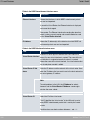
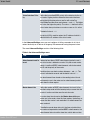
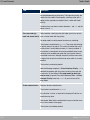
The Reference, which you have in front of you, contains the following chapters:
User's Guide - Reference
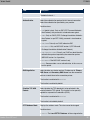
Chapter
Description
Introduction
You see an overview of the device:
About this guide
We explain the various components of this manual and how to
use it.
Installation
This contains instructions for how to set up and connect your
device.
Basic configuration
This chapter provides a step-by-step guide to the basic functions on your device.
Reset
This chapter explains how to reset your device to the ex works
state.
Technical data
This section contains a description of all the device's technical
properties.
Variable switching of S0
interfaces
This section describes how to switch the S0 interfaces from external to internal.
Access and configuration
This includes explanations about the different access and configuration methods.
Assistants
All the configuration options of the GUI are described in this
chapter. The individual menus are described in the order of navigation.
System Management
Physical Interfaces
LAN
The individual chapters also contain more detailed explanations
on the subsystem in question.
Wireless LAN Controller
Networking
Routing Protocols
Multicast
bintec Rxxx2/RTxxx2
3
2 About this guide
Teldat GmbH
Chapter
Description
WAN
VPN
Firewall
VoIP
Local Services
Maintenance
External Reporting
Monitoring
Glossary
Index
The glossary contains a reference to the most important technical terms used in network technology.
The index lists all the key terms for operating the device and all
the configuration options and gives page numbers so they can
be found easily.
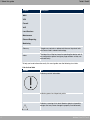
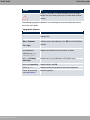
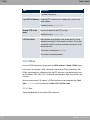
To help you locate information easily, this user's guide uses the following visual aids:
List of visual aids
Symbol
Use
Indicates practical information.
Indicates general and important points.
Indicates a warning of risk level Attention (points out possible
dangers that may cause damage to property if not observed).
4
bintec Rxxx2/RTxxx2
2 About this guide
Teldat GmbH
Symbol
Use
Indicates a warning of risk level Warning (points out possible
dangers that may cause physical injury or even death if not observed).
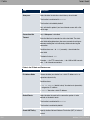
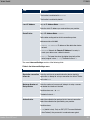
The following typographical elements are used to help you find and interpret the information in this user's guide:
Typographical elements
Typographical element Use
•
Indicates lists.
Menu->Submenu
Indicates menus and submenus in the GUI and in the Windows
interface.
File->Open
bintec Rxxx2/RTxxx2
non-proportional
(Courier), e.g. Indicates commands that you must enter as written.
bold, e.g. Windows
Start menu
Indicates keys, key combinations and Windows terms.
bold, e.g. Licence Key
Identifies fields in the GUI.
italic, e.g. Indicates values that you enter or that can be configured.
Online: blue and italic,
e.g. www.teldat.de
Indicates hyperlinks.
5
3 Installation
Teldat GmbH
Chapter 3 Installation
Caution
Please read the safety notices carefully before installing and starting up your device.
These are supplied with the device.
3.1 Setting up and connecting
Note
All you need for this is the cable supplied with the equipment.
Caution
Incorrect cabling of the ISDN and ETH interfaces may also damage your device. Connect only the ETH interface of the device to the LAN interface of the computer/hub or
an ISDN interface of the device, if any, only to the ISDN connection.
Note
If you connect an unconfigured device to an ISDN connection in parallel to a PBX, the
PBX cannot take any calls until an ISDN number is configured on the device. If no
entry is specified, every incoming ISDN call is accepted by the ISDN Login service.
6
bintec Rxxx2/RTxxx2
3 Installation
Teldat GmbH
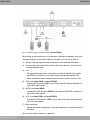
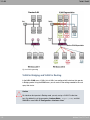
Fig. 2: Connection options using the example of bintec RT4202
When setting up and connecting, carry out the steps in the following sequence (refer to the
connection diagrams for the individual devices in chapter Technical data on page 11):
(1)
Affix the rubber feet supplied to the marked areas on the underside of the device.
(2)
Place your device on a fixed, even surface or install your device in a 19 inch cabinet
using the supplied bracket.
(3)
LAN
For the standard configuration of your device via Ethernet, connect the first switch
port (ETH1) of your device to your LAN using the Ethernet cable supplied. The
device automatically detects whether it is connected to a switch or directly to a PC.
(4)
ADSL (only bintec R3002 and bintec RT3002)
Connect the DSL interface (DSL) of your device to the DSL output of the splitter using the DSL cable supplied.
(5)
SHDSL (only bintec R3802)
Connect the SHDSL interface (SHDSL) of your device to the SHDSL connection using the DSL cable supplied.
(6)
VDSL (only bintec R3502 and bintec RT3502)
Connect the VDSL2 interface (VDSL) of your device to the VDSL connection using
the VDSL cable supplied.
(7)
Mains connection
Connect the device to a plug socket. The power connection is located on the back of
the device.
You can set up further connections as required:
bintec Rxxx2/RTxxx2
7
3 Installation
Teldat GmbH
• ISDN-BRI
(see Variable switching of S0 interfaces on page 37)
Connect the ISDN BRI interface (BRI1, BRI2 or BRI3, BRI4) of the device to your ISDN
socket using the ISDN BRI cable provided.
• ISDN-PRI (only bintec R4402)
Connect the ISDN PRI interface (PRI-1 or PRI-2) of the device to your PRI connection
using the ISDN PRI cable provided.
• Other LANs
Connect any other terminals in your network to the remaining switch ports ETH2, ETH3,
ETH4 or ETH5) of your device using other Ethernet cables.
• Serial connection
For alternative configuration possibilities, connect the serial interface of your PC ( COM1
or COM2) to the serial interface of the gateway ( console). However, configuration via the
serial interface is not provided by default.
• Analog telephone /analog fax (only bintec RT4202)
Connect your analog telephone or your analog fax to the FXS connections.
The device is now ready for configuration with the GUI. Chapter Basic configuration on
page 41 provides a detailed step-by-step guide to the basic functions on your device.
3.2 Cleaning
You can clean your device easily. Use a damp cloth or antistatic cloth. Do not use solvents.
Never use a dry cloth; the electrostatic charge could cause electronic faults. Make sure that
no moisture can enter the device and cause damage.
8
bintec Rxxx2/RTxxx2
3 Installation
Teldat GmbH
3.3 Support information
If you have any questions about your new product or are looking for additional information,
the Teldat GmbH Support Centre can be reached Monday to Friday between the hours of 8
am and 5 pm. They can be contacted as follows:
Email
[email protected]
International Support Coordination
Telephone: +49 911 9673 1550
End-customer Hotline
0900 1 38 65 93 (€1.10/min on land-lines in Germany)
Fax: +49 911 9673 1599
For detailed information on our support services, contact www.teldat.de .
bintec Rxxx2/RTxxx2
9
4 Reset
Teldat GmbH
Chapter 4 Reset
Resetting the device enables you to return your device to a predefined initial state. This
may be necessary if you have made incorrect configuration settings or the device is to be
reprogrammed.
Manually resetting the device
You can reset the device to the ex works state with the RESET button. Depending on how
long it is pressed for, the RESET button performs two different functions:
• After pressing briefly once, the device reboots.
• Hold the RESET button until the STATUS LED starts to flash. The device performs a
factory reset. This means the device is returned to its ex works state. The boot configuration is deleted and all passwords are reset.
10
bintec Rxxx2/RTxxx2
5 Technical data
Teldat GmbH
Chapter 5 Technical data
This chapter summarises all the hardware properties of the R1202, R3002, R3502, R3802,
R4402, RT1202, RT3002, RT3502 and RT4202 devices.
5.1 Scope of supply
Your device is supplied with the following parts:
Product
name
Cable sets/other
Software
Documentation
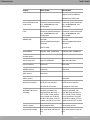
R1202
Ethernet cable
Companion DVD
Quick Install Guide and
safety notices (printed)
ISDN BRI cable
User's Guide (on DVD)
Serial cable
R3002
Network cable
bintec Dime Manager
User's Guide (on DVD)
19-inch installation kit
Release Notes, if required
4x rubber feet - selfadhesive
Installation poster (printed)
Ethernet cable
Companion DVD
ISDN BRI cable
Quick Install Guide and
safety notices (printed)
User's Guide (on DVD)
Serial cable
Network cable
bintec Dime Manager
User's Guide (on DVD)
2 ADSL cables (for Annex A
and for Annex B)
Release Notes, if required
Installation poster (printed)
19-inch installation kit
4x rubber feet - selfadhesive
R3502
Ethernet cable
ISDN BRI cable
Serial cable
Network cable
bintec Rxxx2/RTxxx2
Companion DVD
Quick Install Guide and
safety notices (printed)
User's Guide (on DVD)
bintec Dime Manager
User's Guide (on DVD)
11
5 Technical data
Teldat GmbH
Product
name
Cable sets/other
Software
Documentation
VDSK cable
Release Notes, if required
19-inch installation kit
Installation poster (printed)
4x rubber feet - selfadhesive
R3802
Ethernet cable
Companion DVD
ISDN BRI cable
Quick Install Guide and
safety notices (printed)
User's Guide (on DVD)
Serial cable
Network cable
bintec Dime Manager
User's Guide (on DVD)
SHDSL cable
Release Notes, if required
19-inch installation kit
Installation poster (printed)
4x rubber feet - selfadhesive
R4402
Ethernet cable
Companion DVD
ISDN BRI cable
Quick Install Guide and
safety notices (printed)
User's Guide (on DVD)
ISDN PRI cable
Serial cable
bintec Dime Manager
User's Guide (on DVD)
Network cable
Release Notes, if required
19-inch installation kit
Installation poster (printed)
4x rubber feet - selfadhesive
RT1202
Ethernet cable
Companion DVD
ISDN BRI cable
User's Guide (on DVD)
Serial cable
RT3002
12
Quick Install Guide and
safety notices (printed)
Network cable
bintec Dime Manager
User's Guide (on DVD)
19-inch installation kit
Release Notes, if required
4x rubber feet - selfadhesive
Installation poster (printed)
Ethernet cable
Companion DVD
Quick Install Guide and
safety notices (printed)
bintec Rxxx2/RTxxx2
5 Technical data
Teldat GmbH
Product
name
Cable sets/other
Software
Documentation
ISDN BRI cable
User's Guide (on DVD)
Serial cable
bintec Dime Manager
User's Guide (on DVD)
Network cable
Release Notes, if required
2 ADSL cables (for Annex A
and for Annex B)
Installation poster (printed)
19-inch installation kit
4x rubber feet - selfadhesive
RT3502
Ethernet cable
Companion DVD
ISDN BRI cable
Quick Install Guide and
safety notices (printed)
User's Guide (on DVD)
Serial cable
Network cable
bintec Dime Manager
User's Guide (on DVD)
VDSK cable
Release Notes, if required
19-inch installation kit
Installation poster (printed)
4x rubber feet - selfadhesive
RT4202
Ethernet cable
Companion DVD
ISDN BRI cable
Serial cable
Quick Install Guide and
safety notices (printed)
User's Guide (on DVD)
Network cable
bintec Dime Manager
User's Guide (on DVD)
19-inch installation kit
Release Notes, if required
4x rubber feet - selfadhesive
Installation poster (printed)
5.2 General Product Features
The general product features cover performance features and the technical prerequisites
for installation and operation of your device.
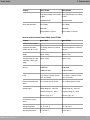
General product features bintec R1202, bintec RT1202
bintec Rxxx2/RTxxx2
13
5 Technical data
Teldat GmbH
Property
bintec R1202
bintec RT1202
Equipment dimensions
without cable (B x H x D):
19" housing (482.6 mm x 220 mm
x 45 mm)
19" housing (482.6 mm x 220 mm
x 45 mm)
Weight
approx. 2.0 kg
approx. 2.0 kg
Transport weight (incl. documentation, cables, packaging)
approx. 2.6 kg
approx. 2.6 kg
Memory
64 MB RAM,
64 MB RAM,
16 MB flash ROM
16 MB flash ROM
LEDs
13 (1x Power, 1x Status, 5x2 Ethernet, 1x Function)
14 (1x Power, 1x Status, 5x2 Ethernet, 2x Function)
Power consumption of the
device
max. 15 Watt, normally 13 Watt
max. 15 Watt, normally 13 Watt
Voltage supply
Voltage Range 85 ~ 264 V AC
Voltage Range 85 ~ 264 V AC
Frequency Range 47 ~ 63 Hz
Frequency Range 47 ~ 63 Hz
Efficiency (Typ.) 79 %
Efficiency (Typ.) 79 %
Storage temperature
-25 °C to +70 °C
-25 °C to +70 °C
Operating temperature
0 °C to +40 °C
0 °C to +40 °C
Relative atmospheric humidity
10 % to 90 % non-condensing in
operation,
10 % to 90 % non-condensing in
operation,
Dimensions and weights:
Environmental requirements:
5 % to 95 % non-condensing when 5 % to 95 % non-condensing when
stored
stored
Room classification
Only use in dry rooms.
Only use in dry rooms.
Permanently installed (twisted pair
only), 10/100/1000 mbps, autosensing, MDIX
Permanently installed (twisted pair
only), 10/100/1000 mbps, autosensing, MDIX
Available interfaces:
Ethernet IEEE 802.3 LAN
(4-port switch)
14
bintec Rxxx2/RTxxx2
5 Technical data
Teldat GmbH
Property
bintec R1202
bintec RT1202
ETH5
Permanently installed (twisted pair
only), 10/100/1000 mbps, autosensing, MDIX
Permanently installed (twisted pair
only), 10/100/1000 mbps, autosensing, MDIX
ISDN-BRI (S0)
Euro-ISDN
(point-to-multipoint/point-to-point
connection)
Euro-ISDN
(point-to-multipoint/point-to-point
connection)
Only TE mode
TE or NT mode
Baudrates: 1200 - 115200 Baud
Baudrates: 1200 - 115200 Baud
Serial interface V.24
5-pole mini USB socket
5-pole mini USB socket
Ethernet interfaces
RJ45 socket
RJ45 socket
ISDN BRI interface
RJ45 socket
RJ45 socket
Standards & Guidelines
R&TTE Directive 1999/5/EC
R&TTE Directive 1999/5/EC
CE symbol for all EU states
CE symbol for all EU states
SAFERNET TM Security
Technology
Community passwords, PAP,
CHAP, MS-CHAP, MS-CHAP v.2,
PPTP, PPPoE, PPPoA, Callback,
Access Control Lists, CLID, NAT,
SIF, MPPE Encryption, PPTP Encryption, VPN with PPTP or IPSec
Community passwords, PAP,
CHAP, MS-CHAP, MS-CHAP v.2,
PPTP, PPPoE, PPPoA, Callback,
Access Control Lists, CLID, NAT,
SIF, MPPE Encryption, PPTP Encryption, VPN with PPTP or IPSec
Software supplied
Dime Manager on DVD
Dime Manager on DVD
Documentation included
Quick Install Guide and safety notices
Quick Install Guide and safety notices
Console/RS232
Available sockets:
bintec Dime Manager User's Guide bintec Dime Manager User's Guide
on DVD
on DVD
Online documentation
Installation poster
Installation poster
User's Guide
User's Guide
Workshops
Workshops
Release Notes, if required
Release Notes, if required
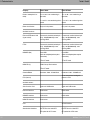
General product features bintec R3002, bintec R3502, bintec R3802
bintec Rxxx2/RTxxx2
15
5 Technical data
Teldat GmbH
Property
bintec R3002
bintec R3502
bintec R3802
Equipment dimensions
without cable (B x H x D):
19" housing (482.6
mm x 220 mm x 45
mm)
19" housing (482.6
mm x 220 mm x 45
mm)
19" housing (482.6
mm x 220 mm x 45
mm)
Weight
approx. 2.0 kg
approx. 2.0 kg
approx. 2.0 kg
Transport weight (incl. docu- approx. 2.6 kg
mentation, cables, packaging)
approx. 2.6 kg
approx. 2.6 kg
Memory
64 MB RAM,
64 MB RAM,
64 MB RAM,
16 MB flash ROM
16 MB flash ROM
16 MB flash ROM
LEDs
14 (1x Power, 1x
Status, 5x2 Ethernet,
2x Function)
14 (1x Power, 1x
Status, 5x2 Ethernet,
2x Function)
14 (1x Power, 1x
Status, 5x2 Ethernet,
2x Function)
Power consumption of the
device
max. 15 Watt, normally 13 Watt
max. 15 Watt, normally 13 Watt
max. 15 Watt, normally 13 Watt
Voltage supply
Voltage Range 85 ~
264 V AC
Voltage Range 85 ~
264 V AC
Voltage Range 85 ~
264 V AC
Frequency Range 47
~ 63 Hz
Frequency Range 47
~ 63 Hz
Frequency Range 47
~ 63 Hz
Dimensions and weights:
Efficiency (Typ.) 79 % Efficiency (Typ.) 79 % Efficiency (Typ.) 79 %
Environmental requirements:
Storage temperature
-25 °C to +70 °C
-25 °C to +70 °C
-25 °C to +70 °C
Operating temperature
0 °C to +40 °C
0 °C to +40 °C
0 °C to +40 °C
10 % to 90 % noncondensing in operation,
10 % to 90 % noncondensing in operation,
5 % to 95 % noncondensing when
stored
5 % to 95 % noncondensing when
stored
5 % to 95 % noncondensing when
stored
Only use in dry
rooms.
Only use in dry
rooms.
Only use in dry
rooms.
Relative atmospheric humidity 10 % to 90 % noncondensing in operation,
Room classification
Available interfaces:
16
bintec Rxxx2/RTxxx2
5 Technical data
Teldat GmbH
Property
bintec R3002
ADSL2+ interface
Internal ADSL2+ modem for Annex A and
Annex B
VDSL2 interface
-
bintec R3502
bintec R3802
-
-
In accordance with
ITU G.993.2; supports
Baud plan ISDN 998.
-
Autodetection of VDSL profile.
SHDSL interface
-
Supports SHDSL.bis.
Internal SHDSL 8 wire
modem.
Bonding technology
with
2-wire/4-wire/6-wire/8wire as an inverse
multiplexer - performed over IMA in
accordance with the
ATM forum.
Ethernet IEEE 802.3 LAN
(4-port switch)
Permanently installed
(twisted pair only),
10/100/1000 mbps,
autosensing, MDIX
Permanently installed
(twisted pair only),
10/100/1000 mbps,
autosensing, MDIX
Permanently installed
(twisted pair only),
10/100/1000 mbps,
autosensing, MDIX
ETH5
Permanently installed
(twisted pair only),
10/100/1000 mbps,
autosensing, MDIX
Permanently installed
(twisted pair only),
10/100/1000 mbps,
autosensing, MDIX
Permanently installed
(twisted pair only),
10/100/1000 mbps,
autosensing, MDIX
ISDN BRI (S0)
Euro-ISDN
Euro-ISDN
Euro-ISDN
(point-to-multipoint/poi (point-to-multipoint/poi (point-to-multipoint/poi
nt-to-point connection) nt-to-point connection) nt-to-point connection)
Console/RS232
Only TE mode
Only TE mode
Only TE mode
Baudrates: 1200 115200 Baud
Baudrates: 1200 115200 Baud
Baudrates: 1200 115200 Baud
Available sockets:
Serial interface V.24
bintec Rxxx2/RTxxx2
5-pole mini USB sock- 5-pole mini USB sock- 5-pole mini USB socket
et
et
17
5 Technical data
Teldat GmbH
Property
bintec R3002
bintec R3502
bintec R3802
Ethernet interfaces
RJ45 socket
RJ45 socket
RJ45 socket
ISDN BRI interface
RJ45 socket
RJ45 socket
RJ45 socket
-
RJ45 socket
ADSL interface
VDSL2 interface
RJ45 socket
-
-
-
R&TTE Directive
1999/5/EC
R&TTE Directive
1999/5/EC
R&TTE Directive
1999/5/EC
CE symbol for all EU
states
CE symbol for all EU
states
CE symbol for all EU
states
SAFERNET TM Security
Technology
Community passwords, PAP, CHAP,
MS-CHAP, MS-CHAP
v.2, PPTP, PPPoE,
PPPoA, Callback, Access Control Lists,
CLID, NAT, SIF,
MPPE Encryption,
PPTP Encryption,
VPN with PPTP or
IPSec
Community passwords, PAP, CHAP,
MS-CHAP, MS-CHAP
v.2, PPTP, PPPoE,
PPPoA, Callback, Access Control Lists,
CLID, NAT, SIF,
MPPE Encryption,
PPTP Encryption,
VPN with PPTP or
IPSec
Community passwords, PAP, CHAP,
MS-CHAP, MS-CHAP
v.2, PPTP, PPPoE,
PPPoA, Callback, Access Control Lists,
CLID, NAT, SIF,
MPPE Encryption,
PPTP Encryption,
VPN with PPTP or
IPSec
Software supplied
Dime Manager on
DVD
Dime Manager on
DVD
Dime Manager on
DVD
Documentation included
Quick Install Guide
and safety notices
Quick Install Guide
and safety notices
Quick Install Guide
and safety notices
bintec Dime Manager
User's Guide on DVD
bintec Dime Manager
User's Guide on DVD
bintec Dime Manager
User's Guide on DVD
Installation poster
Installation poster
Installation poster
User's Guide
User's Guide
User's Guide
Workshops
Workshops
Workshops
Release Notes, if required
Release Notes, if required
Release Notes, if required
SHDSL interface
Standards & Guidelines
Online documentation
RJ45 socket
General product features bintec RT3002, bintec RT3502
18
bintec Rxxx2/RTxxx2
5 Technical data
Teldat GmbH
Property
bintec RT3002
bintec RT3502
Equipment dimensions
without cable (B x H x D):
19" housing (482.6 mm x 220 mm
x 45 mm)
19" housing (482.6 mm x 220 mm
x 45 mm)
Weight
approx. 2.0 kg
approx. 2.0 kg
Transport weight (incl. documentation, cables, packaging)
approx. 2.6 kg
approx. 2.6 kg
Memory
64 MB RAM,
64 MB RAM,
16 MB flash ROM
16 MB flash ROM
LEDs
17 (1x Power, 1x Status, 5x2 Ethernet, 5x Function)
17 (1x Power, 1x Status, 5x2 Ethernet, 5x Function)
Power consumption of the
device
max. 24 Watt, typically 15 Watt
max. 24 Watt, typically 15 Watt
Voltage supply
Voltage Range 85 ~ 264 V AC
Voltage Range 85 ~ 264 V AC
Frequency Range 47 ~ 63 Hz
Frequency Range 47 ~ 63 Hz
Efficiency (Typ.) 79 %
Efficiency (Typ.) 79 %
Storage temperature
-25 °C to +70 °C
-25 °C to +70 °C
Operating temperature
0 °C to +40 °C
0 °C to +40 °C
Relative atmospheric humidity
10 % to 90 % non-condensing in
operation,
10 % to 90 % non-condensing in
operation,
Dimensions and weights:
Environmental requirements:
5 % to 95 % non-condensing when 5 % to 95 % non-condensing when
stored
stored
Room classification
Only use in dry rooms.
Only use in dry rooms.
Available interfaces:
ADSL interface
VDSL2 interface
bintec Rxxx2/RTxxx2
Internal ADSL2+ modem for Annex
A and Annex B
-
-
In accordance with ITU G.993.2;
19
5 Technical data
Teldat GmbH
Property
bintec RT3002
bintec RT3502
supports Baud plan ISDN 998.
Autodetection of VDSL profile.
Ethernet IEEE 802.3 LAN
(4-port switch)
Permanently installed (twisted pair
only), 10/100/1000 mbps, autosensing, MDIX
Permanently installed (twisted pair
only), 10/100/1000 mbps, autosensing, MDIX
ETH5
Permanently installed (twisted pair
only), 10/100/1000 mbps, autosensing, MDIX
Permanently installed (twisted pair
only), 10/100/1000 mbps, autosensing, MDIX
ISDN BRI (S0)
Euro-ISDN
(point-to-multipoint/point-to-point
connection)
Euro-ISDN
(point-to-multipoint/point-to-point
connection)
TE or NT mode
TE or NT mode
Baudrates: 1200 - 115200 Baud
Baudrates: 1200 - 115200 Baud
Serial interface V.24
5-pole mini USB socket
5-pole mini USB socket
Ethernet interfaces
RJ45 socket
RJ45 socket
ISDN BRI interface
RJ45 socket
RJ45 socket
ADSL interface
RJ45 socket
Console/RS232
Available sockets:
VDSL2 interface
Standards & Guidelines
20
-
-
RJ45 socket
R&TTE Directive 1999/5/EC
R&TTE Directive 1999/5/EC
CE symbol for all EU states
CE symbol for all EU states
SAFERNET TM Security
Technology
Community passwords, PAP,
CHAP, MS-CHAP, MS-CHAP v.2,
PPTP, PPPoE, PPPoA, Callback,
Access Control Lists, CLID, NAT,
SIF, MPPE Encryption, PPTP Encryption, VPN with PPTP or IPSec
Community passwords, PAP,
CHAP, MS-CHAP, MS-CHAP v.2,
PPTP, PPPoE, PPPoA, Callback,
Access Control Lists, CLID, NAT,
SIF, MPPE Encryption, PPTP Encryption, VPN with PPTP or IPSec
Software supplied
Dime Manager on DVD
Dime Manager on DVD
Documentation included
Quick Install Guide and safety notices
Quick Install Guide and safety notices
bintec Rxxx2/RTxxx2
5 Technical data
Teldat GmbH
Property
bintec RT3002
bintec RT3502
bintec Dime Manager User's Guide bintec Dime Manager User's Guide
on DVD
on DVD
Online documentation
Installation poster
Installation poster
User's Guide
User's Guide
Workshops
Workshops
Release Notes, if required
Release Notes, if required
General product features bintec R4402, bintec RT4202
Property
bintec R4402
bintec RT4202
Equipment dimensions
without cable (B x H x D):
19" housing (482.6 mm x 220 mm
x 45 mm)
19" housing (482.6 mm x 220 mm
x 45 mm)
Weight
approx. 2.0 kg
approx. 2.0 kg
Transport weight (incl. documentation, cables, packaging)
approx. 2.6 kg
approx. 2.6 kg
Memory
64 MB RAM,
64 MB RAM,
16 MB flash ROM
16 MB flash ROM
LEDs
16 (1x Power, 1x Status, 5x2 Ethernet, 4x Function)
20 (1x Power, 1x Status, 5x2 Ethernet, 8x Function)
Power consumption of the
device
max. 24 Watt, typically 15 Watt
max. 24 Watt, typically 15 Watt
Voltage supply
Voltage Range 85 ~ 264 V AC
Voltage Range 85 ~ 264 V AC
Frequency Range 47 ~ 63 Hz
Frequency Range 47 ~ 63 Hz
Efficiency (Typ.) 79 %
Efficiency (Typ.) 79 %
Storage temperature
-25 °C to +70 °C
-25 °C to +70 °C
Operating temperature
0 °C to +40 °C
0 °C to +40 °C
Dimensions and weights:
Environmental requirements:
bintec Rxxx2/RTxxx2
21
5 Technical data
Teldat GmbH
Property
bintec R4402
bintec RT4202
Relative atmospheric humidity
10 % to 90 % non-condensing in
operation,
10 % to 90 % non-condensing in
operation,
5 % to 95 % non-condensing when 5 % to 95 % non-condensing when
stored
stored
Room classification
Only use in dry rooms.
Only use in dry rooms.
Ethernet IEEE 802.3 LAN
(4-port switch)
Permanently installed (twisted pair
only), 10/100/1000 mbps, autosensing, MDIX
Permanently installed (twisted pair
only), 10/100/1000 mbps, autosensing, MDIX
ETH5
Permanently installed (twisted pair
only), 10/100/1000 mbps, autosensing, MDIX
Permanently installed (twisted pair
only), 10/100/1000 mbps, autosensing, MDIX
ISDN BRI (S0)
Euro-ISDN
(point-to-multipoint/point-to-point
connection)
Euro-ISDN
(point-to-multipoint/point-to-point
connection)
TE or NT mode
TE or NT mode
Available interfaces:
ISDN-PRI (2)
ISDN Primary Rate Interface
TE or NT mode
Console/RS232
Baudrates: 1200 - 115200 Baud
Baudrates: 1200 - 115200 Baud
-
4x for connection of analog telephones or FAX
Serial interface V.24
5-pole mini USB socket
5-pole mini USB socket
Ethernet interfaces
RJ45 socket
RJ45 socket
ISDN BRI interface
RJ45 socket
RJ45 socket
ISDN-PRI interface
RJ45 socket
FXS (internal)
Available sockets:
FXS
Standards & Guidelines
22
-
-
4x RJ45 sockets
R&TTE Directive 1999/5/EC
R&TTE Directive 1999/5/EC
CE symbol for all EU states
CE symbol for all EU states
bintec Rxxx2/RTxxx2
5 Technical data
Teldat GmbH
Property
bintec R4402
bintec RT4202
SAFERNET TM Security
Technology
Community passwords, PAP,
CHAP, MS-CHAP, MS-CHAP v.2,
PPTP, PPPoE, PPPoA, Callback,
Access Control Lists, CLID, NAT,
SIF, MPPE Encryption, PPTP Encryption, VPN with PPTP or IPSec
Community passwords, PAP,
CHAP, MS-CHAP, MS-CHAP v.2,
PPTP, PPPoE, PPPoA, Callback,
Access Control Lists, CLID, NAT,
SIF, MPPE Encryption, PPTP Encryption, VPN with PPTP or IPSec
Software supplied
Dime Manager on DVD
Dime Manager on DVD
Documentation included
Quick Install Guide and safety notices
Quick Install Guide and safety notices
bintec Dime Manager User's Guide bintec Dime Manager User's Guide
on DVD
on DVD
Online documentation
Installation poster
Installation poster
User's Guide
User's Guide
Workshops
Workshops
Release Notes, if required
Release Notes, if required
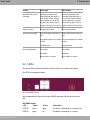
5.3 LEDs
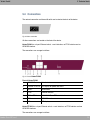
The device LEDs provide information on certain activities and statuses of the device.
The LEDs are arranged as follows:
Fig. 3: Arrangement of LEDs
You can determine the status of the router in BRRP operation with the aid of the status
LED.
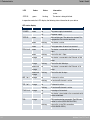
LED BRRP display
bintec Rxxx2/RTxxx2
LED
Colour
Status
Information
STATUS
green
lights
The device is functioning as a master router.
STATUS
green
off
The device is functioning as a backup
23
5 Technical data
Teldat GmbH
LED
Colour
Status
Information
router.
STATUS
green
flashing
The device is being initialised.
In operation mode, the LEDs display the following status information for your device:
LED status display
LED
Colour
Status
Information
POWER
green
on
The power supply is connected.
off
No power supply.
green
on
After switching on: The device has started. During operation: An error has occurred.
green
flashing
The device is active.
green
off
During operation: An error has occurred.
green
on
The device is connected to the Ethernet at 1
Gbps
green
flashing
Data traffic with 1 Gbps.
orange
on
The device is connected to the Ethernet at 100
mbps.
orange
flashing
Data traffic with 100 mbps.
green and
orange
on
The device is connected to the Ethernet at 10
mbps.
green and
orange
flashing
Data traffic with 10 mbps.
orange
on
D-channel is active.
flashing
At least one B-channel is active.
on
D-channel is active.
flashing
At least one B-channel is active.
on
Incoming call to terminal.
off
The device is terminated or the connected could
not be established.
on
DSL synchronisation successful. The DSL connection is active (ADSL/SHDSL/VDSL).
flashing
Data traffic via the DSL connection
(ADSL/SHDSL/VDSL).
STATUS
ETH 1 to 5
BRI 1 to 4
PRI 1 to 2
FXS 1 to 4
DSL
24
orange
orange
orange
bintec Rxxx2/RTxxx2
5 Technical data
Teldat GmbH
5.4 Connectors
The network connection and the on/off switch are located on the back of the device.
Fig. 4: Mains connection
All other connections are located on the front of the device.
bintec R1202 has a 4-port Ethernet switch, a serial interface, an ETH5 interface and an
ISDN BRI interface.
The connections are arranged as follows:
Fig. 5: Front of bintec R1202
Front of bintec R1202
1
CONSOLE
Serial interface
2
POWER / STATUS
LED display for power and status
3
RESET
Reset button
4
ETH5
Ethernet interface
5
ETH1 - ETH4
10/100/1000 Base-T Ethernet interface
6
BRI1
ISDN BRI interface
9
LED
LED display
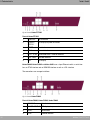
bintec RT1202 has a 4-port Ethernet switch, a serial interface, an ETH5 interface and two
ISDN BRI interfaces.
The connections are arranged as follows:
bintec Rxxx2/RTxxx2
25
5 Technical data
Teldat GmbH
Fig. 6: Front of bintec RT1202
Front of bintec RT1202
1
CONSOLE
Serial interface
2
POWER /
STATUS
LED display for power and status
3
RESET
Reset button
4
ETH5
Ethernet interface
5
ETH1 - ETH4 10/100/1000 Base-T Ethernet interface
6
BRI1 - BRI2
ISDN BRI interface
9
LED
LED display
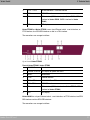
bintec R3002, bintec R3502 and bintec 3802 have a 4-port Ethernet switch, a serial interface, an ETH5 interface and an ISDN BRI interface as well as a DSL interface.
The connections are arranged as follows:
Fig. 7: Front of bintec R3002
Front of bintec R3002, bintec R3502, bintec R3802
26
1
CONSOLE
Serial interface
2
POWER / STATUS
LED display for power and status
3
RESET
Reset button
4
ETH5
Ethernet interface
bintec Rxxx2/RTxxx2
5 Technical data
Teldat GmbH
5
ETH1 - ETH4
10/100/1000 Base-T Ethernet interface
6
BRI1
ISDN BRI interface
8
DSL
DSL interface (ADSL2+ interface for bintec R3002, VDSL2
interface for bintec R3502, SHDSL interface for bintec
R3802)
9
LED
LED display
bintec RT3002 and bintec RT3502 have a 4-port Ethernet switch, a serial interface, an
ETH5 interface, four ISDN BRI interfaces as well as a DSL interface.
The connections are arranged as follows:
Fig. 8: Front of bintec RT3002
Front of bintec RT3002 , bintec RT3502
1
CONSOLE
Serial interface
2
POWER / STATUS
LED display for power and status
3
RESET
Reset button
4
ETH5
Ethernet interface
5
ETH1 - ETH4
10/100/1000 Base-T Ethernet interface
6
BRI1 - BRI4
ISDN BRI interface
8
DSL
DSL interface (ADSL2+ interface for bintec RT3002, VDSL2
interface for bintec RT3502)
9
LED
LED display
bintec R4402 has a 4-port Ethernet switch, a serial interface, an ETH5 interface, two ISDN
BRI interfaces and two ISDN PRI interfaces.
The connections are arranged as follows:
bintec Rxxx2/RTxxx2
27
5 Technical data
Teldat GmbH
Fig. 9: Front of bintec R4402
Front of bintec R4402
1
CONSOLE
Serial interface
2
POWER / STATUS
LED display for power and status
3
RESET
Reset button
4
ETH5
Ethernet interface
5
ETH1 - ETH4
10/100/1000 Base-T Ethernet interface
6
BRI1 - BRI2
ISDN BRI interface
7
PRI1 - PRI2
ISDN-PRI interface
9
LED
LED display
bintec RT4202 has a 4-port Ethernet switch, a serial interface, an ETH5 interface, four
ISDN BRI interfaces and four FXS interfaces.
The connections are arranged as follows:
Fig. 10: Front of bintec RT4202
Front of bintec RT4202
28
1
CONSOLE
Serial interface
2
POWER / STATUS
LED display for power and status
3
RESET
Reset button
4
ETH5
Ethernet interface
bintec Rxxx2/RTxxx2
5 Technical data
Teldat GmbH
5
ETH1 - ETH4
10/100/1000 Base-T Ethernet interface
6
BRI1 - BRI4
ISDN BRI interface
9
LED
LED display
10
FXS1 - FXS4
FXS interfaces
5.5 Pin Assignments
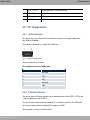
5.5.1 Serial interface
Your device has a serial interface for connection to a console. This supports Baud rates
from 1200 to 115200 Bps.
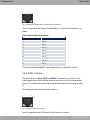
The interface is designed as a 5-pole mini USB socket.
Fig. 11: 5-pole mini USB socket
The pin assignment is as follows:
Pin assignment of the mini USB socket
Pin
Position
1
Not used
2
TxD
3
RxD
4
Not used
5
GND
5.5.2 Ethernet interface
The devices have an Ethernet interface with an integrated 4-port switch (ETH1 - ETH4) and
a separate Ethernet interface (ETH5).
The 4-port switch is used to connect individual PCs or additional switches. The ETH5 interface can be used to connect an optional DSL modem or a DMZ.
The connection is made via an RJ45 socket.
bintec Rxxx2/RTxxx2
29
5 Technical data
Teldat GmbH
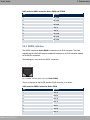
Fig. 12: Ethernet-10/100/1000 Base-T interface (RJ45 connector)
The pin assignment for the Ethernet 10/100/1000 Base-T interface (RJ45 connector) is as
follows:
RJ45 socket for Ethernet connection
Pin
Position
1
Pair 0 +
2
Pair 0 -
3
Pair 1 +
4
Pair 2 +
5
Pair 2 -
6
Pair 1 -
7
Pair 3 +
8
Pair 3 -
The Ethernet 10/100/1000 BASE-T interface does not have an Auto-MDI-X function.
5.5.3 ADSL interface
The ADSL interface on bintec R3002 and RT3002 is connected via an RJ45 plug. The
cable supplied connects the RJ45 plug needed for the device to an RJ11 plug provided for
Annex A. The second cable supplied connected the RJ45 plug with an RJ45 plug for Annex
B.
The following pins are used for the ADSL connection:
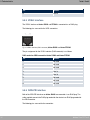
Fig. 13: ADSL interface (RJ45 socket)
The pin assignment for the ADSL interface (RJ45 socket) is as follows:
30
bintec Rxxx2/RTxxx2
5 Technical data
Teldat GmbH
RJ45 socket for ADSL connection bintec R3002 and RT3002
Pin
Position
1
Not used
2
Not used
3
Not used
4
Line 1a
5
Line 1b
6
Not used
7
Not used
8
Not used
5.5.4 SHDSL interface
The SHDSL interface on bintec R3802 is connected via an RJ45 connector. The cable
supplied connects the RJ45 connector needed for the device to an RJ45 connector needed
for the SHDSL connection.
The following pins are used for the SHDSL connection:
Fig. 14: SHDSL interface (RJ45 connector) bintec R3802
The pin assignment for the SHDSL interface (RJ45 connector) is as follows:
RJ45 socket for SHDSL connection bintec R3802
bintec Rxxx2/RTxxx2
Pin
Position
1
Line a4
2
Line b4
3
Line a3
4
Line a1
5
Line b1
6
Line b3
7
Line a2
31
5 Technical data
Teldat GmbH
Pin
Position
8
Line b2
5.5.5 VDSL2 interface
The VDSL2 interface on bintec R3502 and RT3502 is connected via an RJ45 plug.
The following pins are used for the VDSL connection:
Fig. 15: VDSL2 interface (RJ45 connector) bintec R3502 and bintec RT3502
The pin assignment for the VDSL2 interface (RJ45 connector) is as follows:
RJ45 socket for VDSL connection bintec R3502 and bintec RT3502
Pin
Position
1
Not used
2
Not used
3
Not used
4
Line 1a
5
Line 1b
6
Not used
7
Not used
8
Not used
5.5.6 ISDN-PRI interface
Both of the ISDN PRI interfaces on bintec R4402 are connected via an RJ45 plug. The
cable supplied connects the RJ45 plug needed for the device to an RJ45 plug needed for
the PRI connection.
The following pins are used for the connection:
32
bintec Rxxx2/RTxxx2
5 Technical data
Teldat GmbH
Fig. 16: ISDN PRI interface (RJ45 socket)
The pin assignment for the ISDN PRI interface (RJ45 socket) is as follows:
RJ45 socket for ISDN PRI connection
Pin
Position
1
T+
2
T-
3
Not used
4
R+
5
R-
6
Not used
7
Not used
8
Not used
Note for NTs in Germany
Note
In Germany, "Transmit" (NT-->TE) is often designated "S2Mab" (a and b) on the plug
and "Receive" (TE-->NT) "S2Man" (a and b).
5.5.7 ISDN BRI interface
The devices bintec R1202, R3002, R3502 and R3802 have an ISDN BRI interface, which
e.g. can be used for backup functions. The devices bintec R4402 and RT1202 have two
ISDN BRI interfaces. The devices bintec RT3002, RT3502 and RT4202 have four ISDN
BRI interfaces.
The devices bintec R1202, R3002, R3502 and R3802 can only be operated in TE mode.
The devices bintec R4402 and bintec RTxxxx can be operated in TE mode or in NT
mode.
The connection is made via an RJ45 socket:
bintec Rxxx2/RTxxx2
33
5 Technical data
Teldat GmbH
Fig. 17: ISDN BRI interface (RJ45 socket)
The pin assignment for the ISDN BRI interface (RJ45 socket) in TE mode is as follows:
RJ45 socket for ISDN connection in TE mode
Pin
Position
1
Not used
2
Not used
3
Transmit (+)
4
Receive (+)
5
Receive (-)
6
Transmit (-)
7
Not used
8
Not used
The pin assignment for the ISDN BRI interface (RJ45 socket) in NT mode is as follows:
RJ45 socket for ISDN connection in NT mode
Pin
Position
1
Not used
2
Not used
3
Receive (+)
4
Transmit (+)
5
Transmit (-)
6
Receive (-)
7
Not used
8
Not used
5.5.8 FXS interface
bintec RT4202 has four FXS interfaces.
The connection is made via an RJ45 socket.
34
bintec Rxxx2/RTxxx2
5 Technical data
Teldat GmbH
Fig. 18: FXS interface (RJ45 connector)
The pin assignment for the FXS interface (RJ45 connector) is as follows:
RJ45 connector for FXS connection
bintec Rxxx2/RTxxx2
Pin
Position
1
Not used
2
Not used
3
Not used
4
a
5
b
6
Not used
7
Not used
8
Not used
35
5 Technical data
Teldat GmbH
5.6 WEEE information
36
bintec Rxxx2/RTxxx2
6 Variable switching of S0 interfaces
Teldat GmbH
Chapter 6 Variable switching of S0 interfaces
6.1 Switching the S0 interfaces from external to internal
The devices bintec R4402, bintec RT1202, bintec RT3002, bintec RT3502 and bintec
RT4202 have two or four BRI connections. All BRI connections can be operated as internal
or as external S0 connections. The external S0 connections are used for connection to the
network operator's ISDN network. The internal S0 connections are provided for connecting
various ISDN terminals (telephone, PC, etc.). In the ex works state, the BRI connections
are configured as external connections.
The two S0 interfaces BRI-1 and BRI-2 can be switch from external (ex works state) to internal via a link plug field on the PCB for the device. Additional interfaces BRI-3 and BRI-4
can be switched via the link plugs on the side of the ISDN-L module.
If you use a S0 interface as an internal connection, you can specify for each interface
whether or not the connection is powered via your device when the conncted terminal does
not have its own power supply. The respective link plugs must be moved to do this.
In addition, you can switch the 100 Ohm terminators on/off for each interface via additional
link plugs. You require terminators:
• if you connect an external connection directly with the external NTBA
• for a point-to-point connection
• if the bus starts directly with the connection of your device
You can also connect the interfaces BRI-3 and BRI-4 to each other. This can guarantee the
power supply for a terminal on an BRI interface switched to internal mode in the event that
your device is switched off or the power supply fails. For example, an external S0 can be
placed on an internal S0. In this case, an idle relay loops through from external S0 to internal S0 and so creates an emergency supply for the internal S0 bus/telephone.
Warning
Always remove the power cord before opening the device. This is the only way of ensuring that the internal mains unit is completely dead. If you do not remove the power
cord, there is a risk of injury or death.
Note that the device should only be opened by trained service personnel.
bintec Rxxx2/RTxxx2
37
6 Variable switching of S0 interfaces
Teldat GmbH
To carry out the switch proceed as follows:
Unscrew the two screws on the back of the device and slide the cover upwards.
The link plugs for the BRI-1 and BRI-2 interfaces can be found on all devices on the main
PCB behind the terminal block.
Insert the link plugs for interfaces BRI-1 and BRI-2 as shown in the following figure:
Use
Interface
Link plug area Position
Position
BRI-1
J0M
Internal
external
Internal/external switching
BRI-2
J1M
Internal
external
Power supply for internal connection
BRI-1
J0P
Off
On
Power supply for internal connection
BRI-2
J1P
Off
On
100 Ohm terminator
BRI-1
J0T
Off
On
100 Ohm terminator
BRI-2
J1T
Off
On
Internal/external switching
38
bintec Rxxx2/RTxxx2
6 Variable switching of S0 interfaces
Teldat GmbH
You can also switch the interfaces BRI-3 and BRI-4. The link plugs are on the side of the
ISDN-L module.
Insert the link plugs for interfaces BRI-3 and BRI-4 as shown in the following figure:
* "on" is only permitted, if J3M BRI-3 is set to internal mode and J4M BRI-4 is set to external mode.
bintec Rxxx2/RTxxx2
Use
Interface
Link plug area Position
Internal/external switching
BRI-3
J2M
Position
39
6 Variable switching of S0 interfaces
40
Teldat GmbH
Use
Interface
Link plug area Position
Position
Internal/external switching
BRI-4
J3M
Internal
external
Power supply for internal connection
BRI-3
J2P
Off
On
Power supply for internal connection
BRI-4
J3P
Off
On
100 Ohm terminator
BRI-3
J2T
Off
On
100 Ohm terminator
BRI-4
J3T
Off
On
Connection of BRI-3 and BRI-4
-
J2-3
Off
On
bintec Rxxx2/RTxxx2
7 Basic configuration
Teldat GmbH
Chapter 7 Basic configuration
You configure your device using the GUI (Graphical User Interface).
The way to obtain the basic configuration is explained below step-by-step. Detailed knowledge of networks is not necessary. A detailed online help system gives you extra support.
The Companion DVD also supplied includes all the tools that you need for the configuration and management of your device.
7.1 Presettings
7.1.1 Preconfigured data
Your device is shipped with a pre-defined IP configuration:
• IP Address:
• Netmask: Use the following access data to configure your device in an ex works state:
• User Name: • Password: Note
All Teldat devices are delivered with the same username and password. As long as
the password remains unchanged, they are therefore not protected against unauthorised use. Make sure you change the passwords to prevent unauthorised access to
your device!
How to change the passwords is described in Modify system password on page 45.
7.1.2 Software update
Your device contains the version of the system software available at the time of production.
More recent versions may have since been released. You can easily perform an update
with the GUI using the Maintenance->Software &Configuration menu.
For a description of the update procedure, see Software Update on page 47.
bintec Rxxx2/RTxxx2
41
7 Basic configuration
Teldat GmbH
7.2 System requirements
Your Teldat gateway contains extensive features for encrypted data transfer and Internet
access for both individual users and companies.
For configuration of the device, your PC must meet the following system requirements:
• Microsoft Windows operating system Windows 2000 or higher
• Internet Explorer 6 or 7, Mozilla Firefox Version 1.2 or higher
• Installed network card (Ethernet)
• DVD drive
• TCP/IP protocol installed (see Configuring a PC on page 44)
• High colour display (more than 256 colours) for correct representation of the graphics.
7.3 Preparation
To prepare for configuration, you need to...
• gather the data required for the basic configuration and the Internet connection
• Check whether the PC from which you want to perform the configuration meets the necessary requirements.
You can also...
• install the Dime Manager software, which provides more tools for working with your
device. This installation is optional and not essential for the configuration or operation of
the device.
7.3.1 Gathering data
You can gather the main data for configuration with the GUI quickly, because you do not
need any information that requires in-depth knowledge of networks.
If necessary, you can use the sample values.
Before you start the configuration, you should gather the data for the following purposes:
• Basic configuration (if your device is in the ex works state)
• Internet access (optional)
The following table shows examples of possible values for the necessary access data. You
can enter your personal data in the "Your values" column, so that you can refer to these
42
bintec Rxxx2/RTxxx2
7 Basic configuration
Teldat GmbH
values later when needed.
If you configure a new network, you can use the given example values for IP addresses
and netmasks. In cases of doubt, ask your system administrator.
Basic configuration
For a basic configuration of your gateway, you need information that relates to your network environment:
Basic information
Access data
Example value
Your values
IP address of your gateway
Netmask of your gateway
Internet access over ADSL
If you want to set up Internet access, you need an Internet Service Provider (ISP). You also
receive your personal access data from your ISP. The terms used for the required access
data may vary from provider to provider, However, the type of information you need for dialin in is basically the same.
The following table lists the access data that your device also needs for a DSL connection
to the Internet.
Data for internet access over ADSL
Access data
Example value
Provider name
Protocol
Encapsulation
Your values
!"#
VPI (Virtual Path Identifier)
VCI (Virtual Circuit Identifier)
$
Your user name
%&'
Password
( )* " Some Internet Service Providers, such as T-Online, require additional information:
Additional information for T-Online
bintec Rxxx2/RTxxx2
Access data
Example value
User account (12 digits)
Your values
$+
43
7 Basic configuration
Teldat GmbH
Access data
Example value
T-Online number (usually 12 digits) Joint user account
Your values
$+
Note
To configure T-Online Internet access, enter the following succession of numbers
without intervening spaces in the User Name field:
User account (12 digits) + T-Online number (usually 12 digits) + co-user number (for
the main user, always 0001).
If your T-Online number is less than 12 digits long, a "#" character is required between
the T-Online number and the co-user number.
If you use T-DSL, you must add the character string "@t-online.de" at the end of this
string of numbers.
You user name could, for example, look like this:
00012345678906112345678#[email protected]
7.3.2 Configuring a PC
In order to reach your device via the GUI and to be able to carry out configuration, the PC
used for the configuration has to satisfy some prerequisites.
• Make sure that the TCP/IP protocol is installed on the PC.
• Assign fixed IP address to your PC.
Checking the TCP/IP protocol
Proceed as follows to check whether you have installed the protocol:
(1)
Click the Windows Start button and then Settings -> Control Panel -> Network Connections (Windows XP) or Control Panel -> Network and Sharing Center->
Change Adapter Settings (Windows 7).
(2)
Click on LAN Connection.
(3)
Click on Properties in the status window.
(4)
Look for the Internet Protocol (TCP/IP) entry in the list of network components.
Installing the TCP/IP protocol
44
bintec Rxxx2/RTxxx2
7 Basic configuration
Teldat GmbH
If you cannot find the Internet Protocol (TCP/IP) entry, install the TCP/IP protocol as follows:
(1)
First click Properties, then Install in the status window of the LAN Connection.
(2)
Select the Protocol entry.
(3)
Click Add.
(4)
Select Internet Protocol (TCP/IP) and click on OK.
(5)
Follow the on-screen instructions and restart your PC when you have finished.
Allocating PC IP address
Allocate an IP address to your PC as follows:
(1)
Select Internet Protocol (TCP/IP) and click Properties.
(2)
Choose Use next IP address and enter a suitable IP address.
Entering the gateway IP address in your PC
Then continue by entering the IP address of the gateway in the configuration of your PC as
follows:
(1)
In Internet Protocol (TCP/IP) -> Properties under Default gateway, enter the IP address of your gateway.
(2)
Enter the IP address of your device under Use next DNS server address.
(3)
Click OK.
(4)
Close the status window withOK.
The computer now has an IPSec configuration.
Note
You can now launch the GUI for configuration by entering the IP address of your
device (192.168.0.250) in a supported browser (Internet Explorer 6 or later, Mozilla
Firefox 1.2 or later) and entering the pre-configured login information ( User: ,
Password: ).
7.4 Modify system password
All Teldat devices are delivered with the same username and password. As long as the
password remains unchanged, they are therefore not protected against unauthorised use.
Make sure you change the passwords to prevent unauthorised access to your device!
bintec Rxxx2/RTxxx2
45
7 Basic configuration
Teldat GmbH
Proceed as follows:
(a) Go to the System Management->Global Settings->Passwords menu.
(b) Enter a new password for System Admin Password .
(c) Enter the new password again under Confirm Admin Password .
(d) Click OK.
(e) Store the configuration using the Save configuration button above the menu navigation.
Note the following rules on password use:
• The password must not be easy to guess. Names, car registration numbers, dates of
birth, etc. should not be chosen as passwords.
• The password should contain at least one character that is not a letter (special character
or number).
• The password should be at least 8 characters long.
• Change your password regularly, e.g. every 90 days.
7.5 Setting up an internet connection
You can establish various types of internet connection with your device. The most common
configuration is described below. The GUI internet wizard can be used to help configure alternative configuration types.
7.5.1 Internet connection over internal ADSL modem
The devices R3002 and RT3002 have an integrated ADSL2+ modem for establishing a fast
internet connection. To make it easier to configure an ADSL internet connection, the GUI
has a Assistants to guide you through the connection set-up process simply and quickly. A
selection of preconfigured connections from leading providers (T-Home, Arcor) makes configuration even easier.
46
(1)
In GUI select the Assistants->Internet Access menu.
(2)
With New make a new entry and take over the Connection Type , -.*/
% .
(3)
Follow the steps shown by the wizard. The wizard has its own online help, which offers all of the information you may require.
(4)
Once you have exited the wizard, save the configuration by clicking on the Save configuration button above the menu navigation.
bintec Rxxx2/RTxxx2
7 Basic configuration
Teldat GmbH
7.5.2 Other internet connections
In addition to an ADSL connection over the internal ADSL2+ modem, you can connect your
device over other connection types with the internet or over an external modem (e.g. a
cable modem) or an external gateway. The corresponding wizard in GUI provides support
for configurations of this type. You can find the Internet wizards and other wizards for easy
configuration of various applications at the top of the menu tree under Assistants.
7.5.3 Testing the configuration
Once you have completed the configuration of your device, you can test the connection in
your LAN and to the Internet.
Carry out the following steps to test your device:
(1)
Test the connection to your device. Click Run in the Start menu and enter , followed by a space and the IP address of your system (e.g.
). A window appears with the response .
(2)
Test the internet access by entering www.teldat.de in the internet browser. Teldat
GmbH's Internet site offers you the latest news, updates and documentation.
Note
Incorrect configuration of the devices in your LAN may result in unwanted connections
and increased charges! Monitor your device and make sure it only sets up connections
at the times you want it to. Watch the LEDs on your device (LED for ISDN, ADSL and
the Ethernet interface to which you have connected one or more WANs).
7.6 Software Update
The range of functions of Teldat devices is continuously being extended. These extensions
are made available to you by Teldat GmbH free of charge. Checking for new software versions and the installation of updates can be carried out easily with the GUI. An existing internet connection is needed for an automatic update.
Proceed as follows:
bintec Rxxx2/RTxxx2
(1)
Go to the Maintenance->Software &Configuration menu.
(2)
Select under Action 0) #&# # !1 and under Source Location 23
* !1 ! ( , * (3)
Confirm with Go.
47
7 Basic configuration
Teldat GmbH
The device will now connect to the Teldat GmbH download server and check whether an
updated version of the system software is available. If so, your device will be updated automatically. When installation of the new software is complete, you will be invited to restart
the device.
Caution
Once you have clicked on GO , the update cannot be cancelled/interrupted. If an error
occurs during the update, do not re-start the device and contact support.
48
bintec Rxxx2/RTxxx2
8 Access and configuration
Teldat GmbH
Chapter 8 Access and configuration
This chapter describes all the access and configuration options.
8.1 Access Options
The various access options are presented below. Select the procedure to suit your needs.
There are various ways you can access your device to configure it:
• Via your LAN
• Via the serial interface
• Via an ISDN connection
8.1.1 Access via LAN
Access via one of the Ethernet interfaces of your device allows you to to open the GUI in a
web browser for configuration purposes and to access your device via Telnet or SSH.
Caution
If you carry out the initial configuration with the GUI, this can result in inconsistencies
or malfunctions, as soon as you carry out additional settings using other configuration
options. Therefore, it is recommended that the configuration is continued with the GUI.
If you use SNMP shell commands, continue with this configuration method.
8.1.1.1 HTTP/HTTPS
With a current web browser, you can use the HTML interfaces to configure your device. For
this, enter the following in your web browser's address field:
• )455
or
• )#455
bintec Rxxx2/RTxxx2
49
8 Access and configuration
Teldat GmbH
8.1.1.2 Telnet
Apart from configuration using a web browser, with a Telnet connection you can also access the SNMP shell and use other configuration options.
You do not need any additional software on your PC to set up a Telnet connection to your
device: Telnet is available on all operating systems.
Proceed as follows:
Windows
(1)
Click Run… in the Windows Start menu.
(2)
Enter (3)
Click OK.
A window with the login prompt appears. You are now in the SNMP shell of your
device.
(4)
Continue with Logging in for Configuration on page 55.
!! "
#$%.
Unix
You can also set up a Telnet connection on UNIX and Linux without any problem:
(1)
Enter !! " #$% in a terminal.
A window with the login prompt appears. You are now in the SNMP shell of your
device.
(2)
Continue with Logging in for Configuration on page 55.
8.1.1.3 SSH
In addition to the unencrypted and potentially viewable Telnet session, you can also connect to your device via an SSH connection. This is encrypted, so all the remote maintenance options can be carried out securely.
The following preconditions must be met in order to connect to the device via SSH:
• The encryption keys needed for the process must be available on the device.
• An SSH client must be installed on your PC.
Encryption keys
First of all, make sure that the keys for encrypting the connection are available on your
device:
(1)
50
Log in to one of the types already available on your device (e.g. via Telnet - for login
bintec Rxxx2/RTxxx2
8 Access and configuration
Teldat GmbH
see Login on page 54).
(2)
Enter " for the input prompt. You are now in the Flash Management shell.
(3)
Call up a list of all the files saved on the device: !
.
If you see a display like the one below, the keys needed are already there and you can
connect to the device via SSH:
&!' (' % !
&! )! *' + ,
) -.$ / 0 0
1 1
22 .-3! $ )4 5
1 10 22 !!' 3'!3!36 ".
)4 )4 05
1 10 2 20 !!' 3'!3 !36 ".
)4 0
1 10 2 2
1 10 22
!!' 3'!3!36
!!' 3'!3 !36
&!' (' %
Note
The device generates a key pair for each of the algorithms (RSA and DSA), i.e. two
files must be stored in the flash for each algorithm (see example at above).
If no keys are available, you have to generate these first. Proceed as follows:
(1)
Leave the Flash Management shell with -.
(2)
Launch the GUI and log on to your device (see Call up the GUI . on page 58.
(3)
Make sure that . 3#" is selected as the language.
(4)
Check the key status in the System Management->Administrative Access->SSH
menu. If both keys are available, you'll see in both fields RSA Key Status and DSA
Key Status the value (5)
If one or both of these fields contains the value ' , you must generate
the relevant key. To have the device generate the key, click Generate.
The device generates the corresponding key and stores it in the FlashROM. indicates successful generation.
(6)
Make sure that both keys have been successfully generated. If necessary, repeat the
procedure described above.
Login via SSH
bintec Rxxx2/RTxxx2
51
8 Access and configuration
Teldat GmbH
Proceed as follows to log in on your device via SSH:
If you have made sure that all the keys needed are available on the device, you have to
check whether an SSH client is installed on your PC. Most UNIX and Linux distributions install a SSH client by default. Additional software, e.g. PuTTY, usually has to be installed on
a Windows PC.
Proceed as follows to log in on your device via SSH:
UNIX
(1)
Enter !!' !! ' #$% in a terminal.
The login prompt window appears. This is located in the SNMP shell of the device.
(2)
Continue with Login on page 54.
Windows
(1)
How an SSH connection is set up very much depends on the software used. Consult
the documentation for the program you are using.
As soon as you have connected to the device, the login prompt window will appear.
You are now in the SNMP shell of the device.
(2)
Continue with Login on page 54.
Note
PuTTY requires certain settings for a connection to a Teldat device. The support
pages of http://www.teldat.de include FAQs, which list the required settings.
8.1.2 Access via the Serial Interface
Each Teldat gateway has a serial interface, with which a PC can be connected directly. The
following chapter describes what you have to remember when setting up a serial connection and what you can do to configure your device in this way.
Access via the serial interface is ideal if you are setting up an initial configuration of your
device and a LAN access is not possible via the pre-configured IP address
(192.168.0.254/255.255.255.0).
Windows
If you are using a Windows PC, you need a terminal program for the serial connection, e.g.
HyperTerminal. Make sure that HyperTerminal was also installed on the PC with the Windows installation. However, you can also use any other terminal program that can be set to
the corresponding parameters (see below).
52
bintec Rxxx2/RTxxx2
8 Access and configuration
Teldat GmbH
Proceed as follows to access your device via the serial interface:
(1)
In the Windows Start menu, click Programs -> Accessories -> Communication ->
HyperTerminal -> Device on COM1 (or Device on COM2, if you use the COM2 port
of your PC) to start HyperTerminal.
(2)
Press Return (at least once) after the HyperTerminal window opens.
A window with the login prompt appears. You are now in the SNMP shell of your device.
You can now log in on your device and start the configuration.
Check
If the login prompt does not appear after you press Return several times, the connection to
your device has not been set up successfully.
Therefore, check the COM1 or COM2 settings on your PC.
(1)
Click on File ->Properties.
(2)
Click Configure in the Connect to tab.
The following settings are necessary:
- Bits per second: - Data bits: - Parity: ) - Stopbits:
- Flow control: ) (3)
Enter the values and click OK.
(4)
Make the following settings in the Settings tab:
- Emulation: 6( (5)
Click OK.
The changes to the terminal program settings do not take effect until you disconnect the
connection to your device and then make the connection again.
If you use HyperTerminal, there may be problems with displaying umlauts and other special
characters. If necessary, therefore, set HyperTerminal to -3 " instead of 6(
.
Unix
You will require a terminal program such as $" (on System V), (on BSD) or $
(on Linux). The settings for these programs correspond to those listed above.
Example of a command line for using $": $"
Example of a command line for using : !
bintec Rxxx2/RTxxx2
$1 #1(
1 #1(
53
8 Access and configuration
Teldat GmbH
8.1.3 Access over ISDN
All devices that have an ISDN interface can be accessed and configured from another
device via an ISDN call.
Access over ISDN with ISDN Login is especially recommended if your device is to be remotely configured or maintained. This is also possible even if your device is still in the ex
works state. Access is then obtained with the aid of a device that is already configured or a
PC with an ISDN card in the remote LAN. The device to be configured in your own LAN is
reached via a number of the ISDN connection (e.g. 1234). This enables the administrator in
the Remote LAN to configure your device remotely, for example.
Note
If you connect an unconfigured device to an ISDN connection in parallel to a PBX, the
PBX cannot take any calls until an ISDN number is configured on the device.
Access over ISDN costs money. If your device and your computer are in the LAN, it is
cheaper to access your device via the LAN or via the serial interface.
Your device in your LAN merely needs to be connected to the ISDN connection and
switched on.
To reach your device over ISDN Login, proceed as follows:
(1)
Connect your device to the ISDN.
(2)
Log in as administrator on your device in the remote LAN in the usual way.
(3)
In the SNMP shell, type in ! ". ' (+, $$ " #$%, e.g. ! 5.
(4)
The login prompt appears. You are now in the SNMP shell of your device.
Continue with Logging in for Configuration on page 55.
8.2 Login
With certain access data, you can log in on your device and carry out different actions. The
extent of the actions available depend on the authorisations of the user concerned.
A login prompt appears first, regardless of how you access your device. You cannot view
any information on the device or change the configuration without authentication.
54
bintec Rxxx2/RTxxx2
8 Access and configuration
Teldat GmbH
8.2.1 User names and passwords in ex works state
In its ex works state, your device is provided with the following user names and passwords:
User names and passwords in ex works state
Login
name
Password
Authorisations
Read and change system variables, save configurations; use
GUI.
4
".$
Read and write system variables (except passwords) (changes
are lost when you switch off your device).
".$
Read system variables (except passwords).
It is only possible to change and save configurations if you log in with the user name . Access information (user names and passwords) can also only be changed if you log
in with the user name . For security reasons, passwords are normally shown not in
plain text but only as asterisks. The user names, on the other hand, are displayed as plain
text.
The security concept of your device enables you to read all the other configuration settings
with the user name , but not the access information. It is therefore impossible to log in
with , read the password of the user and subsequently log in with and
make changes to the configuration.
Caution
All Teldat devices are delivered with the same username and password. As long as
the password remains unchanged, they are therefore not protected against unauthorised use. How to change the passwords is described in Passwords on page 75.
Make sure you change the passwords to prevent unauthorised access to your device!
If you have forgotten your password, you must reset your device to the ex works state,
which means your configuration will be lost.
8.2.2 Logging in for Configuration
Set up a connection to the device. The access options are described in Access Options on
page 49.
GUI (Graphical User Interface)
bintec Rxxx2/RTxxx2
55
8 Access and configuration
Teldat GmbH
Log in via the HTML surface as follows:
(1)
Enter your user name in the User field of the input window.
(2)
Enter your password in the Password field of the input window and confirm with Return or click the Login button.
The status page of the GUI opens in the browser.
SNMP shell
Log into the SNMP shell as follows:
(1)
Enter your user name e.g. , and confirm with Return.
(2)
Enter your user password, e.g. , and confirm with Return.
Your device logs in with the input prompt, e.g. 2%. The login was successful. You are
now in the SNMP shell.
To leave the SNMP shell after completing the configuration, enter - and press Return.
8.3 Configuration options
This chapter first offers an overview of the various tools you can use for configuration of
your device.
You can configure your device in the following ways:
• GUI
• Assistant
• SNMP shell commands
Note
The detailed help system of the Wizard will help you to clarify any questions you may
have. Therefore the wizard will not be discussed in any greater detail in this document.
The configuration options available to you depend on the type of connection to your device:
Types of connections and configurations
56
Type of connection
Possible types of configuration
LAN
Assistant, GUI, shell command
Serial connection
Shell command
bintec Rxxx2/RTxxx2
8 Access and configuration
Teldat GmbH
The following chapters describe the configuration based on GUI.
Note
To change the device configuration, you must log in with the user name . If you
do not know the password, you cannot make any configuration settings. This applies to
all types of configuration.
8.3.1 GUI (Graphical User Interface)
The GUI is a web-based graphic user surface that you can use from any PC with an upto-date Web browser via an HTTP or HTTPS connection.
With the GUI you can perform all the configuration tasks easily and conveniently. It is integrated in your device and is available in English. If required, other languages can be downloaded from the download areaSoftware &Configuration on page 508 of
www.teldat.de and
installed on your device. To do this, proceed as described in Options on page 508.
The settings you make with the GUI are applied with the OK or Apply button of the menu,
and you do not have to restart the device.
If you finish the configuration and want to save your settings so that they are loaded as the
boot configuration when you reboot your device, save these by clicking the Save configuration button.
You can also use the GUI to monitor the most important function parameters of your
device.
bintec Rxxx2/RTxxx2
57
8 Access and configuration
Teldat GmbH
Fig. 20: GUI Home page
8.3.1.1 Call up the GUI .
(1)
Check whether the device is connected and switched on and that all the necessary
cables are correctly connected (see Setting up and connecting on page 6).
(2)
Check the settings of the PC from which you want to configure your device (see Configuring a PC on page 44).
(3)
Open a web browser.
(4)
Enter )455
(5)
Enter in the User field and enter in the Password field and click LOGIN.
in the address field of the web browser.
You are now in the status menu of your device's GUI (see Status on page 70).
8.3.1.2 Operating elements
GUI window
The GUI window is divided into three areas:
58
bintec Rxxx2/RTxxx2
8 Access and configuration
Teldat GmbH
• The header
• The navigation bar
• The main configuration window
Fig. 21: Areas of the GUI
Header
Fig. 22: GUI Header
GUI Header
Menu
Position
Language: In the dropdown menu, choose the language in
which you want to display the GUI. Here you can choose the
language in which you perform the configuration. German and
English are available.
View: Select the desired view from the dropdown menu. Standard and SNMP browsers can be selected.
Online Help: Click this button if you want help with the menu
now active. The description of the sub-menu where you are now
is displayed.
bintec Rxxx2/RTxxx2
59
8 Access and configuration
Teldat GmbH
Menu
Position
Logout: If you want to end the configuration, click this button to
log out of your device. A window is opened offering you the following options:
• Save configuration, save previous boot configuration, then
exit.
• Save configuration, then exit.
• Exit without saving.
Navigation bar
Fig. 23: Save Configuration button
Fig. 24: Menus
60
bintec Rxxx2/RTxxx2
8 Access and configuration
Teldat GmbH
The Save configuration button is found in the navigation bar.
If you save a current configuration, you can save this as the boot configuration or you can
also archive the previous boot configuration as a backup.
If you click the Save configuration button in the GUI, you will be asked "Do you really
want to save the current configuration as a boot configuration?"
You have the following two options:
• *
" ! 3 , i.e. save the current configuration as the boot configuration
• * " ! 3 1 "73) i.e. save current configuration as boot
configuration while also archiving previous boot configuration as backup.
If you want to load the archived boot configuration into your device, go to the
Maintenance->Software &Configuration menu, select Action = ) " ! 3
and click on Go. The archived backup is used as the current boot configuration.
The navigation bar also contains the main configuration menus and their sub-menus.
Click the main menu you require. The corresponding sub-menu then opens.
If you click the sub-menu you want, the entry selected will be displayed in red. All the other
sub-menus will be closed. You can see at a glance the sub-menu you are in.
Status page
If you launch the GUI, the status page of your device is displayed after you log in. The most
important data of your device can be seen on this at a glance.
Main configuration window
The sub-menus generally contain several pages. These are called using the buttons at the
top of the main window. If you click a button, the window is opened with the basic parameters. You can extend this by clicking the Advanced Settings tab, which displays the additional options.
Configuration elements
The various actions that you can perform when configuring your device in the GUI are
triggered by means of the following buttons:
GUI buttons
Button
Position
Updates the view.
bintec Rxxx2/RTxxx2
61
8 Access and configuration
Teldat GmbH
Button
Position
If you do not want to save a newly configured list entry, cancel
this and any settings made by pressing Cancel.
Confirms the settings of a new entry and the parameter
changes in a list.
Immediately starts the configured action.
Calls the sub-menu to create a new entry.
Inserts an entry in an internal list.
GUI buttons for special functions
Button
Position
In the System Management->Certificates->Certificate List
menu and the System Management->Certificates->CRLs
menu, this button activates the sub-menus for configuration of
the certificate or CRL imports.
In the System Management->Certificates->Certificate List
menu, this button activates the sub-menu for the configuration
of the certificate request.
In the Monitoring->ISDN/Modem->Current Calls menu, pressing this button ends the active calls selected in the
column.
Various icons indicate the following possible actions or statuses:
GUI Icons
Symbol
Position
Deletes the list entry.
Displays the menu for changing the settings of an entry.
Displays the details for an entry.
Moves an entry. A combo box opens in which you can choose
the list entry that selected entry is to be placed in front of/after.
Creates another list entry first and opens the configuration
menu.
Sets the status of the entry to " .
Sets the status of the entry to -" .
62
bintec Rxxx2/RTxxx2
8 Access and configuration
Teldat GmbH
Symbol
Position
Indicates "Dormant" status for an interface or connection.
Indicates "Up" status for an interface or connection.
Indicates "Down" status for an interface or connection.
Indicates "Blocked" status for an interface or connection.
Indicates "Going up" status for an interface or connection.
Indicates that data traffic is encrypted.
Triggers a WLAN bandscan.
Displays the next page in a list.
Displays the previous page in a list.
You can select the following operating functions in the list view:
GUI List options
Menu
Position
Update Interval
Here you can set the interval in which the view is to be updated.
To do this, enter a period in seconds in the input field and confirm it with
.
Filter
You can have the list entries filtered and displayed according to
certain criteria.
You can determine the number of entries displayed per page by
entering the required number in View x per page.
Use the
and
buttons to scroll one page forward and one
page back.
You can filter according to certain keywords within the configuration parameters by selecting the filter rule you want under Filter in x <Option> y and entering the search word in the input
field.
launches filter operation.
Configuration elements
Some lists contain configuration elements.
You can therefore change the configuration of the correspond-
bintec Rxxx2/RTxxx2
63
8 Access and configuration
Teldat GmbH
Menu
Position
ing list entry directly in the list.
Fig. 25: Configuration of the update interval
Fig. 26: Filter list
Structure of the GUI configuration menu
The menus of the GUI contain the following basic structures:
GUI menu structure
Menu
Position
Basic configuration
menu/list
When you select a menu from the navigation bar, the menu of
basic parameters is displayed first. In a sub-menu containing
several pages, the menu containing the basic parameters is displayed on the first page.
The menu contains either a list of all the configured entries or
the basic settings for the function concerned.
Sub-menu
The New button is available in each menu in which a list of all
the configured entries is displayed. Click the button to display
the configuration menu for creating a new list entry.
Sub-menu
Click this button to process the existing list entry. You go to the
configuration menu.
Menu
Click this tab to display extended configuration options.
The following options are available for the configuration:
GUI Configuration elements
Menu
Position
Input fields
e.g. empty text field
Text field with hidden input
64
bintec Rxxx2/RTxxx2
8 Access and configuration
Teldat GmbH
Menu
Position
Enter the data.
Radio buttons
e.g.
Select the corresponding option.
Checkboxes
e.g. activation by selecting checkbox
Selection of several possible options
Dropdown menus
e.g.
Click the arrow to open the list. Select the required option using
the mouse.
Internal lists
e.g.
Click
. A new list entry is created. Enter the correspond-
ing data. If list input fields remain empty, these are not saved
when you confirm with OK. Delete the entries by clicking the
icon.
Display of options that are not available
Options that are not available because they depend on the selection of other options are
generally hidden. If the display of these options could be helpful for a configuration decision, they are instead greyed out and cannot be selected.
Important
Please look at the messages displayed in the sub-menus. These provide information
on any incorrect configurations.
Warning symbols
bintec Rxxx2/RTxxx2
65
8 Access and configuration
Teldat GmbH
Symbol
Meaning
This symbol appears in messages referring you to settings
that were made with the Setup Tool.
This symbol appears in messages referring you to the fact
that values were entered or selected incorrectly.
Pay particular attention to the following message:
"Warning: Changes not supported by the Setup Tool!" If you change them with the
GUI, this can cause inconsistencies or malfunctions. Therefore, it is recommended that
the configuration is continued with the Setup Tool.
8.3.1.3 GUI menus
The configuration options of your device are contained in the sub-menus, which are displayed in the navigation bar in the left-hand part of the window.
Note
Please note that not all devices have the full range of functions. Check the software of
your device on the corresponding product page under www.teldat.de .
8.3.2 SNMP shell
SNMP (Simple Network Management Protocol) is a protocol that defines how you can access the configuration settings.
All configuration settings are stored in the MIB (Management Information Base) in the form
of MIB tables and MIB variables. You can access these directly from the SNMP shell via
SNMP commands. This type of configuration requires a detailed knowledge of our devices.
8.4 BOOTmonitor
The BOOTmonitor is only available over a serial connection to the device.
The BOOTmonitor provides the following functions, which you select by entering the corresponding number:
(1)
66
Boot System (reboot the system):
The device loads the compressed boot file from the flash memory to the working
memory. This happens automatically on starting.
bintec Rxxx2/RTxxx2
8 Access and configuration
Teldat GmbH
(2)
Software Update via TFTP:
The devices performs a software update via a TFTP server.
(3)
Software Update via XMODEM:
The device performs a software update via a serial interface with XMODEM.
(4)
Delete configuration:
The device is reset to the ex works state. All configuration files are deleted and the
BOOTmonitor settings are set to the default values.
(5)
Default BOOTmonitor Parameters:
You can change the default settings of the BOOTmonitor of the device, e.g. the
baud rate for serial connections.
(6)
Show System Information:
Shows useful information about your device, e.g. serial number, MAC address and
software versions.
The BOOTmonitor is started as follows.
The devices passes through various functional states when starting:
• Start mode
• BOOTmonitor mode
• Normal mode
After some self-tests have been successfully carried out in the start mode, your device
reaches the BOOTmonitor mode. The BOOTmonitor prompt is displayed if you are serially
connected to your device.
After display of the BOOTmonitor prompt, press the space bar within four seconds to use
the functions of the BOOTmonitor. If you do not make an entry within four seconds, the
device changes back to normal operating mode.
bintec Rxxx2/RTxxx2
67
8 Access and configuration
Teldat GmbH
Note
If you change the baudrate (the preset value is 9600 baud), make sure the terminal
program used also uses this baudrate. If this is not the case, you will not be able to establish a serial connection to the device.
68
bintec Rxxx2/RTxxx2
9 Assistants
Teldat GmbH
Chapter 9 Assistants
The Assistants menu offers step-by-step instructions for the following basic configuration
tasks:
• First steps
• Internet Access
• VPN
• SWYX (only with active optional DSP module)
• VoIP PBX in LAN
Choose the corresponding task from the navigation bar and follow the instructions and explanations on the separate pages of the Wizard.
bintec Rxxx2/RTxxx2
69
10 System Management
Teldat GmbH
Chapter 10 System Management
The System Management menu contains general system information and settings.
You see a system status overview. Global system parameters such as the system name,
date/time, passwords and licences are managed and the access and authentication methods are configured.
10.1 Status
If you log into the GUI, your device's status page is displayed, which shows the most important system information.
You see an overview of the following data:
• System status
• Your device's activities: Resource utilisation, active sessions and tunnels
• Status and basic configuration of the LAN, WAN, ISDN, and ADSL interfaces
• Information on plugged add-on modules (if any)
You can customise the update interval of the status page by entering the desired period in
seconds as Automatic Refresh Interval and clicking on the Apply button.
Caution
Under Automatic Refresh Interval do not enter a value of less than seconds, otherwise the refresh interval of the screen will be too short to make further changes!
70
bintec Rxxx2/RTxxx2
10 System Management
Teldat GmbH
Fig. 28: System Management ->Status
The menu System Management->Status consists of the following fields:
Fields in the System Information menu.
Field
Value
Uptime
Displays the time past since the device was rebooted.
System Date
Displays the current system date and system time.
Serial Number
Displays the device serial number.
BOSS Version
Displays the currently loaded version of the system software.
Back-up of configuration on SD card
Only with inserted SD cart visible (RXL1250 / RXL12100).
Indicates whether a backup configuration is available on the SD
card or not.
Last configuration
stored
Displays day, date and time of the last saved configuration (boot
configuration in flash).
Fields in the Resource Information menu.
bintec Rxxx2/RTxxx2
71
10 System Management
Teldat GmbH
Field
Value
CPU Usage
Displays the CPU usage as a percentage.
Memory Usage
Displays the usage of the working memory in MByte in relation
to the available total working memory in MByte. The usage is
also displayed in brackets as a percentage.
Memory Card
Shows the status of any optional external memory card that has
been inserted, and the size of the memory in GBytes or MBytes.
ISDN Usage Internal
Shows the number of active B channels and the maximum number of available B channels for internal connections.
ISDN Usage External
Shows the number of active B channels and the maximum number of available B channels for external connections.
Active Sessions (SIF,
RTP, etc... )
Displays the total of all SIF, TDRC, and IP load balancing sessions.
Active IPSec Tunnels
Displays the number of currently active IPSec tunnels in relation
to the number of configured IPSec tunnels.
Fields in the Modules menu
Field
Value
DSP Module
Shows the type of plugged DSP module if any. An acquired fax
licence, if any, can be displayed.
Fields in the Physical Interfaces menu.
Field
Value
Interface - Connection
Information - Link
The physical interfaces are listed here and their most important
settings are shown. The system also displays whether the interface is connected or active.
Interface specifics for Ethernet interfaces:
• IP address
• Netmask
• Not configured
Interface specifics for ISDN interfaces:
• Configured
• Not configured
Interface specifics for xDSL interfaces:
• Downstream/Upstream Line Speed
72
bintec Rxxx2/RTxxx2
10 System Management
Teldat GmbH
Field
Value
Interface specifics for LTE connection:
• Current quality of the UMTS/LTE connection
Fields in the WAN Interfaces menu.
Field
Value
Description - Connection Information - Link
All the WAN interfaces are listed here and their most important
settings are shown. The system also displays whether the interface is active.
10.2 Global Settings
The basic system parameters are managed in the Global Settings menu.
10.2.1 System
Your device's basic system data are entered in the System Management->Global Settings->System menu.
Fig. 29: System Management ->Global Settings ->System
The System Management->Global Settings->Systemmenu consists of the following
fields:
Fields in the Basic Settings menu.
bintec Rxxx2/RTxxx2
73
10 System Management
Teldat GmbH
Field
Value
System Name
Enter the system name of your device. This is also used as the
PPP host name.
A character string with a maximum of 255 characters is possible.
The device type is entered as the default value.
Location
Enter the location of your device.
Contact
Enter the relevant contact person. Here you can enter the email address of the system administrator, for example.
A character string with a maximum of 255 characters is possible.
The default value is (/.-(.
Maximum Number of
Syslog Entries
Enter the maximum number of syslog messages that are stored
internally in the device.
Possible values are to .
The default value is . You can display the stored messages in
Monitoring->Internal Log.
Maximum Message
Select the priority of system messages above which a log
Level of Syslog Entries should be created.
System messages are only recorded internally if they have a
higher or identical priority to that indicated, i.e. all messages
generated are recorded at . 3 syslog level.
Possible values:
• "&: Only messages with emergency priority are recorded.
• -, : Messages with emergency and alert priority are recorded.
• 2",: Messages with emergency, alert and critical priority are recorded.
• : Messages with emergency, alert, critical and error priority are recorded.
74
bintec Rxxx2/RTxxx2
10 System Management
Teldat GmbH
Field
Value
• 8 : Messages with emergency, alert, critical, error and
warning priority are recorded.
• ' " : Messages with emergency, alert, critical, error,
warning and notice priority are recorded.
• ! (default value): Messages with emergency,
alert, critical, error, warning, notice and information priority are
recorded.
• . 3 : All messages are recorded.
Maximum Number of
Accounting Log
Entries
Enter the maximum number of accounting entries that are
stored internally in the device.
Possible values are to .
The default value is .
Manual WLAN ControlThe feature is only for devices with WLAN controller available.
ler IP Address
Enter the IP address of the WLAN controller.
The value can only be modified it the the WLAN controller function is enabled.
LED Mode
The feature is only for W1003n, W2003n, W2003n-ext and
W2004n available.
Select the lighting scheme of the LEDs.
Possible values:
• *3# (default value): Only the status LED flashes once per
second.
• 9,# : All LEDs show their standard behavior.
• :!!: All LEDs are deactivated.
10.2.2 Passwords
Setting the passwords is another basic system setting.
bintec Rxxx2/RTxxx2
75
10 System Management
Teldat GmbH
Fig. 30: System Management ->Global Settings ->Passwords
Note
All Teldat devices are delivered with the same username and password. As long as
the password remains unchanged, they are not protected against unauthorised use.
Make sure you change the passwords to prevent unauthorised access to the device
If the password is not changed, under System Management->Status there appears
the warning: "System password not changed!"
The System Management->Global Settings->Passwords menu consists of the following
fields:
Fields in the System Password menu.
Field
Value
System Admin Password
Enter the password for the user name .
Confirm Admin Password
Confirm the password by entering it again.
This password is also used with SNMPv3 for authentication
(MD5) and encryption (DES).
Fields in the SNMP Communities menu.
76
Field
Value
SNMP Read Community
Enter the password for the user name .
SNMP Write Com-
Enter the password for the user name 4 .
bintec Rxxx2/RTxxx2
10 System Management
Teldat GmbH
Field
Value
munity
Fields in the Global Password Options menu
Field
Value
Show passwords and
keys in clear text
Define whether the passwords are to be displayed in clear text
(plain text).
The function is enabled with * 1
The function is disabled by default.
If you activate the function, all passwords and keys in all menus
are displayed and can be edited in plain text.
One exception is IPSec keys. They can only be entered in plain
text. If you press OK or call the menu again, they are displayed
as asterisks.
10.2.3 Date and Time
You need the system time for tasks such as correct timestamps for system messages, accounting or IPSec certificates.
bintec Rxxx2/RTxxx2
77
10 System Management
Teldat GmbH
Fig. 31: System Management ->Global Settings ->Date and Time
You have the following options for determining the system time (local time):
ISDN/Manual
The system time is updated via ISDN, i.e. the date and time are taken from the ISDN when
the first outgoing call is made, or is set manually on the device.
If the correct location of the device (country/city) is set for the Time Zone, switching from
summer time to winter time (and back) is automatic. This is independent of the exchange
time or the ntp server time. Summer time starts on the last Sunday in March by switching
from 2 a.m. to 3 a.m. The calendar-related or schedule-related switches that are scheduled
for the missing hour are then carried out. Winter time starts on the last Sunday in October
by switching from 3 a.m. to 2 a.m. The calendar-related or schedule-related switches that
are scheduled for the additional hour are then carried out.
If a value other than Universal Time Coordinated (UTC), option 0(2;<, has been chosen
for the Time Zone, the switch from summer to winter time must be carried out manually
when required.
Time server
You can obtain the system time automatically, e.g. using various time servers. To ensure
78
bintec Rxxx2/RTxxx2
10 System Management
Teldat GmbH
that the device uses the desired current time, you should configure one or more time servers. Switching from summer time to winter time (and back) must be carried out manually if
the time is derived using this method by changing the value in the Time Zone field with an
option UTC+ or UTC-.
Note
If a method for automatically deriving the time is defined on the device, the values obtained in this way automatically have higher priority. A manually entered system time is
therefore overwritten.
The menu System Management->Global Settings->Date and Time consists of the following fields:
Fields in the Basic Settings menu.
Field
Description
Time Zone
Select the time zone in which your device is installed.
You can select Universal Time Coordinated (UTC) plus or
minus the deviation in hours or a predefined location, e.g.
3 ) 5= ,.
Current Local Time
The current date and current system time are shown here. The
entry cannot be changed.
Fields in the Manual Time Settings menu.
Field
Description
Set Date
Enter a new date.
Format:
• Day: dd
• Month: mm
• Year: yyyy
Set Time
Enter a new time.
Format:
• Hour: hh
• Minute: mm
bintec Rxxx2/RTxxx2
79
10 System Management
Teldat GmbH
Fields in the Automatic Time Settings (Time Protocol) menu.
Field
Description
ISDN Timeserver
Only for devices with ISDN interface.
Determine whether the system time is to be updated via ISDN.
If a time server is configured, the time is only determined over
ISDN until a successful update is received from this time server.
Updating over ISDN is deactivated for the period in which the
time is determined by means of a time server.
The function is activated with , .
The function is disabled by default.
First Timeserver
Enter the primary time server, by using either a domain name or
an IP address.
In addition, select the protocol for the time server request.
Possible values:
• *'( (default value): This server uses the simple network
time protocol via UDP port 123.
• ( * " 5 0.: This server uses the Time service
with UDP port 37.
• ( * " 5 (2: This server uses the Time service
with TCP port 37.
• ' : This time server is not currently used for the time request.
Second Timeserver
Enter the secondary time server, by using either a domain name
or an IP address.
In addition, select the protocol for the time server request.
Possible values:
• *'( (default value): This server uses the simple network
time protocol via UDP port 123.
• ( * " 5 0.: This server uses the Time service
with UDP port 37.
• ( * " 5 (2: This server uses the Time service
with TCP port 37.
80
bintec Rxxx2/RTxxx2
10 System Management
Teldat GmbH
Field
Description
• ' : This time server is not currently used for the time request.
Third Timeserver
Enter the third time server, by using either a domain name or an
IP address.
In addition, select the protocol for the time server request.
Possible values:
• *'( (default value): This server uses the simple network
time protocol via UDP port 123.
• ( * " 5 0.: This server uses the Time service
with UDP port 37.
• ( * " 5 (2: This server uses the Time service
with TCP port 37.
• ' : This time server is not currently used for the time request.
Time Update Interval
Enter the time interval in minutes at which the time is automatically updated.
The default value is .
Time Update Policy
Enter the time period after which the system attempts to contact
the time server again following a failed time update.
Possible values:
• ' , (default value): The system attempts to contact the
time server after 1, 2, 4, 8, and 16 minutes.
• - ## : For ten minutes, the system attempts to contact the time server after 1, 2, 4, 8 seconds and then every 10
seconds.
• , ##: For an unlimited period, the system attempts to
contact the time server after 1, 2, 4, 8 seconds and then every
10 seconds.
If certificates are used to encrypt data traffic in a VPN, it is extremely important that the correct time is set on the device. To
ensure this is the case, for Time Update Policy, select the
value , ##.
bintec Rxxx2/RTxxx2
81
10 System Management
Teldat GmbH
Field
Description
Internal Time Server
Select whether the internal timeserver is to be used.
The function is activated by selecting , . Time requests
from a client will be answered with the current system time. This
is given as GMT, without offset.
The function is disabled by default. Time requests from a client
are not answered.
10.2.4 System Licences
This chapter describes how to activate the functions of the software licences you have purchased.
The following licence types exist:
• Licences already available in the device's ex works state
• Free extra licences
• Extra licences at additional cost
The data sheet for your device tells you which licences are available in the device's ex
works state and which can also be obtained free of charge or at additional cost. You can
access this data sheet at www.teldat.de .
Entering licence data
You can obtain the licence data for extra licences via the online licensing pages in the support section at www.teldat.de . Please follow the online licensing instructions. (Please also
note the information on the licence card for licences at additional cost.) You will then receive an e-mail containing the following data:
• Licence Key and
• Licence Serial Number.
You enter this data in the System Management->Global Settings->System
Licences->New menu.
In the System Management->Global Settings->System Licences->New menu, a list of
all registered licences is displayed (Description, Licence Type, Licence Serial Number,
Status).
Possible values for Status
82
bintec Rxxx2/RTxxx2
10 System Management
Teldat GmbH
Licence
Meaning
OK
Subsystem is activated.
Not OK
Subsystem is not activated.
Not supported
You have entered a licence for a subsystem your device does
not support.
In addition, above the list is shown the System Licence ID required for online licensing.
Note
To restore the standard licences for a device, click the Default Licences button
(standard licences).
10.2.4.1 Edit or New
Choose the
icon to edit existing entries. Choose the New button to enter more licences.
Fig. 32: System Management ->Global Settings ->System Licences ->New
Activating extra licences
You activate extra licences by adding the received licence information in the System Management->Global Settings->System Licences->New menu.
The menu System Management->Global Settings->System Licences->New consists of
the following fields:
Fields in the Basic Settings menu.
Field
Value
Licence Serial Number Enter the licence serial number you received when you bought
the licence.
Licence Key
bintec Rxxx2/RTxxx2
Enter the licence key you received by e-mail.
83
10 System Management
Teldat GmbH
Note
If ' :> is displayed as the status:
• Enter the licence data again.
• Check your hardware serial number.
If ' *3)) is displayed as the status, you have entered a license for a subsystem that your device does not support. This means you cannot use the functions of
this licence.
Deactivating a licence
Proceed as follows to deactivate a licence:
(1)
Go to System Management->Global Settings->System Licences->New.
(2)
Press the
(3)
Confirm with OK.
icon in the line containing the licence you want to delete.
The licence is deactivated. You can reactivate your additional licence at any time by entering the valid licence key and licence serial number.
10.3 Interface Mode / Bridge Groups
In this menu, you define the operation mode for your device's interfaces.
Routing versus bridging
Bridging connects networks of the same type. In contrast to routing, bridges operate at layer 2 of the OSI model (data link layer), are independent of higher-level protocols and transmit data packets using MAC addresses. Data transmission is transparent, which means the
information contained in the data packets is not interpreted.
With routing, different networks are connected at layer 3 (network layer) of the OSI model
and information is routed from one network to the other.
Conventions for port/interface names
If your device has a radio port, it receives the interface name WLAN. If there are several radio modules, the names of wireless ports in the user interface of your device are made up
of the following parts:
84
bintec Rxxx2/RTxxx2
10 System Management
Teldat GmbH
(a) WLAN
(b) Number of the physical port (1 or 2)
Example: 8/-'
The name of the Ethernet port is made up of the following parts:
(a) ETH
(b) Number of the port
Example: (?
The name of the interface connected to an Ethernet port is made up of the following parts:
(a) Abbreviation for interface type, whereby
stands for internet.
(b) Number of the Ethernet port
(c) Number of the interface
Example: (first interface on the first Ethernet port)
The name of the bridge group is made up of the following parts:
(a) Abbreviation for interface type, whereby stands for bridge group.
(b) Number of the bridge group
Example: (first bridge group)
The name of the wireless network (VSS) is made up of the following parts:
Abbreviation for interface type, whereby ## stands for wireless network.
(a) Number of the wireless module
(b) Number of the interface
Example: ## (first wireless network on the first wireless module)
The name of the WDS link or bridge link is made up of the following parts:
(a) Abbreviation for interface type
(b) Number of the wireless module on which the WDS link or bridge link is configured
(c) Number of the WDS link or bridge link
Example: 1# (first WDS link or bridge link on the first wireless module)
The name of the client link is made up of the following parts:
(a) Abbreviation for interface type
(b) Number of the wireless module on which the client link is configured
(c) Number of the client link
bintec Rxxx2/RTxxx2
85
10 System Management
Teldat GmbH
Example: # (first client link on the first wireless module)
The name of the virtual interface connected to an Ethernet port is made up of the following
parts:
(a) Abbreviation for interface type
(b) Number of the Ethernet port
(c) Number of the interface connected to the Ethernet port
(d) Number of the virtual interface
Example: (first virtual interface based on the first interface on the first Ethernet
port)
10.3.1 Interfaces
You define separately whether each interface is to operate in routing or bridging mode.
If you want to set bridging mode, you can either use existing bridge groups or create a new
bridge group.
The default setting for all existing interfaces is routing mode. When selecting the option
' 1 =
3) for Mode / Bridge Group, a bridge group, i.e. , etc. is automatically created and the interface is run in bridging mode.
Fig. 33: System Management ->Interface Mode / Bridge Groups ->Interfaces
The System Management->Interface Mode / Bridge Groups->Interfacesmenu consists
of the following fields:
Fields in the Interfaces menu.
86
Field
Description
Interface Description
Displays the name of the interface.
Mode / Bridge Group
Select whether you want to run the interface in @ 3
% or whether you want to assign the interface to an existing
( , etc.) or new bridge group ( ' 1 =
3)).
bintec Rxxx2/RTxxx2
10 System Management
Teldat GmbH
Field
Description
When selecting ' 1 =
3), a new bridge group is
automatically created after you click the OK button.
Configuration Interface Select the interface via which the configuration is to be carried
out.
Possible values:
• * , " (default value): Ex works setting The right configuration interface must be selected from the other options.
• : No interface is defined as configuration interface.
• A !" B: Select the interface to be used for configuration. If this interface is in a bridge group, it is assigned
the group's IP address when it is taken out of the group.
10.3.1.1 Add
Add
Choose the New button to edit the mode of PPP interfaces.
Fig. 34: System Management ->Interface Mode / Bridge Groups ->Interfaces->Add
The System Management->Interface Mode / Bridge Groups->Interfaces->Addmenu
consists of the following fields:
Fields in the Interfaces menu.
Field
Description
Interface
Select the interface whose status should be changed.
Edit for devices the WIxxxxn and RS series
For WLAN clients in bridge mode (so-called MAC Bridge) you can also edit additional settings via the
icon.
bintec Rxxx2/RTxxx2
87
10 System Management
Teldat GmbH
Fig. 35: System Management ->Interface Mode / Bridge Groups ->Interfaces->Add
You can realise bridging for devices behind access clients with the MAC Bridge function. In
wildcard mode you cannot define how Unicast non-IP frames or non-ARP frames are processed. To use the MAC bridge function, you must carry out configuration steps in several
menus.
(1)
Select GUI menu Wireless LAN->WLAN->Radio Settings and click the icon to modify an entry.
(2)
Select Operation Mode = -"" ## 2, and save the settings with OK.
(3)
Select the System Management->Interface Mode / Bridge Groups->Interfaces
menu. The additional interface sta1-0 is displayed.
(4)
For interface sta1-0 select Mode / Bridge Group = A- ##B and Configuration Interface= and save the settings with OK.
(5)
Click the Save configuration button to save all of the configuration settings. You can
use the MAC Bridge.
The System Management->Interface Mode / Bridge Groups->Interfaces->
menu
consists of the following fields:
Fields in the Layer-2.5 Options menu.
Field
Value
Interface
Shows the interface that is being edited.
Wildcard Mode
Select the Wildcard mode you want to use on the interface.
Possible values:
• (default value): Wildcard mode is not used.
• #": With this setting, you must enter the MAC address of
a device that is connected over IP under Wildcard MAC Address. Each packet without IP and without ARP is forwarded
to this device. This occurs even when the device is no longer
connected.
• !#: If you choose this setting, the MAC address of the first
non-IP unicast frame or non-ARP unicast frame, which occurs
88
bintec Rxxx2/RTxxx2
10 System Management
Teldat GmbH
Field
Value
on any of the Ethernet interfaces, is used as the wildcard
MAC address. This wildcard MAC address can only be reset
by rebooting the device or by selecting another wildcard
mode.
• ,#: If you choose this setting, the internal WLAN MAC address is used to establish a connection to the access point. As
soon as a non-IP unicast frame or non-ARP unicast frame appears, it is forwarded to the MAC address from which the last
non-IP unicast frame or non-ARP unicast frame was received
on the Ethernet interface of the device. This wildcard MAC address is renewed with each non-IP unicast frame or non-ARP
unicast frame.
Wildcard MAC Address Only for Wildcard Mode = #"
Enter the MAC address of a device that is connected over IP.
Transparent MAC Address
Only for Wildcard Mode = #", !#
Choose whether or not the Wildcard MAC Address are used in
addition as WLAN MAC address to establish the connection to
the access point.
The function is enabled with , .
The function is disabled by default.
10.4 Administrative Access
In this menu, you can configure the administrative access to the device.
10.4.1 Access
In the System Management->Administrative Access->Access menu, a list of all IPcapable interfaces is displayed.
bintec Rxxx2/RTxxx2
89
10 System Management
Teldat GmbH
Fig. 36: System Management ->Administrative Access ->Access
For an Ethernet interface you can select the access parameters ( , , **?, ?((, ?(
(*, , *'% and for the ISDN interfaces *.' / .
Only for hybird devices: You can also authorise your device for maintenance work from
Teldat's Customer Service department. You do this you enable either Service Login (ISDN
Web-Access) or Service Call Ticket (SSH Web Access), depending on the service you
require, and select the OK button. Follow the instructions given by Telekom's Customer
Service!
The menu Advanced Settings consists of the following fields:
Fields in the menu Advanced Settings
Field
Description
Restore Default Settings
Only when you make changes to the administrative access configuration are relevant access rules set up and activated. You
can restore the default settings with the
icon.
10.4.1.1 Add
Select the Add button to configure administrative access for additional interfaces.
Fig. 37: System Management ->Administrative Access ->Access->Add
90
bintec Rxxx2/RTxxx2
10 System Management
Teldat GmbH
The System Management->Administrative Access->Access->Add menu consists of the
following fields:
Fields in the menu Access
Field
Description
Interface
Select the interface for which administrative access is to be configured.
10.4.2 SSH
Your devices offers encrypted access to the shell. You can enable or disable this access in
the System Management->Administrative Access->SSH Enabled menu (standard
value). You can also access the options for configuring the SSH login.
Fig. 38: System Management ->Administrative Access ->SSH
You need an SSH client application, e.g. PuTTY, to be able to reach the SSH Daemon.
If you wish to use SSH Login together with the PuTTY client, you may need to comply with
some special configuration requirements, for which we have prepared FAQs. You will find
these in the Service/Support section at www.teldat.de .
bintec Rxxx2/RTxxx2
91
10 System Management
Teldat GmbH
To be able to reach the shell of your device via an SSH client, make sure the settings for
the SSH Daemon and SSH client are the same.
Note
If configuration of an SSH connection is not possible, restart the device to initialise the
SSH Daemon correctly.
The System Management->Administrative Access->SSHmenu consists of the following
fields:
Fields in the menu SSH (Secure Shell) Parameters
Field
Value
SSH service active
Select whether the SSH Daemon is to be enabled for the interface.
The function is activated by selecting , .
The function is enabled by default.
SSH Port
Here you can enter the port via which the SSH connection is to
be established.
The default value is
Maximum number of
concurrent connections
.
Enter the maximum number of simultaneously active SSH connections.
The default value is .
Fields in the menu Authentication and Encryption Parameters
Field
Value
Encryption Algorithms Select the algorithms that are to be used to encrypt the SSH
connection.
Possible options:
• $.*
• =, 1!#
• -*
• -* 92
bintec Rxxx2/RTxxx2
10 System Management
Teldat GmbH
Field
Value
By default $.*, =, 1!# and -*
Hashing Algorithms
are enabled.
Select the algorithms that are to be available for message authentication of the SSH connection.
Possible options:
• %.
• *?-
• @) %.
By default %., *?- and @) %.
are enabled.
Fields in the menu Key Status
Field
Value
RSA Key Status
Shows the status of the RSA key.
If an RSA key has not been generated yet, ' is
displayed in red and a link, , is provided. If you select
the link, the generation process is triggered and the view is updated. The status is displayed in green. When
generation has been completed successfully, the status
changes from to . If an error occurs
during the generation, ' and the link
are displayed again. You can then repeat generation.
If the 07 1 status is displayed, generation of a key is not
possible, for example because there is not enough space in the
FlashROM.
DSA Key Status
Shows the status of the DSA key.
If no DSA key has yet been generated, ' is displayed in red and a link, , is provided. If you select
the link, the generation process is triggered and the view is updated. The status is displayed in green. When
generation has been completed successfully, the status
changes from to . If an error occurs
during the generation, ' and the link
are displayed again. You can then repeat generation.
If the 07 1 status is displayed, generation of a key is not
bintec Rxxx2/RTxxx2
93
10 System Management
Teldat GmbH
Field
Value
possible, for example because there is not enough space in the
FlashROM.
The menu Advanced Settings consists of the following fields:
Fields in the menu Advanced Settings
Field
Login Grace Time
Value
Enter the time (in seconds) that is available for establishing the
connection. If a client cannot be successfully authenticated during this time, the connection is terminated.
The default value is seconds.
Compression
Select whether data compression should be used.
The function is activated by selecting , .
The function is disabled by default.
TCP Keepalives
Select whether the device is to send keepalive packets.
The function is activated by selecting , .
The function is enabled by default.
Logging Level
Select the syslog level for the syslog messages generated by
the SSH Daemon.
Possible settings:
• ! (default value): Fatal and simple errors of the
SSH Daemon and information messages are recorded.
• 9,: Only fatal errors of the SSH Daemon are recorded.
• : Fatal and simple errors of the SSH Daemon are recorded.
• . 3 : All messages are recorded.
94
bintec Rxxx2/RTxxx2
10 System Management
Teldat GmbH
10.4.3 SNMP
SNMP (Simple Network Management Protocol) is a network protocol used to monitor and
control network elements (e.g. routers, servers, switches, printers, computers etc.) from a
central station. SNMP controls communication between the monitored devices and monitoring station. The protocol describes the structure of the data packets that can be transmitted, as well as the communication process.
The data objects queried via SNMP are structured in tables and variables and defined in
the MIB (Management Information Base). This contains all the configuration and status
variables of the device.
SNMP can be used to perform the following network management tasks:
• Surveillance of network components
• Remote controlling and configuration of network components
• Error detection and notification
You use this menu to configure the use of SNMP.
Fig. 39: System Management ->Administrative Access ->SNMP
The menu System Management->Administrative Access->SNMP consists of the following fields:
Fields in the Basic Settings menu.
Field
Value
SNMP Version
Select the SNMP version your device is to use to listen for external SNMP access.
Possible values:
• : SNMP Version 1
• ": Community-Based SNMP Version 2
• $: SNMP Version 3
bintec Rxxx2/RTxxx2
95
10 System Management
Teldat GmbH
Field
Value
By default, , " and $ are enabled.
If no option is selected, the function is deactivated.
SNMP Listen UDP Port Shows the UDP port ( ) at which the device receives SNMP
requests.
The value cannot be changed.
Tip
If your SNMP Manager supports SNMPv3, you should, if possible, use this version as
older versions transfer all data unencrypted.
10.5 Remote Authentication
This menu contains the settings for user authentication.
10.5.1 RADIUS
RADIUS (Remote Authentication Dial In User Service) is a service that enables authentication and configuration information to be exchanged between your device and a RADIUS
server. The RADIUS server administrates a database with information about user authentication and configuration and for statistical recording of connection data.
RADIUS can be used for:
• Authentication
• Accounting
• Exchange of configuration data
For an incoming connection, your device sends a request with user name and password to
the RADIUS server, which then searches its database. If the user is found and can be authenticated, the RADIUS server sends corresponding confirmation to your device. This confirmation also contains parameters (called RADIUS attributes), which your device uses as
WAN connection parameters.
If the RADIUS server is used for accounting, your device sends an accounting message at
the start of the connection and a message at the end of the connection. These start and
end messages also contain statistical information about the connection (IP address, user
name, throughput, costs).
96
bintec Rxxx2/RTxxx2
10 System Management
Teldat GmbH
RADIUS packets
The following types of packets are sent between the RADIUS server and your device
(client):
Packet types
Field
Value
ACCESS_REQUEST
Client -> Server
If an access request is received by your device, a request is
sent to the RADIUS server if no corresponding connection partner has been found on your device.
ACCESS_ACCEPT
Server -> Client
If the RADIUS server has authenticated the information contained in the ACCESS_REQUEST, it sends an ACCESS_ACCEPT to your device together with the parameters
used for setting up the connection.
ACCESS_REJECT
Server -> Client
If the information contained in the ACCESS_REQUEST does
not correspond to the information in the user database of the
RADIUS server, it sends an ACCESS_REJECT to reject the
connection.
ACCOUNTING_START
Client -> Server
If a RADIUS server is used for accounting, your device sends
an accounting message to the RADIUS server at the start of
each connection.
ACCOUNTING_STOP
Client -> Server
If a RADIUS server is used for accounting, your device sends
an accounting message to the RADIUS server at the end of
each connection.
A list of all entered RADIUS servers is displayed in the System Management->Remote
Authentication->RADIUS menu.
bintec Rxxx2/RTxxx2
97
10 System Management
Teldat GmbH
10.5.1.1 Edit or New
Choose the
icon to edit existing entries. Choose the New button to add RADIUS serv-
ers.
Fig. 40: System Management ->Remote Authentication ->RADIUS->New
The System Management->Remote Authentication->RADIUS->Newmenu consists of
the following fields:
Fields in the Basic Parameters menu.
Field
Value
Authentication Type
Select what the RADIUS server is to be used for.
Possible values:
• -3 " (default value only for PPP connections): The RADIUS server is used for controlling access to a
network.
98
bintec Rxxx2/RTxxx2
10 System Management
Teldat GmbH
Field
Value
• -"" 3 (for PPP connections only): The RADIUS server
is used for recording statistical call data.
• / -3 " : The RADIUS server is used for
controlling access to the SNMP shell of your device.
• * " -3 " : The RADIUS server is used for
sending configuration data for IPSec peers to your device.
• 8/-' <: The RADIUS server is used for controlling
access to a wireless network.
• C-0(?: The RADIUS server is used for authenticating IPSec
peers via XAuth.
Vendor Mode
Only for Authentication Type = -"" 3
In hotspot applications, select the mode define by the provider.
In standard applications, leave the value set to . !3,.
Possible values for hotspot applications:
• 9"
( , " : For France Telecom hotspot applications.
• " ? *) * : For Teldat hotspot applications.
Server IP Address
Enter the IP address of the RADIUS server.
RADIUS Secret
Enter the shared password used for communication between
the RADIUS server and your device.
Default User Password Some Radius servers require a user password for each RADIUS request. Enter the password that your device sends as the
default user password in the prompt for the dialout routes on the
RADIUS server.
Priority
If a number of RADIUS server entries were created, the server
with the highest priority is used first. If this server does not answer, the server with the next-highest priority is used.
Possible values from (highest priority) to + (lowest priority).
The default value is .
See also Policy in the Advanced Settings.
Entry active
bintec Rxxx2/RTxxx2
Select whether the RADIUS server configured in this entry is to
99
10 System Management
Teldat GmbH
Field
Value
be used.
The function is activated by selecting , .
The function is enabled by default.
Group Description
Define a new RADIUS group description or assign the new RADIUS entry to a predefined group. The configured RADIUS
servers for a group are queried according to Priority and the
Policy .
Possible values:
• ' 1 (default value): Enter a new group description in the text
field.
• . !3, 3) : Select this entry for special applications,
such as Hotspot Server configuration.
• A 3) ' B: Select a predefined group from the list.
The Advanced Settings menu consists of the following fields:
Fields in the Advanced Settings menu.
Field
Value
Policy
Select how your device is to react if a negative response to a request is received.
Possible values:
• -3 (default value): A negative response to a
request is accepted.
• ' 3 : A negative response to a request is
not accepted. A request is sent to the next RADIUS server until your device receives a response from a server configured
as authoritative.
UDP Port
Enter the UDP port to be used for RADIUS data.
RFC 2138 defines the default ports 1812 for authentication
(1645 in older RFCs) and 1813 for accounting (1646 in older
RFCs). You can obtain the port to be used from the documentation for your RADIUS server.
The default value is 100
.
bintec Rxxx2/RTxxx2
10 System Management
Teldat GmbH
Field
Value
Server Timeout
Enter the maximum wait time between ACCESS_REQUEST
and response in milliseconds.
After timeout, the request is repeated according to Retries or
the next configured RADIUS server is requested.
Possible values are whole numbers between and .
The default value is (1 second).
Alive Check
Here you can activate a check of the accessibility of a RADIUS
server in Status . 1 .
An Alive Check is carried out regularly (every 20 seconds) by
sending an ACCESS_REQUEST to the IP address of the RADIUS server. If the server is reachable, Status is set to
, again. If the RADIUS server is only reachable over a
switched line (dialup connection), this can cause additional
costs if the server is 1 for a long time.
The function is activated by selecting , .
The function is enabled by default.
Retries
Enter the number of retries for cases when there is no response
to a request. If an response has still not been received after
these attempts, the Status is set to 1. In Alive Check =
, your device attempts to reach the server every 20
seconds. If the server responds, Status is set back to , .
Possible values are whole numbers between and .
The default value is . To prevent Status being set to 1, set
this value to .
RADIUS Dialout
Only for Authentication Type = -3 " and
* " -3 " .
Select whether your device receives requests from RADIUS
server dialout routes. This enables temporary interfaces to be
configured automatically and your device can initiate outgoing
connections that are not configured permanently.
The function is activated by selecting , .
bintec Rxxx2/RTxxx2
101
10 System Management
Teldat GmbH
Field
Value
The function is disabled by default.
If the function is active, you can enter the following options:
• @ , ,: Enter the time period in seconds
between update intervals.
The default entry here is i.e. an automatic reload is not carried out.
10.5.2 TACACS+
TACACS+ permits access control for your device, network access servers (NAS) and other
network components via one or more central servers.
Like RADIUS, TACACS+ is an AAA protocol and offers authentication, authorisation and
accounting services (TACACS+ Accounting is currently not supported by Teldat devices).
The following TACACS+ functions are available on your device:
• Authentication for login shell
• Command authorisation on the shell (e.g. telnet, show)
TACACS+ uses TCP port 49 and establishes a secure and encrypted connection.
A list of all entered TACACS+ servers is displayed in the System Management->Remote
Authentication->TACACS+ menu.
10.5.2.1 Edit or New
Choose the
icon to edit existing entries. Choose the New button to add TACACS+ serv-
ers.
102
bintec Rxxx2/RTxxx2
10 System Management
Teldat GmbH
Fig. 41: System Management ->Remote Authentication ->TACACS+ ->New
The System Management->Remote Authentication->TACACS+ ->Newmenu consists of
the following fields:
Fields in the Basic Parameters menu.
Field
Description
Authentication Type
Displays which TACACS+ function is to be used. The value
cannot be changed.
Possible values:
• / -3 " : Here, you can define whether the
current TACACS+ server is to be used for login authentication
to your device.
bintec Rxxx2/RTxxx2
Server IP Address
Enter the IP address of the TACACS+ server that is to be requested for login authentication.
TACACS+ Secret
Enter the password to be used to authenticate and, if applicable, encrypt data exchange between the TACACS+ server and
the network access server (your device). The maximum length
of the entry is 32 characters.
Priority
Assign a priority to the current TACACS+ server. The server
with the lowest value is the one used first for TACACS+ login
103
10 System Management
Teldat GmbH
Field
Description
authentication. If no response is given or access is denied (only
if Policy = ' 3 ), the entry with the nexthighest priority is used.
The available values are to , the default value is .
Entry active
Select whether this server is to be used for login authentication.
The function is activated by selecting , .
The function is enabled by default.
The menu Advanced Settings consists of the following fields:
Fields in the Advanced Settings menu.
Field
Description
Policy
Select the interpretation of the TACACS+ response.
Possible values:
• ' 3 (default value): The TACACS+ servers are queried in order of their priority (see Priority) until a
positive response is received or a negative response has
been received from an authoritative server.
• -3 : A negative response to a request is accepted, i.e. a request is not sent to another TACACS+ server.
The device's internal user administration is not turned off by
TACACS+. It is checked after all TACACS+ servers have been
queried.
TCP Port
Shows the default TCP port ( ) used for the TACACS+ protocol. The value cannot be changed.
Timeout
Enter time in seconds for which the NAS is to wait for a response from TACACS+.
If a response is not received during the wait time, the next configured TACACS+ server is queried (only if Policy = ' 3 ) and the status of the current server is set to
=, "7 .
The possible values are
104
to , the default value is $.
bintec Rxxx2/RTxxx2
10 System Management
Teldat GmbH
Field
Description
Block Time
Enter the time in seconds for which the status of the current
server shall remain blocked.
When the block has ended, the server is set to the status specified in the Entry active field.
The possible values are to $, the default value is . The
value means that the server is never set to =, "7 status
and thus no other servers are queried.
Encryption
Select whether data exchange between the TACACS+ server
and the NAS is to be encrypted with MD5.
The function is activated by selecting , .
The function is enabled by default.
If the function is not enabled, the packets and all related information are transferred unencrypted. Unencrypted transfer is not
recommended as a default setting and should only be used for
debugging.
10.5.3 Options
This setting possible here causes your device to carry out authentication negotiation for incoming calls, if it cannot identify the calling party number (e.g. because the remote terminal
does not signal the calling party number). If the data (password, partner PPP ID) obtained
by executing the authentication protocol is the same as the data of a listed remote terminal
or RADIUS user, your device accepts the incoming call.
Fig. 42: System Management ->Remote Authentication ->Options
The menu System Management->Remote Authentication->Options consists of the following fields:
bintec Rxxx2/RTxxx2
105
10 System Management
Teldat GmbH
Fields in the Global RADIUS Options menu.
Field
Description
Authentication for PPP By default, the following authentication sequence is used for inDialin
coming calls with RADIUS: First CLID, then PPP and then PPP
with RADIUS.
Options:
• : Only inband RADIUS requests (PAP,CHAP, MSCHAP V1 & V2) (i.e. PPP requests without CLID) are sent to
the RADIUS server defined in Server IP Address.
• :3 2/. : Only outband RADIUS requests (i.e. requests for calling line identification = CLID) are sent to the
RADIUS server.
is enabled by default.
10.6 Certificates
An asymmetric cryptosystem is used to encrypt data to be transported in a network, to generate or check digital signatures and the authenticate users. A key pair consisting of a public key and a private key is used to encrypt and decrypt the data.
For encryption the sender requires the public key of the recipient. The recipient decrypts
the data using his private key. To ensure that the public key is the real key of the recipient
and is not a forgery, a so-called digital certificate is required.
This confirms the authenticity and the owner of a public key. It is similar to an official passport in that it confirms that the holder of the passport has certain characteristics, such as
gender and age, and that the signature on the passport is authentic. As there is more than
one certificate issuer, e.g. the passport office for a passport, and as such certificates can
be issued by several different issuers and in varying qualities, the trustworthiness of the issuer is extremely important. The quality of a certificate is regulated by the German Signature Act or respective EU Directives.
Certification authorities that issue so-called qualified certificates are organised in a hierarchy with the Federal Network Agency as the higher certifying authority. The structure and
content of a certificate are stipulated by the standard used. X.509 is the most important and
the most commonly use standard for digital certificates. Qualified certificates are personal
and extremely trustworthy.
Digital certificates are part of a so-called Public Key Infrastructure (PKI). PKI refers to a
system that can issue, distribute and check digital certificates.
106
bintec Rxxx2/RTxxx2
10 System Management
Teldat GmbH
Certificates are issued for a specific period, usually one year, i.e. they have a limited validity period.
Your device is designed to use certificates for VPN connections and for voice connections
over Voice over IP.
10.6.1 Certificate List
A list of all existing certificates is displayed in the System
Management->Certificates->Certificate List menu.
10.6.1.1 Edit
Click the
bintec Rxxx2/RTxxx2
icon to display the content of the selected object (key, certificate, or request).
107
10 System Management
Teldat GmbH
Fig. 43: System Management ->Certificates->Certificate List->
The certificates and keys themselves cannot be changed, but a few external attributes can
be changed, depending on the type of the selected entry.
The System Management->Certificates->Certificate List->
menu consists of the fol-
lowing fields:
Fields in the Edit parameters menu.
108
Field
Description
Description
Shows the name of the certificate, key, or request.
Certificate is CA Certificate
Mark the certificate as a certificate from a trustworthy certification authority (CA).
bintec Rxxx2/RTxxx2
10 System Management
Teldat GmbH
Field
Description
Certificates issued by this CA are accepted during authentication.
The function is enabled with (3 .
The function is disabled by default.
Certificate Revocation
List (CRL) Checking
Only for Certificate is CA Certificate = (3
Define the extent to which certificate revocation lists (CRLs) are
to be included in the validation of certificates issued by the owner of this certificate.
Possible settings:
• .#, : No CRLs check.
• -,1&#: CRLs are always checked.
• :,& ! 2@/ .#3 #
) # (default value): A check is only carried out if a CRL
Distribution Point entry is included in the certificate. This can
be determined under "View Details" in the certificate content.
• 0# # # ! #3) " !" : The settings of the higher level certificate are used, if one exists. It is
does not, the same procedure is used as that described under
"Only if a CRL Distribution Point is present".
Force certificate to be
trusted
Define that this certificate is to be accepted as the user certificate without further checks during authentication.
The function is enabled with (3 .
The function is disabled by default.
Caution
It is extremely important for VPN security that the integrity of all certificates manually
marked as trustworthy (certification authority and user certificates) is ensured. The displayed "fingerprints" can be used to check this integrity: Compare the displayed values
with the fingerprints specified by the issuer of the certificate (e.g. on the Internet). It is
sufficient to check one of the two values.
bintec Rxxx2/RTxxx2
109
10 System Management
Teldat GmbH
10.6.1.2 Certificate Request
Registration authority certificates in SCEP
If SCEP (Simple Certificate Enrollment Protocol) is used, your device also supports separate registration authority certificates.
Registration authority certificates are used by some Certificate Authorities (CAs) to handle
certain tasks (signature and encryption) during SCEP communication with separate keys,
and to delegate the operation to separate registration authorities, if applicable.
When a certificate is downloaded automatically, i.e. if CA Certificate = . 1, is selected, all the certificates needed for the operation are loaded automatically.
If all the necessary certificates are already available in the system, these can also be selected manually.
Select the Certificate Request button to request or import more certificates.
110
bintec Rxxx2/RTxxx2
10 System Management
Teldat GmbH
Fig. 44: System Management ->Certificates->Certificate List->Certificate Request
The menu System Management->Certificates->Certificate List->Certificate Request
consists of the following fields:
Fields in the Certificate Request menu.
Field
Description
Certificate Request De- Enter a unique description for the certificate.
scription
Mode
Select the way in which you want to request the certificate.
Possible settings:
• %3, (default value): Your device generates a PKCS#10
for the key. This file can then be uploaded directly in the
browser or copied in the
menu using the View details
bintec Rxxx2/RTxxx2
111
10 System Management
Teldat GmbH
Field
Description
field. This file must be provided to the CA and the received
certificate must then be imported manually to your device.
• *2 : The key is requested from a CA using the Simple Certificate Enrolment Protocol.
Generate Private Key
Only for Mode = %3,
Select an algorithm for key creation.
@*- (default value) and .*- are available.
Also select the length of the key to be created.
Possible values: , +, , $, , .
Please note that a key with a length of 512 bits could be rated
as unsecure, whereas a key of 4096 bits not only needs a lot of
time to create, but also occupies a major share of the resources
during IPSec processing. A value of 768 or more is, however,
recommended and the default value is 1024 bits.
SCEP URL
Only for Mode = *2
Enter the URL of the SCEP server, e.g. http://scep.teldat.de:8080/scep/scep.dll
Your CA administrator can provide you with the necessary data.
CA Certificate
Only for Mode = *2
Select the CA certificate.
• In . 1, : In CA Name, enter the name of the CA
certificate of the certification authority (CA) from which you
wish to request your certificate, e.g. "1 1#. Your CA administrator can provide you with the necessary data.
If no CA certificates are available, the device will first download the CA certificate of the relevant CA. It then continues
with the enrolment process, provided no more important parameters are missing. In this case, it returns to the Generate
Certificate Request menu.
If the CA certificate does not contain a CRL distribution point
(Certificate Revocation List, CRL), and a certificate server is
112
bintec Rxxx2/RTxxx2
10 System Management
Teldat GmbH
Field
Description
not configured on the device, the validity of certificates from
this CA is not checked.
• <name of an existing certificate>: If all the necessary certificates are already available in the system, you select these
manually.
RA Sign Certificate
Only for Mode = *2
Only for CA Certificate not = . 1, Select a certificate for signing SCEP communication.
The default value is 0#
CA certificate is used.
RA Encrypt Certificate
2- 2 !"
, i.e. the
Only for Mode = *2
Only if RA Sign Certificate not = 0#
2- 2 !"
If you use one of your own certificates to sign communication
with the RA, you can select another one here to encrypt communication.
The default value is 0# @- * 2 !"
the same certificate is used as for signing.
Password
, i.e.
Only for Mode = *2
You may need a password from the certification authority to obtain certificates for your keys. Enter the password you received
from the certification authority here.
Fields in the Subject Name menu.
Field
Description
Custom
Select whether you want to enter the name components of the
subject name individually as specified by the CA or want to
enter a special subject name.
If , is selected, a subject name can be given in Summary with attributes not offered in the list. Example:
"CN=VPNServer, DC=mydomain, DC=com, c=DE".
bintec Rxxx2/RTxxx2
113
10 System Management
Teldat GmbH
Field
Description
If the field is not selected, enter the name components in Common Name, E-mail, Organizational Unit, Organization, Locality, State/Province and Country.
The function is disabled by default.
Summary
Only for Custom = enabled.
Enter a subject name with attributes not offered in the list.
Example: "CN=VPNServer, DC=mydomain, DC=com, c=DE".
Common Name
Only for Custom = disabled.
Enter the name according to CA.
E-mail
Only for Custom = disabled.
Enter the e-mail address according to CA.
Organizational Unit
Only for Custom = disabled.
Enter the organisational unit according to CA.
Organization
Only for Custom = disabled.
Enter the organisation according to CA.
Locality
Only for Custom = disabled.
Enter the location according to CA.
State/Province
Only for Custom = disabled.
Enter the state/province according to CA.
Country
Only for Custom = disabled.
Enter the country according to CA.
The menu Advanced Settings consists of the following fields:
Fields in the Subject Alternative Names menu.
114
bintec Rxxx2/RTxxx2
10 System Management
Teldat GmbH
Field
Description
#1, #2, #3
For each entry, define the type of name and enter additional
subject names.
Possible values:
• ' (default value): No additional name is entered.
• : An IP address is entered.
• .'*: A DNS name is entered.
• ,: An e-mail address is entered.
• 0@: A uniform resource identifier is entered.
• .': A distinguished name (DN) name is entered.
• @.: A registered identity (RID) is entered.
Fields in the Options menu
Field
Description
Autosave Mode
Select whether your device automatically stores the various
steps of the enrolment internally. This is an advantage if enrolment cannot be concluded immediately. If the status has not
been saved, the incomplete registration cannot be completed.
As soon as the enrolment is completed and the certificate has
been downloaded from the CA server, it is automatically saved
in the device configuration.
The function is enabled with , .
The function is enabled by default.
10.6.1.3 Import
Choose the Import button to import certificates.
bintec Rxxx2/RTxxx2
115
10 System Management
Teldat GmbH
Fig. 45: System Management ->Certificates->Certificate List->Import
The menu System Management->Certificates->Certificate List->Import consists of the
following fields:
Fields in the Import menu.
Field
Description
External Filename
Enter the file path and name of the certificate to be imported, or
use Browse... to select it from the file browser.
Local Certificate Description
Enter a unique description for the certificate.
File Encoding
Select the type of coding so that your device can decode the
certificate.
Possible values:
• -3 (default value): Activates automatic code recognition. If
downloading the certificate in auto mode fails, try with a certain type of encoding.
• =# • =&
Password
You may need a password to obtain certificates for your keys.
Enter the password here.
10.6.2 CRLs
In the System Management->Certificates->CRLs menu, a list of all CRLs (Certification
Revocation List) is displayed.
116
bintec Rxxx2/RTxxx2
10 System Management
Teldat GmbH
If a key is no longer to be used, e.g. because it has fallen into the wrong hands or has been
lost, the corresponding certificate is declared invalid. The certification authority revokes the
certificate and publishes it on a certificate blacklist, so-called CRL. Certificate users should
always check against these lists to ensure that the certificate used is currently valid. This
check can be automated via a browser.
The Simple Certificate Enrollment Protocol (SCEP) supports the issue and revocation of
certificates in networks.
10.6.2.1 Import
Choose the Import button to import CRLs.
Fig. 46: System Management ->Certificates->CRLs->Import
The System Management->Certificates->CRLs->Importmenu consists of the following
fields:
Fields in the CRL Import menu.
Field
Description
External Filename
Enter the file path and name of the CRL to be imported, or use
Browse... to select it from the file browser.
Local Certificate Description
File Encoding
Enter a unique description for the CRL.
Select the type of encoding, so that your device can decode the
CRL.
Possible values:
• -3 (default value): Activates automatic code recognition. If
downloading the CRL in auto mode fails, try with a certain
bintec Rxxx2/RTxxx2
117
10 System Management
Teldat GmbH
Field
Description
type of encoding.
• =# • =&
Password
Enter the password required for the import.
10.6.3 Certificate Servers
A list of certificate servers is displayed in the System Management->Certificates->Certificate Servers menu.
A certification authority (certification service provider, Certificate Authority, CA) issues your
certificates to clients applying for a certificate via a certificate server. The certificate server
also issues the private key <<<und hält Zertifikatsperrlisten (CRL) bereit, die zur Prüfung
von Zertifikaten entweder per LDAP oder HTTP vom Gerät abgefragt werden.>>>
10.6.3.1 New
Choose the New button to set up a certificate server.
Fig. 47: System Management ->Certificates->Certificate Servers ->New
The System Management->Certificates->Certificate Servers->Newmenu consists of the
following fields:
Fields in the Basic Parameters menu.
118
Field
Description
Description
Enter a unique description for the certificate server.
LDAP URL Path
Enter the LDAP URL or the HTTP URL of the server.
bintec Rxxx2/RTxxx2
11 Physical Interfaces
Teldat GmbH
Chapter 11 Physical Interfaces
In this menu, you configure the physical interfaces that you have used when connecting
your gateway. The configuration interface only shows the interfaces that are available on
your device. In the System Management->Status menu, you can see a list of all physical
interfaces and information on whether the interfaces are connected or active and whether
they have already been configured.
11.1 AUX
You require a special cable for the console port of your gateway (e.g. AUX Backup cable)
to connect an external analogue modem to the AUX port on a Teldat gateway.
11.1.1 AUX
With an analogue/GSM interface, the gateway also supports connections for analogue and
GSM modems (e.g. as backup). In principle, you can use any Hayes- or
GSM07.07-compatible modem with a serial interface for this purpose. The following modems have been tested successfully for Teldat:
• US Robotics Sportster Flash (analogue modem)
• US Robotics 56K Fax Modem (analogue modem)
• Siemens TC35i (GSM modem)
Fig. 48: PIN assignment modem cable
bintec Rxxx2/RTxxx2
119
11 Physical Interfaces
Teldat GmbH
Fig. 49: Physical Interfaces ->AUX ->AUX
The Physical Interfaces->AUX->AUXmenu consists of the following fields:
Fields in the Basic Settings menu.
Field
Description
AUX Port Status
Select whether the AUX port should be enabled or disabled.
The port is enabled by choosing , . The port is disabled
by default.
Line Speed
Only for AUX Port Status = enabled
Here you select the speed at which the gateway addresses the
modem (in bps).
Possible values:
• . !3,: The Baud rate of the serial terminal connection is
retained. (9600 in ex works state)
All other values mean that the modem is addressed at the corresponding speed in bps.
•
•
)#
)#
• $ )#
• + )# (default value): Recommended for communication with a GSM modem.
•
120
)#: Recommended for communication with an ana-
bintec Rxxx2/RTxxx2
11 Physical Interfaces
Teldat GmbH
Field
Description
logue modem.
Incoming Service Type Only for AUX Port Status = enabled
Here you select the gateway subsystem to which an incoming
call over the modem is to be assigned.
Possible values:
• .#, : No call is accepted.
• *.' /
tem.
: The call is assigned to the ISDN Login subsys-
• ., (default value): The call is assigned to the PPP
subsystem.
SIM Card Uses PIN
Only for AUX Port Status = enabled
Here you enter the PIN of your GSM modem, if your modem
asks for it.
Entering a wrong PIN blocks communication with the modem
until the entry in the profile is corrected.
Modem Escape Character
Only for AUX Port Status = enabled
Modem Init Sequence
Only for AUX Port Status = enabled
The value for this field is set by default to ;. It should only be
changed if the escape character of the modem is different.
Here you can enter an initialization string for your modem. The
command ATX3&K3\V1 is the default setting (the modem does
not wait for a free signal before dialling).
You can add other AT commands by separating them with
semicolons. The entry is limited to 50 characters. Make sure
you enter the command for activating the XON/XOFF software
flow control. This is proprietary and cannot be set automatically.
The command sequence can be obtained from your modem
manual or the manufacturer.
APN (Access Point
Name)
bintec Rxxx2/RTxxx2
Only for AUX Port Status = enabled
If GPRS is used, the so-called Access Point Name of the pro-
121
11 Physical Interfaces
Teldat GmbH
Field
Description
vider must be entered, e.g. internet.eplus.de for eplus and so
on.
A maximum of 40 characters can be entered. If no APN or an
incorrect APN is entered, a configured GPRS connection will
not function.
11.2 Ethernet Ports
An Ethernet interface is a physical interface for connection to the local network or external
networks.
The Ethernet ports ETH1 to ETH4 are assigned to a single logical Ethernet interface in ex
works state. The logical Ethernet interface is assigned and is preconfigured with the
IP Address
and Netmask .
The logical Ethernet interface is assigned to the ETH5 port and is not preconfigured.
Note
To ensure your device can be reached, when splitting ports make sure that Ethernet
interface is assigned - with the preconfigured IP address and netmask - to a
port that can be reached via Ethernet. If in doubt, carry out the configuration using a
serial connection via the Console interface.
ETH1 - ETH4
The interfaces can be used separately. They are logically separated from each other, each
separated port is assigned the desired logical Ethernet interface in the Ethernet Interface
Selection field of the Port Configuration menu. For each assigned Ethernet interface, another interface is displayed in the list in the LAN->IP Configuration menu, and the interface can be confugred completely independently.
ETH5
By default, the logical Ethernet interface is assigned to the ETH5 port. The configuration options are the same as those for the ports ETH1 - ETH4.
122
bintec Rxxx2/RTxxx2
11 Physical Interfaces
Teldat GmbH
VLANs for Routing Interfaces
Configure VLANs to separate individual network segments from each other, for example
(e.g. individual departments of a company) or to reserve bandwidth for individual VLANs
when managed switches are used with the QoS function.
11.2.1 Port Configuration
Port Separation
Your device makes it possible to run the switch ports as one interface or to logically separate these from each other and to configure them as independent Ethernet interfaces.
During configuration, please note the following: The splitting of the switch ports into several
Ethernet interfaces merely logically separates these from each other. The available total
bandwidth of max. 1000 mbps full duplex for all resulting interfaces remains the same. For
example, if you split all the switch ports from each other, each of the resulting interfaces
only uses a part of the total bandwidth. If you group together several switch ports into one
interface, the full bandwidth of max. 1000 mbps full duplex is available for all the ports together.
Fig. 50: Physical Interfaces ->Ethernet Ports ->Port Configuration
The menu Physical Interfaces->Ethernet Ports->Port Configuration consists of the following fields:
Fields in the Switch Configuration menu.
bintec Rxxx2/RTxxx2
Field
Description
Switch Port
Shows the respective switch port. The numbering corresponds
123
11 Physical Interfaces
Teldat GmbH
Field
Description
to the numbering of the Ethernet ports on the back of the
device.
Ethernet Interface Selection
Assign a logical Ethernet interface to the switch port.
Configured Speed /
Mode
Select the mode in which the interface is to run.
You can select from five interfaces, to . In the basic setting, switch ports 1-4 are assigned to interface and switch port 5 is assigned to interface Possible values:
• 93,, -3 (default value)
• -3
)#
,&
• -3
)#
• -3
)#
• -3
)# 5 93,, .3), <
• -3
)# 5 ?,! .3), <
• -3
)# 5 93,, .3), <
• -3
)# 5 ?,! .3), <
,&
,&
• 9< )# 5 93,, .3), <
• 9< )# 5 93,, .3), <
• 9< )# 5 ?,! .3), <
• 9< )# 5 93,, .3), <
• 9< )# 5 ?,! .3), <
• ' : The interface is created but remains inactive.
Current Speed / Mode
Shows the actual mode and actual speed of the interface.
Possible values:
•
)# 5 93,, .3), <
•
)# 5 93,, .3), <
•
)# 5 ?,! .3), <
•
)# 5 93,, .3), <
•
)# 5 ?,! .3), <
• . 1
124
bintec Rxxx2/RTxxx2
11 Physical Interfaces
Teldat GmbH
Field
Description
Flow Control
Select whether a flow control should be conducted on the corresponding interface.
Possible values:
• .#, (default value): No flow control is performed.
• , : Flow control is performed.
• -3 : Automatic flow control is performed.
11.3 ISDN Ports
In this menu, you configure the ISDN interfaces of your device. Here you enter data such
as the type of ISDN connection to which your gateway is connected. You can use the ISDN
interfaces of your gateway for various types of use.
You must carry out two steps to configure the ISDN interfaces:
• Enter the settings for your ISDN connection: Here you set the most important parameters
of your ISDN connection.
• MSN Configuration: Here you tell your device how to react to incoming calls from the
WAN.
11.3.1 ISDN Configuration
Note
If the ISDN protocol is not detected, it must be selected manually under Port Usage
und ISDN Configuration Type . The automatic D channel detection is then switched
off. An incorrectly set ISDN protocol prevents ISDN connections being set up.
In the Physical Interfaces->ISDN Ports->ISDN Configuration menu, a list of all ISDN
ports and their configuration are displayed.
11.3.1.1 Edit
Choose the
button to edit the configuration of the ISDN port.
ISDN BRI interface
bintec Rxxx2/RTxxx2
125
11 Physical Interfaces
Teldat GmbH
You can use the ISDN BRI interface of your gateway for both dialup connections and
leased lines over ISDN.
Fig. 51: Physical Interfaces ->ISDN Ports->ISDN Configuration ->
The Physical Interfaces->ISDN Ports->ISDN Configuration->
menu consists of the
following fields:
Fields in the Basic Parameters menu.
Field
Description
Port Name
Shows the name of the ISDN port.
Autoconfiguration on
Bootup
Select whether the ISDN switch type (D channel detection for
switched line) is to be automatically identified.
The function is enabled with , .
The function is enabled by default.
Result of Autoconfiguration
Shows the status of the ISDN Auto Config.
Automatic D-channel detection runs until a setting is found, or
until the ISDN protocol is selected manually under Port Usage.
This field cannot be edited. The result of automatic configuration
for the Port Usage and the ISDN Configuration Type is displayed.
Possible values:
• All possible values for the Port Usage and the ISDN Config-
126
bintec Rxxx2/RTxxx2
11 Physical Interfaces
Teldat GmbH
Field
Description
uration Type.
• @3 : Detection is still running.
Port Usage
Only if Autoconfiguration on Bootup is disabled.
Select the protocol that you want to use for the ISDN port.
Possible values:
• ' 3# : The ISDN connection is not used.
• .,3) 3
*.'
• / # /
• D*
ISDN Configuration
Type
Only if Autoconfiguration on Bootup is disabled and for Port
Usage = .,3) 3 *.' or D*
Select the ISDN connection type.
Possible values:
• %3,) (default value): Point-to-multipoint
connection
• : Point-to-point ISDN access.
ISDN Switch Type
Only for Port Usage = / # /
Select the ISDN protocol supplied by your provider.
Possible values:
• / # /
kbps)
=
*: Leased line over B channel 1 (64
• / # / = ;=
nels (128 kbps)
* : Leased line over both B chan-
• / # / .;= ;= (* : Leased line over D-channel
and both B channels (144 kbps)
• / # / = ;= .!! ) #: Leased
line to two different endpoints.
• / # / = ;. (* : Leased line over B channel 1
and D-channel (80 kbps)
• / # / = ;. (* : Leased line over B channel 2
and D-channel (80 kbps)
bintec Rxxx2/RTxxx2
127
11 Physical Interfaces
Teldat GmbH
Field
Description
• / # /
kbps)
Call Number
=
*: Leased line over B channel 2 (64
This parameter is exclusively used by Media Gateway.
Only for Port Usage .,3) 3
figuration Type *.' and ISDN Con-
Only for the devices RTxxx2
Enter the basic number of the Point-to-Point.
With incoming calls, this basis call number is cut off by the
called party number
With outgoing calls, this main number is attached to the number
to be called (calling party number).
The menu Advanced Settings consists of the following fields:
Fields in the Advanced Settings menu.
Field
Description
X.31 (X.25 in D Channel)
Select whether you want to use X.31 (X.25 in the D channel)
e.g. for CAPI applications.
The function is enabled with , .
The function is disabled by default.
X.31 TEI Value
Only if X.31 (X.25 in D Channel) is enabled
With the ISDN autoconfiguration, the X.31-TEI is detected automatically. If the autoconfiguration has not detected TEI, you can
manually enter the value assigned by the exchange.
Possible values are to $.
The default value is X.31 TEI Service
(for automatic detection).
Only for X.31 (X.25 in D Channel) enabled
Select the service for which you want to use X.31 TEI.
Possible values:
128
bintec Rxxx2/RTxxx2
11 Physical Interfaces
Teldat GmbH
Field
Description
• 2-
• 2- . !3,
• "7 *1" (default value)
2- and 2- . !3, are only for the use of X.31 TEI for
CAPI applications. For 2-, the TEI value set in the CAPI application is used. For 2- . !3,, the value of the CAPI application is ignored and the default value set here is always
used.
"7 *1" is set if you want to use X.31 TEI for the X.25
device.
ISDN-PRI interface
For a Primary Rate Interface (PRI, or S2M), the channels are transmitted in series in socalled time slots.
Choose the
bintec Rxxx2/RTxxx2
button to edit the configuration of the ISDN port.
129
11 Physical Interfaces
Teldat GmbH
Fig. 52: Physical Interfaces ->ISDN Ports->ISDN Configuration ->
The Physical Interfaces->ISDN Ports->ISDN Configuration->
menu consists of the
following fields:
Fields in the Basic Parameters menu.
Field
Description
Port Name
Shows the name of the ISDN port.
Port Usage
Select whether the ISDN switch type (D channel detection for
switched line) is to be automatically identified.
Possible values:
• ' (default value): ISDN connection is not used.
• 0@: *.' * % (: EURO ISDN S2M User Profile
• 0@: *.' * % '(: EURO ISDN S2M Network Profile
• ="7 130
="7 ,3): Two S2M connections are dir-
bintec Rxxx2/RTxxx2
11 Physical Interfaces
Teldat GmbH
Field
Description
ectly coupled.
• / # / : You can select a leased line.
• D* * % (: Q-SIG S2M User Profile
• D* * % '(: Q-SIG S2M Network Profile
ISDN Line Framing
Only if Port Usage is selected.
Select the framing type for layer 1.
Possible values:
• 2@2 * (default value)
• '
2@2
The default value can be left in the majority of scenarios. You
can use the ' 2@2 option if required (e.g. in Sweden and
France), if the device is to be connected to a PABX.
P-P Base Number
Only if Port Usage not ' , ="7 / # /
="7 ,3) or
Only for the devices RTxxx2
Enter the main number of the connection.
With incoming calls, this basis call number is cut off by the
called party number
With outgoing calls, this main number is attached to the number
to be called (calling party number).
Channel Selection
Only if Port Usage = 0@: *.' * % (, 0@: *.'
* % '(, D* * % ( or D* * % '(.
An additional option is provided in order to guarantee the compatibility with special providers: If you set the switch type appropriately, you can select a value for the variable Channel Selection. This defines how the B channel is selected for an outgoing
call.
Possible values:
• -& 2 , (default value): The device tells the PABX
that all channels are available. The exchange of the PABX selects the channel to be used.
bintec Rxxx2/RTxxx2
131
11 Physical Interfaces
Teldat GmbH
Field
Description
• '
" , !" : The device sends no IE (Information Element) for channel
identification. The exchange selects the channel to be used.
• *3 ) ! " ,
: The device selects the channel to be used and signals this to
the exchange.
You can normally use the default value. It is only necessary to
change the setting in a few special cases.
If you encounter problems with outgoing calls, ask your provider
whether a special value has to be set.
Clock Mode
Only if Port Usage = ="7 ="7 ,3)
Defines which connection partner sends the clock signal for
synchronization between the sender and the recipient. If the
clock signal is not sent by the exchange itself, one of the connection partners must sent the signal.
Possible values:
• < : The device receives the clock signal.
• ,: The device sends the clock signal.
ISDN Switch Type
Only if Port Usage = / # / Select the ISDN connection
type.
Possible values:
• / # / 23# ( *, #: Up to 31 PPP interfaces can be configured for leased lines to different destinations.
• / # / E
?&) " , +$ ; +:
1984 kbps, structured
• / # /
tured
Custom Time Slots
0#3"3 +$: 2048 kbps, unstruc-
Only if Port Usage = / # / and ISDN Switch Type =
/ # / 23# ( *, #.
You have the option to bundle any channels on the physical lay-
132
bintec Rxxx2/RTxxx2
11 Physical Interfaces
Teldat GmbH
Field
Description
er as so-called hyper channels. You can also group together
channels as PPP multilink channel bundles.
Timeslots divide the available 2 Mbps bandwidth of an S2M
connection into logical channels. No distinction is made below
between timeslots and channels, as the difference is immaterial
for configuration purposes.
A list of the channel bundles already configured is shown.
Click Add to configure new channel bundles.
You can use the Add at Custom Time Slots to configure additional bundles.
Note
This function is only available for leased lines.
Fields in the New Bundle menu.
Field
Description
Description
Enter the name of the channel bundle.
Bundle Type
Displays the type of channel bundle.
Possible values:
• %3,,7: The channels are bundled as PPP Multilink
channels.
• &#", ?&) " ,: The channels are bundled as
physical hyperchannels.
Timeslot Selection
Timeslot Range
Select between @
* , " and ( #, %<.
Only if Timeslot Selection = @
* , " Shows the logical channels (timeslots) combined to form this
channel bundle.
• 9 : Shows the first of the channels used for this channel
bundle. Possible values:
to $ .
• : Shows the last of the channels used for this channel
bundle. Possible values:
to $ .
bintec Rxxx2/RTxxx2
133
11 Physical Interfaces
Teldat GmbH
Field
Timeslot Matrix
X.75 Layer 2 Mode
Description
Only if Timeslot Selection = ( #, %< shows a list
of all channels in detail. If you do not wish to use all the channels between a certain start and end channel for a channel
bundle, you can make a selective assignment here.
Here you define how the interface created by this channel
bundle is to behave during connection setup. You only need to
configure these parameters if you used X.75 in layer 2.
Possible values:
• .2
• .(
11.3.2 MSN Configuration
In this menu, you can assign the available ISDN numbers to the required services (e.g.
PPP routing, ISDN login).
If you use the ISDN interface for outgoing and incoming dialup connections, your own numbers for this interface can be entered in this menu (these settings are not possible for
leased lines). Your device distributes the incoming calls to the internal services according
to the settings in this menu. Your own number is included as the calling party number for
outgoing calls.
The device supports the following services:
• PPP (Routing): The PPP (routing) service is your device's general routing service. This
enables ISDN remote terminals to establish data connections with your LAN, among other things. This enables partners outside your own local network to access hosts within
your LAN. It is also possible to establish outgoing data connections to ISDN remote terminals.
• ISDN Login: The ISDN login service enables both incoming data connections with access
to the SNMP shell of your device, and outgoing data connections to other Teldat devices.
As a result, your device can be remotely configured and administrated.
• IPSec: Teldat devices support the DynDNS service to enable hosts without fixed IP addresses to obtain a secure connection over the Internet. With the IPSec Callback function
and using a direct ISDN call to an IPSec peer with a dynamic IP address you can signal
to this IPSec peer that you are online and waiting for the setup of an IPSec tunnel over
the Internet. If the called peer currently has no connection to the Internet, the ISDN call
causes a connection to be set up. The identification of the caller from his or her ISDN
number is enough information to initiate setting up a tunnel.
134
bintec Rxxx2/RTxxx2
11 Physical Interfaces
Teldat GmbH
• X.25 PAD: X.25 PAD is used to provide a protocol converter, which converts nonpacket-oriented protocols to packet-oriented communication protocols and vice versa.
Data terminal equipment sending or receiving data on a non-data-packet-oriented basis
can this be adapted in line with Datex-P (public data packet network based on the principle of a packet switching exchange).
When a call comes in, your device first uses the entries in this menu to check the type of
call (data or voice call) and the called party number, whereby only part of the called party
number reaches the device, which is forwarded from the local exchange or, if available, the
PBX. The call is then assigned to the corresponding service.
Note
If no entry is specified (ex works state), every incoming ISDN call is accepted by the
ISDN Login service. To avoid this, you should make the necessary entries here. As
soon as an entry exists, the incoming calls not assigned to any entry are forwarded to
the CAPI service.
A list of all MSNs is displayed in the Physical Interfaces->ISDN Ports->MSN Configuration menu.
11.3.2.1 New
Set the New, button to set up a new MSN.
Fig. 53: Physical Interfaces ->ISDN Ports->MSN Configuration ->New
The menu Physical Interfaces->ISDN Ports->MSN Configuration->New consists of the
following fields:
Fields in the Basic Parameters menu.
bintec Rxxx2/RTxxx2
135
11 Physical Interfaces
Teldat GmbH
Field
Description
ISDN Port
Select the ISDN port for which the MSN is to be configured.
Service
Select the service to which a call is to be assigned on the MSN
below.
Possible values:
• *.' /
(default value): Enables login with *.' / • @ 3 : Default setting for PPP routing. Contains
automatic detection of the PPP connections stated below except .:6=.
• * ": Enables a number to be defined for IPSec callback.
• : : Other services can be selected: 7
(Allows 64 kpbs PPP data connections), 7 (Allows
56 kpbs PPP data connections), 6 6 , 6 , 6 $
(Allows PPP connections with V.110 and bitrates of 9,600
bps, 14,400 bps, 19,200 bps, 38,400 bps), 6 (Allows PPP connections with V.120).
MSN
Enter the number used to check the called party number. For
the call to be accepted, it is sufficient for the individual numbers
in the entry to agree, taking account of MSN Recognition.
MSN Recognition
Select the mode your device is to use for the number comparison for MSN with the called party number of the incoming call.
Possible values:
• @ / ! (default value)
• / ! @ ..: Always select if your device is connected to a point-to-point connection.
Bearer Service
Select the type of incoming call (service detection).
Possible values:
• . ; 6 "
(default value): Both data and voice calls.
• .: data call
• 6 " : Voice call (modem, voice, analog fax)
136
bintec Rxxx2/RTxxx2
11 Physical Interfaces
Teldat GmbH
11.4 DSL Modem
The ADSL modem on the bintec R3002 and bintec RT3002 is compatible with ANNEX A
and ANNEX B standards and so can be used universally in several countries. It is particularly suitable for high-speed Internet access and remote access use in SMEs or remote offices.
The bintec R3502 features an integrated VDSL2 modem which supports automatic switching to ADSL2+. If required, VDSL connection is available at any time.
In addition to the VDSL2 modem, the bintec R3502 has five gigabit Ethernet ports, which
can be configured for LAN, WAN or DMZ.
11.4.1 DSL Configuration
In this menu, you make the basic settings for your DSL connection.
Fig. 54: ADSL modem: Physical Interfaces ->DSL Modem->DSL Configuration
bintec Rxxx2/RTxxx2
137
11 Physical Interfaces
Teldat GmbH
Fig. 55: VDSL modem: Physical Interfaces ->DSL Modem->DSL Configuration
The menu Physical Interfaces->DSL Modem->DSL Configuration consists of the following fields:
Fields in the DSL Port Status menu.
Field
Description
DSL Chipset
Shows the key of the installed chipset.
Physical Connection
Shows the current DSL operation mode. The value cannot be
changed.
Possible values:
• 07 1: The ADSL link is not active.
• -'* ( $: ANSI T1.413
• -.*/ : ADSL classic, G.DMT, ITU G.992.1
• ,
: Splitterless ADSL, ITU G.992.2
• -.*/ : G.DMT.Bis, ITU G.992.3
• -.*/
./(: ADSL2 Double Ended Line Test
• -.*/
,3#: ADSL2 Plus, ITU G.992.5
• -.*/
,3# ./(: ADSL2 Plus Double Ended Line Test
• @-.*/ : Reach Extended ADSL2
• @-.*/
Test.
• -.*/
138
./(: Reach Extended ADSL2 Double Ended Line
(0( $ - < %
bintec Rxxx2/RTxxx2
11 Physical Interfaces
Teldat GmbH
Field
Description
• -.*/ ; (0( - < %
• 6.*/
(0( $
• 6.*/
(0( $
Fields in the Current Line Speed menu
Field
Description
Downstream
Displays the data rate in the receive direction (direction from
CO/DSLAM to CPE/router) in bits per second.
The value cannot be changed.
Upstream
Displays the data rate in the send direction (direction from CPE/
router to CO/DSLAM) in bits per second.
The value cannot be changed.
Fields in the DSL Parameter menu.
Field
DSL Mode
Description
Only for devices with an ADSL modem (bintec R3002 / bintec
RT3002)
Define which Annex of ITU-T Recommendation G.991.2 is used
for the connection.
Possible values:
• - < -: For applications in North America
(provider-dependent).
• - < = (default value): For applications in Europe
(provider-dependent) for example.
Only for devices with a VDSL modem (bintec R3502)
Select the DSL Mode.
Possible values:
• " : The VDSL interface is not active.
• (* ( $: ETSI T1.413
• -.*/ :ADSL1 / G.DMT is used.
• -.*/ -3 : The ADSL mode is automatically adapted
bintec Rxxx2/RTxxx2
139
11 Physical Interfaces
Teldat GmbH
Field
Description
for the remote terminal.
• -.*/ : ADSL2 / G.992.3 is used.
• -.*/
,3#: ADSL2 Plus / G.992.5 is used.
• 6.*/ (default value): VDSL is used.
• 6.*/5-.*/ %3, : VDSL/ADSL multi mode is used.
DSL SyncType
Only for devices with an ADSL modem
Select the ADSL synchronization type.
Possible values:
• -.*/ -3 (default value): The ADSL mode is automatically adapted for the remote terminal.
• -.*/ :ADSL1 / G.DMT is used.
• -.*/ : ADSL2 / G.992.3 is used.
• -.*/
,3#: ADSL2 Plus / G.992.5 is used.
• " : The ADSL interface is not active.
Only for ADSL Mode = - < • -3 - <%: The ADSL mode is automatically
adapted to the other end with reference to G.992.3 Annex M.
• -.*/ ,3# - <%: ADSL2 Plus / G.992.3 Annex M
is used.
• -'* ( $: ANSI T1.413
Only for ADSL Mode = - < =
• (* ( $: ETSI T1.413
Transmit Shaping
Select whether the data rate in the send direction is to be reduced. This is only needed in a few cases for special DSLAMs.
Possible values:
• . !3, / *) (default value): The data rate in
the send direction is not reduced.
•
E )# to EE )#: The data rate in the
send direction is reduced to a maximum of 128,000 bps to
2,048,000 bps in defined steps.
• 0# ! :The data rate is reduced to the value entered
140
bintec Rxxx2/RTxxx2
11 Physical Interfaces
Teldat GmbH
Field
Description
in Maximum Upstream Bandwidth.
Maximum Upstream
Bandwidth
Only for Transmit Shaping = 0# ! Enter the maximum data rate in the send direction in bits per
second.
The menu Advanced Settings consists of the following fields:
Fields in the Advanced Settings menu.
Field
Description
ADSL Line Profile
Only for devices with a VDSL modem
Select the line profile for your internet service provider. Use the
* profile if your provider does not appear in the list.
11.5 SHDSL
bintec R3802 has an integrated SHDSL modem. The device supports G.SHDSL according
to ITU-T recommendations G.991.2 Annex A and B and SHDLS.bis according to G.991.2
Annex F and G. Depending on the device type and configuration the gateway transmits the
data over a pair of wires at up to 5696 kbps, over two pairs of wires at up to 11392 kbps,
over three pairs of wires at up to 17088 kbps or over four pairs of wires at up to 22784
kbps.
11.5.1 SHDSL Configuration
In the SHDSL menu you configure the SHDSL interface of your device.
Note
Ask your provider about any special features of your SHDSL connection.
Note
Agree the connection conditions for back-to-back connections (campus connect) with
your remote terminal.
The SHDSL interfaces can be configured separately or as a bundle.
bintec Rxxx2/RTxxx2
141
11 Physical Interfaces
Teldat GmbH
Choose the
button to edit the predefined SHDSL interfaces. In the ex works state, the
logical SHDSL interfaces *#, to *#,$ are each preset with one pair of wires.
Fig. 56: Physical Interfaces +SHDSL->SHDSL Configuration ->
Fields in the SHDSL Parameters menu.
Field
Description
ATM Interface
Displays the name of the ATM interface.
Device Mode
Define the role within the connection.
Possible values:
• 2 23# # # F3) (default value):
Mode for the user page of the SHDSL connection.
• 2: 2 , :!!" : Mode for the provider page of the
SHDSL connection.
Note: CPE on the one hand and CO on the other hand must always be set for each SHDSL connection. All the pairs of wires
should also be set to the same mode - no mixed mode is possible.
SHDSL Type
Define which Annex of ITU-T Recommendation G.991.2 is used
for the connection.
Possible values:
• - < -: For applications in North America
(provider-dependent).
142
bintec Rxxx2/RTxxx2
11 Physical Interfaces
Teldat GmbH
Field
Description
• - < = (default value): For applications in Europe
(provider-dependent) for example.
Clock Rate
Define whether the clock rate should be negotiated.
Possible values:
• 9< : The clock rate is predefined.
• -) (default value): The clock rate is negotiated depending on the line quality.
Note that a fixed value must be set to use the IMA mode (see
8 % ) on at least one side (CO or CPE).
Wire Mode
Define the number and combination of wires (depending on the
device type) used for the SHDSL connection.
Possible values:
•
1 : Two wires are used with m-pair bonding for a clock
rate of 192 kbps to 5696 kbps.
• 1 : Four wires are used with m-pair bonding for a clock
rate of 384 kbps to 11392 kbps. This option supports 4-wire
mode under G991.2 and Globespan Enhanced Mode.
• 1 #: Four wires are used for m-pair bonding
with a clock rate of 384 kbps to 11392 kbps. This option supports 4-wire mode under G991.2 but not Globespan Enhanced Mode.
• 1 %-: 4 wires are used with IMA for a clock rate of
384 kbps to 11392 kbps.
• 1 : 6 wires are used with m-pair bonding for a clock rate
of 576 kbps to 17088 kbps.
• 1 %-: 6 wires are used with IMA for a clock rate of
576 kbps to 17088 kbps.
• 1 : 8 wires are used with m-pair bonding for a clock rate
of 768 kbps to 22784 kbps.
• 1 %-: 8 wires are used with IMA for a clock rate of
768 kbps to 22784 kbps.
Additional Wire Pairs
bintec Rxxx2/RTxxx2
Only for Wire Mode = 1 , 1
%-, 1 , 1 %-.
#, 1
143
11 Physical Interfaces
Teldat GmbH
Field
Description
For Wire Mode = 1 , 1 # or 1
%- the second pair of wires is defined here.
For Wire Mode = 1 or 1
pair of wires is defined here.
%- the second and third
Wire pairs already used in defined connections are not available
for selection. If these continue to be used for this SHDSL connection, the existing connection must first be terminated.
Minimum Number of
active Links
For Wire Mode = 1 %-, 1 %- or 1
the minimum number of active links is defined.
Requested Rate
Only for Clock Rate = 9< .
%-
Select which speed should be used.
Line Speed Interval
Only for Clock Rate = -) .
Under Minimum select the minimum clock rate and under Maximum the maximum clock rate for the connection.
144
bintec Rxxx2/RTxxx2
12 LAN
Teldat GmbH
Chapter 12 LAN
In this menu, you configure the addresses in your LAN and can structure your local network
using VLANs.
12.1 IP Configuration
In this menu, you can edit the IP configuration of the LAN and Ethernet interfaces of your
device.
12.1.1 Interfaces
The existing IP interfaces are listed in the LAN->IP Configuration->Interfaces menu. You
can edit the IP configuration of the interfaces or create virtual interfaces for special applications. Here is a list of all of the interfaces (logical Ethernet interfaces and others created in
the subsystems) configured in the System Management->Interface Mode / Bridge
Groups->Interfaces menu.
Use the
to edit the settings of an existing interface (bridge groups, Ethernet interfaces in
routing mode).
You can use the New button to create virtual interfaces. However, this is only needed in
special applications (e.g. BRRP).
Depending on the option selected, different fields and options are available. All the configuration options are listed below.
Note
Please note:
If your device has obtained an IP address dynamically from a DHCP server operated
in your network for the basic configuration, the fallback IP address is deleted automatically and your device will no longer function over this address.
However, if you have set up a connection to the device over the fallback IP address or
have assigned an IP address with the Dime Manager in the basic configuration, you
will only be able to access your device over this IP address. The device will no longer
obtain an IP configuration dynamically over DHCP.
bintec Rxxx2/RTxxx2
145
12 LAN
Teldat GmbH
Example of subnets
If your device is connected to a LAN that consists of two subnets, you should enter a
second IP Address / Netmask.
The first subnet has two hosts with the IP addresses 192.168.42.1 and 192.168.42.2, for
example, and the second subnet has two hosts with the IP addresses 192.168.46.1 and
192.168.46.2. To be able to exchange data packets with the first subnet, your device uses
the IP address 192.168.42.3, for example, and 192.168.46.3 for the second subnet. The
netmasks for both subnets must also be indicated.
12.1.1.1 Edit or New
Choose the
icon to edit existing entries. Choose the New button to create virtual inter-
faces.
Fig. 57: LAN->IP Configuration ->Interfaces->
The LAN->IP Configuration->Interfaces->
/New
/New menu consists of the following fields:
Fields in the Basic Parameters menu.
146
Field
Description
Based on Ethernet Interface
This field is only displayed if you are editing a virtual routing interface.
bintec Rxxx2/RTxxx2
12 LAN
Teldat GmbH
Field
Description
Select the Ethernet interface for which the virtual interface is to
be configured.
Address Mode
Select how an IP address is assigned to the interface.
Possible values:
• *" (default value): The interface is assigned a static IP
address in IP Address / Netmask.
• .?2: An IP address is assigned to the interface dynamically
via DHCP.
IP Address / Netmask
Only for Address Mode = *"
With Add, add a new address entry, enter the IP Address and
the corresponding Netmask of the virtual interface.
Interface Mode
Only for physical interfaces in routing mode.
Select the configuration mode of the interface.
Possible values:
• 0
(default value): The interface is not assigned for a
specific purpose.
• (
6/-': This option only applies for routing interfaces.
You use this option to assign the interface to a VLAN. This is
done using the VLAN ID, which is displayed in this mode and
can be configured. The definition of a MAC address in MAC
Address is optional in this module.
MAC Address
Only with virtual interfaces and only for Interface Mode = 0
Enter the MAC address associated with the interface. For virtual
interfaces, you can use the MAC address of the physical interface under which the virtual interface was created, but this is not
necessary. You can also allocate a virtual MAC address. The
first 6 characters of the MAC are preset (but can be changed).
VLAN ID
bintec Rxxx2/RTxxx2
Only for Interface Mode = (
6/-'
147
12 LAN
Teldat GmbH
Field
Description
This option only applies for routing interfaces. Assign the interface to a VLAN by entering the VLAN ID of the relevant VLAN.
Possible values are
(default value) to .
The menu Advanced Settings consists of the following fields:
Fields in the Advanced Settings menu.
Field
Description
DHCP MAC Address
Only for Address Mode = .?2
If Use built-in is activated (default setting), the hardware MAC
address of the Ethernet interface is used. In the case of physical
interfaces, the current MAC address is entered by default.
If you disable Use built-in, you enter an MAC address for the
virtual interface, e.g. 4 4! 44!4$.
Some providers use hardware-independent MAC addresses to
allocate their clients IP addresses dynamically. If your provider
has assigned you a MAC address, enter this here.
DHCP Hostname
Only for Address Mode = .?2
Enter the host name requested by the provider. The maximum
length of the entry is 45 characters.
DHCP Broadcast Flag
Only for Address Mode = .?2
Choose whether or not the BROADCAST bit is set in the DHCP
requests for your device. Some DHCP servers that assign IP
addresses by UNICAST do not respond to DHCP requests with
the set BROADCAST bit. In this case, it is necessary to send
DHCP requests in which this bit is not set. In this case, disable
this option.
The function is activated by selecting , .
The function is enabled by default.
Proxy ARP
Select whether your device is to respond to ARP requests from
its own LAN on behalf of defined remote terminals.
The function is activated by selecting , .
148
bintec Rxxx2/RTxxx2
12 LAN
Teldat GmbH
Field
Description
The function is disabled by default.
TCP-MSS Clamping
Select whether your device is to apply MSS Clamping. To prevent IP packets fragmenting, the MSS (Maximum Segment
Size) is automatically decreased by the device to the value set
here.
The function is activated by selecting , .
The function is disabled by default. Once enabled, the default
value $ is entered in the input field.
12.2 VLAN
By implementing VLAN segmentation in accordance with 802.1Q, you can configure
VLANs on your device. The wireless ports of an access point, in particular, are able to remove the VLAN tag of a frame sent to the clients and to tag received frames with a predefined VLAN ID. This functionality makes an access point nothing less than a VLANcompliant switch with the enhancement of grouping clients into VLAN groups. In general,
VLAN segmenting can be configured with all interfaces.
bintec Rxxx2/RTxxx2
149
12 LAN
Teldat GmbH
Fig. 58: VLAN segmenting
VLAN for Bridging and VLAN for Routing
In the LAN->VLAN menu, VLANs (virtual LANs) are configured with interfaces that operate
in Bridging mode. Using the VLAN menu, you can make all the settings needed for this and
query their status.
Caution
For interfaces that operate in Routing mode, you only assign a VLAN ID to the interface. You define this via the parameters Interface Mode = (
6/-' and field
VLAN ID in menu LAN->IP Configuration->Interfaces->New.
150
bintec Rxxx2/RTxxx2
12 LAN
Teldat GmbH
12.2.1 VLANs
In this menu, you can display all the VLANs already configured, edit your settings and create new VLANs. By default, the % VLAN is available, to which all interfaces are
assigned.
12.2.1.1 Edit or New
Choose the
icon to edit existing entries. Select the New button in order to create new
VLANs.
Fig. 59: LAN->VLAN->VLANs->New
The LAN->VLAN->VLANs->New menu consists of the following fields:
Fields in the Configure VLAN menu.
Field
Description
VLAN Identifier
Enter the number that identifies the VLAN. In the
menu, you
can no longer change this value.
Possible values are
to .
VLAN Name
Enter a unique name for the VLAN. A character string of up to
32 characters is possible.
VLAN Members
Select the ports that are to belong to this VLAN. You can use
the Add button to add members.
For each entry, also select whether the frames to be transmitted
from this port are to be transmitted (
(i.e. with VLAN information) or 0
(i.e. without VLAN information).
bintec Rxxx2/RTxxx2
151
12 LAN
Teldat GmbH
12.2.2 Port Configuration
In this menu, you can define and view the rules for receiving frames at the VLAN ports.
Fig. 60: LAN->VLANs->Port Configuration
The LAN->VLANs->Port Configurationmenu consists of the following fields:
Fields in the Port Configuration menu.
Field
Description
Interface
Shows the port for which you define the PVID and processing
rules.
PVID
Assign the selected port the required PVID (Port VLAN Identifier).
If a packet without a VLAN tag reaches this port, it is assigned
this PVID.
Drop untagged frames If this option is enabled, untagged frames are discarded. If the
option is disabled, untagged frames are tagged with the PVID
defined in this menu.
Drop non-members
If this option is enabled, all tagged frames that are tagged with a
VLAN ID to which the selected port does not belong are discarded.
12.2.3 Administration
In this menu, you make general settings for a VLAN. The options must be configured separately for each bridge group.
152
bintec Rxxx2/RTxxx2
12 LAN
Teldat GmbH
Fig. 61: LAN->VLANs->Administration
The LAN->VLANs->Administrationmenu consists of the following fields:
Fields in the Bridge Group br<ID> VLAN Options menu
Field
Description
Enable VLAN
Enable or disable the specified bridge group for VLAN.
The function is enabled with , .
The function is not activated by default.
Management VID
bintec Rxxx2/RTxxx2
Select the VLAN ID of the VLAN in which your device is to operate.
153
13 Wireless LAN Controller
Teldat GmbH
Chapter 13 Wireless LAN Controller
By using the wireless LAN controller, you can set up and manage a WLAN infrastructure
with multiple access points (APs). The WLAN controller has a Wizard which assists you in
the configuration of your access points. The system uses the CAPWAP protocol (Control
and Provisioning of Wireless Access Points Protocol) for any communication between masters and slaves.
In smaller WLAN infrastructures with up to six APs, one of the AP's assumes the master
function and manages the other AP's as well as itself. In larger WLAN networks a gateway,
e.g. such as a R1202, assumes the master function and manages the AP's.
Provided the controller has "located" all of the APs in its system, each of these shall receive a new passport and configuration in succession, i.e. they are managed via the WLAN
controller and can no longer be amended "externally".
With the WLAN controller you can
• automatically detect individual access points (APs) and connect to a WLAN network
• Load the system software into the APs
• Load the configuration into the APs
• Monitor and manage APs
Please refer to your gateway's data sheet to find out the number of APs that you can manage with your gateway's wireless LAN controller and details of the licenses required.
13.1 Wizard
The Wizard menu offers step-by-step instructions for the set up of a WLAN infrastructure.
The Wizard guides you through the configuration.
When you select the Wizard you will receive instructions and explanations on the separate
pages of the Wizard.
Note
We highly recommended that you use the Wizard when initially configuring your WLAN
infrastructure.
154
bintec Rxxx2/RTxxx2
13 Wireless LAN Controller
Teldat GmbH
13.1.1 Basic Settings
Here you can configure all of the various settings that you require for the actual wireless
LAN controller.
The wireless LAN controller uses the following settings:
Region
Select the country in which the wireless controller is to be operated.
Please note: The range of channels that can be used varies depending on the country setting.
Interface
Select the interface to be used for the wireless controller.
DHCP Server
Select whether an external DHCP server shall assign IP addresses to the APs or if you
wish to assign fixed IP addresses yourself. Alternatively, you can use your device as a DHCP server. For this internal DHCP server, CAPWAP option 138 is active in order to allow
communication between the master and slaves.
If you use static IP addresses in your network, you must enter these to all APs manually.
The IP addresses of the wireless LAN controller must be entered for each AP in the System Management->Global Settings->System menu in the Manual WLAN Controller IP
Address field.
Please note: Make sure that option 138 is active when using an external DHCP server.
If you wish to use a Teldat Gateway for example as a DHCP server, click on the GUI menu
for this device under Local Services->DHCP Server->DHCP Pool->New->Advanced
Settings in the DHCP Options field on the Add button. Select as Option 2-8- 2 ,, and in the Value field enter the IP address of the WLAN controller.
IP Address Range
If the IP addresses are to be assigned internally, you must enter the start and end IP address of the desired range.
Please note: If you click on Next, a warning appears which informs you that continuing will
overwrite the wireless LAN controller configuration. By clicking on OK you signal that you
agree with this and wish to continue with the configuration.
bintec Rxxx2/RTxxx2
155
13 Wireless LAN Controller
Teldat GmbH
13.1.2 Radio Profile
Select which frequency band your WLAN controller shall use.
If the ?G @
If the ?G @
!,
!,
is set then the 2.4 GHz frequency band is used.
is set then the 5 GHz frequency band is used.
If the corresponding device contains two wireless modules, you can Use two independent
radio profiles. This assigns ?G @ !, to module 1 and ?G @
!, to module 2.
The function is activated by selecting , .
The function is disabled by default.
13.1.3 Wireless Network
All of the configured wireless networks (VSS) are displayed in the list. At least one wireless
network (VSS) is set up. This entry cannot be deleted.
Click on
to edit an existing entry.
You can also delete entries using the
icon.
With Add, you can create new entries. You can create up to eight wireless networks (VSS)
for a wireless module.
Note
If you wish to use the default wireless network that is set up, you must at least change
the Preshared Key parameters. Otherwise you will be prompted.
13.1.3.1 Change or add wireless networks
Click on
to edit an existing entry.
With Add, you can create new entries.
The following parameters are available
Network Name (SSID)
Enter the name of the wireless network (SSID).
156
bintec Rxxx2/RTxxx2
13 Wireless LAN Controller
Teldat GmbH
Enter an ASCII string with a maximum of 32 characters.
Also select whether the Network Name (SSID) 6#, is to be transmitted.
Security Mode
Select the security mode (encryption and authentication) for the wireless network.
Please note: 8- )# means 802.11x.
WPA Mode
Select for Security Mode = 8-*> or 8- )# , whether you wish to use WPA
oder WPA 2 or both.
Preshared Key
Enter the WPA password for Security Mode = 8-*>.
Enter an ASCII string with 8 - 63 characters.
Important
Change the default Preshared Key! If the key has not been changed, your device will
not be protected against unauthorised access!
Radius Server
You can control access to a wireless network via a RADIUS server.
With Add, you can create new entries.
Enter the IP address and the password of the desired RADIUS server.
EAP Preauthentification
For Security Mode = 8- )# , select whether the EAP preauthentification function is to be , . This function tells your device that WLAN clients, which are already
connected to another access point, can first carry out 802.1x authentication as soon as
they are within range. Such WLAN clients can then simply connect over the existing network connection with your device.
VLAN
Select whether the VLAN segmentation is to be used for this wireless network.
If you wish to use VLAN segmentation, enter a value between
in order to identify the VLAN. (VLAN ID is not possible!).
bintec Rxxx2/RTxxx2
and in the input field
157
13 Wireless LAN Controller
Teldat GmbH
Note
Before you continue, please ensure that all access points that the WLAN controller
shall manage are correctly wired and switched on.
13.1.4 Start automatic installation
You will see a list of all detected access points.
If you wish to change the settings of a detected AP, click on
in the corresponding entry.
You will see the settings for all selected access points. You can change these settings.
The following parameters are available in the Access Point Settingsmenu:
Location
Displays the stated locality of the AP. You can enter another locality.
Assigned Wireless Network (VSS)
Displays the wireless networks that are currently assigned.
The following parameters are available in the wireless module 1 menu:
(The parts wireless module 1 and wireless module 2 are displayed if the AP has two wireless modules.)
Operation Mode
Select the mode in which the wireless module is to be operated.
Possible values:
• : (default value): The wireless module is used as an access point in your network.
• :!!: The wireless module is not active.
Active Radio Profile
Displays the wireless module profile that is currently selected. You can select another wireless module profile from the list if more than one wireless module profile are being set up.
Channel
Displays the channel that is assigned. You can select an alternative channel.
158
bintec Rxxx2/RTxxx2
13 Wireless LAN Controller
Teldat GmbH
The number of channels you can select depends on the country setting. Please consult the
data sheet for your device.
Note
Configuring the network name (SSID) in Access Point mode means that wireless networks can be logically separated from each other, but they can still physically interfere
with each other if they are operating on the same or closely adjacent wireless channels. So if you are operating two or more radio networks close to each other, it is advisable to allocate the networks to different channels. Each of these should be spaced
at least four channels apart, as a network also partially occupies the adjacent channels.
In the case of manual channel selection, please make sure first that the APs actually support these channels.
Transmit Power
Displays the transmission power in dBm. You can select another transmission power.
With OK you apply the settings.
Select the access points that your WLAN controller shall manage. In the Manage column,
click on the desired entries or click on Select all in order to select all entries. Click the
Deselect all button to disable all entries and to then select individual entries if required
(e.g. for large lists).
Click on Start in order to install the WLAN and automatically assign the frequencies.
Note
If there are not enough licences available, the message "The maximum number of
slave access points that can be supported has been exceeded". Please check your licences. If this message is displayed then you should obtain additional licences if appropriate.
During the installation of the WLAN and the allocation of frequencies, on the messages displayed you will see how far the installation has progressed. The display is continuously updated.
Provided that non-overlapping wireless channels are located for all access points, the configuration that is set in the Wizard is transferred to the access points.
When the installation is complete, you will see a list of the Managed access points.
bintec Rxxx2/RTxxx2
159
13 Wireless LAN Controller
Teldat GmbH
Under Configure the Alert Service for WLAN surveillance, click Start to monitor your
managed APs. You are taken to the External Reporting->Alert Service->Alert Recipient
menu with the default setting Event = % - !!, . You can specify that you
wish to be notified by e-mail if the % - !!, event occurs.
Click under New Neighborscan on Start, to rescan adjacent AP's. You will receive a warning that the wireless modules of the access points must also be disabled for a certain period of time. When you start the process with OK, a progress bar is displayed. The located
AP display is updated every ten seconds.
13.2 Controller Configuration
In this menu, you make the basic settings for the wireless LAN controller.
13.2.1 General
Fig. 62: Wireless LAN Controller ->Controller Configuration ->General
The Wireless LAN Controller->Controller Configuration->Generalmenu consists of the
following fields:
Fields in the Basic Settings menu.
Field
Description
Region
Select the country in which the wireless LAN controller is to be
operated.
Possible values are all the countries configured on the device's
wireless module.
160
bintec Rxxx2/RTxxx2
13 Wireless LAN Controller
Teldat GmbH
Field
Description
The range of channels that can be used varies depending on
the country setting.
The default value is &.
Interface
Select the interface to be used for the wireless controller.
DHCP Server
Select whether an external DHCP server shall assign IP addresses to the APs or if you wish to assign fixed IP addresses
yourself. Alternatively, you can use your device as a DHCP
server. For this internal DHCP server, CAPWAP option 138 is
active in order to allow communication between the master and
slaves.
Please note: Make sure that option 138 is active when using an
external DHCP server.
If you wish to use a Teldat Gateway for example as a DHCP
server, click on the GUI menu for this device under Local Services->DHCP Server->DHCP Pool->New->Advanced Settings in the DHCP Options field on the Add button. Select as
Option 2-8- 2 ,, and in the Value field enter the
IP address of the WLAN controller.
If you use static IP addresses in your network, you must enter
these to all APs manually. The IP addresses of the wireless
LAN controller must be entered for each AP in the System
Management->Global Settings->System menu in the Manual
WLAN Controller IP Address field.
Possible values:
• < , #" (default value): An external DHCP
server with an CAPWAP option 138 enabled assigns the IP
addresses to the APs or you can give static IP addresses to
the APs.
• ,: Your device, on which the CAPWAP option 138 is
active, assigns the IP addresses to the APs.
IP Address Range
Only for DHCP Server = ,
Enter the start and end IP address of the range. These IP addresses and your device must originate from the same network.
bintec Rxxx2/RTxxx2
161
13 Wireless LAN Controller
Teldat GmbH
Field
Description
Slave AP location
Select whether the APs that the wireless LAN controller is to
manage are located in the LAN or the WAN.
Possible values:
• / ", /-' (default value)
• @ 8-'
The @ 8-' setting is useful if, for example, there is a
wireless LAN controller installed at head office and its APs are
distributed to different branches. If the APs are linked via VPN,
it may be that a connection is terminated. If this happens, the
relevant AP with the setting @ 8-' maintains its configuration until the connection is reestablished. It then boots up
and the controller and the AP then resynchronize.
Slave AP LED mode
The feature is only for the Access Points W1003n, W2003n,
W2003n-ext and W2004n available.
Select the lighting scheme of the slave AP LEDs.
Possible values:
• * (default value): Only the status LED flashes once per
second.
• 9,# : All LEDs show their standard behavior.
• :!!: All LEDs are deactivated.
13.3 Slave AP configuration
In this menu, you will find all of the settings that are required to manage the slave access
points.
162
bintec Rxxx2/RTxxx2
13 Wireless LAN Controller
Teldat GmbH
13.3.1 Slave Access Points
Fig. 63: Wireless LAN Controller ->Slave AP configuration ->Slave Access Points
In the Wireless LAN Controller->Slave AP configuration->Slave Access Points menu a
list of all APs found with the wizard is displayed.
You will see an entry with a parameter set for each access point ( Location, Name, IP Address, LAN MAC Address, Channel, Search Channel, Status, Action). Choose whether
the selected Access Pont is to be managed by the WLAN Controller by clicking the
button or the
button in the Action column.
You can disconnect the Access Point from the WLAN Controller and therefore remove it
from your WLAN infrastructure by click on the
button. The Access Point then receives
the .#" status, but is no longer %
.
Click on the START button under Channel reallocation in order to reassign any assigned
channels, e.g. when a new access point has been added.
Possible values for Status
bintec Rxxx2/RTxxx2
Status
Meaning
Discovered
The AP has registered at the wireless LAN controller. The controller has prompted the required parameters from the AP.
Initialising
The WLAN controller and the APs "communicate" via CAPWAP.
The configuration is transferred and enabled to the APs.
Managed
The AP is set to "Managed" status. The controller has sent a
configuration to the AP and has enabled this. The AP is managed centrally from the controller and cannot be configured via
the GUI.
No License Available
The AP does not have an unassigned licence for this AP.
Offline
The AP is either administratively disabled or switched off or has
its power supply cut off etc.
163
13 Wireless LAN Controller
Teldat GmbH
13.3.1.1 Edit
Choose the
icon to edit existing entries.
You can also delete entries using the
icon. If you have deleted APs, these will be loc-
ated again but shall not be configured.
Fig. 64: Wireless LAN Controller ->Slave AP configuration ->Slave Access Points ->
The data for wireless module 1 and wireless module 2 are displayed in the Wireless LAN
Controller->Slave AP configuration->Slave Access Points->
menu if the corresponding device has two wireless modules. With devices featuring a single wireless module, the
data for wireless module 1 are displayed.
The menu consists of the following fields:
Fields in the Access Point Settings menu.
164
Field
Description
Device
Displays the type of device for the AP.
Location
Displays the locality of the AP. The locations are given numbers
if no location has been entered. You can enter another locality.
bintec Rxxx2/RTxxx2
13 Wireless LAN Controller
Teldat GmbH
Field
Description
Name
Displays the name of the AP. You can change the name.
Description
Enter a unique description for the AP.
CAPWAP Encryption
Select whether communication between the master and slaves
is to be encrypted.
The function is activated by selecting , .
The function is enabled by default.
You can override the encryption in order to view the communication for debugging purposes.
Fields in the Wireless module1 or in the Wireless module 2 menu.
Field
Description
Operation Mode
Displays the mode in which the wireless module is to be operated. You can change the mode.
Possible values:
• : (default value): The wireless module is used as an access
point in your network.
• :!!: The wireless module is not active.
Active Radio Profile
Displays the wireless module profile that is currently selected.
You can select another wireless module profile from the list if
more than one wireless module profile are being set up.
Channel
Displays the channel that is assigned. You can select another
channel.
The number of channels you can select depends on the country
setting. Please consult the data sheet for your device.
Access Point mode
Configuring the network name (SSID) in Access Point mode
means that wireless networks can be logically separated from
each other, but they can still physically interfere with each other
if they are operating on the same or closely adjacent wireless
channels. So if you are operating two or more radio networks
close to each other, it is advisable to allocate the networks to
bintec Rxxx2/RTxxx2
165
13 Wireless LAN Controller
Teldat GmbH
Field
Description
different channels. Each of these should be spaced at least four
channels apart, as a network also partially occupies the adjacent channels.
In the case of manual channel selection, please make sure first
that the APs actually support these channels.
Possible values (according to the selected wireless module profile):
• For Operation Band = ?G 5:3
Possible values are
to $ and -3 (default value).
• For Operation Band = ?G Possible values are $, , , and -3 (default value)
• For Operation Band = ?G 5:3
:3 and ?G
Only the -3 option is possible here.
Used Channel
Only for managed APs.
Displays the channel that is currently in use.
Transmit Power
Displays the transmission power. You can select another transmission power.
Possible values:
• %< (default value): The maximum antenna power is used.
• =
• =
Assigned Wireless
Network (VSS)
166
•
=
•
=
•
=
Displays the wireless networks that are currently assigned.
bintec Rxxx2/RTxxx2
13 Wireless LAN Controller
Teldat GmbH
13.3.2 Radio Profiles
Fig. 65: Wireless LAN Controller ->Slave AP configuration ->Radio Profiles
An overview of all created wireless module profiles is displayed in the Wireless LAN Controller->Slave AP configuration->Radio Profiles menu. A profile with 2.4 GHz and a profile with 5 GHz are created by default; the 2.4 GHz profile cannot be deleted.
For each wireless module profile you will see an entry with a parameter set ( Radio
Profiles, Configured Radio Modules, Operation Band, Wireless Mode).
13.3.2.1 Edit or New
Choose the
icon to edit existing entries. Select the New button in order to create new
wireless module profiles.
bintec Rxxx2/RTxxx2
167
13 Wireless LAN Controller
Teldat GmbH
Fig. 66: Wireless LAN Controller ->Slave AP configuration ->Radio Profiles ->
The Wireless LAN Controller->Slave AP configuration->Radio Profiles->
/ New
/ New
menu consists of the following fields:
Fields in the menu Radio Profile Definition
Field
Description
Operation Mode
Description
Enter the desired description of the wireless module profile.
Define the mode in which the wireless module profile is to be
operated.
Possible values:
• :!! (default value): The wireless module profile is not active.
• -"" ## : Your device is used as an access point in
168
bintec Rxxx2/RTxxx2
13 Wireless LAN Controller
Teldat GmbH
Field
Description
your network.
Operation Band
Select the frequency band of the wireless module profile.
Possible values:
•
?G 5:3 (default value): Your device is operated at 2.4 GHz (mode 802.11b, mode 802.11g and mode
802.11n), inside or outside buildings.
• ?G : Your device is operated at 5 GHz (mode
802.11a/h and mode 802.11n) inside buildings.
• ?G :3 : Your device is operated at 5 GHz (mode
802.11a/h and mode 802.11n) outside buildings.
• ?G 5:3 : Your device is operated at 5 GHz
(mode 802.11a/h and mode 802.11n) inside or outside buildings.
• ?G :3 : Only for so-called Broadband Fixed
Wireless Access (BFWA) applications. The frequencies in the
frequency range from 5755 MHz to 5875 MHz may only be
used in conjunction with commercial offers for public network
accesses and requires registration with the Federal Network
Agency.
Bandwidth
Not for Operation Band = ?G 5:3
Select how many channels are to be used.
Possible values:
•
%?G (default value): One channel with 20 MHz bandwidth
is used.
• %?G: Two channels each with 20 MHz bandwidth are
used. In the case one channel acts as a control channel and
the other as an expansion channel.
Number of Spatial
Streams
Select how many traffic flows are to be used in parallel.
Possible values:
• $: Three traffic flows are used.
bintec Rxxx2/RTxxx2
•
: Two traffic flows are used.
•
: One traffic flow is used.
169
13 Wireless LAN Controller
Teldat GmbH
Fields in the menu Performance Settings
Field
Wireless Mode
Description
Select the wireless technology that the access point is to use.
For Operation Band = ?G 5:3
Possible values:
• : The device operates only in accordance with
802.11g. 802.11b clients have no access.
• : Your device operates only in accordance with
802.11b and forces all clients to adapt to it.
• < 5 : Your device adapts to the client
technology and operates according to either 802.11b or
802.11g.
• < , 5 : Your device adapts to the client technology and operates according to either 802.11b or
802.11g. Only a data rate of 1 and 2 mbps needs to be supported by all clients (basic rates). This mode is also needed
for Centrino clients if connection problems occur.
• < # 5 : Your device adapts to the
client technology and operates according to either 802.11b or
802.11g. The following applies for mixed-short: The data rates
5.5 and 11 mbps must be supported by all clients (basic
rates).
• 5 5: Your device operates according to either
802.11b, 802.11g or 802.11n.
• 5: Your device operates according to either
802.11g or 802.11n.
• : Your device operates only according to 802.11n.
For Operation Band = ?G , ?G :3
?G 5:3 or ?G :3 , Possible values:
• : The device operates only in accordance with
802.11a.
• : Your device operates only according to 802.11n.
• 5: Your device operates according to either
802.11a or 802.11n.
170
bintec Rxxx2/RTxxx2
13 Wireless LAN Controller
Teldat GmbH
Field
Description
Max. Transmission
Rate
Select the transmission speed.
Possible values:
• -3 (default value): The transmission speed is determined
automatically.
• A6,3 B: According to setting for Operation Band, Bandwidth, Number of Spatial Streams and Wireless Mode various fixed values in mbps are available.
Burst Mode
Activate this function to increase the transmission speed for
802.11g through frame bursting. As a result, several packets
are sent one after the other without a waiting period. This is particularly effective in 11b/g mixed operation.
The function is enabled with , .
The function is disabled by default.
If problems occur with older WLAN hardware, this function
should not be active.
Airtime fairness
This function is not available for all devices.
The Airtime fairness function ensures that the access point's
send resources are distributed intelligently to the connected clients. This means that a powerful client (e. g. a 802.11n client)
cannot achieve only a poor flow level, because a less powerful
client (e. g. a 802.11a client) is treated in the same way when
apportioning.
The function is enabled with , .
The function is disabled by default.
This fuction is only applied to unprioritized frames of the WMM
Classe "Background".
The menu Advanced Settings consists of the following fields:
Fields in the menu Advanced Settings
Field
Channel Plan
Description
Select the desired channel plan.
The channel plan makes a preselection when a channel is se-
bintec Rxxx2/RTxxx2
171
13 Wireless LAN Controller
Teldat GmbH
Field
Description
lected. This ensures that no channels overlap, i.e. a distance of
four channels is maintained between the channels used. This is
useful if more access points are used with overlapping radio
cells.
Possible values:
• -,,: All channels can be dialled when a channel is selected.
• -3 : Depending on the region, operation band, wireless
mode and bandwidth, the channels that have a distance of 4
channels are provided.
• 0# ! : You can select the desired channels yourself.
User Defined Channel
Plan
Only for Channel Plan = 0# ! The currently selected channels are displayed here.
With Add you can add channels. If all available channels are
displayed, you cannot add any more entries.
You can also delete entries using the
Beacon Period
icon.
Enter the time in milliseconds between the sending of two
beacons.
This value is transmitted in Beacon and Probe Response
Frames.
Possible values are
to $.
The default value is .
DTIM Period
Enter the interval for the Delivery Traffic Indication Message
(DTIM).
The DTIM field is a data field in transmitted beacons that informs clients about the window to the next broadcast or multicast transmission. If clients operate in power save mode, they
come alive at the right time and receive the data.
Possible values are
to .
The default value is .
172
bintec Rxxx2/RTxxx2
13 Wireless LAN Controller
Teldat GmbH
Field
RTS Threshold
Short Guard Interval
Short Retry Limit
Description
Here you can specify the data packet length threshold in bytes
(1..2346) as of which the RTS/CTS mechanism is to be used.
This makes sense if several clients that are not in each other's
wireless range are run in one access point.
Enable this function to reduce the guard interval (= time
between transmission of two data symbols) from 800 ns to 400
ns.
Enter the maximum number of attempts to send a frame with
length less than or equal to the value defined in RTS
Threshold. After this many failed attempts, the packet is discarded.
Possible values are
to .
The default value is +.
Long Retry Limit
Enter the maximum number of attempts to send a data packet
of length greater than the value defined in RTS Threshold.
After this many failed attempts, the packet is discarded.
Possible values are
to .
The default value is .
Fragmentation
Threshold
Enter the maximum size as of which the data packets are to be
fragmented (i.e. split into smaller units). Low values are recommended for this field in areas with poor reception and in the
event of radio interference.
Possible values are to $.
The default value is $.
Cyclic Background
Scanning
Not all devices support this function.
You can enable the Cyclic Background Scanning function so
that a search is run at regular intervals for neighbouring or
rogue access points in the network. This search is run without
negatively impacting the function as an access point.
Enable or disable the function Cyclic Background Scanning.
bintec Rxxx2/RTxxx2
173
13 Wireless LAN Controller
Teldat GmbH
Field
Description
The function is enabled with , .
The function is not activated by default.
13.3.3 Wireless Networks (VSS)
Fig. 67: Wireless LAN Controller ->Slave AP configuration ->Wireless Networks (VSS)
An overview of all created wireless networks is displayed in the Wireless LAN Controller>Slave AP configuration->Wireless Networks (VSS) menu. A wireless network is created by default.
For every wireless network (VSS), you see an entry with a parameter set (VSS Description, Network Name (SSID), Number of associated radio modules, Security, Status,
Action).
Under Assign unassigned VSS to all radio modules click on the Start button to assign a
newly-created VSS to all wireless modules.
13.3.3.1 Edit or New
Choose the
icon to edit existing entries. Choose the Newbutton to configure additional
wireless networks.
174
bintec Rxxx2/RTxxx2
13 Wireless LAN Controller
Teldat GmbH
Fig. 68: Wireless LAN Controller ->Slave AP configuration ->Wireless Networks
(VSS)->New
The Wireless LAN Controller->Slave AP configuration->Wireless Networks
(VSS)->New menu consists of the following fields:
Fields in the menu Service Set Parameters
Field
Description
Network Name (SSID)
Enter the name of the wireless network (SSID).
Enter an ASCII string with a maximum of 32 characters.
Also select whether the Network Name (SSID) is to be transmitted.
The network name is displayed by selecting 6#, .
It is visible by default.
Intra-cell Repeating
bintec Rxxx2/RTxxx2
Select whether communication between the WLAN clients is to
be permitted within a radio cell.
175
13 Wireless LAN Controller
Teldat GmbH
Field
Description
The function is activated by selecting , .
The function is enabled by default.
ARP Processing
Select whether the ARP processing function should be enabled.
The ARP data traffic is reduced in the network by the fact that
ARP broadcasts that have been converted to ARP unicasts are
forwarded to IP addresses that are known internally. Unicasts
are quicker and clients with an enabled power save function are
not addressed.
The function is activated by selecting , .
The function is disabled by default.
Make sure that ARP processing cannot be applied together with
the MAC bridge function.
WMM
Select whether voice or video prioritisation via WMM (Wireless
Multimedia) is to be activated for the wireless network so that
optimum transmission quality is always achieved for time-critical
applications. Data prioritisation is supported in accordance with
DSCP (Differentiated Services Code Point) or IEEE802.1d.
The function is activated by selecting , .
The function is enabled by default.
Fields in the menu Security Settings
Field
Security Mode
Description
Select the security mode (encryption and authentication) for the
wireless network.
Possible values:
• " (default value): Neither encryption nor authentication
• 8 : WEP 40 bits
• 8
: WEP 104 bits
• 8-*>: WPA Preshared Key
• 8- )# : 802.11x
176
bintec Rxxx2/RTxxx2
13 Wireless LAN Controller
Teldat GmbH
Field
Transmit Key
Description
Only for Security Mode = 8 or 8
Select one of the keys configured in WEP Key as a standard
key.
The default value is > &
WEP Key 1-4
.
Only for Security Mode = 8 , 8
Enter the WEP key.
Enter a character string with the right number of characters for
the selected WEP mode. For 8 you need a character
string with 5 characters, for 8 with 13 characters, e. g.
,, for 8 , ,1 ) for 8 .
WPA Mode
Only for Security Mode = 8-*> and 8- )#
Select whether you want to use WPA (with TKIP encryption) or
WPA 2 (with AES encryption), or both.
Possible values:
• 8- 8used.
(default value): WPA and WPA 2 can be
• 8-: Only WPA is used.
• 8WPA Cipher
: Only WPA2 is used.
Only for Security Mode = 8-*> and 8 )# and for WPA Mode = 8- and 8- 8Select the type of encryption you want to apply to WPA.
Possible values:
• (> (default value): TKIP is used.
• -*: AES is used.
WPA2 Cipher
Only for Security Mode = 8-*> and 8 )# and for WPA Mode = 8- and 8- 8-
Select the type of encryption you want to apply to WPA2.
Possible values:
bintec Rxxx2/RTxxx2
177
13 Wireless LAN Controller
Teldat GmbH
Field
Description
• -* (default value): AES is used.
• (>: TKIP is used.
Preshared Key
Only for Security Mode = 8-*>
Enter the WPA password.
Enter an ASCII string with 8 - 63 characters.
Note: Change the default Preshared Key! If the key has not
been changed, your device will not be protected against unauthorised access!
Radius Server
You can control access to a wireless network via a RADIUS
server.
With Add, you can create new entries. Enter the IP address and
the password of the RADIUS server.
EAP Preauthentification
Only for Security Mode = 8- )#
Select whether the EAP preauthentification function is to be activated. This function tells your device that WLAN clients, which
are already connected to another access point, can first carry
out 802.1x authentication as soon as they are within range.
Such WLAN clients can then simply connect over the existing
network connection with your device.
The function is activated by selecting , .
The function is enabled by default.
Fields in the menu Client load balancing
Field
Description
Max. number of clients
Enter the maximum number of clients that can be connected to
- hard limit
this wireless network (SSID)
The maximum number of clients that can register with a wireless module depends on the specifications of the respective
WLAN module. This maximum is distrubuted across all wireless
networks configured for this radio module. No more new wireless networks can be created and a warning message will appear if the maximum number of clients is reached.
178
bintec Rxxx2/RTxxx2
13 Wireless LAN Controller
Teldat GmbH
Field
Description
Possible values are whole numbers between
and .
The default value is $ .
Max. number of clients
Not all devices support this function.
- soft limit
To avoid a radio module being fully utilised, you can set a "soft"
restriction on the number of connected clients. If this number is
reached, new connection queries are initially rejected. If the client cannot find another wireless network and, therefore, repeats
its query, the connection is accepted. Queries are only definitively rejected when the Max. number of clients - hard limit is
reached.
The value of the Max. number of clients - soft limit must be
the same as or less than that of the Max. number of clients hard limit.
The default value is .
You can disable this function if you set Max. number of clients
- soft limit and Max. number of clients - hard limit to identical
values.
Client Band select
Not all devices support this function.
This function requires a dual radio setup where the same wireless networkis configured on both radio modules, but in different
frequency bands.
The Client Band select option enables clients to be moved
from the frequency band originally selected to a less busy one,
providing the client supports this. To achieve a changeover, the
connection attempt of a client is initially refused so that the client repeats the attempt in a different frequency band.
Possible values:
• .#, )G ! !# (default
value): The function is not used for this VSS. This is useful if
clients are to switch between different radio cells with as little
delay as possible, e. g. with Voice over WLAN.
•
bintec Rxxx2/RTxxx2
E ?G ) ! : Preference is given to accepting clients in the 2.4 GHz band.
179
13 Wireless LAN Controller
Teldat GmbH
Field
Description
• ?G ) ! : Preference is given to accepting
clients in the 5 GHz band.
Fields in the menu MAC-Filter
Field
Access Control
Description
Select whether only certain clients are to be permitted for this
wireless network.
The function is activated by selecting , .
The function is disabled by default.
Allowed Addresses
Dynamic blacklisting
Use Add to make entries and enter the MAC addresses (MAC
Address) of the clients to be permitted.
You can use the Dynamic blacklisting function to identify clients that want to gain possibly unauthorised access to the network and block them for a certain length of time. A client is
blocked if the number of unsuccessful login attempts with a specified time exceeds a certain number. This threshold value and
the duration of the block can be configured. A blocked client is
blocked at all the APs that are managed by the wireless LAN
controller for the VSS concerned, so neither are they able to log
into a different radio cell in that VSS. If a client needs to be
blocked permanently, this can be done in the Wireless LAN
Controller->Monitoring+Rogue Clients menu.
The function is activated by selecting , .
The function is activated by default.
Failed attempts per
Time
Enter the number of failed attempts that have to originate from a
specific MAC address during a certain time for a blacklist entry
to be created.
Default values are failed attempts during seconds.
Blacklist blocktime
Enter the time for which an entry in the dynamic blacklist remains valid.
Default value is seconds.
Fields in the menu VLAN
180
bintec Rxxx2/RTxxx2
13 Wireless LAN Controller
Teldat GmbH
Field
Description
VLAN
Select whether the VLAN segmentation is to be used for this
wireless network.
The function is activated by selecting , .
The function is disabled by default.
VLAN ID
Enter the number that identifies the VLAN.
Possible values are
to .
VLAN ID 1 is not possible as it is already in use.
13.4 Monitoring
This menu is used to monitor your WLAN infrastructure.
13.4.1 Active Clients
Fig. 69: Wireless LAN Controller ->Monitoring ->Active Clients
In the Wireless LAN Controller->Monitoring->Active Clients menu, current values of all
active clients are displayed.
For each client you will see an entry with the following parameter set: Location, Name,
VSS, Client MAC, Client IP Address, Signal : Noise (dBm) , Status, Uptime.
Possible values for Status
bintec Rxxx2/RTxxx2
Status
Meaning
None
The client is no longer in a valid status.
Logon
The client is currently logging on with the WLAN.
Associated
The client is logged on with the WLAN.
Authenticate
The client is in the process of being authenticated.
181
13 Wireless LAN Controller
Teldat GmbH
Status
Meaning
Authenticated
The client is authenticated.
13.4.2 Wireless Networks (VSS)
Fig. 70: Wireless LAN Controller ->Monitoring ->Wireless Networks (VSS)
In menu Wireless LAN Controller->Monitoring->Wireless Networks (VSS) an overview
of the currently used AP is displayed. You see which wireless module is assigned to which
wireless network. For each wireless a parameter set is displayed (Location, Name, VSS,
MAC Address (VSS), Channel, Clients, Status).
13.4.3 Load Balancing
Fig. 71: Wireless LAN Controller ->Monitoring +Load Balancing
The Wireless LAN Controller->Monitoring+Load Balancing menu displays an overview
of the Load Balancing. For each VSS you can see such information as the number of clients connected, the number of clients that are affected by the 2,4/5 GHz changeover, and
the number of rejected clients.
182
bintec Rxxx2/RTxxx2
13 Wireless LAN Controller
Teldat GmbH
13.4.4 Neighbor APs
Fig. 72: Wireless LAN Controller ->Monitoring ->Neighbor APs
In the Wireless LAN Controller->Monitoring->Neighbor APs menu, the adjacent AP's
found during the scan are displayed. Rogue APs, i.e. APs which are not managed by the
WLAN controller but are using an SSID managed by the WLAN controller are highlighted in
red.
Note
Check the rogue APs shown carefully, as an attacker could attempt to spy on data in
your network using a rogue AP.
Although each AP is found more than once, it is only displayed once with the strongest signal. You see the following parameters for each AP: SSID, MAC Address, Signal dBm,
Channel, Security, Last seen, Strongest signal received by , Total detections.
The entries are displayed in alphabetical order by SSID. Security shows the security settings of the AP. Under Strongest signal received by, you will see the parameters Location and Name of the APs in which the displayed AP was found. Total detections shows
how often the corresponding AP was found during the scan.
Click under New Neighborscan on Start, to rescan adjacent AP's. You will receive a warning that the wireless modules of the access points must also be disabled for a certain period of time. When you start the process with OK, a progress bar is displayed. The located
AP display is updated every ten seconds.
bintec Rxxx2/RTxxx2
183
13 Wireless LAN Controller
Teldat GmbH
13.4.5 Rogue APs
Fig. 73: Wireless LAN Controller ->Monitoring ->Rogue APs
APs which are using an SSID from their own network but are not managed by Wireless
LAN Controller are displayed in the Wireless LAN Controller->Monitoring->Rogue APs
menu. Rogue APs which have been found for the first time are displayed with a red background.
For each rogue AP you will see an entry with the following parameter set: SSID, MAC Address, Signal dBm, Channel, Last seen, Detected via AP,Accepted.
Note
Check the rogue APs shown carefully, as an attacker could attempt to spy on data in
your network using a rogue AP.
You can class a rogue AP as trustworthy by enabling the Accepted checkbox. If an alarm
has been configured, this is then removed and no longer sent. The red background disappears.
Click under New Neighborscan on Start, to rescan adjacent AP's. You will receive a warning that the wireless modules of the access points must also be disabled for a certain period of time. When you start the process with OK, a progress bar is displayed. The located
AP display is updated every ten seconds.
184
bintec Rxxx2/RTxxx2
13 Wireless LAN Controller
Teldat GmbH
13.4.6 Rogue Clients
Fig. 74: Wireless LAN Controller ->Monitoring +Rogue Clients
The Wireless LAN Controller->Monitoring+Rogue Clients menu displays the clients
which have attempted to gain unauthorised access to the network and which are therefore
on the blacklist. The blacklist is configured for each VSS in the Wireless LAN
Controller->Slave AP configuration->Wireless Networks (VSS) menu. You can also
add a new entry to the static blacklist.
Possible values for Rogue Clients
Status
Meaning
Rogue Client MAC Ad- Displays the MAC address of the client on the blacklist.
dress
SSID
Displays the SSID involved.
Attacked Access Point Displays the AP concerned.
Signal dBm
Displays the signal strength of the client during the attempted
access.
Type of attack
This displays the type of potential attack, e. g. an incorrect authentication.
First seen
Displays the time of the first registered attempted access.
Last seen
Displays the time of the last registered attempted access.
Static Blacklist
You can categorise a rogue client as untrustworthy by selecting
the checkbox in the Static Blacklist column. The block on the
client does not then end automatically, rather you need to lift it
manually.
Delete
You can delete entries with the
symbol.
13.4.6.1 New
Choose the Newbutton to configure additional blacklist entries.
bintec Rxxx2/RTxxx2
185
13 Wireless LAN Controller
Teldat GmbH
Fig. 75: Wireless LAN Controller ->Monitoring +Rogue Clients+New
The menu consists of the following fields:
Fields in the New Blacklist Entry menu.
Field
Description
Rogue Client MAC Ad- Enter the MAC address of the client you intend to include in the
dress
static blacklist.
Network Name (SSID)
Pick the wireless network you want to exclude the rogue client
from.
13.5 Maintenance
This menu is used for the maintenance of your managed APs.
13.5.1 Firmware Maintenance
Fig. 76: Wireless LAN Controller ->Maintenance->Firmware Maintenance
In the Wireless LAN Controller->Maintenance->Firmware Maintenance menu, a list of
186
bintec Rxxx2/RTxxx2
13 Wireless LAN Controller
Teldat GmbH
all Managed Access Points is displayed.
For each managed AP you will see an entry with the following parameter set: Update firmware, Location, Device, IP Address, LAN MAC Address, Firmware Version , Status.
Click the Select all button to select all of the entries for a firmware update. Click the
Deselect all button to disable all entries and to then select individual entries if required
(e.g. if there is a large number of entries and only individual APs are to be given software
updates).
Possible values for Status
Status
Meaning
Image already exists.
The software image already exists; no update is required.
Error
An error has occurred.
Running
The operation is currently in progress.
Done
The update is complete.
The Wireless LAN Controller->Maintenance->Firmware Maintenance menu consists of
the following fields:
Fields in the Firmware Maintenance menu.
Field
Action
Description
Select the action you wish to execute.
After each task, a window is displayed showing the other steps
that are required.
Possible values:
• 0) #&# # !1 : You can also start an update
of the system software.
• * " ! 3 1 # ! : You
can save a configuration which contains the AP status information.
Source Location
Select the source for the action.
Possible values:
• ?(( # (default value): The file is stored respectively
on a remote server specified in the URL.
• 23 * !1 ! ( , * : The file is on
the official Teldat update server. (Only for Action= 0)
#&# # !1 )
bintec Rxxx2/RTxxx2
187
13 Wireless LAN Controller
Teldat GmbH
Field
Description
• (9( # : The file is stored respectively on a TFTP
server specified in the URL.
URL
188
Only for Source Location = ?(( # or (9( # Enter the URL of the update server from which the system software file is loaded or on which the configuration file is saved.
bintec Rxxx2/RTxxx2
14 Networking
Teldat GmbH
Chapter 14 Networking
14.1 Routes
Default Route
With a default route, all data is automatically forwarded to one connection if no other suitable route is available. If you set up access to the Internet, you must configure the route to
your Internet Service Provider (ISP) as a default route. If, for example, you configure a corporate network connection, only enter the route to the head office or branch office as a default route if you do not configure Internet access over your device. If, for example, you
configure both Internet access and a corporate network connection, enter a default route to
the ISP and a network route to the head office. You can enter several default routes on
your device, but only one default route can be active at any one time. If you enter several
default routes, you should thus note differing values for Metric.
14.1.1 IPv4 Routes
A list of all configured routes is displayed in the Network->Routes->IPv4 Routes menu.
14.1.1.1 Edit or New
Choose the
icon to edit existing entries. Choose the New button to create additional
routes.
Fig. 77: Network ->Routes ->IPv4 Routes ->New with Extended Route = Standard.
bintec Rxxx2/RTxxx2
189
14 Networking
Teldat GmbH
If the < option is selected for the Route Class, an extra configuration section
opens.
Fig. 78: Network ->Routes ->IPv4 Routes ->New with Extended = , The Network->Routes->IPv4 Routes->New menu consists of the following fields:
Fields in the menu Basic Settings
Field
Description
Interface
Select the interface to be used for this route.
Route Type
Select the type of route.
Possible values:
• . !3, @ 3 !" : Route via a specific interface which is to be used if no other suitable route is available.
• . !3, @ 3 1&: Route via a specific gateway which is to be used if no other suitable route is available.
190
bintec Rxxx2/RTxxx2
14 Networking
Teldat GmbH
Field
Description
• ? # @ 3 !" : Route to an individual host
via a specific interface.
• ? # @ 3 1&: Route to an individual host via
a specific gateway.
• ' 1 7 @ 3 !" (default value): Route to
a network via a specific interface.
• ' 1 7 @ 3 1&: Route to a network via a
specific gateway.
Only for interfaces that are operated in DHCP client mode:
Even if an interface is configured for DHCP client mode, routes
can still be configured for data traffic via that interface. The settings received from the DHCP server are then copied, along
with those configured here, to the active routing table. This enables, e. g., in the case of dynamically changing gateway addresses, particular routes to be maintained, or routes with different metrics (i. e. of differing priority) to be specified. However, if
the DHCP server sends static routes, the settings configured
here are not copied to the routing.
• . !3, @ 3 ( ), ) .?2: The routing information is taken entirely from the DHCP server. Only advanced parameters can be additionally configured. This route
remains unchanged by other routes created for this interface
and is copied to the routing table in parallel with them.
• ? # @ 3 ( ), ) .?2: The settings received
by DHCP are supplemented by routing information about a
particular host.
• ' 1 7 @ 3 ( ), ) .?2: The settings received by DHCP are supplemented by routing information
about a particular network.
Note
When the DHCP lease expires or when the device is restarted, the routes that consist from the combination of DHCP settings and those made here are initially deleted once
more from the active routing. If the DHCP is reconfigured
they are re-generated and re-activated.
bintec Rxxx2/RTxxx2
191
14 Networking
Teldat GmbH
Field
Description
Route Class
Select the type of Route Class.
Possible values:
• *: Defines a route with the default parameters.
• < : Select whether the route is to be defined with extended parameters. If the function is active, a route is created
with extended routing parameters such as source interface
and source IP address, as well as protocol, source and destination port, type of service (TOS) and the status of the
device interface.
Fields in the menu Route Parameters
Field
Description
Local IP Address
Only for Route Type = . !3, @ 3 !" ,
? # @ 3 !" or ' 1 7 @ 3 !"
Enter the IP address of the host to which your device is to forward the IP packets.
Destination IP Address/Netmask
Only for Route Type ? # @ 3
1 7 @ 3 !"
!" or ' Enter the IP address of the destination host or destination network.
When Route Type = ' 1 7 @ 3
!"
Also enter the relevant netmask in the second field.
Gateway IP Address
Only for Route Type = . !3, @ 3 1&, ? #
@ 3 1& or ' 1 7 @ 3 1&
Enter the IP address of the gateway to which your device is to
forward the IP packets.
Metric
Select the priority of the route.
The lower the value, the higher the priority of the route.
Value range from to . The default value is .
192
bintec Rxxx2/RTxxx2
14 Networking
Teldat GmbH
Fields in the menu Extended Route Parameters
Field
Description
Description
Enter a description for the IP route.
Source Interface
Select the interface over which the data packets are to reach
the device.
The default value is ' .
New Source IP Address/Netmask
Enter the IP address and netmask of the source host or source
network.
Layer 4 Protocol
Select a protocol.
Possible values: 2%, %, (2, 0., @, *, -?, :*9,
%, / (, -&.
The default value is -&.
Source Port
Only for Layer 4 Protocol = (2 or 0.
Enter the source port.
First select the port number range.
Possible values:
• -& (default value): The route is valid for all port numbers.
• * , : Enables the entry of a port number.
• @
: Enables the entry of a range of port numbers.
• ,
: Entry of privileged port numbers: 0 ... 1023.
• * : Entry of server port numbers: 5000 ... 32767.
• 2, #
: Entry of client port numbers: 1024 ... 4999.
• 2, #
: Entry of client port numbers: 32768 ... 65535.
• ' ),
... 65535.
: Entry of unprivileged port numbers: 1024
Enter the appropriate values for the individual port or start port
of a range in Port and, for a range, the end port in to Port.
Destination Port
Only for Layer 4 Protocol = (2 or 0.
Enter the destination port.
bintec Rxxx2/RTxxx2
193
14 Networking
Teldat GmbH
Field
Description
First select the port number range.
Possible values:
• -& (default value): The route is valid for all port numbers.
• * , : Enables the entry of a port number.
• @
: Enables the entry of a range of port numbers.
• ,
: Entry of privileged port numbers: 0 ... 1023.
• * : Entry of server port numbers: 5000 ... 32767.
• 2, #
: Entry of client port numbers: 1024 ... 4999.
• 2, #
: Entry of client port numbers: 32768 ... 65535.
• ' ),
... 65535.
: Entry of unprivileged port numbers: 1024
Enter the appropriate values for the individual port or start port
of a range in Port and, for a range, the end port in to Port.
DSCP / TOS Value
Select the Type of Service (TOS).
Possible values:
• (default value): The type of service is ignored.
• .*2 =& 6,3 : Differentiated Services Code Point
according to RFC 3260 is used to signal the priority of IP
packets (indicated in binary format).
• .*2 . ", 6,3 : Differentiated Services Code Point
according to RFC 3260 is used to signal the priority of IP
packets (indicated in decimal format).
• .*2 ? < ", 6,3 : Differentiated Services Code
Point according to RFC 3260 is used to signal the priority of
IP packets (indicated in hexadecimal format).
• (:* =& 6,3 : The TOS value is specified in binary
format, e.g. 00111111.
• (:* . ", 6,3 : The TOS value is specified in decimal
format, e.g. 63.
• (:* ? < ", 6,3 : The TOS value is specified in
hexadecimal format, e.g. 3F.
Enter the relevant value for .*2 =& 6,3 , .*2
. ", 6,3 , .*2 ? < ", 6,3 , (:* =&
194
bintec Rxxx2/RTxxx2
14 Networking
Teldat GmbH
Field
Description
6,3 , (:* . ", 6,3 and (:* ? < ",
6,3 .
Mode
Select when the interface defined in Route Parameters ->Interface is to be used.
Possible values:
• .,3) 1 (default value): The route can be used if
the interface is "up". If the interface is "dormant", then dial and
wait until the interface is "up".
• -3 : The route can always be used.
• .,3) " 3 : The route can be used when the
interface is "up". If the interface is "dormant", then select and
use the alternative route (rerouting) until the interface is "up".
• ' ,3): The route can be used when the interface is
"up".
• -,1&# ,3): The route can be used when the interface
is "up". If the interface is "dormant", then dial and wait until the
interface is "up". In this case, an alternative interface with a
poorer metric is used for routing until the interface is "up".
14.1.2 IPv4 Routing Table
A list of all IPv4 routes is displayed in the Network->Routes+IPv4 Routing Table menu.
The routes do not all need to be active, but can be activated at any time by relevant data
traffic.
Fig. 79: Network ->Routes +IPv4 Routing Table
Fields in the menu IPv4 Routing Table
bintec Rxxx2/RTxxx2
195
14 Networking
Teldat GmbH
Field
Description
Destination IP Address Displays the IP address of the destination host or destination
network.
Netmask
Displays the netmask of the destination host or destination network.
Gateway
Displays the gateway IP address. Nothing is displayed here
when routes are received by DHCP.
Interface
Displays the interface used for this route.
Metric
Displays the route's priority.
The lower the value, the higher the priority of the route
Route Type
Displays the route type.
Extended Route
Displays whether a route has been configured with advanced
parameters.
Delete
You can delete entries with the
symbol.
14.1.3 Options
Back Route Verify
The term Back Route Verify describes a very simple but powerful function. If a check is activated for an interface, incoming data packets are only accepted over this interface if outgoing response packets are routed over the same interface. You can therefore prevent the
acceptance of packets with false IP addresses - even without using filters.
Fig. 80: Networking ->Routes ->Options
The Networking->Routes->Optionsmenu consists of the following fields:
196
bintec Rxxx2/RTxxx2
14 Networking
Teldat GmbH
Fields in the Back Route Verify menu.
Field
Description
Mode
Select how the interfaces to be activated for Back Route Verify
are to be specified.
Possible values:
• , ! ,, !" #: Back Route Verify is activated for all interfaces.
• , ! #) "!" !" # (default value): A list
of all interfaces is displayed in which Back Route Verify is only
enabled for specific interfaces.
• .#, ! ,, !" #: Back route verify is disabled for all interfaces.
No.
Only for Mode = ,
! #) "!" !" #
Displays the serial number of the list entry.
Interface
Only for Mode = ,
! #) "!" !" #
Displays the name of the interface.
Back Route Verify
Only for Mode = ,
! #) "!" !" #
Select whether ="7 @ 3
interface.
6 !& is to be activated for the
The function is enabled with , .
By default, the function is deactivated for all interfaces.
14.2 NAT
Network Address Translation (NAT) is a function on your device for defined conversion of
source and destination addresses of IP packets. If NAT is activated, IP connections are still
only allowed by default in one direction, outgoing (forward) (= protective function). Exceptions to the rule can be configured (in NAT Configuration on page 199).
14.2.1 NAT Interfaces
A list of all NAT interfaces is displayed in the Networking->NAT->NAT Interfaces menu.
bintec Rxxx2/RTxxx2
197
14 Networking
Teldat GmbH
Fig. 81: Networking ->NAT ->NAT Interfaces
For every NAT interface, the '-( " , /
## 3 can be selected.
)"7 " , *, . & and (
In addition, ! 1 # displays how many port forwarding rules were configured
for this interface.
Options in the menu NAT Interfaces
Field
Description
NAT active
Select whether NAT is to be activated for the interface.
The function is disabled by default.
Loopback active
The NAT loopback function also enables network address translation for connectors whereby NAT is not activated. This is often
used in order to interpret queries from the LAN as if they were
coming from the WAN. You can use this to test the server services.
The function is disabled by default.
Silent Deny
Select whether IP packets are to be silently denied by NAT. If
this function is deactivated, the sender of the denied IP packet
is informed by means of an appropriate ICMP or TCP RST message.
The function is disabled by default.
PPTP Passthrough
Select whether the setup and operation of several simultaneous, outgoing PPTP connections from hosts in the network are
also to be permitted if NAT is activated.
The function is disabled by default.
198
bintec Rxxx2/RTxxx2
14 Networking
Teldat GmbH
Field
Description
If PPTP Passthrough is enabled, the device itself cannot be
configured as a tunnel endpoint.
Port
Shows the number of portforwarding rules configured in Networking->NAT->NAT Configuration .
14.2.2 NAT Configuration
In the Networking->NAT->NAT Configuration menu you can exclude data from NAT
simply and conveniently as well as translate addresses and ports. For outgoing data traffic
you can configure various NAT methods, i.e. you can determine how an external host establishes a connection to an internal host.
14.2.2.1 New
Choose the New button to set up NAT.
Fig. 82: Networking ->NAT ->NAT Configuration ->New
The menu Networking->NAT->NAT Configuration ->New consists of the following fields:
Fields in the Basic Parameters menu
bintec Rxxx2/RTxxx2
Field
Description
Description
Enter a description for the NAT configuration.
199
14 Networking
Teldat GmbH
Field
Description
Interface
Select the interface for which NAT is to be configured.
Possible values:
• -& (default value): NAT is configured for all interfaces.
• A !"
list.
Type of traffic
B: Select one of the interfaces from the
Select the type of data traffic for which NAT is to be configured.
Possible values:
• " . # '-( (default value): The data
traffic that comes from outside.
•
•
NAT method
3
<",3
NAT.
* 3"
'-(: Outgoing data traffic.
8 3 '-(: Data traffic excluded from
Only for Type of traffic = 3
* 3"
'-(
Select the NAT method for outgoing data traffic. The starting
point for choosing the NAT method is a NAT scenario in which
an "internal" source host has initiated an IP connection to an "external" destination host over the NAT interface, and in which an
internally valid source address and internally valid source port
are translated to an externally valid source address and an externally valid source port.
Possible values:
• !3,," (UDP only): Any given external host may send IP
packets via the external address and the external port to the
initiating source address and the initial source port.
• #" " (UDP only): Like full-cone NAT; as external host, however, only the initial "external" destination host
is allowed.
• ) #" " (UDP only): Like restricted-cone
NAT; however, exclusively data from the initial destination
port are allowed.
• #& " (default value) any protocol: Outbound, an externally valid source address and an externally valid source
port are administratively set. Inbound, only response packets
200
bintec Rxxx2/RTxxx2
14 Networking
Teldat GmbH
Field
Description
within the existing connection are allowed.
In the NAT Configuration ->Specify original traffic menu, you can configure for which
data traffic NAT is to be used.
Fields in the Specify original traffic menu.
Field
Description
Service
Not for Type of traffic = 3 * 3" '-( and NAT
method = !3,," , #" " or ) #" " .
Select one of the preconfigured services.
Possible values:
• 0# ! (default value)
• A# "
Action
B
Only for Type of traffic = <",3
8 3 '-(
Select data packets to be excluded from NAT.
Possible values:
• <",3 (default value): All data packets will be excluded
from NAT if they match the subsequently specified parameters (Protocol, Source IP Address/Netmask, Destination IP Address/Netmask, ect.).
• . <",3 : All data packets will be excluded from
NAT if they do not match the subsequently specified parameters (Protocol, Source IP Address/Netmask, Destination IP Address/Netmask, ect.).
Protocol
Only for certain services.
Not for Type of traffic = 3 * 3" '-( and NAT
method = !3,," , #" " or ) #" " . In this case UDP is automatically defined.
Select a protocol. According to the selected Service, different
protocols are available.
Possible values:
bintec Rxxx2/RTxxx2
201
14 Networking
Teldat GmbH
Field
Description
• -& (default value)
• -?
• 2 #
• • *
• • @
• ?%
• 2%
• %
• • @
• • • • C • *:
• >&) ,
• / (
• :*9
• 0
• @.
• @*6
• *>
• (2
• (/*
• 0.
• 6@@
• C'*.
Source IP Address/
Netmask
Only for Type of traffic = " <",3 8 3 '-(
. # '-( or
Enter the source IP address and corresponding netmask of the
202
bintec Rxxx2/RTxxx2
14 Networking
Teldat GmbH
Field
Description
original data packets, as the case arises.
Original Destination IP Only for Type of traffic = " . # '-(
Address/Netmask
Enter the destination IP address and corresponding netmask of
the original data packets, as the case arises.
Original Destination
Port/Range
Only for Type of traffic = " . # '-(,
Service = 3# ! and Protocol = (2, 0., (250.
Enter the destination port or the destination port range of the
original data packets. The default setting -,, means that the
port is not specified.
Original Source IP Address/Netmask
Only for Type of traffic = 3
* 3"
'-(
Original Source Port
Only for Type of traffic = 3 * 3" '-(, NAT
method = #& ", Service = 3# ! and Protocol = (2, 0., (250.
Enter the source IP address and corresponding netmask of the
original data packets, as the case arises.
Enter the source port of the original data packets. The default
setting -,, means that the port remains unspecified.
Source Port/Range
Only for Type of traffic = <",3 8 3 '-(, Service = 3# ! and Protocol = (2, 0., (250.
Enter the source port or the source port range of the original
data packets. The default setting -,, means that the port remains unspecified.
Destination IP Address/Netmask
Only for Type of traffic = <",3 8 3 '-( or
3 * 3" '-( and NAT method = #& "
Enter the destination IP address and corresponding netmask of
the original data packets, as the case arises.
Destination Port/Range Only for Type of traffic = 3 * 3" '-(, NAT
method = #& ", Service = 3# ! and Protocol = (2, 0., (250. or Type of traffic = <",3
8 3 '-( , Service = 3# ! and Protocol =
(2, 0., (250.
bintec Rxxx2/RTxxx2
203
14 Networking
Teldat GmbH
Field
Description
Enter the destination port or the destination port range of the
original data packets. The default setting -,, means that the
port is not specified.
In the NAT Configuration ->Replacement Values menu you can define, depending on
whether you're dealing with inbound or outbound data traffic, new addresses and ports, to
which specific addresses and ports from the NAT Configuration ->Specify original traffic
menu can be translated.
Fields in the Replacement Values menu.
Field
Description
New Destination IP Ad- Only for Type of traffic = " . # '-(
dress/Netmask
Enter the destination IP address to which the original source IP
address is to be translated, with corresponding netmask, as the
case arises.
New Destination Port
Only for Type of traffic = " . # '-(,
Service = 3# ! and Protocol = (2, 0., (250.
Leave the destination port as it appears or enter the destination
port to which the original destination port is to be translated.
Selecting : , leaves the original destination port. If you
disable : ,, an input field appears in which you can
enter a new destination port.
: ,is active by default.
New Source IP Address/Netmask
Only for Type of traffic = 3
method = #& "
* 3"
'-( and NAT
Enter the source IP address to which the original source IP address is to be translated, with corresponding netmask, as the
case arises.
New Source Port
Only for Type of traffic = " . # '-(,
NAT method = #& ",, Service = 3# ! and
Protocol = (2, 0., (250.
Leave the source port as it appears or enter a new source port
to which the original source port is to be translated.
204
bintec Rxxx2/RTxxx2
14 Networking
Teldat GmbH
Field
Description
: , leaves the original source port. If you disable :
,, an input field appears in which you can enter a new
source port. : , is active by default.
14.3 Load Balancing
The increasing amount of data traffic over the Internet means it is necessary to send data
over different interfaces to increase the total bandwidth available. IP load balancing enables the distribution of data traffic within a certain group of interfaces to be controlled.
14.3.1 Load Balancing Groups
If interfaces are combined to form groups, the data traffic within a group is divided according to the following principles:
• In contrast to Multilink PPP-based solutions, load balancing also functions with accounts
with different providers.
• Session-based load balancing is achieved.
• Related (dependent) sessions are always routed over the same interface.
• A decision on distribution is only made for outgoing sessions.
A list of all configured load balancing groups is displayed in the Networking->Load Balancing->Load Balancing Groups menu. You can click the
icon next to any list entry to
go to an overview of the basic parameters that affect this group.
Note
Note that the interfaces that are combined into a load balancing group must have
routes with the same metric. If necessary, go to the Networking->Routes menu and
check the entries there.
14.3.1.1 New
Choose the New button to create additional groups.
bintec Rxxx2/RTxxx2
205
14 Networking
Teldat GmbH
Fig. 83: Networking ->Load Balancing->Load Balancing Groups->New
The menu Networking->Load Balancing->Load Balancing Groups->New consists of the
following fields:
Fields in the Basic Parameters menu.
Field
Description
Group Description
Enter the desired description of the interface group.
Distribution Policy
Select the way the data traffic is to be distributed to the interfaces configured for the group.
Possible values:
• * ## @ 3@ (default value): A newly added session is assigned to one of the group interfaces according to
the percentage assignment of sessions to the interfaces. The
number of sessions is decisive.
• / ) =1: A newly added session is
assigned to one of the group interfaces according to the share
of the total data rate handled by the interfaces. The current
data rate based on the data traffic is decisive in both the send
and receive direction.
Consider
Only for Distribution Policy = / ) =1
Choose the direction in which the current data rate is to be considered.
Options:
• . 1, : Only the data rate in the receive direction is considered.
206
bintec Rxxx2/RTxxx2
14 Networking
Teldat GmbH
Field
Description
• 0), : Only the data rate in the send direction is considered.
By default, the . 1, and 0), options are disabled.
Distribution Mode
Select the state the interfaces in the group may have if they are
to be included in load balancing.
Possible values:
• -,1&# (default value): Also includes idle interfaces.
• :,& 3# "
state are included.
!" #: Only interfaces in the up
In the Interface area, you add interfaces that match the current group context and configure these. You can also delete interfaces.
Use Add to create more entries.
Fig. 84: Networking ->Load Balancing->Load Balancing Groups->Add
Fields in the Basic Parameters menu.
Field
Group Description
bintec Rxxx2/RTxxx2
Description
Shows the description of the interface group.
207
14 Networking
Teldat GmbH
Field
Description
Distribution Policy
Displays the type of data traffic selected.
Fields in the Interface Selection for Distribution menu.
Field
Description
Interface
Select the interfaces that are to belong to the group from the
available interfaces.
Distribution Ratio
Enter the percentage of the data traffic to be assigned to an interface.
The meaning differs according to the Distribution Ratio employed:
• For
* ## @ 3@ is based on the number of distributed sessions.
• For / ) =1, the data rate is the decisive factor.
The menu Advanced Settings consists of the following fields:
Fields in the Advanced Settings menu.
Field
Description
Route Selector
The Route Selector parameter is an additional criterion to help
define a load balancing group more precisely. Here, routing information is added to the "interface" entry within a load balancing group. The route selector is required in certain scenarios to
enable the IP sessions managed by the router to be balanced
uniquely for each load balancing group. The following rules apply when using the parameter:
• If an interface is only assigned to one load balancing group, it
is not necessary to configure the route selector.
• If an interface is assigned to multiple load balancing groups,
configuration of the route selector is essential.
• The route selector must be configured identically for all interface entries within a load balancing group.
Select the Destination IP Address of the desired route.
208
bintec Rxxx2/RTxxx2
14 Networking
Teldat GmbH
Field
Description
You can choose between all routes and all extended routes.
Tracking IP Address
You can use the Tracking IP Address parameter to have a
particular route monitored.
The load balancing status of the interface and the status of the
routes connected to the interface can be influenced using this
parameter. This means that routes can be enabled or disabled
irrespective of the interface's operation status. The connection
is monitored using the gateway's host surveillance function
here. Host surveillance entries must be configured in order to
use this function. These can be configured in the Local Services->Surveillance->Hosts menu. Here, it is important that
only the host surveillance entries with the the action Surveillance are taken into account in the context of load balancing.
Links between the load balancing function and the host surveillance function are made through the configuration of the Tracking IP Address in the Load Balancing->Load Balancing
Groups->Advanced Settings menu. The interface's load balancing status now varies according to the status of the assigned
host surveillance entry.
Select the IP address for the route to be monitored.
You can choose from the IP addresses you have entered in the
Local Services->Surveillance->Hosts->New menu under
Monitored IP Address and which are monitored with the aid of
the Action to be executed field (Action = % ).
14.3.2 Special Session Handling
Special Session Handling enables you to route part of the data traffic to your device via a
particular interface. This data traffic is excluded from the Load Balancing function.
You can use the Special Session Handling function with online banking, for example, to
ensure that the HTTPS data traffic is sent to a particular link. Since a check is run in online
banking to see whether all the data traffic comes from the same source, data transmission
using Load Balancing might be terminated at times without Special Session Handling.
The Networking->Load Balancing->Special Session Handling menu displays a list of
entries. If you have not configured any entries, the list is empty.
Every entry contains parameters which describe the properties of a data packet in more or
bintec Rxxx2/RTxxx2
209
14 Networking
Teldat GmbH
less detail. The first data packet which the properties configured here match specifies the
route for particular subsequent data packets.
Which data packets are subsequently routed via this route is configured in the Networking>Load Balancing->Special Session Handling->New->Advanced Settings menu.
If in the Networking->Load Balancing->Special Session Handling->New menu, for example, you select the parameter Service = ) **/ (and leave the default value for
all the other parameters), the first HTTPS packet specifies the Destination Address and
the Destination Port (i. e. Port 443 with HTTPS) for data packets sent subsequently.
If, underFrozen Parameters , for the two parameters Destination Address and Destination Port you leave the default setting , , the HTTPS packets with the same source
IP address as the first HTTPS packet are routed via port 443 to the same Destination Address via the same interface as the first HTTPS packet.
14.3.2.1 Edit or New
Choose the
icon to edit existing entries. Select the New button create new entries.
Fig. 85: Networking ->Load Balancing->Special Session Handling->New
210
bintec Rxxx2/RTxxx2
14 Networking
Teldat GmbH
The Networking->Load Balancing->Special Session Handling->New menu consists of
the following fields:
Fields in the Basic Parameters menu.
Field
Description
Admin Status
Select whether the Special Session Handling should be activated.
The function is activated by selecting , .
The function is enabled by default.
Description
Enter a name for the entry.
Service
Select one of the preconfigured services, if required. The extensive range of services configured ex works includes the following:
• "&
• )), F
• 3
• "
• ", #H
• &
• ")
• #"
The default value is 0# ! .
Protocol
Select a protocol, if required. The -& option (default value)
matches any protocol.
Destination IP Address/Netmask
Enter, if required, the destination IP address and netmask of the
data packets.
Possible values:
• -& (default value)
• ? #: Enter the IP address of the host.
• ' 1 7: Enter the network address and the related netmask.
bintec Rxxx2/RTxxx2
211
14 Networking
Teldat GmbH
Field
Description
Destination Port/Range Enter, if required, a destination port number or a range of destination port numbers.
Possible values:
• -,, (default value): The destination port is not specified.
• *) "!& ) : Enter a destination port.
• *) "!& ) : Enter a destination port range.
Source Interface
If required, select your device's source interface.
Source IP Address/
Netmask
Enter, if required, the source IP address and netmask of the
data packets.
Possible values:
• -& (default value)
• ? #: Enter the IP address of the host.
• ' 1 7: Enter the network address and the related netmask.
Source Port/Range
Enter, if required, a source port number or a range of source
port numbers.
Possible values:
• -,, (default value): The destination port is not specified.
• *) "!& ) : Enter a destination port.
• *) "!& ) : Enter a destination port range.
Special Handling Timer Enter the time period during which the specified data packets
are to be routed via the route that has been defined.
The default value is seconds.
The menu Advanced Settings consists of the following fields:
Fields in the Advanced Settings menu.
212
Field
Description
Frozen Parameters
Specify whether, when data packets are subsequently sent, the
two parameters Destination Address and Destination Port
must have the same value as the first data packet, i. e. whether
bintec Rxxx2/RTxxx2
14 Networking
Teldat GmbH
Field
Description
the subsequent data packets must be routed via the same Destination Port to the same Destination Address.
The two parameters Destination Address and Destination
Port are enabled by default.
If you leave the default setting , for one or both parameters, the value of the parameter concerned must be the
same as in the first data packet with data packets sent subsequently.
You can disable one or both parameters if you wish.
The Source IP Address parameter must always have the same
value in data packets sent subsequently as it did in the first data
packet. So it cannot be disabled.
14.4 QoS
QoS (Quality of Service) makes it possible to distribute the available bandwidths effectively
and intelligently. Certain applications can be given preference and bandwidth reserved for
them. This is an advantage, especially for time-critical applications such as VoIP.
The QoS configuration consists of three parts:
• Creating IP filters
• Classifying data
• Prioritising data
14.4.1 QoS Filter
In the Networking->QoS->QoS Filtermenu IP filters are configured.
The list also displays any configured entries from Networking->Access Rules->Rule
Chains.
14.4.1.1 New
Choose the New button to define more IP filters.
bintec Rxxx2/RTxxx2
213
14 Networking
Teldat GmbH
Fig. 86: Networking ->QoS->QoS Filter ->New
The Networking->QoS->QoS Filter->New menu consists of the following fields:
Fields in the Basic Parameters menu.
Field
Description
Description
Enter the name of the filter.
Service
Select one of the preconfigured services. The extensive range
of services configured ex works includes the following:
• "&
• )), F
• 3
• "
• ", #H
• &
• ")
• #"
The default value is 0# ! .
Protocol
Select a protocol.
The -& option (default value) matches any protocol.
Type
214
Only for Protocol = 2%
bintec Rxxx2/RTxxx2
14 Networking
Teldat GmbH
Field
Description
Select the type.
Possible values: -&, " ),&, . # 3 "
, , * 3" F3 ", @ ", " , (
<" ,
( #), ( #) ),&.
See RFC 792.
The default value is -&.
Connection State
With Protocol = (2, you can define a filter that takes the
status of the TCP connections into account.
Possible values:
• #,# : All TCP packets that would not open any new
TCP connection on routing over the gateway match the filter.
• -& (default value): All TCP packets match the filter.
Destination IP Address/Netmask
Enter the destination IP address of the data packets and the
corresponding netmask.
Destination Port/Range Only for Protocol = (2 or 0.
Enter a destination port number or a range of destination port
numbers.
Possible values:
• -,, (default value): The destination port is not specified.
• *) "!& ) : Enter a destination port.
• *) "!& ) Source IP Address/
Netmask
Source Port/Range
: Enter a destination port range.
Enter the source IP address of the data packets and the corresponding netmask.
Only for Protocol = (2 or 0.
Enter a source port number or a range of source port numbers.
Possible values:
• -,, (default value): The destination port is not specified.
• *) "!& ) : Enter a destination port.
• *) "!& ) bintec Rxxx2/RTxxx2
: Enter a destination port range.
215
14 Networking
Teldat GmbH
Field
Description
DSCP/TOS Filter
(Layer 3)
Select the Type of Service (TOS).
Possible values:
• (default value): The type of service is ignored.
• .*2 =& 6,3 : Differentiated Services Code Point
according to RFC 3260 is used to signal the priority of IP
packets (indicated in binary format, 6 bit).
• .*2 . ", 6,3 : Differentiated Services Code Point
according to RFC 3260 is used to signal the priority of IP
packets (indicated in decimal format).
• .*2 ? < ", 6,3 : Differentiated Services Code
Point according to RFC 3260 is used to signal the priority of
IP packets (indicated in hexadecimal format).
• (:* =& 6,3 : The TOS value is specified in binary
format, e.g. 00111111.
• (:* . ", 6,3 : The TOS value is specified in decimal
format, e.g. 63.
• (:* ? < ", 6,3 : The TOS value is specified in
hexadecimal format, e.g. 3F.
COS Filter
(802.1p/Layer 2)
Enter the service class of the IP packets (Class of Service,
CoS).
Possible values are whole numbers between and +. Value
range to +.
The default value is .
14.4.2 QoS Classification
The data traffic is classified in the Networking->QoS->QoS Classification menu, i.e. the
data traffic is associated using class IDs of various classes. To do this, create class plans
for classifying IP packets based on pre-defined IP filters. Each class plan is associated to
at least one interface via its first filter.
14.4.2.1 New
Choose the New button to create additional data classes.
216
bintec Rxxx2/RTxxx2
14 Networking
Teldat GmbH
Fig. 87: Networking ->QoS->QoS Classification->New
The Networking->QoS->QoS Classification->New menu consists of the following fields:
Fields in the Basic Parameters menu.
Field
Description
Class map
Choose the class plan you want to create or edit.
Possible values:
• ' 1 (default value): You can create a new class plan with this
setting.
• A'
! ",## ),B: Shows a class plan that has
already been created, which you can select and edit. You can
add new filters.
Description
Only for Class map = ' 1
Enter the name of the class plan.
Filter
Select an IP filter.
If the class plan is new, select the filter to be set at the first point
of the class plan.
If the class plan already exists, select the filter to be attached to
the class plan.
bintec Rxxx2/RTxxx2
217
14 Networking
Teldat GmbH
Field
Description
To select a filter, at least one filter must be configured in the
Networking->QoS->QoS Filter menu.
Direction
Select the direction of the data packets to be classified.
Possible values:
• " : Incoming data packets are assigned to the class
(Class ID) that is then to be defined.
• :3 (default value): Outgoing data packets are assigned to the class (Class ID) that is then to be defined.
• = : Incoming and outgoing data packets are assigned to
the class (Class ID) that is then to be defined.
High Priority Class
Enable or disable the high priority class. If the high priority class
is active, the data packets are associated with the class with the
highest priority and priority 0 is set automatically.
The function is enabled with , .
The function is disabled by default.
Class ID
Only for High Priority Class not active.
Choose a number which assigns the data packets to a class.
Note
The class ID is a label to assign data packets to specific
classes. (The class ID defines the priority.)
Possible values are whole numbers between
Set DSCP/TOS value
(Layer 3)
and .
Here you can set or change the DSCP/TOS value of the IP data
packets, based on the class (Class ID) that has been defined.
Possible values:
• # (default value): The DSCP/TOS value of the IP
data packets remains unchanged.
• .*2 =& 6,3 : Differentiated Services Code Point
according to RFC 3260 is used to signal the priority of IP
packets (indicated in binary format).
218
bintec Rxxx2/RTxxx2
14 Networking
Teldat GmbH
Field
Description
• .*2 . ", 6,3 : Differentiated Services Code Point
according to RFC 3260 is used to signal the priority of IP
packets (indicated in decimal format).
• .*2 ? < ", 6,3 : Differentiated Services Code
Point according to RFC 3260 is used to signal the priority of
IP packets (indicated in hexadecimal format).
• (:* =& 6,3 : The TOS value is specified in binary
format, e.g. 00111111.
• (:* . ", 6,3 : The TOS value is specified in decimal
format, e.g. 63.
• (:* ? < ", 6,3 : The TOS value is specified in
hexadecimal format, e.g. 3F.
Set COS value
(802.1p/Layer 2)
Here you can set/change the service class (Layer 2 priority) in
the VLAN Ethernet header of the IP packets, based on the class
(Class ID) that has been defined.
Possible values are whole numbers between and +.
The default value is # .
Interfaces
Only for Class map = ' 1
When creating a new class plan, select the interfaces to which
you want to link the class plan. A class plan can be assigned to
multiple interfaces.
14.4.3 QoS Interfaces/Policies
In the Networking->QoS->QoS Interfaces/Policies menu, you set prioritisation of data.
Note
Data can only be prioritized in the outgoing direction.
Packets in the high-priority class always take priority over data with class IDs 1 - 254.
It is possible to assign or guarantee each queue and thus each data class a certain part of
the total bandwidth of the interface. In addition, you can optimise the transmission of voice
data (real time data).
bintec Rxxx2/RTxxx2
219
14 Networking
Teldat GmbH
Depending on the respective interface, a queue is created automatically for each class, but
only for data traffic classified as outgoing and for data traffic classified in both directions. A
priority is assigned to these automatic queues. The value of the priority is equal to the
value of the class ID. You can change the default priority of a queue. If you add new
queues, you can also use classes in other class plans via the class ID.
14.4.3.1 New
Choose the New button to create additional prioritisations.
Fig. 88: Networking ->QoS->QoS Interfaces/Policies ->New
The Networking->QoS->QoS Interfaces/Policies->New menu consists of the following
fields:
Fields in the Basic Parameters menu.
Field
Description
Interface
Select the interface for which QoS is to be configured.
Prioritisation Algorithm
Select the algorithm according to which the queues are to be
processed. This activates and deactivates QoS on the selected
interface.
Possible values:
• & D3 3 : QoS is activated on the interface. The
available bandwidth is distributed strictly according to the
queue priority.
• 8 @ 3 @ : QoS is activated on the interface.
The available bandwidth is distributed according to the
weighting (weight) of the queue. Exception: High-priority pack-
220
bintec Rxxx2/RTxxx2
14 Networking
Teldat GmbH
Field
Description
ets are always handled with priority.
• 8 9 D3 3 : QoS is activated on the interface. The available bandwidth is distributed as “fairly” as possible among the (automatically detected) traffic flows in a
queue. Exception: High-priority packets are always handled
with priority.
• .#, (default value): QoS is deactivated on the interface. The existing configuration is not deleted, but can be activated again if required.
Traffic shaping
Activate or deactivate data rate limiting in the send direction.
The function is enabled with , .
The function is disabled by default.
Maximum Upload
Speed
Only for Traffic shaping = enabled.
Enter a maximum data rate for the queue in the send direction
in kbits.
Possible values are to .
The default value is , i.e. no limits are set, the queue can occupy the maximum bandwidth.
Protocol Header Size
below Layer 3
Only for Traffic shaping = enabled.
Choose the interface type to include the size of the respective
overheads of a datagram when calculating the bandwidth.
Possible values:
• 0# ! Value in byte.
Possible values are to .
• 0 ! " , ? :!!# I (default
value)
Can only be selected for Ethernet interfaces
• • 6/-'
• bintec Rxxx2/RTxxx2
221
14 Networking
Teldat GmbH
Field
Description
• 6/-'
Can only be selected for IPSec interfaces:
• * "
• * "
6/-'
• * " • * " 6/-'
Encryption Method
Only if an IPSec Peers is selected as Interface, Traffic shaping is -" and Protocol Header Size below Layer 3 is not
0 ! " , ? :!!# I.
Select the encryption method used for the IPSec connection.
The encryption algorithm determines the length of the block
cipher which is taken into account during bandwidth calculation.
Possible values:
• .*E $.*E =, 1!#E 2# ") , "7
#G I =
• AES128, AES192, AES256, Twofish - (cipher block size =
128 Bit)
Real Time Jitter Control
Only for Traffic shaping = enabled
Real Time Jitter Control optimises latency when forwarding real
time datagrams. The function ensures that large data packets
are fragmented according to the available upload bandwidth.
Real Time Jitter Control is useful for small upload bandwidths (<
800 kbps).
Activate or deactivate Real Time Jitter Control.
The function is enabled with , .
The function is disabled by default.
Control Mode
Only for Real Time Jitter Control = enabled.
Select the mode for optimising voice transmission.
Possible values:
222
bintec Rxxx2/RTxxx2
14 Networking
Teldat GmbH
Field
Description
• -,, @( * #: All RTP streams are optimised. The
function activates the RTP stream detection mechanism for
the automatic detection of RTP streams. In this mode, the
Real Time Jitter Control is activated as soon as an RTP
stream has been detected.
• " : Voice data transmission is not optimised.
• 2 ,, @( * # ,&: This mode is used if
either the VoIP Application Layer Gateway (ALG) or the VoIP
Media Gateway (MGW) is active. Real Time Jitter Control is
activated by the control instances ALG or MGW.
• -,1&#: Real Time Jitter Control is always active, even if no
real time data is routed.
Queues/Policies
Configure the desired QoS queues.
For each class created from the class plan, which is associated
with the selected interface, a queue is generated automatically
and displayed here (only for data traffic classified as outgoing
and for data traffic classified as moving in both directions).
Add new entries with Add. The Edit Queue/Policy menu
opens.
By creating a QoS policy a DEFAULT entry with the lowest priority 255 is automatically created.
The menu Edit Queue/Policy consists of the following fields:
Fields in the Edit Queue/Policy menu.
Field
Description
Description
Enter the name of the queue/policy.
Outbound Interface
Shows the interface for which the QoS queues are being configured.
Prioritisation queue
Select the queue priority type.
Possible values:
• 2,## =# (default value): Queue for data classified as
“normal”.
• ? &: Queue for data classified as “high priority”.
bintec Rxxx2/RTxxx2
223
14 Networking
Teldat GmbH
Field
Description
• . !3,: Queue for data that has not been classified or data
of a class for which no queue has been configured.
Class ID
Only for Prioritisation queue = 2,## =# Select the QoS packet class to which this queue is to apply.
To do this, at least one class ID must be given in the Networking->QoS->QoS Classification menu.
Priority
Only for Prioritisation queue = 2,## =# Choose the priority of the queue. Possible values are
) & to , 1 ) &.
The default value is .
Weight
Only for Prioritisation Algorithm = 8 @ 3
@ or 8 9 D3 3 Choose the priority of the queue. Possible values are
to .
The default value is .
RTT Mode (Realtime
Traffic Mode)
Active or deactivate the real time transmission of the data.
The function is enabled with , .
The function is disabled by default.
RTT mode should be activated for QoS classes in which real
time data has priority. This mode improves latency when forwarding real time datagrams.
It is possible to configure multiple queues when RTT mode is
enabled. Queues with enabled RTT mode must always have a
higher priority than queues with disabled RTT mode.
Traffic Shaping
Activate or deactivate data rate (=Traffic Shaping) limiting in the
send direction.
The data rate limit applies to the selected queue. (This is not the
limit that can be defined on the interface.)
The function is enabled with , .
224
bintec Rxxx2/RTxxx2
14 Networking
Teldat GmbH
Field
Description
The function is disabled by default.
Maximum Upload
Speed
Only for Traffic Shaping = enabled.
Enter a maximum data rate for the queue in kbits.
Possible values are to .
The default value is .
Overbooking allowed
Only for Traffic Shaping = enabled.
Enable or disable the function. The function controls the bandwidth limit.
If Overbooking allowed is activated, the bandwidth limit set for
this queue can be exceeded, as long as free bandwidth exists
on the interface.
If Overbooking allowed is deactivated, the queue can never
occupy bandwidth beyond the bandwidth limit that has been set.
The function is enabled with , .
The function is disabled by default.
Burst size
Only for Traffic Shaping = enabled.
Enter the maximum number of bytes that may still be transmitted temporarily when the data rate permitted for this queue has
been reached.
Possible values are to .
The default value is .
The menu Advanced Settings consists of the following fields:
Fields in the Advanced Settings menu.
Field
Description
Dropping Algorithm
Choose the procedure for rejecting packets in the QoS queue, if
the maximum size of the queue is exceeded.
Possible values:
bintec Rxxx2/RTxxx2
225
14 Networking
Teldat GmbH
Field
Description
• (, . ) (default value): The newest packet received is
dropped.
• ? . ): The oldest packet in the queue is dropped.
• @ . ): A randomly selected packet is dropped from
the queue.
Congestion Avoidance Enable or disable preventative deletion of data packets.
(RED)
Packets which have a data size of between Min. queue size
and Max. queue size are preventively dropped to prevent
queue overflow (RED=Random Early Detection). This procedure ensures a smaller long-term queue size for TCP-based data
traffic, so that traffic bursts can also usually be transmitted
without large packet losses.
The function is activated with , .
The function is disabled by default.
Min. queue size
Enter the lower threshold value for the process prevention of
data congestion (RED) in bytes.
Possible values are to $.
The default value is .
Max. queue size
Enter the upper threshold value for the process prevention of
data congestion (RED) in bytes.
Possible values are to $.
The default value is $.
14.5 Access Rules
Accesses to data and functions are restricted with access lists (which user gets to use
which services and files).
You define filters for IP packets in order to allow or block access from or to the various
hosts in connected networks. This enables you to prevent undesired connections being set
up via the gateway. Access lists define the type of IP traffic the gateway is to accept or
deny. The access decision is based on information contained in the IP packets, e.g.:
226
bintec Rxxx2/RTxxx2
14 Networking
Teldat GmbH
• source and/or destination IP address
• packet protocol
• source and/or destination port (port ranges are supported)
Access lists are an effective means if, for example, sites with LANs interconnected over a
Teldat gateway wish to deny all incoming FTP requests or only allow Telnet sessions
between certain hosts.
Access filters in the gateway are based on the combination of filters and actions for filter
rules (= rules) and the linking of these rules to form rule chains. They act on the incoming
data packets to allow or deny access to the gateway for certain data.
A filter describes a certain part of the IP data traffic based on the source and/or destination
IP address, netmask, protocol and source and/or destination port.
You use the rules that you set up in the access lists to tell the gateway what to do with the
filtered data packets, i.e. whether it should allow or deny them. You can also define several
rules, which you arrange in the form of a chain to obtain a certain sequence.
There are various approaches for the definition of rules and rule chains:
Allow all packets that are not explicitly denied, i.e.:
• Deny all packets that match Filter 1.
• Deny all packets that match Filter 2.
• ...
• Allow the rest.
or
Allow all packets that are explicitly allowed, i.e.:
• Allow all packets that match Filter 1.
• Allow all packets that match Filter 2.
• ...
• Deny the rest.
or
Combination of the two possibilities described above.
A number of separate rule chains can be created. The same filter can also be used in different rule chains.
You can also assign a rule chain individually to each interface.
bintec Rxxx2/RTxxx2
227
14 Networking
Teldat GmbH
Caution
Make sure you don’t lock yourself out when configuring filters:
If possible, access your gateway for filter configuration over the serial console interface
or ISDN Login.
14.5.1 Access Filter
This menu is for configuration of access filter Each filter describes a certain part of the IP
traffic and defines, for example, the IP addresses, the protocol, the source port or the destination port.
A list of all access filters is displayed in the Networking->Access Rules->Access Filter
menu.
Fig. 89: Networking ->Access Rules ->Access Filter
14.5.1.1 Edit or New
Choose the
icon to edit existing entries. To configure access fitters, select the New but-
ton.
228
bintec Rxxx2/RTxxx2
14 Networking
Teldat GmbH
Fig. 90: Networking ->Access Rules ->Access Filter ->New
The Networking->Access Rules->Access Filter->Newmenu consists of the following
fields:
Fields in the Basic Parameters menu.
Field
Description
Description
Enter a description for the filter.
Service
Select one of the preconfigured services. The extensive range
of services configured ex works includes the following:
• "&
• )), F
• 3
• "
• ", #H
• &
• ")
• #"
The default value is 0# ! .
Protocol
Select a protocol.
The -& option (default value) matches any protocol.
Type
bintec Rxxx2/RTxxx2
Only if Protocol = 2%
229
14 Networking
Teldat GmbH
Field
Description
Possible values:
• -&
• "
),&
• . # 3 ",
• * 3"
F3 "
• @ "
• "
• (
<"
• ( #)
• ( #) ),&
The default value is -&.
See RFC 792.
Connection State
Only if Protocol = (2
You can define a filter that takes the status of the TCP connections into account.
Possible values:
• -& (default value): All TCP packets match the filter.
• #,# : All TCP packets that would not open any new
TCP connection on routing over the gateway match the filter.
Destination IP Address/Netmask
Enter the destination IP address and netmask of the data packets.
Possible values:
• -& (default value)
• ? #: Enter the IP address of the host.
• ' 1 7: Enter the network address and the related netmask.
Destination Port/Range
Only if Protocol = (2, 0.
Enter a destination port number or a range of destination port
numbers that matches the filter.
230
bintec Rxxx2/RTxxx2
14 Networking
Teldat GmbH
Field
Description
Possible values:
• -,, (default value): The filter is valid for all port numbers
• *) "!& ) : Enables the entry of a port number.
• *) "!& ) numbers.
Source IP Address/
Netmask
Source Port/Range
: Enables the entry of a range of port
Enter the source IP address and netmask of the data packets.
Only if Protocol = (2, 0.
Enter a source port number or the range of source port numbers.
Possible values:
• -,, (default value): The filter is valid for all port numbers
• *) "!& ) : Enables the entry of a port number.
• *) "!& ) numbers.
DSCP/TOS Filter
(Layer 3)
: Enables the entry of a range of port
Select the Type of Service (TOS).
Possible values:
• (default value): The type of service is ignored.
• .*2 =& 6,3 : Differentiated Services Code Point
according to RFC 3260 is used to signal the priority of IP
packets (indicated in binary format, 6 bit).
• .*2 . ", 6,3 : Differentiated Services Code Point
according to RFC 3260 is used to signal the priority of IP
packets (indicated in decimal format).
• .*2 ? < ", 6,3 : Differentiated Services Code
Point according to RFC 3260 is used to signal the priority of
IP packets (indicated in hexadecimal format).
• (:* =& 6,3 : The TOS value is specified in binary
format, e.g. 00111111.
• (:* . ", 6,3 : The TOS value is specified in decimal
format, e.g. 63.
• (:* ? < ", 6,3 : The TOS value is specified in
hexadecimal format, e.g. 3F.
bintec Rxxx2/RTxxx2
231
14 Networking
Teldat GmbH
Field
Description
COS Filter
(802.1p/Layer 2)
Enter the service class of the IP packets (Class of Service,
CoS).
Possible values are whole numbers between and +.
The default value is .
14.5.2 Rule Chains
Rules for IP filters are configured in the Rule Chains menu. These can be created separately or incorporated in rule chains.
In the Networking->Access Rules+Rule Chains menu, all created filter rules are listed.
Fig. 91: Networking ->Access Rules +Rule Chains
14.5.2.1 Edit or New
Choose the
icon to edit existing entries. To configure access lists, select the New but-
ton.
Fig. 92: Networking ->Access Rules +Rule Chains->New
The Networking->Access Rules+Rule Chains->Newmenu consists of the following fields:
232
bintec Rxxx2/RTxxx2
14 Networking
Teldat GmbH
Fields in the Basic Parameters menu.
Field
Rule Chain
Description
Select whether to create a new rule chain or to edit an existing
one.
Possible values:
• ' 1 (default value): You can create a new rule chain with this
setting.
• A'
! ",## ),B: Select an already existing rule
chain, and thus add another rule to it.
Description
Access Filter
Enter the name of the rule chain.
Select an IP filter.
If the rule chain is new, select the filter to be set at the first point
of the rule chain.
If the rule chain already exists, select the filter to be attached to
the rule chain.
Action
Define the action to be taken for a filtered data packet.
Possible values:
• -,, 1 (default value): Allow packet if it matches the filter.
• -,, 1 ! !, # ": Allow packet if it
does not match the filter.
• . & ! !, " #: Deny packet if it matches the
filter.
• . & ! !, not match the filter.
# ": Deny packet if it does
• : Use next rule.
To set the rules of a rule chain in a different order select the
button in the list menu for
the entry to be shifted. A dialog box opens, in which you can decide under Move whether
the entry , 1 (default value) or another rule of this rule chain is to be shifted.
14.5.3 Interface Assignment
In this menu, the configured rule chains are assigned to the individual interfaces and the
gateway’s behavior is defined for denying IP packets.
bintec Rxxx2/RTxxx2
233
14 Networking
Teldat GmbH
A list of all configured interface assignments is displayed in the Networking->Access
Rules->Interface Assignment menu.
Fig. 93: Networking ->Access Rules ->Interface Assignment
14.5.3.1 Edit or New
Choose the
icon to edit existing entries. Choose the New button to configure additional
assignments.
Fig. 94: Networking ->Access Rules ->Interface Assignment ->New
The Networking->Access Rules->Interface Assignment->New menu consists of the following fields:
Fields in the Basic Parameters menu.
Field
Description
Interface
Select the interface for which a configured rule chain is to be assigned.
Rule Chain
Select a rule chain.
Silent Deny
Define whether the sender is to be informed if an IP packet is
denied.
• , (default value): The sender is not informed.
234
bintec Rxxx2/RTxxx2
14 Networking
Teldat GmbH
Field
Description
• .#, : The sender receives an ICMP message.
Reporting Method
Define whether a syslog message is to be generated if a packet
is denied.
Possible values:
• '
) : No syslog message.
• ! (default value): A syslog message is generated with the
protocol number, source IP address and source port number.
• .3): A syslog message is generated with the contents of the
first 64 bytes of the denied packet.
14.6 Drop In
"Drop-in mode" allows you to split a network into smaller segments without having to divide
the IP network into subnets. Several interfaces can be combined in a drop-in group and assigned to a network to do this. All of the interfaces are then configured with the same IP address.
Within a segment, network components which are connected to a connection can then be
grouped and, for example, be protected by firewall. Data traffic from network components
between individual segments which are assigned to different ports are then controlled according to the configured firewall rules.
14.6.1 Drop In Groups
The Networking->Drop In->Drop In Groups menu displays a list of all the Drop In
Groups. Each Drop In group represents a network.
14.6.1.1 New
Select the New button to set up other Drop In Groups.
bintec Rxxx2/RTxxx2
235
14 Networking
Teldat GmbH
Fig. 95: Networking ->Drop In->Drop In Groups ->New
The Networking->Drop In->Drop In Groups->Newmenu consists of the following fields:
Fields in the Basic Parameters menu.
Field
Description
Group Description
Enter a unique name for the Drop In group.
Mode
Select which mode is to be used to send the MAC addresses of
network components.
Possible values:
• (#) (default value): ARP packets and IP packets
belonging to the drop-in network are routed transparently
(unchanged).
• <&: ARP packets and IP packets related to the drop-in
network are forwarded with the MAC address of the corresponding interface.
Network Configuration Select how an IP address is assigned to the routers of the Drop
In group.
Possible values:
• *" (default value)
236
bintec Rxxx2/RTxxx2
14 Networking
Teldat GmbH
Field
Description
• .?2
Network Address
Only for Network Configuration = *"
Enter the network address of the Drop In network.
Netmask
Only for Network Configuration = *"
Enter the corresponding netmask.
Local IP Address
Only for Network Configuration = *"
Enter the local IP address. This IP address must be identical for
all the Ethernet ports in a network.
DHCP Client on Interface
Only for Network Configuration = .?2
Here you can select an Ethernet interface on your router which
is to act as the DHCP client.
You need this setting, for example, if your provider's router is
being used as the DHCP server.
You can choose from the interfaces available to your device;
however the interface must be a member of the drop-in group.
ARP Lifetime
Determines the time period for which the ARP entries will be
held in the cache.
The default value is $ seconds.
DNS assignment via
DHCP
The gateway can modify DHCP packets which pass through the
drop-in group and identify itself as an available DNS server.
Possible values:
• 0"
(default value)
• :1 - ##
Exclude from NAT
(DMZ)
Here you can take data traffic from NAT.
Use this function to, for example, ensure that certain web servers in a DMZ can be accessed.
The function is enabled with , .
bintec Rxxx2/RTxxx2
237
14 Networking
Teldat GmbH
Field
Description
The function is disabled by default.
Interface Selection
Select all the ports which are to be included in the Drop In
group (in the network).
Add new entries with Add.
238
bintec Rxxx2/RTxxx2
15 Routing Protocols
Teldat GmbH
Chapter 15 Routing Protocols
15.1 RIP
The entries in the routing table can be defined statically or the routing table can be updated
constantly by dynamic exchange of routing information between several devices. This exchange is controlled by a Routing Protocol, e.g. RIP (Routing Information Protocol). By default, about every 30 seconds (this value can be changed in Update Timer), a device
sends messages to remote networks using information from its own current routing table.
The complete routing table is always exchanged in this process. If triggered RIP is used, information is only exchanged if the routing information has changed. In this case, only the
changed information is sent.
Observing the information sent by other devices enables new routes and shorter paths for
existing routes to be saved in the routing table. As routes between networks can become
unreachable, RIP removes routes that are older than 5 minutes (i.e. routes not verified in
the last 300 seconds - Garbage Collection Timer + Route Timeout). Routes learnt with
triggered RIP are not deleted.
Your device supports both version 1 and version 2 of RIP, either individually or together.
15.1.1 RIP Interfaces
A list of all RIP interfaces is displayed in the Routing Protocols->RIP->RIP Interfaces
menu.
Fig. 96: Routing Protocols ->RIP->RIP Interfaces
15.1.1.1 Edit
For every RIP interface, go to the
6 # and @ 3
bintec Rxxx2/RTxxx2
menu to select options * 6 # , @ " - 3" .
239
15 Routing Protocols
Teldat GmbH
Fig. 97: Routing Protocols ->RIP->RIP Interfaces->
The menu Networking->RIP->RIP Interfaces->
consists of the following fields:
Fields in the RIP Parameters for menu.
Field
Description
Send Version
Decide whether routes are to be propagated via RIP and if so,
select the RIP version for sending RIP packets over the interface in send direction.
Possible values:
• ' (default value): RIP is not enabled.
• @ 6 : Enables sending and receiving of version 1 RIP
packets.
• @ 6 : Enables sending and receiving of version 2 RIP
packets.
• @ 6 56 :Enables sending and receiving RIP packets of
both version 1 and 2.
• @ 6 %3,"#: For sending RIP V2 messages over
multicast address 224.0.0.9.
• @ 6 (
: RIP V1 messages are sent, received
and processed as per RFC 2091 (triggered RIP).
• @ 6 (
: RIP V2 messages are sent, received
and processed as per RFC 2091 (triggered RIP).
Receive Version
Decide whether routes are to be imported via RIP and if so, select the RIP version for receiving RIP packets over the interface
in receive direction.
Possible values:
240
bintec Rxxx2/RTxxx2
15 Routing Protocols
Teldat GmbH
Field
Description
• ' (default value): RIP is not enabled.
• @ 6 : Enables sending and receiving of version 1 RIP
packets.
• @ 6 : Enables sending and receiving of version 2 RIP
packets.
• @ 6 56 :Enables sending and receiving RIP packets of
both version 1 and 2.
• @ 6 (
: RIP V1 messages are sent, received
and processed as per RFC 2091 (triggered RIP).
• @ 6 (
: RIP V2 messages are sent, received
and processed as per RFC 2091 (triggered RIP).
Route Announce
Select this option if you want to set the time at which any activated routing protocols (e.g. RIP) are to propagate the IP routes
defined for this interface.
Note: This setting does not affect the interface-specific RIP configuration mentioned above.
Possible values:
• 0) . (not for LAN interfaces, interfaces in Bridge
mode and interfaces for leased lines): Routes are propagated
if the interface status is up or ready.
• 0) ,& (default value): Routes are only propagated if the
interface status is up.
• -,1&#: Routes are always propagated independently of operational status.
15.1.2 RIP Filter
In this menu, you can specify exactly which routes are to be exported or imported.
You can use the following strategies for this:
• You explicitly deactivate the import or export of certain routes. The import or export of all
other routes that are not listed is still allowed.
• You explicitly activate the import or export of certain routes. In this case, you must also
explicitly deactivate the import or export of all other routes. This is achieved using a filter
for IP Address / Netmask = no entry (this corresponds to IP address 0.0.0.0 with netmask 0.0.0.0). To make sure this filter is used last, it must be placed at the lowest posi-
bintec Rxxx2/RTxxx2
241
15 Routing Protocols
Teldat GmbH
tion.
You configure a filter for a default route with the following values:
• IP Address / Netmask = no entry for IP address (this corresponds to IP address 0.0.0.0),
for netmask = 255.255.255.255
A list of all RIP filters is displayed in the Routing Protocols->RIP->RIP Filter menu.
Fig. 98: Routing Protocols ->RIP->RIP Filter
You can use the
button to insert another filter above the list entry. The configuration
menu for creating a new window opens.
You can use the
button to move the list entry. A dialog box opens, in which you can se-
lect the position to which the filter is to be moved.
15.1.2.1 New
Choose the New button to set up more RIP filters.
Fig. 99: Routing Protocols ->RIP->RIP Filter ->New
The menu Routing Protocols->RIP->RIP Filter->New consists of the following fields:
Fields in the Basic Parameters menu.
242
bintec Rxxx2/RTxxx2
15 Routing Protocols
Teldat GmbH
Field
Description
Interface
Select the interface to which the rule to be configured applies.
IP Address / Netmask
Enter the IP address and netmask to which the rule is to be applied. This address can be in the LAN or WAN.
The rules for incoming and outgoing RIP packets (import or export) for the same IP address must be separately configured.
You can enter individual host addresses or network addresses.
Direction
Select whether the filter applies to the export or import of routes.
Possible values:
• ) (default value)
• <) Metric Offset for Active Select the value to be added to the route metric if the status of
Interfaces
the interface is "up". During export, the value is added to the exported metric if the interface status is "up".
Possible values are to .
The default value is .
Metric Offset for Inactive Interfaces
Select the value to be added to the route metric if the status of
the interface is "dormant". During export, the value is added to
the exported metric if the interface status is "dormant".
Possible values are to .
The default value is .
bintec Rxxx2/RTxxx2
243
15 Routing Protocols
Teldat GmbH
15.1.3 RIP Options
Fig. 100: Routing Protocols ->RIP->RIP Options
The menu Routing Protocols->RIP->RIP Options consists of the following fields:
Fields in the Global RIP Parameters menu.
Field
Description
RIP UDP Port
The setting option UDP Port, which is used for sending and receiving RIP updates, is only for test purposes. If the setting is
changed, this can mean that your device sends and listens at a
port that no other devices use. The default value should be
retained.
Default Route Distribu- Select whether the default route of your device is to be propagtion
ated via RIP updates.
The function is enabled with , .
The function is enabled by default.
Poisoned Reverse
Select the procedure for preventing routing loops.
With standard RIP, the routes learnt are propagated over all interfaces with RIP SEND activated. With Poisoned Reverse ,
however, your device propagates over the interface via which it
learnt the routes, with the metric (Next Hop Count) 16
244
bintec Rxxx2/RTxxx2
15 Routing Protocols
Teldat GmbH
Field
Description
(=“Network is not reachable“).
The function is enabled with , .
The function is disabled by default.
RFC 2453 Variable
Timer
For the timers described in RFC 2453, select whether the same
values that you can configure in the Timer for RIP V2 (RFC
2453) menu should be used.
The function is enabled with , .
The function is enabled by default.
If you deactivate the function, the times defined in RFC are retained for the timeouts.
RFC 2091 Variable
Timer
For the timers described in RFC 2091, select whether the same
values that you can configure in the Timer for Triggered RIP
(RFC 2091) menu should be used.
The function is enabled with , .
The function is disabled by default.
If the function is not activated, the times defined in RFC are retained for the timeouts.
Fields in the Timer for RIP V2 (RFC 2453) menu.
Field
Description
Update Timer
Only for RFC 2453 Variable Timer = , An RIP update is sent on expiry of this period of time.
The default value is $ (seconds).
Route Timeout
Only for RFC 2453 Variable Timer = , After the last update of a route, the route time is active.
After timeout, the route is deactivated and the Garbage Collection Timer is started.
The default value is (seconds).
bintec Rxxx2/RTxxx2
245
15 Routing Protocols
Teldat GmbH
Field
Description
Garbage Collection
Timer
Only for RFC 2453 Variable Timer = , The Garbage Collection Timer is started as soon as the route
timeout has expired.
After this timeout, the invalid route is deleted from the
IPROUTETABLE if no update is carried out for the route.
The default value is
(seconds).
Fields in the Timer for Triggered RIP (RFC 2091) menu.
Field
Description
Hold Down Timer
Only for RFC 2091 Variable Timer = , The hold down timer is activated as soon as your device receives an unreachable route (metric 16). The route may deleted
once this period has elapsed.
The default value is 120 (seconds).
Retransmission Timer
Only for RFC 2091 Variable Timer = , After this timeout, update request or update response packets
are sent again until an update flush or update acknowledge
packet arrives.
The default value is 5 (seconds).
15.2 OSPF
OSPF (Open Shortest Path First) is a dynamic routing protocol that is frequently used in
larger networks as an alternative to RIP. It was originally developed to avoid a number of
limitations of RIP (when used in larger networks).
The problems (with RIP) avoided by OSPF include:
• Reduced network load: After a short initialization phase, routing information is not sent
periodically as with RIP, but only changed routing information.
• Authentication: Gateway authentication can be configured to increase the security when
exchanging routing information.
• Routing Traffic Control: Gateways can be combined to form areas to limit the traffic created by exchanging routing information.
246
bintec Rxxx2/RTxxx2
Teldat GmbH
15 Routing Protocols
• Connection costs: OSPF differs from RIP in that the connection costs are not calculated
from the number of next hops, but from the bandwidth of the respective transport medium.
• No limitation of the number of hops: The limitation of the maximum number of 16 hops for
RIP does not exist for OSPF.
Although the OSPF protocol is considerably more complex than RIP, the basic concept is
the same, i.e. OSPF also determines the best path for forwarding the packets in each case.
OSPF is an Interior Gateway Protocol that is used to distribute routing information within an
autonomous system (AS). The Link State Updates are exchanged between the gateways
by flooding. Each change of routing information is passed to all gateways in the network.
OSPF areas are defined to limit the number of Link State Updates. All gateways of an area
have an identical Link State database.
An area is interface-specific. Gateways whose interfaces belong to several areas and connect these to the backbone are called Area Border Routers (ABR). ABRs therefore contain
the information of the backbone area and all areas connected. A gateway whose interfaces
are all incorporated in one area are called Internal Routers (IR).
There are four types of Link State packets: Router links show the state of the interfaces of
a gateway that belong to a certain area. Summary links are generated by the ABR to define
how the information on reachability in the network is exchanged between areas. Usually all
information is sent to the backbone area, which then passes the information to the other
areas. Network links are sent by Designated Routers (DS) within a segment and propagate
all gateways that are connected to a certain multi-access segment like Ethernet, Token
Ring and FDDI (also NBMA). External links point to networks outside the AS. These networks are incorporated in OSPF using redistribution. In this case, an Autonomous System
Border Router (ASBR) incorporates these external routes in the AS.
It is possible to increase security by authenticating the OSPF packets, so that the gateways
can participate in Routing Domains using predefined passwords.
It is recommended that several areas are defined in larger networks. If more than one area
is configured, one of these areas must possess the area ID 0.0.0.0, which defines the
backbone area. This must be the centre point of all areas, i.e. all areas must be physically
connected to the backbone area. Occasionally, gateways cannot be physically connected
directly to the backbone area and virtual links must be set up.
The purpose of virtual links is to connect areas in which no physical connection to the backbone is possible and to maintain the connection of the backbone in case of a failure of the
0.0.0.0 area.
Summarizing is the term given to the consolidation of the various routes into a single advertisement (summary link). This is usually done by the ABR at the area borders.
bintec Rxxx2/RTxxx2
247
15 Routing Protocols
Teldat GmbH
Certain areas can be defined as stub areas in OSPF. This prevents external networks, e.g.
those propagated from other protocols by redistribution in OSPF, being propagated into the
stub area. Externally routing of such areas is propagated with a default route. The configuration of a stub area reduces the database size in the area and reduces the amount of storage space needed on the gateways incorporated in the area.
15.2.1 Areas
OSPF areas must be defined before the gateway interface can be assigned to an area.
A list of all configured OSPF areas is displayed in the Routing Protocols+OSPF+Areas
menu.
Fig. 101: Routing Protocols +OSPF+Areas
15.2.1.1 Edit or New
Choose the
icon to edit existing entries. Choose the New button to create additional
areas.
Fig. 102: Routing Protocols +OSPF+Areas->New
The Routing Protocols+OSPF+Areas->New menu consists of the following fields:
Fields in the Basic Parameters menu.
248
bintec Rxxx2/RTxxx2
15 Routing Protocols
Teldat GmbH
Field
Description
Area ID
Enter the ID to identify the OSPF aea. The backbone area is
.
Import external routes
Specifies whether the gateway routing information generated
from external autonomous systems (not areas) is to be imported.
The function is enabled with , .
The function is activated by default.
Import summary
routes
Only for Import external routes = .#, Define whether summary LSAs (routing information generated
by Area Border Gateway) are to be sent to the stub area.
Possible values:
• , (default value): Activates import.
• .#, : Deactivates the import.
Create area default
route (only ABR)
Only for Import external routes = .#, Select whether the Area Border Gateway shall send no LSA's in
the stub area, but rather only propagate a default route.
The function is enabled with , .
The function is not activated by default.
Fields in the Route Aggregation menu.
Field
IP Address
Description
Define the OSPF area.
• - ##: Here you enter the IP address of the area to be
combined.
• ' #7: Enter the netmask here.
• - # : Subnetworks that are combined into areas either
initiate propagation of the given combination ( J #, default
value), or cause the subnetwork not to be propagated outside
the area at all ( ' ), i.e. neither the actual subnetworks nor
the combined overall subnetwork are propagated.
Add new entries with Add.
bintec Rxxx2/RTxxx2
249
15 Routing Protocols
Teldat GmbH
15.2.2 Interfaces
In the Routing Protocols->OSPF->Interfaces menu, a list of all interfaces is displayed.
Fig. 103: Routing Protocols ->OSPF->Interfaces
Caution
If your interfaces are not only to be assigned to Backbone Area 0.0.0.0, you must first
define OSPF areas in the Routing Protocols+OSPF+Areas menu.
15.2.2.1 Edit
Select the
symbol to modify the OSPF settings fot the interfaces.
Fig. 104: Routing Protocols ->OSPF->Interfaces->
The Routing Protocols->OSPF->Interfaces->
menu consists of the following fields:
Fields in the OSPF Interface Configuration menu.
Field
Admin Status
250
Description
The status of an OSPF interface defines whether routes are
propagated and/or OSPF protocol packets are sent over the interface. If OSPF is not yet activated, only the Admin Status field
is shown (in this case changes are irrelevant).
bintec Rxxx2/RTxxx2
15 Routing Protocols
Teldat GmbH
Field
Description
Possible values:
• -" : OSPF is activated for this interface, i.e. routes are
propagated or OSPF protocol packets sent over this interface.
• ## : OSPF is not activated for this interface, i.e. no
routes are propagated or OSPF protocol packets sent over
this interface. Networks reachable over this interface are,
however, included when calculating the routing information
and propagated over active interfaces.
• " : OSPF is completely disabled for this interface.
Area ID
Select the ID of the area to which this interface shall be assigned.
If your interface is not only to be assigned to Backbone Area
0.0.0.0, you must first define OSPF areas in the Routing Protocols->OSPF->Areas menu.
Metric Determination
Defines how the metric of this interface is calculated.
Possible values:
• -3 !" *) (default value): The metric is
automatically set on the basis of the interface speed.
• 9< : Enter a specific value in Metric (direct routes).
Metric (direct routes)
Enter the base metric value. The basis of the metric actually
used for a route is a base metric value, which is obtained from
the bandwidth of the interface: BMV = 100,000,000 / bandwidth
in bps For Metric Determination -3 !"
*) the automatically calculated value is displayed here
and cannot be modified.
The basic metric value for bandwidths >= 100.000.000 bps is always . So the basic metric value of Gigabit interfaces and 100
Mbit interfaces is identical. To change this, you need to specify
a fixed value in Metric Determination.
Authentication Type
Select the type of authentication used if OSPF packets are sent
over this OSPF interface (or incoming packets checked).
Defines how the key in the Authentication Key field is used.
The default value is . In 2, ( <, the key is sent as a
text string in each packet. In %., the key is used to create a
bintec Rxxx2/RTxxx2
251
15 Routing Protocols
Teldat GmbH
Field
Description
hash, which is sent with each packet
Authentication Key
Enter a text string to be used in combination with the defined
Authentication Type.
Export indirect static
routes
If this value is set to ' (default), only direct routes (i.e. routes
to networks reached directly over this interface) are propagated
over active OSPF interfaces (see Admin Status). If the value is
set to J #, indirect static routes are also propagated over active
interfaces.
Demand Circuit Options
Define whether Demand OSPF procedures (Hello suppression
on FULL Neighbors and setting of DoNotAge flags on the
propagated LSA) shall be performed (Yes, default value) or not
( ' ). This option should be enabled particularly in the case of
connections for which the costs are calculated based on time (e.
g. ISDN dialup connections, Internet connections with no flat
rate).
15.2.3 Global Settings
The Routing Protocols->OSPF->Global Settings menu contains global OSPF parameters. OSPF is activated on the gateway.
Fig. 105: Routing Protocols ->OSPF->Global Settings
The Routing Protocols->OSPF->Global Settingsmenu consists of the following fields:
Fields in the Global OSPF Settings menu.
Field
OSPF Status
Description
Enable or disable OSPF.
The function is disabled by default.
252
bintec Rxxx2/RTxxx2
15 Routing Protocols
Teldat GmbH
Field
Description
Generate default route
If this option is activated, the gateway propagates a default
for the AS
route over all active OSPF interfaces.
The function is disabled by default.
Propagate routes
bound on discard/refuse interface
The logical interfaces REFUSE and IGNORE have the following
meaning:
REFUSE means (if a route exists on this) that packets from this
interface are discarded and an ICMP Unreachable Reply is generated.
IGNORE means (if a route exists on this) that packets from this
interface are discarded without comment.
If the option is activated, routes connected to the two discard/refuse interfaces are saved by OSPF in its database. If the option
is deactivated, these routes are ignored.
The function is disabled by default.
Dynamic LS Update
Compression
Only for RXL1250 / RXL12100
Enable or disable the function.
The function is disabled by default.
bintec Rxxx2/RTxxx2
253
16 Multicast
Teldat GmbH
Chapter 16 Multicast
What is multicasting?
Many new communication technologies are based on communication from one sender to
several recipients. Therefore, modern telecommunication systems such as voice over IP or
video and audio streaming (e.g. IPTV or Webradio) focus on reducing data traffic, e.g. by
offering TriplePlay (voice, video, data). Multicast is a cost-effective solution for effective use
of bandwidth because the sender of the data packet, which can be received by several recipients, only needs to send the packet once. The packet is sent to a virtual address
defined as a multicast group. Interested recipients log in to these groups.
Other areas of use
One classic area in which multicast is used is for conferences (audio/video) with several recipients. The most well-known are probably the MBone Multimedia Audio Tool (VAT),
Video Conferencing Tool (VIC) and Whiteboard (WB). VAT can be used to hold audio conferences. All subscribers are displayed in a window and the speaker(s) are indicated by a
black box. Other areas of use are of particular interest to companies. Here, multicasting
makes it possible to synchronise the databases of several servers, which is valuable for
multinationals or even companies with just a few locations.
Address range for multicast
For, IPv4 the IP addresses 224.0.0.0 to 239.255.255.255 (224.0.0.0/4) are reserved for
multicast in the class D network. An IP address from this range represents a multicast
group to which several recipients can log in. The multicast router then forwards the required packets to all subnets with logged in recipients.
Multicast basics
Multicast is connectionless, which means that any trouble-shooting or flow control needs to
be guaranteed at application level.
At transport level, UDP is used almost exclusively, as, in contrast to TCP, it is not based on
a point-to-point connection.
At IP level, the main difference is therefore that the destination address does not address a
254
bintec Rxxx2/RTxxx2
16 Multicast
Teldat GmbH
dedicated host, but rather a group, i.e. during the routing of multicast packets, the decisive
factor is whether a recipient is in a logged-in subnet.
In the local network, all hosts are required to accept all multicast packets. For Ethernet or
FDD, this is based on MAC mapping, where the group address is encoded into the destination MAC address. For routing between several networks, the routers first need to make
themselves known to all potential recipients in the subnet. This is achieved by means of
Membership Management protocols such as IGMP for IPv4 and MLP for IPv6.
Membership Management protocol
In IPv4, IGMP (Internet Group Management Protocol) is a protocol that hosts can use to
provide the router with multicast membership information. IP addresses of the class D address range are used for addressing. An IP address in this class represents a group. A
sender (e.g. Internet radio) sends data to this group. The addresses (IP) of the various
senders within a group are called the source (addresses). Several senders (with different
IP addresses) can therefore transmit to the same multicast group, leading to a 1-to-n relationship between groups and source addresses. This information is forwarded to the router
by means of reports. In the case of incoming multicast data traffic, a router can use this information to decide whether a host in its subnet wants to receive it. Your device supports
the current version IGMP V3, which is upwardly compatible, which means that both V3 and
V1/V2 hosts can be managed.
Your device supports the following multicast mechanisms:
• Forwarding: This relates to static forwarding, i.e. incoming data traffic for a group is
passed in all cases. This is a useful option if multicast data traffic is to be permanently
passed.
• IGMP: IGMP is used to gather information about the potential recipients in a subnet. In
the case of a hop, incoming multicast data traffic can thus be selected.
Tip
With multicast, the focus is on excluding data traffic from unwanted multicast groups.
Note that if forwarding is combined with IGMP, the packets can be forwarded to the
groups specified in the forwarding request.
16.1 General
bintec Rxxx2/RTxxx2
255
16 Multicast
Teldat GmbH
16.1.1 General
In the Multicast->General->Generalmenu you can disable or enable the multicast function.
Fig. 106: Multicast->General->General
The Multicast->General->Generalmenu consists of the following fields:
Fields in the Basic Settings menu.
Field
Description
Multicast Routing
Select whether Multicast Routing should be used.
The function is enabled with , .
The function is disabled by default.
16.2 IGMP
IGMP (Internet Group Management Protocol, see RFC 3376) is used to signal the information about group (membership) in a subnet. As a result, only the packets explicitly wanted
by a host enter the subnet.
Special mechanisms ensure that the requirements of the individual clients are taken into
consideration. At the moment there are three versions of IGMP (V1 - V3); most current systems use V3, and less often V2.
Two packet types play a central role in IGMP: queries and reports.
Queries are only transmitted from a router. If several IGMP routers exist in a network, the
router with the lowest IP address is the "querier". We differentiate here between a general
query (sent to 224.0.0.1), a group-specific query (sent to a group address) and the groupand-source-specific query (sent to a specific group address). Reports are only sent by
hosts to respond to queries.
256
bintec Rxxx2/RTxxx2
16 Multicast
Teldat GmbH
16.2.1 IGMP
In this menu, you configure the interfaces on which IGMP is to be enabled.
16.2.1.1 Edit or New
Choose the
icon to edit existing entries. Choose the New button to configure IGMP on
other interfaces.
Fig. 107: Multicast->IGMP->IGMP->New
The Multicast->IGMP->IGMP->New menu consists of the following fields:
Fields in the IGMP Settings menu.
Field
Description
Interface
Select the interface on which IGMP is to be enabled, i.e. queries
are sent and responses are accepted.
Query Interval
Enter the interval in seconds in which IGMP queries are to be
sent.
Possible values are to .
The default value is
Maximum Response
bintec Rxxx2/RTxxx2
.
For the sending of queries, enter the time interval in seconds
257
16 Multicast
Teldat GmbH
Field
Description
Time
within which hosts must respond. The hosts randomly select a
time delay from this interval before sending the response. This
spreads the load in networks with several hosts, improving performance.
Possible values are E to E.
The default value is E.
Robustness
Select the multiplier for controlling the timer values. A higher
value can e.g. compensate for packet loss in a network susceptible to loss. If the value is too high, however, the time between
logging off and stopping of the data traffic can be increased
(leave latency).
Possible values are
to .
The default value is .
Last Member Query In- Define the time after a query for which the router waits for an
terval
answer.
If you shorten the interval, it will be more quickly detected that
the last member has left a group so that no more packets for
this group should be forwarded to this interface.
Possible values are E to E.
The default value is E.
IGMP State Limit
Limit the number of reports/queries per second for the selected
interface.
Mode
Specify whether the interface defined here only works in host
mode or in both host mode and routing mode.
Possible values:
• @ 3 (default value): The interface is operated in Routing
mode.
• ? #: The interface is only operated in host mode.
IGMP Proxy
258
bintec Rxxx2/RTxxx2
16 Multicast
Teldat GmbH
IGMP Proxy enables you to simulate several locally connected interfaces as a subnet to an
adjacent router. Queries coming in to the IGMP Proxy interface are forwarded to the local
subnets. Local reports are forwarded on the IPGM Proxy interface.
Fig. 108: IGMP Proxy
The menu Advanced Settings consists of the following fields:
Fields in the Advanced Settings menu.
Field
Description
IGMP Proxy
Select whether your device is to forward the hosts' IGMP messages in the subnet via its defined Proxy Interface.
Proxy Interface
Only for IGMP Proxy = enabled
Select the interface on your device via which queries are to be
received and collected.
16.2.2 Options
In this menu, you can enable and disable IGMP on your system. You can also define
whether IGMP is to be used in compatibility mode or only IGMP V3 hosts are to be accepted.
bintec Rxxx2/RTxxx2
259
16 Multicast
Teldat GmbH
Fig. 109: Multicast->IGMP->Options
The Multicast->IGMP->Options menu consists of the following fields:
Fields in the Basic Settings menu.
Field
Description
IGMP Status
Select the IGMP status.
Possible values:
• -3 (default value): Multicast is activated automatically for
hosts if the hosts open applications that use multicast.
• 0): Multicast is always on.
• . 1: Multicast is always off.
Mode
Only for IGMP Status = 0) or -3
Select Multicast Mode.
Possible values:
• 2 ),& % (default value): The router uses IGMP version 3. If it notices a lower version in the network, it
uses the lowest version it could detect.
• 6 # $
260
,&: Only IGMP version 3 is used.
Maximum Groups
Enter the maximum number of groups to be permitted, both internally and in reports.
Maximum Sources
Enter the maximum number of sources that are specified in version 3 reports and the maximum number of internally managed
sources per group.
bintec Rxxx2/RTxxx2
16 Multicast
Teldat GmbH
Field
Description
IGMP State Limit
Enter the maximum permitted total number of incoming queries
and messages per second.
The default value is , i.e. the number of IGMP status messages is not limited.
16.3 Forwarding
16.3.1 Forwarding
In this menu, you specify which multicast groups are always passed between the interfaces
of your device.
16.3.1.1 New
Choose the Newbutton to create forwarding rules for new multicast groups.
Fig. 110: Multicast->Forwarding ->Forwarding ->New
The Multicast->Forwarding->Forwarding->New menu consists of the following fields:
Fields in the Basic Parameters menu.
Field
Description
All Multicast Groups
Select whether all multicast groups, i.e. the complete multicast
address range 224.0.0.0/4, are to be forwarded from the defined
Source Interface to the defined Destination Interface. To do
this, check , Disable the option if you only want to forward one defined multicast group to a particular interface.
bintec Rxxx2/RTxxx2
261
16 Multicast
Teldat GmbH
Field
Description
The option is deactivated by default.
Multicast Group Address
Only for All Multicast Groups = not active.
Enter here the address of the multicast group you want to forward from a defined Source Interface to a defined Destination
Interface.
Source Interface
Select the interface on your device to which the selected multicast group is sent.
Destination Interface
Select the interface on your device to which the selected multicast group is to be forwarded.
16.4 PIM
Protocol Independent Multicast (PIM) is a multicast-routing process that makes possible
dynamic routing from multicast packets. With PIM the distribution of information is regulated via a central point, which is known as the rendezvous point. Data packets are initially
routed here before being made available to other recipient routers.
Multicast routing protocols differentiates between sparse mode and dense mode. In dense
mode, all packets are forwarded and only packets to groups that have been explicitly cancelled are rejected. In sparse mode, packets are only forward to groups if they have been
ordered. Your device uses PIM in sparse mode.
16.4.1 PIM Interfaces
A list of all PIM interfaces is displayed in the Multicast->PIM->PIM Interfaces menu.
Fig. 111: Multicast->PIM->PIM Interfaces
262
bintec Rxxx2/RTxxx2
16 Multicast
Teldat GmbH
16.4.1.1 Edit or New
Choose the
icon to edit existing entries. To configure PIM lists, select the New button.
Fig. 112: Multicast->PIM->PIM Interfaces->New
The Multicast->PIM->PIM Interfaces->New menu consists of the following fields:
Fields in the PIM Interface Settings menu.
Field
Description
Interface
Choose the interface used for PIM, i.e. over which multicast
routing is operated.
PIM Mode
Indicates the mode to be used for PIM. Your device uses PIM in
sparse mode. The entry cannot be changed.
Use as Stub interface
Determine whether or not the interface is used for PIM data
packets. This parameter allows you to use an interface for IGMP, for example, whilst preventing (fake) PIM messages.
If this function is deactivated (default value), the PIM data packets for this interface are blocked.
If the function is active, the interface for the PIM data packets
bintec Rxxx2/RTxxx2
263
16 Multicast
Teldat GmbH
Field
Description
are released.
Designated Router PriDefine the value of the designated router priority entered in the
ority
Designated Router Priority option.
The higher the value, the greater the probability that the corresponding router will be used as the designated router.
The default value is .
The menu Advanced Settings consists of the following fields:
Fields in the Advanced Settings menu.
Field
Hello Interval
Description
Define the interval (in seconds) at which PIM Hello messages
are sent over this interface.
The value means that no PIM Hello messages are sent on
this interface.
Possible values: to seconds.
The default value is $.
Triggered Hello Interval
Define the maximum waiting time until a PIM Hello message is
sent after a system boot or after a reboot of a neighbour.
The value means that PIM Hello messages are always sent
straight away.
Possible values: to seconds.
The default value is .
Hello Hold Time
Define the value of the holdtime field in a PIM Hello message.
This indicates how long a PIM route is available. As soon as the
Hello Hold Time has expired and no other Hello messages
have been received, the PIM router will be classed as unavailable.
Possible values: to $ seconds.
The default value is .
264
bintec Rxxx2/RTxxx2
16 Multicast
Teldat GmbH
Field
Join/Prune Interval
Description
Define the frequency at which the PIM Join/Prune messages
are sent on the interface.
The value means that no periodic PIM Join/Prune messages
are sent on this interface.
Possible values: to seconds.
The default value is .
Join/Prune Hold Time
Define the value entered in the holdtime field of a PIM Join/
Prune message.
This is the time for which a recipient must maintain the Join/
Prune state.
Possible values: to $ seconds.
The default value is
Propagation Delay
.
Define the value entered in the Propagation Delay field. This
field is part of the LAN Prune Delay option in the PIM Hello
messages, which are sent on this interface.
Propagation Delay and Override Interval represent the so-called
LAN-Prune-Delay settings. These result in a delay in processing
prune messages for upstream routers.
If the Propagation Delay is too short, the transfer of multicast
packets may be cancelled before a downstream router has sent
a prune override message.
Possible values: to $ seconds.
The default value is .
Override Interval
Define the value that the gateway enters in the Override_Interval field for the LAN Prune Delay option.
Override Interval defines the maximum time a downstream
router can wait until sending a prune override message.
Possible values: to seconds.
The default value is $.
bintec Rxxx2/RTxxx2
265
16 Multicast
Teldat GmbH
16.4.2 PIM Rendezvous Points
In menu Multicast->PIM->PIM Rendezvous Points you determine which Rendezvous
Point is responsible for which group.
A list of all PIM Rendezvous Points is displayed.
Fig. 113: Multicast->PIM->PIM Rendezvous Points
16.4.2.1 Edit or New
Choose the
icon to edit existing entries. To configure PIM Rendezvous Points, select
the New button.
Fig. 114: Multicast->PIM->PIM Rendezvous Points ->New
The Multicast->PIM->PIM Rendezvous Points->New menu consists of the following
fields:
Fields in the PIM Rendezvous Point Settings menu.
Field
Description
Multicast Group Range Select the Multicast group for the PIM Rendezvouz point. You
can enter -,, 3)# (default value), or specify a multicast
network segment by selecting *) "!" @ .
Multicast Group Address
266
Only if Multicast Group Range = *) "!" @
bintec Rxxx2/RTxxx2
16 Multicast
Teldat GmbH
Field
Description
Here you enter the IP address of the multicast network segment.
Multicast Group Prefix
Only if Multicast Group Range = *) "!" @
Length
Here you enter the network mask length of the multicast network segment.
224.0.0.0/4 indicates the entire multicast class D segment.
Possible values: (default value) to $ .
Rendezvous Point IP
Address
Precedence
Enter the IP address or the hostname of the rendezvous points.
Enter the value for pimGroupMappingPrecedence to be used for
static RP configurations. This allows precise control over which
configuration is to be replaced by this static configuration.
When the function is activated pimStaticRPOverrideDynamic is
ignored. The absolute values of this object are only significant
on the local router and need not be synchronised with other
routers.
The function is deactivated with the default value . If the function is not activated by setting a value not 0, this can different
consequences for other routers. Hence, avoid using this function if exact control of the behaviour of the static RP is not required.
16.4.3 PIM Options
Fig. 115: Multicast->PIM->PIM Options
bintec Rxxx2/RTxxx2
267
16 Multicast
Teldat GmbH
The Multicast->PIM->PIM Options menu consists of the following fields:
Fields in the Basic Settings menu.
Field
Description
PIM Status
Select whether PIM should be activated. The function is activated by selecting , .
The function is disabled by default.
Keepalive Period
Enter the interval in seconds within which a KeepAlive message
must be sent.
Possible values: to $.
The default value is
Register Suppression
Timer
.
Enter the time in seconds after which a PIM Designated Router
(DR) should no longer send any register-encapsulated data to
the Rendezvouz Point (RP) once the Register-Stop-Message
has been received. This object is used to employ timers at the
DR as well as at the RP. This timespan is named Register_Suppression_Time in the PIM-SM specification.
Possible values: to $.
The default value is .
268
bintec Rxxx2/RTxxx2
17 WAN
Teldat GmbH
Chapter 17 WAN
This menu offers various options for configuring accesses or connections from your LAN to
the WAN. You can also optimise voice transmission here for telephone calls over the Internet.
17.1 Internet + Dialup
In this menu, you can set up Internet access or dialup connections.
In addition, you can create address pools for the dynamic assignment of IP addresses.
To enable your device to set up connections to networks or hosts outside your LAN, you
must configure the partners you want to connect to on your device. This applies to outgoing
connections (your device dials its WAN partner) and incoming connections (a remote partner dials the number of your device).
If you want to set up Internet access, you must set up a connection to your Internet Service
Provider (ISP). For broadband Internet access, your device provides the PPPover-Ethernet (PPPoE), PPP-over-PPTP and PPP-over-ATM (PPPoA) protocols. You can
also configure Internet access over ISDN.
Note
Note your provider's instructions.
Dialin connections over ISDN are used to establish a connection to networks or hosts outside your LANs.
All the entered connections are displayed in a list, which contains the Description, the
User Name, the Authentication and the current Status.
The Status field can have the following values:
Possible values for Status
Field
Description
connected
not connected (dialup connection); connection setup possible
not connected (e.g. because of an error during setup of an outgoing connection, a renewed attempt is only possible after a
bintec Rxxx2/RTxxx2
269
17 WAN
Teldat GmbH
Field
Description
specified number of seconds)
administratively set to down (deactivated); connection setup not
possible for leased lines:
Default Route
With a default route, all data is automatically forwarded to one connection if no other suitable route is available. Access to the Internet should always be set up as the default route
to the Internet Service Provider (ISP). Further information on possible route types can be
found under Networking->Routes.
Activating NAT
With Network Address Translation (NAT), you conceal your whole network to the outside
world behind one IP address. You should certainly do this for your connection to the Internet Service Provider (ISP).
Only outgoing sessions are allowed initially if NAT is activated. To allow certain connections from outside to hosts within the LAN, these must be explicitly defined and admitted.
Connection Idle Timeout
The connection idle timeout is determined in order to clear the connection automatically if it
is not being used, i.e. if data is no longer being sent, to help you save costs.
Block after Connection Failure
You use this function to set up a waiting time for outgoing connection attempts after which
your device's connection attempt is regarded as having failed.
Authentication
When a call is received on ISDN connections, the calling party number is always sent over
the ISDN D-channel. This number enables your device to identify the caller (CLID),
provided the caller is entered on your device. After identification with CLID, your device can
additionally carry out PPP authentication with the connection partner before it accepts the
call.
Your device needs the necessary data for this, which you should enter here, for all PPP
connections. Establish the type of authentication process that should be performed, then
270
bintec Rxxx2/RTxxx2
17 WAN
Teldat GmbH
enter a common password and two codes. You get this information, for example, from your
Internet Service Provider (ISP) or the system administrator at your head office. If the data
you entered on your device is the same as the caller's data, the call is accepted. The call is
rejected if the data is not the same.
Callback
The callback mechanism can be used for every connection over an ISDN or over an AUX
interface to obtain additional security regarding the connection partner or to clearly allocate
the costs of connections. A connection is not set up until the calling party has been clearly
identified by calling back. Your device can answer an incoming call with a callback or request a callback from a connection partner. Identification can be based on the calling party
number or PAP/CHAP/MS-CHAP authentication. Identification is made in the former case
without call acceptance, as the calling party number is transferred over the ISDN Dchannel, and in the latter case with call acceptance.
Channel Bundling
Your device supports dynamic and static channel bundling for dialup connections. Channel
bundling can only be used for ISDN connections for a bandwidth increase or as a backup.
Only one B-channel is initially opened when a connection is set up.
Dynamic
Dynamic channel bundling means that your device connects other ISDN B-channels to increase the throughput for connections if this is required, e.g. for large data rates. If the
amount of data traffic drops, the additional B-channels are closed again.
If devices from other manufacturers are to be used at the far end, ensure that these support dynamic channel bundling for a bandwidth increase or as a backup.
Static
In static channel bundling, you specify right from the start how many B-channels your
device is to use for connections, regardless of the transferred data rate.
17.1.1 PPPoE
A list of all PPToE interfaces is displayed in the WAN->Internet + Dialup->PPPoE menu.
PPP over Ethernet (PPPoE) is the use of the Point-to-Point Protocol (PPP) network protocol over an Ethernet connection. Today, PPPoE is used for ADSL connections in Germany. In Austria, the Point To Point Tunnelling Protocol (PPTP) was originally used for ADSL access. However, PPPoE is now offered here too by some providers.
bintec Rxxx2/RTxxx2
271
17 WAN
Teldat GmbH
17.1.1.1 New
Choose the New button to set up new PPPoE interfaces.
Fig. 116: WAN ->Internet + Dialup ->PPPoE ->New
The menu WAN->Internet + Dialup->PPPoE->New consists of the following fields:
Fields in the Basic Parameters menu.
272
Field
Description
Description
Enter a name to uniquely identify the PPPoE partner. The first
character in this field must not be a number No special characters or umlauts must be used.
PPPoE Mode
Select whether you want to use a standard Internet connection
over PPPoE ( *) or your Internet access is to be set
bintec Rxxx2/RTxxx2
17 WAN
Teldat GmbH
Field
Description
up over several interfaces ( %3,,7). If you choose %3,
,7, you can connect several DSL connections from a provider over PPP as a static bundle in order to obtain more bandwidth. Each of these DSL connections should use a separate
Ethernet connection for this. At the moment, many providers are
still in the process of preparing the PPPoE Multilink function.
For PPPoE Multilink, we recommend using your device's Ethernet switch in Split-Port mode and to use a separate Ethernet interface e.g. , for each PPPoE connection.
If you also want to use an external modem for PPPoE Multilink,
you must run your device's Ethernet switch in Split-Port mode.
PPPoE Ethernet Interface
Only for PPPoE Mode = *
Select the Ethernet interface specified for a standard PPPoE
connection.
If you want to use an external DSL modem, select the Ethernet
port to which the modem is connected.
When using the internal DSL modem, select here the EthoA interface configured in Physical
Interfaces->ATM->Profiles->New.
PPPoE Interfaces for
Multilink
Only for PPPoE Mode = %3,,7
User Name
Enter the user name.
Password
Enter the password.
VLAN
Certain Internet service providers require a VLAN-ID. Activate
this function to be able to enter a value under VLAN ID.
VLAN ID
Select the interfaces you want to use for your Internet connection. Click the Add button to create new entries.
Only if VLAN is enabled.
Enter the VLAN-ID that you received from your provider.
Always on
Select whether the interface should always be activated.
The function is enabled with , .
bintec Rxxx2/RTxxx2
273
17 WAN
Teldat GmbH
Field
Description
The function is disabled by default.
Only activate this option if you have Internet access with a flatrate charge.
Connection Idle
Timeout
Only if Always on is disabled.
Enter the idle time in seconds for static short hold. The static
short hold setting determines how many seconds should pass
between sending the last traffic data packet and clearing the
connection.
Possible values are to $ (seconds). deactivates the
short hold.
The default value is $.
Example: for FTP transmission, for LAN-to-LAN transmission, for Internet connections.
Fields in the IP Mode and Routes menu.
Field
Description
IP Address Mode
Select whether your device is to be assigned a static IP address
or whether it should be assigned this dynamically.
Possible values:
• - ## (default value): Your device is dynamically
assigned an IP address.
• *": You enter a static IP address.
Default Route
Select whether the route to this connection partner is to be
defined as the default route.
The function is enabled with , .
The function is enabled by default.
Create NAT Policy
Specify whether Network Address Translation (NAT) is to be activated.
The function is enabled with , .
The function is enabled by default.
274
bintec Rxxx2/RTxxx2
17 WAN
Teldat GmbH
Field
Description
Local IP Address
Only if IP Address Mode = *"
Enter the static IP address of the connection partner.
Route Entries
Only if IP Address Mode = *"
Define other routing entries for this connection partner.
Add new entries with Add.
• @ - ##: IP address of the destination host or
network.
• ' #7: Netmask for Remote IP Address If no entry is
made, your device uses a default netmask.
• % ": The lower the value, the higher the priority of the
route (range of values ... ). The default value is .
The menu Advanced Settings consists of the following fields:
Fields in the Advanced Settings menu.
Field
Description
Block after connection Enter the wait time in seconds before the device should try
failure for
again after an attempt to set up a connection has failed. The default value is .
Maximum Number of
Dialup Retries
Enter the number of unsuccessful attempts to setup a connection before the interface is blocked.
Possible values are to .
The default value is .
Authentication
Select the authentication protocol for this connection partner.
Select the authentication specified by your provider.
Possible values:
• - (default value): Only run PAP (PPP Password Authentication Protocol); the password is transferred unencrypted.
• 2?-: Only run CHAP (PPP Challenge Handshake Authentication Protocol as per RFC 1994); password is transferred encrypted.
bintec Rxxx2/RTxxx2
275
17 WAN
Teldat GmbH
Field
Description
• -52?-: Primarily run CHAP, otherwise PAP.
• %*2?- : Only run MS-CHAP version 1 (PPP Microsoft
Challenge Handshake Authentication Protocol).
• -52?-5%*2?-: Primarily run CHAP, on denial then the
authentication protocol required by the connection partner.
(MSCHAP version 1 or 2 possible.)
• %*2?- : Run MS-CHAP version 2 only.
• ' : Some providers use no authentication. In this case, select this option.
DNS Negotiation
Select whether your device receives IP addresses for Primary
DNS Server and Secondary DNS Server from the connection
partner or sends these to the connection partner.
The function is enabled with , .
The function is enabled by default.
Prioritize TCP ACK
Packets
Select whether the TCP download is to be optimised in the
event of intensive TCP upload. This function can be specially
applied for asymmetrical bandwidths (ADSL).
The function is enabled with , .
The function is disabled by default.
LCP Alive Check
Select whether the availability of the remote terminal is to be
checked by sending LCP echo requests or replies. This makes
it possible to switch to a backup connection more quickly in the
event of line faults.
The function is enabled with , .
The function is enabled by default.
MTU
Enter the maximum packet size (Maximum Transfer Unit, MTU)
in bytes that is allowed for the connection.
With default value -3 ", the value is specified by link
control at connection setup.
If you disable -3 ", you can enter a value.
Possible values are
276
to .
bintec Rxxx2/RTxxx2
17 WAN
Teldat GmbH
Field
Description
The default value is .
17.1.2 PPTP
A list of all PPTP interfaces is displayed in the WAN->Internet + Dialup->PPTP menu.
In this menu, you configure an Internet connection that uses the Point Tunnelling Protocol
(PPTP) to set up a connection. This is required in Austria, for example.
17.1.2.1 New
Choose the New button to set up new PPTP interfaces.
bintec Rxxx2/RTxxx2
277
17 WAN
Teldat GmbH
Fig. 117: WAN ->Internet + Dialup ->PPTP->New
The menu WAN->Internet + Dialup->PPTP->New consists of the following fields:
Fields in the Basic Parameters menu.
Field
Description
Description
Enter a name for uniquely identifying the internet connection.
The first character in this field must not be a number No special
characters or umlauts must be used.
PPTP Ethernet Interface
Select the IP interface over which packets are to be transported
to the remote PPTP terminal.
If you want to use an external DSL modem, select the Ethernet
port to which the modem is connected.
278
bintec Rxxx2/RTxxx2
17 WAN
Teldat GmbH
Field
Description
When using the internal DSL modem, select here the EthoA interface configured in Physical
Interfaces->ATM->Profiles->New, e.g. .
User Name
Enter the user name.
Password
Enter the password.
Always on
Select whether the interface should always be activated.
The function is enabled with , .
The function is disabled by default.
Only activate this option if you have Internet access with a flatrate charge.
Connection Idle
Timeout
Only if Always on is disabled.
Enter the idle interval in seconds. This determines how many
seconds should pass between sending the last traffic data packet and clearing the connection.
Possible values are to $ (seconds). deactivates the
timeout.
The default value is $.
Example: for FTP transmission, for LAN-to-LAN transmission, for Internet connections.
Fields in the IP Mode and Routes menu.
Field
Description
IP Address Mode
Select whether your device is to be assigned a static IP address
or whether it should be assigned this dynamically.
Possible values:
• - ## (default value): Your device is automatically assigned a temporarily valid IP address from the provider.
• *" : You enter a static IP address.
Default Route
bintec Rxxx2/RTxxx2
Select whether the route to this connection partner is to be
279
17 WAN
Teldat GmbH
Field
Description
defined as the default route.
The function is enabled with , .
The function is enabled by default.
Create NAT Policy
Specify whether Network Address Translation (NAT) is to be activated.
The function is enabled with , .
The function is enabled by default.
Local IP Address
Only for IP Address Mode = *"
Assign an IP address from your LAN to the PPT interface, which
is to be used as your device's internal source address.
Route Entries
Only if IP Address Mode = *"
Define other routing entries for this PPTP partner.
Add new entries with Add.
• @ - ##: IP address of the destination host or
network.
• ' #7: Netmask for Remote IP Address If no entry is
made, your device uses a default netmask.
• % ": The lower the value, the higher the priority of the
route (range of values ... ). The default value is .
The menu Advanced Settings consists of the following fields:
Fields in the Advanced Settings menu.
Field
Description
Block after connection Enter the wait time in seconds before the device should try
failure for
again after an attempt to set up a connection has failed. The default value is .
Maximum Number of
Dialup Retries
Enter the number of unsuccessful attempts to setup a connection before the interface is blocked.
Possible values are to .
280
bintec Rxxx2/RTxxx2
17 WAN
Teldat GmbH
Field
Description
The default value is .
Authentication
Select the authentication protocol for this Internet connection.
Select the authentication specified by your provider.
Possible values:
• - (default value): Only run PAP (PPP Password Authentication Protocol); the password is transferred unencrypted.
• 2?-: Only run CHAP (PPP Challenge Handshake Authentication Protocol as per RFC 1994); password is transferred encrypted.
• -52?-: Primarily run CHAP, otherwise PAP.
• %*2?- : Only run MS-CHAP version 1 (PPP Microsoft
Challenge Handshake Authentication Protocol).
• -52?-5%*2?-: Primarily run CHAP, on denial then the
authentication protocol required by the connection partner.
(MSCHAP version 1 or 2 possible.)
• %*2?- : Run MS-CHAP version 2 only.
• ' : Some providers use no authentication. In this case, select this option.
DNS Negotiation
Select whether your device receives IP addresses for Primary
DNS Server and Secondary DNS Server from the connection
partner or sends these to the connection partner.
The function is enabled with , .
The function is enabled by default.
Prioritize TCP ACK
Packets
Select whether the TCP download is to be optimised in the
event of intensive TCP upload. This function can be specially
applied for asymmetrical bandwidths (ADSL).
The function is enabled with , .
The function is disabled by default.
PPTP Address Mode
Displays the address mode. The value cannot be changed.
Possible values:
• *": The Local PPTP IP Address will be assigned to the
bintec Rxxx2/RTxxx2
281
17 WAN
Teldat GmbH
Field
Description
selected Ethernet port.
Local PPTP IP Address Assign the PPTP interface an IP address that is used as the
source address.
The default value is .
Remote PPTP IP Address
Enter the IP address of the PPTP partner.
LCP Alive Check
Select whether the availability of the remote terminal is to be
checked by sending LCP echo requests or replies. This makes
it possible to switch to a backup connection more quickly in the
event of line faults.
The default value is $.
The function is enabled with , .
The function is enabled by default.
17.1.3 PPPoA
A list of all PPPoA interfaces is displayed in the WAN->Internet + Dialup->PPPoA menu.
In this menu, you configure a xDSL connection used to set up PPPoA connections. With
PPPoA, the connection is configured so that the PPP data flow is transported directly over
an ATM network (RFC 2364). This is required by some providers. Note your provider's specifications.
When using the internal DSL modem, a PPPoA interface must be configured with Client
Type = : . for this connection in WAN->ATM->Profiles->New.
17.1.3.1 New
Choose the Newbutton to set up new PPPoA interfaces.
282
bintec Rxxx2/RTxxx2
17 WAN
Teldat GmbH
Fig. 118: WAN ->Internet + Dialup ->PPPoA ->New
The menu WAN->Internet + Dialup->PPPoA->New consists of the following fields:
Fields in the Basic Parameters menu.
bintec Rxxx2/RTxxx2
Field
Description
Description
Enter a name for uniquely identifying the connection partner.
The first character in this field must not be a number No special
characters or umlauts must be used.
ATM PVC
Select an ATM profile created in the ATM->Profiles menu, indicated by the global identifiers VPI and VCI specified by the
provider.
User Name
Enter the user name.
Password
Enter the password for the PPPoA connection.
283
17 WAN
Teldat GmbH
Field
Description
Always on
Select whether the interface should always be activated.
The function is enabled with , .
The function is disabled by default.
Only activate this option if you have Internet access with a flatrate charge.
Connection Idle
Timeout
Only if Always on is disabled.
Enter the idle time in seconds for static short hold. The static
short hold setting determines how many seconds should pass
between sending the last traffic data packet and clearing the
connection.
Possible values are to $ (seconds). deactivates the
short hold.
The default value is $.
Example: for FTP transmission, for LAN-to-LAN transmission, for Internet connections.
Fields in the IP Mode and Routes menu.
Field
Description
IP Address Mode
Choose whether your device has a static IP address or is assigned one dynamically.
Possible values:
• - ## (default value): Your device is dynamically
assigned an IP address.
• *": You enter a static IP address.
Default Route
Select whether the route to this connection partner is to be
defined as the default route.
The function is enabled with , .
The function is enabled by default.
Create NAT Policy
284
Specify whether Network Address Translation (NAT) is to be activated.
bintec Rxxx2/RTxxx2
17 WAN
Teldat GmbH
Field
Description
The function is enabled with , .
The function is enabled by default.
Local IP Address
Only for IP Address Mode = *"
Enter the static IP address you received from your provider.
Route Entries
Only if IP Address Mode = *"
Define other routing entries for this connection partner.
Add new entries with Add.
• @ - ##: IP address of the destination host or
network.
• ' #7: Netmask for Remote IP Address If no entry is
made, your device uses a default netmask.
• % ": The lower the value, the higher the priority of the
route (range of values ... ). The default value is .
The menu Advanced Settings consists of the following fields:
Fields in the Advanced Settings menu.
Field
Description
Block after connection Enter the wait time in seconds before the device should try
failure for
again after an attempt to set up a connection has failed. The default value is .
Maximum Number of
Dialup Retries
Enter the number of unsuccessful attempts to setup a connection before the interface is blocked.
Possible values are to .
The default value is .
Authentication
Select the authentication protocol for this Internet connection.
Select the authentication specified by your provider.
Possible values:
• - (default value): Only run PAP (PPP Password Authentication Protocol); the password is transferred unencrypted.
bintec Rxxx2/RTxxx2
285
17 WAN
Teldat GmbH
Field
Description
• 2?-: Only run CHAP (PPP Challenge Handshake Authentication Protocol as per RFC 1994); password is transferred encrypted.
• -52?-: Primarily run CHAP, otherwise PAP.
• %*2?- : Only run MS-CHAP version 1 (PPP Microsoft
Challenge Handshake Authentication Protocol).
• -52?-5%*2?-: Primarily run CHAP, on denial then the
authentication protocol required by the connection partner.
(MSCHAP version 1 or 2 possible.)
• %*2?- : Run MS-CHAP version 2 only.
• ' : Some providers use no authentication. In this case, select this option.
DNS Negotiation
Select whether your device receives IP addresses for Primary
DNS Server and Secondary DNS Server from the connection
partner or sends these to the connection partner.
The function is enabled with , .
The function is enabled by default.
Prioritize TCP ACK
Packets
Select whether the TCP download is to be optimised in the
event of intensive TCP upload. This function can be specially
applied for asymmetrical bandwidths (ADSL).
The function is enabled with , .
The function is disabled by default.
LCP Alive Check
Select whether the availability of the remote terminal is to be
checked by sending LCP echo requests or replies. This is recommended for leased lines, PPTP and L2TP connections.
The function is enabled with , .
The function is enabled by default.
17.1.4 ISDN
A list of all ISDN interfaces is displayed in the WAN->Internet + Dialup->ISDN menu.
In this menu, you configure the following ISDN connections:
286
bintec Rxxx2/RTxxx2
17 WAN
Teldat GmbH
• Internet access over ISDN
• LAN to LAN connection over ISDN
• Remote (Mobile) dial-in
• Use of the ISDN Callback function
17.1.4.1 New
Choose the Newbutton to set up new ISDN interfaces.
bintec Rxxx2/RTxxx2
287
17 WAN
Teldat GmbH
Fig. 119: WAN ->Internet + Dialup ->ISDN->New
The menu WAN->Internet + Dialup->ISDN->New consists of the following fields:
Fields in the Basic Parameters menu.
288
bintec Rxxx2/RTxxx2
17 WAN
Teldat GmbH
Field
Description
Description
Enter a name for uniquely identifying the connection partner.
The first character in this field must not be a number No special
characters or umlauts must be used.
Connection Type
Select which layer 1 protocol your device should use.
This setting applies for outgoing connections to the connection
partner and only for incoming connections from the connection
partner if they could be identified on the basis of the calling
party number.
Possible values:
• *.' 7)#: For 64-kbps ISDN data connections.
• *.' 7)#: For 56-kbps ISDN data connections.
User Name
Enter your device code (local PPP user name).
Remote User (for Dialin only)
Enter the code of the remote terminal (remote PPP user name).
Password
Enter the password.
Always on
Select whether the interface should always be activated.
The function is enabled with , .
The function is disabled by default.
Only activate this option if you have Internet access with a flatrate charge.
Connection Idle
Timeout
Only if Always on is disabled.
Enter the idle interval in seconds. This determines how many
seconds should pass between sending the last traffic data packet and clearing the connection.
Possible values are to $ (seconds). deactivates the
timeout. The default value is .
Fields in the IP Mode and Routes menu.
bintec Rxxx2/RTxxx2
289
17 WAN
Teldat GmbH
Field
Description
IP Address Mode
Select whether your device is to be assigned a static IP address
or whether it should be assigned this dynamically.
Possible values:
• *" (default value): You enter a static IP address.
• - ##: Your device dynamically assigns an
IP address to the remote terminal.
• - ##: Your device is dynamically assigned an
IP address.
Default Route
Only for IP Address Mode = *" and - ##
Select whether the route to this connection partner is to be
defined as the default route.
The function is enabled with , .
The function is disabled by default.
Create NAT Policy
Only for IP Address Mode = *" and - ##
When you configure an ISDN Internet connection, specify
whether Network Address Translation (NAT) is to be activated.
The function is enabled with , .
The function is disabled by default.
Local IP Address
Only if IP Address Mode = *"
Assign the IP address from your LAN to the ISDN interface
which is to be used as your device's internal source address.
Route Entries
Only if IP Address Mode = *"
Define other routing entries for this connection partner.
• @ - ##: IP address of the destination host or
network.
• ' #7: Netmask for Remote IP Address If no entry is
made, your device uses a default netmask.
• % ": The lower the value, the higher the priority of the
route (range of values ... ). The default value is .
290
bintec Rxxx2/RTxxx2
17 WAN
Teldat GmbH
Field
IP Assignment Pool
Description
Only if IP Address Mode = - ##
Select IP pools configured in the WAN->Internet + Dialup->IP
Poolsmenu. If an IP pool has not been configured here yet, the
message ' & ! appears in this field.
The menu Advanced Settings consists of the following fields:
Fields in the Advanced Settings menu.
Field
Description
Block after connection Enter the wait time in seconds before the device should try
failure for
again after an attempt to set up a connection has failed.
The default value is $.
Maximum Number of
Dialup Retries
Enter the number of unsuccessful attempts to setup a connection before the interface is blocked.
Possible values are to .
The default value is .
Usage Type
If necessary, select a special interface use.
Possible values:
• * (default value): No special type is selected.
• ., ,&: The interface is used for incoming dialup connections and callbacks initiated externally.
• %3,0# ., ,&: The interface is defined as
multi-user connection partner, i.e. several clients dial in with
the same user name and password.
Authentication
Select the authentication protocol for this PPTP partner.
Possible values:
• - (default value): Only run PAP (PPP Password Authentication Protocol); the password is transferred unencrypted.
• 2?-: Only run CHAP (PPP Challenge Handshake Authentication Protocol as per RFC 1994); password is transferred encrypted.
bintec Rxxx2/RTxxx2
291
17 WAN
Teldat GmbH
Field
Description
• -52?-: Primarily run CHAP, otherwise PAP.
• %*2?- : Only run MS-CHAP version 1 (PPP Microsoft
Challenge Handshake Authentication Protocol).
• -52?-5%*2?-: Primarily run CHAP, on denial then the
authentication protocol required by the connection partner.
(MSCHAP version 1 or 2 possible.)
• %*2?- : Run MS-CHAP version 2 only.
• ' : Some providers use no authentication. In this case, select this option.
Encryption
Only for Authentication = %*2?-
If necessary, select the type of encryption that should be used
for data traffic to the connection partner. This is only possible if
STAC or MS-STAC compression is not activated for the connection. If Encryption is set, the remote terminal must also support it, otherwise a connection cannot be set up.
Possible values:
• ' (default value): MPP encryption is not used.
• , : MPP encryption V2 with 128 bit is used to RFC
3078.
• 8 1# " ), : MPP encryption V2 with 128 bit is
used as compatible with Microsoft and Cisco.
Callback Mode
Select the Callback Mode function.
Possible values:
• ' (default value): Your device does not call back.
• -" : Select one of the following options:
• ' : Your device calls the connection
partner to request a callback.
• 8 1# 2, % : Your device calls the connection
partner to request a callback via CBCP (Callback Control
Protocol). Needed for Windows clients.
• ## : Select one of the following options:
• '
2/.: Your device calls back immediately when requested to do so by the connection partner.
292
bintec Rxxx2/RTxxx2
17 WAN
Teldat GmbH
Field
Description
• 8 1# * % : Your device calls back after a
period of time suggested by the Microsoft client (NT: 10
seconds, new systems: 12 seconds. It uses the call number
(Entries->Call Number) with the Mode :3 or
= entered for the connection partner. If no number is
entered, the required number can be reported by the caller
in a PPP negotiation. This setting should be avoided where
possible for security reasons. At present, this cannot be
avoided when connecting mobile Microsoft clients via a
DCN.
• . ,& E 2/. ,&: Your device calls back after approx. four seconds if your device is requested to do so by
the connection partner. Only makes sense for CLID.
• 8 1# * % E 2,,"7 ) ,: like
8 1# * % with the option of termination.
This setting should be avoided for security reasons. The Microsoft client also has the option of aborting callback and
maintaining the initial connection to your device without callback. This only applies if no fixed, outgoing number has
been configured for the connection partner. This is done by
closing the dialog box that appears with Cancel.
Fields in the Bandwith on Demand Options menu.
Field
Description
Channel Bundling
Select whether channel bundling is to be used for ISDN connections with the connection partner, and if so, what type.
Your device supports dynamic and static channel bundling for
dialup connections. Only one B-channel is initially opened when
a connection is set up. Dynamic channel bundling means that
your device connects other ISDN B channels to increase the
throughput for connections if this is required, e.g. for large data
rates. If the amount of data traffic drops, the additional Bchannels are closed again. In static channel bundling, you specify right from the start how many B-channels your device is to
use, regardless of the transferred data rate.
Possible values:
• ' (default value): No channel bundling, only one Bchannel is ever available for connections.
bintec Rxxx2/RTxxx2
293
17 WAN
Teldat GmbH
Field
Description
• *": Static channel bundling.
• .&": Dynamic channel bundling.
Fields in the Dial Numbers menu
Field
Entries
Description
Add new entries with Add.
Fields in menu Dial Number Configuration (appears only for Entries = Add)
Field
Description
Mode
Only if Entries = -
Defines whether Call Number should be used for incoming or
outgoing calls or for both. Possible values:
• = (default value): For incoming and outgoing calls.
• " : For incoming calls, where your connection partner
dials in to your device.
• :3 : For outgoing calls, where you dial your connection partner.
The calling party number of the incoming call is compared with
the number entered under Call Number.
Call Number
Enter the connection partner's numbers.
Number of Used Ports
Select which port is used.
Fields in the IP Options menu.
Field
Description
OSPF Mode
Select whether and how routes are propagated via the interface
and/or OSPF protocol packets are sent.
Possible values:
• ## (default value): OSPF is not activated for this interface, i.e. no routes are propagated or OSPF protocol packets
sent over this interface. Networks reachable over this interface are, however, included when calculating the routing information and propagated over active interfaces.
• -" : OSPF is activated for this interface, i.e. routes are
propagated or OSPF protocol packets sent over this interface.
294
bintec Rxxx2/RTxxx2
17 WAN
Teldat GmbH
Field
Description
• " : OSPF is disabled for this interface.
Proxy ARP Mode
Select whether and how ARP requests from your own LAN are
to be responded to for the specified connection partner.
Possible values:
• " (default value): Deactivates Proxy ARP for this
connection partner.
• 0) . : Your device only responds to an ARP request if the status of the connection to the connection partner
is 0) or . . In the case of . , your device only
responds to the ARP request; the connection is not set up until someone actually wants to use the route.
• 0) ,&: Your device responds to an ARP request only if the
status of the connection to the connection partner is 0) , i.e. a
connection already exists to the connection partner.
DNS Negotiation
Select whether your device receives IP addresses for Primary
DNS Server and Secondary DNS Server and WINS Server
Primary and Secondary from the connection partner or sends
these to the connection partner.
The function is enabled with , .
The function is enabled by default.
17.1.5 AUX
In the WAN+Internet + Dialup+AUX menu, a list of all AUX interfaces is displayed.
You can define various settings for communication between the gateway and modem in
this menu. You require a special cable for the console port of your gateway (e.g. AUX
Backup cable) to connect an external analogue modem to the AUX port on a Teldat gateway.
bintec Rxxx2/RTxxx2
295
17 WAN
Teldat GmbH
17.1.5.1 New
Choose the Newbutton to set up new AUX interfaces.
Fig. 120: WAN ->Internet + Dialup ->AUX ->New
The WAN->Internet + Dialup->AUX->New menu consists of the following fields:
Fields in the Basic Parameters menu.
296
Field
Description
Description
Enter a name for uniquely identifying the WAN partner. The first
character in this field must not be a number No special characters or umlauts must be used.
bintec Rxxx2/RTxxx2
17 WAN
Teldat GmbH
Field
Description
User Name
Enter the user name.
Password
Always on
Enter the password.
Select whether the interface should always be activated.
The function is enabled with , .
The function is disabled by default.
Only activate this option if you have Internet access with a flatrate charge.
Connection Idle
Timeout
Only if Always on is disabled.
Enter the idle time in seconds for static short hold. The static
short hold setting determines how many seconds should pass
between sending the last traffic data packet and clearing the
connection.
Possible values are to $ (seconds). deactivates the
short hold.
The default value is .
Fields in the IP Mode and Routes menu.
Field
IP Address Mode
Description
Select whether your device is to be assigned a static IP address
or whether it should be assigned this dynamically or whether it
should be assigned this dynamically at the remote terminal.
Possible values:
• - ## (default value): Your device is dynamically
assigned an IP address.
• *": You enter a static IP address.
• - ##: Your device dynamically assigns an
IP address to the remote terminal.
Default Route
Select whether the route to this connection partner is to be
defined as the default route.
The function is enabled with , .
bintec Rxxx2/RTxxx2
297
17 WAN
Teldat GmbH
Field
Description
The function is enabled by default.
Create NAT Policy
Specify whether Network Address Translation (NAT) is to be activated.
The function is enabled with , .
The function is enabled by default.
Local IP Address
Only if IP Address Mode = *"
Enter the static IP address of the connection partner.
Route Entries
Only if IP Address Mode = *"
Define other routing entries for this connection partner.
Add new entries with Add.
• @ - ##: IP address of the destination host or
network.
• ' #7: Netmask for Remote IP Address If no entry is
made, your device uses a default netmask.
• % ": The lower the value, the higher the priority of the
route (range of values ... ). The default value is .
IP Assignment Pool
Only if IP Address Mode = - ##
Select IP pools configured in the WAN->Internet + Dialup->IP
Poolsmenu. If an IP pool has not been configured here yet, the
message ' & ! appears in this field.
The menu Advanced Settings consists of the following fields:
Fields in the Advanced Settings menu.
Field
Description
Block after connection
Enter the wait time in seconds before the device should try
failure for
again after an attempt to set up a connection has failed.
The default value is .
Maximum Number of
Dialup Retries
298
Enter the number of unsuccessful attempts to setup a connection before the interface is blocked.
bintec Rxxx2/RTxxx2
17 WAN
Teldat GmbH
Field
Description
Possible values are to .
The default value is .
Usage Type
If necessary, select a special interface use.
Possible values:
• * (default value): No special type is selected.
• ., ,&: The interface is used for incoming dialup connections and callbacks initiated externally.
• %3,0# ., ,& : The interface is defined as
multi-user connection partner, i.e. several clients dial in with
the same user name and password.
Authentication
Select the authentication protocol for this PPTP partner.
Possible values:
• -52?-5%*2?-: Primarily run CHAP, on denial, the authentication protocol required by the PPTP partner. (MSCHAP
version 1 or 2 possible.)
• - (default value): Only run PAP (PPP Password Authentication Protocol); the password is transferred unencrypted.
• 2?-: Only run CHAP (PPP Challenge Handshake Authentication Protocol as per RFC 1994); password is transferred encrypted.
• -52?-: Primarily run CHAP, otherwise PAP.
• %*2?- : Only run MS-CHAP version 1 (PPP Microsoft
Challenge Handshake Authentication Protocol).
• %*2?- : Run MS-CHAP version 2 only.
• ' : Some providers use no authentication. In this case, select this option.
DNS Negotiation
Select whether your device receives IP addresses for Primary
DNS Server and Secondary DNS Server from the connection
partner or sends these to the connection partner.
The function is enabled with , .
The function is enabled by default.
bintec Rxxx2/RTxxx2
299
17 WAN
Teldat GmbH
Field
Prioritize TCP ACK
Packets
Description
Select whether the TCP download is to be optimised in the
event of intensive TCP upload. This function can be specially
applied for asymmetrical bandwidths (ADSL).
The function is enabled with , .
The function is disabled by default.
LCP Alive Check
Select whether the availability of the remote terminal is to be
checked by sending LCP echo requests or replies. This makes
it possible to switch to a backup connection more quickly in the
event of line faults.
The function is enabled with , .
The function is enabled by default.
Callback Mode
Select the Callback Mode function.
Possible values:
• ' (default value): Your device does not call back.
• -" : Select one of the following options:
• ' : Your device calls the connection
partner to request a callback.
• 8 1# 2, % : Your device calls the connection
partner to request a callback via CBCP (Callback Control
Protocol). Needed for Windows clients.
• ## : Select one of the following options:
• '
2/.: Your device calls back immediately when requested to do so by the connection partner.
• 8 1# * % : Your device calls back after a
period of time suggested by the Microsoft client (NT: 10
seconds, new systems: 12 seconds. It uses the call number
(Entries->Number) with the Mode :3 or
= entered for the connection partner. If no number is
entered, the required number can be reported by the caller
in a PPP negotiation. This setting should be avoided where
possible for security reasons. Currently cannot be avoided
for the connection of mobile Microsoft clients via DCN.
• . ,& E 2/.
300
,&: Your device calls back after ap-
bintec Rxxx2/RTxxx2
17 WAN
Teldat GmbH
Field
Description
prox. four seconds if your device is requested to do so by
the connection partner. Only makes sense for CLID.
• 8 1# * % E 2,,"7 ) ,: like
8 1# * % with the option of termination.
This setting should be avoided for security reasons. The Microsoft client also has the option of aborting callback and
maintaining the initial connection to your device without callback. This only applies if no fixed, outgoing number has
been configured for the connection partner. This is done by
pressing CANCEL to close the dialog box that appears.
Fields in the Dial Numbers menu.
Field
Description
Entries
Add new entries with Add.
Fields in the menu Dial Number Configuration entry: <1> (only appears for Entries =
Add
Field
Description
Mode
Only if Entries = -
Defines whether Number should be used for incoming or outgoing calls or for both. Possible values:
• = (default value): For incoming and outgoing calls.
• " : For incoming calls, where your connection partner
dials in to your device.
• :3 : For outgoing calls, where you dial your connection partner.
The calling party number of the incoming call is compared with
the number entered under Number.
Call Number
Enter the connection partner's numbers.
Fields in the IP Options menu.
Field
Description
Proxy ARP Mode
Select whether and how ARP requests from your own LAN are
to be responded to for the specified connection partner.
Possible values:
• " (default value): Deactivates Proxy ARP for this
bintec Rxxx2/RTxxx2
301
17 WAN
Teldat GmbH
Field
Description
connection partner.
• 0) . : Your device only responds to an ARP request if the status of the connection to the connection partner
is 0) or . . In the case of , , your device only responds to the ARP request; the connection is not set up until
someone actually wants to use the route.
• 0) ,&: Your device responds to an ARP request only if the
status of the connection to the connection partner is 0) , i.e. a
connection already exists to the connection partner.
17.1.6 IP Pools
The IP Pools menu displays a list of all IP pools.
Your device can operate as a dynamic IP address server for PPP connections. You can
use this function by providing one or more pools of IP addresses. These IP addresses can
be assigned to dialling-in connection partners for the duration of the connection.
Any host routes entered always have priority over IP addresses from the address pools.
This means that, if an incoming call has been authenticated, your device first checks
whether a host route is entered in the routing table for this caller. If not, your device can allocate an IP address from an address pool (if available). If address pools have more than
one IP address, you cannot specify which connection partner receives which address. The
addresses are initially assigned in order. If a new dial-in takes place within an interval of
one hour, an attempt is made to allocate the same IP address that was assigned to this
partner the previous time.
17.1.6.1 Edit or New
Choose theNew button to set up new IP address pools. Choose the
icon to edit existing
entries.
302
bintec Rxxx2/RTxxx2
17 WAN
Teldat GmbH
Fig. 121: WAN ->Internet + Dialup +IP Pools ->New
Fields in the menu Basic Parameters
Field
Description
IP Pool Name
Enter any description to uniquely identify the IP pool.
IP Address Range
Enter the first (first field) and last (second field) IP address of
the IP address pool.
DNS Server
Primary: Enter the IP address of the DNS server that is to be
used, preferably, by clients who draw an address from this pool.
Secondary: Optionally, enter the IP address of an alternative
DNS server.
17.2 ATM
ATM (Asynchronous Transfer Mode) is a data transmission procedure that was originally
designed for broadband ISDN.
ATM is currently used in high-speed networks. You will need ATM, for example, if you want
high-speed access to the Internet via the integrated ADSL or SHDSL modem.
In an ATM network, different applications such as speech, video and data, can be transmitted side-by-side in the asynchronous time multiplex procedure. Each transmitter is provided
with time sections for transmitting data. With asynchronous transmission, unused time sections of a transmitter are used by another transmitter.
With ATM, the packet switching procedure is connected-based. A virtual connection is used
for data transmission that negotiates between the transmitter and recipient or is configured
on both sides. This determines the route that the data should take, for example. Multiple
virtual connections can be set up over a single physical interface.
bintec Rxxx2/RTxxx2
303
17 WAN
Teldat GmbH
The data is transmitted in so-called cells or slots of constant size. Each cell consists of 48
bytes of usage data and 5 bytes of control information. The control information contains,
amongst other things, the ATM address which is similar to the Internet address. The ATM
address is made up of the Virtual Path Identifier (VPI) and the Virtual Connection Identifier
(VCI); this identifies the virtual connection.
Various types of traffic flows are transported over ATM. To take account of the various demands of these traffic flows on the networks, e.g. in terms of cell loss and delay time, suitable values can be defined using the service categories. Uncompressed video data, for example, requires different parameters to time-uncritical data.
In ATM networks Quality of Service (QoS) is available, i.e. the size of various network parameters, such as bit rate, delay and jitter can be guaranteed.
OAM (Operation, Administration and Maintenance) is used to monitor the data transmission
in ATM. OAM includes configuration management, error management and performance
measurement.
17.2.1 Profiles
A list of all ATM profiles is displayed in the WAN->ATM->Profiles menu.
If the connection for your Internet access is set up using the internal modem, the ATM connection parameters must be set for this. An ATM profile combines a set of parameters for a
specific provider.
By default an ATM profile with the description -0(:2@-(. is preconfigured. Its values
(VPI 1 and VCI 32) are suitable for a Telekom ATM connection, for example.
Note
The ATM encapsulations are described in RFCs 1483 and 2684. You will find the
RFCs on the relevant pages of the IETF (www.ietf.org/rfc.html ).
17.2.1.1 New
Choose the New button to set up new ATM profiles.
304
bintec Rxxx2/RTxxx2
17 WAN
Teldat GmbH
Fig. 122: WAN ->ATM ->Profiles ->New
The menu WAN->ATM->Profiles->New consists of the following fields:
Fields in the ATM Profiles Parameter menu.
Field
Description
Provider
Select one of the preconfigured ATM profiles for your provider
from the list or manually define the profile using 0# ! .
Description
Only for Provider = 0# ! Enter the desired description for the connection.
ATM Interface
Only if several ATM interfaces are available, e.g. if several interfaces are separately configured in devices with SHDSL.
Select the ATM interface that you wish to use for the connection.
Type
Only for Provider = 0# ! Select the protocol for the ATM connection.
Possible values:
bintec Rxxx2/RTxxx2
305
17 WAN
Teldat GmbH
Field
Description
• -(% (default value): Ethernet over ATM
(EthoA) is used for the ATM connection (Permanent Virtual
Circuit, PVC).
• @ 3 " ,# -(%: Routed Protocols over
ATM (RPoA) is used for the ATM connection (Permanent Virtual Circuit, PVC).
• -(%: PPP over ATM (PPPoA) is used for the ATM
connection (Permanent Virtual Circuit, PVC).
Virtual Path Identifier
(VPI)
Only for Provider = 0# ! Enter the VPI value of the ATM connection. The VPI is the identification number of the virtual path to be used. Note your provider's instructions.
Possible values are to .
The default value is .
Virtual Channel Identifier (VCI)
Only for Provider = 0# ! Enter the VCI value of the ATM connection. The VCI is the identification number of the virtual channel. A virtual channel is the
logical connection for the transport of ATM cells between two or
more points. Note your provider's instructions.
Possible values are $ to $.
The default value is 32.
Encapsulation
Only for Provider = 0# ! Select the encapsulation to be used. Note your provider's instructions.
Possible values (in accordance with RFC 2684):
• //2 = 92* (Default value for Ethernet over ATM
: Is only displayed for Type = -(%.
Bridged Ethernet with LLC/SNAP encapsulation without
Frame Check Sequence (checksums).
• //2 = 92*: only displayed for Type = -(%.
306
bintec Rxxx2/RTxxx2
17 WAN
Teldat GmbH
Field
Description
Bridged Ethernet with LLC/SNAP encapsulation with Frame
Check Sequence (checksums).
• ' *: (default value for Routed Protocols over ATM): Is
only displayed for Type = @ 3 " ,# -(%.
Encapsulation with LLC/SNAP header, suitable for IP routing.
• //2: only displayed for Type = -(%.
Encapsulation with LLC header.
• 62 %3,), < (default value for PPP over ATM):
Bridged Ethernet without additional encapsulation (Null Encapsulation) with Frame Check Sequence (checksums).
Fields in menu Ethernet over ATM Settings (appears only for Type = Ethernet over
ATM)
Field
Description
Default Ethernet for
PPPoE Interfaces
Only for Type = -(%
Select whether this Ethernet-over-ATM interface is to be used
for all PPPoE connections
The function is enabled with , .
The function is disabled by default.
Address Mode
Only for Type = -(%
Select how an IP address is to be assigned to the interface.
Possible values:
• *" (default value): The interface is assigned a static IP
address in IP Address / Netmask.
• .?2: An IP address is assigned to the interface dynamically
via DHCP.
IP Address/Netmask
Only for Address Mode = *"
Enter the IP addresses (IP Address) and the corresponding
netmasks (Netmask) of the ATM interfaces. Add new entries
with Add.
bintec Rxxx2/RTxxx2
307
17 WAN
Teldat GmbH
Field
Description
MAC Address
Enter a MAC address for the internal router interface of ATM
connection, e.g. 44! 44!4$. An entry is only required in special cases.
For Internet connections, it is sufficient to select the option Use
built-in (standard setting). An address is used which is derived
from the MAC address of the .
DHCP MAC Address
Only for Address Mode = .?2
Enter the MAC address of the internal router interface of ATM
connection, e.g. 4 4! 44!4$.
If your provider has assigned you an MAC address for DHCP,
enter this here.
You can also select the Use built-in option (default setting) An
address is used which is derived from the MAC address of the
.
DHCP Hostname
Only for Address Mode = .?2
If necessary, enter the host name registered with the provider to
be used by your device for DHCP requests.
The maximum length of the entry is 45 characters.
Fields in menu Routed Protocols over ATM Settings (appears only for Type = Routed
Protocols over ATM)
Field
Description
IP Address/Netmask
Enter the IP addresses (IP Address) and the corresponding
netmasks (Netmask) of the ATM interface. Add new entries
with Add.
Prioritize TCP ACK
Packets
Select whether the TCP download is to be optimised in the
event of intensive TCP upload. This function can be specially
applied for asymmetrical bandwidths (ADSL).
The function is enabled with , .
The function is disabled by default.
Field in menu PPP over ATM Settings (appears only for Type = PPP over ATM)
308
bintec Rxxx2/RTxxx2
17 WAN
Teldat GmbH
Field
Description
Client Type
Select whether the PPPoA connection is to be set up permanently or on demand.
Possible values:
• : . (default value): The PPPoA is only set up on demand, e.g. for Internet access.
You'll find additional information on PPP over ATM under
PPPoA on page 282.
17.2.2 Service Categories
In the WAN->ATM->Service Categories menu is displayed a list of already configured
ATM connections (PVC, Permanent Virtual Circuit) to which specific data traffic parameters
were assigned.
Your device supports QoS (Quality of Service) for ATM interfaces.
Caution
ATM QoS should only be used if your provider specifies a list of data traffic parameters
(traffic contract).
The configuration of ATM QoS requires extensive knowledge of ATM technology and
the way the Teldat devices function. An incorrect configuration can cause considerable
disruption during operation. If applicable, save the original configuration on your PC.
17.2.2.1 New
Choose the New button to create additional categories.
bintec Rxxx2/RTxxx2
309
17 WAN
Teldat GmbH
Fig. 123: WAN ->ATM ->Service Categories->New
The menu WAN->ATM->Service Categories->New consists of the following fields:
Fields in the Basic Parameters menu.
Field
Description
Virtual Channel Connection (VCC)
Select the already configured ATM connection (displayed by the
combination of VPI and VCI) for which the service category is to
be defined.
ATM Service Category
Select how the data traffic of the ATM connection is to be controlled.
A priority is implicitly assigned when you select the ATM service
category: from CBR (highest priority) through VBR.1 /VBR.3 to
VBR (lowest priority).
Possible settings:
• 0#) "! = @ 0=@ (default value): No specific data rate is guaranteed for the connection. The Peak Cell
Rate (PCR) specifies the limit above which data is discarded.
This category is suitable for non-critical applications.
• 2 # = @ 2=@: (Constant Bit Rate) The connection is assigned a guaranteed data rate determined by the
Peak Cell Rate (PCR). This category is suitable for critical
(real-time) applications that require a guaranteed data rate.
• 6, = @ 6 6=@ : A guaranteed data
rate is assigned to the connection - Sustained Cell Rate
(SCR). This may be exceeded by the volume configured in
Maximum Burst Size (MBS). Any additional ATM traffic is
discarded. The Peak Cell Rate (PCR) constitutes the maximum possible data rate. This category is suitable for non-critical
310
bintec Rxxx2/RTxxx2
17 WAN
Teldat GmbH
Field
Description
applications with burst data traffic.
• 6, = @ 6$ 6=@$: A guaranteed data
rate is assigned to the connection - Sustained Cell Rate
(SCR). This may be exceeded by the volume configured in
Maximum Burst Size (MBS). Additional ATM traffic is
marked and handled with low priority based on the utilisation
of the destination network, i.e. is discarded if necessary. The
Peak Cell Rate (PCR) constitutes the maximum possible data
rate. This category is suitable for critical applications with
burst data traffic.
Peak Cell Rate (PCR)
Enter a value for the maximum data rate in bits per second.
Possible values: to .
The default value is .
Sustained Cell Rate
(SCR)
Only for ATM Service Category = 6, = @
6=@ or 6, = @ 6$ 6=@$
6
Enter a value for the minimum available, guaranteed data rate
in bits per second.
Possible values: to .
The default value is .
Maximum Burst Size
(MBS)
Only for ATM Service Category = 6, = @
6=@ or 6, = @ 6$ 6=@$
6
Enter a value for the maximum number of bits per second by
which the PCR can be exceeded briefly.
Possible values: to .
The default value is .
17.2.3 OAM Controlling
OAM is a service for monitoring ATM connections. A total of five hierarchies (flow level F1
to F5) are defined for OAM information flow. The most important information flows for an
ATM connection are F4 and F5. The F4 information flow concerns the virtual path (VP) and
the F5 information flow the virtual channel (VC). The VP is defined by the VPI value, the
VC by VPI and VCI.
bintec Rxxx2/RTxxx2
311
17 WAN
Teldat GmbH
Note
Generally, monitoring is not carried out by the terminal but is initiated by the ISP. Your
device then only needs to react correctly to the signals received. This is ensured
without a specific OAM configuration for both flow level 4 and flow level 5.
Two mechanisms are available for monitoring the ATM connection: Loopback Tests and
OAM Continuity Check (OAM CC). These can be configured independently of each other.
Caution
The configuration of OAM requires extensive knowledge of ATM technology and the
way the Teldat devices functions. An incorrect configuration can cause considerable
disruption during operation. If applicable, save the original configuration on your PC.
In the WAN->ATM->OAM Controlling menu, a list of all monitored OAM flow levels is displayed.
17.2.3.1 New
Choose the New button to set up monitoring for other flow levels.
Fig. 124: WAN ->ATM ->OAM Controlling ->New
The menu WAN->ATM->OAM Controlling->New consists of the following fields:
Fields in the OAM Flow Configuration menu.
312
bintec Rxxx2/RTxxx2
17 WAN
Teldat GmbH
Field
Description
OAM Flow Level
Select the OAM flow level to be monitored.
Possible values:
• 9: (virtual channel level) The OAM settings are used for the
virtual channel (default value).
• 9 : (virtual path level) The OAM settings are used on the virtual path.
Virtual Channel Connection (VCC)
Only for OAM Flow Level = 9
Virtual Path Connection (VPC)
Only for OAM Flow Level = 9
Select the already configured ATM connection to be monitored
(displayed by the combination of VPI and VCI).
Select the already configured virtual path connection to be monitored (displayed by the VPI).
Fields in the Loopback menu.
Field
Description
Loopback End-to-End
Select whether you activate the loopback test for the connection
between the endpoints of the VCC or VPC.
The function is enabled with , .
The function is disabled by default.
End-to-End Send Inter- Only if Loopback End-to-End is enabled.
val
Enter the time in seconds after which a loopback cell is to be
sent.
Possible values are to
.
The default value is 5.
End-to-End Pending
Requests
Only if Loopback End-to-End is enabled.
Enter the number of directly consecutive loopback cells that
may fail to materialise before the connection is regarded as interrupted ("down"). Possible values are to .
The default value is .
bintec Rxxx2/RTxxx2
313
17 WAN
Teldat GmbH
Field
Description
Loopback Segment
Select whether you want to activate the loopback test for the
segment connection (segment = connection of the local endpoint to the next connection point) of the VCC or VPC.
The function is enabled with , .
The function is disabled by default.
Segment Send Interval Only if Loopback Segment is enabled.
Enter the time in seconds after which a loopback cell is sent.
Possible values are to
.
The default value is .
Segment Pending Requests
Only if Loopback Segment is enabled.
Enter the number of directly consecutive loopback cells that
may fail to materialise before the connection is regarded as interrupted ("down").
Possible values are
to
.
The default value is .
Fields in the CC Activation menu.
Field
Description
Continuity Check (CC)
End-to-End
Select whether you activate the OAM-CC test for the connection
between the endpoints of the VCC or VPC.
Possible values:
• ## (default value): OAM CC requests are responded to
after CC negotiation (CC activation negotiation).
• -" : OAM CC requests are sent after CC negotiation (CC
activation negotiation).
• = : OAM CC requests are sent and answered after CC negotiation (CC activation negotiation).
• ' : Depending on the setting in the Direction
field, OAM CC requests are either sent and/or responded to.
There is no CC negotiation.
• ## : The function is disabled.
314
bintec Rxxx2/RTxxx2
17 WAN
Teldat GmbH
Field
Description
Also select whether the test cells of the OAM CC are to be sent
or received.
Possible values:
• = (default value): CC data is both received and generated.
• *7: CC data is received.
• * 3" : CC data is generated.
Continuity Check (CC)
Segment
Select whether you want to activate the OAM-CC test for the
segment connection (segment = connection of the local endpoint to the next connection point) of the VCC or VPC.
Possible values:
• ## (default value): OAM CC requests are responded to
after CC negotiation (CC activation negotiation).
• -" : OAM CC requests are sent after CC negotiation (CC
activation negotiation).
• = : OAM CC requests are sent and answered after CC negotiation (CC activation negotiation).
• ' : Depending on the setting in the Direction
field, OAM CC requests are either sent and/or responded to.
There is no CC negotiation.
• ' : The function is disabled.
Also select whether the test cells of the OAM CC are to be sent
or received.
Possible settings:
• = (default value): CC data is both received and generated.
• *7: CC data is received.
• * 3" : CC data is generated.
17.3 Leased Line
A leased line is a permanent (fixed) connection between two communication partners via a
telecommunications network. Unlike a switched line, the entire transmission channels is always available. The leased line cannot be set up by the subscriber by dialling and therefore
has no call number. The connection must be set up by the network operator.
bintec Rxxx2/RTxxx2
315
17 WAN
Teldat GmbH
17.3.1 Interfaces
In the WAN->Leased Line->Interfaces menu, a list of all is displayed. Automatic generation requires the corresponding ISDN interface to be configured.
Fig. 125: WAN ->Leased Line->Interfaces
316
bintec Rxxx2/RTxxx2
17 WAN
Teldat GmbH
17.3.1.1 Edit
Choose the
button to edit the configuration of the corresponding leased line for a BRI
interface.
Fig. 126: WAN ->Leased Line->Interfaces->Autogenerated from BRI (ISDN-S0) ->
The WAN->Leased Line->Interfaces->Autogenerated from BRI (ISDN-S0)->
menu
consists of the following fields:
Fields in the Basic Parameters menu.
Field
Description
Description
Enter the desired description for the connection.
Fields in the IP Mode and Routes menu.
Field
Description
Default Route
Select whether the route to this connection partner is to be
defined as the default route.
The function is enabled with , .
The function is disabled by default.
bintec Rxxx2/RTxxx2
317
17 WAN
Teldat GmbH
Field
Description
Local IP Address
Enter the IP address you received from your network operator.
Route Entries
Define other routing entries for this connection class.
Add new entries with Add.
The menu Advanced Settings consists of the following fields:
Fields in the Advanced Settings menu.
Field
LCP Alive Check
Description
Select whether the reachability of the remote terminal is to be
checked.
The function is enabled with , .
The function is enabled by default.
Prioritize TCP ACK
Packets
Select whether the TCP download is to be optimised in the
event of intensive TCP upload.
The function is enabled with , .
The function is disabled by default.
Compression
If necessary, select the type of encryption that should be used
for data traffic to the connection partner. If encryption is set, the
remote terminal must also support it, otherwise a connection
cannot be set up.
Possible values:
• ' (default value): Encryption is not used.
• *(-2
• %**(-2
• %2: Microsoft Point-to-Point Compression
Fields in the IP Options menu.
Field
OSPF Mode
Description
Specify whether OSPF protocol packets are sent over the interface.
Possible values:
318
bintec Rxxx2/RTxxx2
17 WAN
Teldat GmbH
Field
Description
• ## (default value): OSPF is not activated for this interface, i.e. no OSPF protocol packets sent over this interface.
Networks reachable over this interface are, however, included
when calculating the routing information and propagated over
active interfaces.
• -" : OSPF is not activated for this interface, i.e. OSPF
protocol packets sent over this interface.
• " : OSPF is disabled for this interface.
Proxy ARP Mode
Select whether and how ARP requests are to be responded to
for the specified connection partner.
Possible values:
• " (default value): Deactivates Proxy ARP for this
connection partner.
• 0) . : Your device only responds to an ARP request if the status of the connection to the connection partner
is 0) or . . In the case of , , your device only responds to the ARP request; the connection is not set up until
someone actually wants to use the route.
• 0) ,&: Your device responds to an ARP request only if the
status of the connection to the connection partner is 0) , i.e. a
connection already exists to the connection partner.
Choose the
button to edit the configuration of the corresponding leased line for a PRI
interface.
bintec Rxxx2/RTxxx2
319
17 WAN
Teldat GmbH
Fig. 127: WAN ->Leased Line->Interfaces->Autogenerated from PRI (ISDN-S2M) ->
The WAN->Leased Line->Interfaces->Autogenerated from PRI (ISDN-S2M)->
menu
consists of the following fields:
Fields in the Basic Parameters menu.
Field
Description
Description
Enter the desired description for the connection.
Fields in the IP Mode and Routes menu.
Field
Description
Default Route
Select whether the route to this connection partner is to be
defined as the default route.
The function is enabled with , .
The function is disabled by default.
Local IP Address
Route Entries
Enter the IP address you received from your network operator.
Define other routing entries for this connection class.
Add new entries with Add.
320
bintec Rxxx2/RTxxx2
17 WAN
Teldat GmbH
The menu Advanced Settings consists of the following fields:
Fields in the Advanced Settings menu.
Field
Description
LCP Alive Check
Select whether the reachability of the remote terminal is to be
checked.
The function is enabled with , .
The function is enabled by default.
Prioritize TCP ACK
Packets
Select whether the TCP download is to be optimised in the
event of intensive TCP upload.
The function is enabled with , .
The function is disabled by default.
Compression
If necessary, select the type of encryption that should be used
for data traffic to the connection partner. If encryption is set, the
remote terminal must also support it, otherwise a connection
cannot be set up.
Possible values:
• ' (default value): Encryption is not used.
• *(-2
• %**(-2
• %2: Microsoft Point-to-Point Compression
Fields in the IP Options menu.
Field
OSPF Mode
Description
Specify whether OSPF protocol packets are sent over the interface.
Possible values:
• ## (default value): OSPF is not activated for this interface, i.e. no OSPF protocol packets sent over this interface.
Networks reachable over this interface are, however, included
when calculating the routing information and propagated over
active interfaces.
• -" : OSPF is not activated for this interface, i.e. OSPF
bintec Rxxx2/RTxxx2
321
17 WAN
Teldat GmbH
Field
Description
protocol packets sent over this interface.
• " : OSPF is disabled for this interface.
Proxy ARP Mode
Select whether and how ARP requests are to be responded to
for the specified connection partner.
Possible values:
• " (default value): Deactivates Proxy ARP for this
connection partner.
• 0) . : Your device only responds to an ARP request if the status of the connection to the connection partner
is 0) or . . In the case of , , your device only responds to the ARP request; the connection is not set up until
someone actually wants to use the route.
• 0) ,&: Your device responds to an ARP request only if the
status of the connection to the connection partner is 0), i.e. a
connection already exists to the connection partner.
17.4 Real Time Jitter Control
When telephoning over the Internet, voice data packets normally have the highest priority.
Nevertheless, if the upstream bandwidth is low, noticeable delays in voice transmission can
occur when other packets are routed at the same time.
The real time jitter control function solves this problem. So that the "line" is not blocked for
too long for the voice data packets, the size of the other packets can be reduced, if required, during a telephone call.
17.4.1 Controlled Interfaces
In the WAN->Real Time Jitter Control->Controlled Interfaces a list of functions is displayed for which the Real Time Jitter Control function is configured.
17.4.1.1 New
Click the New button to optimise voice transmission for other interfaces.
322
bintec Rxxx2/RTxxx2
17 WAN
Teldat GmbH
Fig. 128: WAN ->Real Time Jitter Control ->Controlled Interfaces ->New
The menu WAN->Real Time Jitter Control->Controlled Interfaces->New consists of the
following fields:
Fields in the Basic Settings menu.
Field
Description
Interface
Define for which interfaces voice transmission is to be optimised.
Control Mode
Select the mode for the optimisation.
Possible values:
• 2 ,, @( * # ,& (default value): By
means of the data routed via the media gateway, the system
detects voice data traffic and optimises the voice transmission.
• -,, @( * #: All RTP streams are optimised.
• " : Voice data transmission is not optimised.
• -,1&#: Voice data transmission is always optimised.
Maximum Upload
Speed
bintec Rxxx2/RTxxx2
Enter the maximum available upstream bandwidth in kbp/s for
the selected interface.
323
18 VPN
Teldat GmbH
Chapter 18 VPN
A connection that uses the Internet as a "transport medium" but is not publicly accessible is
referred to as a VPN (Virtual Private Network). Only authorised users have access to such
a VPN, which is seemingly also referred to as a VPN tunnel. Normally the data transported
over a VPN is encrypted.
A VPN allows field staff or staff working from home offices to access data on the company's
network. Subsidiaries can also connect to head office over VPN.
Various protocols are available for creating a VPN tunnel, e.g. IPSec or PPTP.
The connection partner is authenticated with a password, using preshared keys or certificates.
With IPSec the data is encrypted using AES or 3DES, for example; with PPTP, you can
use MPPE.
18.1 IPSec
IPSec enables secure connections to be set up between two locations (VPN). This enables
sensitive business data to be transferred via an unsecure medium such as the Internet.
The devices used function here as the endpoints of the VPN tunnel. IPSec involves a number of Internet Engineering Task Force (IETF) standards, which specify mechanisms for the
protection and authentication of IP packets. IPSec offers mechanisms for encrypting and
decrypting the data transferred in the IP packets. The IPSec implementation can also be
smoothly integrated in a Public Key Infrastructure (PKI, see Certificates on page 106).
IPSec implementation achieves this firstly by using the Authentication Header (AH) protocol
and Encapsulated Security Payload (ESP) protocol and secondly through the use of cryptographic key administration mechanisms like the Internet Key Exchange (IKE) protocol.
Additional Traffic Filter
Teldat gateways support two different methods of setting up IPSec connections:
• a method based on policies and
• a method based on routing.
The policy-based method can only be configured using the Setup tool. With the GUI, you
use the routing-based method. (The routing-based method is also available using the
Setup tool.)
324
bintec Rxxx2/RTxxx2
18 VPN
Teldat GmbH
The policy-based method uses data traffic filters to negotiate the IPSec phase 2 SAs. This
allows for a very "fine-grained" filter to be applied to the IP packet, even at the level of the
protocol and the port.
The routing-based method offers various advantages over the policy-based method, e.g.,
NAT/PAT within a tunnel, IPSec in combination with routing protocols and the creation of
VPN backup scenarios. With the routing-based method, the configured or dynamically
learned routes are used to negotiate the IPSec phase 2 SAs. Although this method doe
simplify many configurations, problems may also be caused by competing routes or the
"coarser" filtering of data traffic.
The Additional Traffic Filter parameter fixes this problem. You can apply a "finer" filter,
i.e. you can enter the source IP address or the source port. If a Additional Traffic Filter is
configured, this is used to negotiate the IPSec phase 2 SAs; the route now only determines
which data traffic is to be routed.
If an IP packet does not match the defined Additional Traffic Filter , it is rejected.
If an IP packet meets the requirements in an Additional Traffic Filter , IPSec phase 2 negotiation begins and data traffic is transferred over the tunnel.
Note
The parameter Additional Traffic Filter is exclusively relevant for the initiator of the
IPSec connection, it is only used for outgoing traffic.
Note
Please note that the phase 2 policies must be configured identically on both of the
IPSec tunnel endpoints.
18.1.1 IPSec Peers
An endpoint of a communication is defined as peer in a computer network. Each peer offers its services and uses the services of other peers.
A list of all configured IPSec Peers is displayed in the VPN->IPSec->IPSec Peers menu.
bintec Rxxx2/RTxxx2
325
18 VPN
Teldat GmbH
Fig. 129: VPN->IPSec->IPSec Peers
Peer Monitoring
The menu for monitoring a peer is called by selecting the
button for the peer in the peer
list. See Values in the IPSec Tunnels list on page 532.
18.1.1.1 New
Choose the New button to set up more IPSec peers.
326
bintec Rxxx2/RTxxx2
18 VPN
Teldat GmbH
Fig. 130: VPN->IPSec->IPSec Peers ->New
The menu VPN->IPSec->IPSec Peers->New consists of the following fields:
Fields in the menu Peer Parameters
bintec Rxxx2/RTxxx2
Field
Description
Administrative Status
Select the status to which you wish to set the peer after saving
the peer configuration.
327
18 VPN
Teldat GmbH
Field
Description
Possible values:
• 0) (default value): The peer is available for setting up a tunnel
immediately after saving the configuration.
• . 1: The peer is initially not available after the configuration
has been saved.
Description
Enter a description of the peer that identifies it.
The maximum length of the entry is 255 characters.
Peer Address
Enter the official IP address of the peer or its resolvable host
name.
The entry can be omitted in certain configurations, whereby
your device then cannot initiate an IPSec connection.
Peer ID
Select the ID type and enter the peer ID.
This entry is not necessary in certain configurations.
The maximum length of the entry is 255 characters.
Possible ID types:
• 93,,& D3,! . '
9D.'
• , - ##
• 6 - ##
• -*' .' .# 3# ' • > & .: Any string
On the peer device, this ID corresponds to the Local ID Value.
Internet Key Exchange Not available to devices in the WIxxxxn series. These devices
only support IKEv1.
Select the version of the Internet Exchange Protocol to be used.
Possible values:
• > (default value): Internet Key Exchange Protocol Version 1
• > : Internet Kex Exchange Protocol Version 2
328
bintec Rxxx2/RTxxx2
18 VPN
Teldat GmbH
Field
Authentication Method
Description
Only for Internet Key Exchange = >
Select the authentication method.
Possible values:
• # > &# (default value): If you do not use certificates for the authentication, you can select Preshared Keys.
These are configured during peer configuration in the IPSec
Peers. The preshared key is the shared password.
• @*- * 3 : Phase 1 key calculations are authenticated
using the RSA algorithm.
Local ID Type
Only for Internet Key Exchange = >
Select the local ID type.
Possible ID types:
• 93,,& D3,! . '
9D.'
• , - ##
• 6 - ##
• -*' .' .# 3# ' • > & .: Any string
Local ID
Only for Internet Key Exchange = >
Enter the ID of your device.
For Authentication Method = .*- * 3 or @*- * 3 the Use Subject Name from certificate option is displayed.
When you enable the Use Subject Name from certificate option, the first alternative subject name indicated in the certificate
is used, or, if none is specified, the subject name of the certificate is used.
Note: If you use certificates for authentication and your certificate contains alternative subject names (see Certificates on
page 106), you must make sure your device selects the first alternative subject name by default. Make sure you and your peer
both use the same name, i.e. that your local ID and the peer ID
your partner configures for you are identical.
bintec Rxxx2/RTxxx2
329
18 VPN
Teldat GmbH
Field
Description
Preshared Key
Enter the password agreed with the peer.
The maximum length of the entry is 50 characters. All characters are possible except for < at the start of the entry.
Fields in the menu Interface Routes
Field
Description
IP Address Assignment
Select the configuration mode of the interface.
Possible values:
• *" (default value): Enter a static IP address.
• > 2 ! % 2, : Can only be selected for
IKEv1: Select this option if your gateway receives an IP address from the server as IPSec client.
• > 2 ! % * : Select this option if your gateway assigns an IP address as server for connecting clients.
This is taken from the selected IP Assignment Pool.
Config Mode
Only for IP Address Assignment = > 2 !
* or > 2 ! % 2, % Possible values:
• 3,, (default value): The client requests the IP address and
the gateway answers the request.
• 3#: The gateway suggests an IP address to the client and
the client must either accept or reject this.
This value must be identical for both sides of the tunnel.
IP Assignment Pool
Only if IP Address Assignment = > 2 !
% * Select an IP pool configured in the VPN->IPSec->IP
Poolsmenu. If an IP pool has not been configured here yet, the
message ' & ! appears in this field.
Default Route
Only for IP Address Assignment = *" or > 2 !
% 2, Select whether the route to this IPSec peer is to be defined as
330
bintec Rxxx2/RTxxx2
18 VPN
Teldat GmbH
Field
Description
the default route.
The function is enabled with , .
The function is disabled by default.
Local IP Address
Only for IP Address Assignment = *" or > 2 !
% * Enter the WAN IP address of your IPSec tunnel. This can be the
same IP address as the address configured on your router as
the LAN IP address.
Metric
Only for IP Address Assignment = *" or > 2 !
% 2, and Default Route = , Select the priority of the route.
The lower the value, the higher the priority of the route.
Value range from to . The default value is .
Route Entries
Only for IP Address Assignment = *" or > 2 !
% 2, Define routing entries for this connection partner.
• @ LAN.
- ##: IP address of the destination host or
• ' #7: Netmask for @ - ##.
• % ": The lower the value, the higher the priority of the
route (possible values ). The default value is .
Fields in the menu Additional Traffic Filter
Field
Description
Additional Traffic Filter Only for Internet Key Exchange = >
Use Add to create a new filter.
Additional data traffic filters
Teldat Gateways support two different methods for establishing IPSec connections:
bintec Rxxx2/RTxxx2
331
18 VPN
Teldat GmbH
• a method based on policies and
• a method based on routing.
The policy-based method can only be configured using the Setup tool. With the GUI, you
use the routing-based method. (The latter is also available using the Setup tool.)
The policy-based method uses data traffic filters to negotiate the IPSec phase 2 SAs. This
enables the filtering of the IP packets to be very "fine grained" down to protocol and port
level.
The routing-based method offers various advantages over the policy-based method, e.g.,
NAT/PAT within a tunnel, IPSec in combination with routing protocols and the creation of
VPN backup scenarios. With the routing-based method, the configured or dynamically
learned routes are used to negotiate the IPSec phase 2 SAs. While it is true that this method simplifies many configurations, at the same time there can be problems due to competing routes or the "coarser" filtering of the data traffic.
The Additional Traffic Filter parameter fixes this problem. You can filter more "finely", i. e.
you can, e. g., specify the source IP address or the source port. If there is a Additional
Traffic Filter configured, it is used to negotiate the IPSec phase 2 SAs; the route only determines which data traffic is to be routed.
If an IP packet does not match the defined Additional Traffic Filter it is discarded.
If an IP packet meets the requirements in an Additional Traffic Filter , IPSec phase 2 negotiation begins and data traffic is transferred over the tunnel.
Note
The Additional Traffic Filter parameter is only relevant to the initiator of the IPSec
connection, it only applies to outgoing data traffic.
Note
Please note that the phase 2 policies must be configured identically on both of the
IPSec tunnel endpoints.
Add new entries with Add.
332
bintec Rxxx2/RTxxx2
18 VPN
Teldat GmbH
Fig. 131: VPN->IPSec->IPSec Peers ->New->Add
Fields in the menu Basic Parameters
Field
Description
Description
Enter a description for the filter.
Protocol
Select a protocol. The -& option (default value) matches any
protocol.
Source IP Address/
Netmask
Enter, if required, the source IP address and netmask of the
data packets.
Possible values:
• -&
• ? #: Enter the IP address of the host.
• ' 1 7 (default value): Enter the network address and the
related netmask.
Source Port
Only for Protocol = (2 or 0.
Enter the source port of the data packets. The default setting bintec Rxxx2/RTxxx2
333
18 VPN
Teldat GmbH
Field
Description
-,, (= -1) means that the port is not specified.
Destination IP Address/Netmask
Enter the destination IP address and corresponding netmask of
the data packets.
Destination Port
Only for Protocol = (2 or 0.
Enter the destination port of the data packets. The default setting -,, (= -1) means that the port is not specified.
The menu Advanced Settings consists of the following fields:
Fields in the menu Advanced IPSec Options
Field
Description
Phase-1 Profile
Select a profile for Phase 1. Besides user-defined profiles, predefined profiles are available.
Possible values:
• ' 3# !3, ) !, : Uses the profile marked
as standard in VPN->IPSec->Phase-1 Profiles
• %3, ) #,: Uses a special profile which contains the
proposals for Phase 1 3DES/MD5, AES/MD5 and Blowfish/
MD5 regardless of the proposal selection in menu
VPN->IPSec->Phase-1 Profiles.
• A !, B: Uses a profile configured in menu
VPN->IPSec->Phase-1 Profiles for Phase 1.
Phase-2 Profile
Select a profile for Phase 2. Besides user-defined profiles, predefined profiles are available.
Possible values:
• ' 3# !3, ) !, : Uses the profile marked
as standard in VPN->IPSec->Phase-2 Profiles
• %3, ) #,: Uses a special profile which contains the
proposals for Phase 2 3DES/MD5, AES-128/MD5 and Blowfish/MD5 regardless of the proposal selection in menu
VPN->IPSec->Phase-2 Profiles.
• A !, B: Uses a profile configured in menu
VPN->IPSec->Phase-2 Profiles for Phase 2.
334
bintec Rxxx2/RTxxx2
18 VPN
Teldat GmbH
Field
Description
XAUTH Profile
Select a profile created in VPN->IPSec->XAUTH Profiles if you
wish to use this IPSec peer XAuth for authentication.
If XAuth is used together with IKE Config Mode, the transactions for XAuth are carried out before the transactions for IKE
Config Mode.
Number of Admitted
Connections
Choose how many users can connect using this peer profile.
Possible values:
• : 0# (default value): Only one peer can be connected
with the data defined in this profile.
• %3,), 0# #: Several peers can be connected with the
data defined in this profile. The peer entry is duplicated for
each connection request with the data defined in this profile.
Start Mode
Select how the peer is to be switched to the active state.
Possible values:
• : . (default value): The peer is switched to the active
state by a trigger.
• -,1&# 3): The peer is always active.
Fields in the menu Advanced IP Options
Field
Public Source IP Address
Description
If you are operating more than one Internet connection in parallel, you can specify here the public IP address which is to be
used as the source address for the peer's data traffic. Select
whether the Public Source IP Address is to be enabled.
The function is enabled with , .
In the input field, enter the public IP address which is to be used
as the sender address.
The function is disabled by default.
Back Route Verify
Select whether a check on the back route should be activated
for the interface to the connection partner.
The function is enabled with , .
bintec Rxxx2/RTxxx2
335
18 VPN
Teldat GmbH
Field
Description
The function is disabled by default.
MobIKE
Only for peers with IKEv2.
MobIKE With changing public IP addresses, enables only these
addresses to be updated in the SAs, without having to renegotiate the SAs themselves.
The function is enabled by default.
Note that MobIKE requires a current IPSec client, e.g. an upto-date Windows 7 or Windows 8 client, or the most recent version of the Teldat IPSec client.
Proxy ARP
Select whether your device is to respond to ARP requests from
its own LAN on behalf of the specific connection partner.
Possible values:
• " (default value): Deactivates Proxy ARP for this
IPSec peer.
• 0) . : Your device only responds to an ARP request if the status of the connection to the IPSec peer is
0) (active) or . (dormant). In the case of . ,
your device only responds to the ARP request; the connection
is not set up until someone actually wants to use the route.
• 0) ,&: Your device responds to an ARP request only if the
status of the connection to the IPSec peer is 0) (active), i.e. a
connection already exists to the IPSec peer.
IPSec Callback
Teldat devices support the DynDNS service to enable hosts without fixed IP addresses to
obtain a secure connection over the Internet. This service enables a peer to be identified
using a host name that can be resolved by DNS. You do not need to configure the IP address of the peer.
The DynDNS service does not signal whether a peer is actually online and cannot cause a
peer to set up an Internet connection to enable an IPSec tunnel over the Internet. This possibility is created with IPSec callback: Using a direct ISDN call to a peer, you can signal
that you are online and waiting for the peer to set up an IPSec tunnel over the Internet. If
the called peer currently has no connection to the Internet, the ISDN call causes a connection to be set up. This ISDN call costs nothing (depending on country), as it does not have
336
bintec Rxxx2/RTxxx2
18 VPN
Teldat GmbH
to be accepted by your device. The identification of the caller from his or her ISDN number
is enough information to initiate setting up a tunnel.
To set up this service, you must first configure a call number for IPSec callback on the
passive side in the Physical Interfaces->ISDN Ports->MSN Configuration->New menu.
The value Service is available for this purpose in the * " field. This entry ensures that
incoming calls for this number are routed to the IPSec service.
If callback is active, the peer is caused to initiate setting up an IPSec tunnel by an ISDN
call as soon as this tunnel is required. If callback is set to passive, setting up a tunnel to the
peer is always initiated if an ISDN call is received on the relevant number ( MSN in menu
Physical Interfaces->ISDN Ports->MSN Configuration->New for Service * "). This
ensures that both peers are reachable and that the connection can be set up over the Internet. The only case in which callback is not executed is if SAs (Security Associations)
already exist, i.e. the tunnel to the peer already exists.
Note
If a tunnel is to be set up to a peer, the interface over which the tunnel is to be implemented is activated first by the IPSec Daemon. If IPSec with DynDNS is configured on
the local device, the own IP address is propagated first and then the ISDN call is sent
to the remote device. This ensures that the remote device can actually reach the local
device if it initiates the tunnel setup.
Transfer of IP Address over ISDN
Transferring the IP address of a device over ISDN (in the D channel and/or B channel)
opens up new possibilities for the configuration of IPSec VPNs. This enables restrictions
that occur in IPSec configuration with dynamic IP addresses to be avoided.
Note
To use the IP address transfer over ISDN function, you must obtain a free-of-charge
extra licence.
You can obtain the licence data for extra licences via the online licensing pages in the
support section at www.teldat.de . Please follow the online licensing instructions.
Before System Software Release 7.1.4, IPSec ISDN callback only supported tunnel setup if
the current IP address of the initiator could be determined by indirect means (e.g. via
DynDNS). However, DynDNS has serious disadvantages, such as the latency until the IP
address is actually updated in the database. This can mean that the IP address propagated
bintec Rxxx2/RTxxx2
337
18 VPN
Teldat GmbH
via DynDNS is not correct. This problem is avoided by transferring the IP address over
ISDN. This type of transfer of dynamic IP addresses also enables the more secure ID Protect mode (main mode) to be used for tunnel setup.
Method of operation: Various modes are available for transferring your own IP address to
the peer: The address can be transferred free in the D channel or in the B channel, but
here the call must be accepted by the remote station and therefore incurs costs. If a peer
whose IP address has been assigned dynamically wants to arrange for another peer to set
up an IPSec tunnel, it can transfer its own IP address as per the settings described in
Fields in the menu IPSec Callback on page 339. Not all transfer modes are supported by all
telephone companies. If you are not sure, automatic selection by the device can be used to
ensure that all the available possibilities can be used.
Note
The callback configuration should be the same on the two devices so that your device
is able to identify the IP address information from the called peer.
The following roles are possible:
• One side takes on the active role, the other the passive role.
• Both sides can take on both roles (both).
The IP address transfer and the start of IKE phase 1 negotiation take place in the following
steps:
(1)
Peer A (the callback initiator) sets up a connection to the Internet in order to be assigned a dynamic IP address and be reachable for peer B over the Internet.
(2)
Your device creates a token with a limited validity and saves it together with the current IP address in the MIB entry belonging to peer B.
(3)
Your device sends the initial ISDN call to peer B, which transfers the IP address of
peer A and the token as per the callback configuration.
(4)
Peer B extracts the IP address of peer A and the token from the ISDN call and assigns them to peer A based on the calling party number configured (the ISDN number
used by peer A to send the initial call to peer B).
(5)
The IPSec Daemon at peer B's device can use the transferred IP address to initiate
phase 1 negotiation with peer A. Here the token is returned to peer A in part of the
payload in IKE negotiation.
(6)
Peer A is now able to compare the token returned by peer B with the entries in the
MIB and so identify the peer without knowing its IP address.
As peer A and peer B can now mutually identify each other, negotiations can also be con-
338
bintec Rxxx2/RTxxx2
18 VPN
Teldat GmbH
ducted in the ID Protect mode using preshared keys.
Note
In some countries (e.g. Switzerland), the call in the D channel can also incur costs. An
incorrect configuration at the called side can mean that the called side opens the B
channel the calling side incurs costs.
The following options are only available on devices with an ISDN connection:
Fields in the menu IPSec Callback
Field
Description
Mode
Select the Callback Mode.
Possible values:
• " (default value): IPSec callback is deactivated. The
local device neither reacts to incoming ISDN calls nor initiates
ISDN calls to the remote device.
• ## : The local device only reacts to incoming ISDN calls
and, if necessary, initiates setting up an IPSec tunnel to the
peer. No ISDN calls are sent to the remote device to cause
this to set up an IPSec tunnel.
• -" : The local device sends an ISDN call to the remote
device to cause this to set up an IPSec tunnel. The device
does not react to incoming ISDN calls.
• = : Your device can react to incoming ISDN calls and send
ISDN calls to the remote device. The setting up of an IPSec
tunnel is executed (after an incoming ISDN call) and initiated
(by an outgoing ISDN call).
Incoming Phone Num- Only for Mode = ## or = ber
Enter the ISDN number from which the remote device calls the
local device (calling party number). Wildcards may also be
used.
Outgoing Phone Num- Only for Mode = -" or = ber
Enter the ISDN number with which the local device calls the remote device calls (called party number). Wildcards may also be
used.
bintec Rxxx2/RTxxx2
339
18 VPN
Teldat GmbH
Field
Description
Transfer own IP address over ISDN/GSM
Select whether the IP address of your own device is to be transferred over ISDN for IPSec callback.
The function is enabled with , .
The function is disabled by default.
Transfer Mode
Only for Transfer own IP address over ISDN/GSM = enabled
Select the mode in which your device is to attempt to transfer its
IP address to the peer.
Possible values:
• -3 " # : Your device automatically determines the most favourable mode. It first tries all D channel
modes before switching to the B channel. (Costs are incurred
for using the B channel.)
• -3 " ,& . 2 , % #: Your device automatically determines the most favourable D channel mode.
The use of the B channel is excluded.
• 0# #) "!" . 2 , % : Your device tries to
transfer the IP address in the mode set in the Mode field.
• (& #) "!" . 2 , % E !,, "7 =
2 ,: Your device tries to transfer the IP address in the
mode set in the Mode field. If this does not succeed, the IP
address is transferred in the B channel. (This incurs costs.)
• 0#
,& = 2 , % : Your device transfers the IP
address in the B channel. This incurs costs.
D Channel Mode
Only for Transfer Mode = 0# #) "!" . 2 , % or (& #) "!" . 2 , % E !,, "7 =
2 ,
Select the D channel mode in which your device tries to transfer
the IP address.
Possible values:
• //2 (default value): The IP address is transferred in the "LLC
information elements" of the D channel.
• *0=-..@: The IP address is transferred in the subaddress "information elements" of the D channel.
340
bintec Rxxx2/RTxxx2
18 VPN
Teldat GmbH
Field
Description
• //2 *0=-..@: The IP address is transferred in both the
"LLC" and "subaddress information elements".
18.1.2 Phase-1 Profiles
A list of all configured tunnel profiles is displayed in the VPN->IPSec->Phase-1 Profiles
menu.
Fig. 132: VPN->IPSec->Phase-1 Profiles
In the Default column, you can mark the profile to be used as the default profile.
18.1.2.1 New
Choose the New (at Create new IKEv1 Profile or Create new IKEv2 Profile ) button to
create additional profiles.
bintec Rxxx2/RTxxx2
341
18 VPN
Teldat GmbH
Fig. 133: VPN->IPSec->Phase-1 Profiles ->New
The menu VPN->IPSec->Phase-1 Profiles->New consists of the following fields:
Fields in the Phase-1 (IKE) Parameters menu.
Field
Description
Description
Enter a description that uniquely defines the type of rule.
Proposals
In this field, you can select any combination of encryption and
message hash algorithms for IKE phase 1 on your device. The
combination of six encryption algorithms and four message
hash algorithms gives 24 possible values in this field. At least
one proposal must exist. Therefore the first line of the table cannot be deactivated.
Encryption algorithms (Encryption):
• $.* (default value): 3DES is an extension of the DES algorithm with an effective key length of 112 bits, which is rated
as secure. It is the slowest algorithm currently supported.
• (1 !#: Twofish was a final candidate for the AES
342
bintec Rxxx2/RTxxx2
18 VPN
Teldat GmbH
Field
Description
(Advanced Encryption Standard). It is rated as just as secure
as Rijndael (AES), but is slower.
• =, 1!#: Blowfish is a very secure and fast algorithm.
Twofish can be regarded as the successor to Blowfish.
• 2-*(: CAST is also a very secure algorithm, marginally
slower than Blowfish, but faster than 3DES.
• .*: DES is an older encryption algorithm, which is rated as
weak due to its small effective length of 56 bits.
• -*: Rijndael has been nominated as AES due to its fast key
setup, low memory requirements, high level of security
against attacks and general speed. The partner's AES key
length is used here. If this has also selected the parameter
-* , a key length of 128 bits is used.
• -* : Rijndael has been nominated as AES due to its
fast key setup, low memory requirements, high level of security against attacks and general speed. Here, it is used with a
key length of 128 bits.
• -*
: Rijndael has been nominated as AES due to its
fast key setup, low memory requirements, high level of security against attacks and general speed. Here, it is used with a
key length of 192 bits.
• -* : Rijndael has been nominated as AES due to its
fast key setup, low memory requirements, high level of security against attacks and general speed. Here, it is used with a
key length of 256 bits.
Hash algorithms (Authentication):
• %. (default value): MD5 (Message Digest #5) is an older
hash algorithm. It is used with a 96 bit digest length for IPSec.
• *?- : SHA1 (Secure Hash Algorithm #1) is a hash algorithm
developed by NSA (United States National Security Association). It is rated as secure, but is slower than MD5. It is used
with a 96 bit digest length for IPSec.
• @) %. : RipeMD 160 is a 160 bit hash algorithm. It is
used as a secure replacement for MD5 and RipeMD.
• ( gorithm.
: Tiger 192 is a relatively new and very fast al-
Please note that the description of the encryption and authentic-
bintec Rxxx2/RTxxx2
343
18 VPN
Teldat GmbH
Field
Description
ation or the hash algorithms is based on the author’s knowledge
and opinion at the time of creating this User Guide. In particular,
the quality of the algorithms is subject to relative aspects and
may change due to mathematical or cryptographic developments.
DH Group
Only for Phase-1 (IKE) Parameters
The Diffie-Hellman group defines the parameter set used as the
basis for the key calculation during phase 1. "MODP" as supported by Teldat devices stands for "modular exponentiation".
Possible values:
•
+ =: During the Diffie-Hellman key calculation, modular exponentiation at 768 bits is used to create the encryption
material.
•
=: During the Diffie-Hellman key calculation,
modular exponentiation at 1024 bits is used to create the encryption material.
• $ =: During the Diffie-Hellman key calculation,
modular exponentiation at 1536 bits is used to create the encryption material.
Lifetime
Create a lifetime for phase 1 keys.
As for RFC 2407, the default value is eight hours, which means
the key must be renewed once eight hours have elapsed.
The following options are available for defining the Lifetime:
• Input in Seconds: Enter the lifetime for phase 1 key in
seconds. The value can be a whole number from 0 to
2147483647. The default value is .
• Input in kBytes: Enter the lifetime for phase 1 keys as amount
of data processed in kBytes. The value can be a whole number from 0 to 2147483647. The default value is . The default
value as per RFC is used seconds and Kbytes are
entered.
Authentication Method Only for Phase-1 (IKE) Parameters
Select the authentication method.
344
bintec Rxxx2/RTxxx2
18 VPN
Teldat GmbH
Field
Description
Possible values:
• # > &# (default value): If you do not use certificates for the authentication, you can select Preshared Keys.
These are configured during peer configuration in the
VPN->IPSec->IPSec Peers. The preshared key is the shared
password.
• .*- * 3 : Phase 1 key calculations are authenticated
using the DSA algorithm.
• @*- * 3 : Phase 1 key calculations are authenticated
using the RSA algorithm.
• @*- "&) : In RSA encryption the ID payload is also
encrypted for additional security.
Local Certificate
Only for Phase-1 (IKE) Parameters
Only for Authentication Method = .*- * 3 , @** 3 or @*- "&) This field enables you to select one of your own certificates for
authentication. It shows the index number of this certificate and
the name under which it is saved. This field is only shown for
authentication settings based on certificates and indicates that a
certificate is essential.
Mode
Only for Phase-1 (IKE) Parameters
Select the phase 1 mode.
Possible values:
• - ## (default value): The Aggressive Mode is necessary if one of the peers does not have a static IP address and
preshared keys are used for authentication. It requires only
three messages to configure a secure channel.
• % % . ": This mode (also designated
Main Mode) requires six messages for a Diffie-Hellman key
calculation and thus for configuring a secure channel, over
which the IPSec SAs can be negotiated. A condition is that
both peers have static IP addresses if preshared keys are
used for authentication.
Also define whether the selected mode is used exclusively
bintec Rxxx2/RTxxx2
345
18 VPN
Teldat GmbH
Field
Description
Strict), or the peer can also propose another mode.
Local ID Type
Only for Phase-1 (IKE) Parameters
Select the local ID type.
Possible values:
• 93,,& D3,! . '
9D.'
• , - ##
• 6 - ##
• -*' .' .# 3# ' Local ID Value
Only for Phase-1 (IKE) Parameters
Enter the ID of your device.
For Authentication Method = .*- * 3 , @*- * 3 or @*- "&) the Use Subject Name from certificate option is displayed.
When you enable the Use Subject Name from certificate option, the first alternative subject name indicated in the certificate
is used, or, if none is specified, the subject name of the certificate is used.
Note: If you use certificates for authentication and your certificate contains alternative subject names (see Certificates on
page 106), you must make sure your device selects the first alternative subject name by default. Make sure you and your peer
both use the same name, i.e. that your local ID and the peer ID
your partner configures for you are identical.
Alive Check
During communication between two IPSec peers, one of the peers may become unavailable, e.g. due to routing problems or a reboot. However, this can only be detected when
the end of the lifetime of the security connection is reached. Up until this point the data
packets are lost. These are various methods of performing an alive check to prevent this
happening. In the Alive Check field you can specify whether a method should be used to
check the availability of a peer.
Two methods are available: Heartbeats and Dead Peer Detection.
346
bintec Rxxx2/RTxxx2
18 VPN
Teldat GmbH
The menu Advanced Settings consists of the following fields:
Fields in the Advanced Settings menu.
Field
Description
Alive Check
Only for Phase-1 (IKE) Parameters
Select the method to be used to check the functionality of the
IPSec connection.
In addition to the default method Dead Peer Detection (DPD),
the (proprietary) Heartbeat method is implemented. This sends
and receives signals every 5 seconds, depending on the configuration. If these signals are not received after 20 seconds, the
SA is discarded as invalid.
Possible values:
• -3 " (default value): Your device detects and uses
the mode supported by the remote terminal.
• " : Your device sends and expects no heartbeat. Set
this option if you use devices from other manufacturers.
• ? # <) " ,&: Your device expects a
heartbeat from the peer but does not send one itself.
• ? # * ,&: Your device expects no heartbeat from the peer, but sends one itself.
• ? # * K<) ": Your device expects a
heartbeat from the peer and sends one itself.
• . . " : Use DPD (dead peer detection) in
accordance with RFC 3706. DPD uses a request-reply protocol to check the availability of the remote terminal and can
be configured independently on both sides. This option only
checks the availability of the peer if data is to be sent to it.
• . . " , : Use DPD (dead peer detection) in accordance with RFC 3706. DPD uses a requestreply protocol to check the availability of the remote terminal
and can be configured independently on both sides. This option is used to carry out a check at certain intervals depending
on forthcoming data transfers.
Only for Phase-1 (IKEv2) Parameters
Enable or disable alive check.
bintec Rxxx2/RTxxx2
347
18 VPN
Teldat GmbH
Field
Description
The function is enabled by default.
Block Time
Define how long a peer is blocked for tunnel setups after a
phase 1 tunnel setup has failed. This only affects locally initiated
setup attempts.
Possible values are to (seconds); means the
value in the default profile is used and means that the peer is
never blocked.
The default value is $.
NAT Traversal
NAT Traversal (NAT-T) also enables IPSec tunnels to be
opened via one or more devices on which network address
translation (NAT) is activated.
Without NAT-T, incompatibilities may arise between IPSec and
NAT (see RFC 3715, section 2). These primarily prevent the
setup of an IPSec tunnel from a host within a LANs and behind
a NAT device to another host or device. NAT-T enables these
kinds of tunnels without conflicts with NAT device, activated
NAT is automatically detected by the IPSec Daemon and NAT-T
is used.
Only for >
) !, #
Possible values:
• , (default value): NAT Traversal is enabled.
• .#, : NAT Traversal is disabled.
• 9 " : The device always behaves as it would if NAT were in
use.
Only for >
) !, #
The function is enabled with , .
The function is enabled by default.
CA Certificates
Only for Phase-1 (IKE) Parameters
Only for Authentication Method = .*- * 3 , @** 3 or @*- "&) If you enable the Trust the following CA certificates option,
348
bintec Rxxx2/RTxxx2
18 VPN
Teldat GmbH
Field
Description
you can select up to three CA certificates that are accepted for
this profile.
This option can only be configured if certificates are loaded.
18.1.3 Phase-2 Profiles
You can define profiles for phase 2 of the tunnel setup just as for phase 1.
In the VPN->IPSec->Phase-2 Profiles menu, a list of all configured IPSec phase 2 profiles
is displayed.
Fig. 134: VPN->IPSec->Phase-2 Profiles
In the Default column, you can mark the profile to be used as the default profile.
18.1.3.1 New
Choose the New button to create additional profiles.
bintec Rxxx2/RTxxx2
349
18 VPN
Teldat GmbH
Fig. 135: VPN->IPSec->Phase-2 Profiles ->New
The menu VPN->IPSec->Phase-2 Profiles->New consists of the following fields:
Fields in the Phase-2 (IPSEC) Parameters menu.
Field
Description
Description
Enter a description that uniquely identifies the profile.
The maximum length of the entry is 255 characters.
Proposals
In this field, you can select any combination of encryption and
message hash algorithms for IKE phase 2 on your default. The
combination of six encryption algorithms and two message hash
algorithms gives 12 possible values in this field.
Encryption algorithms (Encryption):
• $.* (default value): 3DES is an extension of the DES algorithm with an effective key length of 112 bits, which is rated
as secure. It is the slowest algorithm currently supported.
• -// : All options can be used.
• -*: Rijndael has been nominated as AES due to its fast key
setup, low memory requirements, high level of security
against attacks and general speed. The partner's AES key
length is used here. If this has also selected the parameter
350
bintec Rxxx2/RTxxx2
18 VPN
Teldat GmbH
Field
Description
-* , a key length of 128 bits is used.
• -* : Rijndael has been nominated as AES due to its
fast key setup, low memory requirements, high level of security against attacks and general speed. Here, it is used with a
key length of 128 bits.
• -*
: Rijndael has been nominated as AES due to its
fast key setup, low memory requirements, high level of security against attacks and general speed. Here, it is used with a
key length of 192 bits.
• -* : Rijndael has been nominated as AES due to its
fast key setup, low memory requirements, high level of security against attacks and general speed. Here, it is used with a
key length of 256 bits.
• (1 !#: Twofish was a final candidate for the AES
(Advanced Encryption Standard). It is rated as just as secure
as Rijndael (AES), but is slower.
• =, 1!#: Blowfish is a very secure and fast algorithm.
Twofish can be regarded as the successor to Blowfish.
• 2-*(: CAST is also a very secure algorithm, marginally
slower than Blowfish, but faster than 3DES.
• .*: DES is an older encryption algorithm, which is rated as
weak due to its small effective length of 56 bits.
Hash algorithms (Authentication):
• %. (default value): MD5 (Message Digest #5) is an older
hash algorithm. It is used with a 96 bit digest length for IPSec.
• -// : All options can be used.
• *?- : SHA1 (Secure Hash Algorithm #1) is a hash algorithm
developed by NSA (United States National Security Association). It is rated as secure, but is slower than MD5. It is used
with a 96 bit digest length for IPSec.
Note that RipeMD 160 and Tiger 192 are not available for message hashing in phase 2.
Use PFS Group
bintec Rxxx2/RTxxx2
As PFS (Perfect Forward Secrecy) requires another DiffieHellman key calculation to create new encryption material, you
must select the exponentiation features. If you enable PFS (
, ), the options are the same as for the configuration of
DH Group in the VPN->IPSec->Phase-1 Profiles menu. PFS is
351
18 VPN
Teldat GmbH
Field
Description
used to protect the keys of a renewed phase 2 SA, even if the
keys of the phase 1 SA have become known.
The field has the following options:
•
+ =: During the Diffie-Hellman key calculation, modular exponentiation at 768 bits is used to create the encryption
material.
•
= (default value): During the Diffie-Hellman key
calculation, modular exponentiation at 1024 bits is used to
create the encryption material.
• $ =: During the Diffie-Hellman key calculation,
modular exponentiation at 1536 bits is used to create the encryption material.
Lifetime
Define how the lifetime is defined that will expire before phase 2
SAs need to be renewed.
The new SAs are negotiated shortly before expiry of the current
SAs. As for RFC 2407, the default value is eight hours, which
means the key must be renewed once eight hours have
elapsed.
The following options are available for defining the Lifetime:
• Input in Seconds: Enter the lifetime for phase 2 key in
seconds. The value can be a whole number from to
+$+. The default value is + .
• Input in kBytes: Enter the lifetime for phase 2 keys as amount
of data processed in Kbytes. The value can be a whole number from to +$+. The default value is .
Rekey after : Specify the percentage in the course of the lifetime
at which the phase 2 keys are to be regenerated.
The percentage entered is applied to both the lifetime in
seconds and the lifetime in Kbytes.
The default value is %.
The menu Advanced Settings consists of the following fields:
Fields in the Advanced Settings menu.
352
bintec Rxxx2/RTxxx2
18 VPN
Teldat GmbH
Field
Description
IP Compression
Select whether compression is to be activated before data encryption. If data is compressed effectively, this can result in
higher performance and a lower volume of data to be transferred. In the case of fast lines or data that cannot be compressed, you are advised against using this option as the performance can be significantly affected by the increased effort
during compression.
The function is enabled with , .
The function is disabled by default.
Alive Check
Select whether and how IPSec heartbeats are used.
A Teldat IPSec heartbeat is implemented to determine whether
or not a Security Association (SA) is still valid. This function
sends and receives signals every 5 seconds, depending on the
configuration. If these signals are not received after 20 seconds,
the SA is discarded as invalid.
Possible values:
• -3 " (default value): Automatic detection of whether
the remote terminal is a Teldat device. If it is, ? #
* K<) " (for a remote terminal with Teldat) or " (for a remote terminal without Teldat) is set.
• " : Your device sends and expects no heartbeat. Set
this option if you use devices from other manufacturers.
• ? # <) " ,&: Your device expects a
heartbeat from the peer but does not send one itself.
• * : Your device expects no heartbeat from the peer, but
sends one itself.
• ? # * K<) ": Your device expects a
heartbeat from the peer and sends one itself.
Propagate PMTU
Select whether the PMTU (Path Maximum Transfer Unit) is to
be propagated during phase 2.
The function is enabled with , .
The function is enabled by default.
bintec Rxxx2/RTxxx2
353
18 VPN
Teldat GmbH
18.1.4 XAUTH Profiles
In the XAUTH Profiles menu a list of all XAUTH profiles is displayed.
Extended Authentication for IPSec (XAuth) is an additional authentication method for IPSec
tunnel users.
The gateway can take on two different roles when using XAuth as it can act as a server or
as a client:
• As a server the gateway requires a proof of authorisation.
• As a client the gateway provides proof of authorisation.
In server mode multiple users can obtain authentication via XAuth, e.g. users of Apple
iPhones. Authorisation is verified either on the basis of a list or via a Radius Server. If using
a one time password (OTP), the password check can be carried out by a token server (e.g.
SecOVID from Kobil), which is installed behind the Radius Server. If a company's
headquarters is connected to several branches via IPSec, several peers can be configured.
A specific user can then use the IPSec tunnel over various peers depending on the assignment of various profiles. This is useful, for example, if an employee works alternately in different branches, if each peer represents a branch and if the employee wishes to have onsite access to the tunnel.
XAuth is carried out once IPSec IKE (Phase 1) has been completed successfully and before IKE (Phase 2) begins.
If XAuth is used together with IKE Config Mode, the transactions for XAuth are carried out
before the transactions for IKE Config Mode.
18.1.4.1 New
Choose the New button to create additional profiles.
Fig. 136: VPN->IPSec->XAUTH Profiles ->New
354
bintec Rxxx2/RTxxx2
18 VPN
Teldat GmbH
The VPN->IPSec->XAUTH Profiles ->New menu consists of the following fields:
Fields in the Basic Parameters menu.
Field
Description
Description
Enter a description for this XAuth profile.
Role
Select the role of the gateway for XAuth authentication.
Possible values:
• * (default value): The gateway requires a proof of authorisation.
• 2, : The gateway provides proof of authorisation.
Mode
Only for Role = * Select how authentication is carried out.
Possible values:
• @-.0* (default value): Authentication is carried out via a Radius server. It is configured in the System Management->Remote Authentication->RADIUSmenu and selected in the
RADIUS Server Group ID field.
• / ",: Authentication is carried out via a local list.
Name
Only for Role = 2, Enter the authentication name of the client.
Password
Only for Role = 2, Enter the authentication password.
RADIUS Server Group
ID
Only for Role = * Users
Only for Role = * and Mode = / ",
Select the desired list in System Management->Remote Authentication->RADIUS configured RADIUS group.
If your gateway is configured as an XAuth server, the clients
can be authenticated via a locally configured user list. Define
the members of the user group of this XAUTH profile here by
bintec Rxxx2/RTxxx2
355
18 VPN
Teldat GmbH
Field
Description
entering the authentication name of the client (Name)) and the
authentication password (Password). Add new members with
Add.
18.1.5 IP Pools
In the IP Pools menu a list of all IP pools for your configured IPSec connections is displayed.
If for an IPSec peer you have set IP Address Assignment > 2 ! % you must define the IP pools here from which the IP addresses are assigned.
* ,
18.1.5.1 Edit or New
Choose the New button to set up new IP address pools. Choose the
icon to edit exist-
ing entries.
Fig. 137: VPN->IPSec+IP Pools ->New
Fields in the menu Basic Parameters
Field
Description
IP Pool Name
Enter any description to uniquely identify the IP pool.
IP Address Range
Enter the first (first field) and last (second field) IP address of
the IP address pool.
DNS Server
Primary: Enter the IP address of the DNS server that is to be
used, preferably, by clients who draw an address from this pool.
Secondary: Optionally, enter the IP address of an alternative
356
bintec Rxxx2/RTxxx2
18 VPN
Teldat GmbH
Field
Description
DNS server.
18.1.6 Options
Fig. 138: VPN->IPSec->Options
The menu VPN->IPSec->Options consists of the following fields:
Fields in the Global Options menu.
Field
Description
Enable IPSec
Select whether you want to activate IPSec.
The function is enabled with , .
The function is active as soon as an IPSec Peer is configured.
Delete complete IPSec If you click the
configuration
of your device.
bintec Rxxx2/RTxxx2
icon, delete the complete IPSec configuration
357
18 VPN
Teldat GmbH
Field
Description
This cancels all settings made during the IPSec configuration.
Once the configuration is deleted, you can start with a completely new IPSec configuration.
You can only delete the configuration if Enable IPSec = not activated.
IPSec Debug Level
Select the priority of the syslog messages of the IPSec subsystem to be recorded internally.
Possible values:
• "& (highest priority)
• -, • 2",
• • 8
• ' "
• ! • . 3 (default value, lowest priority)
Syslog messages are only recorded internally if they have a
higher or identical priority to that indicated, i.e. all messages
generated are recorded at syslog level "debug".
The Advanced Settings menu is for adapting certain functions and features to the special
requirements of your environment, i.e. mostly interoperability flags are set. The default values are globally valid and enable your system to work correctly to other Teldat devices, so
that you only need to change these values if the remote terminal is a third-party product or
you know special settings are necessary. These may be needed, for example, if the remote
end operates with older IPSec implementations.
The menu Advanced Settings consists of the following fields:
Fields in the Advanced Settings menu.
Field
Description
IPSec over TCP
Determine whether IPSec over TCP is to be used.
IPSec over TCP is based on NCP pathfinder technology. This
technology insures that data traffic (IKE, ESP, AH) between
peers is integrated into a pseudo HTTPS session.
358
bintec Rxxx2/RTxxx2
18 VPN
Teldat GmbH
Field
Description
The function is enabled with , .
The function is disabled by default.
Send Initial Contact
Message
Select whether IKE Initial Contact messages are to be sent during IKE (phase 1) if no SAs with a peer exist.
The function is enabled with , .
The function is enabled by default.
Sync SAs with ISP interface state
Select whether all SAs are to be deleted whose data traffic was
routed via an interface on which the status has changed from
0) to . 1, . or =, "7 .
The function is enabled with , .
The function is disabled by default.
Use Zero Cookies
Select whether zeroed ISAKMP Cookies are to be sent.
These are equivalent to the SPI (Security Parameter Index) in
IKE proposals; as they are redundant, they are normally set to
the value of the negotiation currently in progress. Alternatively,
your device can use zeroes for all values of the cookie. In this
case, select , .
Zero Cookie Size
Only for Use Zero Cookies = enabled.
Enter the length in bytes of the zeroed SPI used in IKE proposals.
The default value is $ .
Dynamic RADIUS Authentication
Select whether RADIUS authentication is to be activated via
IPSec.
The function is enabled with , .
The function is disabled by default.
Fields in the PKI Handling Options menu.
bintec Rxxx2/RTxxx2
Field
Description
Ignore Certificate Re-
Select whether certificate requests received from the remote
359
18 VPN
Teldat GmbH
Field
Description
quest Payloads
end during IKE (phase 1) are to be ignored.
The function is enabled with , .
The function is disabled by default.
Send Certificate Request Payloads
Select whether certificate requests are to be sent during IKE
(phase 1).
The function is enabled with , .
The function is enabled by default.
Send Certificate
Chains
Select whether complete certificate chains are to be sent during
IKE (phase 1).
The function is enabled with , .
The function is enabled by default.
Deactivate this function if you do not wish to send the peer the
certificates of all levels (from your level to the CA level).
Send CRLs
Select whether CRLs are to be sent during IKE (phase 1).
The function is enabled with , .
The function is disabled by default.
Send Key Hash Payloads
Select whether key hash payloads are to be sent during IKE
(phase 1).
In the default setting, the public key hash of the remote end is
sent together with the other authentication data. Only applies for
RSA encryption. Activate this function with , to suppress this behaviour.
18.2 L2TP
The layer 2 tunnel protocol (L2TP) enables PPP connections to be tunnelled via a UDP
connection.
Your Teldat device supports the following two modes:
360
bintec Rxxx2/RTxxx2
18 VPN
Teldat GmbH
• L2TP LNS Mode (L2TP Network Server): for incoming connections only
• L2TP LAC Mode (L2TP Access Concentrator): for outgoing connections only
Note the following when configuring the server and client: An L2TP tunnel profile must be
created on each of the two sides (LAC and LNS). The corresponding L2TP tunnel profile is
used on the initiator side (LAC) to set up the connection. The L2TP tunnel profile is needed
on the responder side (LNS) to accept the connection.
18.2.1 Tunnel Profiles
A list of all configured tunnel profiles is displayed in the VPN->L2TP->Tunnel Profiles
menu.
18.2.1.1 New
Choose the New button to create additional tunnel profiles.
Fig. 139: VPN->L2TP->Tunnel Profiles ->New
The menu VPN->L2TP->Tunnel Profiles ->New consists of the following fields:
bintec Rxxx2/RTxxx2
361
18 VPN
Teldat GmbH
Fields in the Basic Parameters menu.
Field
Description
Description
Enter a description for the current profile.
The device automatically names the profiles / (
and numbers them, but the value can be changed.
Local Hostname
Enter the host name for LNS or LAC.
• /-2: The local hostname is used in outgoing tunnel setup
messages to identify this device and is associated with the remote hostname of a tunnel profile configured on the LNS.
These tunnel setup messages are SCCRQs (Start Control
Connection Request) sent from the LAC and SCCRPs (Start
Control Connection Reply) sent from the LNS.
• /'*: Is the same as the value for Remote Hostname of the
incoming tunnel setup message from the LAC.
Remote Hostname
Enter the host name of the LNS or LAC.
• /-2: Defines the value for Local Hostname of the LNS
(contained in the SCCRQs received from the LNS and the
SCCRPs received from the LAC). A Local Hostname configured in the LAC must match Remote Hostname configured
for the intended profile in the LNS and vice versa.
• /'*: Defines the Local Hostname of the LAC. If the Remote
Hostname field remains empty on the LNS, the related profile
qualifies as the standard entry and is used for all incoming
calls for which a profile with a matching remote hostname
cannot be found.
Password
Enter the password to be used for tunnel authentication. Authentication between LAC and LNS takes place in both directions, i.e. the LNS checks the Local Hostname and the Passwordcontained in the SCCRQ of the LAC and compares them
with those specified in the relevant profile. The LAC does the
same with the fields of the SCCRP of the LNS.
If this field remains empty, authentication data in the tunnel
setup messages are not sent and are ignored.
Fields in the LAC Mode Parameters menu.
362
bintec Rxxx2/RTxxx2
18 VPN
Teldat GmbH
Field
Description
Remote IP Address
Enter the fixed IP address of the LNS used as the destination
address for connections based on this profile.
The destination must be a device that can behave like an LNS.
UDP Source Port
Enter how the port number to be used as the source port for all
outgoing L2TP connections based on this profile is to be determined.
By default, the Fixed option is disabled, which means that ports
are dynamically assigned to the connections that use this profile.
If you want to enter a fixed port, enable the 9< option. Select this option if you encounter problems with the firewall or
NAT.
The available values are to $.
UDP Destination Port
Enter the destination port number to be used for all calls based
on this profile. The remote LNS that receives the call must monitor this port on L2TP connections.
Possible values are to $.
The default value is + (RFC 2661).
The menu Advanced Settings consists of the following fields:
Fields in the Advanced Settings menu.
Field
Description
Local IP Address
Enter the IP address to be used as the source address for all
L2TP connections based on this profile.
If this field is left empty, your device uses the IP address of the
interface used to reach the remote IP Address by the L2TP tunnel.
Hello Intervall
Enter the interval (in seconds) between the sending of two L2TP
HELLO messages. These messages are used to keep the tunnel open.
The available values are to , the default value is $. The
bintec Rxxx2/RTxxx2
363
18 VPN
Teldat GmbH
Field
Description
value means that no L2TP HELLO messages are sent.
Minimum Time
between Retries
Enter the minimum time (in seconds) that your device waits before resending a L2TP control packet for which it received no response.
The wait time is dynamically extended until it reaches the Maximum Time between Retries. The available values are to
, the default value is .
Maximum Time
between Retries
Enter the maximum time (in seconds) that your device waits before resending a L2TP control packet for which it received no response.
The available values are to , the default value is .
Maximum Retries
Enter the maximum number of times your device is to try to resend the L2TP control packet for which is received no response.
The available values are to , the default value is .
Data Packets Sequence Numbers
Select whether your device is to use sequence numbers for
data packets sent through a tunnel on the basis of this profile.
The function is not currently used.
The function is enabled with , .
The function is disabled by default.
18.2.2 Users
A list of all configured interface L2TP partners is displayed in the VPN->L2TP->Users
menu.
18.2.2.1 New
Choose the New button to set up new L2TP partners.
364
bintec Rxxx2/RTxxx2
18 VPN
Teldat GmbH
Fig. 140: VPN->L2TP->Users->New
The menu VPN->L2TP->Users->New consists of the following fields:
Fields in the Basic Parameters menu.
Field
Description
Description
Enter a name for uniquely identifying the L2TP partner.
The first character in this field must not be a number No special
characters or umlauts must be used. The maximum length of
the entry is 25 characters.
bintec Rxxx2/RTxxx2
365
18 VPN
Teldat GmbH
Field
Description
Connection Type
Select whether the L2TP partner is to take on the role of the
L2TP network server (LNS) or the functions of a L2TP access
concentrator client (LAC client).
Possible values:
• /'* (default value): If you select this option, the L2TP partner
is configured so that it accepts L2TP tunnels and restores the
encapsulated PPP traffic flow.
• /-2: If you select this option, the L2TP partner is configured
so that it encapsulates a PPP traffic flow in L2TP and sets up
a L2TP tunnel to a remote LNS.
Tunnel Profile
Only for Connection Type = /-2
Select a profile created in the Tunnel Profile menu for the connection to this L2TP partner.
User Name
Enter the code of your device.
Password
Enter the password.
Always on
Select whether the interface should always be activated.
The function is enabled with , .
The function is disabled by default.
Connection Idle
Timeout
Only if Always on is disabled
Enter the idle time in seconds for static short hold. The static
short hold setting determines how many seconds should pass
between sending the last traffic data packet and clearing the
connection.
Possible values are to $ (seconds). deactivates the
short hold. The default value is $.
Fields in the IP Mode and Routes menu.
366
Field
Description
IP Address Mode
Select whether your device is to be assigned a static IP address
or whether it should be assigned this dynamically.
bintec Rxxx2/RTxxx2
18 VPN
Teldat GmbH
Field
Description
Possible values:
• *" (default value): You enter a static IP address.
• - ##: Only for Connection Type = /'*.
Your device dynamically assigns an IP address to the remote
terminal.
• - ##: Only for Connection Type = /-2. Your
device is dynamically assigned an IP address.
Default Route
Only for IP Address Mode = - ##
and *"
Select whether the route to this connection partner is to be
defined as the default route.
The function is enabled with , .
The function is disabled by default.
Create NAT Policy
Only for IP Address Mode = - ##
and *"
Specify whether Network Address Translation (NAT) is to be activated for this connection.
The function is enabled with , .
The function is disabled by default.
IP Assignment Pool
(IPCP)
Only for IP Address Mode = Local IP Address
Only for IP Address Mode = *"
- ##
Select an IP pool configured in the WAN->Internet +
Dialup->IP Poolsmenu.
Enter the WAN IP address of your device.
Route Entries
Only for IP Address Mode = *"
Enter Remote IP Address and Netmask of the LANs for L2TP
partners and the corresponding Metric. Add new entries with
Add.
bintec Rxxx2/RTxxx2
367
18 VPN
Teldat GmbH
The menu Advanced Settings consists of the following fields:
Fields in the Advanced Settings menu.
Field
Description
Block after connection Enter the wait time in seconds before the device should try
failure for
again after an attempt to set up a connection has failed.
The default value is $.
Authentication
Select the authentication protocol for this L2TP partner.
Possible values:
• -52?-5%*2?- (default value): Primarily run CHAP, on
denial, the authentication protocol required by the PPTP partner. (MSCHAP version 1 or 2 possible.)
• -: Only run PAP (PPP Password Authentication Protocol);
the password is transferred unencrypted.
• 2?-: Only run CHAP (PPP Challenge Handshake Authentication Protocol as per RFC 1994); password is transferred encrypted.
• -52?-: Primarily run CHAP, otherwise PAP.
• %*2?- : Only run MS-CHAP version 1 (PPP Microsoft
Challenge Handshake Authentication Protocol).
• %*2?- : Run MS-CHAP version 2 only.
• ' : Some providers use no authentication. In this case, select this option.
Encryption
If necessary, select the type of encryption that should be used
for data traffic to the L2TP partner. This is only possible if STAC
or MS-STAC compression is not activated for the connection. If
Encryption is set, the remote terminal must also support it, otherwise a connection cannot be set up.
Possible values:
• ' : MPP encryption is not used.
• , (default value): MPP encryption V2 with 128 bit is
used to RFC 3078.
• 8 1# " ), : MPP encryption V2 with 128 bit is
used as compatible with Microsoft and Cisco.
368
bintec Rxxx2/RTxxx2
18 VPN
Teldat GmbH
Field
Description
Compression
If necessary, select the type of encryption that should be used
for data traffic to the connection partner. If encryption is set, the
remote terminal must also support it, otherwise a connection
cannot be set up.
Possible values:
• ' (default value): Encryption is not used.
• *(-2
• %**(-2
• %2: Microsoft Point-to-Point Compression
LCP Alive Check
Select whether the availability of the remote terminal is to be
checked by sending LCP echo requests or replies. This is recommended for leased lines, PPTP and L2TP connections.
The function is enabled with , .
The function is enabled by default.
Prioritize TCP ACK
Packets
Select whether the TCP download is to be optimised in the
event of intensive TCP upload. This function can be specially
applied for asymmetrical bandwidths (ADSL).
The function is enabled with , .
The function is disabled by default.
Fields in the IP Options menu.
Field
Description
OSPF Mode
Select whether and how routes are propagated via the interface
and/or OSPF protocol packets are sent.
Possible values:
• ## (default value): OSPF is not activated for this interface, i.e. no routes are propagated or OSPF protocol packets
sent over this interface. Networks reachable over this interface are, however, included when calculating the routing information and propagated over active interfaces.
• -" : OSPF is activated for this interface, i.e. routes are
propagated or OSPF protocol packets sent over this interface.
bintec Rxxx2/RTxxx2
369
18 VPN
Teldat GmbH
Field
Description
• " : OSPF is disabled for this interface.
Proxy ARP Mode
Select whether your device is to respond to ARP requests from
its own LAN on behalf of the specific L2TP partner.
Possible values:
• " (default value): Deactivates Proxy ARP for this
L2TP partner.
• 0) . : Your device only responds to an ARP request if the status of the connection to the L2TP partner is
0) (active) or . . In the case of , , your device only
responds to the ARP request; the connection is not set up until someone actually wants to use the route.
• 0) ,&: Your device responds to an ARP request only if the
status of the connection to the L2TP partner is 0) (active), i.e.
a connection already exists to the L2TP partner.
DNS Negotiation
Select whether your device receives IP addresses for Primary
DNS Server und Secondary DNS Server and WINS Server
Primary and Secondary from the L2TP partner or sends these
to the L2TP partner.
The function is enabled with , .
The function is enabled by default.
18.2.3 Options
Fig. 141: VPN->L2TP->Options
The menu VPN->L2TP->Options consists of the following fields:
Fields in the Global Options menu.
370
bintec Rxxx2/RTxxx2
18 VPN
Teldat GmbH
Field
Description
UDP Destination Port
Enter the port to be monitored by the LNS on incoming L2TP
tunnel connections.
Available values are all whole numbers from to $, the
default value is + , as specified in RFC 2661.
UDP Source Port Selection
Select whether the LNS should only use the monitored port
(UDP Destination Port) as the local source port for the L2TP
connection.
The function is enabled with 9< .
The function is disabled by default.
18.3 PPTP
The Point-to-Point Tunnelling Protocol (=PPTP) can be used to set up an encrypted PPTP
tunnel to provide security for data traffic over an existing IP connection.
First a connection to an ISP (=Internet Service Provider) is set up at both sites. Once these
connections are available, a tunnel is set up to the PPTP partner over the Internet using
PPTP.
The PPTP subsystem sets up a control connection between the endpoints of the tunnel.
This is used to send control data to set up, keep alive and terminate the connection
between the two PPTP tunnel end-points. As soon as this control connection is set up, the
PPTP transfers the traffic data packed in GRE packets (GRE = Generic Routing Encapsulation).
18.3.1 PPTP Tunnels
A list of all PPTP tunnels is displayed in the PPTP Tunnels menu.
bintec Rxxx2/RTxxx2
371
18 VPN
Teldat GmbH
18.3.1.1 New
Click on New to set up further PPTP partners.
Fig. 142: VPN->PPTP->PPTP Tunnels ->New
The VPN->PPTP->PPTP Tunnels->New menu consists of the following fields:
Fields in the PPTP Partner Parameters menu.
372
bintec Rxxx2/RTxxx2
18 VPN
Teldat GmbH
Field
Description
Description
Enter a unique name for the tunnel.
The first character in this field must not be a number No special
characters or umlauts must be used.
PPTP Mode
Enter the role to be assigned to the PPTP interface.
Possible values:
• '* (default value): this assigns the PPTP interface the role
of PPTP server.
• 8 1# 2, % : This assigns the PPTP interface
the role of PPTP client.
User Name
Enter the user name.
Password
Enter the password.
Always on
Select whether the interface should always be activated.
The function is enabled with , .
The function is disabled by default.
Connection Idle
Timeout
Only if Always on is disabled.
Enter the idle interval in seconds. This determines how many
seconds should pass between sending the last traffic data packet and clearing the connection.
Possible values are to $ (seconds). deactivates the
timeout.
The default value is $.
Example: for FTP transmission, for LAN-to-LAN transmission, for Internet connections.
Remote PPTP IP Address
Only for PPTP Mode = '*
Enter the IP address of the PPTP partner.
Remote PPTP IP AddressHost Name
Only for PPTP Mode = 8 1# 2, % Enter the IP address of the PPTP partner.
bintec Rxxx2/RTxxx2
373
18 VPN
Teldat GmbH
Fields in the IP Mode and Routes menu.
Field
Description
IP Address Mode
Select whether your device is to be assigned a static IP address
or whether it should be assigned this dynamically.
Possible values:
• *" (default value): You enter a static IP address.
• - ##: Only for PPTP Mode = '*: Your
device dynamically assigns an IP address to the remote terminal.
• - ##: Only for PPTP Mode = 8 1# 2,
% : Your device is dynamically assigned an IP address.
Default Route
Only if IP Address Mode = *"
Select whether the route to this connection partner is to be
defined as the default route.
The function is enabled with , .
The function is disabled by default.
Create NAT Policy
Only if IP Address Mode = *"
When you configure an PPTP connection, specify whether Network Address Translation (NAT) is to be enabled.
The function is enabled with , .
The function is disabled by default.
Local IP Address
Only for IP Address Mode = *"
Assign the IP address from your LAN to the PPTP interface
which is to be used as your device's internal source address.
Route Entries
Only if IP Address Mode = *"
Define routing entries for this connection partner.
• @ LAN.
- ##: IP address of the destination host or
• ' #7: Netmask for Remote IP Address
374
bintec Rxxx2/RTxxx2
18 VPN
Teldat GmbH
Field
Description
• % ": The lower the value, the higher the priority of the
route (possible values ). The default value is .
IP Assignment Pool
(IPCP)
Only if PPTP Mode = '*, IP Address Mode = - ##
Select a IP pool configured in the VPN->PPTP->IP Pools
menu.
The menu Advanced Settings consists of the following fields:
Fields in the Advanced Settings menu.
Field
Description
Block after connection
Enter the wait time in seconds before the device should try
failure for
again after an attempt to set up a connection has failed.
The default value is $.
Authentication
Select the authentication protocol for this PPTP partner.
Possible values:
• -: Only run PAP (PPP Password Authentication Protocol);
the password is transferred unencrypted.
• 2?-: Only run CHAP (PPP Challenge Handshake Authentication Protocol as per RFC 1994); password is transferred encrypted.
• -52?-: Primarily run CHAP, otherwise PAP.
• %*2?- : Only run MS-CHAP version 1 (PPP Microsoft
Challenge Handshake Authentication Protocol).
• -52?-5%*2?-: Give priority to CHAP, if refused use
the authentication protocol requested by the PPTP partner.
(MSCHAP version 1 or 2 possible.)
• %*2?-
(default value): Run MS-CHAP version 2 only.
• ' : Some providers use no authentication. In this case, select this option.
Encryption
bintec Rxxx2/RTxxx2
If necessary, select the type of encryption that should be used
for data traffic to the connection partner. If Encryption is set,
the remote terminal must also support it, otherwise a connection
cannot be set up.
375
18 VPN
Teldat GmbH
Field
Description
Possible values:
• ' : MPP encryption is not used.
• , (default value): MPP encryption V2 with 128 bit is
used to RFC 3078.
• 8 1# " ), : MPP encryption V2 with 128 bit is
used as compatible with Microsoft and Cisco.
Compression
If necessary, select the type of encryption that should be used
for data traffic to the connection partner. If encryption is set, the
remote terminal must also support it, otherwise a connection
cannot be set up.
Possible values:
• ' (default value): Encryption is not used.
• *(-2
• %**(-2
• %2: Microsoft Point-to-Point Compression
LCP Alive Check
Select whether the availability of the remote terminal is to be
checked by sending LCP echo requests or replies. This is recommended for leased lines, PPTP and L2TP connections.
The function is enabled with , .
The function is enabled by default.
Fields in the IP Options menu.
Field
Description
OSPF Mode
Select whether and how routes are propagated via the interface
and/or OSPF protocol packets are to be sent.
Possible values:
• ## (default value): OSPF is not activated for this interface, i.e. no routes are propagated or OSPF protocol packets
sent over this interface. Networks reachable over this interface are, however, included when calculating the routing information and propagated over active interfaces.
• -" : OSPF is activated for this interface, i.e. routes are
376
bintec Rxxx2/RTxxx2
18 VPN
Teldat GmbH
Field
Description
propagated or OSPF protocol packets sent over this interface.
• " : OSPF is disabled for this interface.
Proxy ARP Mode
Select whether your device is to answer APR requests from
your LAN on behalf of the specific PPTP partner.
Possible values:
• " (default value): Disables Proxy-ARP (Address
Resolution Protocol) for this PPTP partner.
• 0) . : Your device only responds to an ARP request if the status of the connection to the PPTP partner is
0) (active) or . . In the case of , , your device only
responds to the ARP request; the connection is not set up until someone actually wants to use the route.
• 0) ,&: Your device answers an APR request only if the
status of the connection to the PPTP partner is -" , i.e. if
a connection to the PPTP partner has already been established.
DNS Negotiation
Select whether your device receives IP addresses for Primary
DNS Server and Secondary DNS Server from the PPTP partner or sends these to the PPTP partner.
The function is enabled with , .
The function is enabled by default.
Fields in the PPTP Callback menu.
Field
Callback
Description
Enables a PPTP tunnel through the Internet to be set up with a
PPTP partner, even if the partner is currently inaccessible. As a
rule, the PPTP partner will be requested by means of an ISDN
call to go online and set up a PPTP connection.
The function is enabled with , .
The function is disabled by default.
Note that you must activate the relevant option on the gateways
of both partners. An ISDN connection is usually required for this
function. Without ISDN, callback is only to be activated in spe-
bintec Rxxx2/RTxxx2
377
18 VPN
Teldat GmbH
Field
Description
cial applications.
Incoming ISDN Number
Only if Callback is enabled.
Outgoing ISDN Number
Only if Callback is enabled.
Enter the ISDN number from which the remote device calls the
local device (calling party number).
Enter the ISDN number with which the local device calls the remote device calls (called party number).
Fields in the Dial Port Selection (only if callback = activated)
Field
Selected Ports
Description
Enter the ISDN port over which callback is carried out.
Possible values:
• -,, #: The callback is routed over an available ISDN
port.
• *) "!& ) : In Specific Ports You can select the required ISDN port.
Specific Ports
Only for Selected Ports = *) "!& ) , you can select additional ports with Add.
18.3.2 Options
In this menu, you can make general settings of the global PPTP profile.
Fig. 143: VPN->PPTP->Options
The VPN->PPTP->Optionsmenu consists of the following fields:
Fields in the Global Options menu.
378
bintec Rxxx2/RTxxx2
18 VPN
Teldat GmbH
Field
GRE Window Adaption
Description
Select whether the GRE Window Adaptation is to be enabled.
This adaptation only becomes necessary if you have installed
service pack 1 from Microsoft Windows XP. Since, in SP 1, Microsoft has changed the confirmation algorithm in the GRE protocol, the automatic window adaptation for GRE must be turned
off for Teldat devices.
The function is enabled with , .
The function is enabled by default.
GRE Window Size
Enter the maximum number of GRE packets that can be sent
without confirmation.
Windows XP uses a higher initial reception window in the GRE,
which is why the maximum send window size must be adjusted
here by the GRE Window Size value. Possible values are to
.
The default value is .
Max. incoming control Enter the maximum number of control connections.
connections per remote IP Address
18.3.3 IP Pools
The IP Pools menu displays a list of all IP pools for PPTP connections.
Your device can operate as a dynamic IP address server for PPTP connections. You can
use this function by providing one or more pools of IP addresses. These IP addresses can
be assigned to dialling-in connection partners for the duration of the connection.
Any host routes entered always have priority over IP addresses from the address pools.
This means if an incoming call has been authenticated, your device first checks whether a
host route is entered in the routing table for this caller. If not, your device can allocate an IP
address from an address pool (if available). If address pools have more than one IP address, you cannot specify which connection partner receives which address. The addresses are initially assigned in order. If a new dial-in takes place within an interval of one
hour, an attempt is made to allocate the same IP address assigned to this partner the last
time.
Choose theAdd button to set up new IP pools.
bintec Rxxx2/RTxxx2
379
18 VPN
Teldat GmbH
18.3.3.1 Edit or New
Choose theNew button to set up new IP address pools. Choose the
icon to edit existing
entries.
Fig. 144: VPN->PPTP+IP Pools ->New
Fields in the menu Basic Parameters
Field
Description
IP Pool Name
Enter any description to uniquely identify the IP pool.
IP Address Range
Enter the first (first field) and last (second field) IP address of
the IP address pool.
DNS Server
Primary: Enter the IP address of the DNS server that is to be
used, preferably, by clients who draw an address from this pool.
Secondary: Optionally, enter the IP address of an alternative
DNS server.
18.4 GRE
Generic Routing Encapsulation (GRE) is a network protocol that encapsulates other protocols and transports them in the form of IP tunnels to the specified recipients.
The specification of the GRE protocol is available in two versions:
• GRE V.1 for use in PPTP connections (RFC 2637, configuration in the PPTPmenu)
• GRE V.0 (RFC 2784) for general encapsulation using GRE
In this menu you can configure a virtual interface for using GRE V.0. The data traffic routed
380
bintec Rxxx2/RTxxx2
18 VPN
Teldat GmbH
over this interface is then encapsulated using GRE and sent to the specified recipient.
18.4.1 GRE Tunnels
A list of all configured GRE tunnels is displayed in the VPN->GRE->GRE Tunnels menu.
18.4.1.1 New
Choose the New button to set up new GRE tunnels.
Fig. 145: VPN->GRE->GRE Tunnels ->New
The VPN->GRE->GRE Tunnels->Newmenu consists of the following fields:
Fields in the Basic Parameters menu.
Field
Description
Description
Enter a description for the GRE tunnel.
Local GRE IP Address
Enter the source IP address of the GRE packets to the GRE
partner.
If no IP address is given (this corresponds to IP address
0.0.0.0), the source IP address of the GRE packets is selected
automatically from one of the addresses of the interface via
which the GRE partner is reached.
Remote GRE IP Address
bintec Rxxx2/RTxxx2
Enter the target IP address of the GRE packets to the GRE
partner.
381
18 VPN
Teldat GmbH
Field
Default Route
Description
If you enable the Default Route, all data is automatically routed
to one connection.
The function is disabled by default.
Local IP Address
Route Entries
Here, enter the (LAN-side) IP address that is to be used as your
device's source address for your own packets through the GRE
tunnel.
Define other routing entries for this connection partner.
Add new entries with Add.
• @ - ##: IP address of the destination host or
network.
• ' #7: Netmask for Remote IP Address If no entry is
made, your device uses a default netmask.
• % ": The lower the value, the higher the priority of the
route (range of values ... ). The default value is .
MTU
Enter the maximum packet size (Maximum Transfer Unit, MTU)
in bytes that is allowed for the GRE connection between the
partners.
Possible values are
to .
The default value is .
Use key
Enable the key input for the GRE connection, which makes it
possible to distinguish between several parallel GRE connections between two GRE partners (see RFC 1701).
The identification is enabled with , The function is disabled by default.
Key Value
Only if Use key is enabled.
Enter the GRE connection key.
Possible values are to
+$+.
The default value is .
382
bintec Rxxx2/RTxxx2
19 Firewall
Teldat GmbH
Chapter 19 Firewall
The Stateful Inspection Firewall (SIF) provided for Teldat gateways is a powerful security
feature.
The SIF with dynamic packet filtering has a decisive advantage over static packet filtering:
The decision whether or not to send a packet cannot be made solely on the basis of source
and destination addresses or ports but also using dynamic packet filtering based on the
state of the connection to a partner.
This means packets that belong to an already active connection can also be forwarded.
The SIF also accepts packets that belong to an "affiliated connection". The negotiation of
an FTP connection takes place over port 21, for example, but the actual data exchange can
take place over a completely different port.
SIF and other security features
Teldats Stateful Inspection Firewall fits into the existing security architecture of Teldat. The
configuration work for the SIF is comparatively straightforward with systems like Network
Address Translation (NAT) and IP Access Lists (IPAL).
As SIF, NAT and IPAL are active in the system simultaneously, attention must be given to
possible interaction: If any packet is rejected by one of the security instances, this is done
immediately. This is irrelevant whether another instance would accept it or not. Your need
for security features should therefore be accurately analysed.
The essential difference between SIF and NAT/IPAL is that the rules for the SIF are generally applied globally, i.e. not restricted to one interface.
In principle, the same filter criteria are applied to the data traffic as those used in NAT and
IPAL:
• Source and destination address of the packet (with an associated netmask)
• Service (preconfigured, e.g. Echo, FTP, HTTP)
• Protocol
• Port number(s)
To illustrate the differences in packet filtering, a list of the individual security instances and
their method of operation is given below.
NAT
bintec Rxxx2/RTxxx2
383
19 Firewall
Teldat GmbH
One of the basic functions of NAT is the translation of the local IP addresses of your LAN
into the global IP addresses you are assigned by your ISP and vice versa. All connections
initiated externally are first blocked, i.e. every packet your device cannot assign to an existing connection is rejected. This means that a connection can only be set up from inside to
outside. Without explicit permission, NAT rejects every access from the WAN to the LAN.
IP Access Lists
Here, packets are allowed or rejected exclusively on the basis of the criteria listed above,
i.e. the state of the connection is not considered (except for Services = (2).
SIF
The SIF sorts out all packets that are not explicitly or implicitly allowed. The result can be a
"deny", in which case no error message is sent to the sender of the rejected packet, or a
"reject", where the sender is informed of the packet rejection.
The incoming packets are processed as follows:
• The SIF first checks if an incoming packet can be assigned to an existing connection. If
so, it is forwarded. If the packet cannot be assigned to an existing connection, a check is
made to see if a suitable connection is expected (e.g. as affiliated connection of an existing connection). If so, the packet is also accepted.
• If the packet cannot be assigned to any existing or expected connection, the SIF filter
rules are applied: If a deny rule matches the packet, the packet is rejected without sending an error message to the sender of the packet; if a reject rule matches, the packet is
rejected and an ICMP Host Unreachable message sent to the sender of the packet. The
packet is only forwarded if an accept rule matches.
• All packets without matching rules are rejected without sending an error message to the
sender when all the existing rules have been checked (=default behaviour).
19.1 Policies
19.1.1 Filter Rules
The default behaviour with Action = -"" ## consists of two implicit filter rules: If an incoming packet can be assigned to an existing connection and if a suitable connection is expected (e.g. such as an affiliated connection of an existing connection), the packet is allowed.
The sequence of filter rules in the list is relevant: The filter rules are applied to each packet
384
bintec Rxxx2/RTxxx2
19 Firewall
Teldat GmbH
in succession until a rule matches. If overlapping occurs, i.e. more than one filter rule
matches a packet, only the first rule is executed. This means that if the first rule denies a
packet, whereas a later rule allows it, the packet is rejected. A deny rule also has no effect
if a relevant packet has previously been allowed by another filter rule.
A list of all configured filter rules is displayed in the Firewall->Policies->Filter Rules
menu.
Fig. 146: Firewall ->Policies ->Filter Rules
You can use the
button to insert another policy above the list entry. The configuration
menu for creating a new policy opens.
You can use the
button to move the list entry. A dialog box opens, in which you can se-
lect the position to which the policy is to be moved.
19.1.1.1 New
Choose the New button to create additional parameters.
Fig. 147: Firewall ->Policies ->Filter Rules ->New
The menu Firewall->Policies->Filter Rules->New consists of the following fields:
Fields in the Basic Parameters menu.
bintec Rxxx2/RTxxx2
385
19 Firewall
Teldat GmbH
Field
Description
Source
Select one of the preconfigured aliases for the source of the
packet.
In the list, all WAN/LAN interfaces, interface groups (see Firewall->Interfaces->Groups), addresses (see Firewall->Addresses->Address List) and address groups (see
Firewall->Addresses->Groups) are available.
The value -& means that neither the source interface nor the
source address is checked.
Destination
Select one of the preconfigured aliases for the destination of the
packet.
In the list, all WAN/LAN interfaces, interface groups (see Firewall->Interfaces->Groups), addresses (see Firewall->Addresses->Address List) and address groups (see
Firewall->Addresses->Groups).
The value -& means that neither the destination interface nor
the destination address is checked.
Service
Select one of the preconfigured services to which the packet to
be filtered must be assigned.
The extensive range of services configured ex works includes
the following:
• !)
• , • #)
• #
• )
• )
• • ' Additional services are created in Firewall->Services->Service
List.
In addition, the service groups configured in
Firewall->Services->Groups can be selected.
386
bintec Rxxx2/RTxxx2
19 Firewall
Teldat GmbH
Field
Description
Action
Select the action to be applied to a filtered packet.
Possible values:
• -"" ## (default value): The packets are forwarded on the
basis of the entries.
• . &: The packets are rejected.
• @ L ": The packets are rejected. An error message is issued to the sender of the packet.
Apply QoS
Only for Action = -"" ##
Select whether you want to enable QoS for this policy with the
priority selected in Priority.
The function is enabled with , .
The option is deactivated by default.
If QoS is not activated for this policy, bear in mind that the data
cannot be prioritised on the sender side either.
A policy for which QoS has been enabled is also set for the firewall. Make sure therefore that data traffic that has not been expressly authorised if blocked by the firewall!
Priority
Only for Apply QoS = , Select the priority with which the data specified by the policy is
handled on the send side.
Possible values:
• ' (default value): No priority.
• / 1 / "&: Low Latency Transmission (LTT), i.e. handling of data with the lowest possible latency, e.g. suitable for
VoIP data.
• ? • % 3
• / 1
bintec Rxxx2/RTxxx2
387
19 Firewall
Teldat GmbH
19.1.2 QoS
More and more applications need increasingly larger bandwidths, which are not always
available. Quality of Service (QoS) makes it possible to distribute the available bandwidths
effectively and intelligently. Certain applications can be given preference and bandwidth reserved for them.
A list of all QoS rules is displayed in the Firewall->Policies->QoS menu.
19.1.2.1 New
Choose the New button to set up new QoS rules.
Fig. 148: Firewall ->Policies ->QoS->New
The Firewall->Policies->QoS->New menu consists of the following fields:
Fields in the Configure QoS Interface menu.
Field
Description
Interface
Select the interface on which bandwidth management is to be
carried out.
Traffic Shaping
Select whether you want to activate bandwidth management for
the selected interface.
The function is enabled with , .
The function is disabled by default.
Specify bandwidth
Only for Traffic Shaping = , Enter the maximum available bandwidth in kbps for the selected
interface.
388
bintec Rxxx2/RTxxx2
19 Firewall
Teldat GmbH
Field
Description
Filter Rules
This field contains a list of all configured firewall policies for
which QoS was activated (Apply QoS = , ). The following options are available for each list entry:
• Use: Select whether this entry should be assigned to the QoS
interface. The option is deactivated by default.
• Bandwidth: Enter the maximum available bandwidth in Bit/s
for the service specified under Service. is entered by default.
• Bounded: Select whether the bandwidth defined in Bandwidth can be exceeded in the longer term. By activating this
field, you specify that it cannot be exceeded. If the option is
deactivated, the bandwidth can be exceeded and the excess
data rate is handled in accordance with the priority defined in
the firewall policy. The option is deactivated by default.
19.1.3 Options
In this menu, you can disable or enable the firewall and can log its activities. In addition,
you can define after how many seconds of inactivity a session shall be ended.
Fig. 149: Firewall ->Policies ->Options
The menu Firewall->Policies->Options consists of the following fields:
Fields in the Global Firewall Options menu.
bintec Rxxx2/RTxxx2
389
19 Firewall
Teldat GmbH
Field
Description
Firewall Status
Enable or disable the firewall function.
The function is enabled with , The function is enabled by default.
Logged Actions
Select the firewall syslog level.
The messages are output together with messages from other
subsystems.
Possible values:
• -,, (default value): All firewall activities are displayed.
• . &: Only reject and deny events are shown, see "Action".
• -"" ): Only accept events are shown.
• ' : Syslog messages are not generated.
Full Filtering
Here you define whether packets are only to be filtered if they
are sent to an interface other than the interface that created the
connection.
With , , all the packets are filtered (default value).
Fields in the Session Timer menu.
Field
Description
UDP Inactivity
Enter the inactivity time after which a UDP session is to be regarded as expired (in seconds).
Possible values are $ to .
The default value is .
TCP Inactivity
Enter the inactivity time after which a TCP session is to be regarded as expired (in seconds).
Possible values are $ to .
The default value is $.
PPTP Inactivity
Enter the inactivity time after which a PPTP session is to be regarded as expired (in seconds).
Possible values are $ to .
390
bintec Rxxx2/RTxxx2
19 Firewall
Teldat GmbH
Field
Description
The default value is .
Other Inactivity
Enter the inactivity time after which a session of another type is
to be regarded as expired (in seconds).
Possible values are $ to .
The default value is $.
19.2 Interfaces
19.2.1 Groups
A list of all configured interface routes is displayed in the Firewall->Interfaces->Groups
menu.
You can group together the interfaces of your device. This makes it easier to configure firewall rules.
19.2.1.1 New
Choose the New button to set up new interface groups.
Fig. 150: Firewall ->Interfaces->Groups->New
The menu Firewall->Interfaces->Groups->New consists of the following fields:
Fields in the Basic Parameters menu.
bintec Rxxx2/RTxxx2
391
19 Firewall
Teldat GmbH
Field
Description
Description
Enter the desired description of the interface group.
Members
Select the members of the group from the available interfaces.
To do this, activate the field in the Selection column.
19.3 Addresses
19.3.1 Address List
A list of all configured addresses is displayed in the Firewall->Addresses->Address List
menu.
19.3.1.1 New
Choose the New button to create additional addresses.
Fig. 151: Firewall ->Addresses ->Address List ->New
The menu Firewall->Addresses->Address List->New consists of the following fields:
Fields in the Basic Parameters menu.
Field
Description
Description
Enter the desired description of the address.
Address Type
Select the type of address you want to specify.
Possible values:
• - ## 5 *3 (default value): Enter an IP address
with subnet mask.
392
bintec Rxxx2/RTxxx2
19 Firewall
Teldat GmbH
Field
Description
• - ## @
end address.
Address / Subnet
: Enter an IP address range with a start and
Only for Address Type = - ## 5 *3 Enter the IP address of the host or a network address and the
related netmask.
The default value is .
Address Range
Only for Address Type = - ## @
Enter the start and end IP address of the range.
19.3.2 Groups
A list of all configured address groups is displayed in the Firewall->Addresses->Groups
menu.
You can group together addresses. This makes it easier to configure firewall rules.
19.3.2.1 New
Choose the New button to set up additional address groups.
Fig. 152: Firewall ->Addresses ->Groups->New
The menu Firewall->Addresses->Groups->New consists of the following fields:
Fields in the Basic Parameters menu.
bintec Rxxx2/RTxxx2
Field
Description
Description
Enter the desired description of the address group.
393
19 Firewall
Teldat GmbH
Field
Description
Selection
Select the members of the group from the available Addresses.
To do this, activate the Fields in the Selection column.
19.4 Services
19.4.1 Service List
In the Firewall->Services->Service List menu, a list of all available services is displayed.
19.4.1.1 New
Choose the New button to set up additional services.
Fig. 153: Firewall ->Services->Service List->New
The menu Firewall->Services->Service List->New consists of the following fields:
Fields in the Basic Parameters menu.
Field
Description
Description
Enter an alias for the service you want to configure.
Protocol
Select the protocol on which the service is to be based. The
most important protocols are available for selection.
Destination Port Range Only for Protocol = (2, 0.5(2 or 0.
In the first field, enter the destination port via which the service
is to run.
If a port number range is specified, in the second field enter the
last port of the port range. By default the field does not contain
an entry. If a value is displayed, this means that the previously
394
bintec Rxxx2/RTxxx2
19 Firewall
Teldat GmbH
Field
Description
specified port number is verified. If a port range is to be
checked, enter the upper limit here.
Possible values are
Source Port Range
to $.
Only for Protocol = (2, 0.5(2 or 0.
In the first field, enter the source port to be checked, if applicable.
If a port number range is specified, in the second field enter the
last port of the port range. By default the field does not contain
an entry. If a value is displayed, this means that the previously
specified port number is verified. If a port range is to be
checked, enter the upper limit here.
Possible values are
Type
to $.
Only for Protocol = 2%
The Type field shows the class of ICMP messages, the Code
field specifies the type of message in greater detail.
Possible values:
• -& (default value)
• "
@ ),&
• . # 3 ",
• * 3"
D3 "
• @ "
• "
• (
<"
• , • ( #)
• ( #) @ ),&
• ! @ F3 #
• ! @ ),&
• - ## %#7 @ F3 #
• - ## %#7 @ ),&
bintec Rxxx2/RTxxx2
395
19 Firewall
Teldat GmbH
Field
Description
Code
Selection options for the ICMP codes are only available for
Type = . # 3 ",
Possible values:
• -& (default value)
• ' 0 ",
• ? # 0 ",
• " , 0 ",
• 0 ",
• 9 '
• 2 3" 1 . # ' 1 7 # -
# ,& • 2 3" 1 . # ? # # -
# ,& 19.4.2 Groups
A list of all configured service groups is displayed in the Firewall->Services->Groups
menu.
You can group together services. This makes it easier to configure firewall rules.
19.4.2.1 New
Choose the New button to set up additional service groups.
396
bintec Rxxx2/RTxxx2
19 Firewall
Teldat GmbH
Fig. 154: Firewall ->Services->Groups->New
The menu Firewall->Services->Groups->New consists of the following fields:
Fields in the Basic Parameters menu.
bintec Rxxx2/RTxxx2
Field
Description
Description
Enter the desired description of the service group.
Members
Select the members of the group from the available service aliases. To do this, activate the Fields in the Selection column.
397
20 VoIP
Teldat GmbH
Chapter 20 VoIP
Voice over IP (VoIP) uses the IP protocol for voice and video transmission.
The main difference compared with conventional telephony is that the voice information is
not transmitted over a switched connection in a telephone network, but divided into data
packets by the Internet protocol and these packets are then passed to the destination over
undefined paths in a network. This technology uses the existing network infrastructure for
voice transmission and shares this with other communication services.
The Session Initiation Protocol (SIP) is used to establish, clear and control a communication session.
20.1 Application Level Gateway
To enable IP telephones to connect by SIP to a VoIP Provider your device has an Application Level Gateway (ALG), i.e. an appropriate proxy that implements the necessary NAPT
and firewall releases.
Note
The Application Level Gateway must always be used if NAT is enabled on the interface that makes the connection to the Internet.
20.1.1 SIP Proxies
Here you can view a list of application level gateway entries that have already been configured. These entries enable the ALG. Each entry defines a particular TCP or UDP destination port that is to be supervised by the ALG. In the ex works state, there are two entries
configured for the SIP Ports TCP 5060 and UDP 5060 in accordance with the IANA definition.
398
bintec Rxxx2/RTxxx2
20 VoIP
Teldat GmbH
20.1.1.1 Edit or New
Choose the
icon to edit existing entries. Choose the New button to create application
level gateway entries.
Fig. 155: VoIP ->Application Level Gateway ->SIP Proxies ->
The VoIP->Application Level Gateway->SIP Proxies->
+New
+New menu consists of the fol-
lowing fields:
Fields in the Basic Parameters menu.
Field
Description
Description
Enter the name of the application level gateway.
Administrative Status
Select whether the SIP proxy should be enabled or disabled.
The function is activated by selecting , .
The function is enabled by default.
Protocol
Select the protocol to be used.
Possible values: 0. (default value) or (2
Enter the port to be supervised by the proxy as Destination
Port.
or each destination port to which VoIP clients from the LAN can
connect, you must configure a proxy.
The ports can be provider-specific.
Session Timeout
bintec Rxxx2/RTxxx2
Enter the time in seconds for which a session stays up if no
399
20 VoIP
Teldat GmbH
Field
Description
data packets are sent or received.
This value must be greater than the SIP Expire Time of the connected SIP client (SIP telephone, terminal adapter etc.)
The default value is .
Low Latency Transmission
Specify whether a mechanism should be used to minimise the
transit time of VoIP data packets between two subscribers. This
guarantees good voice quality with high line load.
Note that low latency transmission only has to be enabled for
calls that are not established via the connections configured in
VoIP->Media Gateway.
The function is activated by selecting , .
The function is disabled by default.
20.1.2 SIP Endpoints
Shows the sessions that are currently being managed by ALG.
This includes static entries to make internal SIP servers/proxies (e.g. internal Asterisk server) accessible from the WAN (Internet) by NAPT. In addition, internal SIP clients without registration can be made accessible using a static entry. All active SIP sessions that have
been initiated from internal SIP terminals are recognised dynamically and listed here.
These are only displayed for monitoring and administration and cannot be edited.
Note
All automatically created entries that are not used for longer than 24 hours are automatically deleted from the table.
20.1.2.1 Edit or New
Choose the New button to add static entries for SIP terminals in the LAN that are to be accessible by terminals from the WAN across the NAPT barrier. Choose the
icon to edit
existing static entries.
400
bintec Rxxx2/RTxxx2
20 VoIP
Teldat GmbH
Note
Entries created dynamically for active sessions cannot be edited. These entries can
only be removed resulting in the immediate termination of the corresponding SIP connection.
Fig. 156: VoIP ->Application Level Gateway ->SIP Endpoints->
The VoIP->Application Level Gateway->SIP Endpoints->
+New
+New menu consists of the
following fields:
Fields in the Basic Parameters menu.
Field
Description
Type of Endpoint
Select the role for the SIP endpoint in the LAN.
Possible values:
• 2, (default value): The internal SIP endpoint is a SIP client (e.g. telephone).
• * : The internal SIP endpoint is a SIP server into which
the SIP endpoint can login externally.
Protocol
Select the protocol to be used for data transmission.
Possible values:
• 0. (default value)
• (2
If a protocol has been automatically recognised, it should not be
changed.
bintec Rxxx2/RTxxx2
401
20 VoIP
Teldat GmbH
Field
Description
Internal IP Address
Specify the IP address for the internal SIP endpoint in the LAN.
Remote Port
Only for Type of Endpoint = 2, Enter the port of the removed SIP terminal (in the WAN).
Internal Port
Only for Type of Endpoint = * Enter the port for the internal SIP endpoint in the LAN.
External Port
Specify the port on the WAN site of the gateway that is used for
access through the NAPT barriers to a SIP endpoint in the LAN.
For clients, the external port is recognised automatically and
should not be changed.
20.2 Media Gateway
A media gateway serves as a translation instance between different telecommunications
networks, e.g between the plain old phone network and the next generation networks (IP
networks).
With the Teldat Media Gateway, a company equipped with an automatic PBX on a wired
telephone network can be connected to a SIP Trunking Service Provider on the Internet in
order to use IP telephony.
The Teldat Media Gateway supports the binding of several SIP Provider Accounts. With
this gateway, you can set up extensions, create an extension number plan and configure
exchange functions and optimise voice data transmission for low bandwidth of the upload
connection.
Note
Your device must be fitted with a DSP module to be able to use the media gateway
functions. Information on building in the DSP module is provided in the installation instructions included with the module.
402
bintec Rxxx2/RTxxx2
20 VoIP
Teldat GmbH
20.2.1 Extensions
Here you can configure the numbers of the terminal devices (=Extensions) connected to
the media gateway, i.e. the numbers of the SIP terminals and the numbers of the ISDN terminals, depending on the available interfaces.
A list of all existing subscribers is displayed in the VoIP->Media Gateway->Extensions
menu.
20.2.1.1 Edit or New
Choose the
icon to edit existing entries. Select the New button to create new exten-
sions.
Fig. 157: VoIP ->Media Gateway ->Extensions->
bintec Rxxx2/RTxxx2
+New
403
20 VoIP
Teldat GmbH
The VoIP->Media Gateway->Extensions->
+New menu consists of the following fields:
Fields in the Basic Parameters menu.
Field
Description
Description
Enter the name of the extension.
Extension / User Name ISDN terminals: Enter the subscriber number the extension.
SIP terminals: Enter the user name.
A maximum of 40 characters can be entered.
Interface Type
Select the interface type to be used.
The selection depends on the interfaces available.
Possible values:
• *: A SIP terminal device is used for the call.
• *.': An ISDN terminal device is used for the call. Can only
be selected if ISDN interfaces configured with Euro ISDN
point-to-multipoint (NT mode) are available.
• -, 3 : An analogue terminal device is used for the call.
Can only be selected if analogue interfaces are available.
Select ISDN interface
Only for Interface Type = *.'
Select an ISDN interface. The ISDN interfaces you can select
depends on the device used.
Select analogue interface
Only for Interface Type = -,
3
Select an analogue interface.
Possible values:
• fxs5-1
• fxs5-2
• fxs5-3 (default value)
• fxs5-4
Registration
Only for Interface Type = *
Specify whether the registration mechanism is to be used by
404
bintec Rxxx2/RTxxx2
20 VoIP
Teldat GmbH
Field
Description
SIP REGISTER. Normally, every SIP client (user) sends its current position to a REGISTRAR server by means of a REGISTER message. This information about the user and his current address is held by the REGISTRAR server and queried by
other proxies to find the user.
The function is enabled with , .
The function is enabled by default.
Apart from this standard procedure, the relevant data can also
be sent to a particular IP address that is already known to the
correspondent. Registration and authentication are not then
needed and the Registration function is disabled. An example
of this method is Microsoft Exchange SIP.
Expire Time
Only if Registration is enabled.
Enter the time in seconds after which the current registration becomes invalid and a new registration request is therefore sent.
For clients, the external port is recognised automatically and
should not be changed.
Possible values are to $.
The default value is .
SIP Endpoint IP Address
Authentication ID
Only if Registration is disabled.
For configurations with no registration (e.g. connection to a Microsoft Exchange Communication Server) the connection can
be set up as a static host. This requires you to specify the static
IP address of the terminal.
Only for Interface Type = *
Enter a name that is to be used for authentication.
A maximum of 20 characters can be entered.
The name given here must also be entered on the SIP telephone.
If you do not enter a name, the name in the Extension / User
Name field is used.
bintec Rxxx2/RTxxx2
405
20 VoIP
Teldat GmbH
Field
Password
Description
Only for Interface Type = *
Enter a password here.
A maximum of 20 characters can be entered.
The password given here must also be entered on the SIP telephone.
Protocol
Select the protocol to be used for data transmission.
Possible values: 0. (default value), (2 or (/*.
If a protocol has been automatically recognised, it should not be
changed.
Port
Enter the number of the UDP, TCP port or TLS ports to be used
for the connection to the server or proxy.
Possible values are to $.
The default value is .
Fields in the Codec Settings menu.
Field
Description
Codec Proposal Sequence
Choose the order in which the codecs are offered for use by the
media gateway. If the first codec cannot be used, the second is
tried and so on.
Possible values:
• . !3, (default value): the codec in the first position in the
menu will be used if possible.
• D3,&: The codecs are sorted by quality. If possible, the
codec with the best quality is used.
• / 1 #: The codecs are sorted by required bandwidth. If
possible, the codec with the lowest bandwidth requirement is
used.
• ? #: The codecs are sorted by required bandwidth. If
possible, the codec with the highest bandwidth requirement is
used.
Sort Order
406
Select the codecs to be proposed for the connection. The co-
bintec Rxxx2/RTxxx2
20 VoIP
Teldat GmbH
Field
Description
decs chosen here are proposed in a certain order, depending
on the setting in the Codec Proposal Sequence field.
Possible values:
• +
3/1: ISDN codec according to US law
• +
/1: ISDN codec according to EU law
• +
: Compressed from 31 to 8 kbps; good voice quality
• + : Compressed from 63 to 40 kbps
• + $ : Compressed from 55 to 32 kbps
• + : Compressed from 47 to 24 kbps
• + : Compressed from 39 to 16 kbps
• .(%9 :3: DTMF Outband. First the system attempts to
use RFC 2833. If the remote terminal does not use this standard, SIP Info is used.
• ($ 9<: Allows the transmission of fax messages over
data networks.
• *@(: SRTP is an encrypted variant of the Real-Time Transport Protocol (RTP).
• . @92 : Enable the transport of 64 kbit/s channel
data in RTP packets.
By default +
3/1, +
/1 and +
are enabled.
The codecs actually used are the intersect of the codecs
defined here and those signalled by the provider. For outgoing
calls, any remaining codecs are dropped from the list that would
require more than the available bandwidth.
Fields in the Voice Quality Settings menu.
Field
Description
Echo Cancellation
Select whether echo cancellation should be used.
Echo cancellation is a technique to suppress echo feedback in
voice communication on full duplex lines.
The function is enabled with , .
The function is enabled by default.
bintec Rxxx2/RTxxx2
407
20 VoIP
Teldat GmbH
Field
Description
Comfort Noise Genera- Specify whether Comfort Noise Generation should be used.
tion (CNG)
For digital voice transmission, this function introduces a low
level of background noise to avoid the impression that, during
pauses at the other end, the connection is lost.
The function is enabled with , .
The function is enabled by default.
Packet Size
Specify how many milliseconds of voice an RTP data packet
should contain.
Possible values are to .
The default value is .
20.2.2 SIP Accounts
If your want your device to connect to other SIP servers (e.g. servers of Internet SIP Service providers), you can configure the necessary entries here. In this case, the media gateway acts as a SIP client.
Furthermore, you can configure the entries for SIP trunking scenarios here. In this case,
the media gateway acts as a SIP server for other SIP servers. An example for this is the
connection of a SIP PBX (e.g. Asterisk) to the media gateway.
This means that not only all SIP provider accounts are configured here but also direct dialin PBXs connected with the media gateway.
Note
In no case should you use this menu to configure SIP extensions, i.e. for SIP clients or
PSTN clients such as SIP telephones, terminal adapters or ISDN telephones
SIP extensions can be configured in the VoIP->Extensionsmenu.
The VoIP->Media Gateway->SIP Accounts menu displays a list of all existing SIP accounts (SIP Client Mode and SIP Server Mode).
408
bintec Rxxx2/RTxxx2
20 VoIP
Teldat GmbH
20.2.2.1 Edit or New
Select the New button to create new SIP accounts. Choose the
icon to edit existing
entries. In this menu SIP accounts are configured in SIP client mode as well as in SIP server mode.
Fig. 158: VoIP ->Media Gateway ->SIP Accounts->
The VoIP->Media Gateway->SIP Accounts->
+New
+New menu consists of the following
fields:
Fields in the Basic Parameters menu.
bintec Rxxx2/RTxxx2
409
20 VoIP
Teldat GmbH
Field
Description
Description
Enter the name of the SIP account.
Administrative Status
Select whether the SIP account should be enabled or disabled.
The function is enabled with , .
The function is enabled by default.
Trunk Mode
Select whether and in which trunk mode the SIP account should
be operated.
Trunk mode (DDI, Direct Dial In) allows an incoming call to be
assigned correctly to a terminal (DDI). For an outgoing call, the
caller can be indicated to the called party.
The setting that you can use depends on the provider.
Possible values:
• :!! (default value): Trunk mode is not used. The SIP account
has only one number.
• 2, : The media gateway is operated as DDI client. It is
assigned a DDI.
• * : The media gateway is operated as a DDI server so
that DDI clients can connect.
•
Registrar
137: The media gateway is operated as DDI client, but
used as a trunk. This setting is used to connect a softwarebased IP PBX from Swyx.
Only for Trunk Mode = :!!, 2, and 137Enter the
IP address or domain name (FQDN) of the SIP registrar. The
maximum number of characters is 40.
Entries with spaces are not allowed.
SIP Endpoint IP Address
Only for Trunk Mode = * and Registration deactivated
Outbound Proxy
Only for Trunk Mode = :!!, 2, or 137
Enter the IP address or domain name (FQDN) of the SIP proxy
server.
Enter the name or IP address of the SIP outbound proxy server.
410
bintec Rxxx2/RTxxx2
20 VoIP
Teldat GmbH
Field
Description
A maximum of 32 characters can be entered.
Here you must make an entry only if, for all SIP sessions, the
communication is not to be direct but via a further proxy.
In SIP client mode: Enter a name or IP address only if this is explicitly specified by the provider.
Realm
Enter a new domain name or a new IP address for the SIP
proxy server.
If you do not make an entry, the entry in the Registrar field is
used.
In SIP client mode: Enter a name or IP address only if this is explicitly specified by the provider.
Protocol
Select the protocol to be used for data transport.
Possible values: 0. (default value) or (2
Enter the Portvia which the data is to be transported.
The default value is .
In SIP client mode: The ports can be provider-specific.
User Name
In SIP client mode: Enter the username for authentication if your
VoIP provider has assigned one for you.
In SIP server mode: You must define the user name.
A maximum of 40 characters can be entered.
Authentication ID
Enter a name that is to be used for authentication with the outbound proxy.
If you do not enter a name, the name in the User Name field is
used.
In SIP client mode: Enter a name only if this is explicitly specified by the provider.
Password
bintec Rxxx2/RTxxx2
In SIP client mode: The VoIP provider gives you a PIN or password for authentication. You must enter this value here.
411
20 VoIP
Teldat GmbH
Field
Description
In SIP server mode: Define a PIN or a password.
A maximum of 40 characters can be entered.
Registration
Specify whether the registration mechanism is to be used by
SIP REGISTER. Normally, every SIP client (user) sends its current position to a REGISTRAR server by means of a REGISTER message. This information about the user and his current address is held by the REGISTRAR server and queried by
other proxies to find the user.
The function is enabled with , .
The function is enabled by default.
Apart from this standard procedure, the relevant data can also
be sent to a particular IP address that is already known to the
correspondent. Registration and authentication are not then
needed and the Registration function is disabled. An example
of this method is Microsoft Exchange SIP.
Expire Time
Only if Registration is enabled.
Enter the time in seconds after which the current registration becomes invalid and a new registration request is therefore sent.
Possible values are to $.
The default value is .
In answer to a REGISTER request, a server can set another Expire Time which overwrites the setting here.
Fields in the Trunk Settings menu.
Field
Description
SIP Header Field(s) for Only for Trunk Mode = 2, , * or 137
Caller Address
Select the position of the sender ID (e.g. subscriber number) in
the SIP header for outgoing calls. (For incoming calls, the subscriber number is taken automatically from the SIP header.)
Possible values:
• .#, (default value): the sender ID is not sent.
412
bintec Rxxx2/RTxxx2
20 VoIP
Teldat GmbH
Field
Description
• .#),& 0# ' : The sender ID is placed in both
"Display" and "User" fields of the SIP header.
• .#),& ,&: The sender ID is placed in the "Display" field
of the SIP header.
• 0# ,&: The sender ID is sent in the "User" field of the
SIP header.
• ! : The so-called "p-preferred-identity" field is added to the SIP header and contains the sender ID.
• -## : The so-called "p-asserted-identity" field is added to the SIP header and contains the sender ID.
Call Number
Only for Trunk Mode = * You can set a number that is added as a prefix for outgoing
calls to the sender's number and is removed from the destination number for incoming calls. This corresponds to the trunk
(exchange) number of an exchange.
Fields in the Codec Settings menu.
Field
Description
Codec Proposal Sequence
Choose the order in which the codecs are offered for use by the
media gateway. If the first codec cannot be used, the second is
tried and so on.
Possible values:
• . !3, (default value): the codec in the first position in the
menu will be used if possible.
• D3,&: The codecs are sorted by quality. If possible, the
codec with the best quality is used.
• / 1 =1: The codecs are sorted by required bandwidth. If possible, the codec with the lowest bandwidth requirement is used.
• ? =1: The codecs are sorted by required bandwidth. If possible, the codec with the highest bandwidth requirement is used.
Sort Order
bintec Rxxx2/RTxxx2
Select the codecs to be proposed for the connection. The codecs chosen here are proposed in a certain order, depending
on the setting in the Codec Proposal Sequence field.
413
20 VoIP
Teldat GmbH
Field
Description
Possible values:
• +
3/1: ISDN codec according to US law
• +
/1: ISDN codec according to EU law
• +
: Compressed from 31 to 8 kbps; good voice quality
• + : Compressed from 63 to 40 kbps
• + $ : Compressed from 55 to 32 kbps
• + : Compressed from 47 to 24 kbps
• + : Compressed from 39 to 16 kbps
• .(%9 :3: DTMF Outband. First the system attempts to
use RFC 2833. If the remote terminal does not use this standard, SIP Info is used.
• ($ 9<: Allows the transmission of fax messages over
data networks.
• *@(: SRTP is an encrypted variant of the Real-Time Transport Protocol (RTP).
• . @92 : Enable the transport of 64 kbit/s channel
data in RTP packets.
By default +
3/1, +
/1 and +
are enabled.
The codecs actually used are the intersect of the codecs
defined here and those signalled by the provider. For outgoing
calls, any remaining codecs are dropped from the list that would
require more than the available bandwidth.
Fields in the Voice Quality Settings menu.
Field
Description
Echo Cancellation
Select whether echo cancellation should be used.
Echo cancellation is a technique to suppress echo feedback in
voice communication on full duplex lines.
The function is enabled with , .
The function is enabled by default.
Comfort Noise Genera- Specify whether Comfort Noise Generation should be used.
tion (CNG)
For digital voice transmission, this function introduces a low
414
bintec Rxxx2/RTxxx2
20 VoIP
Teldat GmbH
Field
Description
level of background noise to avoid the impression that, during
pauses at the other end, the connection is lost.
The function is enabled with , .
The function is enabled by default.
Packet Size
Specify how many milliseconds of voice an RTP data packet
should contain.
Possible values are to .
The default value is .
20.2.3 Call Routing
Here you can define the conditions for the routing of calls. Define a list with rules or rule
chains that are used to manipulate the indicated destination numbers.
A list of all existing entries is displayed in the VoIP->Media Gateway->Call Routing menu.
20.2.3.1 Edit or New
Choose the
bintec Rxxx2/RTxxx2
icon to edit existing entries. Select the New button to create new entries.
415
20 VoIP
Teldat GmbH
Fig. 159: VoIP ->Media Gateway ->Call Routing->
The VoIP->Media Gateway->Call Routing->
+New
+New menu consists of the following
fields:
Fields in the Basic Parameters menu.
Field
Description
Description
Enter the name of the entry.
Administrative Status
Select whether the entry should be activated.
The function is enabled with , .
The function is enabled by default.
Type
Specify how calls are to be routed.
Possible values:
• -"" ) @3, : For calls forwarded by the media gateway to
a PBX or an ISDN TE connector or a SIP DDI client. For this,
the following can be used: PRI interfaces in NT mode, BRI in-
416
bintec Rxxx2/RTxxx2
20 VoIP
Teldat GmbH
Field
Description
terfaces in NT mode, SIP accounts in trunk mode (server
mode).
• . &: For calls that are not to be routed (to be blocked).
Calling Line
You can restrict the application of the entry to the line on which
the call comes in.
The selection depends on the interfaces available and on the
SIP accounts that have been created.
Possible values:
• )A !" <B: restricts the routing entry to the
selected PRI interface.
• A !" <B: restricts the routing entry to the
selected BRI interface.
• A* -"" 3B: restricts the routing entry to the selected
SIP account.
• -&: No restriction of the entry.
Calling Address
You can restrict the application of the entry to a particular caller.
To do this, you must specify the subscriber number exactly (no
wildcards).
Called Address
Enter the called address to which the rule is to be applied.
To do this, enter an address numerically (e.g. a subscriber number) or alphanumerically (e.g. for a trunk) that is to be compared
with a dialled address.
The following wildcards can be used:
• * means that at the end of a character string any number of
characters may follow,
• ? is a placeholder for an arbitrary character.
If the configured address agrees with the signalled address, the
entry is used.
In the Routing Rulesmenu you can define rules to determine how the subscriber number
is manipulated before it is used for dialling.
Use Add to create more entries.
bintec Rxxx2/RTxxx2
417
20 VoIP
Teldat GmbH
Fields in the Routing Rules menu (For Type = Accept Rule only)
Field
Description
Priority
Enter a whole number starting with 1 in ascending order to
define the order of filter rules.
The rules are worked through in the order given in the list.
If a line or SIP account is not available, the next rule is automatically used.
Administrative Status
Select whether the rule should be activated.
The rule is enabled with , .
The rule is active by default.
Line
Choose the ISDN line (PRI, BRI) or SIP account used for the
outgoing call.
Called Address Translation
Enter how the subscriber number is manipulated before it is
used for dialling.
Notation: <a:b>; i.e. a is replaced by b. Every rule must be
ended with a semicolon. A number of rules can be chained together using semicolons as separators, e.g. <a:b>;<c:d>;<e:f>.
After confirmation of entry, the rule chain is automatically sorted
by the "best match" method.
Numerical and alphanumerical values are permissible.
? is a placeholder for an arbitrary character.
Example 20.1. Example of a rule
• Rule: <:+49911>;
• number dialled: 96731234
• manipulated number: +4991196731234
418
bintec Rxxx2/RTxxx2
20 VoIP
Teldat GmbH
20.2.4 CLID Translation
Here you define the processing of the calling party number for incoming calls. You can, for
example, add a prefix to a received call number in order to route corresponding outgoing
calls via a particular SIP account.
In the VoIP->Media Gateway->CLID Translation menu, a list of all existing entries is
shown on which the received number is edited.
20.2.4.1 Edit or New
Choose the
icon to edit existing entries. Select the New button to create entries for
CLID translation.
Fig. 160: VoIP ->Media Gateway ->CLID Translation ->
The VoIP->Media Gateway->CLID Translation->
+New
+New menu consists of the following
fields:
Fields in the Basic Parameters menu.
Field
Description
Description
Enter the name of the entry.
Calling Line
Select the ISDN line or SIP account from which the call comes.
The selection depends on the interfaces available and on the
SIP accounts that have been created.
Possible values:
• )A !"
bintec Rxxx2/RTxxx2
<B: Restricts the entry to the selected
419
20 VoIP
Teldat GmbH
Field
Description
PRI interface.
• A !"
BRI interface.
<B: Restricts the entry to the selected
• A* -"" 3B: Restricts the entry to the selected SIP account.
• -&: No restriction of the entry.
Called Line
Here you have the option of entering the destination line of the
call.
Possible values:
• )A !"
PRI interface.
<B: Restricts the entry to the selected
• A !"
BRI interface.
<B: Restricts the entry to the selected
• A* -"" 3B: Restricts the entry to the selected SIP account.
• -&: No restriction of the entry.
Enter either Called Line or Called Address.
If a value other than -& is selected, Called Address should
not be used. If Called Line = -& and Called Address is not
used, all calls for Called Line are processed.
Called Address
Here you have the option of entering the destination address of
the call.
Enter either Called Line or Called Address. If Called Address
is used, then Called Line = -& can be set .
Calling Address Trans- Enter the transformation rule applied to the call numbers.
lation
Notation: <a:b>; i.e. a is replaced by b. Every rule must be
ended with a semicolon. A number of rules can be chained together using semicolons as separators, e.g. <a:b>;<c:d>;<e:f>;.
After confirmation of entry, the rule chain is automatically sorted
by the "best match" method.
? is a placeholder for an arbitrary digit.
420
bintec Rxxx2/RTxxx2
20 VoIP
Teldat GmbH
Field
Description
Example 20.2. Example of a rule
• Rule: <:+49911>;
• number dialled: 96731234
• manipulated number: +4991196731234
20.2.5 Call Translation
You can create a list for the translation of subscriber numbers, i.e. this list associates internal and external numbers.
Note
Which number (called party number or calling party number) is translated depends on
the direction (incoming or outgoing) of the call in question. For incoming calls it is the
called party number, for outgoing calls the calling party number that is translated.
For example, the internal number 340 can be shown externally as 09119673900 or a call
from outside for the number 09119673200 can be routed internally to the number 340.
In the VoIP->Media Gateway->Call Translation menu, a list of existing transformations is
displayed.
20.2.5.1 Edit or New
Choose the
icon to edit existing entries. Select the New button to create entries for call
translation.
bintec Rxxx2/RTxxx2
421
20 VoIP
Teldat GmbH
Fig. 161: VoIP ->Media Gateway ->Call Translation ->
The VoIP->Media Gateway->Call Translation->
+New
+New menu consists of the following
fields:
Fields in the Basic Parameters menu.
Field
Description
Description
Enter the name of the call translation.
Direction
Select the direction for the entry.
Possible values:
• = (default value): For incoming and outgoing calls
(bidirectional).
• " : For incoming calls.
• :3
Associated Line
: For outgoing calls.
Select the ISDN line or SIP account via which the calls are to be
routed.
Possible values:
• )A !"
PRI interface.
<B: Restricts the call to the selected
• A !"
BRI interface.
<B: Restricts the call to the selected
• A* -"" 3B: restricts the call to the selected SIP account.
Local Address
422
Enter the internal number (e.g. extension or PABX number). For
bintec Rxxx2/RTxxx2
20 VoIP
Teldat GmbH
Field
Description
incoming calls, the signalled Called Party Number (corresponds
in the menu to the External Address) is translated to Local
Address. For outgoing calls, the signalled Calling Party Number
(corresponds in the menu to the Local Address field) is translated to External Address.
Numerical and alphanumerical characters are permissible.
M is a placeholder for an arbitrary digit.
See Local Address and External Address must contain the
same number of wildcards.
External Address
Enter the external number (e.g. ISDN MSN or SIP account subscriber number). For incoming calls, the signalled Called Party
Number (corresponds in the menu to the External Address) is
translated to Local Address. For outgoing calls, the signalled
Calling Party Number (corresponds in the menu to the Local
Address field) is translated to External Address.
The External Address is not shown if the field Associated
Line = A* -"" 3B is set. In this case, the User Name of
the selected SIP Account is used as External Address..
20.2.6 ISDN Trunks
The ISDN Trunks menu is only displayed if you device has at least two ISDN connections
in point-to-point mode (BRI or PRI), which are configured as TE (party line) or NT.
Note
Note that, for BRI connections, the connection mode (NT mode or TE mode) must be
set by jumper in the device.
In this menu, the ISDN party lines (bundles) are defined.
20.2.6.1 Edit or New
Choose the
icon to edit existing entries. Select the New button to create a new party
line.
bintec Rxxx2/RTxxx2
423
20 VoIP
Teldat GmbH
Fig. 162: VoIP ->Media Gateway ->ISDN Trunks
The VoIP->Media Gateway->ISDN Trunksmenu consists of the following fields:
Fields in the Basic Parameters menu.
Field
Description
Description
Enter the name of the party line.
The maximum number of characters is 40.
ISDN Mode
Select the mode in which the party line is to be operated.
Possible values:
• < (default value): Point-to-Point TE connection
(telecom party line)
• (37Point-to-Point NT connection (for connection of a
PABX).
Members
Select the desired ISDN interfaces to be included with this party
line.
20.2.7 Options
In the VoIP->Media Gateway->Options menu you can perform global settings for the Media Gateway.
424
bintec Rxxx2/RTxxx2
20 VoIP
Teldat GmbH
Fig. 163: VoIP ->Media Gateway ->Options
The VoIP->Media Gateway->Optionsmenu consists of the following fields:
Fields in the Basic Parameters menu.
Field
Description
Media Gateway Status
Select whether the media gateway function should be enabled.
The function is enabled with , .
The function is disabled by default.
Session Border Controller Mode
Specify how the media gateway should behave in conjunction
with a session border controller mode.
Possible values:
• -3 (default value): for all extensions that exactly agree with
an existing SIP account, the call routing is handled by the session border controller, i.e. all SIP messages configured for the
corresponding SIP account are forwarded to the session border controller. For all other extensions, the call routing is
handled by the media gateway in accordance with the entries
configured under Call Routing. Note that the call routing is
handled by the media gateway if the provider is not available
(backup).
• :!!: Call routing is handled exclusively by the media gateway
in accordance with the entries configured under Call Routing
and the local extensions. For calls that are to be routed via a
bintec Rxxx2/RTxxx2
425
20 VoIP
Teldat GmbH
Field
Description
particular provider (SIP account), you must configure a corresponding call routing entry. Internal calls (from internal extension to internal extension) that are only to be routed internally do not require an additional call routing entry.
• A* (37B: Select a SIP trunk account configured under
VoIP->Media Gateway->SIP Accounts. In this case, the call
routing for all extensions is handled by the session border
controller, all SIP messages are forwarded to the session border controller. Note that the call routing is handled by the media gateway if the provider is not available (backup).
Please note: Entries in Call Routing have priority ahead of the
session border controller configuration!
Media Stream Termina- Choose how RTP sessions are controlled by the system.
tion
If the function is enabled, RTP sessions are terminated on the
media gateway, i.e. all RTP streams are controlled by the media
gateway and routed via the media gateway. The participating
terminal devices (e.g. SIP telephones) are not connected directly with one another. Note that, for VoIP to VoIP connections,
there is no code translation for different VoIP terminal codecs.
The codecs of media gateway and VoIP terminals must therefore agree.
If the function is disabled, RTP sessions are not terminated on
the media gateway, i.e. all RTP streams are routed by the media gateway without termination. The RTP data packets can be
routed in complex networks and thus also via other gateways.
The function is enabled with , .
The function is enabled by default.
Default Drop Extension You can specify an extension to which incoming calls are forwarded if they cannot be assigned to an extension or connected
PABX.
Dial Latency
Enter the maximum delay time before the system assumes the
call number entered is complete and starts the SIP dialling process (sends the SIP INVITE message). This timeout is reset
each time that a button is pressed.
Possible values are to .
426
bintec Rxxx2/RTxxx2
20 VoIP
Teldat GmbH
Field
Description
The default value is .
If you terminate the number entered with #, dialling is immediate.
Fields in the Advanced Settings menu.
Field
Description
Speed Dialing
Define short sequences of numbers that can be dialled instead
of the entire number.
Click Add to configure new speeddial numbers.
Enter the desired speeddial number for the user, e.g.
Shortcut.
$ under
Under Replacement enter the subscriber number to be dialled
in place of the speed dial number, e.g. +$.
In the example above, if a user types in N
+$.
If the user wishes to call extension
The device dials +$
.
$, the device dials
, he types in N
$
.
A period at the end of the number indicates a complete number.
This is dialled immediately the period is recognised.
If you want to use a speeddial number from this list, you must dial * followed by the speeddial number.
20.3 RTSP
In this menu, you configure the use of the RealTime Streaming protocol (RTSP).
RTSP is a network protocol for controlling multimedia traffic flows in IP-based networks.
Payload data is not transferred using RTSP. Rather, it is used to control a multimedia session between sender and recipient.
If you want to use RTSP, the firewall and NAT must be configured accordingly. In the VoIP>RTSP menu, you can activate the RTSP proxy to enable requested RTSP sessions over
the defined port if required.
bintec Rxxx2/RTxxx2
427
20 VoIP
Teldat GmbH
20.3.1 RTSP Proxy
In the VoIP->RTSP->RTSP Proxy menu, you configure the use of the RealTime Streaming
protocol.
Fig. 164: VoIP ->RTSP->RTSP Proxy
The VoIP->RTSP->RTSP Proxymenu consists of the following fields:
Fields in the Basic Parameters menu.
Field
Description
RTSP Proxy
Select whether you want to permit RTSP sessions.
The function is activated by selecting , .
The function is disabled by default.
RTSP Port
Select the port over which the RTSP messages are to come in
and go out.
Possible values are to $.
The default value is .
428
bintec Rxxx2/RTxxx2
21 Local Services
Teldat GmbH
Chapter 21 Local Services
This menu offers services for the following application areas:
• Name resolution (DNS)
• Configuration via web browser (HTTPS)
• Locating of dynamic IP addresses using a DynDNS provider
• Configuration of gateway as a DHCP server (assignment of IP addresses)
• Access restriction on the Internet (web filter)
• Assignment of incoming and outgoing data and voice calls to authorised users (CAPI
server)
• Automation of tasks according to schedule (scheduling)
• Alive checks for hosts or interfaces, ping tests
• User LAN protection (theft protection)
• Realtime video/audio conferences (Messenger services, universal plug & play)
• Provision of public Internet accesses (hotspot).
• Use of a redundant gateway (BRRP).
21.1 DNS
Each device in a TCP/IP network is usually located by its IP address. Because host names
are often used in networks to reach different devices, it is necessary for the associated IP
address to be known. This task can be performed by a DNS server, which resolves the
host names into IP addresses. Alternatively, name resolution can also take place over the
HOSTS file, which is available on all PCs.
Your device offers the following options for name resolution:
• DNS Proxy, for forwarding DNS requests sent to your device to a suitable DNS server.
This also includes specific forwarding of defined domains (Forwarded Domains).
• DNS cache, for saving the positive and negative results of DNS requests.
• Static entries (static hosts), to manually define or prevent assignments of IP addresses to
names.
• DNS monitoring (statistics), to provide an overview of DNS requests on your device.
Name server
bintec Rxxx2/RTxxx2
429
21 Local Services
Teldat GmbH
Under Local Services->DNS->Global Settings->Basic Parameters you enter the IP addresses of name servers that are queried if your device cannot answer requests itself or by
forwarding entries. Global name servers and name servers that are attached to an interface
can both be entered.
Your device can also receive the global name servers dynamically via PPP or DHCP and
transfer them dynamically if necessary.
Strategy for name resolution on your device
A DNS request is handled by your device as follows:
(1)
If possible, the request is answered directly from the static or dynamic cache with IP
address or negative response.
(2)
Otherwise, if a suitable forwarding entry exists, the relevant DNS server is asked, depending on the configuration of the Internet or dialin connections, if necessary by setting up a WAN connection at extra cost. If the DNS server can resolve the name, the
information is forwarded and a dynamic entry created in the cache.
(3)
Otherwise, if name servers have been entered, taking into account the priority configured and if the relevant interface status is "up", the primary DNS server is queried
and then the secondary DNS server. If one of the DNS servers can resolve the name,
the information is forwarded and a dynamic entry created in the cache.
(4)
Otherwise, if a suitable Internet or dialin connection is selected as the standard interface, the relevant DNS server is asked, depending on the configuration of the Internet
or dialin connections, if necessary by setting up a WAN connection at extra cost. If
one of the DNS servers can resolve the name, the information is forwarded and a dynamic entry created in the cache.
(5)
Otherwise, if overwriting the addresses of the global name servers is allowed in the
WAN->Internet + Dialup menu (Interface Mode = .&"), a connection is set up
– if necessary at extra cost – to the first Internet or dialin connection configured to enable DNS server addresses to be requested from DNS servers ( DNS Negotiation =
, ), if this has not been already attempted. When the name servers have been
negotiated successfully, these name servers are then available for more queries.
(6)
Otherwise the initial request is answered with a server error.
If one of the DNS servers answers with -! , the initial request is immediately answered accordingly and a corresponding negative entry is made in the DNS
cache of your device.
430
bintec Rxxx2/RTxxx2
21 Local Services
Teldat GmbH
21.1.1 Global Settings
Fig. 165: Local Services->DNS->Global Settings
The menu Local Services->DNS->Global Settings consists of the following fields:
Fields in the Basic Parameters menu.
Field
Description
Domain Name
Enter the standard domain name of your device.
WINS Server
Enter the IP address of the first and, if necessary, alternative
global Windows Internet Name Server (=WINS) or NetBIOS
Name Server (=NBNS).
Primary
Secondary
The menu Advanced Settings consists of the following fields:
Fields in the Advanced Settings menu.
bintec Rxxx2/RTxxx2
Field
Description
Positive Cache
Select whether the positive dynamic cache is to be activated,
431
21 Local Services
Teldat GmbH
Field
Description
i.e. successfully resolved names and IP addresses are to be
stored in the cache.
The function is activated by selecting , .
The function is enabled by default.
Negative Cache
Select whether the negative dynamic cache is to be activated,
i.e. whether queried names for which a DNS server has sent a
negative response are stored as negative entries in the cache.
The function is activated by selecting , .
The function is enabled by default.
Cache Size
Enter the maximum total number of static and dynamic entries.
Once this value is reached, the dynamic entry not requested for
the longest period of time is deleted when a new entry is added.
Cache Size is reduced by the user, dynamic entries are deleted
if necessary. Statistical entries are not deleted. Cache Size
cannot be set to lower than the current number of static entries.
Possible values: .. .
The default value is .
Maximum TTL for Pos- Enter the value to which the TTL is to be set for a positive dyitive Cache Entries
namic DNS entry in the cache if its TTL is or its TTL exceeds
the value for Maximum TTL for Positive Cache Entries .
The default value is .
Maximum TTL for Neg- Enter the value set to which the TTL is to be set in the case of a
ative Cache Entries
negative dynamic entry in the cache.
The default value is .
Fallback interface to
get DNS server
Select the interface to which a connection is set up for name
server negotiation if other name resolution attempts were not
successful.
The default value is -3 ", i.e. a one-time connection is
set up to the first suitable connection partner configured in the
system.
432
bintec Rxxx2/RTxxx2
21 Local Services
Teldat GmbH
Fields in the IP address to use for DNS/WINS server assignment menu.
Field
Description
As DHCP Server
Select which name server addresses are sent to the DHCP client if your device is used as DHCP server.
Possible values:
• ' : No name server address is sent.
• :1 - ## (default value): The address of your
device is transferred as the name server address.
• .'* * : The addresses of the global name servers
entered on your device are sent.
As IPCP Server
Select which name server addresses are to be transmitted by
your device in the event of dynamic server name negotiation if
your device is used as the IPCP server for PPP connections.
Possible values:
• ' : No name server address is sent.
• :1 - ##: The address of your device is transferred
as the name server address.
• .'* * (default value): The addresses of the global
name servers entered on your device are sent.
21.1.2 DNS Servers
A list of all configured DNS servers is displayed in the Local Services->DNS->DNS Servers menu.
21.1.2.1 Edit or New
Choose the
icon to edit existing entries. Select the New button to set up additional DNS
servers.
Here you can configure both global DNS servers and DNS servers that are to be assigned
to a particular interface.
Configuring a DNS server for a particular interface can be useful, for example, if accounts
with different providers have been set up via different interfaces and load balancing is being used.
bintec Rxxx2/RTxxx2
433
21 Local Services
Teldat GmbH
Fig. 166: Local Services->DNS->DNS Servers->New
The Local Services->DNS->DNS Servers->Newmenu consists of the following fields:
Fields in the Basic Parameters menu.
Field
Description
Admin Status
Select whether the DNS server should be enabled.
The function is activated by selecting , .
The function is enabled by default.
Description
Enter a description for DNS server.
Priority
Assign a priority to the DNS server.
You can assign more than one pair of DNS servers ( Primary
DNS Server and Secondary DNS Server) to an interface (i. e.
for example, to an Ethernet port or a PPPoE WAN partner). The
pair with the highest priority is used if the interface is "up".
Possible values from (highest priority) to
(lowest priority).
The default value is .
Interface Mode
Select whether the IP addresses of name servers for resolving
the names of Internet addresses are to be obtained automatically or whether up to two fixed DNS server addresses are to be
entered, depending on the priority.
Possible values:
• *"
434
bintec Rxxx2/RTxxx2
21 Local Services
Teldat GmbH
Field
Description
• .&" (default value)
Interface
Select the interface to which the DNS server pair is to be assigned.
For Interface Mode = .&"
A global DNS server is created with the setting ' .
For Interface Mode = *"
A DNS server is configured for all interfaces with the -&
setting.
Primary DNS Server
Only if Interface Mode = %3,
Enter the IP address of the first name server for Internet address name resolution.
Secondary DNS Server Only if Interface Mode = %3,
Optionally, enter the IP address of an alternative name server.
21.1.3 Static Hosts
A list of all configured static hosts is displayed in the Local Services->DNS->Static Hosts
menu.
21.1.3.1 New
Choose the New button to set up new static hosts.
Fig. 167: Local Services->DNS->Static Hosts->New
bintec Rxxx2/RTxxx2
435
21 Local Services
Teldat GmbH
The menu Local Services->DNS->Static Hosts->New consists of the following fields:
Fields in the Basic Parameters menu.
Field
Description
DNS Hostname
Enter the host name to which the IP Address defined in this
menu is to be assigned if a positive response is received to a
DNS request. If a negative response is received to a DNS request, no address is specified.
The entry can also start with the wildcard *, e.g. *.teldat.de.
If a name is entered without a dot, this is completed with OK
"<Name.> " after confirmation.
Entries with spaces are not allowed.
Response
In this entry, select the type of response to DNS requests.
Possible values:
• ' : A DNS request for DNS Hostname gets a negative response.
• # (default value): A DNS request for DNS Hostname is answered with the related IP Address.
• ' : A DNS request is ignored; no answer is given.
IP Address
Only if Response = #
Enter the IP address assigned to DNS Hostname.
TTL
Enter the validity period of the assignment from DNS Hostname
to IP Address in seconds (only relevant for Response = #
) transmitted to requesting hosts.
The default value is (= 24 h).
21.1.4 Domain Forwarding
In the Local Services->DNS->Domain Forwardingmenu, a list of all configured forwardings for defined domains is displayed.
436
bintec Rxxx2/RTxxx2
21 Local Services
Teldat GmbH
21.1.4.1 New
Choose the New button to set up additional forwardings.
Fig. 168: Local Services->DNS->Domain Forwarding ->New
The menu Local Services->DNS->Domain Forwarding->New consists of the following
fields:
Fields in the Forwarding Parameters menu.
Field
Description
Forward
Select whether a host or domain is to be forwarded.
Possible values:
• ? # (default value)
• . Host
Only for Forwarding = ? #
Enter the name of the host to be forwarded.
The entry can also start with the wildcard *, e.g. *.teldat.de. If a
name is entered without a full stop, you complete with OK "
<Default Domain>. " " is added.
Domain
Only for Forwarding = . Enter the name of the domain to be forwarded.
The entry can also start with the wildcard *, e.g. *.teldat.de. If a
name is entered without a full stop, you complete with OK "
<Default Domain>. " " is added.
bintec Rxxx2/RTxxx2
437
21 Local Services
Teldat GmbH
Field
Description
Forward to
Select the forwarding destination requests to the name defined
in Host or Domain.
Possible values:
• !" (default value): The request is forwarded to the
defined Interface.
• .'* * : The request is forwarded to the defined DNS
Server.
Interface
Only for Forward to = !"
Select the interface via which the requests for the defined Domain are to be received and forwarded to the DNS server.
DNS Server
Only for Forward to = .'* * Enter the IP address of the primary and secondary DNS server.
21.1.5 Cache
In the Local Services->DNS->Cachemenu, a list of all available cache entries is displayed.
Fig. 169: Local Services->DNS->Cache
You can select individual entries using the checkbox in the corresponding line, or select
them all using the Select all button.
A dynamic entry can be converted to a static entry by marking the entry and confirming with
Make static. This corresponding entry disappears from the list and is displayed in the list in
the Static Hosts menu. The TTL is transferred.
438
bintec Rxxx2/RTxxx2
21 Local Services
Teldat GmbH
21.1.6 Statistics
Fig. 170: Local Services->DNS->Statistics
In the Local Services->DNS->Statisticsmenu, the following statistical values are displayed:
Fields in the DNS Statistics menu.
Field
Description
Received DNS Packets Shows the number of received DNS packets addressed direct to
your device, including the response packets for forwarded requests.
bintec Rxxx2/RTxxx2
Invalid DNS Packets
Shows the number of invalid DNS packets received and addressed direct to your device.
DNS Requests
Shows the number of valid DNS requests received and addressed direct to your device.
Cache Hits
Shows the number of requests that were answered with static or
dynamic entries from the cache.
Forwarded Requests
Shows the number of requests forwarded to other name servers.
Cache Hitrate (%)
Indicates the number of Cache Hits pro DNS request in percentage.
Successfully
Answered Queries
Shows the number of successfully answered requests (positive
and negative).
Server Failures
Shows the number of requests that were not answered by any
name server (either positively or negatively).
439
21 Local Services
Teldat GmbH
21.2 HTTPS
You can operate the user interface of your device from any PC with an up-to-date Web
browser via an HTTPS connection.
HTTPS (HyperText Transfer Protocol Secure) is the procedure used to establish an encrypted and authenticated connection by SSL between the browser used for configuration
and the device.
21.2.1 HTTPS Server
In the Local Services->HTTPS->HTTPS Servermenu, configure the parameters of the
backed up configuration connection via HTTPS.
Fig. 171: Local Services->HTTPS->HTTPS Server
The Local Services->HTTPS->HTTPS Servermenu consists of the following fields:
Fields in the HTTPS Parameters menu.
Field
Description
HTTPS TCP Port
Enter the port via which the HTTPS connection is to be established.
Possible values are to $.
The default value is $.
Local Certificate
Select a certificate that you want to use for the HTTPS connection.
Possible values:
• , (default value): Select this option if you want to
use the certificate built into the device.
440
bintec Rxxx2/RTxxx2
21 Local Services
Teldat GmbH
Field
Description
• A2 !" B: Under System Management->Certificates->Certificate List select entered certificate.
21.3 DynDNS Client
The use of dynamic IP addresses has the disadvantage that a host in the network can no
longer be found once its IP address has changed. DynDNS ensures that your device can
still be reached after a change to the IP address.
The following configuration steps are necessary:
• Registration of a host name at a DynDNS provider
• Configuration of your device
Registration
The registration of a host name means that you define an individual user name for the
DynDNS service, e.g. &H", . The service providers offer various domain names for
this, so that a unique host name results for your device , e.g.
&H", ) " . The DynDNS provider relieves you of the task of answering all DNS requests concerning the host &H", ) " with the dynamic
IP address of your device.
To ensure that the provider always knows the current IP address of your device, your
device contacts the provider when setting up a new connection and propagates its present
IP address.
21.3.1 DynDNS Update
In the Local Services->DynDNS Client->DynDNS Update menu, a list of all configured
DynDNS registrations for updating is displayed
21.3.1.1 New
Choose the New button to set up further DynDNS registrations to be updated.
bintec Rxxx2/RTxxx2
441
21 Local Services
Teldat GmbH
Fig. 172: Local Services->DynDNS Client->DynDNS Update->New
The menu Local Services->DynDNS Client->DynDNS Update->New consists of the following fields:
Fields in the Basic Parameters menu.
Field
Description
Host Name
Enter the complete host name as registered with the DynDNS
provider.
Interface
Select the WAN interface whose IP address is to be propagated
over the DynDNS service (e.g. the interface of the Internet Service Provider).
User Name
Enter the user name as registered with the DynDNS provider.
Password
Enter the password as registered with the DynDNS provider.
Provider
Select the DynDNS provider with which the above data is registered.
A choice of DynDNS providers is already available in the unconfigured state and their protocols are supported.
Other DynDNS providers can be configured in the Local Services->DynDNS Client->DynDNS Provider menu.
442
bintec Rxxx2/RTxxx2
21 Local Services
Teldat GmbH
Field
Description
The default value is .&.'*.
Enable update
Select whether the DynDNS entry configured here is to be activated.
The function is activated by selecting , .
The function is disabled by default.
The menu Advanced Settings consists of the following fields:
Fields in the Advanced Settings menu.
Field
Description
Mail Exchanger (MX)
Enter the full host name of a mail server to which e-mails are to
be forwarded if the host currently configured is not to receive
mail.
Ask your provider about this forwarding service and make sure
e-mails can be received from the host entered as MX.
Wildcard
Select whether forwarding of all subdomains of the Host Name
is to be enabled for the current IP address of the Interface
(advanced name resolution).
The function is activated by selecting , .
The function is disabled by default.
21.3.2 DynDNS Provider
A list of all configured DynDNS providers is displayed in the Local Services->DynDNS Client->DynDNS Provider menu.
21.3.2.1 New
Choose the New button to set up new DynDNS providers.
bintec Rxxx2/RTxxx2
443
21 Local Services
Teldat GmbH
Fig. 173: Local Services->DynDNS Client->DynDNS Provider ->New
The menu Local Services->DynDNS Client->DynDNS Provider->New consists of the following fields:
Fields in the Basic Parameters menu.
Field
Description
Provider Name
Enter a name for this entry.
Server
Enter the host name or IP address of the server on which the
provider’s DynDNS service runs.
Update Path
Enter the path on the provider’s server that contains the script
for managing the IP address of your device.
Ask your provider for the path to be used.
Port
Enter the port at which your device is to reach your provider’s
server.
Ask your provider for the relevant port.
The default value is .
Protocol
Select one of the protocols implemented.
Possible values:
• .&.'* (default value)
• *" .&.'*
• :.*
444
bintec Rxxx2/RTxxx2
21 Local Services
Teldat GmbH
Field
Description
• ?'
• .J'*
• 3.?(%/
• 3.(2
• 23# .&.'*
• .#<
Update Interval
Enter the minimum time (in seconds) that your device must wait
before it is allowed to propagate its current IP address to the
DynDNS provider again.
The default value is $ seconds.
21.4 DHCP Server
You can configure your device as a DHCP (Dynamic Host Configuration Protocol) server.
Your device and each PC in your LAN requires its own IP address. One option for allocating IP addresses in your LAN is the Dynamic Host Configuration Protocol (DHCP). If you
configure your device as a DHCP server, the device automatically assigns IP addresses to
requesting PCs in the LAN from a predefined IP address pool.
If a client requires an IP address for the first time, it sends a DHCP request (with its MAC
address) to the available DHCP server as a network broadcast.* The client then receives
its IP address from Teldat (as part of a brief exchange).
You therefore do not need to allocate fixed IP addresses to PCs, which reduces the
amount of configuration work in your network. To do this, you set up a pool of IP addresses, from which your device assigns IP addresses to hosts in the LAN for a defined
period of time. A DHCP server also transfers the addresses of the domain name server
entered statically or by PPP negotiation (DNS), NetBIOS name server (WINS) and default
gateway.
21.4.1 IP Pool Configuration
The Local Services->DHCP Server+IP Pool Configuration menu displays a list of all the
configured IP pools. This list is global and also displays pools configured in other menus.
bintec Rxxx2/RTxxx2
445
21 Local Services
Teldat GmbH
21.4.1.1 Edit or New
Choose the New button to set up new IP address pools. Choose the
icon to edit exist-
ing entries.
Fig. 174: Local Services->DHCP Server+IP Pool Configuration +New
Fields in the menu Basic Parameters
Field
Description
IP Pool Name
Enter any description to uniquely identify the IP pool.
IP Address Range
Enter the first (first field) and last (second field) IP address of
the IP address pool.
DNS Server
Primary: Enter the IP address of the DNS server that is to be
used, preferably, by clients who draw an address from this pool.
Secondary: Optionally, enter the IP address of an alternative
DNS server.
21.4.2 DHCP Configuration
To activate your device as a DHCP server, you must first define IP address pools from
which the IP addresses are distributed to the requesting clients.
A list of all configured IP address pools is displayed in the Local Services->DHCP
Server+DHCP Configuration menu.
In the list, for each entry, you have the possibility under Status of enabling or disabling the
configured DHCP pools.
446
bintec Rxxx2/RTxxx2
21 Local Services
Teldat GmbH
Note
In the ex works state the DHCP pool is preconfigured with the IP addresses
192.168.0.10 to 192.168.0.49 and is used if there is no other DHCP server available in
the network.
21.4.2.1 Edit or New
Choose the New button to set up new IP address pools. Choose the
icon to edit exist-
ing entries.
Fig. 175: Local Services->DHCP Server+DHCP Configuration ->New
The Local Services->DHCP Server+DHCP Configuration->New menu consists of the
following fields:
Fields in the menu Basic Parameters
Field
Description
Interface
Select the interface over which the addresses defined in IP Address Range are to be assigned to DHCP clients.
When a DHCP request is received over this Interface, one of
the addresses from the address pool is assigned.
IP Pool Name
bintec Rxxx2/RTxxx2
Enter any description to uniquely identify the IP pool.
447
21 Local Services
Teldat GmbH
Field
Description
Pool Usage
Specify whether the IP pool is used for DHCP requests in the
same subnet or for DHCP requests that have been forwarded to
your device from another subnet. In this case it is possible to
define IP addresses from another network.
Possible values:
• / ", (default value): The DHCP pool is only used for DHCP
requests in the same subnet.
• @ ,&: The DHCP pool is only used for DHCP requests forwarded from other subnets.
• / ",5@ ,&: The DHCP pool is used for DHCP requests in
the same subnet and from other subnets.
The menu Advanced Settings consists of the following fields:
Fields in the menu Advanced Settings
Field
Description
Gateway
Select which IP address is to be transferred to the DHCP client
as gateway.
Possible values:
• 0# 3 # 1& (default value): Here, the IP address defined for the Interface is transferred.
• '
1&: No IP address is sent.
• *) "!&: Enter the corresponding IP address.
Lease Time
Enter the length of time (in minutes) for which an address from
the pool is to be assigned to a host.
After the Lease Time expires, the address can be reassigned
by the server.
The default value is
DHCP Options
.
Specify which additional data is forwarded to the DHCP client.
Possible values for Option:
• ( * (default value): Enter the IP address of the
time server to be sent to the client.
448
bintec Rxxx2/RTxxx2
21 Local Services
Teldat GmbH
Field
Description
• .'* * : Enter the IP address of the DNS server to be
sent to the client.
• .'* . ' : Enter the DNS domain to be sent to the
client.
• 8'*5'='* * : Enter the IP address of the WINS/
NBNS server to be sent to the client.
• 8'*5'=( ' (&) : Select the type of the WINS/NBT
node to be sent to the client.
• (9( * : Enter the IP address of the TFTP server to be
sent to the client.
• 2-8- 2 ,, : Enter the IP address of the CAPWAP
controller to be sent to the client.
• 0@/ ) # # : This option enables you to
send a client any URL.
Use this option to send querying IP1x0 telephones the URL of
the provisioning server if the telephones are to be provisioned
automatically. The URL then needs to take the form )455A ## ! ) # # B5 H) .
• 6 3) (Vendor Specific Information): This enables
you to send the client any manufacturer-specific information in
any text string.
Several entries are possible. Add additional entries with the
Add button.
Edit
In the Local Services->DHCP Server +DHCP Configuration->Advanced Settings menu
you can edit an entry in the DHCP Options field, if Option = 6 3) is selected.
Choose the
icon to edit an existing entry. In popup menu, you configure manufacture-specif-
ic settings in the DHCP server for specific telephones.
Fields in the Basic Parameters menu
Field
Description
Select vendor
Your device does not currently use this parameter.
Here, you can select for which manufacturer specific values
bintec Rxxx2/RTxxx2
449
21 Local Services
Teldat GmbH
Field
Description
shall be transmitted for the DHCP server.
Possible values:
• * # (default value)
• : Provisioning Server
(code 3)
Your device does not currently use this parameter.
Enter which manufacturer value shall be transmitted.
For the setting Select vendor = * #, the default value
#,) is displayed.
You can complete the IP address of the desired server.
21.4.3 IP/MAC Binding
The Local Services->DHCP Server->IP/MAC Binding menu displays a list of all clients
that received an IP address from your device via DHCP.
You can allocate an IP address from a defined IP address pool to specific MAC addresses.
You can do this by selecting the Static Binding option in the list to convert a list entry as a
fixed binding, or you manually create a fixed IP/MAC binding by configuring this in the New
sub-menu.
Note
You can only create new static IP/MAC bindings if IP address ranges were configured
in Local Services->DHCP Server->DHCP Pool.
21.4.3.1 New
Choose the New button to set up new IP/MAC bindings.
450
bintec Rxxx2/RTxxx2
21 Local Services
Teldat GmbH
Fig. 176: Local Services->DHCP Server->IP/MAC Binding ->New
The menu Local Services->DHCP Server->IP/MAC Binding->New consists of the following fields:
Fields in the Basic Parameters menu.
Field
Description
Description
Enter the name of the host to which the MAC Address the IP
Address is to be bound.
A character string of up to 256 characters is possible.
IP Address
Enter the IP address to be assigned to the MAC address specified in MAC Address is to be assigned.
MAC Address
Enter the MAC address to which the IP address specified in IP
Address is to be assigned.
21.4.4 DHCP Relay Settings
If your device for the local network does not distribute any IP addresses to the clients by
DHCP, it can still forward the DHCP requests on behalf of the local network to a remote
DHCP server. The DHCP server then assigns the your device an IP address from its pool,
which in turn sends this to the client in the local network.
bintec Rxxx2/RTxxx2
451
21 Local Services
Teldat GmbH
Fig. 177: Local Services->DHCP Server->DHCP Relay Settings
The menu Local Services->DHCP Server->DHCP Relay Settings consists of the following fields:
Fields in the Basic Parameters menu.
Field
Description
Primary DHCP Server
Enter the IP address of a server to which BootP or DHCP requests are to be forwarded.
Secondary DHCP Serv- Enter the IP address of an alternative BootP or DHCP server.
er
21.5 Web Filter
In theLocal Services->Web Filter menu, you can configure a URL-based Web Filter service, which during operation accesses the Proventia Web Filter from the company Internet
Security Systems (www.iss.net) and checks how a requested Internet page is categorised
by the Proventia Web Filter. The action resulting from the classification is configured on
your device.
452
bintec Rxxx2/RTxxx2
21 Local Services
Teldat GmbH
21.5.1 General
This menu contains the configuration of basic parameters for using the Proventia Web Filter.
Fig. 178: Local Services->Web Filter ->General
The Local Services->Web Filter->Generalmenu consists of the following fields:
Fields in the Web Filter Options menu.
Field
Description
Web Filter Status
Activate or deactivate the filter.
The function is activated by selecting , .
The function is disabled by default.
Filtered Input Interface(s)
bintec Rxxx2/RTxxx2
Select for which of the existing Ethernet and WLAN interfaces
web filtering is to be activated.
453
21 Local Services
Teldat GmbH
Field
Description
Press the Add button to add more interfaces. The requests from
http Internet pages that reach your device via these interfaces
are then monitored by web filtering.
Maximum Number of
History Entries
Define the number of entries to be saved in the web filtering history (History menu).
Possible values are
to .
The default value is .
URL Path Depth
Select the path length to which a URL is to be checked by the
Cobion Orange Filter.
Action if server not
reachable
Select which is to be done with URL requests if the web filtering
server cannot be reached.
Possible values:
• -,, 1 ,, (default value): Callup is permitted.
• =, "7 ,,: Callup of the requested page is blocked.
• /
,,: Callup is permitted, but logged.
Action if license not re- Select what is to be done with URL requests if the licence key
gistered
status is ' 6,.
Possible values:
• -,, 1 ,, (default value): Callup is permitted.
• =, "7 ,,: Callup of the requested page is blocked.
• /
,,: Callup is permitted, but logged.
The menu License Information consists of the following fields:
Fields in the License Information menu.
Field
Description
Licence Key
Enter the number of your Proventia Web Filter licence. The preset code assigned by ISS designates the device type.
In the ex works state, you can activate a 30-day demo version
of the Proventia Web Filter. To do this, click the link Activate 30
days demo licence
454
bintec Rxxx2/RTxxx2
21 Local Services
Teldat GmbH
Field
Description
Licence Status
Shows the result of the last validity check of the licence. The
validity of the licence is checked every 23 hours.
License valid until
This shows the expiry date of the licence (relative to the time set
on your device) and cannot be edited.
21.5.2 Filter List
In the Local Services->Web Filter->Filter List menu, you configure how the various categories of Internet pages are to be handled.
You configure the relevant filters for this purpose. A list of filters already configured is displayed.
There are basically different approaches for configuring the filters:
• First a filter list can be created that only contains entries for those addresses that are to
be blocked. In this case it is necessary to make an entry at the end of the filter list that allows all accesses that do not match a filter. (Setting for this: Category = . !3, 3, Action = -,, 1 or -,, 1 / )
• If you only create entries for those addresses that are to be allowed or logged, it is not
necessary to change the default behaviour (= all other calls are blocked).
21.5.2.1 New
Choose the New button to create additional filters.
Fig. 179: Local Services->Web Filter ->Filter List ->New
The Local Services->Web Filter->Filter List->Newmenu consists of the following fields:
Fields in the Filter Parameters menu.
bintec Rxxx2/RTxxx2
455
21 Local Services
Teldat GmbH
Field
Description
Category
Select which category of addresses/URLs the filter is to be used
on.
The options are first the standard categories of the Proventia
Web Filter (default value: - & 3# < #). Actions can
also be defined for the following special cases, e.g.:
• . !3, 3: This category applies to all Internet
addresses.
• : 2
&: Some addresses are already known to
the Proventia Web Filter, but not yet classified. The action associated with this category is used for such addresses.
• 07 1 0@/: If an address is not known to the Proventia
Web Filter, the action associated with this category is used.
Day
Select the days on which the filter is to be active.
Possible settings:
• && (default value): The filter is used every day of the
week.
• A8 7&B: The filter is used on a certain day of the week.
Only one day can be selected per filter; several filters must be
configured if several individual days are to be covered.
• % &9&: The filter is used from Monday to Friday.
The default value is &&.
Schedule (Start / Stop
Time)
In From, enter the time at which the filter is to be activated. The
time is entered in the form hh:mm. Enter the time at which the
filter is to be deactivated after the to in the field. The time is
entered in the form hh:mm. The default value is 00:00 to 23:59.
Action
Select the action to be executed if the filter matches a call.
Possible values:
• =, "7 / (default value): The call of the requested
page is prevented and logged.
• -,, 1 / : Callup is permitted, but logged. You can
view the logged events in the Local Services->Web
Filter->Filter List menu.
456
bintec Rxxx2/RTxxx2
21 Local Services
Teldat GmbH
Field
Description
• -,, 1: Callup is allowed and not logged.
21.5.3 Black / White List
The Local Services->Web Filter->Black / White List menu contains a list of URLs or IP
addresses, as the case applies. The addresses on the White List can also be called if
they had been blocked because of filter configuration and classification in the Proventia
web filter. The addresses on the Black List remain blocked even if they could be called
because of filter configuration and classification in the Proventia web filter. In standard configuration neither of the two lists contains entries.
Use the Add button to add further URLs or IP addresses to the list.
Fig. 180: Local Services->Web Filter ->Black / White List ->Add
The Local Services->Web Filter->Black / White List->Addmenu consists of the following
fields:
Fields in the Black / White List menu.
Field
Description
URL / IP Address
You enter a URL or IP address. The length of the entry is limited
to 60 characters.
Blacklisted
You can select whether an URL or IP Address can always (
8 ,# ) or never ( =,"7,# ) be called up.
Whitelisted
8 ,# is enabled by default.
Addresses listed in the White List are allowed automatically. It is
not necessary to configure a suitable filter.
bintec Rxxx2/RTxxx2
457
21 Local Services
Teldat GmbH
21.5.4 History
In the Local Services->Web Filter->History menu, you can view the recorded history of
the web filter. The history logs all requests that are marked for logging by a relevant filter
(Action = -,, 1 / ), likewise all rejected requests.
Fig. 181: Local Services->Web Filter ->History
21.6 CAPI Server
You can use the CAPI Server function to assign user names and passwords to users of the
CAPI applications on your device. This makes sure that only authorised users can receive
incoming calls and make outgoing calls via CAPI.
The CAPI service allows connection of incoming and outgoing data and voice calls to communications applications on hosts in the LAN that access the Remote CAPI interface of
your device. This enables, for example, hosts connected to your device to receive and
send faxes.
Note
All incoming calls to the CAPI are offered to all registered and "eavesdropping" CAPI
applications in the LAN.
In the ex works state, a user with the user name !3, and no password is entered
for the CAPI subsystem.
Once you've created your intended users with password, you should delete the !3, user without password.
21.6.1 User
A list of all configured CAPI users is displayed in the Local Services->CAPI Server->User
menu.
458
bintec Rxxx2/RTxxx2
21 Local Services
Teldat GmbH
21.6.1.1 New
Choose the New button to set up new CAPI users.
Fig. 182: Local Services->CAPI Server ->User->New
The menu Local Services->CAPI Server->User->New consists of the following fields:
Fields in the Basic Parameters menu.
Field
Description
User Name
Enter the user name for which access to the CAPI service is to
be allowed or denied.
Password
Enter the password which the user User Name shall use for
identification to gain access to the CAPI service.
Access
Select whether access to the CAPI service is to be permitted or
denied for the user.
The function is activated by selecting , .
The function is enabled by default.
bintec Rxxx2/RTxxx2
459
21 Local Services
Teldat GmbH
21.6.2 Options
Fig. 183: Local Services->CAPI Server ->Options
The menu Local Services->CAPI Server->Options consists of the following fields:
Fields in the Basic Parameters menu.
Field
Description
Enable server
Select whether your device is to be enabled as a CAPI server.
The function is activated by selecting , .
The function is enabled by default.
Faxheader
Only for devices the RTxxx2 series.
Select whether the fax header should be printed at the top of
outgoing faxes.
The function is activated by selecting , .
The function is disabled by default.
CAPI Server TCP Port
The field can only be edited if Enable server is enabled.
Enter the TCP port number for remote CAPI connections.
The default value is .
21.7 Scheduling
Your device has a event scheduler, which enables certain standard actions (for example,
activating and deactivating interfaces) to be carried out. Moreover, every existing MIB variable can be configured with any value.
460
bintec Rxxx2/RTxxx2
21 Local Services
Teldat GmbH
You specify the Actions you want and define the Trigger that control when and under
which conditions the Actions are to be carried out. A Trigger may be a single event or a
sequence of events which are combined into an Event List. You also create an event list
for a single event, but it only contains one event.
Actions can be initiated on a time-controlled basis. Moreover, the status or accessibility of
interfaces or their data traffic may lead to execution of the configured actions, or also the
validity of licences. Here also, it is possible to set up every MIB variable as initiator with any
value.
To take the event scheduler live, enable the Schedule Interval under Options. This interval species the time gap in which the system checks whether at least one event has occurred. This event is used as the initiator for a configured action.
Caution
The configuration of actions that are not available as defaults requires extensive knowledge of the method of operation of Teldat gateways. An incorrect configuration can
cause considerable disruption during operation. If applicable, save the original configuration on your PC.
Note
To run the event scheduler, the date configured on your device must be 1.1.2000 or
later.
21.7.1 Trigger
The Local Services->Scheduling->Trigger menu displays all the event lists that have
been configured. Every event list contains at least one event which is intended to be the initiator for an action.
21.7.1.1 New
Choose the New button to create more event lists.
bintec Rxxx2/RTxxx2
461
21 Local Services
Teldat GmbH
Fig. 184: Local Services->Scheduling->Trigger ->New
The menu Local Services->Scheduling->Trigger->New consists of the following fields:
Fields in the Basic Parameters menu.
Field
Event List
Description
You can create a new event list with ' 1 (default value). You
give this list a name with Description. You use the remaining
parameters to create the first event in the list.
If you want to add to an existing event list, select the event list
you want and add at least one more event to it.
You can use event lists to create complex conditions for initiating an action. The events are processed in the same order in
which they are created in the list.
Description
Only for Event List ' 1
Enter your chosen designation for the event list.
Event Type
Select the type of event.
Possible values:
• ( (default value): The operations configured and assigned
in Actions are initiated at specific points in time.
• %=5*'%: The actions configured and assigned in Actions
462
bintec Rxxx2/RTxxx2
21 Local Services
Teldat GmbH
Field
Description
are initiated when the defined MIB variables assumes the assigned values.
• !" *3#: Operations configured and assigned in
Actions are initiated, when the defined interfaces take on a
specified status.
• !" (!!": The operations configured and assigned in Actions are triggered if the data traffic on the specified interfaces falls below or exceed the defined value.
• ( #: the operations configured and assigned in Actions are triggered if the defined IP address is accessible or
not accessible.
• 2 !" /! : Operations configured and assigned in Actions are initiated when the defined period of
validity is reached.
Monitored Variable
Only for Event Type %=5*'%
Select the MIB variable whose defined value is to be configured
as initiator. First, select the System in which the MIB variable is
saved, then the MIB Table and finally the MIB Variable itself.
Only the MIB tables and MIB variables present in the respective
area are displayed.
Compare Condition
Only for Event Type %=5*'%
Select whether the MIB variable (default value),
F3,, / ##, ' F3, must have the value given in 2 ) 6,3 or must lie within @ to initiate the operation.
Compare Value
Only for Event Type %=5*'%
Enter the value of the MIB variable.
Index Variables
Only for Event Type %=5*'%
Where required, select MIB variables to uniquely identify a specific data set in the MIB Table, e.g. 2 ! <. The unique
identification of a particular table entry is derived from the combination of Index Variable (usually an index variable which is
flagged with *) and Index Value.
Use Index Variables to create more entries with Add.
bintec Rxxx2/RTxxx2
463
21 Local Services
Teldat GmbH
Field
Monitored Interface
Description
Only for Event Type !"
(!!"
*3# and !"
Select the interface whose defined status shall trigger an operation.
Interface Status
Only for Event Type !"
*3#
Select the status that the interface must have in order to initiate
the intended operation.
Possible values:
• 0) (default value): The function is enabled.
• . 1: The interface is disabled.
Traffic Direction
Only for Event Type !"
(!!"
Select the direction of the data traffic whose values should be
monitored as initiating an operation.
Possible values:
• @C (default value): Incoming data traffic is monitored.
• (C: Outgoing data traffic is monitored.
Interface Traffic CondiOnly for Event Type !"
tion
(!!"
Select whether the value for data traffic must be
(default value) or / ## the value specified in (#
! (!!" in order to initiate the operation.
Transferred Traffic
Only for Event Type !"
(!!"
Enter the desired value in kBytes for the data traffic to serve as
comparison.
The default value is .
Destination IP Address
Only for Event Type ( #
Enter the IP address whose accessibility is to be checked.
Source IP Address
464
Only for Event Type ( #
bintec Rxxx2/RTxxx2
21 Local Services
Teldat GmbH
Field
Description
Enter an IP address to be used as sender address for the ping
test.
Possible values:
• -3 " (default value): The IP address of the interface
over which the ping is sent is automatically entered as sender
address.
• *) "!": Enter the desired IP address in the input field.
Status
Only for Event Type ( #
Select whether Destination IP Address @ " , must be
(default value) or 0 " , in order to initiate the operation.
Interval
Only for Event Type ( #
Enter the time in Seconds after which a ping must be resent.
The default value is seconds.
Trials
Only for Event Type ( #
Enter the number of ping tests to be performed until Destination IP Address as 0 " , applies.
The default value is $.
Monitored Certificate
Only for Event Type 2 !"
/! Select the certificate whose validity should be checked.
Remaining Validity
Only for Event Type 2 !"
/! Enter the desired value for the remaining validity of the certificate in percentage.
Fields in the Select time interval menu.
Field
Description
Time Condition
For Event Type ( only
First select the type of time entry in Condition Type.
bintec Rxxx2/RTxxx2
465
21 Local Services
Teldat GmbH
Field
Description
Possible values:
• 8
7&: Select a weekday in Condition Settings.
• # (default value): In Condition Settings, select a particular period.
• .& ! % : Select a specific day of the month in Condition Settings.
Possible values for Condition Settings in Condition Type =
8 7&:
% & (default value) ... *3&.
Possible values for Condition Settings in Condition Type =
#:
• .,&: The initiator becomes active daily (default value).
• % &9&: The initiator becomes active daily from
Monday to Friday.
• % & *3&: The initiator becomes active daily
from Monday to Saturday.
• *3& *3&: The initiator becomes active on Saturdays and Sundays.
Possible values for Condition Settings in Condition Type =
.& ! % :
... $ .
466
Start Time
Enter the time from which the initiator is to be activated. Activation is carried on the next scheduling interval. the default value
of this interval is 55 seconds.
Stop Time
Enter the time from which the initiator is to be deactivated. Deactivation is carried on the next scheduling interval. If you do not
enter a Stop Time or set a Stop Time = Start Time, the initiator is activated, and deactivated after 10 seconds.
bintec Rxxx2/RTxxx2
21 Local Services
Teldat GmbH
21.7.2 Actions
In the Local Services->Scheduling->Actions menu is displayed a list of all operations to
be initiated by events or event chains configured in Local
Services->Scheduling->Trigger.
21.7.2.1 New
Choose the New button to configure additional operations.
Fig. 185: Local Services->Scheduling->Actions->New
The menu Local Services->Scheduling->Actions->New consists of the following fields:
Fields in the Basic Parameters menu.
Field
Description
Command Type
Description
Enter your chosen designation for the action.
Select the desired action.
Possible values:
• @ (default value): Your device is rebooted.
• %=5*'%: The desired value is entered for a MIB variable.
• !"
*3#: The status of an interface is modified.
• 8, *3#: The status of an WLAN-SSID is modified.
• * !1
0) : A software update is initiated.
• 2 ! 3 % : A configuration file is loaded
onto your device or backed up by your device.
bintec Rxxx2/RTxxx2
467
21 Local Services
Teldat GmbH
Field
Description
• ( #: Accessibility of an IP address is checked.
• 2 !" %
deleted or entered.
: A certificate is to be renewed,
• ?G 8/-' =#": A scan of the 5 GHz frequency
band is performed.
• ?G 8/-' =#": A scan of the 5.8 GHz frequency range is performed.
• 8/24 ' 1 ' *": Only for devices with Wireless
LAN Controller. A Neighbor Scan is initiated in a WLAN network controlled by the WLAN controller.
• 8/24 6** * : Only for devices with Wireless LAN Controller. The status of a wireless network is modified.
Event List
Event List Condition
Select the event list you want which has been created in Local
Services->Scheduling->Trigger.
For the selected chains of events, select how many of the configured events must occur for the operation to be initiated.
Possible values:
• -,, (default value): The operation is initiated if all events occur.
• : : The operation is initiated if a single event occurs.
• ' : The operation is initiated if none of the events occurs.
• : : The operation is initiated if one of the events does
not occur.
Reboot device after
Only if Command Type = @ Enter the timespan in seconds that must elapse after occurrence of the event until the device is restarted.
The default value is seconds.
MIB/SNMP Variable to
add/edit
Only if Command Type = %=5*'%
Select the MIB table in which the MIB variable whose value
shall be changed is saved. First, select the System, then the
MIB Table. Only the MIB tables present in the respective area
are displayed.
468
bintec Rxxx2/RTxxx2
21 Local Services
Teldat GmbH
Field
Command Mode
Description
Only if Command Type = %=5*'%
Select how the MIB entry is to be manipulated.
Possible settings:
• 2
<#
shall be modified.
• 2 Index Variables
1 %=
& (default value): An existing entry
&: A new entry shall be created.
Only if Command Type = %=5*'%
Where required, select MIB variables to uniquely identify a specific data set in MIB Table, e.g. 2 ! <. The unique
identification of a particular table entry is derived from the combination of Index Variable (usually an index variable which is
flagged with *) and Index Value.
Use Index Variables to create more entries with Add.
Trigger Status
Only if Command Type = %=5*'%
Select what status the event must have in order to modify the
MIB variable as defined.
Possible values:
• -" (default value): The value of the MIB variable is modified if the initiator is active.
• " : The value of the MIB variable is modified if the initiator is inactive.
• = : The value of the MIB variable is differentially modified if
the initiator status changes.
MIB Variables
Only if Command Type = %=5*'%
Select the MIB variable whose value is to be configured as dependent upon initiator status.
If the initiator is active (Trigger Status -" ), the MIB variable is described with the value entered in Active Value.
If the initiator is inactive (Trigger Status " ), the MIB
variable is described with the value entered in Inactive Value.
bintec Rxxx2/RTxxx2
469
21 Local Services
Teldat GmbH
Field
Description
If the MIB variable is to be modified, depending on whether the
initiator is active or inactive (Trigger Status = ), it is described with an active initiator with the value entered in Active
Value and with an inactive initiator with the value in Inactive
Value.
Use Add to create more entries.
Interface
Only if Command Type = !"
*3#
Select the interface whose status should be changed.
Set interface status
Only if Command Type = !"
*3#
Select the status to be set for the interface.
Possible values:
• 0) (default value)
• . 1
• @ # Source Location
Only if Command Type = * !1
0)
Select the source for the software update.
Possible values:
• 23 * !1 ! ( , * (default
value): The latest software will be downloaded from the Teldat
server.
• ?(( * : The latest software will be downloaded from
an HTTP server that you define in * 0@/.
• ?((* * : The latest software will be downloaded from
an HTTPS server that you define in * 0@/.
• (9( * : The latest software will be downloaded from
an TFTP server that you define in * 0@/.
Server URL
For Command Type = * !1
0)
if Source Location not 23 * !1
* .
470
! ( ,
bintec Rxxx2/RTxxx2
21 Local Services
Teldat GmbH
Field
Description
Enter the URL of the server from which the desired software
version is to be retrieved.
For Command Type = 2 ! 3 % with
Action = ) " ! 3 or <) " ! 3
Enter the URL of the server from which a configuration file is to
be retrieved, or on which the configuration file is to be backed
up.
File Name
For Command Type = * !1
0)
Enter the file name of the software version.
For Command Type = 2 !"
tion = ) " !"
%
with Ac-
Enter the file name of the certificate file.
Action
For Command Type = 2 ! 3 %
Select which operation is to be performed on a configuration
file.
Possible values:
• ) " ! 3 (default value)
• <) " ! 3 • @ " ! 3 • . , " ! 3 • 2 )& " ! 3 For Command Type = 2 !"
%
Select which operation you wish to perform on a certificate file.
Possible values:
• ) " !" (default value)
• . , " !"
• *2
Protocol
bintec Rxxx2/RTxxx2
Only for Command Type = 2 !"
%
and
471
21 Local Services
Teldat GmbH
Field
Description
2 ! 3 %
3 if Action = ) " ! Select the protocol for the data transfer.
Possible values:
• ?(( (default value)
• ?((*
• (9(
CSV File Format
Only for Command Type = 2 ! 3 % and Action = ) " ! 3 or <
) " ! 3 Select whether the file is to be sent in the CSV format.
The CSV format can easily be read and modified. In addition,
you can view the corresponding file clearly using Microsoft Excel for example.
The function is enabled by default.
Remote File Name
Only if Command Type = 2 ! 3 %
For Action = ) " ! 3 Enter the name of the file under which it is saved on the server
from which it is to be retrieved.
For Action = <) " ! 3 Enter the file name under which it should be saved on the server.
Local File Name
Only for Command Type = 2 ! 3 % and Action = ) " ! 3 , @ " ! 3 or 2 )& " ! 3 At import, renaming or copying enter a name for the configuration file under which to save it locally on the device.
File Name in Flash
For Command Type = 2 ! 3 %
Action = <) " ! 3 and
Select the file to be exported.
472
bintec Rxxx2/RTxxx2
21 Local Services
Teldat GmbH
Field
Description
For Command Type = 2 ! 3 %
Action = @ " ! 3 and
Select the file to be renamed.
For Command Type = 2 ! 3 %
Action = . , " ! 3 and
Select the file to be deleted.
For Command Type = 2 ! 3 %
Action = 2 )& " ! 3 and
Select the file to be copied.
Configuration contains
Only for Command Type = 2 ! 3 certificates/keys
% and Action = ) " ! 3 or <
) " ! 3 Select whether the certificates and keys contained in the configuration are to be imported or exported.
The function is disabled by default.
Encrypt configuration
Only for Command Type = 2 ! 3 % and Action = ) " ! 3 or <
) " ! 3 Define whether the data of the selected Action are to be encrypted..
The function is disabled by default.
Reboot after execution
Only if Command Type = 2 ! 3 %
Select whether your device should restart after the intended Action.
The function is disabled by default.
Version Check
Only for Command Type = 2 ! 3 % and Action = ) " ! 3 Select whether, when importing a configuration file, to check on
the server for the presence of a more current version of the
bintec Rxxx2/RTxxx2
473
21 Local Services
Teldat GmbH
Field
Description
already loaded configuration. If not, the file import is interrupted.
The function is disabled by default.
Destination IP Address
Only if Command Type = ( #
Enter the IP address whose accessibility is to be checked.
Source IP Address
Only if Command Type = ( #
Enter an IP address to be used as sender address for the ping
test.
Possible values:
• -3 " (default value): The IP address of the interface
over which the ping is sent is automatically entered as sender
address.
• *) "!": Enter the desired IP address in the input field.
Interval
Only if Command Type = ( #
Enter the time in Seconds after which a ping must be resent.
The default value is
Count
second.
Only if Command Type = ( #
Enter the number of ping tests to be performed until Destination IP Address is considered unreachable.
The default value is $.
Server Address
Only for Command Type = 2 !"
Action = ) " !"
%
and
Enter the URL of the server from which a certificate file is to be
retrieved.
Local Certificate Description
For Command Type = 2 !"
tion = ) " !"
%
and Ac-
Enter a description for the certificate under which to save it on
the device.
474
bintec Rxxx2/RTxxx2
21 Local Services
Teldat GmbH
Field
Description
For Command Type = 2 !"
tion = . , " !"
%
and Ac-
Select the certificate to be deleted.
Password for protected Certificate
Only for Command Type = 2 !"
Action = ) " !"
%
and
Select whether to use a secure certificate requiring a password
and enter it into the entry field.
The function is disabled by default.
Overwrite similar certiOnly for Command Type = 2 !"
ficate
Action = ) " !"
%
and
Select whether to overwrite a certificate already present on the
your device with the new one.
The function is disabled by default.
Write certificate in conOnly for Command Type = 2 !"
figuration
Action = ) " !"
%
and
Select whether to integrate the certificate in a configuration file;
and if so, select the desired configuration file.
The function is disabled by default.
Certificate Request DeOnly for Command Type = 2 !"
scription
Action = *2
%
and
Enter a description under which the SCEP certificate on your
device is to be saved.
URL SCEP Server URL
Only for Command Type = 2 !"
Action = *2
%
and
Enter the URL of the SCEP server, e.g. )455#" ) , 45#" )5#" ),,
Your CA administrator can provide you with the necessary data.
Subject Name
bintec Rxxx2/RTxxx2
Only for Command Type = 2 !"
Action = *2
%
and
475
21 Local Services
Teldat GmbH
Field
Description
Enter a subject name with attributes.
Example: O2'I6'* E .2I& E .2I" E
"I.O
CA Name
Only for Command Type = 2 !"
Action = *2
%
and
Enter the name of the CA certificate of the certification authority
(CA) from which you wish to request your certificate, e.g.
"1 1#. Your CA administrator can provide you with the
necessary data.
Password
Only for Command Type = 2 !"
Action = *2
%
and
To obtain certificates, you may need a password from the certification authority. Enter the password you received from the certification authority here.
Key Size
Only for Command Type = 2 !"
Action = *2
%
and
Select the length of the key to be created. Possible values are
(default value) to and .
Autosave Mode
Only for Command Type = 2 !"
Action = *2
%
and
Select whether your device automatically stores the various
steps of the enrolment internally. This is an advantage if enrolment cannot be concluded immediately. If the status has not
been saved, the incomplete registration cannot be completed.
As soon as the enrolment is completed and the certificate has
been downloaded from the CA server, it is automatically saved
in the device configuration.
The function is enabled by default.
Use CRL
Only for Command Type = 2 !"
Action = *2
%
and
Define the extent to which certificate revocation lists (CRLs) are
to be included in the validation of certificates issued by the own-
476
bintec Rxxx2/RTxxx2
21 Local Services
Teldat GmbH
Field
Description
er of this certificate.
Possible values:
• -3 (default value): In case there is an entry for a CDP, CRL
distribution point this should be evaluated in addition to the
CRLs globally configured in the device.
• J #: CRLs are always checked.
• ' : No checking of CRLs.
Select radio
Only for Command Type = ?G 8/-' =#" and ?G 8/-' =#"
Select the WLAN module on which to perform the frequency
band scan.
WLC SSID
Only if Command Type = 8/24 6** *
Select the wireless network administered over the WLAN controller whose status should be changed.
Set status
Only if Command Type = 8/24 6** *
Select the status for the selected wireless network.
Possible values:
• -"
(default value)
• . "
21.7.3 Options
You configure the schedule interval in the Local Services->Scheduling->Options.
Fig. 186: Local Services->Scheduling->Options
bintec Rxxx2/RTxxx2
477
21 Local Services
Teldat GmbH
The Local Services->Scheduling->Optionsmenu consists of the following fields:
Fields in the Scheduling Options menu.
Field
Description
Schedule Interval
Select whether the schedule interval is to be enabled for the interface.
Enter the period of time in seconds after which the system
checks whether configured events have occurred.
Possible values are to $.
The value $ is recommended (5 minute accuracy). Values
lower than 60 are generally pointless and are an unnecessary
use of system resources.
21.8 Surveillance
In this menu, you can configure an automatic availability check for hosts or interfaces and
automatic ping tests.
You can monitor temperature with devices from the bintec WI series.
Note
This function cannot be configured on your device for connections that are authenticated via a RADIUS server.
21.8.1 Hosts
A list of all monitored hosts is displayed in the Local Services->Surveillance->Hosts
menu.
21.8.1.1 Edit or New
Choose the
icon to edit existing entries. Choose the New button to create additional
monitoring tasks.
478
bintec Rxxx2/RTxxx2
21 Local Services
Teldat GmbH
Fig. 187: Local Services->Surveillance->Hosts->New
The menu Local Services->Surveillance->Hosts->New consists of the following fields:
Fields in the Host Parameters menu
Field
Description
Group ID
If the availability of a group of hosts or the default gateway is to
be monitored by your device, select an ID for the group or the
default gateway.
The group IDs are automatically created from to . If an
entry has not yet been created, a new group is created using
the ' 1 . option. If entries have been created, you can select
one from the list of created groups.
Each host to be monitored must be assigned to a group.
The operation configured in Interface is only executed if no
group member can be reached.
Fields in the Trigger menu.
Field
Description
Monitored IP Address
Enter the IP address of the host to be monitored.
Possible values:
• . !3, 1& (default value): The default gateway is
bintec Rxxx2/RTxxx2
479
21 Local Services
Teldat GmbH
Field
Description
monitored.
• *) "!": Enter the IP address of the host to be monitored
manually in the adjacent input field.
Source IP Address
Select how the IP address is to be determined that your device
uses as the source address of the packet sent to the host to be
monitored.
Possible values:
• -3 " (default value): The IP address is determined
automatically.
• *) "!"; Enter the IP address in the adjacent input field.
Interval
Enter the time interval (in seconds) to be used for checking the
availability of hosts.
Possible values are
to $.
The default value is .
Within a group, the smallest Interval of the group members is
used.
Successful Trials
Specify how many pings need to be answered for the host to be
regarded as accessible.
You can use this setting to specify, for example, when a host is
deemed to be accessible once more, and used again, instead of
a backup device.
Possible values are
to $.
The default value is $.
Unsuccessful Trials
Specify how many pings need to be unanswered for the host to
be regarded as inaccessible.
You can use this setting to specify, for example, when a host is
deemed to be inaccessible, and that a backup device should be
used.
Possible values are
to $.
The default value is $.
480
bintec Rxxx2/RTxxx2
21 Local Services
Teldat GmbH
Field
Description
Action to be performed Select which Action should be run. For most actions, you select
an Interface to which the Action relates.
All physical and virtual interfaces can be selected.
For each interface, select whether it is to be enabled ( , ),
disabled ( .#, default value), reset ( @ # ), or the connection restablished ( @ ,).
With Action = % you can monitor the IP address that is
specified under Monitored IP Address. This information can be
used for other functions, such as the Tracking IP Address .
21.8.2 Interfaces
A list of all monitored hosts is displayed in the Local Services->Surveillance->Interfaces
menu.
21.8.2.1 Edit or New
Choose the
icon to edit existing entries. Choose the New button to set up monitoring for
other interfaces.
Fig. 188: Local Services->Surveillance->Interfaces->New
The menu Local Services->Surveillance->Interfaces->New consists of the following
fields:
Fields in the Basic Parameters menu.
bintec Rxxx2/RTxxx2
Field
Description
Monitored Interface
Select the interface on your device that is to be monitored.
481
21 Local Services
Teldat GmbH
Field
Description
Trigger
Select the state or state transition of Monitored Interface that
is to trigger a particular Interface Action.
Possible values:
Interface Action
• !"
# 3) (default value)
• !"
# 1
Select the action that is to follow the state or state transition
defined in Trigger.
The action is applied to the Interface(s) selected in Interface.
Possible values:
• , (default value): Activation of interface(s)
• .#, : Deactivation of interface(s)
Interface
Select the interface(s) for which the action defined in Interface
is to be performed.
You can choose all physical and virtual interfaces as well as options -,, !" # and -,, * " !" #.
21.8.3 Temperature
Devices from the WI series are fitted with a temperature sensor. This is located on the main
board, under the first WLAN card.
The sensor measures the current temperature. Its measurement range is from -55 to +125
°C, with an accuracy of less than 1 °C.
In addition, the minimum and maximum temperatures reached are shown, together with the
times at which they were reached. These values are cleared and refilled upon rebooting the
device.
Lower and upper limits are set for the temperature by default; overstepping these sets an
alert variable and generates a syslog message. The values are updated every 10 seconds.
The temperature limits are configured in the Local Services->Surveillance->Temperature
menu. You can link the overstepping of a limit value with an action.
482
bintec Rxxx2/RTxxx2
21 Local Services
Teldat GmbH
21.8.3.1 Edit or New
Choose the
icon to edit existing entries. Choose the New button to configure new limits
and actions.
Fig. 189: Local Services->Surveillance->Temperature ->New
Fields in the Basic Parameters menu.
Field
Trigger
Description
Enter here the temperature limit value (min/max).
Possible values:
Action
• ( ) 3
• ( ) 3
, 1
Select the desired action.
Possible values:
• ,
(default value)
• .#,
Interface
Select the interface to be used to perform the action.
Possible values:
• @ ,& (default value): The overstepping of the limit is coupled
with the relay (see Physical Interfaces->Relay->Relay Configuration menu).
• <Interface>: The selected interface is turned off if the temperature limit is exceeded.
bintec Rxxx2/RTxxx2
483
21 Local Services
Teldat GmbH
21.8.4 Ping Generator
In the Local Services->Surveillance->Ping Generator menu, a list of all configured, automatically generated pings is displayed.
21.8.4.1 Edit or New
Choose the
icon to edit existing entries. Choose the New button to create additional
pings.
Fig. 190: Local Services->Surveillance->Ping Generator ->New
The menu Local Services->Surveillance->Ping Generator->New consists of the following fields:
Fields in the Basic Parameters menu.
Field
Description
Destination IP Address Enter the IP address to which the ping is automatically sent.
Source IP Address
Enter the source IP address of the outgoing ICMP echo request
packets.
Possible values:
• -3 ": The IP address is determined automatically.
• *) "!" (default value): Enter the IP address in the adjacent input field e.g. to test a particular extended route.
Interval
Enter the interval in seconds during which the ping is sent to the
address specified in Remote IP Address.
Possible values are
484
to $.
bintec Rxxx2/RTxxx2
21 Local Services
Teldat GmbH
Field
Description
The default value is .
Trials
Enter the number of ping tests to be performed until Destination IP Address as 0 " , applies.
The default value is $.
21.9 ISDN Theft Protection
With the ISDN theft protection function, you can prevent a thief who has stolen a gateway
from gaining access to the gateway owner's LAN. (Without theft protection, he could dial into the LAN by ISDN if under WAN->Internet + Dialup->ISDN->
the field Always on is
activated.)
21.9.1 Options
All interfaces for which the theft protection is enabled are administratively set to "down"
when the gateway boots.
The gateway then calls itself by ISDN and checks its location. If the configured ISDN call
numbers differ from the numbers dialled, the interfaces remain disabled.
If the numbers agree, the device assumes that it is at the original location and the interfaces are administratively set to "up".
To reduce cost, the function uses the ISDN D channel.
Note
Note that the ISDN theft protection function is not available for Ethernet interfaces.
bintec Rxxx2/RTxxx2
485
21 Local Services
Teldat GmbH
Fig. 191: Local Services->ISDN Theft Protection ->Options
The menu Local Services->ISDN Theft Protection->Options consists of the following
fields:
Fields in the Basic Parameters menu.
Field
Description
ISDN Theft Protection
Service
Enable or disable the ISDN theft protection function.
The function is enabled with , .
The function is disabled by default.
Dialling Number
Only if ISDN Theft Protection Service is enabled.
Enter the subscriber number that the gateway dials to call itself.
Incoming Number
Only if ISDN Theft Protection Service is enabled.
Enter the subscriber number to be compared with the current
calling party number.
Outgoing Number
Only if ISDN Theft Protection Service is enabled.
Enter the subscriber number to be set as calling party number.
Monitored Interfaces
486
Only if ISDN Theft Protection Service is enabled.
bintec Rxxx2/RTxxx2
21 Local Services
Teldat GmbH
Field
Description
Use Add to add a new interface.
Select from the available interfaces those to which the ISDN
theft protection function is to be applied.
Fields in the Advanced Settings menu.
Field
Description
Number of Dialling Re- Enter the number of dial attempts that the gateway is to make to
tries
call itself by ISDN after a reboot.
Possible values are
to .
The default value is $.
Timeout
Enter the time in seconds that the gateway is to wait before trying again after an unsuccessful attempt to call itself.
Possible values are
to .
The default value is .
21.10 UPnP
Universal Plug and Play (UPnP) makes it possible to use current messenger services (e.g.
real time video/audio conferencing) as peer-to-peer communication where one of the peers
lies behind a NAT-enabled gateway.
UPnP enables (mostly) Windows-based operating systems to take control of other devices
with UPnP functionality on the local network. These include gateways, access points and
print servers. No special device drivers are needed as known common protocols are used,
such as TCP/IP, HTTP and XML.
Your gateway makes it possible to use the subsystem of the Internet Gateway Device
(IGD) from the UPnP function range.
In a network behind a NAT-enabled gateway, the UPnP-configured computers act as LAN
UPnP clients. To do this, the UPnP function on the PC must be enabled.
The pre-configured port used for UPnP communication between LAN UPnP clients and the
gateway is +. The LAN UPnP client acts as a so-called service control point, i.e. it recognizes and controls the UPnP devices on the network.
The ports assigned dynamically by, for example, MSN Messenger, lie in the range from
bintec Rxxx2/RTxxx2
487
21 Local Services
Teldat GmbH
to $. The ports are released internally to the gateway on demand, i.e. when an
audio/video transfer is started in Messenger. When the application is closed, the ports are
immediately closed again.
The peer-to-peer-communication is initiated via public SIP servers with only the information
from the two clients being forwarded. The clients then communicate directly with one another.
For further information about UPnP, see www.upnp.org .
21.10.1 Interfaces
In this menu, you configure the UPnP settings individually for each interface of your gateway.
You can determine whether UPnP requests from clients are accepted by each interface (for
requests from the local network) and/or whether the interface can be controlled via UPnP
requests.
Fig. 192: Local Services->UPnP->Interfaces
The menu Local Services->UPnP->Interfaces consists of the following fields:
Fields in the Interfaces menu.
Field
Description
Interface
Shows the name of the interface for which the UPnP settings
are to be made. The entry cannot be changed.
Answer to client request
Determine whether UPnP requests from clients are to be
answered via the particular interface (from the local network).
The function is enabled with , .
The function is disabled by default.
488
bintec Rxxx2/RTxxx2
21 Local Services
Teldat GmbH
Field
Description
Interface is UPnP con- Determine whether the NAT configuration of this interface is
trolled
controlled by UPnP.
The function is enabled with , .
The function is disabled by default.
21.10.2 General
In this menu, you make the basic UPnP settings.
Fig. 193: Local Services->UPnP->General
The Local Services->UPnP->Generalmenu consists of the following fields:
Fields in the General menu.
Field
Description
UPnP Status
Decide how the gateway processes UPnP requests from the
LAN.
The function is enabled with , . The gateway proceeds
with UPnP releases in accordance with the parameters contained in the request from the LAN UPnP client, independently
of the IP address of the requesting LAN UPnP client.
The function is disabled by default. The gateway rejects UPnP
requests, NAT releases are not made.
UPnP TCP Port
Enter the number of the port on which the gateway listens for
UPnP requests.
The possible values are
bintec Rxxx2/RTxxx2
to $, the default value is +.
489
21 Local Services
Teldat GmbH
21.11 HotSpot Gateway
The HotSpot Solution allows provision of public Internet accesses (using WLAN or wired
Ethernet). The solution is adapted to setup of smaller and larger Hotspot solutions for
cafes, hotels, companies, communal residences, campgrounds, etc.
The HotSpot Solution consists of a Teldat gateway installed onsite (with its own WLAN
access point or additional connected WLAN device or wired LAN) and of the Hotspot server, centrally located at a computing centre. The operator account is administered on the
server via an administration terminal (e.g., a hotel reception PC); this includes functions
such as registration entry, generating tickets, statistical analysis, etc.
Login sequence at the Hotspot server
• When a new user connects with the Hotspot, he/she is automatically assigned an IP address via DHCP.
• As soon as he attempts to access any Internet site with a browser, the user is redirected
to the home/login page.
• After the user has entered the registration data (user/password), these are sent to the
central RADIUS server (Hotspot server) as RADIUS registration.
• Following successful registration, the gateway opens Internet access.
• For each user, the gateway sends regular additional information to the RADIUS server
for recording accounting data.
• When the ticket expires, the user is automatically logged off and again redirected to the
home/login page.
Requirements
To operate a Hotspot, the customer requires:
• a Teldat device as hotspot gateway with active Internet access and configured hotspot
server entries for login and accounting (see menu System Management->Remote Authentication->RADIUS->New with Group Description !3, 3) )
• Teldat Hotspot hosting (article number 5510000198)
• Access data
• Documentation
• Software licensing
Please note that you must first activate the licence.
490
bintec Rxxx2/RTxxx2
21 Local Services
Teldat GmbH
Go to www.teldat.de then Service/Support -> Services -> Online Services.
- Enter the required data (please note the relevant explanations on the license sheet),
and follow the instructions of the online licensing.
- You then receive the Hotspot server's login data.
Note
Activation may require 2-3 business days.
Access data for gateway configuration
RADIUS Server IP
62.245.165.180
RADIUS Server Password
Set by Teldat GmbH
Domain
Individually set for customers by customer/dealer
Walled Garden Network
Individually set for customers by customer/dealer
Walled Garden Server URL
Individually set for customers by customer/dealer
Terms & Conditions URL
Individually set for customers by customer/dealer
Access data for configuration of the Hotspot server
Admin URL
https://hotspot.teldat.de/
Username
Individually set by Teldat
Password
Individually set by Teldat
Note
Also refer to the WLAN Hotspot Workshop that is available to download from
www.teldat.de
21.11.1 HotSpot Gateway
In the HotSpot Gateway menu, you can configure the Teldat gateway installed onsite for
the Hotspot Solution.
A list of all configured hotspot networks is displayed in the Local Services->HotSpot
bintec Rxxx2/RTxxx2
491
21 Local Services
Teldat GmbH
Gateway->HotSpot Gateway menu.
Fig. 194: Local Services->HotSpot Gateway ->HotSpot Gateway
You can use the Enabled option to enable or disable the corresponding entry.
21.11.1.1 Edit or New
You configure the hotspot networks in the Local Services->HotSpot Gateway->HotSpot
Gateway->
menu. Choose the New button to set up additional Hotspot networks.
Fig. 195: Local Services->HotSpot Gateway ->HotSpot Gateway ->
The Local Services->HotSpot Gateway->HotSpot Gateway->
menu consists of the fol-
lowing fields:
Fields in the menu Basic Parameters
492
bintec Rxxx2/RTxxx2
21 Local Services
Teldat GmbH
Field
Interface
Description
Choose the interface to which the Hotspot LAN or WLAN is connected. When operating over LAN, enter the Ethernet interface
here (e. g. en1-0). If operating over WLAN, the WLAN interface
to which the access point is connected must be selected.
Caution
For security reasons you cannot configure your device over
an interface that is configured for the Hotspot. Therefore
take care when selecting the interface you want to use for
the Hotspot.
If you select the interface over which the current configuration session is running, the current connection will be lost.
You must then log in again over a reachable interface that
is not configured for the Hotspot to configure your device.
Domain at the HotSpot Enter the domain name that you used when setting up the HotServer
Spot server for this customer. The domain name is required so
that the Hotspot server can distinguish between the different clients (customers).
Walled Garden
Enable this function if you want to define a limited and free area
of websites (intranet).
The function is not activated by default.
Walled Network / Netmask
Only if Walled Garden is enabled.
Enter the network address of the Walled Network and the corresponding Netmask of the intranet server.
For the address range resulting from Walled Network / Netmask, clients require no authentication.
Example: Enter 192.168.0.0 / 255.255.255.0, if all IP addresses
from 192.168.0.0 to 19.168.0.255 are free. Enter 192.168.0.1 /
255.255.255.255, if only the IP address 192.168.0.1 is free.
Walled Garden URL
Only if Walled Garden is enabled.
Enter the Walled Garden URL of the intranet server. Freely accessible websites must be reachable over this address.
bintec Rxxx2/RTxxx2
493
21 Local Services
Teldat GmbH
Field
Terms &Conditions
Description
Only if Walled Garden is enabled.
In the Terms &Conditions input field, enter the address of the
general terms and conditions on the intranet server, or public
server, e.g., http://www.webserver.de/agb.htm. The page must
lie within the address range of the walled garden network.
Additional freely accessible Domain
Names
Only if Walled Garden is enabled.
Language for login
window
Here you can choose the language for the start/login page.
Add further URLs or IP addresses with Add. The web pages
can be accessed via these additional freely accessible addresses.
The following languages are supported: ,#, . 3#",
, , 9P#, #)Q ,, 3 3R# and ' ,# .
The language can be changed on the start/login page at any
time.
The menu Advanced Settings consists of the following fields:
Fields in the menu Advanced Settings
Field
Ticket Type
Description
Select the ticket type.
Possible values:
• 6 3" : Only the user name must be entered. Define a default password in the input field.
• 0# 5##1 (default value): User name and password must be entered.
Allowed HotSpot Client
Here you can define which type of users can log in to the Hotspot.
Possible values:
• -,,: All clients are approved.
• .?2 2, : Prevents users who have not received an IP
address from DHCP from logging in.
494
bintec Rxxx2/RTxxx2
21 Local Services
Teldat GmbH
Field
Login Frameset
Description
Enable or disable the login window.
The login window on the HTML homepage consists of two
frames.
When the function is enabled, the login form displays on the lefthand side.
When the function is disabled, only the website with information,
advertising and/or links to freely accessible websites is displayed.
The function is enabled by default.
Pop-Up window for
status indication
Specify whether the device uses pop-up windows to display the
status.
The function is enabled by default.
Default Idle Timeout
Enable or disable the Default Idle Timeout. If a hotspot user
does not trigger any data traffic for a configurable length of time,
they are logged out of the hotspot.
The function is enabled by default.
The default value is seconds.
21.11.2 Options
In the Local Services->HotSpot Gateway->Options menu, general settings are performed for the hotspot.
Fig. 196: Local Services->HotSpot Gateway ->Options
The Local Services->HotSpot Gateway->Optionsmenu consists of the following fields:
bintec Rxxx2/RTxxx2
495
21 Local Services
Teldat GmbH
Fields in the Basic Parameters menu.
Field
Description
Host for multiple locations
If several locations (branches) are set up on the Hotspot server,
enter the value of the NAS identifier (RADIUS server parameter)
that has been registered for this location on the Hotspot server.
21.12 BRRP
In the BRRPmenu you can configure the redundancy of your gateway.
Note
You require a licence for devices in the R23x series and RS series.
BRRP (Bintec Router Redundancy Protocol) is a Teldat-specific implementation of the
VRRP (Virtual Router Redundancy Protocol). A router redundancy procedure is used
mainly to safeguard the availability of a physical gateway in a LAN or WAN.
Terms and Definitions
A number of special terms are used to describe the function. The following terms are
defined in the relevant RFC and in the Internet draft.
BRRP terms
Field
Description
VRRP router
“A router that uses the Virtual Router Redundancy Protocol. It
can be integrated into one or more “virtual routers”.”
Virtual Router
IP Address Owner
Primary IP Address
496
“An abstract object controlled by the VRRP, which is used as
default router for the hosts of a LAN. It comprises a Virtual
Router Identifier (Virtual Router ID) and an IP address or a
group of associated IP addresses in a common LAN. A VRRP
router can protect the data traffic of one or more virtual routers.”
“The VRRP router that possesses the IP address(es) of the virtual router as real interface address(es). This is the router that –
if active - answers packets for ICMP pings, TCP connections,
etc. to one of these IP addresses.”
“An IP address that is selected from the group of real interface
addresses. A possible algorithm option is the selection of the
bintec Rxxx2/RTxxx2
21 Local Services
Teldat GmbH
Field
Description
first address. VRRP advertisements are always sent with the
primary IP address as source of the IP packet.”
VRRP Advertisement
Virtual Router Master
Virtual Router Backup
A keepalive that sends the master to the backup gateway to indicate his reachability.
“The VRRP router that takes over forwarding the packets that
have been sent to the IP addresses associated with the “virtual
router”. It is also responsible for answering ARP (Address Resolution Protocol) requests for these IP addresses."
“The group of VRRP routers that take over responsibility for forwarding the packets if the master fails.” In backup status these
VRRP routers are inactive, i.e. they do not respond to any ARP
requests."
21.12.1 Virtual Routers
When using a route redundancy protocol, multiple routers are combined into a logical unit.
The router redundancy protocol BRRP manages the routes involved and organises these
as follows:
It ensures that only one routers within the logical connection is active.
It guarantees that if the active route fails, another router takes over the function of the failed
device. The time that each router is active is determined by the priority assigned to the
router.
Let us take the example of a simple scenario, in which gateway A provides Internet access
for the hosts in a LAN. If this gateway fails, all hosts cannot access the Internet and their
routes are configured statically. To allow the hosts continued access to the Internet, gateway B offers all hosts in the LAN the service that gateway A previously performed. All the
tasks of a “virtual router” and the switching of services from one gateway to the other are
controlled by the BRRP redundancy procedure.
The BRRP conforms to the specifications in RFC 2338 and the relevant Internet draft (see
www.ietf.org ).
The configuration of the router redundancy procedure is carried out in the following steps:
• Configuration of the interface via which the BRRP advertisement data packets are sent.
bintec Rxxx2/RTxxx2
497
21 Local Services
Teldat GmbH
Note
This interface is used to transmit the BRRP advertisement data packets and possibly
to transmit keepalive monitoring data packets. Another interface must be configured in
the next step to transmit the usage data.
Configuration of the advertisement interface is performed in the Local Services->BRRP>Virtual Router->New menu under BRRP Advertisement Interface.
Only the active router in the router group sends advertisement data packets. The IPv4
multicast address 224.0.0.18 is used as the destination address for all routers in the
group. All passive routers in the group must monitor this address so that if the advertisement data packets are not received that can react according to their priority and BRRP
configuration.
• Configuration of the interface for transmitting usage data (configuration of the virtual interface).
A virtual interface is activated and deactivated by assigning it to a virtual router over the
BRRP router redundancy protocol.
Configuration is performed in the Local Services->BRRP->Virtual Router->New->Ethernet Interface menu.
In this step, you configure the IP address settings and assign the interface to a virtual
router. The properties of the virtual router (e.g. the priority) are also defined here.
Note
The system automatically assigns the MAC address of the virtual interface according
to the following model: 00:00:5E:00:01:<ID of the virtual router>. The ID of the virtual
router therefore determines the MAC address of the interface, which is used to transmit the usage data.
The configuration of the virtual interface (MAC address, IP address) and the configuration of the virtual router (sending interval for advertisement, master down trials) must
be identical on all routers with the same virtual router ID within the logical group.
You must use IP addresses from different subnets for the advertisement interface and
for the virtual interface.
All virtual interfaces on a physical router should normally have the same priority.
• Configuration of the synchronisation between the virtual router and configuration of the
498
bintec Rxxx2/RTxxx2
21 Local Services
Teldat GmbH
events, which result in a switching of the operating status of the virtual router.
Controlling the operating status of a virtual router implicitly also controls the operating
status of the interface to which the virtual router is linked. If an error occurs, all interfaces
on a device have to be deactivated. Consequently, the operating status of all interfaces
on a device must be synchronised. This synchronisation is required if multiple interfaces
are monitored on a single device. This configuration is performed in the Local Services>BRRP->VR Synchronisation->New menu.
• Switching on the redundancy procedure. This configuration is performed in the Local
Services->BRRP->Options menu.
You configure the advertisement interface and the virtual interface(s) in the Local
Services->BRRP->Virtual Router->New menu. You must configure the same virtual
routers with the same interfaces on all physical routers involved in the redundancy procedure. (However, the virtual routers have different priorities on the various physical routers.)
21.12.1.1 New
Choose the New button to configure other virtual routers.
Fig. 197: Local Services->BRRP->Virtual Routers ->New
The Local Services->BRRP->Virtual Routers->New menu consists of the following fields:
bintec Rxxx2/RTxxx2
499
21 Local Services
Teldat GmbH
Fields in the BRRP Advertisement Interface menu.
Field
Description
Ethernet Interface
Choose the interface via which BRRP advertisement packets
are sent and expected.
If you edit a Virtual Router, the Ethernet interface is displayed
and cannot be changed.
Please note: The Ethernet interface for sending the advertisements is always up and running and cannot therefore be used
as the Virtual Router Interface.
IP Address
Shows the IP address(es) of the interface via which BRRP advertisement packets are sent and expected.
Fields in the BRRP Monitored Interface menu.
Field
Description
Indicates on which physical interface the virtual interface is
Virtual Router Interface based, if a new virtual interface is created. The name of the virtual interface is assigned automatically when it is created.
Shows the name of the virtual interface, if a virtual interface that
has already been created is edited.
Virtual Router IP Address
Enter the IP address and the netmask of the virtual router. Here
enter the IP address that you want to use in the local network as
the actual gateway IP address.
Note
To avoid problems in the LAN, the IP Address for advertisements and the Virtual Router IP Address cannot originate from the same subnet.
Virtual Router ID
Select the ID of the virtual router.
This ID identifies the “virtual router” in the LAN and is part of
every BRRP advertisement packet that is sent by the current
master.
Possible values are whole numbers between
500
and .
bintec Rxxx2/RTxxx2
21 Local Services
Teldat GmbH
Field
Description
Virtual Interface Priority
Define the transmitted BRRP priority of the interface for the virtual router. Higher priorities determine the master interfaces
during the initialization pahse as well as with active PreEmpt-Mode.Possible values are between and . The higher
the value, the higher the priority. The value defines that this
virtual router always functions as master as soon as it is active.
The default value is .
A priority of 255 is used for routers the IP address of which is
idential with the IP address of the virtual router.
In the Advanced Settings menu you must configure all of the parameters for all virtual
routers identically on all devices in the group. We recommend leaving the preset values.
The menu Advanced Settings consists of the following fields:
Fields in the Advanced Settings menu.
Field
Description
Advertisement send in- Determine how often a BRRP advertisement packet is sent if
terval
the virtual router is defined as master. Only the current master
sends via multicast BRRP advertisements, which also contain
the ID and the priority of the master.
Possible values are whole numbers between and . The
value is indicated in seconds and the default value is 1. .
An advertisement timer based on the sending interval for advertisements runs in the router and an advertisement packet is
sent when the timer expires.
Master down trials
Define the number of BRRP advertisements that must fail before the backup router with the lowest priority assumes that the
master is inactive and takes over the role of master.
A master down timer based on the Master down trials parameter runs in the router; when this timer expires, the backup assumes that the master is not reachable if no advertisement has
been received.
The effective master down interval is the time calculated from
the number of expected but omitted BRRP advertisements, the
advertisement interval and the skew time, which adds a minim-
bintec Rxxx2/RTxxx2
501
21 Local Services
Teldat GmbH
Field
Description
um period depending on the priority. The higher the priority, the
shorter the time added. Consequently, a backup router with a
higher priority responds more quickly than a router with lower
priority).
Possible values are whole numbers between
default value is .
and and the
Pre-empt mode (go
Define whether a backup router with higher priority has priority
back into master state) over a master router with low priority.
Pre-empt mode is used to prevent unnecessary switching.
The function is enabled with , . The router with the higher priority always has priority. This means that when the actual
master router is accessible once more, it is always enabled. If
the function is not enabled, the currently enabled backup router
continues to be enabled even when the actual master router is
accessible once more, although the priority of the master router
is higher than the priority of the backup router which is currently
enabled.
The function is enabled by default.
Note the following exception: If Virtual Interface Priority is
selected, the gateway with this priority certainly takes over the
master role, i.e. the setting in Pre-empt mode (go back into
master state) is ignored. You should therefore select a Virtual
Interface Priority lower than if you wish to use Preempt Mode.
Enable authentication
Enable or disable authentication.
The function is enabled with , .
If the function is active, an input field is displayed. Enter the authentication key here.
Please note: Note that the authentication key must be the same
for all virtual routers in the group.
The function is disabled by default.
502
bintec Rxxx2/RTxxx2
21 Local Services
Teldat GmbH
21.12.2 VR Synchronisation
The watchdog daemon is configured in the Local Services->BRRP->VR Synchronisation
menu, i.e. you define how state changes are handled.
After opening the menu Local Services->BRRP->VR Synchronisation a list of all synchronisations is displayed. You can either synchronise virtual interfaces or interfaces. New
synchronisations can be added in the New menu.
For example, you can synchronise both virtual routers R1 and R2 over BRRP. To do this,
you must create two entries. For the first entry, as Monitoring VR / Interface R1 and as
Synchronisation VR / Interface you must use R2. For the second entry, as Monitoring
VR / Interface R2 and as Synchronisation VR / Interface you must use R1.
21.12.2.1 New
Select the New button to create new synchronisations.
Fig. 198: Local Services->BRRP->VR Synchronisation ->New
The Local Services->BRRP->VR Synchronisation->New menu consists of the following
fields:
Fields in the Monitoring VR / Interface menu.
Field
Description
Monitoring Mode
Shows which mechanism is used for monitoring a virtual router.
Possible values:
• =@@:The BRRP-specific state advertisements are used for
determining the state of the master. (The master sends ad-
bintec Rxxx2/RTxxx2
503
21 Local Services
Teldat GmbH
Field
Description
vertisements as per its configuration in the Local
Services->BRRP->Virtual Routers->New->Advanced Settings menu.)
Virtual Router ID
Select a virtual router using the Virtual Router ID and define
which interface is to be checked. You can choose previously
defined IDs (see Virtual Router ID in the Local
Services->BRRP->Virtual Router->New menu under BRRP
Monitored Interface). The watchdog daemon requests detailed
information entered in the Virtual Routers.
Fields in the Synchronisation VR / Interface menu.
Field
Description
Synchronisation Mode Indicates the mechanism with which virtual routers or interfaces
are synchronised:
Possible values:
• =@@: BRRP is used to synchronise the virtual router.
Virtual Router ID
Select the ID of the virtual router to be synchronised. Synchronising the virtual router implicitly synchronises the virtual interface associated with the virtual router.
21.12.3 Options
In the Local Services->BRRP->Options menu,you can enable or disable the BRRP function.
Fig. 199: Local Services->BRRP->Options
The Local Services->BRRP->Optionsmenu consists of the following fields:
Fields in the Basic Parameters menu.
504
bintec Rxxx2/RTxxx2
21 Local Services
Teldat GmbH
Field
Description
Enable BRRP
Enable or disable the BRRP function.
The function is enabled with , .
The function is disabled by default.
bintec Rxxx2/RTxxx2
505
22 Maintenance
Teldat GmbH
Chapter 22 Maintenance
This menu provides you with numerous functions for maintaining your device. It firstly
provides a menu for testing availability within the network. You can manage your system
configuration files. If more recent system software is available, you can use this menu to install it. If you need other languages for the configuration interface, you can import these.
You can also trigger a system reboot in this menu.
22.1 Diagnostics
In the Maintenance->Diagnostics menu, you can test the availability of individual hosts,
the resolution of domain names and certain routes.
22.1.1 Ping Test
Fig. 200: Maintenance->Diagnostics->Ping Test
You can use the ping test to check whether a certain host in the LAN or an internet address
can be reached. The Outputfield displays the ping test messages. The ping test is
launched by entering the IP address to be tested in Test Ping Address and clicking the
Go button.
506
bintec Rxxx2/RTxxx2
22 Maintenance
Teldat GmbH
22.1.2 DNS Test
Fig. 201: Maintenance->Diagnostics->DNS Test
The DNS test is used to check whether the domain name of a particular host is correctly resolved. The Outputfield displays the DSN test messages. The ping test is launched by entering the domain name to be tested in DNS Address and clicking the Go button.
22.1.3 Traceroute Test
Fig. 202: Maintenance->Diagnostics->Traceroute Test
bintec Rxxx2/RTxxx2
507
22 Maintenance
Teldat GmbH
You use the traceroute test to display the route to a particular address (IP address or domain name), if this can be reached. The Outputfield displays the traceroute test messages.
The ping test is launched by entering the IP address to be tested in Traceroute Address
and clicking the Go button.
22.2 Software &Configuration
You can use this menu to manage the software version of your device, your configuration
files and the language of the GUI.
22.2.1 Options
Your device contains the version of the system software available at the time of production.
More recent versions may have since been released. You may therefore need to carry out
a software update.
Every new system software includes new features, better performance and any necessary
bugfixes from the previous version. You can find the current system software at
www.teldat.de . The current documentation is also available here.
Important
If you want to update your software, make sure you consider the corresponding release notes. These describe the changes implemented in the new system software.
The result of an interrupted update (e.g. power failure during the update) could be that
your gateway no longer boots. Do not turn your device off during the update.
An update of BOOTmonitor and/or Logic is recommended in a few cases. In this case,
the release notes refer expressly to this fact. Only update BOOTmonitor or Logic if
Teldat GmbH explicitly recommends this.
Flash
Your device saves its configuration in configuration files in the flash EEPROM (Electrically
Erasable Programmable Read Only Memory). The data even remains stored in the flash
when your device is switched off.
RAM
The current configuration and all changes you set on your device during operation are
508
bintec Rxxx2/RTxxx2
22 Maintenance
Teldat GmbH
stored in the working memory (RAM). The contents of the RAM are lost if the device is
switched off. So if you modify your configuration and want to keep these changes for the
next time you start your device, you must save the modified configuration in the flash
memory before switching off: The Save configuration button over the navigation area of
the GUI. This configuration is then saved in the flash in a file with the name . When
you start your device, the configuration file is used by default.
Actions
The files in the flash memory can be copied, moved, erased and newly created. It is also
possible to transfer configuration files between your device and a host via HTTP.
Configuration file format
The file format of the configuration file allows encryption and ensures compatibility when
restoring the configuration on the gateway in various system software versions. This is a
CSV format, which can be read and modified easily. In addition, you can view the corresponding file clearly using Microsoft Excel for example. The administrator can store encrypted backup files for the configuration. When the configuration is sent by e-mail (e.g for support purposes) confidential configuration data can be protected fully if required. You can
save or import files with the actions "Export configuration", "Export configuration with status
information" and "Load configuration". If you want to save a configuration file with the action
""Export configuration" or "Export configuration with status information", you can choose
whether the configuration file is saved encrypted or without encryption.
Caution
If you have saved a configuration file in an old format via the SNMP shell with the "
command, there is no guarantee that it can be reloaded to the device. As a result, the
old format is no longer recommended.
Fig. 203: Maintenance->Software &Configuration ->Options
bintec Rxxx2/RTxxx2
509
22 Maintenance
Teldat GmbH
The Maintenance->Software &Configuration ->Optionsmenu consists of the following
fields:
Fields in the Currently Installed Software menu.
Field
Description
BOSS
Shows the current software version loaded on your device.
System Logic
ADSL Logic
Shows the current system logic loaded on your device.
Shows the current version of the ADSL logic loaded on your
device.
Fields in the Software and Configuration Options menu.
Field
Action
Description
Select the action you wish to execute.
After each task, a window is displayed showing the other steps
that are required.
Possible values:
• '
-" (default value):
• <) " ! 3 : The configuration file Current
File Name in Flash is transferred to your local host. If you
click the Go button, a dialog box is displayed, in which you
can select the storage location on your PC and enter the desired file name.
• ) " ! 3 : Under Filename select a configuration file you want to import. Please note: Click Go to first
load the file under the name in the flash memory for the
device. You must restart the device to enable it.
Please note: The files to be imported must be in CSV format!
• 2 )& " ! 3 : The configuration file in the Source
File Name field is saved asDestination File Name.
• . , " ! 3 : The configuration in the Select
file field is deleted.
• @ " ! 3 : The configuration file in the Select file field is renamed to New File Name.
• @ # "73) " ! 3 : Only if, under Save
configuration with the setting * " ! 3 510
bintec Rxxx2/RTxxx2
22 Maintenance
Teldat GmbH
Field
Description
"7 3) ) 3# " ! 3 the current
configuration was saved as boot configuration and the previous boot configuration was also archived.
You can load back the archived boot configuration.
• . , # !1 5!1 : The file in the Select file
field is deleted.
• ) , 3 : You can import additional language versions of the GUI into your device. You can download the files
to your PC from the download area at www.teldat.de and
from there import them to your device
• 0) #&# # !1 : You can launch an update of
the system software, the ADSL logic and the BOOTmonitor.
• ) 6 " %, 8 9, #: (Only displayed if an
SD card is inserted.) In file name, select the
#H1!, #G) file that you wish to import.
• <) " ! 3 1 # ! :
The active configuration from the RAM is transferred to your
local host. If you click the Go button, a dialog box is displayed, in which you can select the storage location on your
PC and enter the desired file name.
Action
Select the action you wish to execute.
After each task, a window is displayed showing the other steps
that are required.
Possible values:
• '
-" (default value):
• ) " ! 3 : Under Filename select a configuration file you want to import. Please note: Click Go to first
load the file under the name in the flash memory for the
device. You must restart the device to enable it.
Please note: The files to be imported must be in CSV format!
• ) , 3 : You can import additional language versions of the GUI into your device. You can download the files
to your PC from the download area at www.teldat.de and
from there import them to your device.
• 0) #&# # !1 : You can launch an update of
the system software, the ADSL logic and the BOOTmonitor.
bintec Rxxx2/RTxxx2
511
22 Maintenance
Teldat GmbH
Field
Description
• <) " ! 3 : The configuration file Current
File Name in Flash is transferred to your local host. If you
click the Go button, a dialog box is displayed, in which you
can select the storage location on your PC and enter the desired file name.
• <) " ! 3 1 # ! :
The active configuration from the RAM is transferred to your
local host. If you click the Go button, a dialog box is displayed, in which you can select the storage location on your
PC and enter the desired file name.
• @ # "73): Only if, under Save configuration with
the setting * " ! 3 "7 3) ) 3# " ! 3 the current configuration was
saved as boot configuration and the previous boot configuration was also archived.
You can load back the archived boot configuration.
• 2 )& " ! 3 : The configuration file in the Source
File Name field is saved asDestination File Name.
• @ " ! 3 : The configuration file in the Select file field is renamed to New File Name.
• . , " ! 3 : The configuration in the Select
file field is deleted.
• . , # !1 5!1 : The file in the Select file
field is deleted.
Configuration Encryption
Only for Action = ) " ! 3 , <) " ! 3 , <) " ! 3 1 # ! . Define whether the data of the selected Action
are to be encrypted..
The function is activated by selecting , .
The function is disabled by default.
If the function is enabled, you can enter the Password in the
text field.
Filename
Only for Action = ) " ! 3 , ) ,
3
0) #&# # !1 .
Enter the path and name of the file or select the file with
512
bintec Rxxx2/RTxxx2
22 Maintenance
Teldat GmbH
Field
Description
Browse... via the explorer/finder.
Source Location
Only for Action = 0)
#&# # !1
Select the source of the update.
Possible values:
• / ", 9, (default value): The system software file is
stored locally on your PC.
• ?(( * : The file is stored on a remote server specified
in the URL.
• 23 * !1 ! ( , * : The file is on
the official Teldat update server.
URL
Current File Name in
Flash
Only for Source Location = ?(( * Enter the URL of the update server from which the system software file is loaded.
For Action = <) " ! 3 Select the configuration file to be exported.
Include certificates
and keys
For Action = <) " ! 3 , <) " ! 3
1 # ! Define whether the selected Action should also be applied for
certificates and keys.
The function is activated by selecting , .
The function is enabled by default.
Source File Name
Only for Action = 2 )& " ! 3 Select the source file to be copied.
Destination File Name
Only for Action = 2 )& " ! 3 Enter the name of the copy.
Select file
Only for Action = @ " ! 3 , . , ! 3 or . , # !1 5!1
" Select the file or configuration to be renamed or deleted.
bintec Rxxx2/RTxxx2
513
22 Maintenance
Teldat GmbH
Field
New File Name
Description
Only for Action = @ " ! 3 Enter the new name of the configuration file.
22.3 Reboot
22.3.1 System Reboot
In this menu, you can trigger an immediate reboot of your device. Once your system has
restarted, you must call the GUI again and log in.
Pay attention to the LEDs on your device. For information on the meaning of the LEDs, see
the Technical Data chapter of the manual.
Note
Before a reboot, make sure you confirm your configuration changes by clicking the
Save configuration button, so that these are not lost when you reboot.
Fig. 204: Maintenance->Reboot->System Reboot
If you wish to restart your device, click the OK button. The device will reboot.
514
bintec Rxxx2/RTxxx2
23 External Reporting
Teldat GmbH
Chapter 23 External Reporting
In this system menu, you define what system protocol messages are saved on which computers, and whether the system administrator should receive an e-mail for certain events.
Information on IP data traffic can also be saved--depending on the individual interfaces. In
addition, SNMP traps can be sent to specific hosts in case of error. Moreover, you can prepare your device for monitoring with the activity monitor.
23.1 Syslog
Events in various subsystems of your device (e.g. PPP) are logged in the form of syslog
messages (system logging messages). The number of messages visible depends on the
level set (eight steps from "& over ! to . 3 ).
In addition to the data logged internally on your device, all information can and should be
transmitted to one or more external PCs for storage and processing, e.g. to the system administrator’s PC. The syslog messages saved internally on your device are lost when you
reboot.
Warning
Make sure you only pass syslog messages to a safe computer. Check the data regularly and ensure that there is always enough spare capacity available on the hard disk
of your PC.
Syslog Daemon
All Unix operating systems support the recording of syslog messages. For Windows PCs,
the Syslog Demon included in the DIME Tools can record the data and distribute to various
files depending on the contents (can be called in the download area at www.teldat.de ).
23.1.1 Syslog Servers
Configure your device as a syslog server so that defined system messages can be sent to
suitable hosts in the LAN.
In this menu, you define which messages are sent to which hosts and with which conditions.
bintec Rxxx2/RTxxx2
515
23 External Reporting
Teldat GmbH
A list of all configured system log servers displayed in the External
Reporting->Syslog->Syslog Servers menu.
23.1.1.1 New
Select the New button to set up additional syslog servers.
Fig. 205: External Reporting ->Syslog ->Syslog Servers ->New
The menu External Reporting->Syslog->Syslog Servers->New consists of the following
fields:
Fields in the Basic Parameters menu.
Field
Description
IP Address
Enter the IP address of the host to which syslog messages are
passed.
Level
Select the priority of the syslog messages that are to be sent to
the host.
Possible values:
• "& (highest priority)
• -, • 2",
• • 8
• ' "
• ! (default value)
516
bintec Rxxx2/RTxxx2
23 External Reporting
Teldat GmbH
Field
Description
• . 3 (lowest priority)
Syslog messages are only sent to the host if they have a higher
or identical priority to that indicated, i.e. at syslog level
. 3 all messages generated are forwarded to the host.
Facility
Enter the syslog facility on the host.
This is only required if the Log Host is a Unix computer.
Possible values: , ", +
.
The default value is , ",.
Timestamp
Select the format of the time stamp in the syslog.
Possible values:
• ' (default value): No system time indicated.
• ( : System time without date.
• .
Protocol
K( : System time with date.
Select the protocol for the transfer of syslog messages. Note
that the syslog server must support the protocol.
Possible values:
• 0. (default value)
• (2
Type of Messages
Select the message type.
Possible values:
• *&# K-"" 3 (default value)
• *&# • -"" 3
bintec Rxxx2/RTxxx2
517
23 External Reporting
Teldat GmbH
23.2 IP Accounting
In modern networks, information about the type and number of data packets sent and received over the network connections is often collected for commercial reasons. This information is extremely important for Internet Service Providers that bill their customers by data
volume.
However, there are also non-commercial reasons for detailed network accounting. If, for
example, you manage a server that provides different kinds of network services, it is useful
for you to know how much data is generated by the individual services.
Your device contains the IP Accounting function, which enables you to collect a lot of useful
information about the IP network traffic (each individual IP session).
23.2.1 Interfaces
In this menu, you can configure the IP Accounting function individually for each interface.
Fig. 206: External Reporting ->IP Accounting->Interfaces
In the External Reporting->IP Accounting->Interfaces menu, a list of all interfaces configured on your device is shown. For each entry, you can activate IP Accounting by setting
the checkmark. In the IP Accounting column, you do not need to click each entry individually. Using the options Select all or Deselect all you can enable or disable the IP accounting function for all interfaces simultaneously.
23.2.2 Options
In this menu, you configure general settings for IP Accounting.
518
bintec Rxxx2/RTxxx2
23 External Reporting
Teldat GmbH
Fig. 207: External Reporting ->IP Accounting->Options
In the External Reporting->IP Accounting->Options menu, you can define the Log
Format of the IP accounting messages. The messages can contain character strings in
any order, sequences separated by a slash, e.g. S or S or defined tags.
Possible format tags:
Format tags for IP Accounting messages
Field
Description
%d
Date of the session start in the format DD.MM.YY
%t
Time of the session start in the format HH:MM:SS
%a
Duration of the session in seconds
%c
Protocol
%i
Source IP Address
%r
Source Port
%f
Source interface index
%I
Destination IP Address
%R
Destination Port
%F
Destination interface index
%p
Packets sent
%o
Octets sent
%P
Packets received
%O
Octets received
%s
Serial number for accounting message
%%
%
By default, the following format instructions are entered in the Log Format field: '(4
TTTT"T4T5T! B T4T@5T9T)T TT:UT#V
bintec Rxxx2/RTxxx2
519
23 External Reporting
Teldat GmbH
23.3 Alert Service
It was previously possible to send syslog messages from the router to any syslog host. Depending on the configuration, e-mail alerts are sent to the administrator as soon as relevant
syslog messages appear.
23.3.1 Alert Recipient
A list of Syslog messages is displayed in the Alert Recipient menu.
23.3.1.1 New
Select the New to create additional alert recipients.
Fig. 208: External Reporting ->Alert Service->Alert Recipient->New
The menu External Reporting->Alert Service->Alert Recipient->New consists of the following fields:
Fields in the Add / Edit Alert Recipient menu.
Field
Alert Service
520
Description
Displays the alert service. Select the alert service (only for
RS120wu, RS230au+ and RS230bu+).
bintec Rxxx2/RTxxx2
23 External Reporting
Teldat GmbH
Field
Description
Possible values:
• E-mail
• SMS
Recipient
Message Compression
Enter the recipient's e-mail address. The entry is limited to 40
characters.
Select whether the text in the alert E-mail is to be shortened.
The e-mail then contains the syslog message only once plus the
number of relevant events.
Enable or disable the field.
The function is enabled by default.
Subject
Event
You can enter a subject.
This feature is available only for devices with Wireless LAN
Controller.
Select the event to trigger an email notification.
Possible values:
• *&#,
" # # (default value): A Syslog message includes a specific string.
• ' 1 ' - ! 3: A new adjacent AP has been
found.
• ' 1 @ 3 - ! 3: A new Rough AP has been found,
i.e. an AP using an SSID of its own network, yet is not a component of this network.
• ' 1 *, - 8( ! 3: A new unconfigured AP has
reported to the WLAN.
• %
ible.
Matching String
-
!!, : A managed AP is no longer access-
You must enter a "Matching String". This must occur in a syslog
message as a necessary condition for triggering an alert.
The entry is limited to 55 characters. Bear in mind that without
the use of wildcards (e.g. "*"), only those strings that correspond
exactly to the entry fulfil the condition. The "Matching String"
bintec Rxxx2/RTxxx2
521
23 External Reporting
Teldat GmbH
Field
Description
entered therefore usually contains wildcards. To be informed of
all syslog messages of the selected level, just enter "*".
Severity
Select the severity level which the string configured in the
Matching String field must reach to trigger an e-mail alert.
Possible values:
"& (default value), -, , 2",, , 8
, ' " , ! , . 3
Monitored Subsystems
Select the subsystems to be monitored.
Add new subsystems with Add.
Message Timeout
Enter how long the router must wait after a relevant event before it is forced to send the alert mail.
Possible values are to . The value disables the
timeout. The default value is .
Number of Messages
Enter the number of syslog messages that must be reached before an E-mail can be sent for this case. If timeout is configured,
the mail is sent when this expires, even if the number of messages has not been reached.
Possible values are to
522
; the default value is .
bintec Rxxx2/RTxxx2
23 External Reporting
Teldat GmbH
23.3.2 Alert Settings
Fig. 209: External Reporting ->Alert Service->Alert Settings
The menu External Reporting->Alert Service->Alert Settings consists of the following
fields:
Fields in the Basic Parameters menu.
Field
Alert Service
Description
Select whether the alert service is to be enabled for the interface.
The function is enabled with , .
The function is enabled by default.
Maximum E-mails per
Minute
Limit the number of outgoing mails per minute. Possible values
are to , the default value is .
Fields in the E-mail Parameters menu.
Field
Description
E-mail Address
Enter the mail address to be entered in the sender field of the Email.
SMTP Server
Enter the address (IP address or valid DNS name) of the mail
server to be used for sending the mails.
The entry is limited to 40 characters.
SMTP Authentication
bintec Rxxx2/RTxxx2
Authentication expected by the SMTP server.
523
23 External Reporting
Teldat GmbH
Field
Description
Possible values:
• ' (default value): The server accepts and send emails
without further authentication.
• *%(: The server only accepts e-mails if the router logs in
with the correct user name and password.
• *%( ! :: The server requires that e-mails are
called via POP3 by the sending IP with the correct POP3 user
name and password before sending an e-mail.
User Name
Only if SMTP Authentication = *%( or *%( ! :
Enter the user name for the POP3 or SMTP server.
Password
Only if SMTP Authentication = *%( or *%( ! :
Enter the password of this user.
POP3 Server
Only if SMTP Authentication = *%( ! :
Enter the address of the server from which the e-mails are to be
retrieved.
POP3 Timeout
Only if SMTP Authentication = *%( ! :
Enter how long the router must wait after the POP3 call before it
is forced to send the alert mail.
The default value is seconds.
Fields in the SMS Parameters menu (only for RS120wu, RS230au+ and RS230bu+)
Field
Description
SMS Device
You can receive notification of system alerts in text messages.
Select the device to be used to send the text message.
Maximum SMS per Day Limit the maximum number of SMS sent during a single day.
Activating '
sent.
/ allows any number of SMS to be
The defualt value is 10 SMS per day.
Note: Entering a value of is equivalent to activating '
.
524
/
bintec Rxxx2/RTxxx2
23 External Reporting
Teldat GmbH
23.4 SNMP
SNMP (Simple Network Management Protocol) is a protocol from the IP protocol family for
transporting management information about network components.
Every SNMP management system contains an MIB. SNMP can be used to configure, control and administrate various network components from one system. Such an SNMP tool is
included on your device: the Configuration Manager. As SNMP is a standard protocol, you
can use any other SNMP managers, e.g. HPOpenView.
For more information on the SNMP versions, see the relevant RFCs and drafts:
• SNMP V. 1: RFC 1157
• SNMP V. 2c: RFC 1901 - 1908
• SNMP V. 3: RFC 3410 - 3418
23.4.1 SNMP Trap Options
In the event of errors, a message - known as a trap packet - is sent unrequested to monitor
the system.
In the External Reporting->SNMP->SNMP Trap Options menu, you can configure the
sending of traps.
Fig. 210: External Reporting ->SNMP->SNMP Trap Options
The menu External Reporting->SNMP->SNMP Trap Options consists of the following
fields:
Fields in the Basic Parameters menu.
Field
Description
SNMP Trap Broadcast- Select whether the transfer of SNMP traps is to be activated.
bintec Rxxx2/RTxxx2
525
23 External Reporting
Teldat GmbH
Field
Description
ing
Your device then sends SNMP traps to the LAN's broadcast address.
The function is activated by selecting , .
The function is disabled by default.
SNMP Trap UDP Port
Only if SNMP Trap Broadcasting is enabled.
Enter the number of the UDP port to which your device is to
send SNMP traps.
Any whole number is possible.
The default value is .
SNMP Trap Community
Only if SNMP Trap Broadcasting is enabled.
Enter a new SNMP code. This must be sent by the SNMP Manager with every SNMP request so that this is accepted by your
device.
A character string of between and characters is possible.
The default value is *'% ().
23.4.2 SNMP Trap Hosts
In this menu, you specify the IP addresses to which your device is to send the SNMP traps.
In the External Reporting->SNMP->SNMP Trap Hosts menu, a list of all configured SNMP trap hosts is displayed.
23.4.2.1 New
Select the Newbutton to create additional SNMP trap hosts.
526
bintec Rxxx2/RTxxx2
23 External Reporting
Teldat GmbH
Fig. 211: External Reporting ->SNMP->SNMP Trap Hosts ->New
The menu External Reporting->SNMP->SNMP Trap Hosts->New consists of the following fields:
Fields in the Basic Parameters menu.
Field
Description
IP Address
Enter the IP address of the SNMP trap host.
23.5 Activity Monitor
This menu contains the settings needed to monitor your device with the Windows tool
Activity Monitor (part of BRICKware for Windows).
Purpose
The Activity Monitor enables Windows users to monitor the activities of your device. Important information about the status of physical interfaces (e.g. ISDN line) and virtual interfaces is easily obtained with a single tool. A permanent overview of the utilisation of your
device is possible.
Method of operation
A Status Daemon collects information about your device and transfers it as UDP packets to
the broadcast address of the first LAN interface (default setting) or to an explicitly entered
IP address. One packet is sent per time interval, which can be adjusted individually to values from 1 - 60 seconds. Up to 100 physical and virtual interfaces can be monitored,
provided the packet size of 4096 bytes is not exceeded. The Activity Monitor on your PC
receives the packets and can display the information contained in them in various ways according to the configuration.
Activate the Activity Monitor as follows:
• configure the relevant device(s) to be monitored.
bintec Rxxx2/RTxxx2
527
23 External Reporting
Teldat GmbH
• Start and configure the Windows application on your PC (you can download BRICKware
for Windows to your PC from the download area at www.teldat.de and from there import
it to your device).
23.5.1 Options
Fig. 212: External Reporting ->Activity Monitor ->Options
The menu External Reporting->Activity Monitor->Options consists of the following
fields:
Fields in the Basic Parameters menu.
Field
Description
Monitored Interfaces
Select the type of information to be sent in the UDP packets to
the Windows application.
Possible values:
• ' (default value): Deactivates the sending of information
to the Activity Monitor.
• &#",: Only information about the physical interfaces is
sent.
• &#",58-'56': Information about physical and virtual
interfaces is sent.
Send information to
Select where your device sends the UDP packets.
Possible values:
• -,, - ## # = "# (default value): The default value means that the broadcast address of the first LAN interface is used.
528
bintec Rxxx2/RTxxx2
23 External Reporting
Teldat GmbH
Field
Description
• * , ? #: The UDP packets are sent to the IP address
entered in the adjacent input field.
Update Interval
Enter the update interval (in seconds).
Possible values are to .
The default value is .
UDP Destination Port
Enter the port number for the Windows application Activity
Monitor.
The default value is
+ (registered by IANA - Internet Assigned Numbers Authority).
Password
bintec Rxxx2/RTxxx2
Enter the password for the Activity Monitor.
529
24 Monitoring
Teldat GmbH
Chapter 24 Monitoring
This menu contains information that enable you to locate problems in your network and
monitor activities, e.g. at your device's WAN interface.
24.1 Internal Log
24.1.1 System Messages
In the Monitoring->Internal Log->System Messages menu, a list of all internally stored
system messages is displayed. Above the table you will find the configured vales for the
Maximum Number of Syslog Entries and Maximum Message Level of Syslog Entries
fields. These values can be changed in the System Management->Global
Settings->System menu.
Fig. 213: Monitoring ->Internal Log ->System Messages
Values in the System Messages list
530
Field
Description
No.
Displays the serial number of the system message.
Date
Displays the date of the record.
Time
Displays the time of the record.
Level
Displays the hierarchy level of the message.
bintec Rxxx2/RTxxx2
24 Monitoring
Teldat GmbH
Field
Description
Subsystem
Displays which subsystem of the device generated the message.
Message
Displays the message text.
24.2 IPSec
24.2.1 IPSec Tunnels
A list of all configured IPSec tunnel providers is displayed in the
Monitoring->IPSec->IPSec Tunnels menu.
Fig. 214: Monitoring ->IPSec->IPSec Tunnels
Values in the IPSec Tunnels list
Field
Description
Description
Displays the name of the IPSec tunnel.
Remote IP
Displays the IP address of the remote IPSec Peers.
Remote Networks
Displays the currently negotiated subnets of the remote terminal.
Security Algorithm
Displays the encryption algorithm of the IPSec tunnel.
Status
Displays the operating status of the IPSec tunnel.
Action
Enables you to change the status of the IPSec tunnel as displayed.
Details
Opens a detailed statistics window.
You change the status of the IPSec tunnel by clicking the
button or the
button in the
Action column.
By clicking the
bintec Rxxx2/RTxxx2
button, you display detailed statistics on the IPSec connection.
531
24 Monitoring
Teldat GmbH
Fig. 215: Monitoring ->IPSec->IPSec Tunnels ->
Values in the IPSec Tunnels list
Field
Description
Description
Shows the description of the peer.
Local IP Address
Shows the WAN IP address of your device.
Remote IP Address
Shows the WAN IP address of the connection partner.
Local ID
Shows the ID of your device for this IPSec tunnel.
Remote ID
Shows the ID of the peer.
Negotiation Type
Shows the exchange type.
Authentication Method Shows the authentication method.
532
MTU
Shows the current MTU (Maximum Transfer Unit).
Alive Check
Shows the method for checking that the peer is reachable.
NAT Detection
Displays the NAT detection method.
Local Port
Shows the local port.
Remote Port
Shows the remote port.
Packets
Shows the total number of incoming and outgoing packets.
Bytes
Shows the total number of incoming and outgoing bytes.
Errors
Shows the total number of errors.
IKE (Phase-1) SAs (x)
The parameters of the IKE (Phase 1) SAs are displayed here.
bintec Rxxx2/RTxxx2
24 Monitoring
Teldat GmbH
Field
Description
Role / Algorithm / Lifetime remaining / Status
IPSec (Phase-2) SAs
(x)
Shows the parameters of the IPSec (Phase 2) SAs.
Role / Algorithm / Lifetime remaining / Status
Messages
The system messages for this IPSec tunnel are displayed here.
24.2.2 IPSec Statistics
In the Monitoring->IPSec->IPSec Statistics menu, statistical values for all IPSec connections are displayed.
Fig. 216: Monitoring ->IPSec->IPSec Statistics
The Monitoring->IPSec->IPSec Statistics menu consists of the following fields:
Fields in the Licences menu
Field
Description
IPSec Tunnels
Shows the IPSec licences currently in use (In Use) and the
maximum number of licenses usable (Maximum).
Fields in the Peers menu
bintec Rxxx2/RTxxx2
533
24 Monitoring
Teldat GmbH
Field
Description
Status
Displays the number of IPSec tunnels by their current status.
• Up: Currently active IPSec tunnels.
• Going up: IPSec tunnels currently in the tunnel setup phase.
• Blocked: IPSec tunnels that are blocked.
• Dormant: Currently inactive IPSec tunnels.
• Configured: Configured IPSec tunnels.
Fields in the SAs menu.
Field
Description
IKE (Phase-1)
Shows the number of active phase 1 SAs (Established) from
the total number of phase 1 SAs (Total).
IPSec (Phase-2)
Shows the number of active phase 2 SAs (Established) from
the total number of phase 2 SAs (Total).
Fields in the Packet Statistics menu.
Field
Description
Total
Shows the number of all processed incoming (In) or outgoing
(Out) packets.
Passed
Shows the number of incoming (In) or outgoing (Out) packets
forwarded in plain text.
Dropped
Shows the number of all rejected incoming (In) or outgoing
(Out) packets.
Encrypted
Shows the number of all incoming (In) or outgoing (Out) packets protected by IPSec.
Errors
Shows the number of incoming (In) or outgoing (Out) packets
for which processing led to errors.
24.3 ISDN/Modem
24.3.1 Current Calls
In the Monitoring->ISDN/Modem->Current Calls menu, a list of the existing ISDN connections (incoming and outgoing) is displayed.
534
bintec Rxxx2/RTxxx2
24 Monitoring
Teldat GmbH
Fig. 217: Monitoring ->ISDN/Modem->Current Calls
Values in the Current Calls list
Field
Description
Service
Displays the service to or from which the call is connected: ,
* ", C , :(*.
Remote Number
Displays the number that was dialled (in the case of outgoing
calls) or from which the call was made (in the case of incoming
calls).
Interface
Displays additional information for PPP connections.
Direction
Displays the send direction: " , :3
Charge
Displays the costs of the current connection.
Duration
Displays the duration of the current connection.
Stack
Displays the related ISDN port (STACK).
Channel
Displays the number of the ISDN B channel.
Status
Displays the state of the connection: 3,,, " ,
,# , ") ", " , , ") # , " ",
") ", 3), #" F, #" , #3#) F, #3 F, , ".
.
24.3.2 Call History
In the Monitoring->ISDN/Modem->Call History menu, a list of the last 20 ISDN calls
(incoming and outgoing) completed since the last system start is displayed.
bintec Rxxx2/RTxxx2
535
24 Monitoring
Teldat GmbH
Fig. 218: Monitoring ->ISDN/Modem->Call History
Values in the Call History list
Field
Description
Service
Displays the service to or from which the call was connected:
, * ", C , :(*.
Remote Number
Displays the number that was dialled (in the case of outgoing
calls) or from which the call was made (in the case of incoming
calls).
Interface
Displays additional information for PPP connections.
Direction
Displays the send direction: " , :3
Charge
Displays the costs of the connection.
Start Time
Displays the time at which the call was made or received.
Duration
Displays the duration of the connection.
.
24.4 Interfaces
24.4.1 Statistics
In the Monitoring->Interfaces->Statistics menu, current values and activities of all device
interfaces are displayed.
With the filter bar, you can select whether to display Transfer Totals or Transfer
Throughput. The values per second are shown on the Transfer Throughput display.
536
bintec Rxxx2/RTxxx2
24 Monitoring
Teldat GmbH
Fig. 219: Monitoring ->Interfaces->Statistics
Change the status of the interface by clicking the
or the
button in the Action column.
Values in the Statistics list
Field
Description
No.
Shows the serial number of the interface.
Description
Displays the name of the interface.
Type
Displays the interface text.
Tx Packets
Shows the total number of packets sent.
Tx Bytes
Displays the total number of octets sent.
Tx Errors
Shows the total number of errors sent.
Rx Packets
Shows the total number of packets received.
Rx Bytes
Displays the total number of bytes received.
Rx Errors
Shows the total number of errors received.
Status
Shows the operating status of the selected interface.
Unchanged for
Shows the length of time for which the operating status of the
interface has not changed.
Action
Enables you to change the status of the interface as displayed.
Press the
bintec Rxxx2/RTxxx2
button to display the statistical data for the individual interfaces in detail.
537
24 Monitoring
Teldat GmbH
Fig. 220: Monitoring ->Interfaces->Statistics->
Values in the Statistics list
Field
Description
Description
Displays the name of the interface.
MAC Address
Displays the interface text.
IP Address / Netmask
Shows the IP address and the netmask.
NAT
Indicates if NAT is activated for this interface.
Tx Packets
Shows the total number of packets sent.
Tx Bytes
Displays the total number of octets sent.
Rx Packets
Shows the total number of packets received.
Rx Bytes
Displays the total number of bytes received.
Fields in the TCP Connections menu
538
Field
Description
Status
Displays the status of an active TCP connection.
Local Address
Displays the local IP address of the interface for an active TCP
connection.
Local Port
Displays the local port of the IP address for an active TCP connection.
Remote Address
Displays the IP address to which an active TCP connection exists.
Remote Port
Displays the port to which an active TCP connection exists.
bintec Rxxx2/RTxxx2
24 Monitoring
Teldat GmbH
24.5 Bridges
24.5.1 br<x>
In the Monitoring->Bridges-> br<x> menu, the current values of the configured bridges
are shown.
Fig. 221: Monitoring ->Bridges
Values in the br<x> list
Field
Description
MAC Address
Shows the MAC addresses of the associated bridge.
Port
Shows the port on which the bridge is active.
24.6 HotSpot Gateway
24.6.1 HotSpot Gateway
A list of all linked hotspot users is displayed in the Monitoring->HotSpot Gateway->HotSpot Gateway menu.
Fig. 222: Monitoring ->HotSpot Gateway ->HotSpot Gateway
Values in the HotSpot Gateway list
bintec Rxxx2/RTxxx2
539
24 Monitoring
Teldat GmbH
Field
Description
User Name
Displays the user's name.
IP Address
Shows the IP address of the user.
Physical Address
Shows the physical address of the user.
Logon
Displays the time of the notification.
Interface
Shows the interface used.
24.7 QoS
In the Monitoring->QoS menu, statistics are displayed for interfaces on which QoS has
been configured.
24.7.1 QoS
A list of all interfaces for which QoS was configured is displayed in the
Monitoring->QoS->QoS menu.
Fig. 223: Monitoring ->QoS->QoS
Values in the QoS list
540
Field
Description
Interface
Shows the interface for which QoS has been configured.
QoS Queue
Shows the QoS queue, which has been configured for this interface.
Send
Shows the number of sent packets with the corresponding packet class.
Dropped
Shows the number of rejected packets with the corresponding
packet class in case of overloading.
Queued
Shows the number of waiting packets with the corresponding
packet class in case of overloading.
bintec Rxxx2/RTxxx2
24 Monitoring
Teldat GmbH
24.8 OSPF
In the Monitoring+OSPF menu information on OSPF is monitored . The OSPF monitor is
arranged horizontally in three sections and shows information about OSPF interfaces, the
detected neighbor and the LinkStateDatabase entries.
24.8.1 Status
In the Monitoring->OSPF->Status menu, a list of all interfaces configured for OSPF is displayed.
Fig. 224: Monitoring ->OSPF->Status
Values in the Status list
Field
View
Description
Select the desired view from the dropdown menu.
Are available: -,,, :*9 !" #, :*9 ' #
and :*9 /7 * .#
In the OSPF Interfaces area all enabled OSPF interfaces are listed:
Values in the OSPF Interfaces list
bintec Rxxx2/RTxxx2
Field
Description
Interface
Shows the interface for which OSPF has been configured.
541
24 Monitoring
Teldat GmbH
Field
Designated Router
Description
Shows the IP address of the designated router.
The designated router generates network links and distributes
these to all gateways within the BMA network (BMA = Broadcast Multi Access Network, e.g. Ethernet, FDDI, Tokenring).
A designated router is not shown for non-BMA networks, e.g.
X.25, Frame Relay, ATM.
Backup Designated
Router
Shows the IP address of the backup designated router.
Admin Status
Shows the OSPF Admin Status ( " or )## ) of the
interface.
State
The OSPF status of the interface displayed here can take on
the following values:
• . 1: OSPF is not running on this interface.
• 8 : The initial phase of the OSPF, in which the DR and
BDR are determined.
• ) : The interface is a point-to-point interface.
DR or BDR are not shown.
• . # @ 3 : The gateway is the designated router
within the BMA network.
• . # @ 3 ="73): The gateway is the backup
designated router within the BMA network.
• : . # @ 3 : Another gateway is designated router or backup designated router within the BMA network.
The Neighbor section lists the neighbor gateways that have been identified via the HELLO
protocol.
Values in the OSPF Neighbors list
Field
Description
Neighbor
Shows the IP address of the neighbor gateway.
Router ID
Shows the system-wide router ID of the neighbor gateway.
Interface
Indicates the interface over which the neighbor gateway was
identified.
State
542
The OSPF status with this neighbor gateway can have the fol-
bintec Rxxx2/RTxxx2
24 Monitoring
Teldat GmbH
Field
Description
lowing values:
• . 1: The connection to this OSPF neighbor is inactive.
• : The initial phase. A HELLO packet is received from the
neighbor.
• = " ,: Bidirectional communication with the
neighbor. The HELLO packets sent are accepted by the
neighbor gateway (with correct parameters).
• * <" : The exchange of Database Description
packets between the gateways has started.
• <" : Active exchange of Database Description packets
with the neighbor.
• / : The gateway now exchanges Link State Advertisements with the neighbor.
• 2 ), : The Link State Databases of the gateway and its
neighbor are now synchronized.
The headers of all Link State Advertisements (LSA) are listed in the section for the Link
State Database.
Values in the OSPF Link State Database list
Field
Description
Area
Indicates the area database to which the LSA is assigned.
Type
Indicates the LSA type. There are five LSA types: Router Link,
Network Link, Summary Link, Summary ASBR, and AS External.
Link State ID
The Link State ID of the LSA. The meaning of the Link State ID
depends on the type of advertisement.
Router ID
Identifies the gateway that has generated this LSA.
Sequence Age
The age of the LSA (in seconds)
24.8.2 Statistics
In the Monitoring+OSPF+Statistics menu, current values and activities are displayed.
bintec Rxxx2/RTxxx2
543
24 Monitoring
Teldat GmbH
Fig. 225: Monitoring +OSPF+Statistics
Values in the Statistics list
Field
Description
Received Hello Messages
Displays the number of Hello packets received.
Sent Hello Messages
Displays the number of Hello packets sent.
Received Database De- Displays the number of received databank entries.
scription Packets
Sent Database Description Packets
Displays the number of sent databank entries.
Received Link State
Acknowledge Packets
Displays the number of Link State Acknowlede packets received.
Sent Link State Acknowledge Packets
Displays the number of Link State Acknowlede packets sent.
Received Link State
Request Packets
Displays the number of Link State Request packets received.
Sent Link State Request Packets
Displays the number of Link State Request packets sent.
Received Link State
Update Packets
Displays the number of Link State Update packets received.
Sent Link State Update Displays the number of Link State Update packets sent.
Packets
Routing table updates
caused by Summary
544
Displays the number of incremental routing table updates performed when new Summary Link Advertisements have been re-
bintec Rxxx2/RTxxx2
24 Monitoring
Teldat GmbH
Field
Links Advertisements
Description
ceived.
Routing table updates
caused by External Ad- Displays the number of incremental routing table updates performed when new external Advertisements have been received.
vertisements
24.9 PIM
24.9.1 Global Status
The status of all configured PIM components is displayed in the Monitoring+PIM+Global
Status menu.
Fig. 226: Monitoring +PIM+Global Status
Values in the Global Status list
Field
View
Description
Select the desired view from the dropdown menu.
Are available: -,,, % !" #, % ' # and
%3,"# 3) 5 @ %)) #
Values in the PIM Interfaces list
bintec Rxxx2/RTxxx2
545
24 Monitoring
Teldat GmbH
Field
Description
Interface
Displays the name of the PIM interface.
IP Address
Displays the primary IP address of the PIM interface.
Designated Router
Displays the primary IP address of the designated router on this
PIM interface.
Values in the PIM Neighbors list
Field
Description
Interface
Displays the interface via which the PIM Neighbor is reached.
Generation ID
Displays the ID of the neighbor gateway.
IP Address
Displays the primary IP address of the PIM Neighbor.
Uptime
Indicates how long the last PIM Neighbor is a neighbor of the
local router.
Expiry Timer
Indicates when the PIM Neighbor is no longer entered as neighbor. If the value is displayed, the PIM Neighbor always remains entered as neighbor.
Values in the Multicast Group / RP Mappings list
Field
Description
Multicast Group Address
Displays the multicast group address.
Multicast Group Prefix Displays the related network mask.
Length
Rendevous Point IP
Address
Displays the IP address of the Rendezvous point.
24.9.2 Not Interface-Specific Status
The menu Monitoring+PIM+Not Interface-Specific Status includes status information for
all PIM interfaces.
546
bintec Rxxx2/RTxxx2
24 Monitoring
Teldat GmbH
Fig. 227: Monitoring +PIM+Not Interface-Specific Status
Values in the Not Interface-Specific Status list
Field
View
Description
Select the desired view from the dropdown menu.
Are available: -,,, NENE@ * #, NE * #,
*E * # and
*EE@( * #
Values in the (*,*,RP) States list
bintec Rxxx2/RTxxx2
Field
Description
Rendevous Point IP
Address
Displays the IP address of the Rendezvous Point (RP) for the
group.
Upstream Join State
The Upstream (*,*,RP) Join/Prune Status indicates the status of
the Upstream (*,*,RP) State Machine in the PIM-SM Specification.
Upstream Neighbor IP
Address
Displays the primary IP address of the Upstream Neighbors, or
unknown (0) if the Upstream Neighbor IP address is not known,
or if it is not a PIM Neighbor.
Uptime
Indicates the timespan of the RP's existence.
547
24 Monitoring
Teldat GmbH
Field
Description
Upstream Join Timer
Join/Prune Timer is used to periodically send Join(*,*,RP) messages, and to correct Prune(*,*,RP) messages from peers on an
Upstream LAN interface.
Values in the (*,G) States list
Field
Description
Multicast Group Address
Displays the multicast group address.
Upstream Neighbor IP
Address
Displays the primary IP address of the Neighbor on pimStarGRPFIfIndex, to which the local router periodically (*,G) sends
Join messages. The InetAddressType is defined through the
pimStarGUpstreamNeighborType. In the PIM-SM specification,
this address is named RPF'(*,G).
ReverseIndicates the address type of the RPF Next Hop to the RP, or
Path-Forwarding (RPF) unknown(0), if the Next Hop is not known.
Upstream Join State
Indicates whether the local router should join the group's RP
Tree. This corresponds to the status of the Upstream (*,G) State
Machine in the PIM-SM specification.
Uptime
Indicates the timespan since the entry was generated by the
local router.
Upstream Join Timer
Indicates the remaining time until the local router sends out the
next periodic (*,G) Join message on pimStarGRPFIfIndex. In
the PIM-SM specification, this address is named (*,G) Upstream
Join Timer. If the timer is deactivated, it has the value .
Values in the (S,G) States list
548
Field
Description
Multicast Group Address
Displays the multicast group address. InetAddressType is
defined in the pimSGAddressType object.
Source IP Address
Displays the source IP address. InetAddressType is defined in
the pimSGAddressType object.
Upstream Neighbor IP
Address
Displays the primary IP address of the Neighbor on pimSGRPFIfIndex, to which the router periodically (S,G) sends Join messages. The value is , if the RPF Next Hop is unknown or is no
PM Neighbor. InetAddressType is defined in the pimSGAddressType object. In the PIM-SM specification, this address is
named RPF'(S,G).
Upstream Join State
Indicates whether the local router should join the ShortestPath-Tree for the source and the group represented by this
bintec Rxxx2/RTxxx2
24 Monitoring
Teldat GmbH
Field
Description
entry. This corresponds to the status of the Upstream (S,G)
State Machine in the PIM-SM specification.
Uptime
Indicates the timespan since the entry was generated by the
local router.
Upstream Join Timer
Indicates the remaining time until the local router sends out the
next periodic (S,G) Join message on pimSGRPFIfIndex. In the
PIM-SM specification, this timer is named (S,G) Upstream Join
Timer. If the timer is deactivated, it has the value .
Shortest Path Tree
Indicates whether the Shortest Path Tree Bit is set, i.e. whether
forwarding via the Shortest Path Tree should take place.
Values in the (S,G,RPT) States list
Field
Description
Multicast Group Address
Displays the multicast group address. InetAddressType is
defined in the pimStarGAddressType object.
Source IP Address
Displays the source IP address. InetAddressType is defined in
the pimStarGAddressType object.
ReverseIndicates the address type of the RPF Next Hop to the RP, or
Path-Forwarding (RPF) unknown(0), if the RPF Next Hop is not known.
Uptime
Indicates the timespan since the entry was generated by the
local router.
Upstream Override
Timer
Indicates the remaining time until the local router sends out the
next Triggered (S,G, rpt) Join message on pimSGRPFIfIndex. In
the PIM-SM specification, this timer is named (S,G, rpt) Upstream Override Join Timer. If the timer is deactivated, it has the
value .
24.9.3 Interface-Specific States
The menu Monitoring+PIM+Interface-Specific States includes interface-specific status
information.
bintec Rxxx2/RTxxx2
549
24 Monitoring
Teldat GmbH
Fig. 228: Monitoring +PIM+Interface-Specific States
Values in the Interface-Specific States list
Field
View
Description
Select the desired view from the dropdown menu.
Are available: -,,, NEE * #, *EE * # and
*EE@( * #
Values in the (*,G,I) States list
550
Field
Description
Multicast Group Address
Displays the multicast group address. InetAddressType is
defined in the pimStarGAddressType object.
Interface
Displays the name of the interface.
Join/Prune State
Indicates the status that results from the (*,G) Join/Prune messages received on this interface. This corresponds to the status
of the Downstream Per-Interface (*,G) State Machine in the
PIM-SM specification.
Uptime
Indicates the timespan since the entry was generated by the
local router.
Expiry Timer
Displays the remaining time until the (*,G) Join State becomes
invalid for this interface. In the PIM-SM specification, this address is named (*,G) Join Expiry Timer. If the timer is deactivated, it has the value . The value 'FFFFFFFF'h stands for infinite.
bintec Rxxx2/RTxxx2
24 Monitoring
Teldat GmbH
Field
Description
Assert State
Displays the (*,G) Assert State for this interface. This corresponds to the status of the Per-Interface (*,G) Assert State Machinen in the PIM-SM specification. If pimStarGPimMode is 'bidir', this object must 'noInfo' be.
Assert Winner IP Address
Indicates the address of Assert Winner, if pimStarGIAssertState
runs 'iAmAssertLoser'. InetAddressType is defined through the
object pimStarGIAssertWinnerAddressType.
Values in the (S,G) States list
Field
Description
Multicast Group Address
Displays the multicast IP address. InetAddressType is defined
through the object pimSGAddressType.
Source IP Address
Displays the source IP address. InetAddressType is defined
through the object pimSGAddressType.
Interface
Displays the name of the interface.
Join/Prune State
Indicates the status that results from the (S,G) Join/Prune messages received on this interface. This corresponds to the status
of the Downstream Per-Interface (S,G) State Machine in the
PIM-SM and PIM-DM.
Uptime
Indicates the time remaining before the local router reacts to an
(S,G) Prune message received on this interface. The router
waits this period to check whether another downstream router
corrects the Prune message. In the PIM-SM specification, this
timer is named (S,G) Prune-Pending Timer. If the timer is deactivated, it has the value .
Expiry Timer
Displays the remaining time until the (S,G) Join State becomes
invalid for this interface. In the PIM-SM specification, this timer
is named (S,G) Join Expiry Timer . If the timer is deactivated, it
has the value . The value 'FFFFFFFF'h stands for infinite. In
the PIM-DM specification, this timer is named (S,G) Prune
Timer.
Assert State
Displays the (S,G) Assert State for this interface. This corresponds to the status of the Per-Interface (S,G) Assert State Machine in der PIM-SM Specification See "I-D.ietf-pim-sm-v2-new
section 4.6.1"
Assert Winner IP Address
Indicates the address of Assert Winner, if pimStarGIAssertState
runs 'iAmAssertLoser. InetAddressType is defined through the
object pimSGIAssertWinnerAddressType.
Values in the (S,G,RPT) States list
bintec Rxxx2/RTxxx2
551
24 Monitoring
552
Teldat GmbH
Field
Description
Multicast Group Address
Displays the multicast IP address. InetAddressType is defined
through the object pimSGAddressType.
Source IP Address
Displays the source IP address. InetAddressType is defined
through the object pimStarGAddressType.
Interface
Displays the name of the interface.
Uptime
Indicates the timespan since the entry was generated by the
local router.
Join/Prune State
Indicates whether the local router should sever the source of the
RP tree. This corresponds in the PIM-SM specification to the
status of the Upstream (S,G,rpt) State Machine for Triggered
Messages.
Expiry Timer
Displays the remaining time until the (S,G, rpt) Prune State becomes invalid for this interface. In the PIM-SM specification, this
timer is named (S,G, rpt) Prune Expiry Timer. If the timer is deactivated, it has the value . The value 'FFFFFFFF'h stands for
infinite. In the PIM-DM specification, this timer is named (S,G)
Prune Timer.
bintec Rxxx2/RTxxx2
Glossary
Teldat GmbH
Glossary
bintec Rxxx2/RTxxx2
10 Base 2
Thin Ethernet connection. Network connection for 10-mbps networks with BNC connector. T-connectors are used for the connection of equipment with BNC sockets.
100Base-T
Twisted pair connection, Fast Ethernet. Network connection for
100-mbps networks.
10Base-T
Twisted pair connection. Network connection for 10-mbps networks
with RJ45 connector.
1TR6
D channel protocol used in the German ISDN. Today the more common protocol is DSS1.
3DES (Triple DES)
See DES.
802.11a/g
Specified data rates of 54, 48, 36, 24, 18, 12, 9 and 6 mbps and a
working frequency in the range of 5 GHz (for IEEE802.11a) or 2.4
GHz (for IEEE802.11g). IEEE802.11 g can be configured to run in
compliance with 11b or 11b and 11 as well.
802.11b/g
One of the IEEE standards for wireless network hardware. Products
that meet the same IEEE standard can communicate with each other, even if they come from different hardware manufacturers. The
IEEE802.11b standard specifies the data rates of 1, 2, 5.5 and 11
mbps, a working frequency in the range of 2.4 to 2.4835 GHz and
WEP encryption. IEEE802.11 wireless networks are also known as
Wi-Fi networks.
A-subscriber
The A-subscriber is the caller.
a/b interface
For connection of an analogue terminal. In the case of an ISDN terminal (terminal adapter) with a/b interface, the connected analogue
terminal is able to use the supported T-ISDN performance features.
AAA
Authentication, Authorisation, Accounting
Access code
PIN or password
Access list
A rule that defines a set of packets that should or should not be
transmitted by the device.
Access point
An active component of a network consisting of wireless parts and
optionally also of wired parts. Several WLAN clients (terminals) can
log in to an access point (AP) and communicate via the AP data. If
553
Glossary
Teldat GmbH
the optional wired Ethernet is connected, the signals between the
two physical media, the wireless interface and wired interface, are
bridged (bridging).
Access protection
Filters can be used to prevent external persons from accessing the
data on the computers in your LAN. These filters are a basic function of a firewall.
Accounting
Recording of connection data, e.g. date, time, connection duration,
charging information and number of data packets transferred.
Active probing
Active probing takes advantage of the fact that as standard, access
points are to respond to client requests. Clients therefore send
"probe requests" on all channels and wait for responses from an access point in the vicinity. The response packet then contains the
SSID of the wireless LAN and information on whether WEP encryption is used.
Ad hoc network
An ad hoc network refers to a number of computers that form an independent 802.11 WLAN each with a wireless adapter. Ad hoc networks work independently without an access point on a peer-to-peer
basis. Ad hoc mode is also known as IBSS mode (Independent Basic Service Set) and makes sense for the smallest networks, e.g. if
two notebooks are to be linked to each other without an access
point.
ADSL
Asymmetric digital subscriber line
AH
Authentication header
Alphanumeric display
Display unit e.g. for T-Concept PX722 system telephone, able to
display letters and other characters as well as digits.
Analogue connections
For the connection of analogue terminals such as telephone, fax
and answering machine.
Analogue terminals Terminals that transmit voice and other information analogously,
e.g. telephone, fax machine, answering machine and modem.
554
Analogue voice
transmission
To transmit voice via the telephone, acoustic oscillations are converted to continuous electrical signals, which are transmitted via a network of lines (digital voice transmission).
Announcement
If you want to call your employees or family members to a meeting
or the dinner table, you could call each one of them individually or
simply use the announcement function. With just one call, you reach
all the announcement-enabled telephones without the subscribers
bintec Rxxx2/RTxxx2
Glossary
Teldat GmbH
having to pick up the receiver.
Announcement func- Performance feature of a PBX. On suitable telephones (e.g. system
tion
telephones), announcements can be made as on an intercom.
Answering machine You configure an analogue answering machine under "Terminal
Type".
bintec Rxxx2/RTxxx2
AOC-D
Display during and at end of connection.
AOC-D/E
Advice of charge-during/end.
AOC-E
Display only at end of connection.
ARP
Address Resolution Protocol
Assignment
An external call can be signalled to internal subscribers. The entries
in the "Day" option and "Night" option can be different.
Asynchronous
A method of data transmission in which the time intervals between
transmitted characters can vary in length. This allows computers
and peripheral devices to intercommunicate without being synchronised by clock signals. The beginning and end of the transmitted
characters must be marked by start and stop bits – in contrast to
synchronous transmission.
ATM
Asynchronous transfer mode
Attention tone
Superimposing of an acoustic signal during a telephone call e.g. for
call waiting.
Authentication
Check on the user's identify.
Authorisation
Based on the identity (authentication), the user can access certain
services and resources.
Auto Attendant
A system that forwards incoming calls.
Automatic callback
Special feature on telephones: By pressing a key or code, the caller
requests a call back from the engaged terminal. If the subscriber
you want is not at their desk or cannot take the call, they are automatically connected with the caller as soon as they have used the
telephone again and replaced the receiver.
Automatic callback
on busy
This function can only be used on telephones that permit suffix dialling. An automatic callback from an inquiry connection is not possible.
555
Glossary
Teldat GmbH
Automatic callback
on busy (CCBS)
You urgently need to contact a business partner or internal subscriber. However, when you call, you always hear the engaged tone.
If you were to receive notification that the subscriber had ended the
call, your chance of reaching them would be very good. With "Callback on Busy" you can reach the engaged subscriber once they
have replaced the receiver at the end of the call. Your telephone
rings. When you lift the receiver, a connection to the required subscriber is set up automatically. An internal "Callback on Busy" is deleted automatically after 30 minutes. The external "Callback on
Busy" is deleted after a period specified by the exchange (approx.
45 minutes). Manual deletion before this period has elapsed is also
possible.
Automatic callback You urgently need to contact a business partner or internal subon no reply (CCBS) scriber. When you call them, you always hear the ringing tone, but
your business partner is not close to the telephone and does not
pick up. With "Callback on no reply", you can reach the subscriber
as soon as they have completed a call or lifted and replaced the receiver of their telephone. Your telephone rings. When you lift the receiver, a connection to the required subscriber is established automatically.
Automatic clearing
of Internet connection (ShortHold)
You can activate ShortHold. When you do so, you define the time
after which an existing connection is cleared if data transfer is no
longer taking place. If you enter a time of 0, ShortHold is deactivated.
Automatic outside
line
After the receiver of a telephone is lifted, the telephone number of
the external subscriber can be dialled immediately.
Automatic redialling Performance feature of a terminal. If the line is busy, several redial
attempts are made.
556
B channel
Corresponds to a telephone line in T-Net. In T-ISDN, the basic connection contains two B channels, each with a data transmission rate
of 64 kbps.
B channel
Bearer channel of an ISDN Basic Rate Interface or a Primary Rate
Interface for the transmission of traffic (voice, data). An ISDN Basic
Rate Interface consists of two B channels and one D channel. A B
channel has a data transmission rate of 64 kbps. The data transmission rate of an ISDN Basic Rate Interface with your gateway can be
increased to up to 128 kbps using channel bundling.
BACP/BAP
Bandwidth Allocation Control Protocols (BACP/BAP in accordance
with RFC 2125)
bintec Rxxx2/RTxxx2
Glossary
Teldat GmbH
Base station
Central unit of wireless telephone devices. There are two different
types: The simple base station is used to charge the handheld unit.
For special-feature telephones, the base station can also be used as
a telephone, the handheld unit is charged using separate charging
stations.
Basic Rate Interface ISDN connection that includes two basic channels (B channels)
each with 64 kbps and one control and signalling channel (D channel) with 16 kbps. The two basic channels can be used independently of each other for each service offered in the T-ISDN. You can
therefore telephone and fax at the same time. T-Com offers the Basic Rate Interface as a point-to-multipoint or point-to-point connection.
Bit
Binary digit. Smallest unit of information in computer technology.
Signals are represented in the logical states "0" and "1".
Blacklist (dialling
ranges)
You can define a restriction on external dialling for individual subscribers. The telephone numbers entered in the blacklist table cannot be called by the terminals subject to dialling control, e.g. entry
0190 would block all connections to expensive service providers.
Block Cipher Modes Block-based encryption algorithm
bintec Rxxx2/RTxxx2
Blowfish
An algorithm developed by Bruce Schneier. It relates to a block
cipher with a block size of 64 bit and a key of variable length (up to
448 bits).
Bluetooth
Bluetooth is a wireless transfer technology that can connect up different devices. Bluetooth replaces cables to connect various devices
e.g. Notebook, PC, PDA, etc. Thanks to Bluetooth, these devices
can exchange data with each other without a fixed connection. For
example, PCs, notebooks or a PDA can access the Internet or a local network. The appointments on a PDA can be synchronised with
the appointments on the PC without the need for a cable connection. Because of the many different application areas for the
Bluetooth technology, the different types of connections between the
devices are divided into profiles. A profile determines the service
(function) that the individual Bluetooth clients can use among each
other.
BOD
Bandwidth on Demand
BootP
Bootstrap protocol
Bps
Bits per second. A unit of measure for the transmission rate.
557
Glossary
558
Teldat GmbH
Break-in
In a PBX, the option of breaking in to an existing call. This is signalled acoustically by an attention tone.
BRI
Basic Rate Interface
Bridge
Network component for connecting homogeneous networks. As opposed to a gateway, bridges operate at layer 2 of the OSI model,
are independent of higher-level protocols and transmit data packets
using MAC addresses. Data transmission is transparent, which
means the information contained in the data packets is not interpreted.
Broadcast
Broadcasts (data packages) are sent to all devices in a network in
order to exchange information. Generally, there is a certain address
(broadcast address) in the network that allows all devices to interpret a message as a broadcast.
Brokering
Brokering makes it possible to switch between two external or internal subscribers without the waiting subscriber being able to hear
the other conversation.
Browser
Program for displaying content on the Internet or World Wide Web.
Bundle
The external connections of larger PBXs can be grouped into
bundles. When an external call is initiated by the exchange code or
in the event of automatic external line access a bundle released for
this subscriber is used to establish the connection. If a subscriber
has authorisation for several bundles, the connection is established
using the first released bundle. If one bundle is occupied, the next
released bundle is used. If all the released bundles are occupied,
the subscriber hears the engaged tone.
Bus
A data transmission medium for use by all the devices connected to
a network. Data is forwarded over the entire bus and received by all
devices on the bus.
Busy On Busy
Call to engaged team subscriber. If one subscriber in a team has
taken the receiver off the hook or is on the telephone, you can decide whether other calls are to be signalled for this team. The setting
for reaching a subscriber can be toggled between "Standard" and
"Busy On Busy". In the basic configuration, it is set to Standard. If
Busy on Busy is set for a team, other callers hear the engaged tone.
CA
Certificate Authority
Calendar
By allocating a calendar, you switch between Day and Night call as-
bintec Rxxx2/RTxxx2
Glossary
Teldat GmbH
signment. For each day of the week, you can select any day/night
switching time. A calendar has four switch times, which can be specifically assigned to each individual day of the week.
Call allocation
In a PBX, calls can be assigned to certain terminals.
Call costs account
You can set up a "call costs account" for a subscriber here. The
maximum available number of units, in the form of a limit, can be assigned to each subscriber on their personal "call costs account". The
"cost limit" is to be activated so that units can be booked. Once the
units have been used up, no further external calls are possible. Internal calls can still be made at any time. The units are booked to
the account each time a call is ended.
Call diversion
Also known as call forwarding. An incoming call is diverted to a specified telephone, Internet or wireless connection.
Call filter
Performance feature e.g. of the T-Concept PX722 system telephone, special-feature telephones or answering machines. The call
is only signalled in the case of certain previously defined telephone
numbers.
Call forwarding in
the exchange
You can only use the options of call forwarding in the exchange via
the keypad if certain services are activated for your connection. You
can receive more information on this from your T-Com advisor. The
exchange connects the calling subscriber with an external subscriber you have specified.
Call forwarding in
the PBX
The call forwarding (CF) performance feature of the PBX enables
you to be reached even if you are not in the vicinity of your telephone. You achieve this by automatically forwarding your calls to
the required internal or external telephone number. You can use the
configuration program to define whether call forwarding should be
carried out in the PBX or the exchange. You should use call forwarding in the exchange if certain services are activated for your
connection. You can receive more information on this from your TCom advisor.
Call option day/night Option of changing the call allocation on a PBX using a calendar.
Calls received after office hours are forwarded to a telephone still
manned, or to the answering machine or fax.
bintec Rxxx2/RTxxx2
Call pickup
Performance feature of a PBX. Calls can be received on an internal
terminal that is not part of active call allocation.
Call pickup
An external call is only signalled for your colleague. As you belong
559
Glossary
Teldat GmbH
to several different teams, this is not surprising. You can now form
various groups of subscribers in which call pickup is possible. A call
can only be picked up by subscribers/terminals in the same pickup
group. The assignment of subscribers in pickup groups is not dependent on the settings in the Day and Night team call assignment.
Call Relay on Busy
Reject
Call Through
Call Through is a dial-in via an external connection to the PBX with
the call put through from the PBX via another external connection.
Call to engaged sub- Busy on busy
scriber
Call waiting
The "Call Waiting" performance feature means that other people can
contact you during a telephone call. If another subscriber calls while
you are on the telephone, you hear your telephone's call waiting
tone. You can then decide whether to continue with your first call or
speak to the person whose call is waiting.
Call waiting protec- If you do not want to use the call waiting feature, you switch on call
tion
waiting protection. If you are taking a call, a second caller hears the
engaged tone.
Callback on Busy
Performance feature in T-ISDN, PBXs and T-Net. A connection is
set up automatically as soon as the Busy status on the destination
connection ends. When the connection is free, this is signalled to
the caller. As soon as the caller lifts the receiver, the connection is
set up automatically. However, Callback must first be activated by
the caller on his or her terminal.
Callback on no reply You call a subscriber, who does not pick up. With "Callback on no
reply", this is not a problem for you, because with this special feature, you can set up the connection without having to redial. If you
are not on the telephone yourself, a new connection with the subscriber is set up - for a maximum of 180 minutes.
Called party number Number of the terminal called.
Caller list
Special-feature telephones such as the T-Concept PX722 system
telephone enable call requests to be stored during absence.
Calling party numberNumber of the calling terminal.
560
CAPI
Common ISDN Application Programming Interface
CAST
A 128-bit encryption algorithm with similar functionality to DES. See
bintec Rxxx2/RTxxx2
Glossary
Teldat GmbH
Block Cipher Modes.
CBC
Cipher Block Chaining
CCITT
Consultative Committee for International Telegraphy and Telephony
CD (Call Deflection) The forwarding of calls. This performance feature enables you to
forward a call without having to take it yourself. If you forward a call
to an external subscriber, you bear any connection costs from your
connection to the destination of the forwarded call. This feature can
therefore be used by system telephones and ISDN telephones that
support this function (see user's guide for terminals). For more information on using this performance feature with the telephone,
please see the user's guide.
bintec Rxxx2/RTxxx2
Central speeddial
memory
Performance feature of a PBX. Telephone numbers are stored in a
PBX and can be called from every connected telephone using a key
combination.
Certificate
Certificate
Channel Bundling
Channel bundling
CHAP
Challenge Handshake Authentication Protocol
Checksum field
Frame Check Sequence (FCS)
CLID
Calling Line Identification
Client
A client uses the services provided by a server. Clients are usually
workstations.
CLIP
Abbreviation for Calling Line Identification Presentation. Telephone
number display of calling party.
CLIR
Abbreviation for Calling Line Identification Restriction. Temporary
suppression of the transmission of the calling party's telephone
number.
COLR
Connected Line Identification Restriction (suppress B telephone
number). This performance feature permits or suppresses the display of the called subscriber's telephone number. If display of the B
telephone number is suppressed, your telephone number is not
transmitted to the caller when you take a call. Example: You have
set up call diversion to another terminal. If this terminal has activated suppression of the B telephone number, the calling party does
not see a telephone number on the terminal display.
561
Glossary
Teldat GmbH
Combination device If an analogue terminal connection of the PBX is set up as a "multifunctional port" for combination devices, all calls are received, regardless of the service. In the case of trunk prefixes using codes,
the service ID "Analogue Telephony" or "Telefax Group 3" can also
be transmitted, regardless of the configuration of the analogue connection. If 0 is dialled, the service ID "Analogue Telephony" is also
transmitted.
Conference call
Performance feature of a PBX: Several internal subscribers can
telephone simultaneously. Three-party conferences are also possible with external subscribers.
Configuration Man- Windows application (similar to the Windows Explorer), which uses
ager
SNMP commands to request and carry out the settings of your gateway. The application was called the DIME Browser before BRICKware version 5.1.3.
Configuration of the One important prerequisite for the transfer of your configuration to
PBX with the PC
the PBX is that you have set up a connection between the PC and
PBX. You can do this using the LAN Ethernet connection.
Configuration of the With some restrictions, you can also program your PBX using the
PBX with the teletelephone. For information on programming your PBX using the telephone
phone, please see the accompanying user's guide.
Connection of analogue terminals
The performance features for analogue terminals can only be used
with terminals that use the MFC dialling method and that have an R
or flash key.
Connection of ISDN The internal telephone number of the connection, and not the exterminals
ternal number (multiple subscriber number) must be entered as the
MSN in the ISDN terminal connected to the internal ISDN bus. See
the user's guide for the ISDN terminals: Enter MSN. Please note
that not all the ISDN terminals available on the market can use the
performance features provided by the PBX via their key interface.
562
CRC
Cyclic Redundancy Check
CTI
Computer Telephony Integration. Term for connection between a
PBX and server. CTI enables PBX functions to be controlled and
evaluated by a PC.
D channel
Control and signalling channel of an ISDN Basic Rate Interface or
Primary Rate Interface. The D channel has a data transmission rate
of 16 kbps. In addition to the D channel, each ISDN BRI has two B
channels.
bintec Rxxx2/RTxxx2
Glossary
Teldat GmbH
Data compression
A process for reducing the amount of data transmitted. This enables
higher throughput to be achieved in the same transmission time. Examples of this technique include STAC, VJHC and MPPC.
Data Link Layer
(DLL)
Data packet
A data packet is used for information transfer. Each data packet
contains a prescribed number of characters (information and control
characters).
Data transmission
rate
The data transmission rate specifies the number of information units
for each time interval transferred between sender and recipient.
Datagram
A self-contained data packet that is forwarded in the network with
minimum protocol overhead and without an acknowledgement
mechanism.
Datex-J
Abbreviation for Data Exchange Jedermann, the T-Online access
platform. Local dial-in node in every local network. Some German
cities offer additional high-speed access over T-Net/T-Net-ISDN.
Day/Night option
If you want to transfer important calls made after office hours to your
home office to an answering machine, so that you are not disturbed,
you can use call assignment. You can allocate each subscriber two
different call allocations (call assignment Day and call assignment
Night). With call assignments, it is also possible to forward the call to
an external subscriber, so that you can be contacted at all times.
With call assignment Day/Night, therefore, you define which internal
terminals are to ring in the event of an external call. Call assignment
Day/Night is achieved using a table in which all the incoming calls
are assigned to internal subscribers.
Day/Night/Calendar You define switching of call variant Day/Night.
DCE
Data Circuit-Terminating Equipment
DCN
Data communications network
DECT
Digital European Cordless Telecommunication. European standard
for wireless telephones and wireless PBXs. Internal calls can be
made free of charge between several handheld units. Another advantage is the higher degree of interception protection (GAP).
Default gateway
Describes the address of the gateway to which all traffic not
destined for its own network is sent.
Denial-Of-Service At-A Denial-of-Service (DoS) attack is an attempt to flood a gateway or
bintec Rxxx2/RTxxx2
563
Glossary
Teldat GmbH
tack
host in a LAN with fake requests so that it is completely overloaded.
This means the system or a certain service can no longer be run.
DES
Data Encryption Standard
Destination number Speeddial memory
memory
564
DHCP
Dynamic Host Configuration Protocol
Dial preparation
On some telephones with a display, you can first enter a telephone,
check it first, and then dial it.
Dial-in parameters
Define the dial-in parameters i.e. you enter the provider's dial-in
number and specify:
Dialling control
In the configuration for certain terminals, you can define restrictions
for external dialling.
Dialup connection
A connection is set up when required by dialling an extension number, in contrast to a leased line.
Digital exchange
Allows computer-controlled crossbar switches to set up a connection
quickly, and special features such as inquiries, call waiting, threeparty conference and call forwarding to be activated. All T-Com exchanges have been digital since January 1998.
Digital voice transmission
As a result of the internationally standardised Pulse Code Modulation (PCM), analogue voice signals are converted to a digital pulse
flow of 64 kbps. Advantages: Better voice quality and less susceptibility to faults during analogue voice transmission.
DIME
Desktop Internetworking Management Environment
DIME Browser
Old name for Configuration Manager.
Direct Call
You are not at home. However, there is someone at home who
needs to be able to reach you quickly and easily by telephone if necessary (e.g. children or grandparents). As you can set up the Direct
Call function for one or more telephones, the receiver of the telephone simply needs to be lifted. After five seconds, the PBX automatically calls the defined direct call number, if you do not start dialling another number first. You can enter up to 12 destination numbers when you configure Direct Call. A direct call number can only
be used by one subscriber. If you want to change an entered direct
call number, you can simply enter the new direct call number without
having to delete the old direct call number. The old number is auto-
bintec Rxxx2/RTxxx2
Glossary
Teldat GmbH
matically overwritten when the new configuration is transferred to
the PBX.
Direct dial-in
Performance feature of larger PBXs at the point-to-point connection:
The extensions can be called directly from outside.
Direct dialling range See Extension numbers range
DISA
Direct Inward System Access
Display and output
of connection data
In the configuration, it is possible to define storage of data records
for specific terminals or all terminals. In the ex works setting, all incoming external connections and all external calls you make are
stored.
Display of caller's
number
A suitable telephone is a prerequisite for this feature. Transmission
of the telephone number must be permitted by the caller.
DLCI
In a Frame Relay network, a DLCI uniquely describes a virtual connection. Note that a DLCI is only relevant for the local end of the
point-to-point connection.
DMZ
Demilitarised Zone
DNS
Domain Name System
Do not disturb
Station guarding
DOI
Domain of Interpretation
Domain
A domain refers to a logical group of devices in a network. On the
Internet, this is part of a naming hierarchy (e.g. bintec.de).
Door intercom
Door intercom device. It can be connected to various PBXs. A telephone can be used to take an intercom call and open the door.
Door intercom on
An analogue connection can be set up for connected of function
analogue connection module M06 to connect a DoorLine intercom system.
Door terminal adapter
bintec Rxxx2/RTxxx2
The function module can be installed on an analogue connection of
your PBX. If a door intercom (DoorLine) is connected to your PBX
via a function module, you can speak with a visitor at the door via
every authorised telephone. You can assign particular telephones to
each ring button. These phones then ring if the ring button is
pressed. On analogue telephones, the signal on the telephone
matches the intercom call. In place of the internal telephones, an external telephone can also be configured as the call destination for
565
Glossary
Teldat GmbH
the ring button. Your door intercom can have up to 4 ring buttons.
The door opener can be pressed during an intercom call. It is not
possible activate the door opener if an intercom call is not taking
place.
Dotted Decimal
Notation
The syntactic representation of a 32-bit whole number, written in
four 8-bit numbers in decimal form and subdivided by a point. It is
used to represent IP addresses on the Internet, e.g. 192.67.67.20
Download
Data transfer during online connections, where files are "loaded"
from a PC or data network server to the user's own PC, PBX or terminal, so that they can be used there.
Downstream
Data transmission rate from the ISP to the customer.
DSA (DSS)
Digital Signature Algorithm (Digital Signature Standard).
DSL and ISDN con- Data is transferred between the Internet and your PBX over ISDN or
nections
T-DSL. The PBX determines the remote terminal to which a data
packet is to be sent. For a connection to be selected and set up,
parameters must be defined for all the required connections. These
parameters are stored in lists which together permit the right connection to be set up. The PBX uses the PPP (Point-to-Point Protocol) for ISDN access, and PPPoE (Point-to-Point Protocol over
Ethernet) for access over T-DSL. The traffic on these two Internet
connections is monitored separately by the PBX.
566
DSL modem
Special modem for data transmission using DSL access technology.
DSL splitter
A DSL splitter is a device that splits the data or frequencies of various applications that run via a subscriber line or distribution point,
and provides this via separate connections.
DSL/xDSL
Digital Subscriber Line
DSS1
Digital Subscriber Signalling System
DSSS
Direct Sequence Spread Spectrum is a wireless technology that was
originally developed for the military and offers a high level of protection against faults because the wanted signal is spread over a wide
area. The signal is spread by means of a spread sequence or chipping code consisting of 11 chips across 22 MHz. Even if there is a
fault on one or more of the chips during transfer, the information can
still be obtained reliably from the remaining chips.
DTE
Data Terminal Equipment
bintec Rxxx2/RTxxx2
Glossary
Teldat GmbH
DTMF
Dual Tone Multi Frequency (tone dialling system)
Dynamic IP address In contrast to a static IP address, a dynamic IP address is assigned
temporarily by DHCP. Network components such as the web server
or printer usually have static IP address, while clients such as notebooks or workstations usually have dynamic IP addresses.
E1/T1
E1: European variant of the 2.048 mbps ISDN Primary Rate Interface, which is also called the E1 system.
ECB
Electronic Code Book mode
ECT
Explicit Call Transfer. This performance feature allows two external
connections to be transferred without blocking the two B channels of
the exchange connection.
Email
Electronic mail
Emergency numbers You urgently need to contact the policy, fire brigade or another telephone number. To make things worse, all the connections are busy.
However, you have informed your PBX of the telephone numbers
that need to be contactable in an emergency. If you now dial one of
these numbers, it is recognised by the PBX and a B channel of the
T-ISDN is automatically freed up for your emergency call. Emergency calls are not subject to configuration restrictions. If "Calling
with prefix plus code number" is set for a a connection, the internal
connection is busy. To make an external call, first dial 0 and then
the required emergency number.
bintec Rxxx2/RTxxx2
Encapsulation
Encapsulation of data packets in a certain protocol for transmitting
the packets over a network that the original protocol does not directly support (e.g. NetBIOS over TCP/IP).
Encryption
Refers to the encryption of data, e.g. MPPE.
Entry of external
connection data
In the ex works setting, all external connections made and received
via your PBX are recorded and stored in the form of connection data
records.
ESP
Encapsulating Security Payload
ESS
The Extended Service Set describes several BSS (several access
points) that form a single, logical wireless network.
Ethernet
A local network that connects all devices in the network (PC, printers, etc.) via a twisted pair or coaxial cable.
567
Glossary
Teldat GmbH
Ethernet connections
The 4 connections are led equally through an internal switch. Network clients can be directly connected to the connection sockets.
The ports are designed as 100/BaseT full-duplex, autosensing, auto
MDIX upwardly compatible to 10/Base T. Up to 4 SIP telephones or
IP softclients with SIP standard can be directly connected to PCs
with a network card.
Eumex Recovery
If the power supply to the PBX cuts out while new firmware is being
loaded, the PBX functions are deleted.
Euro ISDN
Harmonised ISDN standardised within Europe, based on signalling
protocol DSS1, the introduction of which network operators in over
20 European countries have committed to. Euro-ISDN has been introduced in Germany, replacing the previous national system 1 TR6.
Eurofile transfer
Communication protocol for the exchange of files between two PCs
over ISDN using an ISDN card (file transfer) or telephones or PBXs
configured for this.
Exchange
Node in the public telecommunication network. We differentiate
between local exchanges and remote exchanges.
Exchange access
right
PBXs differentiate between the following "exchange access rights".
These can be set up differently for each subscriber in the configuration.
Extended redialling A selected telephone number is "parked" in the telephone's memory.
It can be redialled later, even if you have called other numbers in the
meantime.
Extension
For PBXs, describes the terminal (e.g. telephone) connected to the
exchange. Each extension can access PBX services and communicate with other extensions.
Extension number
An extension is an internal number for a terminal or subsystem. In
point-to-point ISDN accesses, the extension is usually a number
from the extension numbers range assigned by the telephone provider. In point-to-multipoint connections, it can be the MSN or a part
of the MSN.
Extension numbers (direct dialling range)
range
Fall Back: Priority of The priority of the Internet provider entries is defined by the sethe Internet provider quence in which they are entered in the list. The first entry of a DSL
entries
connection is the standard access. If a connection cannot be set up
568
bintec Rxxx2/RTxxx2
Glossary
Teldat GmbH
via the standard access after a predefined number of attempts,
setup is attempted using the second entry then subsequent entries.
If the final entry in the list does not enable a connection to be set up
successfully, the operation is terminated until a new request is
made. When fall back occurs and all other ISPs can only be reached
by dialup connections, both B channels may be occupied. If channel
bundling is used, you cannot be reached for the duration of this connection.
bintec Rxxx2/RTxxx2
Fax
Abbreviation of telefax.
FHSS, Frequency
Hopping Spread
Spectrum
In a FHSS system, the frequency spread is achieved through constantly changing frequencies based on certain hopping patterns. In
contrast to DSSS systems, hopping patterns are configured, not the
frequency. The frequency changes very frequently in one second.
File transfer
Data transmission from one computer to another, e.g. based on the
Eurofile transfer standard.
Filter
A filter comprises a number of criteria (e.g. protocol, port number,
source and destination address). These criteria can be used to select a packet from the traffic flow. Such a packet can then be
handled in a specific way. For this purpose, a certain action is associated with the filter, which creates a filter rule.
Firewall
Describes the whole range of mechanisms to protect the local network against external access. Your gateway provides protection
mechanisms such as NAT, CLID, PAP/CHAP, access lists, etc.
Firmware
Software code containing all a device's functions. This code is written to a PROM (programmable read only memory) and is retained
there, even after the device is switched off. Firmware can be updated by the user when a new software version is available
(firmware upgrade).
First-level domain
Describes the last part of a name on the Internet. For
www.t-com.de, the first-level domain is de and in this case stands
for Germany.
Flash key
The flash key on a telephone is the R button. R stands for
Rückfrage (inquiry). The key interrupts the line briefly to start certain
functions such as inquiries via the PBX.
Follow-me
Performance feature of a PBX for diverting calls on the destination
telephone.
569
Glossary
570
Teldat GmbH
Fragmentation
Process by which an IP datagram is divided into small parts in order
to meet the requirements of a physical network. The reverse process is known as reassembly.
Frame
Unit of information sent via a data connection.
Frame relay
A packet switching method that contains smaller packets and fewer
error checks than traditional packet switching methods such as
X.25. Because of its properties, frame relay is used for fast WAN
connections with a high density of traffic.
Freecall
Telephone number. Previous service 0130. These telephone numbers have been switched to freecall 0800 since January 1, 1998.
FTP
File Transfer Protocol
Full duplex
Operating mode in which both communication partners can communicate bidirectionally at the same time.
Function keys
Keys on the telephone that can be assigned telephone numbers or
network functions.
G.991.1
Data transmission recommendation for HDSL
G.991.2
Data transmission recommendation for SHDSL
G.992.1
Data transmission recommendation for ADSL. See also G.992.1 Annex A and G.992.1 Annex B.
G.992.1 Annex A
Data transmission recommendation for ADSL: ITU-T G.992.1 Annex
A
G.992.1 Annex B
Data transmission recommendation for ADSL: ITU-T G.992.1 Annex
B
G.SHDSL
See G.991.2.
Gateway
Entrance and exit, transition point
Half duplex
Bidirectional communication method in which it is only possible to
either send or receive at a particular point in time. Also known as
Simplex.
Handheld unit
Mobile component of wireless telephone units. In the event of digital
transmission, it is also possible to make telephone calls between the
handheld units (DECT).
Hands free
If the telephone has a microphone and speaker installed, you can
bintec Rxxx2/RTxxx2
Glossary
Teldat GmbH
conduct a call without using your hands. As a result, other people in
the room can also participate in the call.
bintec Rxxx2/RTxxx2
Hashing
The process of deriving a number (hash) from a character string. A
hash is generally far shorter than the text flow it was derived from.
The hashing algorithm is designed so that there is a relatively low
probability of generating a hash that is the same as another hash
generated from a text sequence with a different meaning. Encryption
methods use hashing to make sure that intruders cannot change
transmitted messages.
HDLC
High Level Data Link Control
HDSL
High Bit Rate DSL
HDSL2
High Bit Rate DSL, version 2
Headset
Combination of headphones and microphone as a useful aid for
anyone who makes a lot of telephone calls and wants to keep hands
free for making notes.
HMAC
Hashed Message Authentication Code
HMAC-MD5
Hashed Message Authentication Code - uses Message Digest Algorithm Version 5.
HMAC-SHA1
Hashed Message Authentication Code - uses Secure Hash Algorithm Version 1.
Holding a call
A telephone call is put on hold without breaking the connection
(inquiry/brokering).
Holding in the PBX
Both B channels of the ISDN connection are needed for the performance features "Call another person during a call" and "Speak alternately with two people" (brokering). As a result, you cannot be
reached from outside or make external calls via your PBX's second
B channel. With this setting, an external caller put on hold hears the
PBX's on-hold music.
Hook flash
The use of the inquiry, brokerage and three-party conference special features in T-Net and certain performance features of some
PBXs is only possible with the hook flash function (long flash) of the
signal key on the telephone. On modern telephones, this key is indicated with an "R".
Host name
A name used in IP networks instead of the corresponding address.
A host name consists of an ASCII string that uniquely identifies the
571
Glossary
Teldat GmbH
host computer.
HTTP
HyperText Transfer Protocol
Hub
Network component used to connect several network components
together to form a local network (star-shaped).
IAE
ISDN connection unit, ISDN connection socket.
ICMP
Internet Control Message Protocol
ICV
Integrity Check Value
Identify malicious
callers (intercept)
You have to request this performance feature from T-Com. The
company will provide you with further information on the procedure.
If you enter code 77 during a call or after the caller has ended a call
(you hear the engaged tone from the exchange), the caller's telephone number is stored in the exchange. ISDN telephones can also
use separate functions for this performance feature. For more information on this function, please see your user's guide.
IEEE
The Institute of Electrical and Electronics Engineers (IEEE). A large,
global association of engineers, which continuously works on standards in order to ensure different devices can work together.
IETF
Internet Engineering Task Force
Index
The index from 0...9 is fixed. Every external multiple subscriber
number entered is assigned to an index. You need this index when
configuring performance features using the telephone's codes, e.g.
configuring "Call forwarding in the exchange" or "Define telephone
number for the next external call".
Infrastructure mode A network in infrastructure mode is a network that contains at least
one access point as the central point of communication and control.
In a network in infrastructure mode, all clients communicate with
each other via access points only. There is no direct communication
between the individual clients. A network of this kind is also known
as a BSS (basic service set), and a network that consists of several
BSS is known as an ESS (extended service set). Most wireless networks operate in infrastructure mode to establish a connection with
the wired network.
572
Inquiry
Makes it possible to put the first call on hold in the event of a call
waiting and take a new call.
Internal call tone
Special signal on a PBX to differentiate between internal and extern-
bintec Rxxx2/RTxxx2
Glossary
Teldat GmbH
al calls.
Internal calls
Free-of-charge connection between terminals in a PBX.
Internal telephone
numbers
Your PBX has a fixed internal telephone number plan.
Internet
The Internet consists of a number of regional, local and university
networks. The IP protocol is used for data transmission on the Internet.
Internet time sharing Allows several users to surf the Internet simultaneously over an
ISDN connection. The information is requested by the individual
computers with a time delay.
Intranet
Local computer network within a company based on Internet technology providing the same Internet services, e.g. homepages and
sending email.
IP
Internet Protocol
IP Address
The first part of the address by which a device is identified in an IP
network, e.g. 192.168.1.254. See also netmask.
IPComP
IP payload compression
IPCONFIG
A tool used on Windows computers to check or change its own IP
settings.
IPoA
IP over ATM
ISDN
Integrated Services Digital Network
ISDN address
The address of an ISDN device that consists of an ISDN number followed by further numbers that relate to a specific terminal, e.g.
47117.
ISDN Basic Rate In- ISDN subscriber connection. The Basic Rate Interface consists of
terface
two B channels and one D channel. In addition to the Basic Rate Interface, there is the Primary Rate Interface. The interface to the subscriber is provided by an So bus.
ISDN card
bintec Rxxx2/RTxxx2
Adapter for connecting a PC to the ISDN Basic Rate Interface. From
a technical perspective, we differentiate between active and passive
cards. Active ISDN cards have their own processor, which handles
communication operations independently of the PC processor and
therefore does not require any resources. A passive ISDN card, on
573
Glossary
Teldat GmbH
the other hand, uses the PC's resources.
574
ISDN Login
Function of your gateway. Your gateway can be configured and administrated remotely using ISDN Login. ISDN Login operates on
gateways in the ex works state as soon they are connected to an
ISDN connection and therefore reachable via an extension number.
ISDN number
The network address of the ISDN interface, e.g. 4711.
ISDN router
A router that does not have network connections but provides the
same functions between PC, ISDN and the Internet.
ISDN-BRI
ISDN Basic Rate Interface
ISDN-Dynamic
This performance feature requires the installation of the T-ISDN
Speedmanager. If you are surfing the Internet and use two B channels for downloading, you cannot be reached by telephone from outside. As a further call is signalled over the D channel, your PBX can,
depending on the setting, specifically shut down a B channel so that
you can take the call.
ISDN-Internal/External
Alternative name for the So bus.
ISDN-PRI
ISDN Primary Rate Interface
ISO
International Standardization Organization
ISP
Internet Service Provider
ITU
International Telecommunication Union
Key Escrow
Stored keys can be viewed by the government. The US government,
in particular, requires key storages to prevent crimes being covered
up through data encryption.
LAN
Local Area Network
LAPB
Link Access Procedure Balanced
Last access
The last access by T-Service is stored and displayed in the configuration.
Layer 1
Layer 1 of the ISO OSI Model, the bit transfer layer.
LCD
Liquid Crystal Display, a screen in which special liquid crystal is
used to display information.
bintec Rxxx2/RTxxx2
Glossary
Teldat GmbH
bintec Rxxx2/RTxxx2
LCP
Link Control Protocol
LDAP
Lightweight Directory Access Protocol
Lease Time
The "Lease Time" is the time a computer keeps the IP address assigned to it without having to "talk" to the DHCP server.
Leased Line
Leased line
LLC
Link Layer Control
Local exchange
Switching node of a public local telephone network that supports the
connection of end systems.
Loudspeaker
Function on telephones with an integrated loudspeaker: You can
press a button so that the people present in the room can also hear
the telephone call.
MAC Address
Every device in the network is defined by a fixed hardware address
(MAC address). The network card of a device defines this internationally unique address.
Man-in-the-Middle
Attack
Encryption using public keys requires the public keys to be exchanged first. During this exchange, the unprotected keys can be intercepted easily, making a "man-in-the-middle" attack possible. The
attacker can set a key at an early stage so that a key known to the
"man-in-the-middle" is used instead of the intended key from the
real communication partner.
MD5
See HMAC-MD5
MFC
Multifrequency code dialling method
MIB
Management Information Base
Microphone mute
Switch for turning off the microphone. The subscriber on the telephone cannot hear the discussions in the room.
Mixed mode
The access point accepts WPA and WPA2.
MLPPP
Multilink PPP
Modem
Modulator/Demodulator
MPDU
MAC Protocol Data Unit - every information packet exchanged on
the wireless medium includes management frames and fragmented
MSDUs.
575
Glossary
Teldat GmbH
MPPC
Microsoft Point-to-Point Compression
MPPE
Microsoft Point-to-Point Encryption
MSDU
MAC Service Data Unit - a data packet that ignores fragmentation in
the WLAN.
MSN
Multiple subscriber number
MSSID
See SSID
MTU
Maximum Transmission Unit
Multicast
A specific form of broadcast in which a message is simultaneously
transmitted to a defined user group.
Multiple subscriber Multiple subscriber number
number
Multiprotocol gateway
A gateway that can route several protocols, e.g. IP, X.25, etc.
Music on hold (MoH) Your PBX has two internal music-on-hold melodies. On delivery, internal melody 1 is active. You can choose between melody 1 or 2, or
deactivate the music on hold.
Music on hold (MoH) Performance feature of a PBX. During an inquiry or call forwarding,
a melody is played that the waiting subscriber hears. On your PBX,
you can choose between two internal melodies.
576
MWI
Transmission of a voice message from a mailbox e.g. T-NetBox or
MailBox to a terminal. The receipt of the message on the terminal is
signalled e.g. by a LED.
NAT
Network Address Translation
NDIS WAN
NDIS WAN is a Microsoft enhancement of this standards in relation
to wide area networking (WAN). The NDIS WAN CAPI driver permits the use of the ISDN controller as a WAN card. The NDIS WAN
driver enables the use of a DCN network on Windows. NDIS is the
abbreviation for Network Device Interface Specification and is a
standard for the connection of network cards (hardware) to network
protocols (software).
Net surfing
A "journey of discovery" for interesting information in wide-ranging
data networks such as T-Online. Known mainly from the Internet.
bintec Rxxx2/RTxxx2
Glossary
Teldat GmbH
NetBIOS
Network Basic Input Output System
Netmask
The second part of an address in an IP network, used for identification of a device, e.g. 255.255.255.0. See also IP address.
Network
Your PBX has a DSL router so that one or more PCs can surf the Internet and download information.
Network address
A network address designates the address of a complete local network.
Network termination In telecommunications, the network termination is the point at which
(NTBA)
access to a communication network is provided to the terminal.
Netz-Direkt (keypad You can use the "Netz-Direkt" (keypad) function (automatic external
functions)
line access) to enter a key sequence from your ISDN or analogue
telephone to use current T-ISDN functions. For more information on
this, consult your T-Com client advisor and request the necessary
codes (e.g. call forwarding in the exchange).
bintec Rxxx2/RTxxx2
NMS
Network Management Station
Notebook function
During a telephone call, a telephone number can be entered in the
telephone's buffer so that it can be dialled at a later point in time.
NT
Network Termination
NTBA
Network Termination for Basic Access
NTP
Network Time Protocol
OAM
Operation and Maintenance
Offline
Without connection. Connectionless operating state e.g. of the PCs.
Online
With connection. For example the state of a connection between a
PC and data network or for data exchange between two PCs.
Online banking
Term for electronic banking e.g. using T-Online.
Online Pass
Part of the T-Com certification services for the Internet. Digital pass
for the Internet. With the Online Pass, an Internet user can be authenticated as a customer in a company.
Online services
Services available around the clock via communication services
such as T-Online and the Internet.
OSI model
OSI = Open Systems Interconnection
577
Glossary
Teldat GmbH
OSPF
Open Shortest Path First
Outgoing extension The "outgoing extension number signal" is intended for internal connumber signal
nections on the point-to-point to which an explicit extension number
was not assigned. When an external call is made, the extension
number entered under Outgoing Extension Number Signal is also
transmitted.
Outgoing telephone If you have not suppressed transmission of your telephone number,
number
and the telephone of the person you are calling supports the CLIP
function, the person you are calling can see the telephone number
of the connection you are calling from on their telephone display.
This telephone number transmitted during an external call is called
the outgoing telephone number.
578
Packet switching
Packet switching
PAP
Password Authentication Protocol
Parking
The call is held temporarily in the exchange. The main difference to
on hold: The call is interrupted, the receiver can be replaced. Can
be used for brokering. Possible in T-Net, T-ISDN and PBXs. The terminal must have MFC and the R key.
PBX
Private Branch Exchange
PBX
The features offered by a PBX are manufacturer-specific and enable
operation of exchanges, free internal calls, callback on busy, and
conference calls, among other things. PBXs are used e.g. for office
communication (voice, text and data transfer).
PBX
Private Branch Exchange (PBX)
PBX
Private Automatic Branch Exchange
PBX number
A point-to-point ISDN access includes a PBX number and an extension numbers range. The PBX number is used to reach the PBX. A
certain terminal of the PBX is then dialled via one of the extension
numbers of the extension numbers range.
PCMCIA
The PCMCIA (Personal Computer Memory Card International Association) is an industry association founded in 1989 that represents
credit card-sized I/O cards such as WLAN cards.
PDM
Abbreviation for pulse dialling method. Conventional dialling procedure in the telephone network. Dialled numbers are represented by a
defined number of dc impulses. The pulse dialling method is being
bintec Rxxx2/RTxxx2
Glossary
Teldat GmbH
replaced by the multifrequency code method (MFC) .
PGP
Pretty Good Privacy
PH
Packet handler
Phone book
The PBX has an internal phone book. You can store up to 300 telephone numbers and the associated names. You can access the
PBX's phone book with the Teldat devices (for example CS 410).
You add entries to the phone book using the configuration interface.
PIN
Personal identification number
Ping
Packet Internet Groper
PKCS
Public Key Cryptography Standards
Point-to-multipoint
Point-to-multipoint connection
Point-to-multipoint
Basic connection in T-ISDN with three telephone numbers and two
lines as standard. The ISDN terminals are connected directly on the
network termination (NTBA) or ISDN internet connection of a PBX.
Point-to-multipoint
Point-to-multipoint
Point-to-multipoint
connection for the
PBX
You enter the multiple subscriber numbers received from T-Com
with the order confirmation in the table fields defined for them in the
configuration. As a rule, you receive three multiple subscriber numbers, but can apply for up to 10 telephone numbers for each connection. When you enter the telephone numbers, they are assigned
to an "index" and also to a team. Note that initially, all telephone
numbers are assigned to team 00. The internal telephone numbers
10, 11 and 20 are entered in team 00 ex works. External calls are
therefore signalled with the internal telephone numbers 10, 11 and
20 for the connections entered in team 00.
Point-to-point
Point-to-point
Point-to-point ISDN Point-to-point
access
bintec Rxxx2/RTxxx2
Polling
Fax machine function that "fetches" documents provided by other
fax machines or fax databases.
Port
Input/output
POTS
Plain Old Telephone System
579
Glossary
Teldat GmbH
PPP
Point-to-Point Protocol
PPP authentication Security mechanism. A method of authentication using passwords in
PPP.
PPPoA
Point to Point Protocol over ATM
PPPoE
Point to Point Protocol over Ethernet
PRI
Primary Rate Interface
Primary Rate Interface (PRI)
ISDN subscriber connection. The PRI consists of one D channel and
30 B channels (in Europe). (In America: 23 B channels and one D
channel.) There is also the ISDN Basic Rate Interface.
Protocol
Protocols are used to define the manner and means of information
exchange between two systems. Protocols control and rule the
course of data communication at various levels (decoding, addressing, network routing, control procedures, etc.).
Proxy ARP
ARP = Address Resolution Protocol
PSN
Packet Switched Network
PSTN
Public Switched Telephone Network
PVID
Port VLAN ID
R key
Telephones that have a R key (inquiry key) can also be connected
to a PBX. In modern telephones, the R key triggers the hook flash
function. This is required for use of performance features in T-Net
such as inquiry/brokering and three-party conference.
RADIUS
Remote Authentication Dial In User Service
RADSL
Rate-Adaptive Digital Subscriber Line
RAS
Remote access service
Real Time Clock
(RTC)
Hardware clock with buffer battery
Receiver volume
Function for controlling the volume in the telephone receiver.
Reconnection on the For a point-to-multipoint connection, enables the terminal connecbus (parking)
tion to be reconnected to another ISDN socket during the telephone
call.
580
bintec Rxxx2/RTxxx2
Glossary
Teldat GmbH
Recording telephone Performance feature of an answering machine. Enables a conversacalls
tion to be recorded during the telephone call.
Remote
Remote, as opposed to local.
Remote access
Opposite to local access, see Remote.
Remote CAPI
bintec's own interface for CAPI.
Remote diagnosis/re-Some terminals and PBXs are supported and maintained by Tmote maintenance Service support offices over the telephone line, which often means a
service engineer does not have to visit the site.
bintec Rxxx2/RTxxx2
Remote query
Answering machine function. Involves listening to messages remotely, usually in connection with other options such as deleting
messages or changing recorded messages.
Repeater
A device that transmits electrical signals from one cable connection
to another without making routing decisions or carrying out packet
filtering. See Bridge and Router.
Reset
Resetting the device enables you to return your system to a predefined initial state. This may be necessary if you have made incorrect configuration settings or the device is to be reprogrammed.
RFC
Specifications, proposals, ideas and guidelines relating to the Internet are published in the form of RFCs (request for comments).
Rijndael (AES)
Rijndael (AES) was selected as AES due to its fast key generation,
low memory requirements and high level of security against attacks.
For more information on AES, see http://csrc.nist.gov/encryption/aes.
RIP
Routing Information Protocol
RipeMD 160
RipeMD 160 is a cryptographic hash function with 160 bits. It is regarded as a secure replacement for MD5 and RipeMD.
RJ45
Plug or socket for maximum eight wires. Connection for digital terminals.
Roaming
In a multicell WLAN, clients can move freely and log off from one access point and log on to another when moving through cells, without
the user noticing this. This is known as roaming.
Room monitoring
(acoustic)
To use the "Room Monitoring" performance feature, the telephone
must be activated in the room to be monitored by means of a code,
581
Glossary
Teldat GmbH
and the receiver must be lifted or "Hands-free" switched on. If you
replace the telephone receiver or turn off "Hands-free", room monitored ends and the performance feature is switched off.
582
Room monitoring
from external telephones
This function can be used to monitor rooms from an external telephone.
Room monitoring
from internal telephones
You can acoustically monitor a room from an internal telephone in
your PBX. This is set up using the telephone procedures described
in the user's guide. Please read the information on the described
functions in the user's guide.
Router
A device that connects different networks at layer 3 of the OSI model and routes information from one network to the other.
RSA
The RSA algorithm (named after its inventors Rivest, Shamir, Adleman) is based on the problem of factoring large integers. It therefore
takes a large amount of data processing capacity and time to derive
a RSA key.
RTSP
Real-Time Streaming Protocol
S2M interface
See Primary Rate Interface.
SAD
The SAD (=Security Association Database) contains information on
security agreements such as AH or ESP algorithms and keys, sequence numbers, protocol modes and SA life. For outgoing IPSec
connections, an SPD entry refers to an entry in the SAD i.e. the
SPD defines which SA is to be applied. For incoming IPSec connections, the SAD is queried to determine how the packet is to be processed.
SDSL
Symmetric Digital Subscriber Line
Server
A server offers services used by clients. Often refers to a certain
computer in the LAN, e.g. DHCP server.
ServerPass
Part of the T-Com certification services for the Internet. Digital pass
for a company. With the ServerPass, T-Com confirms that a server
on the Internet belongs to a particular company and that this was
verified through the presentation of an excerpt from the business register.
Service 0190
Additional voice service from T-Com for the commercial distribution
of private information services. The T-Com services are limited to
providing the technical infrastructure and collection processing for
bintec Rxxx2/RTxxx2
Glossary
Teldat GmbH
the information providers. The provided information is accessed using the telephone number 0190 which is uniform across Germany
plus a 6-digit telephone number. Information offering: Entertainment,
weather, finance, sport, health, support and service hotlines.
Service 0700
Additional voice service from T-Com. Allows calls to be received via
a location-independent telephone number uniform across Germany,
starting with the numbers 0700. Free-of-charge routing to national
fixed network. Enhancement with Vanity possible.
Service 0900
Additional voice service from T-Com. Replaces Service 0190.
Service number 0180 Additional voice service 0180call from T-Com to receive calls from a
location-dependent telephone number uniform across Germany,
starting with the numbers 0180.
bintec Rxxx2/RTxxx2
Services
Euro ISDN contains service indicates with defined names. Some of
these have only historical meaning. In general, you should choose
the "Telephony" service for "real" telephone calls. If this selection
does not work (depends on network operator), you can try "speech",
"audio 3k1Hz" or "telephony 3k1Hz". The same applies for faxing.
Here, too, there is the collective term "Fax" plus a couple of more
specific cases. From a purely technical point of view, the services
are bits in a data word evaluated by means of a mask. If you include
several bits in the mask, all these services are approved for activation, while in the case of just one bit, it is just the one selected service.
Setup Tool
Menu-driven tool for the configuration of your gateway. The Setup
Tool can be used as soon as the gateway has been accessed
(serial, ISDN Login, LAN).
SHA1
See HMAC-SHA.
SHDSL
Single-Pair High-Speed
Short hold
Is the defined amount of time after which a connection is cleared if
no more data is transmitted. Short hold can be set to static (fixed
amount of time) or dynamic (according to charging information).
Signalling
Simultaneous signalling: All assigned terminals are called simultaneously. If a telephone is busy, call waiting can be used.
Simplex operation
(ISDN subscribers
only)
This connection can only be used for an ISDN telephone (only TConcept PX722 system telephones) with a simplex function. If you
call an ISDN telephone with a simplex function, this automatically
583
Glossary
Teldat GmbH
activates the Loudspeaker function so that a conversation can take
place immediately. Please see the information on the telephone
user's guide on the simplex operation function.
584
SIP
Session Initiation Protocol
SMS
Short Message Service
SMS receipt
If you have connected an SMS-enabled terminal, you can decide
whether SMS receipt is to be permitted for the connection. The ex
works setting is no SMS receipt. To receive an SMS with your SMSenabled terminal, you must register once with the T-Com SMS Service. One-time registration is free. You simply send an SMS containing ANMELD to the destination call number 8888. You then receive
a free-of-charge confirmation of registration from the T-Com SMS
Service. You can deregister your device or telephone number by
sending an SMS containing ABMELD to the destination number
8888. Incoming SMS are then read out. Information on which telephones are SMS-enabled can be obtained from T-Punkt, our customer hotline 0800 330 1000 or on the Internet at http://www.t-com.de.
SMS server telephone numbers
You can connect SMS-enabled telephones to your PBX and thus
use the SMS performance feature in the T-Com fixed network.
SMSs are forwarded to the recipient via the T-Com SMS server. To
send an SMS with an SMS-enabled terminal, the telephone number
0193010 of the SMS server must be prefixed to the recipient number. This telephone number is already stored in your PBX, so manual input of the server telephone is not necessary and does not need
to be sent from the telephone. To receive an SMS with your SMSenabled fixed-network telephone, you must register once with the
Deutsche Telekom SMS Service. Charges are made for sending
SMSs. There are no costs for receiving SMSs.
SNMP
Simple Network Management Protocol
SNMP shell
Input level for SNMP commands.
So bus
All ISDN sockets and the NTBA of an ISDN point-to-multipoint connection. All So buses consist of a four-wire cable. The lines transmit
digital ISDN signals. The So bus is terminated with a terminating
resistor after the last ISDN socket. The So bus starts at the NTBA
and can be up to 150 m long. Any ISDN devices can be operated on
this bus. However, only two devices can use the So bus at any one
time, as only two B channels are available.
bintec Rxxx2/RTxxx2
Glossary
Teldat GmbH
bintec Rxxx2/RTxxx2
So connection
See ISDN Basic Rate Interface
So interface
Internationally standardised interface for ISDN systems. This interface is provided on the network side by the NTBA . On the user
side, the interface is intended for connecting a PBX (point-to-point
connection) and for connecting up to eight ISDN terminals
(point-to-multipoint connection).
SOHO
Small Offices and Home Offices
SPD
The SPD (=Security Policy Database) defines the security services
available for IP traffic. These security services are dependent on
parameters such as the source and destination of the packet etc.
Special features
Performance features of the T-Net and T-ISDN networks such as
display of the caller's number, callback on busy, call forwarding,
changeable connection lock, changeable telephone number lock,
connection without dialling and transmission of charge information.
Availability depends on the standard of the connected terminals.
Special-features
connection
T-ISDN Basic Rate Interface with an extensive range of services:
call waiting, call forwarding, third-party conference, display of call
costs at the end of a connection, inquiry/brokering, telephone number transmission. In the special-features connection, three multiple
subscriber numbers are included as standard.
Specify own telephone number for
next call
If you want to make a business call late in the evening from your
private sphere - say the living room - for example, you can define
your business telephone number as the outgoing multiple subscriber
number (MSN) for this call. The advantages of this are that the costs
for the connection are recorded for the selected MSN and the person you are calling can identify you by the transferred MSN. Before
you call an external number, you can define which of your telephone
numbers is to be sent to the exchange and called party. You make
the selection using the telephone number index.
Speeddial number
A speeddial index (000...299) can be assigned to each of the 300
telephone numbers in the telephone book. You then dial this speeddial index instead of the long telephone number. Note that telephone
numbers dialled using the speeddial function must also comply with
the dialrule.
SPID
Service Profile Identifier
Splitter
The splitter separates data and voice signals on the DSL connection.
585
Glossary
Teldat GmbH
Spoofing
Technique for reducing data traffic (and thus saving costs), especially in WANs.
SSID
The Service Set Identifier (SSID) or Network Name refers to the
wireless network code based on IEEE 802.11.
SSL
Secure Sockets Layer A technology, now standard, developed by
Netscape, which is generally used to secure HTTP traffic between a
web browser and a web server.
STAC
Data compression procedure.
Standard connection T-ISDN Basic Rate Interface with the performance features Inquiry/
Brokering and Telephone Number Transmission. The standard connection contains three multiple subscriber numbers.
586
Static IP address
A fixed IP address, in contrast to a dynamic IP address.
Station guarding
Deactivation of acoustic call signalling: do not disturb.
Subaddressing
In addition to the transmission of ISDN telephone numbers, additional information in the form of a subaddress can be transmitted from
the caller to the called party over the D channel when the connection is set up. Addressing that goes beyond the pure MSN, which
can be used e.g. specifically to locate several ISDN terminals that
can be reached on one telephone number for a particular service. In
the called terminal - e.g. a PC - various applications can also be addressed and in some cases executed. Costs are charged for the
performance feature, and it must be requested separately from the
network operator.
Subnet
A network scheme that divides individual logical networks into smaller physical units to simplify routing.
Subnet mask
A method of splitting several IP networks into a series of subgroups
or subnetworks. The mask is a binary pattern that must match the IP
addresses in the network. 255.255.255.0 is the default subnet mask.
In this case, 254 different IP addresses can occur in a subnet, from
x.x.x.1 to x.x.x.254.
Subscriber Name
To distinguish between connections more easily, you can assign a
subscriber name for each internal subscriber.
Suppress Atelephone number
(CLIR)
CLIP/CLIR: Calling line identification presentation/calling line identification restriction
bintec Rxxx2/RTxxx2
Glossary
Teldat GmbH
Suppress B telephone number
(COLR)
COLP/COLR: Connected line identification presentation/connected
line identification restriction = Activate/suppress transmission of
called party's telephone number to caller. This performance feature
suppresses the display of the called subscriber's telephone number.
If display of the B telephone number is suppressed, your telephone
number is not transmitted to the caller when you take a call.
Suppress own tele- Temporary deactivation of the transmission of your own telephone
phone number
number.
bintec Rxxx2/RTxxx2
Suppression of the
telephone number
Performance feature of a PBX. The display of the telephone number
can be deactivated on an individual basis.
Switch
LAN switches are network components with a similar function to
bridges or even gateways. They switch data packets between the input and output port. In contrast to bridges, switches have several input and output ports. This increases the bandwidth in the network.
Switches can also be used for conversion between networks with
different speeds (e.g. 100-mbps and 10-mbps networks).
Switchable dialling
method
Option of switching between the pulse dialling method and MFC
method by means of a switch or key input on the terminal, such as
the telephone or fax machine.
Synchronous
Transmission process in which the sender and receiver operate with
exactly the same clock signals – in contrast to asynchronous transmission. Spaces are bridged by a stop code.
Syslog
Syslog is used as the de facto standard for transmitting log messages in an IP network. Syslog messages are sent as unencrypted
text messages over the UDP port 514 and collected centrally. They
are usually used to monitor computer systems.
System telephones
Telephone that belongs to a modern PBX, which - depending on the
PBX - has a number of special features and keys, e.g. the TConcept PX722.
T-DSL
Product name used by Deutsche Telekom AG for its DSL services
and products.
T-Fax
Product name for T-Com fax machines.
T-ISDN
Telephony, faxing, data transfer and online services from one network and a single connection: T-ISDN offers exciting services with
numerous benefits, for example a point-to-multipoint connection the ideal solution for families or small businesses. This connection
587
Glossary
Teldat GmbH
option, which can be used with the existing telephone cable, costs
less than two telephone connections but offers far greater quality
and ease of use: Two independent lines, so that you can still make a
phone call, receive a fax, or surf the Internet when another family
member is making a long call on the other line. Three or more telephone numbers, which you can assign individually to your devices
and distribute differently if needed through simple programming
steps. Most ISDN telephones can "manage" several telephone numbers, so you can set up a "central" telephone in your household, for
example, to allow you to react to calls to all ISDN telephone numbers with this telephone. The fax and telephone in your home office
can also each be assigned a number, as can your son or daughter's
phone. As a result, each family member can be contacted with a
separate number, helping to eliminate "day-to-day friction"! And as
far as the costs are concerned, on request you can have your bill
broken down to show which units have been charged for the individual ISDN telephone numbers.
T-Net
The digital telephone network of T-Com for connecting analogue terminals.
T-NetBox
The answering machine in T-Net and T-ISDN. The T-NetBox can
store up to 30 messages.
T-NetBox telephone Enter the current T-NetBox telephone number here if it differs from
number
the 08003302424 entered ex works. As soon as your T-NetBox receives a voice or fax message, notification is sent to your PBX.
588
T-Online
Umbrella term the T-Com online platform. Offers services such as email and Internet access.
T-Online software
T-Com software decoder for all conventional computer systems that
enables access to T-Online. Supports all functions such as KIT, email and the Internet with a browser. T-Online users receive this
software free of charge.
T-Service
T-Service carries out all installation work and configurations for the
PBX at the customer's request. The service ensures optimum voice
and data transmission at all times thanks to maintenance work.
T-Service access
T-Service access enables you to have your PBX configured by TService. Give T-Service a call! Get advice and provide information
on your configuration requirements. T-Service will then configure
your PBX remotely without you having to do anything.
TA
Terminal Adapter
bintec Rxxx2/RTxxx2
Glossary
Teldat GmbH
TAPI
Telephony Application Program Interface
TAPI configuration
You can use the TAPI configuration to modify the TAPI driver in line
with the program that uses this driver. You can check which MSN is
to be assigned to a terminal, define a line name, and configure the
dialling parameters. First configure your PBX. You must then configure the TAPI interface. Use the "TAPI Configuration" program.
TCP
Transmission Control Protocol
TCP/IP
Transmission Control Protocol/Internet Protocol
TCU
Telecommunication connection unit
TE
Terminal equipment
TEI
Terminal Endpoint Identifier
Telefax
Term that describes the remote copying for transmitting texts,
graphics and documents true to the original over the telephone network.
Telematics
Telematics is a combination of telecommunication and computer
technology and describes data communication between systems
and devices.
Telnet
Protocol from the TCP/IP protocol family. Telnet enables communication with a remote device in the network.
Terminal adapter
Device for interface adaptation. It enables different equipment to be
connected to T-ISDN. The terminal adapter a/b is used to connect
analogue terminals to the So interface of the ISDN Basic Rate Interface. Existing analogue terminals can still be operated with tone dialling.
TFTP
Trivial File Transfer Protocol
Three-party confer- A three-way telephone call. Performance feature in T-Net, T-ISDN
ence
and your PBX.
bintec Rxxx2/RTxxx2
Tiger 192
Tiger 192 is a relatively new and very fast hash algorithm.
TLS
Transport Layer Security
Tone dialling
Multifrequency code method (MFC)
Transfer internal
code
If you receive an internal call, e.g. from the subscriber with internal
telephone number 22, while you are away, this subscriber's internal
589
Glossary
Teldat GmbH
telephone number is stored in your telephone's caller list. However,
because your connection is automatically set to Automatic Outside
Line as a result of the ex works settings, you would first have to dial
** for a callback in order to obtain the internal dialling tone, and then
22. If "Transfer Internal Code" is active, ** is placed before the 22
and the callback can be made directly from the caller list.
Transmission speed The number of bits per second transmitted in T-Net or T-ISDN from
the PC or fax machine. Fax machines achieve up to 14.4 kbps, modems 56 kbps. In the ISDN, data and fax exchange with 64 kbps is
possible. With T-DSL, up to 8 mbps can be received and up to 768
kbps sent.
TSD
Terminal Selection Digit
TTL
TTL stands for Time to Live and describes the time during which a
data packet is sent between the individual servers before it is discarded.
Twofish
Twofish was a possible candidate for the AES (Advanced Encryption Standard). It is regarded as just as secure as Rijndael (AES),
but is slower.
U-ADSL
Universal Asymmetric Digital Subscriber Line
UDP
User Datagram Protocol
Update
Update to a software program (PBX firmware). An update is the updated version of an existing software product, and is indicated by a
new version number.
Upload
Data transfer during online connections, where files are transferred
from the user's PC to another PC or to a data network server.
UPnP
Universal Plug and Play
Upstream
Data transmission rate from the client to the ISP.
URL
Universal/Uniform Resource Locator
USB
Universal Serial Bus
User guidance
Electronic user guidance that takes the user through the required
functions of a terminal such as a telephone, answering machine or
fax machine step by step (menu-guided operation).
UUS1 (User to User This function is only possible for system telephones and ISDN tele-
590
bintec Rxxx2/RTxxx2
Glossary
Teldat GmbH
bintec Rxxx2/RTxxx2
Signalling 1)
phones.
V.11
ITU-T recommendation for balanced dual-current interface lines (up
to 10 mbps).
V.24
CCITT and ITU-T recommendation that defines the interface
between a PC or terminal as Data Terminal Equipment (DTE) and a
modem as Data Circuit-terminating Equipment (DCE).
V.28
ITU-T recommendation for unbalanced dual-current interface line.
V.35
ITU-T recommendation for data transmission at 48kbps in the range
from 60 to 108kHz.
V.36
Modem for V.35.
V.42bis
Data compression procedure.
V.90
ITU standard for 56 kbps analogue modems. In contrast to older
V.34 modems, data is sent in digital form to the client when the V.90
standard is used and does not need to be first converted from digital
to analogue on one side of the modem (provider), as was the case
with V.34 and earlier modems. This makes higher transmission
rates possible. A maximum speed of 56 kbps can be achieved only
under optimum conditions.
Vanity
Letter dialling
VDSL
Very high bit rate digital subscriber line (also called VADSL or BDSL).
VID
VLAN ID
VJHC
Van Jacobson Header Compression
VLAN
Virtual LAN
VoIP
Voice over IP
VPN
Virtual Private Network
VSS
Virtual Service Set
WAN
Wide Area Network
WAN interface
WAN interface
WAN partner
Remote station that is reached over a WAN, e.g. ISDN.
591
Glossary
592
Teldat GmbH
Web server
Server that provides documents in HTML format for access over the
Internet (WWW).
Webmail
T-Online service with which e-mails can be sent and received worldwide on the Internet by means of a browser.
WEP
Wired Equivalent Privacy
Western plug
(also known as RJ-45 plug) Plug used for ISDN terminals with eight
contacts. Developed by the US telephone company Western Bell.
Western plugs for analogue telephones have four or six contacts.
WINIPCFG
A graphical tool on Windows 95, 98 and Millennium that uses Win32
API to view and configure the IP address configuration of computers.
WLAN
A group of computers wirelessly connected to each other (wireless
LAN).
WMM
Wireless multimedia
WPA
Wi-Fi-protected access
WPA Enterprise
Concentrates primarily on the needs of companies and offers secure
encryption and authentication. Uses 802.1x and the Extensible Authentication Protocol (EAP) and thus offers an effective means of
user authentication.
WPA-PSK
Intended for private users or small businesses that do not run a
central authentication server. PSK stands for Pre-Shared Key and
means that AP and client use a fixed character string (8 to 63 characters) known to all subscribers as the basis for key calculation for
wireless traffic.
WWW
World Wide Web
X.21
The X.21 recommendation defines the physical interface between
two network components in packet-switched data networks (e.g. Datex-P).
X.21bis
The X.21bis recommendation defines the DTE/DCE interface to Vseries synchronous modems.
X.25
An internationally agreed standard protocol that defines the interface
between network components and a packet-switched data network.
X.31
ITU-T recommendation on the integration of X.25-compatible DTEs
bintec Rxxx2/RTxxx2
Glossary
Teldat GmbH
in ISDN (D channel).
bintec Rxxx2/RTxxx2
X.500
ITU-T standards that cover user directory services, see LDAP. Example: The phone book is the directory in which you find people on
the basis of their name (agreement with the telephone directory).
The Internet supports several databases with information on users,
such as e-mail addresses, telephone numbers and postal addresses. You can search these databases to obtain information
about individuals.
X.509
ITU-T standards that define the format of the certificates and certificate queries and their use.
593
Index
Teldat GmbH
Index
187
ISDN Timeserver 80
Modem Init Sequence 120
System Admin Password 76
#
#1 #2, #3
114
A
Access 459
Access Control 180
Access Filter 233
Access Filter 228
Access Rules 226
ACCESS_ACCEPT 97
ACCESS_REJECT 97
ACCESS_REQUEST 97
ACCOUNTING_START 97
ACCOUNTING_STOP 97
Action 187 , 233 , 385 , 455 , 467 ,
483 , 510 , 531 , 537
Action if license not registered 453
Action if server not reachable 453
Action to be performed 479
Actions 467
Active Clients 181
Active IPSec Tunnels 71
Active Radio Profile 165
Active Sessions (SIF, RTP, etc... ) 71
Activity Monitor 527
Additional Traffic Filter 331 , 333
Additional freely accessible Domain
Names 492
Additional Wire Pairs 142
Address Mode 146 , 307
Address Range 392
Address Type 392
Address List 392
594
Address / Subnet 392
Addresses 392
Admin Status 211 , 250
Admin Status 541
Administration 152
Administrative Status 327 , 399 , 409
, 416 , 418 , 434
Administrative Access 89
ADSL Line Profile 141
ADSL Logic 510
Advertisement send interval 501
Airtime fairness 170
Alert Service 520
Alert Service 523
Alert Recipient 520
Alert Settings 523
Alert Service 520
Alive Check 100 , 347 , 352
Alive Check 532
All Multicast Groups 261
Allowed Addresses 180
Allowed HotSpot Client 494
Always on 272 , 278 , 283 , 288 , 296
, 365 , 372
Answer to client request 488
APN (Access Point Name) 120
Application Level Gateway 398
Apply QoS 385
Area 543
Area ID 248 , 250
Areas 248
ARP Lifetime 236
ARP Processing 175
As DHCP Server 433
As IPCP Server 433
Assert State 550 , 551
Assert Winner IP Address 550 , 551
Assigned Wireless Network (VSS)
165
Assistants 69
Associated Line 422
ATM 303
ATM Interface 142
ATM PVC 283
bintec Rxxx2/RTxxx2
Index
Teldat GmbH
ATM Service Category 310
Attacked Access Point 185
Authentication 275 , 280 , 285 , 291 ,
298 , 368 , 375
Authentication ID 404 , 409
Authentication Key 250
Authentication Method 327 , 342
Authentication Type 98 , 103 , 250
Authentication Method 532
Authentication for PPP Dialin 106
Autoconfiguration on Bootup 126
Autosave Mode 115 , 467
AUX 119 , 295
AUX Port Status 120
B
Back Route Verify 335
Back Route Verify 197
Back-up of configuration on SD card
71
Backup Designated Router 541
Bandwidth 168
Based on Ethernet Interface 146
Beacon Period 171
Bearer Service 135
Black / White List 457
Blacklisted 457
Block after connection failure for 275 ,
280 , 285 , 291 , 298 , 368 , 375
Block Time 104 , 347
BOSS 510
BOSS Version 71
Bridges 539
BRRP 496
Bundle Type 133
Burst size 223
Burst Mode 170
Bytes 532
C
CA Certificate 111
CA Certificates 347
CA Name 467
bintec Rxxx2/RTxxx2
Cache 438
Cache Hitrate (%) 439
Cache Hits 439
Cache Size 431
Call Number 294 , 301 , 412
Call History 535
Call Routing 415
Call Translation 421
Call Number 126
Callback 377
Callback Mode 291 , 298
Called Address 416 , 419
Called Line 419
Called Address Translation 418
Calling Address 416
Calling Line 416 , 419
Calling Address Translation 419
CAPI Server 458
CAPI Server TCP Port 460
CAPWAP Encryption 164
Category 455
Certificate Request 110
Certificate List 107
Certificate Servers 118
Certificate is CA Certificate 108
Certificate Request Description 111 ,
467
Certificate Revocation List (CRL)
Checking 108
Certificates 106
Channel 165 , 535
Channel Bundling 293
Channel Plan 171
Channel Selection 130
Charge 535 , 536
Class ID 217 , 223
Class map 217
CLID Translation 419
Client Type 308
Client Band select 178
Clock Mode 130
Clock Rate 142
Code 394
Codec Proposal Sequence 406 , 413
595
Index
Teldat GmbH
Comfort Noise Generation (CNG) 407
, 414
Command Mode 467
Command Type 467
Common Name 113
Compare Condition 462
Compare Value 462
Compression 94 , 318 , 321 , 368 ,
375
Config Mode 330
Configuration Encryption 510
Configuration contains
certificates/keys 467
Configuration Interface 86
Configured Speed / Mode 123
Confirm Admin Password 76
Congestion Avoidance (RED) 225
Connection State 214 , 229
Connection Type 288 , 365
Connection Idle Timeout 272 , 278 ,
283 , 288 , 296 , 365 , 372
Consider 206
Contact 73
Continuity Check (CC) End-to-End
314
Continuity Check (CC) Segment 314
Control Mode 220 , 323
Controlled Interfaces 322
Controller Configuration 160
COS Filter (802.1p/Layer 2) 214 , 229
Count 467
Country 113
CPU Usage 71
Create area default route (only ABR)
248
Create NAT Policy 274 , 279 , 284 ,
289 , 297 , 366 , 374
CRLs 116
CSV File Format 467
Current Calls 534
Current File Name in Flash 510
Current Local Time 79
Current Speed / Mode 123
Custom 113
596
Custom Time Slots 130
Cyclic Background Scanning
171
D
D Channel Mode 339
Data Packets Sequence Numbers
363
Date 530
Date and Time 77
Day 455
Default Route 274 , 279 , 284 , 289 ,
297 , 317 , 320 , 330 , 366 , 374 ,
381
Default Drop Extension 425
Default Ethernet for PPPoE Interfaces
307
Default Idle Timeout 494
Default Route Distribution 244
Default User Password 98
Delete 185 , 195
Delete complete IPSec configuration
357
Demand Circuit Options 250
Description 108 , 118 , 133 , 164 ,
168 , 193 , 199 , 211 , 214 , 217 ,
223 , 229 , 233 , 272 , 278 , 283 ,
288 , 296 , 305 , 317 , 320 , 327 ,
333 , 342 , 350 , 355 , 362 , 365 ,
372 , 381 , 391 , 392 , 393 , 394 ,
397 , 399 , 404 , 409 , 416 , 419 ,
422 , 424 , 434 , 451 , 462 , 467 ,
531 , 532 , 537 , 538
Description - Connection Information Link 73
Designated Router 541 , 545
Designated Router Priority 263
Destination 385
Destination Interface 261
Destination Port 193 , 333
Destination Port/Range 201 , 211 ,
214 , 229
Destination File Name 510
Destination IP Address 462 , 467 ,
484
bintec Rxxx2/RTxxx2
Index
Teldat GmbH
Destination IP Address/Netmask 192
, 201 , 211 , 214 , 229 , 333
Destination IP Address 195
Destination Port Range 394
Details 531
Device 164
Device Mode 142
DH Group 342
DHCP Hostname 148 , 307
DHCP Options 448
DHCP Server 160
DHCP Configuration 446
DHCP Broadcast Flag 148
DHCP Client on Interface 236
DHCP MAC Address 148 , 307
DHCP Relay Settings 451
DHCP Server 445
Diagnostics 506
Dial Latency 425
Dialling Number 486
Direction 217 , 242 , 422 , 535 , 536
Distribution Mode 206
Distribution Policy 206 , 207
Distribution Ratio 208
DNS 429
DNS Hostname 436
DNS Negotiation 275 , 280 , 285 ,
294 , 298 , 369 , 376
DNS Server 303 , 356 , 380 , 437 ,
446
DNS Requests 439
DNS Servers 433
DNS Test 507
Domain 437
Domain Forwarding 436
Domain at the HotSpot Server 492
Domain Name 431
Done 187
Downstream 139
Drop non-members 152
Drop In 235
Drop In Groups 235
Drop untagged frames 152
Dropped 534 , 540
bintec Rxxx2/RTxxx2
Dropping Algorithm 225
DSA Key Status 93
DSCP / TOS Value 193
DSCP/TOS Filter (Layer 3) 214 , 229
DSL Chipset 138
DSL Configuration 137
DSL Mode 139
DSL Modem 137
DSL SyncType 139
DSP Module 72
DTIM Period 171
Duration 535 , 536
Dynamic blacklisting 180
Dynamic LS Update Compression
252
Dynamic RADIUS Authentication 358
DynDNS Provider 443
DynDNS Update 441
DynDNS Client 441
E
E-mail 113
E-mail Address 523
EAP Preauthentification 176
Echo Cancellation 407 , 414
Enable authentication 501
Enable update 442
Enable BRRP 504
Enable IPSec 357
Enable server 460
Enable VLAN 153
Enabled 381
Encapsulation 305
Encrypt configuration 467
Encrypted 534
Encryption 104 , 291 , 368 , 375
Encryption Algorithms 92
End-to-End Pending Requests 313
End-to-End Send Interval 313
Entries 294 , 301
Entry active 98 , 103
Error 187
Errors 532 , 534
Ethernet Interface 500
597
Index
Teldat GmbH
Ethernet Interface Selection 123
Ethernet Ports 122
Event 520
Event Type 462
Event List 462 , 467
Event List Condition 467
Ex works setting 10
Exclude from NAT (DMZ) 236
Expire Time 404 , 409
Expiry Timer 546 , 550 , 551 , 551
Export indirect static routes 250
Extended Route 195
Extension / User Name 404
Extensions 403
External Address 422
External Filename 116 , 117
External Port 401
External Reporting 515
F
Facility 516
Fallback interface to get DNS server
431
Faxheader 460
File Encoding 116 , 117
File Name 467
File Name in Flash 467
Filename 510
Filter 217
Filter Rules 388
Filter Rules 384
Filter List 455
Filtered Input Interface(s) 453
Firewall 383
Firewall Status 389
Firmware Maintenance 186
First Timeserver 80
First seen 185
Flow Control 123
Force certificate to be trusted 108
Forward 437
Forward to 437
Forwarded Requests 439
Forwarding 261
598
Fragmentation Threshold
Frozen Parameters 212
Full Filtering 389
171
G
Garbage Collection Timer 245
Gateway 195 , 448
Gateway IP Address 192
General 255 , 453 , 489
Generate Private Key 111
Generate default route for the AS 252
Generation ID 546
Global Settings 252 , 431
Global Status 545
Global Settings 73
GRE 380
GRE Tunnels 381
GRE Window Adaption 378
GRE Window Size 378
Group Description 98 , 206 , 207 ,
236
Group ID 479
Groups 391 , 393 , 396
H
Hashing Algorithms 92
Hello Interval 264
Hello Intervall 363
Hello Hold Time 264
High Priority Class 217
History 458
Hold Down Timer 246
Host 437
Host for multiple locations 496
Host Name 442
Hosts 478
HotSpot Gateway 491
HotSpot Gateway 490 , 539
HTTP 89
HTTPS 89 , 440
HTTPS Server 440
HTTPS TCP Port 440
bintec Rxxx2/RTxxx2
Index
Teldat GmbH
I
IGMP 256
IGMP Proxy 259
IGMP State Limit 257
IGMP State Limit 260
IGMP Status 260
Ignore Certificate Request Payloads
359
IKE (Phase-1) 534
IKE (Phase-1) SAs 532
Image already exists. 187
Import external routes 248
Import summary routes 248
Include certificates and keys 510
Incoming Number 486
Incoming ISDN Number 377
Incoming Phone Number 339
Incoming Service Type 120
Index Variables 462 , 467
Interface 87 , 88 , 91 , 152 , 160 , 190
, 195 , 197 , 199 , 208 , 220 , 234 ,
242 , 257 , 263 , 323 , 388 , 434 ,
437 , 442 , 447 , 467 , 481 , 483 ,
488 , 492 , 535 , 536 , 539 , 540 ,
541 , 542 , 545 , 546 , 550 , 551 ,
551
Interface Action 481
Interface Mode 146 , 434
Interface Status 462
Interface Traffic Condition 462
Interface Type 404
Interface Description 86
Interface Assignment 233
Interface - Connection Information Link 72
Interface is UPnP controlled 488
Interface Mode / Bridge Groups 84
Interface Selection 236
Interface-Specific States 549
Interfaces 86 , 145 , 217 , 250 , 316 ,
391 , 481 , 488 , 518 , 536
Internal Port 401
Internal IP Address 401
bintec Rxxx2/RTxxx2
Internal Log 530
Internal Time Server 80
Internet + Dialup 269
Internet Key Exchange 327
Interval 462 , 467 , 479 , 484
Intra-cell Repeating 175
Invalid DNS Packets 439
IP Compression 352
IP Accounting 518
IP Configuration 145
IP Address 249 , 307 , 308 , 436 , 451
, 500 , 516 , 527 , 539 , 545 , 546
IP Address Assignment 330
IP Address Mode 274 , 279 , 284 ,
289 , 297 , 366 , 374
IP Address Range 303 , 356 , 374 ,
380 , 446
IP Address Range 160
IP Address / Netmask 146 , 242
IP Address / Netmask 538
IP Address Owner 496
IP Assignment Pool 289 , 297 , 330
IP Assignment Pool (IPCP) 366 , 374
IP Pool Name 303 , 356 , 380 , 446 ,
447
IP Pool Configuration 445
IP Pools 302 , 356 , 379
IP/MAC Binding 450
IPSec 324 , 531
IPSec (Phase-2) 534
IPSec Tunnels 533
IPSec Statistics 533
IPSec Tunnels 531
IPSec (Phase-2) SAs 532
IPSec Debug Level 357
IPSec over TCP 358
IPSec Peers 325
IPv4 Routes 189
IPv4 Routing Table 195
ISDN 286
ISDN Configuration 125
ISDN Configuration Type 126
ISDN Line Framing 130
ISDN Login 89
599
Index
Teldat GmbH
ISDN Mode 424
ISDN Port 135
ISDN Ports 125
ISDN Switch Type 126 , 130
ISDN Theft Protection Service
ISDN Theft Protection 485
ISDN Trunks 423
ISDN Usage External 71
ISDN Usage Internal 71
ISDN/Modem 534
486
J
Join/Prune Interval 264
Join/Prune State 550 , 551 , 551
Join/Prune Hold Time 264
K
Keepalive Period
Key Size 467
Key Value 381
268
L
L2TP 360
LAN 145
Language for login window 492
Last configuration stored 71
Last Member Query Interval 257
Last seen 185
Layer 4 Protocol 193
LCP Alive Check 275 , 280 , 285 ,
298 , 318 , 321 , 368 , 375
LDAP URL Path 118
Lease Time 448
Leased Line 315
LED Mode 73
Level 516 , 530
Licence Key 83
Licence Status 454
Licence Key 454
Licence Serial Number 83
License valid until 454
Lifetime 342 , 350
Line 418
600
Line Speed 120
Line Speed Interval 142
Link State ID 543
Load Balancing 182
Load Balancing 205
Load Balancing Groups 205
Local Address 422
Local Certificate 342
Local Hostname 362
Local Address 538
Local Certificate 440
Local Certificate Description 116 ,
117 , 467
Local File Name 467
Local GRE IP Address 381
Local ID 327 , 532
Local ID Type 327 , 342
Local ID Value 342
Local IP Address 192 , 236 , 274 ,
279 , 284 , 289 , 297 , 317 , 320 ,
330 , 363 , 366 , 374 , 381
Local IP Address 532
Local Port 532 , 538
Local PPTP IP Address 280
Local Services 429
Locality 113
Location 73 , 164
Log Format 519
Logged Actions 389
Logging Level 94
Login Frameset 494
Login Grace Time 94
Logon 539
Long Retry Limit 171
Loopback End-to-End 313
Loopback Segment 313
Loopback active 198
Low Latency Transmission 399
M
MAC Address 146 , 307 , 451
MAC Address 538 , 539
Mail Exchanger (MX) 443
Maintenance 186 , 506
bintec Rxxx2/RTxxx2
Index
Teldat GmbH
Management VID 153
Manual WLAN Controller IP Address
73
Manually resetting the device 10
Master down trials 501
Matching String 520
Max. incoming control connections per
remote IP Address 378
Max. number of clients - hard limit
178
Max. number of clients - soft limit 178
Max. queue size 225
Max. Transmission Rate 170
Maximum Number of Dialup Retries
275 , 280 , 285 , 291 , 298
Maximum Retries 363
Maximum Groups 260
Maximum Message Level of Syslog
Entries 73
Maximum Number of Accounting Log
Entries 73
Maximum Number of History Entries
453
Maximum Sources 260
Maximum Burst Size (MBS) 310
Maximum E-mails per Minute 523
Maximum Number of Syslog Entries
73
Maximum number of concurrent connections 92
Maximum Response Time 257
Maximum Time between Retries 363
Maximum TTL for Negative Cache
Entries 431
Maximum TTL for Positive Cache
Entries 431
Maximum Upload Speed 220 , 223 ,
323
Maximum Upstream Bandwidth 139
Media Gateway 402
Media Gateway Status 425
Media Stream Termination 425
Members 391 , 397 , 424
Memory Usage 71
bintec Rxxx2/RTxxx2
Memory Card 71
Message 530
Message Compression 520
Message Timeout 520
Messages 532
Metric 192 , 195 , 330
Metric Determination 250
Metric (direct routes) 250
Metric Offset for Inactive Interfaces
242
Metric Offset for Active Interfaces 242
MIB Variables 467
MIB/SNMP Variable to add/edit 467
Min. queue size 225
Minimum Number of active Links 142
Minimum Time between Retries 363
MobIKE 335
Mode 111 , 193 , 197 , 236 , 257 ,
260 , 294 , 301 , 339 , 342 , 355
Mode / Bridge Group 86
Modem Escape Character 120
Monitored Certificate 462
Monitored Interface 462 , 481
Monitored Subsystems 520
Monitored Variable 462
Monitored Interfaces 486 , 528
Monitored IP Address 479
Monitoring 181 , 530
Monitoring Mode 503
MSN 135
MSN Configuration 134
MSN Recognition 135
MTU 381 , 532
Multicast 254
Multicast Group Prefix Length 266
Multicast Group Prefix Length 546
Multicast Routing 256
Multicast Group Address 261 , 266
Multicast Group Range 266
Multicast Group Address 546 , 548 ,
548 , 549 , 550 , 551 , 551
N
Name
164 , 355
601
Index
Teldat GmbH
NAT 197 , 538
NAT method 199
NAT Traversal 347
NAT Detection 532
NAT Configuration 199
NAT active 198
NAT Interfaces 197
Negative Cache 431
Negotiation Type 532
Neighbor 542
Neighbor APs 183
Netmask 195 , 236 , 307 , 308 , 366
Network Address 236
Network Configuration 236
Network Name (SSID) 175
Networking 189
New Destination Port 204
New Destination IP Address/Netmask
204
New File Name 510
New Source Port 204
New Source IP Address/Netmask 193
, 204
No. 197 , 530 , 537
Not Interface-Specific Status 546
Number of Messages 520
Number of Spatial Streams 168
Number of Dialling Retries 487
Number of Admitted Connections 334
Number of B Channels 293
Number of Used Ports 294
O
OAM Controlling 311
OAM Flow Level 312
Operation Band 168
Operation Mode 165 , 168
Options 105 , 196 , 259 , 357 , 370 ,
378 , 389 , 424 , 460 , 477 , 485 ,
495 , 504 , 508 , 518 , 528
Organization 113
Organizational Unit 113
OSPF 246 , 541
OSPF Status 252
602
OSPF Mode 294 , 318 , 321 , 369 ,
376
Other Inactivity 390
Outbound Interface 223
Outbound Proxy 409
Outgoing Number 486
Outgoing ISDN Number 377
Outgoing Phone Number 339
Overbooking allowed 223
Override Interval 264
Overwrite similar certificate 467
P
P-P Base Number 130
Packet Size 407 , 414
Packets 532
Passed 534
Password 111 , 116 , 117 , 272 , 278
, 283 , 288 , 296 , 355 , 362 , 365 ,
372 , 404 , 409 , 442 , 459 , 467 ,
510 , 523 , 528
Password for protected Certificate
467
Passwords 75
Peak Cell Rate (PCR) 310
Peer Address 327
Peer ID 327
Phase-1 Profile 334
Phase-1 Profiles 341
Phase-2 Profile 334
Phase-2 Profiles 349
Physical Address 539
Physical Connection 138
Physical Interfaces 119
PIM 262 , 545
PIM Mode 263
PIM Status 268
PIM Interfaces 262
PIM Options 267
PIM Rendezvous Points 266
Ping 89
Ping Generator 484
Ping Test 506
Poisoned Reverse 244
bintec Rxxx2/RTxxx2
Index
Teldat GmbH
Policies 384
Policy 100 , 104
Pool Usage 447
Pop-Up window for status indication
494
POP3 Server 523
POP3 Timeout 523
Port 198 , 404 , 444 , 539
Port Configuration 152
Port Configuration 123
Port Name 126 , 130
Port Usage 126 , 130
Positive Cache 431
PPPoA 282
PPPoE 271
PPPoE Mode 272
PPPoE Ethernet Interface 272
PPPoE Interfaces for Multilink 272
PPTP 277 , 371
PPTP Inactivity 390
PPTP Passthrough 198
PPTP Tunnels 371
PPTP Address Mode 280
PPTP Ethernet Interface 278
PPTP Mode 372
Pre-empt mode (go back into master
state) 501
Precedence 266
Preshared Key 176 , 327
Primary DHCP Server 452
Primary DNS Server 434
Primary IP Address 496
Prioritisation Algorithm 220
Prioritize TCP ACK Packets 275 , 280
, 285 , 298 , 308 , 318 , 321 , 368 ,
375
Priority 98 , 103 , 223 , 385 , 418 ,
434
Priority Queueing 223
Profiles 304
Propagate PMTU 352
Propagate routes bound on discard/refuse interface 252
Propagation Delay 264
bintec Rxxx2/RTxxx2
Proposals 342 , 350
Protocol 201 , 211 , 214 , 229 , 333 ,
394 , 399 , 401 , 404 , 409 , 444 ,
467 , 516
Protocol Header Size below Layer 3
220
Provider 305 , 442
Provider Name 444
Provisioning Server (code 3) 449
Proxy Interface 259
Proxy ARP 148 , 335
Proxy ARP Mode 294 , 301 , 318 ,
321 , 369 , 376
Public Source IP Address 335
PVID 152
Q
QoS 213 , 388 , 540
QoS Classification 216
QoS Interfaces/Policies 219
QoS Filter 213
QoS Queue 540
Query Interval 257
Queued 540
Queues/Policies 220
R
RA Encrypt Certificate 111
RA Sign Certificate 111
Radio Profiles 167
RADIUS 96
RADIUS Dialout 100
RADIUS Secret 98
Radius Server 176
RADIUS Server Group ID 355
Real Time Jitter Control 220
Real Time Jitter Control 322
Realm 409
Reboot 514
Reboot after execution 467
Reboot device after 467
Receive Version 240
Received Database Description
603
Index
Teldat GmbH
544
Received DNS Packets 439
Received Hello Messages 544
Received Link State Acknowledge Packets 544
Received Link State Request Packets
544
Received Link State Update Packets
544
Recipient 520
Region 160
Register Suppression Timer 268
Registrar 409
Registration 404 , 409
Remaining Validity 462
Remote Hostname 362
Remote Port 401
Remote Address 538
Remote Networks 531
Remote Number 535 , 536
Remote Port 532 , 538
Remote Authentication 96
Remote File Name 467
Remote GRE IP Address 381
Remote ID 532
Remote IP 531
Remote IP Address 362
Remote IP Address 532
Remote PPTP IP Address 280 , 372
Remote PPTP IP AddressHost Name
372
Remote User (for Dialin only) 288
Rendevous Point IP Address 546 ,
547
Rendezvous Point IP Address 266
Reporting Method 234
Requested Rate 142
Reset 10
Resetting the settings 10
Response 436
Restore Default Settings 90
Result of Autoconfiguration 126
Retransmission Timer 246
Retries 100
604
Reverse-Path-Forwarding (RPF) 548
, 549
RFC 2091 Variable Timer 244
RFC 2453 Variable Timer 244
RIP 239
RIP Filter 241
RIP Interfaces 239
RIP Options 244
RIP UDP Port 244
Robustness 257
Rogue Clients 185
Rogue APs 184
Rogue Client MAC Address 185
Role 355
Route Announce 240
Route Class 190
Route Entries 274 , 279 , 284 , 289 ,
297 , 317 , 320 , 330 , 366 , 374 ,
381
Route Selector 208
Route Timeout 245
Route Type 190 , 195
Router ID 542 , 543
Routes 189
Routing Protocols 239
Routing table updates caused by External Advertisements 544
Routing table updates caused by Summary Links Advertisements 544
RSA Key Status 93
RTS Threshold 171
RTSP 427
RTSP Port 428
RTSP Proxy 428 , 428
RTT Mode (Realtime Traffic Mode)
223
Rule Chain 233 , 234
Rule Chains 232
Running 187
Rx Bytes 537 , 538
Rx Errors 537
Rx Packets 537 , 538
S
bintec Rxxx2/RTxxx2
Index
Teldat GmbH
SCEP URL 111
Schedule Interval 478
Schedule (Start / Stop Time) 455
Scheduling 460
Second Timeserver 80
Secondary DHCP Server 452
Secondary DNS Server 434
Security Mode 176
Security Algorithm 531
Segment Pending Requests 313
Segment Send Interval 313
Select radio 467
Select vendor 449
Select analogue interface 404
Select file 510
Select ISDN interface 404
Selected Ports 378
Selection 393
Send 540
Send Version 240
Send Certificate Chains 359
Send Certificate Request Payloads
359
Send CRLs 359
Send information to 528
Send Initial Contact Message 358
Send Key Hash Payloads 359
Sent Database Description Packets
544
Sent Hello Messages 544
Sent Link State Acknowledge Packets
544
Sent Link State Request Packets 544
Sent Link State Update Packets 544
Sequence Age 543
Serial Number 71
Server 444
Server Address 467
Server Timeout 100
Server URL 467
Server Failures 439
Server IP Address 98 , 103
Service 135 , 201 , 211 , 214 , 229 ,
385 , 535 , 536
bintec Rxxx2/RTxxx2
Service Categories 309
Session Timeout 399
Session Border Controller Mode 425
Set status 467
Set Time 79
Set COS value (802.1p/Layer 2) 217
Set Date 79
Set DSCP/TOS value (Layer 3) 217
Set interface status 467
Severity 520
SHDSL 141
SHDSL Configuration 141
SHDSL Type 142
Short Guard Interval 171
Short Retry Limit 171
Shortest Path Tree 548
Show passwords and keys in clear
text 77
Signal dBm 185
Silent Deny 234
Silent Deny 198
SIM Card Uses PIN 120
SIP Endpoints 400
SIP Accounts 408
SIP Endpoint IP Address 404 , 409
SIP Header Field(s) for Caller
Address 412
SIP Proxies 398
Slave Access Points 163
Slave AP location 160
Slave AP configuration 162
SMS Device 524
SMTP Authentication 523
SMTP Server 523
SNMP 89 , 95 , 525
SNMP Version 95
SNMP Listen UDP Port 95
SNMP Read Community 76
SNMP Trap Broadcasting 525
SNMP Trap Community 525
SNMP Trap Hosts 526
SNMP Trap Options 525
SNMP Trap UDP Port 525
SNMP Write Community 76
605
Index
Teldat GmbH
Software &Configuration 508
Sort Order 406 , 413
Source 385
Source Interface 193 , 211 , 261
Source Location 467
Source Port 193 , 201 , 333
Source Port/Range 201 , 211 , 214 ,
229
Source Location 187 , 510
Source File Name 510
Source IP Address 462 , 467 , 479 ,
484
Source IP Address/Netmask 201 ,
211 , 214 , 229 , 333
Source IP Address 548 , 549 , 551 ,
551
Source Port Range 394
Special Handling Timer 211
Special Session Handling 209
Specific Ports 378
Specify bandwidth 388
Speed Dialing 427
SSH 89 , 91
SSH Port 92
SSH service active 92
SSID 185
Stack 535
Start Mode 334
Start Time 465
Start Time 536
State 541 , 542
State/Province 113
Static Blacklist 185
Static Hosts 435
Statistics 439 , 536 , 543
Status 70 , 462 , 531 , 533 , 535 , 537
, 538 , 541
Stop Time 465
Subject 520
Subject Name 467
Subsystem 530
Successful Trials 479
Successfully Answered Queries 439
Summary 113
606
Surveillance 478
Sustained Cell Rate (SCR) 310
Switch Port 123
Sync SAs with ISP interface state
Synchronisation Mode 504
Syslog 515
Syslog Servers 515
System 73
System Logic 510
System Name 73
System Licences 82
System Messages 530
System Reboot 514
System Management 70
System Date 71
358
T
TACACS+ 102
TACACS+ Secret 103
TCP Inactivity 390
TCP Keepalives 94
TCP Port 104
TCP-MSS Clamping 148
Telnet 89
Temperature 482
Terms &Conditions 492
Third Timeserver 80
Ticket Type 494
Time 530
Time Condition 465
Time Update Interval 80
Time Update Policy 80
Time Zone 79
Timeout 104 , 487
Timeslot Matrix 133
Timeslot Range 133
Timeslot Selection 133
Timestamp 516
Total 534
Traceroute Test 507
Tracking IP Address 208
Traffic Direction 462
Traffic shaping 220 , 223 , 388
Transfer Mode 339
bintec Rxxx2/RTxxx2
Index
Teldat GmbH
Transfer own IP address over ISDN/
GSM 339
Transferred Traffic 462
Transmit Key 176
Transmit Power 165
Transmit Shaping 139
Transparent MAC Address 88
Trials 462 , 484
Trigger 461 , 481 , 483
Trigger Status 467
Triggered Hello Interval 264
Trunk Mode 409
TTL 436
Tunnel Profile 365
Tunnel Profiles 361
Tx Bytes 537 , 538
Tx Errors 537
Tx Packets 537 , 538
Type 214 , 229 , 305 , 394 , 416 , 537
, 543
Type of Endpoint 401
Type of Messages 516
Type of traffic 199
Type of attack 185
U
UDP Inactivity 390
UDP Destination Port 362
UDP Destination Port 370 , 528
UDP Port 100
UDP Source Port 362
UDP Source Port Selection 370
Unchanged for 537
Unsuccessful Trials 479
Update Interval 444
Update Path 444
Update Interval 528
Update Timer 245
UPnP 487
UPnP Status 489
UPnP TCP Port 489
Upstream 139
Upstream Join State 547 , 548 , 548
Upstream Join Timer 547 , 548 , 548
bintec Rxxx2/RTxxx2
Upstream Neighbor IP Address 547 ,
548 , 548
Upstream Override Timer 549
Uptime 71 , 546 , 547 , 548 , 548 ,
549 , 550 , 551 , 551
URL 187 , 510
URL / IP Address 457
URL Path Depth 453
URL SCEP Server URL 467
Usage Type 291 , 298
Use CRL 467
Use as Stub interface 263
Use PFS Group 350
Use Zero Cookies 358
Used Channel 165
User 458
User Defined Channel Plan 171
User Name 272 , 278 , 283 , 288 ,
296 , 365 , 372 , 409 , 442 , 459 ,
523 , 539
Users 355 , 364
V
Vendor Mode 98
Version Check 467
View 541 , 545 , 547 , 550
Virtual Routers 497
Virtual Channel Identifier (VCI) 305
Virtual Channel Connection (VCC)
310 , 312
Virtual Interface Priority 500
Virtual Path Connection (VPC) 312
Virtual Path Identifier (VPI) 305
Virtual Router 496
Virtual Router ID 500 , 503 , 504
Virtual Router Interface 500
Virtual Router Backup 496
Virtual Router IP Address 500
Virtual Router Master 496
VLAN 149 , 180 , 272
VLAN Identifier 151
VLAN Members 151
VLAN ID 146 , 180 , 272
VLAN Name 151
607
Index
Teldat GmbH
VLANs 151
VoIP 398
VPN 324
VR Synchronisation 503
VRRP Advertisement 496
VRRP router 496
W
Walled Garden 492
Walled Garden URL 492
Walled Network / Netmask 492
WAN 269
Web Filter 452
Web Filter Status 453
Weight 223
WEP Key 1-4 176
Whitelisted 457
Wildcard 443
Wildcard Mode 88
Wildcard MAC Address 88
WINS Server 431
Wire Mode 142
Wireless Mode 170
Wireless Networks (VSS) 174 , 182
WLC SSID 467
WMM 175
WPA Cipher 176
WPA Mode 176
WPA2 Cipher 176
Write certificate in configuration 467
X
X.31 (X.25 in D Channel)
X.31 TEI Service 128
X.31 TEI Value 128
X.75 Layer 2 Mode 133
XAUTH Profile 334
XAUTH Profiles 354
128
Z
Zero Cookie Size
608
358
bintec Rxxx2/RTxxx2