1
Installation Instructions
K3 Series
K3G Mounts (Grommet)
1.
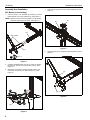
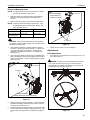
Use four 1/4-20 x 1 1/4" flat head cap screws (F) to secure
grommet plate (P) to array assembly (A). Make sure longer
legs of grommet plate are aligned with the front of column.
(See Figure 5)
6.
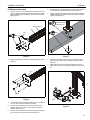
Insert grommet screw (N) through grommet hole and thread
into center hole of grommet plate (P). (See Figure 7)
7.
Tighten grommet screw (N) until grommet base is tightened
against underside of desk and mount is securely mounted
to desk. (See Figure 7)
diameter between
1/2" and 3 1/2"
4
front of column
(A)
(P)
1
(N)
7
(F) x 4
6
Figure 7
Figure 5
2.
5
Apply bumpers (G) to underside of grommet plate (P). (See
Figure 6)
8.
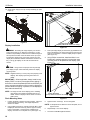
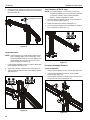
Carefully manipulate base cover (E) to create an opening
large enough to wrap cover around array column. (See
Figure 8)
9.
Wrap base cover around column and slide it down until
base cover fits securely onto table top base (C). (See Figure
8)
(P)
9
8
(G) x 6
Figure 6
3.
Locate a flat surface (thickness minimum of 1" to maximum
of 5") on which to mount the array assembly.
4.
If a hole doesn’t already exist, drill a hole in desk with a
diameter between 1/2" and 3 1/2" at desired mounting
location. (See Figure 7)
5.
Position mount on desk so that center hole of grommet plate
(P) is centered over grommet hole. (See Figure 7)
(E)
8
Figure 8
9