1
3 | ENGLISH
2.0 Connecting the Mini Powerline Adapters
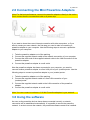
Note: For the best performance, connect the powerline adapters directly to the mains.
Don’t connect them to an extension cable or a power strip.
If you want to share the current internet connection with other computers, or if you
want to create your own network, the first step you need to take is connecting a
powerline adapter to your computer. Use the following steps to connect a powerline
adapter to your computer:
1. Take the powerline adapter out of the packing.
2. Connect the supplied network cable to the network connection of your computer.
3. Connect the other end of the supplied network cable to the LAN connection of the
powerline adapter.
4. Connect the powerline adapter to a wall outlet.
Now the powerline adapter has been connected to your computer, you need to
connect another powerline adapter to a free LAN port of your (modem)router. Use the
following steps to connect a powerline adapter to your (modem)router:
1. Take the powerline adapter out of the packing.
2. Connect the supplied network cable to a free LAN connection of your
(modem)router.
3. Connect the supplied network cable to the LAN connection of the powerline
adapter.
4. Connect the powerline adapter to a wall outlet.
Note: You can connect a maximum of 16 Mini Powerline adapters in your network.
3.0 Using the software
As soon as the powerline devices haven been connected correctly, a network
connection will be established automatically. It is possible to secure the powerline
network. In order to secure the network, the powerline software needs to be installed.