1
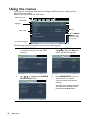
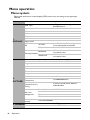
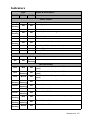
Description of each menu
•
The default values listed in this manual, especially on pages 49-57, are for reference only.
They may vary between the projectors due to the continuous improvement to the
products.
FUNCTION
DESCRIPTION
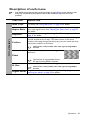
Wall Color
Corrects the projected picture’s color when the projection surface is
not white. See "Using Wall Color" on page 36 for details.
There are four options to set the image's aspect ratio depending on
your input signal source. See "Selecting the aspect ratio" on page 33
for details.
Corrects any keystoning of the image. See "Correcting keystone" on
page 27 for details.
Displays the position adjustment page. To move the projected image,
use the directional arrow keys. The values shown on the lower
position of the page change with every key press you made until they
reach their maximum or minimum.
Aspect Ratio
Keystone
1. DISPLAY menu
Position
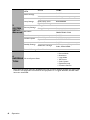
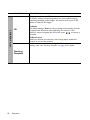
This function is only available when a PC signal (analog RGB) is
selected.
Adjusts the clock phase to reduce image
distortion.
Phase
H. Size
This function is only available when a
PC signal (analog RGB) is selected.
Adjusts the horizontal width of the image.
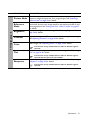
This function is only available when a PC signal (analog RGB) is
selected.
or reduces the projected image. See "Magnifying and
Digital Zoom Magnifies
searching for details" on page 33 for details.
Operation 49