1
Basic Web-Based Browser Management
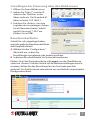
1. Open your Web browser.
2. Enter “http://” and the IP address of
the switch in the Address field. The
default management IP address is
192.168.2.1.
3. Press <Enter> to display the login
screen. In the Username field,
enter “admin”; in the Password
field, enter “1234.” Click OK.
192.168.2.1
192.168.2.1
192.168.2.1
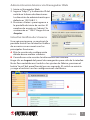
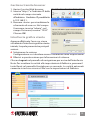
Graphic User Interface
Once you’ve logged in, the initial
screen displays for the Graphic User
Interface, which presents three main
sections:
A Select the Configuration section
where you want to establish or
edit your settings.
B Refer to this section for system information.
admin
1234
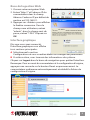
Click Logout in the navigation panel to exit the interface. Note: To
reset the switch to its factory default configuration, press the Reset
button on the front panel for one second. The switch automatically
reboots and reloads its factory configuration file.
LOGOUT
B
A
ENGLISH
3