1
iK63 IB English Back
324Wmm x 140Hmm
Print in 1C+1C Black color
April 18, 2012
changed to micro-USB
Using the iK63
Rechargeable Lithium-ion Battery
Thank you for purchasing the iK63 mini speaker. This unit is designed
to provide years of trouble free audio performance. Please read these
instructions carefully for proper operation and save for future
referfence.
This device uses an internal rechargeable Lithium-ion battery that should last the
lifetime of the device. If you suspect your battery may be dead, try charging it
several times. If the battery does not recharge, please contact us for repair
information. Please do NOT attempt to change the battery yourself. If the battery
has died and you do not want us to replace your battery, you should follow the
disposal instructions below.
Connecting the iK63
WARNING/DISPOSAL OF UNIT
• Never dispose of used batteries/electronics with ordinary solid wastes, since
they contain toxic substances.
• Always dispose of used batteries/electronics in accordance with the prevailing
community regulations that apply to the disposal of batteries/electronics. If
there are no local regulations concerning battery/electronics disposal, please
dispose of the device in a waste bin for electronic devices.
• Many electronics retailers now recycle batteries and other electronic
components at no charge. Check to see which ones in your area do so.
•
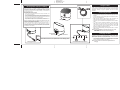
Connect the micro-USB plug to the audio/charge input jack on the
speaker.
• Connect the stereo 3.5mm audio plug to the headphone jack or
line-out of any audio device.
• Slide the Power Switch of the speaker to the ON position. The
blue power light (red if speaker is charging) will come on.
• Press play on your audio device and adjust its volume to listen to
audio.
• If you wish to “daisy chain” iK63 speakers, connect the 3.5mm
audio plug to the Line Out Jack on an iK63 that is already
connected to an audio source (see above) and the micro-USB
plug to the audio input jack on another iK63. Turn on second
speaker by sliding the Power Switch to ON.
• When you are done listening, turn iK63 speaker OFF to conserve
battery charge.
Note: The larger USB plug is used for charging only, not for
audio. Please refer to next section for charging
instructions.
LED
Caution: The battery used in this device may present a risk of fire,
explosion or chemical burn if mistreated
Unit shall not be exposed to excessive heat such as sunshine, fire, or the like. Do
not use or charge the battery if it appears to be leaking, discolored, deformed, or
in any way abnormal. Do not leave your battery discharged or unused for
extended periods of time. When batteries are misused, they may explode or leak,
causing burns and personal injury. If your battery leaks, use normal precaution
and discard the unit immediately.
Charging the iK63
Power Switch
Line-out jack
USB 2.0
USB Connection
Note: When not in use, turn speaker off to save battery power
mobile phone
PSP
iPod
MP3/MP4
PC
Laptop
Charging the iK63
Connect To Audio Input Source
The iK63 is powered by a rechargeable battery in the speaker. When
the blue power light dims, or if you start to notice sound distortion at
higher volumes, it's time to recharge the battery.
• Connect the larger USB plug to a powered USB port, such as that
on a computer. The light on the speaker will turn red while
charging and turn blue when fully charged.
Note: You can continue to listen to the speaker while it is
charging