1
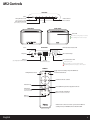
iW2 Controls
TOP PANEL
power
power
AirPlay Wireless mode
iPod and iTunes
music controls
(audio via iOS device or iTunes)
Local iPod Audio mode
volume
(audio via USB sync cable or aux-in)
REAR PANEL
FRONT PANEL
status LED
Green when touching a button on remote
Green, blinking when volume is muted
status
aux-in
network setup
12V 3A
REAR PANEL
aux-in
firmware button & status LED
status
aux-in
AC power
network setup
Wi-Fi network setup
12V 3A
USB Port
Wi-Fi network status LED
ethernet
(Sync, Charge, Play and firware update)
(direct network connection)
Master power is OFF
Green, solid when connected to a Wi-Fi network
Red, blinking when NOT connected to a Wi-Fi network
REMOTE
Toggle between standby and power ON mode
AirPlay Wireless mode
Local iPod Audio mode
Volume and music controls
Volume mute
iPod shuffle & repeat music playback controls
SFX button
turn SRS TruBass DSP audio
enhancement on/off
bass
treble
Bass and treble adjustment
default is 0 for both bass and treble
reset
EQ reset
return eq setting to default
Rz14
English
NOTE: Power control on remote cycles between ON and
standby modes; it will NOT turn the unit OFF or ON.
4