1
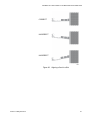
SwitchBlade x8112 Chassis Switch and AT-SBx81CFC960 Card Installation Guide The default speed setting of Auto-Negotiation is not appropriate for ports connected to network devices that do not support AutoNegotiation and have fixed speeds or 10 or 100 Mbps. For those switch ports, you should disable Auto-Negotiation and set the port’s speed manually to match the speeds of the network devices. The ports must be set to Auto-Negotiation, the default setting, to operate at 1000Mbps. The default duplex mode setting for the ports is Auto-Negotiation. This setting is appropriate for ports connected to network devices that also support Auto-Negotiation for duplex modes. The default duplex mode setting of Auto-Negotiation is not appropriate for ports connected to network devices that do not support Auto-Negotiation and have a fixed duplex mode. Disable Auto-Negotiation on those ports and set the duplex modes manually to avoid the possibility of duplex mode mismatches. A switch port using Auto-Negotiation defaults to half-duplex if it detects that the end node is not using Auto-Negotiation, which can result in a mismatch if the end node is operating at a fixed duplex mode of full-duplex. Note The AT-SBx81GT40 Line Card does not support half-duplex mode. Yet another source for a poor or intermittent link can be a MDI/MDIX wiring configuration mismatch. The wiring configurations of the ports on the ATSBx81GT24, AT-SBx81GT40, and AT-SBx81GP24 Line Cards are set automatically with automatic MDIX detection when the ports are operating at 10 or 100 Mbps. (Automatic MDIX detection does not apply to the ports when they are operating at 1000 Mbps.) You may not disable this feature on the ports. For automatic MDIX detection to work successfully, the network device connected to a port must also support the feature. If it does not, a port on the switch defaults to MDIX. This may require the use of a crossover cable. Here are the guidelines to choosing straight-through or crossover cables for the ports: Section II: Installing the Chassis You may use straight-through cables on ports that are connected to network devices that operate at 1000 Mbps. You may use straight-through or crossover cables on ports that are connected to network devices that support automatic MDIX detection and that operate at 10 or 100 Mbps. You must use straight-through cables on ports that are connected to network devices that have a fixed wiring configuration of MDI and that operate at 10 or 100 Mbps. You must use crossover cables on ports that are connected to network devices that have a fixed wiring configuration of MDIX and that operate at 10 or 100 Mbps. 213