1
EN
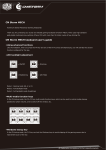
LED Backlight control
Thank you for purchasing CM Storm Quick Fire Pro – A rugged gaming keyboard using the highest grade gold plated mechanical
switches (CHERRY MX) rated for over 50 million keystrokes.
Package Content:
System Requirements
- Quick Fire Pro Mechanical Gaming Keyboard
PC with USB port
- User Guide
Windows® XP / Vista / 7
- Keycap Tool
ON/OFF
Brightness down
Brightness up
LED Mode
Mode1: Gaming Cluster
- 1.8m long braided cable
Warranty
2 years limited manufacturer warranty
Damages as a result of improperly removing keycaps are not covered by the warranty.
Technical Support
Free technical support and FAQ can be found on www.cmstorm.com
Using your CM Storm Quick Fire Pro Keyboard
Accessing Advanced Functions
Pressing the FN Key once locks it, pressing it a second time unlocks it, just like Caps Lock.
Once the Storm Key has been locked in its active state, the Function of the following keys changes, giving you easy access to
several important functions.
Mode2: Extended Gaming Cluster
Media Keys
In FN-Lock mode F5-F11 act as media keys and let you control media players and the sysytem volume.
Windows Key Lock
In FN-Lock mode F12 key lets you disable the Windows keys so you dont get kicked out of a gaming session by accident.
Switching between full N Key and 6N Key rollover
In FN-Lock mode pressing the following key combinations lets you switch between two NKRO modes.
6N Key
Mode3: Extended Gaming Cluster (breathing)
Full N Key
*Full N Key mode is not supported on Macs
Switching Polling Rate
In FN-Lock mode pressing the following key combinations lets you adjust QuickFire Pro’s USB Polling rate.
125Hz (8ms)
250Hz (4ms)
500Hz (2ms)
1000Hz (1ms)
02 / 03