1
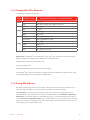
11.4 Compatible File Formats
The following file types work with nabi:
Type
Audio
Image
Video
Format/ Codec
Supported File Type(s) / Container Formats
MP3
MP3 (.mp3)
AAC
AAC (.m4a) (.mp4a) (.aac) (.3gp) (.m4v) (.mp4)
JPEG
JPEG (.jpg)
GIF
GIF (.gif)
PNG
PNG (.png)
BMP
BMP (.bmp)
H.263
3GPP (.3gp) MPEG-4 (.mp4)
H.264 AVC
3GPP (.3gp) MPEG-4 (.mp4)
MPEG-4 SP
3GPP (.3gp)
WVM
WVM (.wvm)
AVI
AVI (.avi)
AAC
AAC (.3gp) (.m4v) (.mp4)
Please note: For Windows® XP and Windows® Vista, nabi™ Sync requires that one of the following
external modules be installed to play AAC audio and H.264/AVC video:
• MainConcept H.264/AVC Pro Decoder Pack
• DivX Plus Codec Pack
• MainConcept Showcase (includes demo version codecs)
On Windows® Vista, some music files may not play, even with the additional codec files. In this case,
you will be prompted to play the file with the default player.
11.5 Using My Library
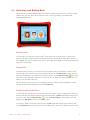
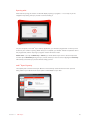
My Library is where you can find all of your apps, videos, music and photos. You can listen to your
music and edit your playlists. You can also watch your videos and view your photos.
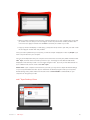
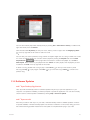
Click My Library on the left side of the screen to view your content. You can set nabi™ Sync to
automatically scan your media files when you launch the application. Click Advanced > My Library
Preferences to choose the folders you would like nabi™ Sync to scan automatically. Check the box
next to Auto scan on application launch if you would like nabi™ Sync to automatically scan your files
each time you launch the application. Any time a file is added to the selected folders, nabi™ Sync will
automatically import the file into My Library.
Section 11 nabi Sync
™
69