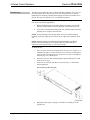
1
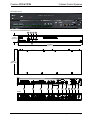
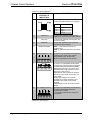
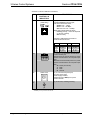
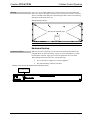
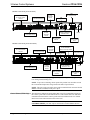
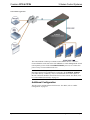
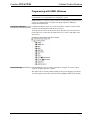
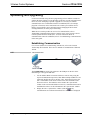
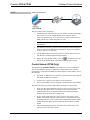
Crestron CP3 & CP3N 3-Series Control Systems Operations Guide This document was prepared and written by the Technical Documentation department at: Regulatory Compliance These products are Listed to applicable UL Standards and requirements by Underwriters Laboratories Inc. As of the date of manufacture, the CP3 and CP3N have been tested and found to comply with specifications for CE marking and standards per EMC and Radiocommunications Compliance Labelling. Federal Communications Commission (FCC) Compliance Statement CAUTION: Changes or modifications not expressly approved by the manufacturer responsible for compliance could void the user’s authority to operate the equipment. NOTE: This equipment has been tested and found to comply with the limits for a Class B digital device, pursuant to part 15 of the FCC Rules. These limits are designed to provide reasonable protection against harmful interference in a residential installation. This equipment generates, uses and can radiate radio frequency energy and, if not installed and used in accordance with the instructions, may cause harmful interference to radio communications. However, there is no guarantee that interference will not occur in a particular installation. If this equipment does cause harmful interference to radio or television reception, which can be determined by turning the equipment off and on, the user is encouraged to try to correct the interference by one or more of the following measures: Reorient or relocate the receiving antenna Increase the separation between the equipment and receiver Connect the equipment into an outlet on a circuit different from that to which the receiver is connected Consult the dealer or an experienced radio/TV technician for help Industry Canada (IC) Compliance Statement CAN ICES-3(B)/NMB-3(B) The specific patents that cover Crestron products are listed at patents.crestron.com. Crestron, the Crestron logo, 3-Series, 3-Series Control System, Core 3, Core 3 OS, Core 3 UI, Cresnet, Crestron Fusion, Crestron Mobile, Crestron Mobile Pro, Crestron Toolbox, e-Control, Fusion RV, RoomView, and SystemBuilder are either trademarks or registered trademarks of Crestron Electronics, Inc. in the United States and/or other countries. Android is either a trademark or registered trademark of Google, Inc. in the United States and/or other countries. BACnet is either trademarks or registered trademarks of American Society of Heating, Refrigerating and Air-Conditioning Engineers, Inc. in the United States and/or other countries. iPad and iPhone are either trademarks or registered trademarks of Apple Inc. in the United States and/or other countries. Blu-Ray Disc is either a trademark or registered trademark of the Blu-ray Disc Association (BDA) in the United States and/or other countries. Microsoft, Internet Explorer, and Windows are either trademarks or registered trademarks of Microsoft Corporation in the United States and/or other countries. Other trademarks, registered trademarks and trade names may be used in this document to refer to either the entities claiming the marks and names or their products. Crestron disclaims any proprietary interest in the marks and names of others. ©2012 Crestron Electronics, Inc. Crestron CP3 & CP3N 3-Series Control Systems Contents 3-Series Control Systems: CP3 & CP3N 1 Introduction ............................................................................................................................... 1 Features and Functions ................................................................................................ 1 Specifications .............................................................................................................. 4 Physical Description.................................................................................................... 6 Setup ........................................................................................................................................ 11 Network Wiring......................................................................................................... 11 Identity Code ............................................................................................................. 11 Installation ................................................................................................................. 11 Hardware Hookup ..................................................................................................... 13 Additional Configuration........................................................................................... 15 Programming Software ............................................................................................................ 16 Software Requirements for the PC ............................................................................ 16 Programming with SystemBuilder ............................................................................ 16 Programming with D3 Pro......................................................................................... 16 Programming with SIMPL Windows ........................................................................ 17 Uploading and Upgrading........................................................................................................ 18 Establishing Communication..................................................................................... 18 Control Subnet (CP3N Only) .................................................................................... 19 Programs and Firmware ............................................................................................ 20 Configure for Operations ......................................................................................................... 21 Set Date & Time........................................................................................................ 21 Online Configuration................................................................................................. 21 Problem Solving ...................................................................................................................... 23 Troubleshooting......................................................................................................... 23 Check Network Wiring.............................................................................................. 24 Reference Documents................................................................................................ 25 Further Inquiries ........................................................................................................ 25 Future Updates .......................................................................................................... 26 Return and Warranty Policies .................................................................................................. 27 Merchandise Returns / Repair Service ...................................................................... 27 Crestron Limited Warranty........................................................................................ 27 Operations Guide – DOC. 7316B Contents i Crestron CP3 & CP3N 3-Series Control Systems 3-Series Control Systems: CP3 & CP3N Introduction The Crestron® CP3 and CP3N present a new benchmark in control system technology. Featuring the Core 3 OS™ control engine, the CP3 and CP3N form the core of any modern networked home or commercial building, managing and integrating all the disparate technologies throughout a facility to make life easier, greener, more productive, and more enjoyable. The CP3N is an enhanced version of the CP3 featuring a dedicated CONTROL SUBNET port. The CP3 and CP3N are generally identical. For simplicity within this guide, the term “CP3” is used except where noted. Features and Functions Next generation control system Core 3 OS - substantially faster and more powerful than other control systems Exclusive modular programming architecture Vector floating point coprocessor Onboard 512 MB RAM and 4 GB flash memory Expandable storage up to 1 TB Rear panel MMC memory card slot High-speed USB 2.0 host port Industry-standard Ethernet and Cresnet® wired communications Control Subnet provides a dedicated local network for Crestron devices (CP3N only) Onboard e-Control® Web server Supports Core 3 UI™ XPanel Web-based remote control Supports Crestron Mobile® control apps for iPhone®, iPad®, and Android™ Supports Fusion RV™ and SNMP remote management One RS-232/422/485 COM port with hardware and software handshaking Two RS-232 COM ports with software handshaking only Eight IR/serial, eight relay, and eight Versiport I/O ports Backwards compatible to run existing SIMPL programs Full Unicode (multi-language) support (Continued on following page) Operations Guide – DOC. 7316B 3-Series Control Systems: CP3 & CP3N 1 3-Series Control Systems Crestron CP3& CP3N Features and Functions (Continued) Native BACnet®/IP support1 Installer setup via Crestron Toolbox™ or Internet Explorer®2 Increased network throughput and security Secure access though Active Directory integration or standalone account management IIS v.6.0 Web Server IPv6 ready Front panel USB computer console port Single space rack-mountable Core 3 OS Today's commercial buildings and custom homes comprise more technology than ever before, and all these systems need to be networked, managed, and controlled in fundamentally new ways. The IP based Core 3™ platform is engineered from the ground up to deliver a network-grade server appliance capable of faithfully handling everything from boardroom AV and home theater control to total building management. Core 3 OS embodies a distinctively robust, dynamic, and secure platform to elevate system designs to higher levels of performance and reliability. Compared to other control systems, Core 3 OS provides a pronounced increase in processing power and speed with more memory, rock solid networking and IP control, and a unique modular programming architecture. Modular Programming Architecture Designed for enhanced scalability, the CP3 affords high-speed, real-time multi-tasking to seamlessly run multiple programs simultaneously. This exclusive programming architecture lets programmers independently develop and run device-specific programs for AV, lighting, HVAC, security, etc., allowing for the optimization of each program, and allowing changes to be made to one program without affecting the whole. As the system grows, processing resources can easily be shifted from one 3-Series™ processor to another without rewriting any code. The end benefit is dramatically simplified upgradability with minimal downtime, whether implementing changes on site or remotely via the network. Robust Ethernet & IP Control IP technology is the heart of Core 3, so it should be no surprise that its networking abilities are second to none. High-speed Ethernet connectivity (10/100 MBps on CP3, Gigabit on the CP3N) enables integration with IP-controllable devices and allows the CP3 to be part of a larger managed control network. Whether residing on a sensitive corporate LAN, a home network, or accessing the Internet through a cable modem, the CP3 provides secure, reliable interconnectivity with IP-enabled touch screens, computers, mobile devices, video displays, Blu-ray Disc® players, media servers, security systems, lighting, HVAC, and other equipment — whether on premises or across the globe. 1. License required. The CP3 and CP3N support a maximum of 1000 BACnet objects when dedicated for BACnet use only. Actual capabilities are contingent upon the overall program size and complexity. 2. Web-based installer setup requires the Microsoft® Internet Explorer Web browser running on a Windows® PC. 2 3-Series Control Systems: CP3 & CP3N Operations Guide – DOC. 7316B Crestron CP3 & CP3N 3-Series Control Systems Dedicated Control Subnet (CP3N Only) The Crestron Control Subnet is a Gigabit Ethernet network dedicated to Crestron devices. Via the CP3N’s CONTROL SUBNET port, an installer may simply connect a single touch screen or wireless gateway, or add a Crestron PoE switch (CEN-SW-POE-5, CEN-SW-POE-16, or CEN-SWPOE-24)* to handle multiple touch screens, gateways, AV components and other devices. Auto-configuration of the entire subnet is performed by the CP3N, discovering each device and assigning IP addresses without any extra effort from the installer. A separate LAN port on the CP3N provides a single-point connection to the customer’s LAN, requiring just one IP address for the complete control system. The LAN port allows full interconnectivity between devices on the local subnet with other devices, systems, servers, and WAN/Internet connections outside the local subnet. For sensitive applications that require absolute security, the entire Control Subnet can be completely isolated from the customer’s LAN using Isolation mode. e-Control Remote Access Years ago, Crestron pioneered the world’s first IP-based control system unleashing vast new possibilities for controlling, monitoring, and managing integrated systems over a LAN, WAN, and the Internet. Today, a variety of e-Control® solutions offer more ways than ever to control an integrated system. With e-Control, anything in the home or office can be controlled from anywhere in the world using a smartphone, tablet, or computer. Built-in Core 3 UI™ XPanel technology affords virtual touch screen control through any popular Web browser running on a laptop or desktop computer. Our Crestron Mobile Pro® app delivers the Crestron touch screen experience to an iPhone®, iPad®, or Android™ device letting one safely monitor and control an entire facility using the one device that goes everywhere. Remote access is simplified using the myCrestron Dynamic DNS service to establish a friendly URL for the system. If technical support is needed, a Crestron system installer can perform diagnostics and implement updates to the system remotely without coming on site. Fusion RV and SNMP As part of a complete managed network in a corporate enterprise, college campus, convention center or any other facility, the CP3 works integrally with Crestron Fusion RV™ Remote Asset Management Software to enable remote scheduling, monitoring, and control of rooms and technology from a central help desk. Built-in SNMP support enables integration with third-party network management software, allowing control and monitoring in a format that's familiar to IT personnel. Cresnet Cresnet® provides a dependable network wiring solution for Crestron keypads, lighting controls, thermostats, and other devices that do not require the higher speed of Ethernet. The Cresnet bus offers easy wiring and configuration, carrying bidirectional communication and 24 Vdc power to each device over a simple 4-conductor cable. To assist with troubleshooting, the CP3 includes Crestron’s patent pending Network Analyzer which continuously monitors the integrity of the Cresnet network for wiring faults, marginal performance, and other errors. * Operations Guide – DOC. 7316B Item(s) sold separately 3-Series Control Systems: CP3 & CP3N 3 3-Series Control Systems Crestron CP3& CP3N Onboard Control Ports In addition to Ethernet, the CP3 includes three bidirectional COM ports and eight IR ports to interface directly with all of the centralized AV sources, video displays, and other devices. Eight programmable relay ports are included for controlling window shades, projection screens, lifts, power controllers, and other contact closure actuated equipment. Eight “Versiport” I/O ports enable the integration of occupancy sensors, power sensors, door switches, or anything else that provides a dry contact closure, low-voltage logic, or 0-10 volt dc signal. BACnet/IP Native support for the BACnet®/IP communication protocol provides a direct interface to third-party building management systems over Ethernet, simplifying integration with HVAC, security, fire and life safety, voice and data, lighting, shades, and other systems. Using BACnet/IP, each system runs independently with the ability to communicate together on one platform for a truly smart building.* * License required. The CP3 and CP3N support a maximum of 1000 BACnet objects when dedicated for BACnet use only. Actual capabilities are contingent upon the overall program size and complexity. Specifications Specifications for the CP3 are listed in the following table. CP3 Specifications SPECIFICATION Control Engine DETAILS Core 3 OS; real time, preemptive multi-threaded/multitasking kernel; Transaction-Safe Extended FAT file system; supports up to 10 simultaneously running programs Memory SDRAM 512 MB Internal Flash 4 GB Memory Card Expandable storage up to 32 GB using MMC compatible card (not included) External Storage Up to 1 TB using USB mass storage device (not included) Communications Ethernet 10/100 Mbps (10/100/1000 Mbps on CP3N); auto-switching, auto-negotiating, auto-discovery, full/half duplex, industrystandard TCP/IP stack, UDP/IP, CIP, DHCP, SSL, IEEE 802.1X; SNMP; BACnet/IP1; IPv4 or IPv6, Active Directory authentication, IIS v.6.0 Web Server, SMTP e-mail client, installer setup via Crestron Toolbox or MSIE2; supports all e-Control, Core 3 UI XPanel, Crestron Mobile, Crestron Fusion™ and RoomView® applications (Continued on following page) 4 3-Series Control Systems: CP3 & CP3N Operations Guide – DOC. 7316B Crestron CP3 & CP3N 3-Series Control Systems CP3 Specifications (Continued) SPECIFICATION DETAILS Communications (continued) Control Subnet (CP3N Only) 10/100/1000 Mbps Ethernet, auto-switching, auto-negotiating, auto-discovery, full/half duplex, DHCP server, DNS server, port forwarding, Isolation mode Cresnet Cresnet master mode USB Supports USB HID and USB mass storage class devices via rear panel USB 2.0 host port, supports computer console via front panel, USB 2.0 device port RS-232/422/485 For 2-way device control and monitoring, all ports support RS-232 up to 115.2k baud with software handshaking, one port also supports hardware handshaking, RS-422, and RS-485 IR/Serial Supports 1-way device control via infrared up to 1.2 MHz or serial TTL/RS-232 (0-5 volts) up to 115.2k baud Power Requirements Power Pack 2.0 amps @ 24 volts dc,100-240 volts ac, 50/60 Hz power pack, included Available Cresnet Power 24 watts (1 amp @ 24 volts dc) when using power pack Cresnet Power Usage 15 watts (0.625 amp @ 24 volts dc) when using Cresnet network power Net ID3 02 Minimum 3-Series Control System® Update File4 Version 1.2.16 or later Environmental Temperature 41º to 113º F (5º to 45º C) Humidity 10% to 90% RH (non-condensing) Heat Dissipation 50 Btu/h Enclosure Chassis Metal, black finish Faceplate Extruded metal, black finish, polycarbonate label overlay Mounting Freestanding or 1U 19-inch rack-mountable (adhesive feet and rack ears included) Dimensions Height 1.70 in (44 mm) without feet Width 17.28 in (439 mm) 19.00 in (483 mm) with rack ears Depth 6.56 in (167 mm) Weight 3.1 lbs (1.42 kg) Included Accessory Power Pack 24 volt dc, Universal (Continued on following page) Operations Guide – DOC. 7316B 3-Series Control Systems: CP3 & CP3N 5 3-Series Control Systems Crestron CP3& CP3N CP3 Specifications (Continued) SPECIFICATION DETAILS Available Accessories 1. 2. 3. 4. 3-Series BACnet/IP Support 3-Series Native BACnet/IP Interface License C2N-HBLOCK Cresnet Network Distribution Block CEN-SW-POE-16 16-Port Managed PoE Switch CEN-SW-POE-24 24-Port Managed PoE Switch CEN-SW-POE-5 5-Port PoE Switch CNSP-XX Custom Serial Interface Cable Crestron Mobile Control App for iPhone and iPod touch Crestron Mobile Pro G Control App for iPhone, iPad, and Android Devices CSP-LIR-USB IR Learner Fusion RV Remote Asset Management Software IRP2 IR Emitter Probe myCrestron Dynamic DNS Service for Crestron systems PWE-4803RU PoE Injector RoomView Express Remote Help Desk and Resource Management Software License required. The CP3 and CP3N support a maximum of 1000 BACnet objects when dedicated for BACnet use only. Actual capabilities are contingent upon the overall program size and complexity Web-based installer setup requires the Microsoft Internet Explorer Web browser running on a Windows PC. Refer to “Identity Code” on page 11. The latest software versions can be obtained from the Crestron Web site. Refer to the NOTE following these footnotes. NOTE: Crestron software and any files on the Web site are for authorized Crestron dealers and Crestron Authorized Independent Programmers (CAIPs) only. New users must register to obtain access to certain areas of the site (including the FTP site). Physical Description This section provides information on the connections, controls and indicators available on the CP3. CP3 Physical View 6 3-Series Control Systems: CP3 & CP3N Operations Guide – DOC. 7316B Crestron CP3 & CP3N 3-Series Control Systems CP3N Physical View CP3 and CP3N Overall Dimensions 1 2 4 5 1.70 in (44 mm) 3 17.28 in (439 mm) 6.56 in (167 mm) CP3 6 7 8 9 10 11 12 13 14 15 16 17 CP3N Operations Guide – DOC. 7316B 3-Series Control Systems: CP3 & CP3N 7 3-Series Control Systems Crestron CP3& CP3N Connectors, Controls & Indicators # CONNECTORS*, CONTROLS & INDICATORS 1 COMPUTER DESCRIPTION (1) USB Type B female, USB 2.0 computer console port (cable included); For setup only PIN DESCRIPTION 1 +5 VDC 2 Data - 3 Data + 4 Ground 2 PWR LED (1) Green LED, indicates operating power supplied from power pack or Cresnet network 3 NET LED (1) Amber LED, indicates communication with the Cresnet system 4 MSG LED (1) Red LED, indicates control system has generated an error message 5 RESET BUTTONS HW-R – (1) Recessed push button for hardware reset SW-R –(1) Recessed push button for software reset 6 RELAY OUTPUT (1 – 8) (2) 8-pin 3.5 mm detachable terminal blocks comprising (8) normally open, isolated relays; Rated 1 amp, 30 volts ac/dc; MOV arc suppression across contacts 7 I/O (1-8) (1) 9-pin 3.5 mm detachable terminal block comprising (8) “Versiport” digital input/output or analog input ports (referenced to GND); Digital Input: Rated for 0-24 volts dc, input impedance 20k Ω, logic threshold >3.125 V low/0 and <1.875 V high/1; Digital Output: 250 mA sink from maximum 24 volts dc, catch diodes for use with “real world” loads; Analog Input: Rated for 0-10 volts dc, protected to 24 volts dc maximum, input impedance 21k Ω with pull-up resistor disabled; Programmable 5 volts, 2k Ω pull-up resistor per pin 8 IR – SERIAL OUTPUT (1-8) (2) 8-pin 3.5 mm detachable terminal blocks comprising (8) IR/Serial output ports; IR output up to 1.2 MHz; 1-way serial TTL/RS-232 (0-5 volts) up to 115.2k baud (Continued on following page) 8 3-Series Control Systems: CP3 & CP3N Operations Guide – DOC. 7316B Crestron CP3 & CP3N 3-Series Control Systems Connectors, Controls & Indicators (Continued) # CONNECTORS*, CONTROLS & INDICATORS DESCRIPTION 9 COM1 (1) 5-pin 3.5 mm detachable terminal block Bidirectional RS-232/422/485 port Up to 115.2k baud; hardware and software handshaking support RS-232 RS-422 RS-485 GND TX RX RTS CTS * GND TXRX+ TX+ RX- GND* TX-/RXNot Used TX+/RX+ Not Used A ground terminal connection is recommended but not required. Ground potential difference must be under ±4 V. (2) 3-pin 3.5 mm detachable terminal blocks; Bidirectional RS-232 ports; Up to 115.2k baud; software handshaking support 10 COM 2 & COM 3 11 MEMORY 12 USB (1) USB Type A female; USB 2.0 port for storage devices 13 LAN (1) 8-pin RJ-45 with two LED indicators; 10BASE-T/100BASE-TX Ethernet port (CP3) (10/100/1000BASE-T Ethernet port (CP3N); Left LED indicates link status; Amber: Link – 1 Gbps (CP3N Only) Green: Link – 100 Mbps Off: No link or Link – 10 Mbps Right LED indicates Ethernet activity Flashing: Activity – Flash rate depends on amount of activity Off: No Activity (1) MMC compatible card slot; Accepts Multimedia Memory Cards (MMC) up to 32 GB for memory expansion Connects to the customer’s LAN CP3 Pin Assignments PIN SIGNAL PIN SIGNAL 1 2 3 4 TX + TX RX + N/C 5 6 7 8 N/C RX N/C N/C CP3N Pin Assignments PIN SIGNAL PIN SIGNAL 1 2 3 4 BI_DA + BI_DA- BI_DB + BI_DC + 5 6 7 8 BI_DC BI_DB BI_DD + BI_DD - (Continued on following page) Operations Guide – DOC. 7316B 3-Series Control Systems: CP3 & CP3N 9 3-Series Control Systems Crestron CP3& CP3N Connectors, Controls & Indicators (Continued) # CONNECTORS*, CONTROLS & INDICATORS DESCRIPTION 14 CONTROL SUBNET (CP3N Only) (1) 8-pin RJ-45 with two LED indicators; 10/100/1000BASE-T Ethernet port; Left LED indicates link status; Amber: Link – 1 Gbps Green: Link – 100 Mbps Off: No link or Link – 10 Mbps Right LED indicates Ethernet activity Flashing: Activity – Flash rate depends on amount of activity Off: No Activity Provides a dedicated local network for Crestron Ethernet devices * 15 NET 16 24VDC 2.0A 17 G PIN SIGNAL PIN SIGNAL 1 2 3 4 BI_DA + BI_DA- BI_DB + BI_DC + 5 6 7 8 BI_DC BI_DB BI_DD + BI_DD - (1) 4-pin 3.5 mm detachable terminal block, Cresnet master port; Outputs power to Cresnet devices if a power pack is connected to the 24 Vdc power input jack; Receives Cresnet network power if no power pack is connected to the 24 Vdc power input jack 24: Power (24 volts dc) Y: Data Z: Data G: Ground (1) 2.1 mm barrel dc power jack, 24 volt dc power input Power supply included; Passes through to NET port to power Cresnet devices (1) 6–32 screw, chassis ground lug Interface connectors for RELAY OUTPUT, I/O, IR-SERIAL OUTPUT, COM1, COM 2, COM 3, and NET ports are provided with the unit. 10 3-Series Control Systems: CP3 & CP3N Operations Guide – DOC. 7316B Crestron CP3 & CP3N 3-Series Control Systems Setup Network Wiring When wiring the Cresnet or Ethernet network, consider the following: Use Crestron Certified Wire. Use Crestron power supplies for Crestron equipment. Provide sufficient power to the system. CAUTION: Insufficient power can lead to unpredictable results or damage to the equipment. Use the Crestron Power Calculator to help calculate how much power is needed for the system (www.crestron.com/calculators). For networks with 20 or more Cresnet devices, use a Cresnet Hub/Repeater (CNXHUB) to maintain signal quality. For more details, refer to “Check Network Wiring” on page 24. The CP3N can also use high-speed Ethernet on a dedicated Control Subnet for communications between the control system and Crestron Ethernet devices. For general information on connecting Ethernet devices in a Crestron system, refer to the latest version of the Crestron e-Control Reference Guide (Doc. 6052), which is available from the Crestron Web site (www.crestron.com/manuals). Identity Code Net ID The Net ID of the CP3 has been factory set to 02. This Net ID is defined as the “Master” control system on the Cresnet network and cannot be changed. IP ID The IP ID is set within the CP3’s IP table using Crestron Toolbox. For information on setting an IP table, refer to the Crestron Toolbox help file. When setting the IP ID, consider the following: The IP ID of each unit must match an IP ID specified in the SIMPL Windows program. Each device using IP to communicate with a control system must have a unique IP ID. Installation Ventilation The CP3 should be used in a well-ventilated area. The venting holes should not be obstructed under any circumstances. To prevent overheating, do not operate this product in an area that exceeds the environmental temperature range listed in the table of specifications. Consider using forced air ventilation and/or incrementing the spacing between units to reduce overheating. Consideration must be given if installed in a closed or multi-unit rack assembly since the operating ambient temperature of the environment may be greater than the room ambient temperature. Contact with thermal insulating materials should be avoided on all sides of the unit. Operations Guide – DOC. 7316B 3-Series Control Systems: CP3 & CP3N 11 3-Series Control Systems Rack Mounting Crestron CP3& CP3N The CP3 can be mounted in a rack or stacked with other equipment. Two “ears” are provided with the CP3 so that the unit can be rack mounted. These ears must be installed prior to mounting. Complete the following procedure to attach the ears to the unit. The only tool required is a #1 or #2 Phillips screwdriver. WARNING: To prevent bodily injury when mounting or servicing this unit in a rack, observe the following guidelines: When mounting this unit in a partially filled rack, load the rack from the bottom to the top with the heaviest component at the bottom of the rack. If the rack is provided with stabilizing devices, install the stabilizers before mounting or servicing the unit in the rack. NOTE: If rack mounting is not required, rubber feet are provided for tabletop mounting or stacking. Apply the feet near the corner edges on the underside of the unit. NOTE: Reliable earthing of rack-mounted equipment should be maintained. Particular attention should be given to supply connections other than direct connections to the branch circuit (e.g. use of power strips). To install the ears: 1. There are screws that secure each side of the CP3 top cover. Using a #1 or #2 Phillips screwdriver, remove the three screws closest to the front panel from one side of the unit. Set screws aside for step 3. Refer to the diagram following step 3 for a detailed view. 2. Position a rack ear so that its mounting holes align with the holes vacated by the screws in step 1. 3. Secure the ear to the unit with three screws from step 1, as shown in the following diagram. Ear Attachment for Rack Mounting 4. Repeat procedure (steps 1 through 3) to attach the remaining ear to the opposite side. 12 3-Series Control Systems: CP3 & CP3N Operations Guide – DOC. 7316B Crestron CP3 & CP3N Stacking 3-Series Control Systems Four “feet” are provided with the CP3 so that if the unit is not rack mounted, the rubber feet can provide stability when the unit is placed on a flat surface or stacked. These feet should be attached prior to the hookup procedure. Refer to the following illustration for placement of the feet. Foot Placement for the CP3 Mounting Feet (2002389), Qty. 4 NOTE: No more than two CP3 units should be stacked. Hardware Hookup Connect the Device Make the necessary connections as called out in the illustration that follows this paragraph. Refer to “Network Wiring” on page 11 before attaching the 4-position terminal block connector. Apply power after all connections have been made. When making connections to the CP3, note the following: Use Crestron power supplies for Crestron equipment. The included cable(s) cannot be extended. Hardware Connection for the CP3and CP3N (CP3 Shown, Front) COMPUTER: To Computer Console Operations Guide – DOC. 7316B 3-Series Control Systems: CP3 & CP3N 13 3-Series Control Systems Crestron CP3& CP3N Hardware Connections for the CP3 (Rear) RELAY OUTPUT (1-8): To Contact Closure Devices IR-SERIAL (1-8): To TTL/RS-232 Devices I/O (1-8): To Controllable Devices NET: To Cresnet Devices COM 2 & 3: To Serial Controlled Devices USB: To Storage Devices LAN: 10BASE-T/100BASE-TX Ethernet to LAN COM 1: To Serial Controlled Devices MEMO RY: MMC Compatible Card Slot Ground 24V DC, 2.0 A: From AC Power Pack Hardware Connections for the CP3N (Rear) RELAY OUTPUT (1-8): To Contact Closure Devices IR-SERIAL (1-8): To TTL/RS-232 Devices I/O (1-8): To Controllable Devices COM 2 & 3: To Serial Controlled Devices CONTROL SUBNET: 10/100/1000BASE-T Ethernet to Control Subnet USB: To Storage Devices LAN: 10/100/1000BASE-T Ethernet to LAN COM 1: To Serial Controlled Devices MEMO RY: MMC Compatible Card Slot NET: To Cresnet Devices Ground 24V DC, 2.0 A: From AC Power Pack NOTE: Ensure the unit is properly grounded by connecting the chassis ground lug to an earth ground (building steel). NOTE: To prevent overheating, do not operate this product in an area that exceeds the environmental temperature range listed in the table of specifications. NOTE: The CP3 can be powered by the 4-position terminal block connector labeled NET or with the (included) 24 Vdc power pack. Control Subnet (CP3N Only) The CP3N has a dedicated Control Subnet that is used for communication between the control system and Crestron Ethernet devices. This subnet allows for dedicated communication between the control system and Crestron Ethernet devices without interferences from other network traffic on the LAN. CAUTION: Do not connect the CONTROL SUBNET port to the LAN. The CONTROL SUBNET port must only be connected to Crestron Ethernet devices. 14 3-Series Control Systems: CP3 & CP3N Operations Guide – DOC. 7316B Crestron CP3 & CP3N 3-Series Control Systems Control Subnet Application The Control Subnet can host up to 64000 Crestron Ethernet devices. Connect a Crestron Ethernet switch such as the CEN-SWPOE-16 16-Port Managed PoE Switch (sold separately) to the CP3N’s CONTROL SUBNET port to use as a connection point a variety of Crestron Ethernet devices. NOTE: If the CP3N is operating in the Isolation mode, Crestron Ethernet devices that require Internet access should not be connected to the CONTROL SUBNET port (either directly or indirectly). Any Crestron Ethernet device that requires an Internet connection should be connected to the local area network. For details, refer to “Control Subnet (CP3N Only)” on page 19. Additional Configuration The CP3 can be configured from a Web browser. For details, refer to “Online Configuration” on page 21. Operations Guide – DOC. 7316B 3-Series Control Systems: CP3 & CP3N 15 3-Series Control Systems Crestron CP3& CP3N Programming Software Have a question or comment about Crestron software? Answers to frequently asked questions (FAQs) can be viewed in the Online Help section of the Crestron Web site. To post a question or view questions submitted to Crestron’s True Blue Support, log in at www.crestron.com/support. First-time users must establish a user account. Software Requirements for the PC NOTE: The latest software can be downloaded from the Crestron Web site (www.crestron.com/software). NOTE: Crestron software and any files on the Web site are for authorized Crestron dealers and Crestron Authorized Independent Programmers (CAIPs) only. New users must register to obtain access to certain areas of the site (including the FTP site). Crestron provides an assortment of Windows-based software tools to develop a customized system. Use SystemBuilder™ or SIMPL Windows to create a program to control the CP3. Customers whose focus is on lighting systems may prefer to use the D3 Pro software since it is designed especially for creating lighting and environmental system control applications. Customers already familiar with SIMPL Windows who are including a lighting system as part of an overall control system project may prefer to continue using SIMPL Windows. Programming with SystemBuilder SystemBuilder is a comprehensive programming environment. Appropriate for most systems, it can quickly and easily generate a complete working program including both control processor logic and touch screen graphics. Programming with D3 Pro Crestron’s D3 Pro lighting software provides all the tools necessary to create a complete Crestron lighting system for residential applications. The lighting system includes the control system logic program, touch screen projects and keypad programming, documentation and real-time lighting adjustment capabilities. As with all Crestron software, D3 Pro provides extensive right-click and drag-anddrop functionality in addition to convenient keyboard shortcuts for frequently used functions and commands. Programming is organized into six system Views of the lighting system, each providing a moveable toolbox of devices such as interfaces, fixtures and control modules. A device can be added to the system simply by selecting it from one of the toolboxes and dragging it to a room. The available toolboxes differ depending on the View but all Views include a "General" toolbox that allows areas and rooms to be added at any time. 16 3-Series Control Systems: CP3 & CP3N Operations Guide – DOC. 7316B Crestron CP3 & CP3N 3-Series Control Systems Programming with SIMPL Windows NOTE: While SIMPL Windows can be used to program the CP3, it is recommended to use SystemBuilder for configuring a system. SIMPL Windows is Crestron’s premier software for programming Crestron control systems. It is organized into two separate but equally important “Managers”: Configuration and Program. Configuration Manager Configuration Manager is the view where programmers “build” a Crestron control system by selecting hardware from the Device Library. To incorporate the CP3 or CP3N into the system, drag the CP3 or CP3N from the Crestron Devices | Control Systems folder of the Device Library and drop it in the System Views. Locating the CP3 and CP3N in the Device Library Program Manager Program Manager is the view where programmers “program” a Crestron control system by assigning signals to symbols. The symbol can be viewed by double clicking on the icon or dragging it into Detail View. Each signal in the symbol is described in the SIMPL Windows help file (F1). Operations Guide – DOC. 7316B 3-Series Control Systems: CP3 & CP3N 17 3-Series Control Systems Crestron CP3& CP3N Uploading and Upgrading Crestron recommends using the latest programming software and that each device contains the latest firmware to take advantage of the most recently released features. However, before attempting to upload or upgrade it is necessary to establish communication. Once communication has been established, files (for example, programs or firmware) can be transferred to the control system (and/or device). Finally, program checks can be performed (such as changing the device ID or creating an IP table) to ensure proper functioning. While the next section provides an overview for communication, refer to “Establishing Communications with the Control System” in the Crestron 3-Series Control Systems Reference Guide (Doc. 7150) for connection details. If communications cannot be established, refer to “Troubleshooting Communications” in the same guide. Establishing Communication Use Crestron Toolbox for communicating with the CP3; refer to the Crestron Toolbox help file for details. There are two methods of communication: USB and TCP/IP. USB USB Communication The COMPUTER port on the CP3 connects to the USB port on the PC via the included Type A to Type B USB cable: 1. Use the Address Book in Crestron Toolbox to create an entry using the expected communication protocol (USB). When multiple USB devices are connected, identify the CP3 by entering “CP3” in the Model text box, the unit’s serial number in the Serial text box or the unit’s hostname in the Hostname text box. The hostname can be found in the “System Info” window in the section marked Ethernet however, communications must be established in order to see this information in the “System Info” window. 2. icon); Display the CP3’s “System Info” window (click the communications are confirmed when the device information is displayed. 18 3-Series Control Systems: CP3 & CP3N Operations Guide – DOC. 7316B Crestron CP3 & CP3N TCP/IP 3-Series Control Systems Ethernet Communication The CP3 connects to PC via Ethernet: 1. Confirm Ethernet connection between CP3 and PC. If connecting through a hub or router, use CAT5 straight through cables with 8-pin RJ-45 connectors. Alternatively, use a CAT5 crossover cable to connect the two LAN ports directly without using a hub or router. NOTE: Some PCs may not require a crossover cable. Check with PC manufacturer. 2. Use the Device Discovery Tool in Crestron Toolbox to detect all Ethernet devices on the network and their IP configuration. The tool is available in Toolbox version 1.15.143 or later. 3. Use the Address Book in Crestron Toolbox to create an entry for the CP3 with the CP3’s TCP/IP communication parameters. 4. Display the “System Info” window (click the icon) and select the CP3 entry from the Address Book or the Address Book drop-down menu. Control Subnet (CP3N Only) The CP3N has a CONTROL SUBNET port which can be used to communicate with Crestron Ethernet devices on a subnet that is independent of the local area network that is connected to the LAN port. When using the Control Subnet, observe the following: The CP3N is a DHCP server to all devices connected to the Control Subnet and assigns IP addresses as needed. A DNS server is built in to the CP3N to resolve hostnames. Only Crestron Ethernet devices should be connected to the Control Subnet. The CP3N can operate in Isolation mode. When operating in Isolation mode: Operations Guide – DOC. 7316B Devices on the Control Subnet do not have access to any resources on the LAN side. This means that if a touch screen with a smart object that requires Internet access is installed on the Control Subnet operating in Isolation mode, the smart object cannot work. Devices on the LAN do not have access to any devices on the Control Subnet. This includes Crestron Toolbox when it is connected to the LAN. To configure devices on the Control Subnet with Crestron Toolbox, the PC running Crestron Toolbox, must be physically connected to the Control Subnet. Any NAT/Portmapping rules that were previously created do not work when the CP3N is in Isolation mode. 3-Series Control Systems: CP3 & CP3N 19 3-Series Control Systems Crestron CP3& CP3N Programs and Firmware Program or firmware files may be distributed from programmers to installers or from Crestron to dealers. Firmware upgrades are available from the Crestron Web site as new features are developed after product releases. One has the option to upload programs via the programming software or to upload and upgrade via the Crestron Toolbox. For details on uploading and upgrading, refer to the SIMPL Windows help file or the Crestron Toolbox help file. SIMPL Windows If a SIMPL Windows program is provided, it can be uploaded to the control system using SIMPL Windows or Crestron Toolbox. Firmware Check the Crestron Web site to find the latest firmware. (New users must register to obtain access to certain areas of the site, including the FTP site.) Upgrade CP3 firmware via Crestron Toolbox. 1. Establish communication with the CP3 and display the “System Info” window. 2. Select Tools | Package Update Tool… to upgrade the CP3 firmware or double click on an appropriate Package Update File (PUF) located on the hard drive. The Package Update Tool is loaded as a standalone application. 20 3-Series Control Systems: CP3 & CP3N Operations Guide – DOC. 7316B Crestron CP3 & CP3N 3-Series Control Systems Configure for Operations Before setting up the CP3 the time and time zone needs to be set. The CP3 can also be further configured using a Web browser. Set Date & Time 1. Establish communication with the CP3 as described in “Establishing Communication” on page 18. 2. In Crestron Toolbox, select Functions | System Clock…. 3. Set the date and time. Online Configuration The CP3 can be configured using the built-in Web based setup tool. 1. Using Internet Explorer®, navigate to http://xxx.xx.xx.xxx/setup where xxx.xx.xx.xxx is the IP address of the control system. NOTE: The Web-based setup tool is only accessible from Internet Explorer. NOTE: If a security warning is displayed, click Install to continue. The control system’s “Welcome” screen is displayed. “Welcome” Screen 2. Operations Guide – DOC. 7316B Click Setup to display the “CP3 Setup” menu. 3-Series Control Systems: CP3 & CP3N 21 3-Series Control Systems Crestron CP3& CP3N “CP3 Setup” Menu The “CP3 Setup” menu displays the IP address, hostname and MAC address of the device. It also allows access to various setup and programming screens. The “CP3 Setup” menu contains buttons for Ethernet Setup, Application Setup, Input/Output Control, Diagnostics, and About, as shown in the illustration above. Click one of the following options: Ethernet Setup – Configures the CP3’s Ethernet settings and displays HDCP, hostname, IP address, subnet mask, default router, domain, and MAC address settings. Click Advanced Settings to specify DNS servers, Web server settings, and SSL settings. Click MyCrestron Dynamic DNS to configure the myCrestron.com Dynamic DNS service. Click Ethernet Diagnostics to test Ethernet communications. Click Reboot to reboot the CP3. Application Setup – Selects programs to be loaded on startup and controls which program(s) are running. Input/Output Control – Configures the COM ports, operates the relays, and monitors the Versiports. Diagnostics – Displays information about the connected devices, hardware configuration, and error logs. About – Displays firmware information. Click the 22 3-Series Control Systems: CP3 & CP3N icon to return to the previous screen. Operations Guide – DOC. 7316B Crestron CP3 & CP3N 3-Series Control Systems Problem Solving Troubleshooting The following table provides corrective action for possible trouble situations. If further assistance is required, please contact a Crestron customer service representative. CP3 Troubleshooting TROUBLE POSSIBLE CAUSE(S) CORRECTIVE ACTION Device is not communicating with the network. Use Crestron Toolbox to poll the network. Verify network connection to the device. Device is not receiving power from a Crestron power source. Use the provided Crestron power source. Verify connections. Device is not receiving sufficient power. Use the Crestron Power Calculator to help calculate how much power is needed for the system. MSG LED illuminates. Hardware or software failure. Verify that hardware configuration matches software configuration. Use Crestron Toolbox to display the error log. Compilation error RLCMCVT166 & RLCMCVT177. Poor analog versus serial signal definition in the SIMPL Windows program. Confirm properly defined signal definition in the program. System locks up. Various. Hold down SW-R button on control system front panel to bypass program and communicate directly with processor. Refer to “Troubleshooting Communications” in the Crestron 3-Series Control System Reference Guide (Doc. 7150) for more details. Cresnet device does not respond. Device not wired correctly. Verify Cresnet wiring. Improper NET ID used. Verify that device ID matches NET ID in the program. Improper grounding. Check that all ground connections have been made properly. Device does not function. Loss of functionality due to electrostatic discharge. (Continued on following page) Operations Guide – DOC. 7316B 3-Series Control Systems: CP3 & CP3N 23 3-Series Control Systems Crestron CP3& CP3N CP3 Troubleshooting (Continued) TROUBLE POSSIBLE CAUSE(S) A/V system device does not respond. CORRECTIVE ACTION IRP2 or serial port not placed properly. Verify placement of IRP2 (hold phosphor card under IRP2 while pressing button) and tighten serial cables. Used wrong IR/serial port. Verify that proper IR or serial port is defined. Serial cable not wired correctly. Verify that serial cable is wired correctly for RS-232, 422, 485. Device is not receiving sufficient power. User the Crestron Power Calculator to help calculate how much power is needed for the system. Network Analyzer To assist with troubleshooting, the unit contains Crestron’s patent-pending network analyzer to continuously monitor the integrity of the Cresnet network for wiring faults and marginal system performance or other network errors. For more information on how to use the network analyzer, refer to the Crestron Toolbox help file and use the index to search for “Network Analyzer.” Battery Replacement A Lithium battery is used to power the system clock within the 3-Series integrated dual bus control system. Under normal conditions, it lasts for approximately 10 years. In the event that the clock fails, only an authorized technician should replace it. Refer to caution statement below. CAUTION: Danger of explosion if battery is incorrectly replaced. Replace only with the same or equivalent type recommended by the manufacturer. Dispose of used batteries according to the manufacturer's instructions. Check Network Wiring Use the Right Wire To ensure optimum performance over the full range of the installation topology, use Crestron Certified Wire only. Failure to do so may incur additional charges if support is required to identify performance deficiencies because of using improper wire. Calculate Power CAUTION: Use only Crestron power supplies for Crestron equipment. Failure to do so could cause equipment damage or void the Crestron warranty. CAUTION: Provide sufficient power to the system. Insufficient power can lead to unpredictable results or damage to the equipment. Use the Crestron Power Calculator to help calculate how much power is needed for the system (www.crestron.com/calculators). When calculating the length of wire for a particular Cresnet run, the wire gauge and the Cresnet power usage of each network unit to be connected must be taken into consideration. Use Crestron Certified Wire only. If Cresnet units are to be daisy chained on the run, the Cresnet power usage of each network unit to be daisy chained must be added together to determine the Cresnet power usage of the entire chain. If the unit is run from a Crestron system power supply network port, the 24 3-Series Control Systems: CP3 & CP3N Operations Guide – DOC. 7316B Crestron CP3 & CP3N 3-Series Control Systems Cresnet power usage of that unit is the Cresnet power usage of the entire run. The wire gauge and the Cresnet power usage of the run should be used in the following equation to calculate the cable length value on the equation’s left side. Cable Length Equation L< 40,000 RxP Where: L = Length of run (or chain) in feet R = 6 Ohms (Crestron Certified Wire: 18 AWG (0.75 mm 2 )) or 1.6 Ohms (Cresnet HP: 12 AWG (4 mm 2 )) P = Cresnet power usage of entire run (or chain) Make sure the cable length value is less than the value calculated on the right side of the equation. For example, a Cresnet run using 18 AWG Crestron Certified Wire and drawing 20 watts should not have a length of run more than 333 feet (101 meters). If Cresnet HP is used for the same run, its length could extend to 1250 feet (381 meters). NOTE: All Crestron certified Cresnet wiring must consist of two twisted pairs. One twisted pair is the +24V conductor and the GND conductor and the other twisted pair is the Y conductor and the Z conductor. Strip and Tin Wire When daisy chaining Cresnet units, strip the ends of the wires carefully to avoid nicking the conductors. Twist together the ends of the wires that share a pin on the network connector and tin the twisted connection. Apply solder only to the ends of the twisted wires. Avoid tinning too far up the wires or the end becomes brittle. Insert the tinned connection into the Cresnet connector and tighten the retaining screw. Repeat the procedure for the other three conductors. Add Hubs Use of a Cresnet Hub/Repeater (CNXHUB) is advised whenever the number of Cresnet devices on a network exceeds 20 or when the combined total length of Cresnet cable exceeds 3000 feet (914 meters). Reference Documents The latest version of all documents mentioned within the guide can be obtained from the Crestron Web site (www.crestron.com/manuals). List of Related Reference Documents DOCUMENT TITLE 3-Series Control Systems Reference Guide Crestron e-Control Reference Guide Further Inquiries To locate specific information or resolve questions after reviewing this guide, contact Crestron's True Blue Support at 1-888-CRESTRON [1-888-273-7876] or refer to the listing of Crestron worldwide offices on the Crestron Web site (www.crestron.com/offices) for assistance within a particular geographic region. To post a question about Crestron products, log onto the Online Help section of the Crestron Web site (www.crestron.com/onlinehelp). First-time users must establish a user account to fully benefit from all available features. Operations Guide – DOC. 7316B 3-Series Control Systems: CP3 & CP3N 25 3-Series Control Systems Crestron CP3& CP3N Future Updates As Crestron improves functions, adds new features and extends the capabilities of the CP3, additional information may be made available as manual updates. These updates are solely electronic and serve as intermediary supplements prior to the release of a complete technical documentation revision. Check the Crestron Web site periodically for manual update availability and its relevance. Updates are identified as an “Addendum” in the Download column. 26 3-Series Control Systems: CP3 & CP3N Operations Guide – DOC. 7316B Crestron CP3 & CP3N 3-Series Control Systems Return and Warranty Policies Merchandise Returns / Repair Service 1. No merchandise may be returned for credit, exchange or service without prior authorization from Crestron. To obtain warranty service for Crestron products, contact an authorized Crestron dealer. Only authorized Crestron dealers may contact the factory and request an RMA (Return Merchandise Authorization) number. Enclose a note specifying the nature of the problem, name and phone number of contact person, RMA number and return address. 2. Products may be returned for credit, exchange or service with a Crestron Return Merchandise Authorization (RMA) number. Authorized returns must be shipped freight prepaid to Crestron, 6 Volvo Drive, Rockleigh, N.J. or its authorized subsidiaries, with RMA number clearly marked on the outside of all cartons. Shipments arriving freight collect or without an RMA number shall be subject to refusal. Crestron reserves the right in its sole and absolute discretion to charge a 15% restocking fee plus shipping costs on any products returned with an RMA. 3. Return freight charges following repair of items under warranty shall be paid by Crestron, shipping by standard ground carrier. In the event repairs are found to be non-warranty, return freight costs shall be paid by the purchaser. Crestron Limited Warranty Crestron Electronics, Inc. warrants its products to be free from manufacturing defects in materials and workmanship under normal use for a period of three (3) years from the date of purchase from Crestron, with the following exceptions: disk drives and any other moving or rotating mechanical parts, pan/tilt heads and power supplies are covered for a period of one (1) year; touch screen display and overlay components are covered for 90 days; batteries and incandescent lamps are not covered. This warranty extends to products purchased directly from Crestron or an authorized Crestron dealer. Purchasers should inquire of the dealer regarding the nature and extent of the dealer's warranty, if any. Crestron shall not be liable to honor the terms of this warranty if the product has been used in any application other than that for which it was intended or if it has been subjected to misuse, accidental damage, modification or improper installation procedures. Furthermore, this warranty does not cover any product that has had the serial number altered, defaced or removed. This warranty shall be the sole and exclusive remedy to the original purchaser. In no event shall Crestron be liable for incidental or consequential damages of any kind (property or economic damages inclusive) arising from the sale or use of this equipment. Crestron is not liable for any claim made by a third party or made by the purchaser for a third party. Crestron shall, at its option, repair or replace any product found defective, without charge for parts or labor. Repaired or replaced equipment and parts supplied under this warranty shall be covered only by the unexpired portion of the warranty. Except as expressly set forth in this warranty, Crestron makes no other warranties, expressed or implied, nor authorizes any other party to offer any warranty, including any implied warranties of merchantability or fitness for a particular purpose. Any implied warranties that may be imposed by law are limited to the terms of this limited warranty. This warranty statement supersedes all previous warranties. Crestron software, including without limitation, product development software and product operating system software is licensed to Crestron dealers and Crestron Authorized Independent Programmers (CAIPs) under a limited non-exclusive, non-transferable license pursuant to a separate end-user license agreement. The terms of this end user license agreement can be found on the Crestron Web site at www.crestron.com/legal/software_license_agreement. Operations Guide – DOC. 7316B 3-Series Control Systems: CP3 & CP3N 27 Crestron Electronics, Inc. 15 Volvo Drive Rockleigh, NJ 07647 Tel: 888.CRESTRON Fax: 201.767.7576 www.crestron.com Operations Guide – DOC. 7316B (2032696) 12.12 Specifications subject to change without notice.