1
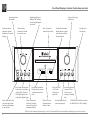
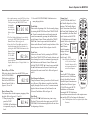
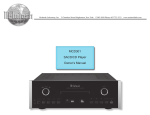
Front Panel Displays, Controls, Push-buttons and Jack
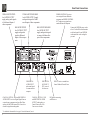
Audio Output Mute
On Indicator
Connection for low
impedance dynamic
headphones, for private
listening
Digital Signal Detector
Indicator LED indicates
when the digital signal is
not present
Allows moving
backward or forward
one track at a time
Selects either disc playback
or selects the external input
(Coaxial, BNC, Optical or
USB) Digital Input for decoding of the Digital Signal
Push to mute the audio at
rear panel Audio Output
Connectors (Headphones
are not affected)
12
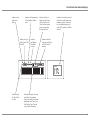
Disc Tray opens to
load and unload a disc
Front Panel Information
Display indicates various
operation functions and
times
Selects various playback times for indication on the Front Panel
Information Display
1
Adjusts the listening
volume level
IR Sensor receives
commands from a
Remote Control
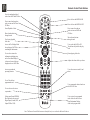
Front Panel Information
Display indicates volume
levels and external Digital Input Selected
Selects the SACD
or CD Audio
Tracks from a
hybrid disc
Standby Power
On Indicator
Stops disc playback,
Opens and Closes
the disc tray for
loading or unloading
discs
Starts disc playback and
pauses disc playback
STANDBY/ON Push-button switches
the MCD1100 ON or OFF (Standby)
PCM (Pulse Code Modulation) Digital Signal type used for CD Discs and DSD (Direct Stream Digital) Digital Signal type used for SACD Discs