1
Proprietary Statement
This manual contains proprietary information of Argox Information Co., Ltd. It is intended solely
for the information and use of parties operating and maintaining the equipment described herein.
Such proprietary information may not be used, reproduced, or disclosed to any other parties for
any other purpose without the expressed written permission of Argox Information Co., Ltd.
Product Improvements
Continuous improvement of products is a policy of Argox Information Co., Ltd. All
specifications and signs are subject to change without notice.
FCC Compliance Statement
NOTE: This equipment has been tested and found to comply with the limits for a Class A
digital device, pursuant to Part 15 of the FCC Rules. These limits are designed to provide
reasonable protection against harmful interference in a residential installation. This equipment
generates, uses, and can radiate radio frequency energy and, if not installed and used in
accordance with the instructions, may cause harmful interference to radio communications.
However, there is no guarantee that the interference will not occur in a particular installation. If
this equipment does cause harmful interference to radio or television reception, which can be
determined by turning the equipment off and on, the user is encouraged to try to correct the
interference by one or more of the following measures:
■ Reorient or relocate the receiving antenna.
■ Increase the separation between the equipment and the receiver.
■ Connect the equipment into an outlet on a circuit different than that to which the receiver is
connected.
■ Consult the dealer or an experience Radio/TV technician for help.
NOTE: This unit was tested with shielded cables on the peripheral devices. Shielded cables must
be used with the unit to insure compliance. The user is cautioned that any changes or modifications
not expressly approved by Argox Information Co., Ltd. could void the user‟s authority to operate the
equipment.
Liability Disclaimer
Argox Information Co., Ltd. takes steps to assure that its published engineering specifications
and manuals are correct; however, errors do occur. Argox Information Co., Ltd. reserves the right
to correct any such errors and disclaims liability resulting therefrom.
No Liability for Consequential Damage
In no event shall Argox Information Co., Ltd. or anyone else involved in the creation, production,
or delivery of the accompanying product (including hardware and software) be liable for any
damages whatsoever (including, without limitation, damages for loss of business profits, business
interruption, loss of business information, or other pecuniary loss) arising out of the use of or the
results of use of or inability to use such product, even if Argox Information Co., Ltd. has been
advised of the possibility of such damages.
1
A Letter to Our Customers
Dear Customers,
Congratulation on selecting an Argox Refine series printer!
We believe soon you will find that you have made a
cleverest choice!
This booklet is a small gift from us. It is intended for
helping you to know your printer better, then further to
optimize it. Basically, this booklet contains two parts:
operation guidance and related valuable information.
In the part of the operation guidance, we will furnish you
with a lot of complementary illustrations, so you may pick
up those operation guides more quickly.
In the latter chapters of Trouble Shooting, Maintenance as
well as Reference Technical information, which we think,
you may need them just in case. Therefore, for your quick
reference, we try to table them as much as possible.
Enjoy your reading and have a good time with your printer!
Best wishes,
Argox Information Co., Ltd.
2
CONTENTS
Page
1.
2.
3.
4.
5.
Checking Your Box…………………………….. 5
Power Supply…………………………………… 7
Parts and Features……………………………... 8
Loading the Ribbon……………………………. 10
Loading the Media……………………………... 15
5.1 Standard Mode
5.2 Peel Off Mode
5.3 Cutter Mode
6.
Operator Controls……………………………… 25
6.1 Power Switch
6.2 Buttons
6.3 LED Indicators
7.
8.
9.
10.
11.
Performing Calibration………………………...
Printing Configuration Report………………...
Returning to Factory Default Settings...………
Hooking up the Printer and the Computer…...
Communicate with the Printer………………...
28
29
31
32
33
11.1 Before installation
11.2 Installing a Plug and Play printer driver
(for USB only)
11.3 Installing a Printer Driver
(for other interfaces except USB)
12.
Troubleshooting……………….……………….. 46
12.1 Problems on media
12.2 Problems on ribbon
12.3 Miscellaneous
12.4 Recovery
13.
Caring for Your Printer……………….………. 49
13.1 Cleaning the print head (TPH)
13.2 Cleaning the roller
13.3 Cleaning the media compartment
3
14.
Reference Technical Information……………... 52
14.1 General Specifications
14.2 Fonts, Bar Codes and Graphics Specification
14.2.1 Printer Programming Language A, PPLA
14.2.2 Printer Programming Language B, PPLB
14.2.3 Printer Programming Language Z, PPLZ
14.3 Interface Specifications
14.3.1 Introduction
14.3.2 Serial
14.3.3 USB
14.3.4 Connection with host
14.3.5 Parallel ( Centronics )
14.3.6 Auto Polling
14.4 ASCII TABLE
15.
Appendix……………………………... ………... 62
15.1 Appendix A : Printer Status
15.2 Appendix B : Stand-Alone Operation
15.3 Appendix C : Dispenser Kit Installation
15.4 Appendix D : Cutter Installation
4
1. Checking Your Box
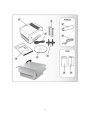
Receiving the box of your printer, you are advised to check first
for the possible shipping damage. There are two ways you can
do it:
1.1 Inspect the outer appearances of both the box and the
printer for possible damage.
1.2 Raise the top cover of the printer to see if the media
compartments are in order.
If damages did occur, immediately file the claim to the shipping
company for settlement.
Having performed the primary inspections, next step, please
check whether you have received the following accessories
together with the printer. If there is any item missing, contact
your local dealer to get it.
Printer
Power cord
An extra ribbon core (R-400plus / R-400K plus)
Ribbon core adaptor
Media hanger
USB cable (R-400plus / R-400K plus)
CD-ROM
Quick Installation Guide
Sample Media and Ribbon (R-600)
5
6
2. Power Supply
WARNING:
NEVER OPERATE THE PRINTER AND POWER SUPPLY IN AN
AREA WHERE THEY CAN GET WET.
2.1
2.2
Leave the power switch at the “ O ” Position.
Connect the power supply plug to the power cord
connecter and the other end to your AC source.
AC Electrical Outlet
Power Switch
Power Cord Connecter
Power Cord
7
3. Parts and Features
Top Cover
Power Switch
Cover Lock
8
Media Hanger
Release Levers
Ribbon Pick-up Holder
Thermal Printhead
Ribbon Supply Holder
Platen
Cover Lock
Roller
9
Power Switch
4. Loading the Ribbon
Note:
This section is not applicable to the direct thermal printing.
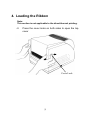
4.1
Press the cover locks on both sides to open the top
cover
Cover Lock
10
4.2
4.3
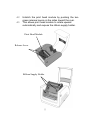
Unlatch the print head module by pushing the two
green release levers on the sides toward the rear.
This allows print head module to rotate upward
automatically and expose the ribbon supply holder.
Print Head Module
Release Lever
Ribbon Supply Holder
11
4.4
4.5
4.6
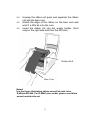
Unwrap the ribbon roll pack and separate the ribbon
roll and the bare core.
Attach the edge of the ribbon on the bare core and
wind it a little bit onto the core.
Insert the ribbon roll into the supply holder. (First
snap in the right side and then the left side.)
Ribbon Roll
Bare Core
Noted:
It is the figure illustrating ribbon wound ink-side in for
R-400plus/R-600. For R-400K plus model, please use ribbon
wound coated side out.
12
4.7
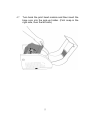
Turn back the print head module and then insert the
bare core into the pick-up holder. (First snap in the
right side, then the left side.)
13
4.8
4.9
Turn the wheel of the print head module to ensure
the ribbon is tightly wound.
Press down the print head module firmly on both
sides till you hear a snap.
Wheel
Print Head Module
Note:
1. R-400plus / R-600 use ribbon wound coated side in.
R-400K plus use ribbon wound coated side out.
2. Optional ribbon core adapter is available once ribbon
width is less than 4’’ width.
14
5. Loading the Media
R-Series printers can be operated in three different options:
standard, peel-off, or with a cutter.
-
-
Standard mode allows you to collect each label freely.
In peel-off mode, the backing material is being peeled
away
from the label as it is printed. After the
former label is removed, the next one will be printed.
In cutter mode, the printer automatically cuts the label
after it is printed.
15
5.1 Standard Mode
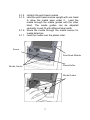
5.1.1 Press the cover locks on both sides to swing the
top cover toward the rear and expose the media
compartment.
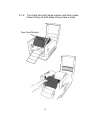
5.1.2 Load the media roll onto the media hanger.
5.1.3 Put the media roll on the hanger holder.
Media Roll
16
Media Hanger
5.1.4 Unlatch the print head module.
5.1.5 Hold the print head module upright with one hand
to allow the media pass under it. Lead the
media through the media guides with the other
hand. The media guides can be adjusted
centrality to well fit with different label width.
5.1.6 Route the media through the media sensor for
media detection.
5.1.7 Lead the media over the platen roller.
Sensor
Print Head Module
Platen Roller
Media Guides
Media Guides
17
5.1.8 Turn back the print head module and then press
it down firmly on both sides till you hear a snap.
Print Head Module
18
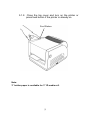
5.1.9
Close the top cover and turn on the printer or
press feed button if the printer is already on.
Feed Button
Note:
3” holder paper is available for 3” ID media roll.
19
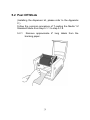
5.2 Peel Off Mode
(Installing the dispenser kit, please refer to the Appendix
C.)
Follow the common procedure of "Loading the Media "of
Standard Mode from step 5.1.1 to step 5.1.9.
5.2.1
Remove approximate 6" long labels from the
backing paper.
20
5.2.2 Trim the edge of label backing paper with scissors
or knife.
5.2.3 Push down peeler-switch to ease the access
packing paper.
5.2.4 Lead the backing paper over the plate, then thread
it back into the slot, ensuring that it is inserted
between white plastic roller and plate.
5.2.5 Pull back the peeler-switch to secure backing
paper.
Peeler-Switch
21
5.2.6 Latch print head module.
5.2.7 Turn on the printer and press feed button.
5.2.8 Labels will be separated from backing paper and
fed out on H cover, while backing paper will come
out from the slot under the H cover, and label will
be fed out.
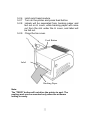
5.2.9 Close the top cover.
Feed Button
Label
Backing Paper
Note:
The "FEED" button will not drive the printer to peel. The
peeling work can be executed only when the software
setting is ready.
22
5.3 Cutter Mode
(Installing the cutter, please refer to Appendix D )
Follow the same procedure as "Loading the Media" from
step 5.1.1 to step 5.1.9.
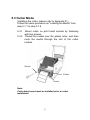
5.3.1
Mount cutter on print head module by fastening
with two screws.
5.3.2 Thread the media over the platen roller, and then
route the media through the slot of the cutter
module.
Screw
Cutter
Screw
Note:
Cutter baby board must be installed prior to cutter
installation.
23
5.3.3 Press down the print head module firmly.
Cutter
Note:
The "Feed" button will not drive the printer to cut.
The cutting work can be executed only when the software
setting is ready.
24
6. Operator Controls
6.1 Power Switch
Controls printer power
On-normal operation
Off-the power should be turned off before connect or
disconnect the communication cables and power cables
6.2 Buttons
There are three buttons, each has two basic functions.
BUTTON
FEED
PAUSE
CANCEL
Pressed at normal status
Pressed during
power-on
Feed a label.
Perform a self-test for
configuration report.
■ Stop the printing process. Perform the media
■ Resume the printing job calibration.
after press it again.
■ Interrupt and delete the
Reset the settings at
printing job.
E2PROM.
■ Force the printer to
continue working after
an error had been
recovered.
25
6.3 LED Indicators
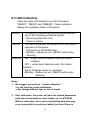
There are three LED indicators on the front panel,
“READY”, “MEDIA” and “RIBBON”. These indicators
display the operation status of the printer.
READY
The READY indicator will remain lighted except if
any of the following conditions prevail.
- Receiving data from host.
- A fault condition.
MEDIA
The MEDIA indicator will remain on for the normal
operation of the printer.
- The printer is at PAUSE state.
- Blinking – Media run out. (READY will be also
blinking.)
RIBBON
ONI– under thermal transfer mode with ribbon
installed.
OFF – under direct thermal mode. (No ribbon
installed.)
Set by Windows driver or command.
Blinking – Ribbon run out. (READY will be also
blinking.)
Notes:
1. We suggest you perform “ media calibration “.
- for the first time media installation
- after change different type or size of media
2. After calibration, the printer will save the related parameters
2
(reflection characteristics, label length, etc.) to E PROM.
Without calibration, the incorrect media/Gap detection may
occur, especially for small-size labels (less than 20mm in
26
height).
3. Before calibration, the media and ribbon must be loaded
properly and move the label sensor to correct position.
4. After self-test, the printer is at dump mode, If you need
normal operation, you must press CANCEL to restart the
printer.
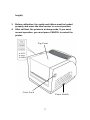
Top Cover
Cover Lock
Power Switch
27
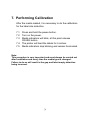
7. Performing Calibration
After the media loaded, it is necessary to do the calibration
for the label size detection.
7.1 Press and hold the pause button.
7.2 Turn on the power.
7.3 Media indicators will blink, at this point release
PAUSE button.
7.4 The printer will feed the labels for 6 inches.
7.5 Media indicators stop blinking and remain illuminated.
Note:
This procedure is very important and must always be carried out
after installation and every time the media type is changed.
Failure to do so will result in the gap and label-empty detection
being incorrect.
28
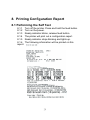
8. Printing Configuration Report
8.1 Performing the Self Test
8.1.1
8.1.2
8.1.3
8.1.4
8.1.5
8.1.6
report.
Turn off the printer. Press and hold the feed button.
Turn on the power.
Ready indicator blinks, release feed button.
The printer will print out a configuration report.
Ready indicator stops blinking and lights up.
The following information will be printed on this
29
Note:
1. After self-test the printer will enter character dump mode. For
normal operation press the cancel button to exit from dump
mode.
2. On the report:
PPLA – Present emulation type
R2A0-1.00 – Firmware version
052302 – Date code
Please provide the above information to Argox support team in
case your printer has a printing problem.
30
9. Resetting the Printer to Factory
Default Settings
If you would like to reset the printer to its factory defaults
after certain commands have been sent or settings
changed:
9.1 Turn off the printer. Press and hold the CANCEL
button.
9.2 Turn on the power.
9.3 Ribbon indicator blinks, release the button.
9.4 Ribbon indicator stops blinking and lights up.
9.5 The following parameters automatically reset.
-
Label parameters
Heat (Darkness)
Speed
Symbol set (language)
Others for specific emulation
Notes :
2
1. All settings stored in non-volatile E PROM cannot be destroyed
even by turning the printer off.
2. It is necessary to perform label sensitivity calibration after
resetting.
3. The printed label count can not be reset.
31
10. Hooking up the Printer & Computer
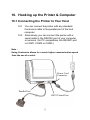
10.1 Connecting the Printer to Your Host
10.1 You can connect the printer with any standard
Centronics cable to the parallel port of the host
computer.
10.2 Alternatively you can connect the printer with a
serial cable to the RS232C port of your computer
or terminal. (for PC compatibles, the RS232C port
is COM1, COM2 or COM3.)
Note :
Using Centronics allows for a much higher communication speed
than the use of a serial.
Power Cord
Connecter
Parallel Port
RS232 Serial Port
32
11. Communicate with the Printer
The bundled printer driver can be applied to all applications
under Windows XP/ Vista/ Windows 7, supporting 32-bit/ 64-bit
operation systems. With this driver you can operate any popular
Windows software applications including Argox Bartender UL
label editing software or MS Word, etc., to print to this printer.
11.1 Before installation
The following installation steps are based on R-400plus as an
example. The screens included for these steps are taken from
Windows XP; steps in other versions of operation systems are
similar. Drivers can be installed via the CD-Rom included in
printer package; or it can be downloaded from Argox website >>
Technical Support >> Download Center >> select product model
to access: http://www.argox.com/content.php?sno=0000033
11.2 Installing a Plug and Play printer driver
(for USB only)
Note:
We strongly recommend that you use the Seagull Driver Wizard
instead of the Microsoft Windows Add Printer Wizard when
installing and updating your Drivers by Seagull.
(Even though the "Add Printer Wizard" is from Microsoft, it too
easily performs a number of tasks incorrectly when updating
existing drivers. It also badly handles the situation where a
printer driver is already in use by a Windows application.)
33
1. Turn off the printer. Plug the power cable into the power
socket on the wall, and then connect the other end of the
cable to printer's power socket. Connect the USB cable to
the USB port on the printer and on the PC.
2. Turn on the printer. If the printer supports Plug-and-Play, and
you have successfully connected it using a USB cable, then
the Windows Add Hardware Wizard will automatically detect
the printer and display a dialog that allows you to install a
driver. Click Cancel and do not install the driver using this
wizard.
3. Prepare the documentation and software CD-Rom from
printer package and then install to CD-Rom drive of your
computer. The CD-Rom will bring out the following prompt.
Click “Go”:
34
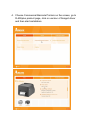
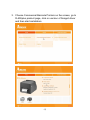
4. Choose Commercial Barcode Printers on the screen, go to
R-400plus product page, click on version of Seagull driver
and then start installation:
35
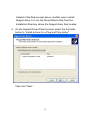
Instead of the flash prompt above, another way to install
Seagull driver is to run the DriverWizard utility from the
Installation Directory where the Seagull driver files locates.
5. On the Seagull Driver Wizard prompt, select the first radio
button to “Install a driver for a Plug and Play printer”:
Argox R-400plus PPLB
USB002
Then click “Next.”
36
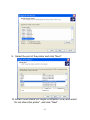
6. Enter Printer name (i.e. Argox R-400plus PPLB) and select
"do not share this printer”, and click "Next"
Argox R-400plus PPLB
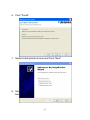
7. Check all the data on the showing screen, if it is correct,
click "Finish".
Argox R-400plus PPLB
USB002
Argox R-400plus PPLB
37
8. After the related files have been copied to your system, click
"Finish".
Installing printer „Argox R-400plus PPLB‟…
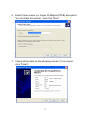
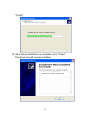
9. After driver installation is complete, click "Close".
The driver should now be installed.
Installed printer Argox R-400plus
PPLB
38
11.3 Installing a Printer Driver (for other
interfaces except USB)
1. Turn off the printer. Plug the power cable into the power
socket on the wall, and then connect the other end of the
cable to printer's power socket. Connect the Parallel cable,
Serial cable, or Ethernet cable to the proper port on the
printer and on your computer.
2. Prepare the documentation and software CD-Rom from
printer package and then install to CD-Rom drive of your
computer. The CD-Rom will bring out the following prompt.
Click “Go”:
39
3. Choose Commercial Barcode Printers on the screen, go to
R-400plus product page, click on version of Seagull driver
and then start installation:
40
Instead of the flash prompt above, another way to install
Seagull driver is to run the DriverWizard utility from the
Installation Directory where the Seagull driver files locates.
4. On the prompt, Windows Printer Driver, select “I accept…”
and click "Next".
5. Assign the directory to keep Seagull driver, (for example:
C:\Seagull) and click "Next".
41
6. Click "Finish".
7. Select Install printer drivers and Click "Next"
8. Select model & emulation - the following examples are
based on model R-400plus PPLB:
42
Argox R-400plus PPLB
9. Select the port of the printer and click "Next".
LPT1
Parallel Port40 PPLB
10. Enter Printer name (i.e. Argox R-400plus PPLB) and select
"do not share this printer”, and click "Next".
43
Argox R-400plus0 PPLB
11. Check all the data on the showing screen, if it is correct,
click "Finish".
Argox R-400plus PPLB
LPT1
Argox R-400plus PPLB
12. After the related files have been copied to your system, click
44
"Finish".
Installing printer „Argox R-400plus PPLB‟…
13. After driver installation is complete, click "Close".
The driver should now be installed.
Installed printer Argox R-400plus PPLB
45
12. Troubleshooting
Generally, when a malfunction or an abnormal condition
occurs, the “READY” LED will keep blinking and printing
and communication between the host and printer will stop.
To understand what the problem, please check
the LEDs.
12.1 Problems on media
Possible
Problems
Missing gap
Solutions
Remarks
. Check the media
path.
. Check the position
of label sensor.
If you use continuous
media, check your
application software
and driver. You
should select
continuous.
Media out
. Supply the media
roll.
Media not
. Install the media
installed
roll.
Media jam
. Recover the jam.
If everything is Okay try to mark the label sensor calibration
(please see page 25)
46
12.2 Problems on ribbon
Possible
Problems
Ribbon has run
out
Solutions
Remarks
Supply the ribbon
roll.
Ribbon jam
Ribbon sensor
error
Recover the jam.
Replace the ribbon
sensor.
Does not apply to
direct thermal. If you
use direct thermal,
set bit 1 of DIP switch
to OFF.
not for direct thermal.
not for direct thermal.
12.3 Miscellaneous
12.3.1 The host shows “Printer Time out”.
1. Is the communication cable (parallel or serial)
connected securely to your parallel or serial
port on the PC and to the connector on the
printer ?
2. Is the printer power turned on ?
If the power cord is connected, the power
switch is at position „ ‟׀and the power LED is
still not illuminated, call for service.
12.3.2 The data has been sent, but there is no output
from the printer. Check the active printer driver, it
should be Label Dr. for your Windows system
and the label printer..Check the emulation and
the print (command) file.
47
12.3.3 Vertical streaks in the printout usually indicate a
dirty or faulty print head. Clean the print head
first, if they still persist, replace the print head.
12.3.4 Unstable ribbon roll rotation.
Check the label path and make sure the head
latch is securely closed.
12.3.5 Poor printout quality.
. The ribbon may be not qualified.
. The media may be not qualified.
. Adjust the Darkness (heat temperature).
. Slow down the print speed.
. Refer to the following paragraphs and clear the
related modules.
12.4 Recovery
In order to continue your print jobs after any abnormal
conditions have been recovered, simply press the
CANCEL button or restart the printer. Make sure that the
LED indicator is illuminated and not blinking and
remember to resend your files.
48
13. Caring for your Printer
Before maintenance be sure to turn off the printer power.
13.1 Cleaning the print head (TPH)
To keep the Print Head remain in the best conditions and
efficiency and to extend duration for use, regular cleaning action
is needed.
Clean the print head as follows:
1. Turn off the printer.
2. Open the top cover to access the print head module
3. Remove the ribbon.
4. Rub the print head with a cotton bud moistened with
“Ethanol” or “IPA”.
5. Check for any traces of black coloring or adhesive on the
cotton after cleaning.
6. Repeat if necessary until the cotton is clean after it is
passed over the head.
Cleaning Interval
It‟s strongly recommended to regularly clean print heads at least
when changing every one label roll (in direct thermal printing
mode) or every one ribbon roll (in thermal transfer printing
mode). In addition, if printers are operated under critical
applications and environments, or if it‟s found that print quality is
degraded, please clean print heads more frequently.
49
Cleaning Material
Surface of print head‟s heating element is very fragile. To
prevent from any possible damage, please use soft cloth/ cotton
buds with “Ethanol” or “IPA” to clean print head surface.
It‟s strongly recommended to wear hand gloves during cleaning
progress.
Do not touch print head surface by bare hands or with any hard
equipment.
Water or spit should be kept away in case of corrosion on
heating elements.
Cleaning Direction
When cleaning the print head, always wipe in One-Way
Direction - from Left to Right only, or, from Right to Left only, to
clean “Heating Line” of print head gently without excessive
stress.
Do not wipe back and forth, to avoid dust or dirt on cleaning
cotton would be attached onto print head again.
Special Caution:
Warranty of print heads will be void if print head serial number is
removed, altered, defected, or made illegible, under every
circumstance.
50
13.2 Cleaning the roller
Using a cotton moistened with alcohol, clean the roll and rip off
the attached glue.
Note :
The roller should be cleaned whenever it has been in contact with
foreign materials such as dust or adhesives.
13.3 Cleaning the media compartment
Clean the media compartment with cotton, which has been
moistened with a mild detergent. Every time a media roll is
printed this compartment should be cleaned to reduce the
incidence dust.
51
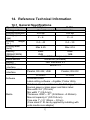
14. Reference Technical Information
14.1 General Specifications
Specifications
R-400plus
R-600
Printing method
Direct thermal & Thermal Transfer
Printing resolution
203 dpi
300 dpi
Printing speed
2~6
2~4
(ips)
Printing
length
0.4 ~ 43
0.4 ~ 30
(in.)
Printing width
Max 4.25
Max 4.16
(inch)
Memory
2MB/
2MB/
(DRAM/FROM)
2MB
1MB
CPU type
32 bit RISC microprocessor
Media sensor
Reflective (Movable)
Display
LED indicators x 3
Operation
Button x 3
interface
Communication
Parallel, RS-232, USB
Parallel, RS-232
interface
PPLA/B/Z
PPLA/B
Software
Windows Driver
Label editing software – ArgoBar, Printer Utility
Roll-feed, die-cut, continuous, fan-fold, tags, ticket in
thermal paper or plain paper and fabric label
Max width 4.6” (118 mm)
Min width 1” (25.4 mm)
Media
Thickness .0025”~. 01” (0.0635mm ~0.254mm)
Max roll capacity 6” (OD 152 mm)
Core size 1”~1.5” (25mm ~ 37mm)
(Core sized 3” ID can by applied by installing with
extra media core adapter)
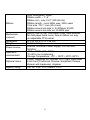
52
Ribbon
Mechanism
request
Dimension
Weight
Power source
Operation
environment
Optional items
Agency listing
Wax, Wax/Resin, Resin
Ribbon width – 1”~4”
Ribbon roll – max 2.67” (OD 68 mm)
Ribbon length – max 360m wax, 300m resin
Core size - ID 1” core (25.4 mm)
Ribbon wound ink-side in: R-400plus/ R-600;
Ribbon wound ink-side out: R-400K plus
Built-in Tear off bar, front-open cover, clear window,
fan fold paper back cover, face-in ribbon run way,
un-adjustable TPH carrier.
W 314 x H 231 x L 218 mm
9.3 lbs/ 4.2 kgs
Internal Universal Power Supply 100~240VAC,
50/60Hz
40ºF ~ 100ºF (4ºC~38ºC)
10~90% non condensing
Storage Temperature: -4ºF ~ 122ºF (-20ºC~50ºC)
Cutter, Dispenser Kit, Stacker, RTC Card, 2MB Asian
Font Card (Traditional Chinese, Simplified Chinese
Korean and Japanese), Argokee
CE, UL, CUL, FCC class A, CCC
53
14.2 Fonts, Bar Codes and Graphics
Specification
The specifications of fonts, bar codes and graphics
depend on the printer emulation. The emulation is a
printer programming language, through which the host
can communicate with your printer. There are printer
PPLA / PPLB programming languages for R-series.
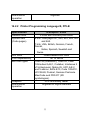
14.2.1 Printer Programming Language A, PPLA
Specification
General fonts
ASD smooth
fonts
Symbol sets for
smooth fonts
Courier fonts
Soft fonts
Font
expandability
Bar code types
Graphics
R-400plus
R-600
7 alpha-numeric fonts, OCR A and OCR B
4, 6, 8, 10, 12, 14, and 18 points
USASCII, UK, German, French, Italian,
Spanish, Swedish, and Danish/Norwegian
8 symbol sets (PC, PC-A,
PC-B, EAMA-94, Roman ,
Legal, Greek and
Russian)
Downloadable PCL fonts
1x1 to 24x24
Code 39, Code 93, Code 128/subset A,B,C,
Codabar, Interleave 2 of 5, UPC A/E/2 and 5
add-on, EAN-8/13, UCC/EAN-128, Postnet,
Plessey, HBIC, Telepen and FIM.
MaxiCode PDF417 and DataMatrix
(ECC-200 only).
PCX, BMP, IMG and HEX formats
54
Stand-alone
operation
ArgoKee
14.2.2 Printer Programming Language B, PPLB
Specification
General fonts
Symbol sets
(Code pages)
Soft fonts
Font expandability
Bar code types
Graphics
Stand-alone
operation
R-400plus / R-600
5 fonts with different point sizes
8 bits: code page 437, 850, 852, 860, 863
and 865.
7 bits: USA, British, German, French,
Danish,
Italian, Spanish, Swedish and
Swiss.
Downloadable soft fonts
1x1 to 24x24
Code 39 (checksum), Code 93, Code
128/subset A,B,C, Codabar, Interleave 2
of 5(checksum), Matrix 25, UPC A/E 2
and 5 add-on, EAN-8/13, Code 128UCC,
UCC/EAN, Postnet, German Postcode.
MaxiCode and PDF417 (2D
symbologies).
PCX and binary raster
ArgoKee or Argox scanners
55
14.2.3 Printer Programming Language Z, PPLZ
Specification
General fonts
Symbol sets
Soft fonts
Font expandability
Bar code types
Graphics
Stand-alone
operation
R-400plus
9 alpha-numeric bitmapped fonts and 1
scaleable font (CG Triumvirate Bold
Condensed)
Scaleable font: PC 850
Bitmapped font: USA, UK, Holland,
Germany, France, Denmark/Norway,
Italy, Span, Sweden/Finland, Japan and
miscellaneous
Downloadable soft fonts
2 to 10 times
Code 39 (checksum), Code 93, Code
128/subset A,B,C, Codabar, Interleave 2
of 5 (checksum), Industrial 2 of 5,
Standard 2 of 5, UPC A/E 2 and 5
add-on, EAN-8/13, Postnet, Code 11,
logmars, MSI code
MaxiCode and PDF417, QR code (2D
symbologies).
GRF, Hex, GDI
ArgoKee (Quick Basic mode only)
Notes:
As the font board and flash modules use the same connector,
only one of them can be installed onto printers each time.
56
14.3 Interface Specifications
14.3.1 Introduction
This appendix presents the interface specifications of I/O ports
for the printer. These specifications include pin assignments,
protocols and detailed information about how to properly
interface your printer with your host or terminal.
14.3.2 Serial
The RS232 connector on the printer side is a female, DB-9.
Pin
1
2
3
4
5
6
7
Signal
No function
Received Data,
RxD
Transmitted Data,
TxD
No function
GND
No function
Request to Send,
RTS
8
Clear to Send, CTS
9
+5V
Description
Shorted to Pin - 6
Input. Serial “Received Data”
Output. Serial “Transmitted
Data”.
No connection
Signal Ground
Shorted to Pin - 1
Output. Used as the control
signal for “H/W Flow Control “
Input. Used as the control
signal for “H/W Flow Control”
Output. Pin 9 is reserved for
KDU (keyboard device unit)
Note:
Pin 9 is reserved for KDU (keyboard device unit) only; therefore
do not connect this pin if you are using a general host like a PC .
57
14.3.3 USB
2
1
3
4
USB series “B” Receptacle Interface
Pin
1
2
3
4
Signal Name
VBUS
DD+
GND
Connector Terminal Pin Assignment
14.3.4 Connection with host:
Host 25S
Printer 9P
(PC or compatible)
DTR 20
DSR 6
TX 2
RX 3
CTS 5
RTS 4
GND 7
……
……
……
……
……
……
……
1 DSR
6 DTR
2 RX
3 TX
7 RTS
8 CTR
5 GND
Host 9S
Printer 9P
(PC or compatible)
DTR 4
DSR 6
TX 3
RX 2
CTS 8
RTS 7
GND 5
58
……
……
……
……
……
……
……
1 DSR
6 DTR
2 RX
3 TX
7 RTS
8 CTS
5 GND
Alternatively you can just connect the 3 wires in the following
way.
Host 25S
Printer 9P
(PC or compatible)
TX 2
RX 3
GND 7
pin 4
pin 5
pin 6
pin 20
…… 2 RX
…… 3 TX
…… 5 GND
Host 9S
Printer 9P
(PC or compatible)
TX 3
RX 2
GND 5
pin 4
pin 6
pin 7
pin 8
…… 2 RX
…… 3 TX
…… 5 GND
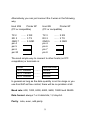
The most simple way to connect to other hosts (not PC
compatible) or terminals is:
Printer
Pin 2- RxData ………
Pin 3- TxData ………
Pin 5- Ground ………
Terminal/Host
TxData
RxData
Ground
In general as long as the data quantity is not too large or you
use Xon/Xoff as flow control, there will be no problem at all.
Baud rate: 600, 1200, 2400, 4800, 9600, 19200 and 38400.
Data format: always 7 or 8 data bits; 1,2 stop bit.
Parity : note, even, odd parity.
59
Handshaking : XON/XOFF as well as CTS/RTS (hardware flow
control).
If you run an application with the bundled printer driver under
Windows and use the serial port, you should check the above
parameters and set the flow control to “Xon/Xoff” or “hardware”.
14.3.5 Parallel (Centronics)
The parallel port is a standard 36-pin Centronics. Its pin
assignments are listed as following.
Pin Direction Definition Pin
1
2
3
4
5
6
In
In
In
In
In
In
/STROBE
Data 1
Data 2
Data 3
Data 4
Data 5
7
8
9
In
In
In
Data 6
Data 7
Data 8
10
11
12
Out
Out
Out
/ACK
BUSY
PE
Directio Definition
n
13
Out
SELECT
14,15
NC
16
Ground
17
Ground
18
NC
19~3 Ground
0
31
NC
32
Out
/Fault
33~3 NC
6
60
14.3.6 Auto Polling
Both the serial and parallel ports are active at the same
time on this printer, i.e. data can be received on either
one, however no provision is made for port contention. If
data is transmitted to both ports simultaneously, it will
cause the data in the received buffer to be corrupted.
14.4
ASCII TABLE
0
1
0 NUL
1 SOH XON
2 STX
3
XOFF
4
5
NAK
6 ACK
7 BEL
8 BS
9
A LF
B
ESC
C FF
D CR
E SO
RS
F SI
US
2
!
“
#
$
%
&
„
(
)
*
+
,
.
/
3
0
1
2
3
4
5
6
7
8
9
:
;
<
=
>
?
61
4
@
A
B
C
D
E
F
G
H
I
J
K
L
M
N
O
5
P
Q
R
S
T
U
V
W
X
Y
Z
[
\
]
^
_
6
`
a
b
c
d
e
f
g
h
i
j
k
l
m
n
o
7
p
q
r
s
t
u
v
w
x
y
z
{
|
}
~
DEL
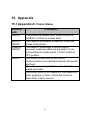
15. Appendix
15.1 Appendix A: Printer Status
Blinking
LED
MEDIA
MEDIA
READY
RIBBON
READY
READY
Description
The printer is at pause state. Press PAUSE or
CANCEL to return to normal state.
The media is uninstalled or used up. Load new
media to the printer.
The ribbon is uninstalled or end-of-ribbon
occurred. Load new ribbon to the printer. If you
just use thermal media set bit 1 of DIP switch to
OFF position.
The format or baud rate of the RS232
communication is inconsistent between the printer
and host.
The cutter can not cut off the media, check the
media and cutter.
The printer buffer is full caused by the loaded soft
fonts, graphics or forms. Check the format of
these data. Call for service.
62
15.2 Appendix B: Stand-Alone Operation
Stand-Alone operation for keyboard and barcode reader
Apart from related hardware devices and PPLB
emulation, in order to use keyboards and barcode
readers (scanner) you should follow apply with ArgoKee.
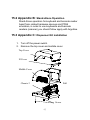
15.3 Appendix C: Dispenser Kit installation
1.
2.
Turn off the power switch.
Remove the top cover and middle cover.
Top Cover
H Cover
Middle Cover
Pull
Chassis 2
Screw
63
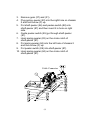
3.
4.
Remove gear (27) and (31).
Plug spring–peeler (83) into the right hole on chassis
2 and lock screw (F) up.
5. Put shaft-peeler (86) and peeler-switch (88) into
shaft-peeler (87) and then insert it in hole on right
side.
6. Guide peeler-switch (85) go through shaft-peeler
(87).
7. Hook spring-peeler (83) on the circle notch of
shaft-peeler (87).
8. Put spring-peeler (84) into the left hole of chassis 2
and lock screw (F) up.
9. Put peeler-switch (89) into shaft-peeler (87).
10. Hook spring-peeler (84) on the circle notch of
shaft-peeler (87).
Cable Connector
64
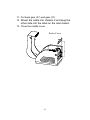
11. Put back gear (27) and gear (31).
12. Mount the cable into chassis 2 and plug the
other side into the label on the main board.
13. Close the middle cover.
Peeler-Cover
65
15.4 Appendix D : Cutter Installation
1. Turn off the power switch.
2. Remove the top cover and middle cover.
Top Cover
H Cover
Middle Cover
Pull
Chassis 2
Screw
66
1. Remove the E- ring(I), gear(27) and release the
screw(F).
2. Remove the bracket-peeler(71) from the module.
3. Secure two attached screws (B) for the cable
connector.
4. Add a baby board to JP29 on the main board.
5. Plug the cable connector into JP13, and make sure
Jumper (J1) position is “2-3”
6. Click back the middle cover.
7. Click back the top cover.
8. Secure two attached screws (M) for the cutter.
9. Plug cutter cable into “ External Connector”.
External Connector
Cutter Cable
67
Environmentally sensible
disposal of electrical and
electronic equipment
Electrical and electronic equipment
contains valuable materials that should
be supplied to recycling or recovery.
Please dispose of electrical and
electronic equipment at qualified
collecting points separate from
municipal waste.
68