1
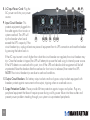
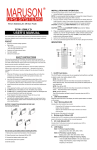
8.AC Input Power Cord: Plug the
AC power cord into your power
source.
10
12
11
10 9
9. Input Circuit Breaker: This
protects equipment plugged into
the outlet against short circuits or
system overload. The UPS will
8
17
16 15 14
13 10
trip the breaker when loads
exceed the UPS’s capacity. If the
circuit breaker trips, unplug at least one piece of equipment from its UPS connection and reset the breaker
by pressing the button back in.
If the AC input current is much higher than what the circuit breaker can regulate, the circuit breaker may trip. Once the breaker is tripped, the UPS will attempt to power the load using its internal power source. If the UPS detects an overload at this point, turn off the UPS and decide which equipment will be left unprotected. Reset the breaker after the overload or short circuit is released, then restart the UPS.
NOTE: Most circuit breaker trips are due to overload conditions.
10.Output Circuit Breakers: Six battery output sockets and two bypass output sockets equipped with breakers protect against overcurrent on the output, tripping when an overload occurs.
11.Surge Protection Outlets: These provide full-time protection against surges and spikes. Plug any
peripheral equipment that doesn’t require power during a utility power failure into these outlets and prevent power problems traveling through your system via unprotected peripherals.
8