1
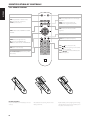
IDENTIFICATION OF CONTROLS
12
FRANÇAIS
11
ENGLISH
FRONT PANEL
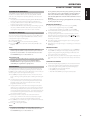
“No Disc” appears on the C 545BEE’s VFD if the disc is placed upside
down or there is no disc loaded.
NOTE
This player is not designed to accommodate neither a “damping disc”
placed on a CD nor two CDs stacked together. It plays audio CDs, but not
discs identified as CD-V, DVD, CD-I, CD-ROM or PHOTO CD. Refer also to
the item “CD-R AND CD-RW AUDIO DISCS” at the “USING THE C 545BEE
– FEATURES” section of the “OPERATION” page.
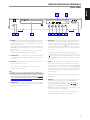
4OPEN/CLOSE: Press this button to open and close the disc tray. When
in standby mode, pressing this button will also switch ON the C 545BEE
and at the same time open the disc tray.
7
8
9
10
ITALIANO
During playback, press this button to stop playback temporarily,
keeping the optical pickup at its current position on the disc. The icon
[ ] is illuminated in the VFD indicating the C 545BEE is in pause mode.
To resume playback at the exact point where it stopped, press [PLAY/
PAUSE] again.
6 STOP: Press the [STOP] button once to stop playback and re-set the
pickup to the beginning of the disc. The display reverts to showing
the number of tracks and total playing time on the disc; for WMA/MP3
files, the display will revert to total number of files. If the C 545BEE was
programmed to play a selection of tracks, the program will be retained
in the player’s memory. Pressing [STOP] twice at program mode will
delete the program.
DEUTSCH
6
5PLAY/PAUSE: This dual-function button alternates between starting
and stopping playback. Press this button to toggle between Play
and Pause of a CD or other compatible media disc. Press to start play
or resume play after Pause. The icon [ ] is illuminated in the VFD
indicating the C 545BEE is in playback mode. If the disc tray is open,
press this button to automatically close the tray and start playback if a
disc is loaded.
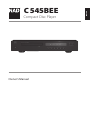
2 STANDBY LED: This indicator will light up amber when the C 545BEE
is in standby state. When the C 545BEE is at ON state, this indicator will
illuminate blue.
3DISC TRAY: With the disc tray open, insert a CD or other compatible
media disc face down onto the tray.
5
Repeat and Random playback mode can be disengaged by pressing
the [STOP] button.
NEDERLANDS
1 STANDBY: Press this button to switch ON the C 545BEE. The Standby
LED indicator will turn from amber to blue and illuminate the Vacuum
Fluorescent Display (VFD). Pressing the Standby button again turns the
unit back to standby mode.
The C 545BEE can also be switched ON from standby mode by pressing
[OPEN/CLOSE] or [PLAY/PAUSE] buttons on the front panel as well as on
the remote control.
If the disc tray is open and the Standby button is pressed, the disc tray
will draw close and the C 545BEE goes to standby mode.
4
ESPAÑOL
3
7RANDOM: This button when pressed will engage or disengage random
playback mode. When engaged (a corresponding “RANDOM” icon is
illuminated in the VFD), random playback of tracks or files will begin
by pressing [PLAY/PAUSE] from STOP mode or [SKIP
] during
playback mode. Press [RANDOM] again to return to normal playback
(“RANDOM” icon in the VFD is extinguished). Random playback mode can
also be disengaged by pressing [STOP] button.
SVENSKA
2
The Random playback mode can be used in combination with the
Repeat Play All mode but not with Program playback mode.
РУССКИЙ
1