1
English
unused for long periods of time.
Refer all servicing to qualified service personnel.
Servicing is required when the apparatus has been
damaged in any way, such as power-supply cord or
plug is damaged, liquid has been spilled or objects
have fallen into the apparatus, the apparatus has been
exposed to rain or moisture, does not operate normally,
or has been dropped.
•
2
il
F
PLEASE READ AND SAVE THIS FOR FUTURE REFERENCE
al
r
o
o
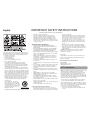
IMPORTANT SAFETY INSTRUCTIONS
Some of the following information may not apply to your
particular product; however, as with any electronic product,
precautions should be observed during handling and use.
• Read these instructions.
• Keep these instructions.
• Heed all warnings.
• Follow all instructions.
• Do not use this apparatus near water.
• Clean only with dry cloth.
• Do not block any ventilation openings. Install in
accordance with the manufacturer’s instructions.
• Do not install near any heat sources such as radiators,
heat registers, stoves, or other apparatus (including
amplifiers) that produce heat.
• Do not defeat the safety purpose of the polarized or
grounding-type plug. A polarized plug has two blades
with one wider than the other. A grounding type plug
has two blades and a third grounding prong. The wide
blade or the third prong is provided for your safety. If
the provided plug does not fit into your outlet, consult
an electrician for replacement of the obsolete outlet.
• Protect the power cord from being walked on or
pinched particularly at plugs, convenience receptacles,
and the point where they exit from the apparatus.
• Only use attachments/accessories specified by the
manufacturer.
• Use only with the cart, stand,
]
tripod, bracket, or table specified
by the manufacturer, or sold with
the apparatus. When a cart is used,
use caution when moving the cart/
apparatus combination to avoid
Portable Cart Warning
injury from tip-over.
• Unplug this apparatus during lightning storms or when
ADDITIONAL SAFETY INFORMATION
• The AC/AC adapter supplied with this product is
intended to be correctly oriented in a vertical or floor
mount position.
• Do not use unauthorized chargers or power adapters.
Use only chargers or power adapters that came with
your product or that is listed in the user’s guide.
• Apparatus shall not be exposed to dripping or splashing
and no objects filled with liquids, such as vases, shall be
placed on the apparatus.
• Always leave sufficient space around the product for
ventilation. Do not place product in or on a bed, rug,
in a bookcase or cabinet that may prevent air flow
through vent openings.
• Do not place lighted candles, cigarettes, cigars, etc. on
the product.
• Care should be taken so that objects do not fall into the
product.
• Do not attempt to disassemble the cabinet. This product
does not contain customer serviceable components.
• The marking information is located at the bottom of
apparatus.
• To be completely disconnect the power input, the AC/
AC adaptor of apparatus shall be disconnected from the
mains.
• AC/AC adaptor is a disconnect device. The AC/AC
adaptor should not be obstructed OR should be easily
accessed during intended use.
• The ventilation should not be impeded by covering
the ventilation openings with items such as newspaper,
table-cloths, curtains etc.
• No naked flame sources such as lighted candled should
be placed on the apparatus.
• Attention should be drawn to the environmental aspects
of battery disposal.
• The use of apparatus in moderate climates.
Important battery precautions
•
Any battery may present a risk of fire, explosion, or
chemical burn if abused. Do not try to charge a battery
that is not intended to be recharged, do not incinerate,
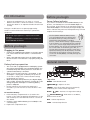
The unit is equipped with GRAD-U-WAKE. The alarm volume
will increase gradually to its maximum in about 30 to 45
seconds.
•
•
Wake to radio
To
1.
2.
3.
set wake radio station:
Select radio band.
Select desired station.
Adjust the volume by + VOL –.
Checking wake time
Slide the
/WAKE1/WAKE2/
switch to WAKE 1 or
WAKE 2 to check the set wake time.
Ways to turn off alarm
•
To silence the wake function momentarily, press
SNOOZE. The alarm or radio will be on again when
the snooze period (default: 9 minutes) is over. (see
Ecology
Help protect the environment - we recommend that you
dispose of used batteries by putting them into specially
designed receptacles.
•
If the alarm is set to wake to radio mode,
the alarm will not sound if the AUX source
is activated at the time of alarm.
Do not use the wake function in Aux
mode. No wake icon will be shown on the display
in this mode.
As no wake mode icon will be shown on the display
in AUX mode, switch off AUX mode when you press
WAKE –
OFF 1 or 2 to select wake source or
turn off alarm.
Sleep function
AC/AC adaptor:
Input: AC 120 V ~ 60 Hz
Output: AC 10.5 V @ 1 A
FCC Information
Note: This equipment has been tested and found to comply
with the limits for a Class B digital device, pursuant to
Part 15 of FCC Rules. These limits are designed to provide
reasonable protection against harmful interference in a
residential installation. This equipment generates, uses, and
can radiate radio frequency energy and, if not installed and
used in accordance with the instructions, may cause harmful
interference to radio communications.
However, there is no guarantee that interference will not
occur in a particular installation. If this equipment does
cause harmful interference to radio or television reception,
which can be determined by turning the equipment off and
on, the user is encouraged to try to correct the interference
by one or more of the following measures:
• Reorient or relocate the receiving antenna.
• Increase the separation between the equipment and
receiver.
REV or FWD
to set
•
Ch
A
eq
B
P
•
•
B
•
•
•
•
To
1.
2.
3.
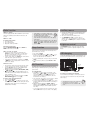
1. Connect your auxiliary source (e.g. mp3 player) to the
AUX input jack on the right side of the unit with an
audio cable (not included).
2. Turn on the unit and your auxiliary source.
3. Slide FM/AM/AUX to AUX to switch to listen to
auxiliary source. The AUX indicator on the front will
turn on. Slide to FM/AM again to switch back to listen
to the radio.
Brightness control
W
12
Ap
AU
to
th
co
wi
de
pr
an
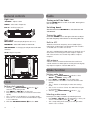
Slide BRIGHTNESS switch on the back of the unit to Hi
(high) or Lo (low) position to adjust the brightness of the
display.
To
W
wa
de
ad
USB charging
Th
ex
pr
to
In sleep mode, the unit will turn off automatically after a
specified time (up to 2 hours).
1. Press and hold SLEEP.
2. While holding SLEEP, press
•
Electrical power information
Auxiliary source
Wake function
Wake to alarm
and do not puncture.
Non-rechargeable batteries, such as alkaline batteries,
may leak if left in your product for a long period of
time. Remove the batteries from the product if you
are not going to use it for a month or more.
• If your product uses more than one battery, do not
mix types and make sure they are inserted correctly.
Mixing types or inserting incorrectly may cause them
to leak.
• Discard any leaky or deformed battery immediately.
They may cause skin burns or other personal injury.
• Please help to protect the environment by recycling or
disposing of batteries according to federal, state, and
local regulations.
WARNING: The battery (battery or batteries or battery
pack) shall not be exposed to excessive heat such as
sunshine, fire or the like.
•