1
English
3M™ Mobile Projector MP225
Getting Started
Removing the Protective Film
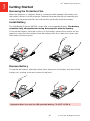
When the projector is shipped, there is a protective film between the battery and
the battery contacts on the projector. Remove the protective film by removing the
battery and the protective film, discard the film and finally install the battery.
Install Battery
The 3M Mobile Projector MP225 comes with a rechargeable battery. The battery
should be fully charged before using the projector with the battery.
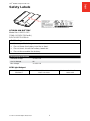
To install the battery: point the contacts on the battery toward the contacts on the
projector, insert the end farthest from the battery latch first, then push down until
the battery clicks into place.
Remove Battery
To remove the battery: slide the battery latch away from the battery and then lift the
battery out, starting at the end closest to the latch.
Important Note: Use only the 3M specified battery: 78-6972-0058-8.
10
© 2012 3M. All Rights Reserved.