1
Connecting to a Composite Video Device
(Optional Accessory)
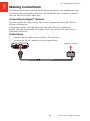
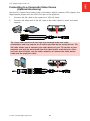
Use the AV cable to input video from camcorders, digital cameras, DVD players and
digital media players into the VGA-AV input on the projector.
1
Connect the AV cable to the projector’s VGA-AV input.
2
Connect the other end of the AV cable to the video device’s audio and video
outputs.
Tip: Some video devices do not have the standard audio and video
connections and may require an AV cable specified by the manufacturer. The
AV cable allows you to connect your video device to your TV monitor or your
projector and may be purchased from the video device manufacturer. Once
you have the AV cable, use the cable adapters to connect the video device
cable and the projector cable.
© 2012 3M. All Rights Reserved.
15
English
3M™ Mobile Projector MP225