1
English
3M™ Mobile Projector MP225
My video device is connected to the projector but the projector will not
display the video.
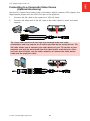
• Unplug the AV cable from the projector and the splash screen will display.
•
Plug the AV cable into the projector and the icon in the upper-left corner of the
image will display the “AV cable” icon. See “On Screen Icons” on page 19.
•
The video output on some devices is turned off by default. Please refer to the
device’s documentation for details on enabling the video output.
24
© 2012 3M. All Rights Reserved.