1
9 Adjust sound
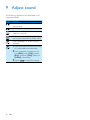
The following operations are applicable to all
supported media.
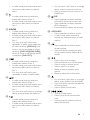
Button
Function
Rotate to increase or decrease the
volume level.
Press to mute or restore sound.
Press to enable or disable the
maximum volume.
Press and hold to enable or disable
the Dynamic Bass Boost (DBB) effect.
Press repeatedly to select a sound
equalizer.
1Press and hold to activate the setup
of customized sound equalizer.
2Press repeatedly to select an op-
tion: [BAS] (bass), [TRE] (treble),
[BAL] (balance), [FAD] (fader), or
[SUBW] (subwoofer).
3Rotate
20
EN
to adjust the setting.