1
8
Chapter 2: About the Printer
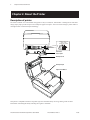
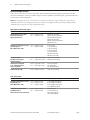
Available printer configurations
There are several configurations of the printer, depending on the combination of desired options.
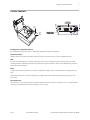
Printer configuration identification
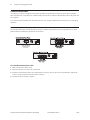
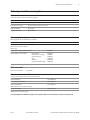
See the sample below to determine the printer configuration. The printer configuration identification (Model ID) is located
on the model label attached to the back of the printer. This information is also shown on the installation quality report card.
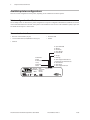
The Model ID description is shown below.
Communication interfaces
• RS-232C serial interface (25-pin)
• Powered USB
• Universal Serial Bus (USB)/RS232 serial (9-pin)
• Parallel
• Ethernet
D = 9-pin RS-232/USB
E = Ethernet
N = No Interface
S = 25-pin RS-232C
W = Powered USB
N = No Logo
T = TPG Logo
2 = 2 MB Flash
4 = 4 MB
X = Extended Memory
D = Power Supply and Domestic Cord
I = Power Supply and International Cord
N = No Power Cord
P = Power Supply
U = Power Supply and UK Cord
1 = Gray
2 = Dark Gray
7 = Black
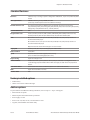
Ithaca, N.Y.
Assembled in
Mexico
Model
A799-XX0X-XXXX
Cust. Part No.
Revision
Serial No.
anada
I NM
lass lasse A
A799 Two-Color Thermal Receipt Printer: User Guide
A799-UG00001 Rev. C
12/08