1
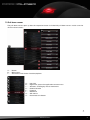
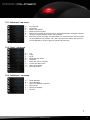
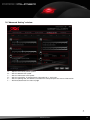
7.2 “Button Setting” window E A B C D F G H I J A – B – C – D – E– F– G – H – I – J– “DPI Setting“ window: see below 7.4 “Color Setting“ window: see below 7.5 “Advanced Setting“ window: see below 7.6 “Favorites“ window: see below 7.7 Minimize window/close application Profiles: The DarkGlider can be assigned up to five different user profiles (see below 7.3.5) Button assignment: Every mouse button and the scroll wheel can be assigned different functions, which you can select from the according pull down menu (see below 7.3) Via the reset button the current button assignment can be deleted Counter “OK“ transfers the settings to the mouse and closes the window; “Cancel“ discards the settings; “Apply“ transfers the settings to the mouse, and leaves the window open darkglider 7