1
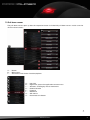
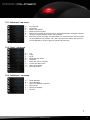
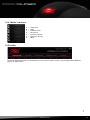
7.3.1 “Advanced” sub menu A B C D E F G A – B – C – D – E– F– G – Increase DPI Lower DPI Select next profile Select previous profile Defines the number of left clicks (max. 20) performed after clicking the button Assigns a keyboard letter to the mouse button Starts the macro manager. The DarkGlider can record macros, which contain up to 20 different key strokes. Thus the most common orders and shortcuts can be defined, to increase gaming speed and precision. A – B – C – D – E– F– G – H – I – Cut Copy Paste Undo the last action Select All Starts the search function Create new document Open print dialog Save document 7.3.2 “Basic” sub menu A B C D E F G H I 7.3.3 “Additional” sub menu A B C D E A – B – C – D – E– F– Swap Window Close Window Open the Windows Explorer Execute file Switch to desktop Lock PC F darkglider 9