1
ESPAÑOL
ENGLISH
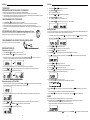
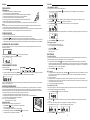
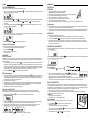
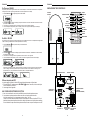
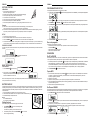
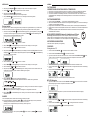
Volume control
Press VOLUME UP /
/ VOLUME DOWN /
1. Mantenga pulsado el botón PROGRAM /
- El icono “memory” empezará a parpadear
on the remote control to adjust the volume.
MUTE
hasta que aparezca Auto
-
Se memorizarán las emisoras disponibles
-
Después de guardar todas las emisoras, se reproducirá la última que se encontró
You can temporarily switch off the sound without switching off the unit.
1.
2.
Press MUTE /
on the remote control to switch off the sound, playback continues without sound.
To switch on the sound , you can:
-
press MUTE /
again;
adjust the volume controls;
change source
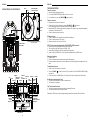
ANTENA
EQ
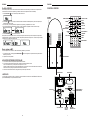
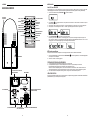
Antena: para la recepción de FM, la unidad viene equipada con una ANTENA DE CABLE PARA FM, mueva el cable hasta
que la recepción sea clara y sin interferencias. Para la recepción de AM, la unidad está equipada con una antena de ferrita
direccional incorporada. Gire el equipo hasta encontrar la posición en la que se consigue una mejor recepción. No conecte
la ANTENA EXTERNA PARA FM a ninguna antena exterior.
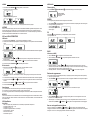
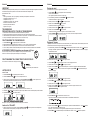
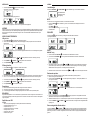
Press EQ /
on the remote control to select desired EQ mode.
5 modes preset EQ:
FUNCIONAMIENTO DEL USB / TARJETA SD
Funcionamiento del USB:
1. Pulse FUNCTION /
para ajustar la unidad en modo USB.
2. Conecte el dispositivo de almacenamiento masivo USB. Aparecerá READ en pantalla mientras el sistema lee el
contenido del dispositivo USB.
3. Se reproducirá automáticamente la pista 1 de la carpeta raíz (carpeta 1) cuando acabe la lectura del USB.
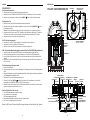
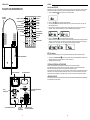
RADIO
AM/FM Tuning
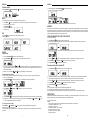
1. Press the FUNCTION /
2. Press STOP/BAND /
to set the unit to TUNER mode.
4. Pulse FF /
repeatedly to select your desired waveband. FM or AM
o FB /
5. Pulse PRESET + /
6. Pulse STOP/BAND /
3. Auto Tuning – Press and hold FF /
or FB /
until frequency begins to scroll the radio automatically tunes to a
station with sufficient reception. If a station in received in stereo, (ST) is shown. Repeat step 3 if necessary until you
find the desired station.
4. Manual Tuning – Press FF /
or FB /
una o más veces hasta que aparezca en pantalla el número de pista que desea.
or PRESET – /
para seleccionar el álbum que desee.
para detener la reproducción.
Funcionamiento de la tarjeta SD:
1. Pulse FUNCTION /
para ajustar la unidad en modo CARD (tarjeta).
briefly and repeatedly until found a station.
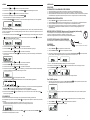
Programming radio stations
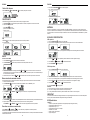
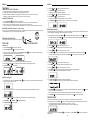
You can store up to a total of 40 radio stations (FM and AM) in the memory, manually or automatically (Autostore)
1. Tune to your desired station
2. Press PROGRAM /
2. Introduzca una tarjeta SD en la ranura. Aparecerá READ en pantalla mientras el sistema lee el contenido de la tarjeta SD.
3. Se reproducirá automáticamente la pista 1 de la carpeta raíz (carpeta 1) cuando acabe la lectura de la SD.
to activate programming, icon “ MEMORY” and P01 will start flashing.
4. Pulse FF /
o FB /
5. Pulse PRESET + /
3. Press PRESET + /
or PRESET – /
una o más veces hasta que aparezca en pantalla el número de pista que desea.
or PRESET – /
para seleccionar el álbum que desee.
6. Pulse STOP/BAND /
para detener la reproducción.
Notas:
1) El conector USB no soporta la conexión mediante alargadores USB.
2) Esta unidad no está diseñada para comunicarse directamente con un ordenador.
3) No garantizamos que todos los dispositivos USB y todas las tarjetas SD funcionen en este sistema de audio.
to allocate a number from 1 to 20 stations.
IMPORTANTE:
4. Press PROGRAM /
to confirm, display shows the preset number waveband and the frequency of the preset station.
5. Repeat steps 1-4 to store other stations to listen to a preset station. Press PRESET + /
or more until the desired preset station in displayed.
or PRESET – /
once
To listen to a preset station
Press PRESET + /
or PRESET – /
once or more until the desired preset station in displayed.
Automatic programming radio stations
Automatic programming will station preset 1, from this preset number upwards, former programmed tuner stations will
be erased.
7
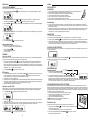
No desconecte el dispositivo USB mientras esté en modo USB ya que puede dañar el dispositivo o los archivos. Por favor,
apague la unidad o pulse otro modo antes de desconectar el dispositivo USB.
Especificaciones del USB:
Interfaz
- USB 2.0 gran velocidad, HOST (no soporta HUB USB) correspondiente a memoria Flash
- Compatible con MPEG Audio 1, 2, 2.5
- Compatible con Layer 1, 2, 3
- Compatible con Bit rate: 128 – 320 Kbps
- Niveles de subcarpetas: 8 niveles
- Número de pistas / títulos: máx 999
- Soporta ID3 tag V2.0
60