1
Scan (Continued)
Using the Photo Sleeve
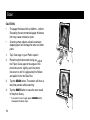
Use the Photo Sleeve when photos are fragile or
small to avoid damage or jams, and get the best
result.
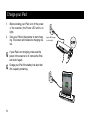
1.
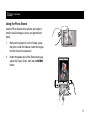
Remove the plastic foil on the Sleeve, place
the photo inside the Sleeve, insert the tongue
into the hole at the open end.
2.
Insert the sealed end of the Sleeve facing up,
adjust the Paper Guide, then tap the SCAN
button.
11