1
Installation to Supporting Surface
WARNING
• Installer must verify that the supporting surface will safely support the combined weight of all attached equipment and
hardware.
1
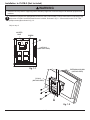
There are eight mounting places for the alternate support brackets (B) as shown in fig. 1.3. Determined the locations
for alternate support brackets (B) according to supporting surface. Using allen wrench (F), fasten two or four alternate
support brackets (B) to computer box (A) with two M5 x 10 mm type-F socket pin screws (H) for each alternate
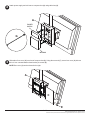
support bracket (B). Use installer supplied screws/fasteners to attach alternate support brackets (B) to supporting
surface.
NOTE: For each alternate support brackets (B), two screws must be used for attachment to supporting surface.
A
H
B
fig. 1.3
B
A
fig. 1.4
4 of 5
ISSUED: 03-05-09 SHEET #: 125-9053-1