1
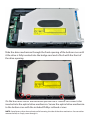
Slide the drive mechanism through the front opening of the bottom case until
it the drive is fully inserted into the bridge card and is flush with the front of
the drive opening.
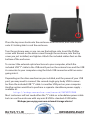
On the back and side of the enclosure you will see 3 cutouts for screws to be
inserted into the optical drive mechanism. Secure the optical drive mechanism
to the bottom case with the included Phillips collared screws.
NOTE: Some factory drives have aluminum foil covering the side of the drive mechanism. You can either
remove the foil, or simply screw through it.