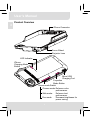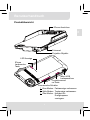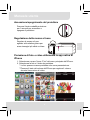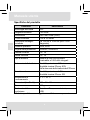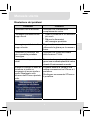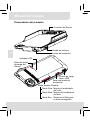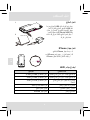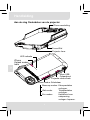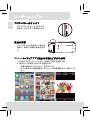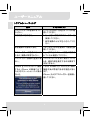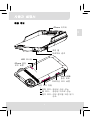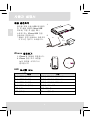
1
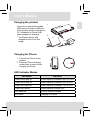
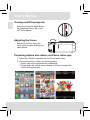
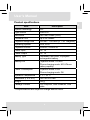
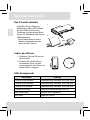
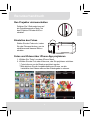
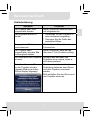
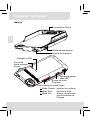
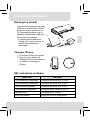
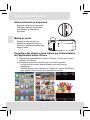
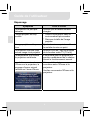
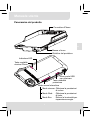
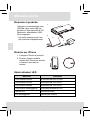
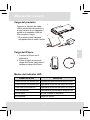
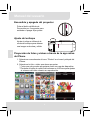
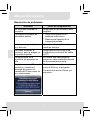
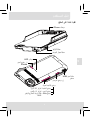
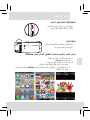
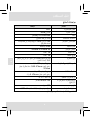
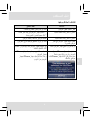
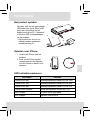
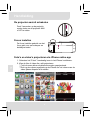
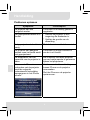
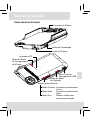
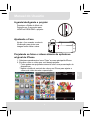
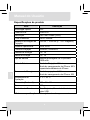
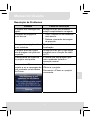
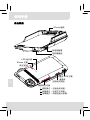
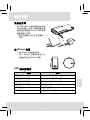
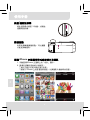
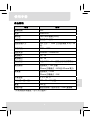
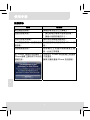
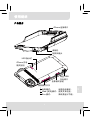
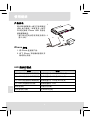
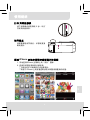
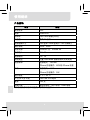
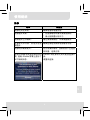
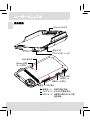
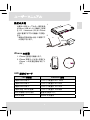
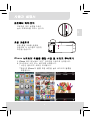
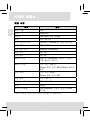
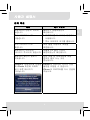
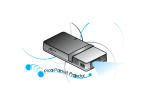
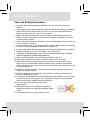
User’s Manual Care and Safety Information 1. Keep the device and packaging materials out of the reach of infants and children. 2. Avoid subjecting the power adapter and other contacts to dripping or splashing water and dry your hands before you use it. Do not place objects filled with liquids such as vases, etc. on or near the device. 3. Make sure that the used power outlet is always readily available and never hidden. In case of emergency, use the power adapter to separate the device from the power network. 4. Keep your device away from all flames such as candles and do not set them up in the vicinity of the device. 5. Keep the unit at least 10 cm away from other objects. Make sure the ventilation is not covered by newspapers, tablecloths, curtains, etc. 6. For your own safety, do not use the projector during thunderstorms or lightning. 7. Relative Humidity is 5~35°C, 80% (Max.), non-condensing. 8. The battery is integrated with the device. Do not dissemble and modify. The battery should be replaced by qualified service staff only. 9. Ensure that the ambient room temperature is within -10~55°C 10. During the operation, this product may heat lightly, which is normal. 11. Wait before using if the device has been moved from a cold location into a warm one. Any condensation that has formed may in certain circumstances destroy the device. As soon as the device has reached room temperature it can be used without risk. 12. Handle the product with care. Avoid contact with sharp objects. Keep device away from metallic objects. 13. Place the projector on a flat surface. Any collision or falling to the ground is likely to damage the product. 14. Do not drop or disassemble the product otherwise the warranty voids. Opening or removing covers may expose you to dangerous voltage or other hazards. Refer all servicing to qualified service personnel. 15. Use only the accessories supplied by the manufacturer. 16. Both product and user’s manual are subject to further improvement or supplement without further notice. 17. Avoid facing directly into the projector’s lens. I User’s Manual Sicherheitshinweise: 1. Das Gerät und das Verpackungsmaterial außerhalb der Reichweite von Kindern halten. 2. Das Netzteil nicht in Kontakt mit tropfendem oder fließendem Wasser kommen lassen und Hände vor der Benutzung abtrocknen. Keine mit Flüssigkeiten gefüllte Gegenstände, wie z.B. Vasen usw. auf oder in die Nähe des Gerätes stellen. 3. Stellen Sie sicher, dass die verwendete Steckdose immer verfügbar und niemals blockiert ist. Verwenden Sie im Notfall das Netzteil, um das Gerät vom Stromnetz zu trennen. 4. Das Gerät von Flammen, wie z.B. Kerzen fernhalten und diese nicht in der Nähe des Gerätes aufstellen. 5. Das Gerät mindestens 10 cm von anderen Gegenständen entfernt halten. Stellen Sie sicher, dass die Lüftungsschlitze nicht durch Zeitungen, Tischdecken, Vorhänge usw. blockiert werden. 6. Den Projektor zu Ihrer eigenen Sicherheit nicht während eines Gewitters oder Blitzschlages verwenden. 7. Relative Luftfeuchtigkeit liegt bei 5 bis 35°C, 80% (max.), nicht kondensierend. 8. Der Akku ist im Gerät integriert. Nicht auseinander nehmen oder ändern. Der Akku sollte nur von einer Fachkraft ausgetauscht werden. 9. Stellen Sie sicher, dass die Raumtemperatur innerhalb von -10 ist ~ 55°C liegt. 10. Dieses Produkt kann während des Betriebes etwas warm werden, was normal ist. 11. Warten Sie mit der Verwendung des Geräts etwas, wenn das es von einem kalten an einen warmen Ort gebracht wurde. Kondenswasser kann das Gerät unter bestimmten Umständen zerstören. Sobald das Gerät Raumtemperatur erreicht hat, kann es ohne Risiko verwendet werden. 12. Produkt mit Vorsicht handhaben. Kontakt mit scharfen Gegenständen vermeiden. Von Gegenständen aus Metall fernhalten. 13. Den Projektor auf eine flache Unterlage stellen. Stöße oder ein Herunterfallen auf den Boden führt wahrscheinlich zu Schäden des Produktes. 14. Das Produkt nicht fallen lassen oder auseinander nehmen, da sonst die Gewährleistung erlischt. Das Öffnen oder Entfernen von Abdeckungen kann sie gefährlichen Spannungen und anderen Risiken aussetzen. Alle Wartungsarbeiten von Fachpersonal durchführen lassen. 15. Nur vom Hersteller empfohlenes Zubehör verwenden. 16. Sowohl das Produkt als auch das Benutzerhandbuch unterliegen fortlaufenden Verbesserungen oder Ergänzungen ohne vorherige Mitteilung. 17. Nicht direkt in das Objektiv des Projektors sehen. II User’s Manual Entretien et précaustion d’emploi (FR) 1. Attention - Evitez de vous placer en face de la lentille du vidéo projecteur. 2. Evitez tout contact avec de l’eau, et gardez vos mains sèches lors de l’utilisation. 3. Assurez-vous que la température de la pièce est comprise entre -10 et 55°C 4. Le taux d’humidité relative doit être de 80% au maximum entre 5 et 35°C, sans condensation. 5. Ne pas faire tomber, frapper ou démonter cet appareil ; sinon la garantie sera annulée. Informazioni sulla cura e sulla sicurezza (IT) 1. Attenzione - Non guardare l’obiettivo in modo diretto. 2. Evitare il contatto con liquidi e utilizzare con mani asciutte. 3. Assicurarsi che la temperatura ambiente della stanza sia compresa tra -10 e 55°C ° 4. L’umidità relativa deve essere compresa tra 5 e 35 C, all’80% (max.), senza condensazione. 5. Non far cadere, non colpire e non smontare il dispositivo; in caso contrario la garanzia verrà annullata. Información de seguridad (ES) 1. Advertencia - Evite ponerse directamente en frente de las lentes del proyector. 2. Avite cualquier contacto con el agua. Mantenga sus manos secas durante su uso. 3. Asegúrese de que la temperatura ambiente de la sala sea de -10~55°C 4. Humedad relativa de 5~35°C, 80% (Máx.), no-condensada. 5. No caiga, golpee o desmonte el dispositivo, ya que de lo contrario se invalidaría la garantía. ΔϳΎϋήϟϭ Δϣϼδϟ ΕΎϣϮϠόϣ (AR) .νήόϟ ίΎϬΟ ΔγΪόϟ ήηΎΒϣ ϞϜθΑ νήόΘϟ ΐϨΠΗ -ήϳάΤΗ .ϡΪΨΘγϻ ˯ΎϨΛ ϦϴΘϓΎΟ ϚϳΪϳ ϰϠϋ υΎϔΤϟϭ ˬ˯ΎϤϟΎΑ ίΎϬΠϟ ϝΎμΗ ΐϨΠΗ .ΔϳϮΌϣ ΔΟέΩ 55 ϰϟ· 10 ϦϴΑ Ύϣ ΔτϴΤϤϟ Δϓήϐϟ ΓέήΣ ΔΟέΩ ϥ Ϧϣ Ϊϛ΄Θϟ ήϴϏ ˬ(ϰμϗ ΪΤΑ) %80 ϝΩΎόϳ ΎϤΑ ˬΔΟέΩ 35 ϰϟ· 5 Ϧϣ ΔϴΒδϨϟ ΔΑϮσήϟ ϥϮϜΗ ϥ .ΔϔΜϜϣ .ϥΎϤπϟ ϖΣ ϞτΑ ϻ·ϭ ˭ίΎϬΠϟ ϚϔΑ ϡϮϘΗ ϭ ΐϘΜΗ ϭ ςϘδΗ ϻ III .1 .2 .3 .4 .5 User’s Manual FCC Compliance Statement: This device complies with Part 15 of the FCC Rules. Operation is subjected to the following two conditions: (1) this device may not cause harmful interference, and (2) this device must accept any interference received, including interference that may cause undesired operation. This equipment has been tested and found to comply with limits for a Class B digital device, pursuant to Part 15 of the FCC rules. These limits are designed to provide reasonable protection against harmful interference in residential installations. This equipment generates, uses, and can radiate radio frequency energy, and if not installed and used in accordance with the instructions, may cause harmful interference to radio communications. However, there is no guarantee that interference will not occur in a particular installation. If this equipment does cause interference to radio or television equipment reception, which can be determined by turning the equipment off and on, the user is encouraged to try to correct the interference by one or more of the following measures: - Reorient or relocate the receiving antenna. - Move the equipment away from the receiver. - Plug the equipment into an outlet on a circuit different from that to which the receiver is connected. - Consult the dealer or an experienced radio/television technician for additional suggestions. You are cautioned that any change or modifications to the equipment not expressly approved by the party responsible for compliance could void your authority to operate such equipment. (EN) If the time arises to throw away your product, please recycle all the components possible. Batteries and rechargeable batteries are not to be disposed in your domestic waste! Please recycle them at your local recycling point. Together we can help to protect the environment. IV User’s Manual (DE) Wenn die Lebensdauer des Produkts zu Ende kommt, lassen Sie bitte möglichst alle Komponenten recyceln. Bitte recyceln Sie dieses Produkt ordnungsgemäß, wenn es nicht mehr verwendet werden kann. Es kann nicht als Haushaltsmüll behandelt werden. Es muss separat über die verfügbaren Rücknahme- und Sammelsysteme entsorgt werden. (FR) Si il est temps de jeter votre produit, veuillez recycler tous les composants possibles. Si ce produit est arrivé en fin de vie, veuillez s’il vous plait le recycler correctement. Il ne peut pas être traité comme les ordures ménagères. Il doit être être apporté à un point de collecte approprié pour le recyclage. (IT) Al momento di buttare via il prodotto, riciclare il maggior numero di componenti. Se questo prodotto giunge alla fine del suo ciclo di vita, lo ricicli correttamente. Non può essere trattato come rifiuto urbano. Deve essere smaltito separatamente attraverso l'appropriato sistema di reso e di raccolta. (ES) Si ha llegado la hora de deshacerse del producto, recicle todos los componentes que pueda. Si ha finalizado la vida útil de este producto, recíclelo adecuadamente. Debe deshacerse del mismo de forma separada a través de los sistemas de recogida disponibles. (AR) .ΔϨϜϤϤϟ ˯ΰΟϷ ΔϓΎϛ ήϳϭΪΗ ΓΩΎϋ· ˯ΎΟήϟ ˬΞΘϨϤϟ Ϧϣ κϠΨΘϟ Ζϗϭ ϥΎΣ Ϋ· ϦΤθϟ ΓΩΎϋϹ ΔϠΑΎϘϟ ΕΎϳέΎτΒϟϭ ΕΎϳέΎτΒϟ Ϧϣ κϠΨΘϟ ϢΘϳ ϻ ΓΩΎϋ· ΰϛήϣ ϯΪϟ ΎϫήϳϭΪΗ ΓΩΎϋ· ˯ΎΟήϟ! ΔϴϟΰϨϤϟ ΕΎϔϠΨϤϟ ϦϤο .ϚϳΪϟ ϲϠΤϤϟ ήϳϭΪΘϟ .ΔΌϴΒϟ ΔϳΎϤΣ ϲϓ ΓΪϋΎδϤϟ ΎϨϨϜϤϳ Ύ˱όϣ (NL) Als het einde van de levensduur van het product is bereikt, moet u alle mogelijke componenten recyclen. Batterijen en oplaadbare batterijen mogen niet bij het huishoudelijke afval worden gegooid. Lever ze af bij uw lokale dienst voor recycling. Samen kunnen we helpen bij de bescherming van het milieu. (BPT) Se você decidir descartar o produto, faça-o de modo que seja possível a reciclagem de todos os componentes. As baterias e pilhas recarregáveis não devem ser descartadas em seu lixo doméstico! Favor reciclá-las em seu ponto de reciclagem local. Juntos, podemos ajudar a proteger o meio ambiente. V User’s Manual EN Product Overview iPhone Connector Focus Wheel Projector Lens LED Indicator iPhone Charging Mode Button Micro USB Charging Port Projection Mode Button Scene mode Switch Cinema mode: Enhance color performance. Web mode: Enhance text performance. Eco mode: Decrease brightness for power saving. 1 User’s Manual 1 Connect one end of the bundled USB cable to the Micro USB port of the product and the other end to PC / Notebook or iPhone USB power adapter for charging. 2 2. * The Product can be fully charged around 5 hrs from empty. 1. EN Charging the product 1 or Charging for iPhone 1. Connect the iPhone to the product. 2. Press the iPhone charging mode button to start or stop charging for iPhone. LED Indicator Modes LED Status Indication 3 white LEDs stay on Power capacity is between 80% to 100% 2 white LEDs stay on Power capacity is between 45% to 80% 1 white LED stays on Power capacity is between 10% to 45% 1 white LED blinks Power capacity is below 10% LED Marquee Product is being charged LED blinks Charging for iPhone 2 User’s Manual EN Turning on/off the projector Press the Projection Mode Button for 3 seconds to turn ON or turn OFF the projector. Adjusting the Focus Adjust the focus by using the focus wheel to get a sharper and clear picture. Projecting photos and videos via iPhone native app 1. Select the “Photos” manually icon on iPhone main menu. 2. Choose the photo or video you want to project. * Photos can only be projected as a slideshow. **Please push the volume control button on iPhone to adjust the volume during playback. 3 Product specifications Item Description Optical Technology DLP Light Source RGB LED Resolution 640 x 480 Pixels (VGA) Luminous Flux Up to 35 lumens Projection Image Size 152 mm ~ 1524 mm (6” ~ 60” Diagonal) Operating System iOS4, iOS5 Projection Source iPhone 4, iPhone 4S Power Input 5V / 1A Power Output 5V / 1A Battery Type Embedded 1850 mAh, Li-polymer rechargeable battery Battery Life Projection mode: 120 min iPhone charging mode: 80% iPhone battery capacity Power Consumption Projection mode: 4.5W iPhone charging mode: 5W Operation Temperature 5 °C ~ 35 °C Dimension (L x W x H) 126 x 68 x 20 mm Weight 125 g Package Content Pico Projector, User‘s Manual, USB cable * All specifications are subject to change without notice. 4 EN User’s Manual User’s Manual EN Troubleshooting Symptom Check Point The projector can not turn on. Ensure the battery is fully charged. The projecting image is too dark. * Use the Projector in a darker environment. * Decrease the size of projecting image. The projecting image is too blurry. Adjust the focus by using focus wheel. The projector can turn on, but the image can not be projected. Ensure the App is equipped with TV-out function. The temperature of the projector’s surface is warm. It is normal for this projector to generate moderate heat during normal operation. When connecting the iPhone to the projector and see the error message displayed in iPhone screen as below. It may cause the bad connection between iPhone and the projector. Please reconnect iPhone and the projector again. 5 Benutzerhandbuch Produktübersicht DE iPhone Anschluss Fokusrad Projektor-Objektiv LED Anzeige iPhone LademodusTaste Mikro USB Ladeanschluss Projektionsmod us-Taste Szenemodus Schalter Kino-Modus: Farbanzeige verbessern. Web-Modus: Textanzeige verbessern. Öko-Modus: Hellgkeit für Energiesparen verringern. 1 Benutzerhandbuch Das Produkt aufladen 1 DE Schließen Sie ein Ende des beiliegenden Mikro-USB-Kabels an den USB-Anschluss des Produktes und das andere Ende an den PC/Notebook oder iPhone USB-Netzteil an. * Das Produkt kann in etwa 5 Stunden aufgeladen werden, wenn der Akku leer ist. 1. 1 2 2. oder Laden des iPhone 1. Verbinden Sie das iPhone mit dem Produkt. 2. Drücken Sie auf die iPhone Lademodus-Taste, um den Ladevorgang für das iPhone zu starten oder zu stoppen. LED Anzeigemodi LED Status Anzeige 3 weiße LEDs leuchten Ladestand liegt zwischen 80% und 100% 2 weiße LEDs leuchten Ladestand liegt zwischen 45% und 80% 1 weiße LED leuchtet Ladestand liegt zwischen 10% und 45% 1 weiße LED blinkt Ladestand beträgt weniger als 10% LED Fortlaufend Produkt wird aufgeladen LED blinkt Laden für iPhone 2 Benutzerhandbuch Den Projektor ein/ausschalten DE Drücken Sie 3 Sekunden lang auf die Projektionsmodus-Taste, um den Projektor EIN oder AUS zu schalten. Einstellen des Fokus Stellen Sie den Fokus ein, indem Sie das Fokusrad drehen, um ein schärferes und klareres Bild zu erhalten. Fotos und Videos über iPhone App projizieren 1. Wählen Sie “Fotos” aus dem iPhone Menü. 2. Wählen Sie das Foto oder Video aus, das Sie projizieren möchten. * Fotos können nur als Diashow projiziert werden. **Bitte drücken Sie die Lautstärketaste am iPhone, um die Lautstärke des Videos während der Wiedergabe zu steuern. 3 Benutzerhandbuch Technische Daten Element Beschreibung DE Optische Technologie DLP Lichtquelle RGB LED Auflösung 640 x 480 Pixel (VGA) Helligkeit Bis zu 35 Lumen Projektion Bildgröße 152 cm ~ 1524 cm (6” ~ 60” Diagonale) Interner Lautsprecher iOS4, iOS5 Projektionsquelle iPhone 4, iPhone 4S Eingangsleistung 5V / 1A Ausgangsleistung 5V / 1A Akkutyp Integrierter 1850 mAh, Li-Polymer Akku Batterielaufzeit Projektionsmodus: 120 Min. iPhone Lademodus: 80% iPhone Stromverbrauch Projektionsmodus: 4.5W iPhone Lademodus: 5W Betriebstemperatur 5 °C ~ 35 °C Abmessungen (L x B x H) 126 x 68 x 20 mm Gewicht 125 g Lieferumfang Pico Projektor, Benutzerhandbuch, USB-Kabel * Änderungen der technischen Daten vorbehalten. 4 Benutzerhandbuch Fehlerbehebung Prüfpunkt Der Projektor kann nicht eingeschaltet werden. Stellen Sie sicher, dass der Akku voll aufgeladen ist. Das projizierte Bild ist zu dunkel. * Verwenden Sie den Projektor in einer dunkleren Umgebung. * Verringern Sie die Größe des projizierten Bildes. Das projizierte Bild ist zu verschwommen. Stellen Sie den Fokus über das Fokusrad ein. Der Projektor kann eingeschaltet, aber das Bild nicht projiziert werden. Stellen Sie sicher, dass die App über eine TV-Out Funktion verfügt. Die Oberfläche des Projektors Während des Betriebes des ist warm. Projektors ist es normal, wenn er sich etwas erwärmt. Beim Anschluss des iPhone an den Projektor wird die folgende Meldung auf dem iPhone Display angezeigt. Dies kann durch eine schlechte Verbindung zwischen dem iPhone und dem Projektor verursacht werden. Bitte schließen Sie das iPhone und den Projektor erneut an. 5 DE Symptom Guide de l’utilisateur Aperçu Connecteur iPhone FR Molette de mise au point Objectif du projecteur Indicateur à DEL Bouton du mode recharge iPhone Port de chargement Micro USB Bouton de mode Projection Commutateur de mode Scène Mode Cinéma : améliore les couleurs. Mode Web : améliore le texte. Mode Eco : diminue la luminosité pour économiser de l'énergie. 1 Guide de l’utilisateur 1 Connectez une extrémité du câble USB fourni au port Micro USB du produit et l'autre extrémité sur le PC /ordinateur portable ou à un adapteur d'alimentation USB pour iPhone pour le recharger. * Le produit sera entièrement chargé en 5 heures (lorsque la batterie était entièrement déchargée). 1. 1 2 2. ou Chargeur iPhone 1. Connectez l’iPhone au produit. 2. Appuyez sur le bouton de recharge iPhone pour démarrer ou arrêter la recharge de l'iPhone. DEL indicatrices de Modes Statut LED Indication 3 LEDs blanches constantes La batterie est entre 80% et 100% 2 LEDs blanches constantes La batterie est entre 45% et 80% 1 LED blanche constante La batterie est entre 10% et 45% 1 LED blanche clignotante La batterie est en dessous de 10% Panneau LEDs Le produit est en charge LEDs clignotantes iPhone en cours de chargement 2 FR Recharger le produit Guide de l’utilisateur Allumer/éteindre le projecteur Appuyez sur le bouton de mode Projection pendant 3 secondes pour allumer ou éteindre le projecteur. FR Mettre au point Ajustez la mise au point en utilisant la molette de mise au point pour obtenir une image plus nette et claire. Projection des photos et des vidéos par l'intermédiaire de l’application native iPhone 1. Sélectionnez manuellement l'option « Photos » l’icône sur le menu principal de l’iPhone. 2. Choisissez la photo ou la vidéo que vous voulez projeter. * Les photos ne peuvent être projetées que sous forme de diaporama. **Veuillez appuyez sur le bouton de contrôle du volume de l'iPhone pour ajuster le volume lors de la lecture d'une vidéo. 3 Guide de l’utilisateur Spécifications produit Description Technologie optique DLP Source lumineuse LED RGB Résolution 640 x 480 Pixels (VGA) Flux lumineux Jusqu'à 35 Lumens Taille de l’image projetée 152 cm ~ 1524 cm (diagonale 6” ~ 60”) Système d’exploitation iOS4, iOS5 Source de projection iPhone 4, iPhone 4S Tension et intensité d'entrée 5V / 1A Tension et intensité de sortie 5V / 1A Type de batterie Batterie Li-polymer rechargeable intégrée de 1850 mAh Autonomie Mode projection : 120 min Mode charge iPhone : 80% de la capacité de la batterie iPhone Consommation électrique Mode projection : 4.5W Mode charge iPhone : 5W Température de fonctionnement 5 °C ~ 35 °C Dimensions (L x l x H) 126 x 68 x 20 mm Poids 125 g Contenu de la boîte Projecteur Pico, Manuel de l'utilisateur, Câble USB * Toutes les spécifications sont sujettes à changement sans préavis. 4 FR Élément Guide de l’utilisateur Dépannage Symptôme Point à vérifier Vérifiez que la batterie est bien chargée. L’image projetée est trop sombre. * Utilisez le projecteur dans un environnement plus sombre. * Diminuez la taille de l’image projetée. L’image projetée est trop floue. Ajustez la mise au point en utilisant la molette de mise au point. Le projecteur s’allume mais aucune image n’est projetée. Assurez-vous de l’App est équipée de la fonction sortie TV (TV-out). La température à la surface du projecteur est élevée. Il est normal pour ce projecteur à produire modérément de la chaleur durant le fonctionnement normal. Lors de la connexion de l’iPhone sur le projecteur, le message d’erreur suivant s’affiche sur l’écran iPhone. Cela peut-être du à une mauvaise connexion entre l'iPhone et le projecteur. Veuillez reconnectez l'iPhone et le projecteur. FR Le projecteur ne peut pas démarrer. 5 Manuale utente Panoramica del prodotto IT Connettore iPhone Messa a fuoco Obiettivo del proiettore Indicatore LED Tasto modalità ricarica iPhone Micro porta USB per ricaricare Tasto modalità proiezione Modo scena Interruttore Modo cinema: Ottimizza la prestazioni di colore. Modo Web: Ottimizza la prestazioni di testo. Modo Eco: Riduce la luminosità per risparmiare energia. 1 Manuale utente Ricaricare il prodotto 1 Collegare una estremità del cavo USB alla micro porta USB del prodotto e l’altra estremità al PC/ Notebook o all’adattatore USB iPhone apposito. * Il prodotto impiega circa 5 ore per ricaricarsi completamente. 1. 1 2 2. o IT Ricarica per iPhone 1. Collegare l’iPhone al prodotto. 2. Premere il tasto modalità ricarica dell’ iPhone per avviare o fermare il processo di ricarica. Stato indicatori LED Stato LED Indicazione 3 LED bianchi accesi Autonomia tra 80% e 100% 2 LED bianchi accesi Autonomia tra 45% e 80% 1 LED bianco acceso Autonomia tra 10% e 45% 1 LED bianco lampeggiante Autonomia inferiore al 10% Cornice LED Ricarica prodotto LED lampeggiante Ricarica per iPhone 2 Manuale utente Accensione/spegnimento del proiettore Premere il tasto modalità proiezione per 3 secondi per accendere o spegnere il proiettore. Regolare la messa a fuoco agendo sulla relativa ghiera per avere immagini più nitide e chiare. Proiezione di foto e video utilizzando la app nativa di iPhone 1. Selezionare a mano l’icona “Foto” dal menu principale dell’iPhone. 2. Selezionare la foto o il video da proiettare. * Le foto possono essere proiettate solo come presentazione. **Premere il tasto del volume dell’iPhone per regolare il volume durante l’esecuzione di video. 3 IT Regolazione della messa a fuoco Manuale utente Specifiche del prodotto Elemento Descrizione IT Tecnologia dell’ottica DLP Sorgente luminosa LED RGB Risoluzione 640 x 480 Pixel (VGA) Flusso luminoso Fino a 35 lumen Dimensioni immagini proiettate Da 152 cm a 1524 cm (da 6” a 60” diagonale) Sistema operativo iOS4, iOS5 Origine della proiezione iPhone 4, iPhone 4S Entrata corrente 5V / 1A Uscita corrente 5V / 1A Tipo di batteria Batteria al litio-ione-polimero ricaricabile a 1850 mAh integrati Autonomia della batteria Modalità proiezione: 120 min Modalità ricarica iPhone: 80% dell’autonomia della batteria dell’iPhone Assorbimento Modalità proiezione: 4.5W Modalità ricarica iPhone: 5W Temperatura di funzionamento 5 °C ~ 35 °C Dimensioni (L x P x H) 126 x 68 x 20 mm Peso 125 g Contenuto della Proiettore Pico, manual utente, cavo confezione USB * Tutte le specifiche sono soggette a modifiche senza preavviso. 4 Manuale utente Risoluzione dei problemi Controllo Il proiettore non si accende. Verificare che la batteria sia completamente carica. L’immagine proiettata risulta troppo scura. * Usare il proiettore in un ambiente più scuro. * Ridurre le dimensioni dell’immagine proiettata. L’immagine proiettata risulta troppo sfocata. Regolare la messa a fuoco utilizzando la ghiera per la messa a fuoco. Il proiettore si accende, ma non è possibile proiettare l’immagine. Verificare che la App sia dotata della funzione TV-out. La superficie del proiettore è calda. È normale che questo proiettore generi una moderata quantità di calore durante il funzionamento normale. Quando si collega l’iPhone al proiettore si riceve un messaggio di errore simile a quello visualizzato nello schermo dell’iPhone riportato sotto. Potrebbe essere la causa di una cattiva connessione tra l’iPhone e il proiettore. Ricollegare nuovamente l’iPhone e il proiettore. 5 IT Problema Manual del usuario Presentación del producto Conector del iPhone Rueda de enfoque ES Lentes del proyector Indicador LED Botón de modo de carga del iPhone Puerto de carga Micro USB Botón del modo de proyección Modo Escena Cambiar Modo Cine: Mejora el rendimiento del color. Modo Web: Mejora del rendimiento de texto. Modo Eco: Disminuir el brillo para el ahorro energético. 1 Manual del usuario Carga del producto 1 Conecte un extremo del cable USB suministrado del producto y el otro extremo en el ordenador / portátil o el adaptador USB del iPhone para su carga. 2 2. * El producto puede cargarse completamente en unas 5 horas. 1. 1 o ES Carga del iPhone 1. Conecte el iPhone en el dispositivo. 2. Pulse el botón de modo de carga del iPhone para iniciar o detener la carga del iPhone. Modos del indicator LED Estado de la LED Indicación 3 LEDs blancas encendidas fijas Capacidad de la potencia está entre el 80% al 100% 2 LEDs blancas encendidas fijas Capacidad de la potencia está entre el 45% al 80% 1 LED blanca encendida fija Capacidad de la potencia está entre el 10% al 45% 1 LED parpadeante Capacidad de la potencia está por debajo del 10% LED del dosel Se está cargando el dispositivo LED parpadea Carga Del iPhone 2 Manual del usuario Encendido y apagado del proyector Pulse el botón del Modo de Proyección por 3 segundos para encender o apagar el proyector. Ajuste del enfoque Ajuste el enfoque utilizando la rueda del enfoque para obtener una imagen más clara y nítida. ES Proyección de fotos y vídeos a través de la app nativa de iPhone 1. Seleccione manualmente el icono “Photos” en el menú prinicpal del iPhone. 2. Seleccione la foto o vídeo que desee proyectar. * Fotos que solo pueden proyectarse como un pase de diapositiva. **Presione el botón de control del volumen en el iPhone para ajustar el volumen del vídeo durante su reproducción. 3 Manual del usuario Especificaciones de producto Descripción Technología óptica DLP Fuente de luz LED RGB Resolución 640 x 480 Píxeles (VGA) Flux Luminoso Hasta 35 lúmenes Tamaño de la imagen proyectada 152 cm ~ 1524 cm (6” ~ 60” Diagonal) Sistema operativo iOS4, iOS5 Fuente de la proyección iPhone 4, iPhone 4S Entrada de la fuente de alimentación 5V / 1A Salida de la fuente de alimentación 5V / 1A Tipo de batería Batería recargable integrada de Li-polymer y 1850 mAh Vida útil de la batería Modo proyección: 120 min Modo de carga del iPhone: 80% de la capacidad de la batería del iPhone Consumo de potencia Modo de proyección: 4.5W Modo de carga del iPhone: 5W Temperatura de funcionamiento 5 °C ~ 35 °C Dimensiones (L x A x P) 126 x 68 x 20 mm Peso 125 g Contenido del paquete Proyector Pico, Manual del usuario y cable USB. * Todas las especificaciones están sujetas a cambio sin previo aviso. 4 ES Elemento Manual del usuario Resolución de problemas Síntomas Punto de comprobación ES No se puede encender el proyector. Asegúrese de que la batería esté cargada. La imagen proyectada es demasiado oscura. * Utilice el proyector en un ambiente más oscuro. * Disminuya el tamaño de la imagen proyectada. La imagen proyectada se ve muy borrosa. Ajuste el enfoque utilizando la rueda de enfoque. Se puede encender el proyector, pero la imagen no se puede proyectar. Asegúrese de que la App esté equipada con la función de salida de TV. La temperatura de la superficie del proyector es alta. Es normal que este proyector genere un calor moderado durante su funcionamiento normal. Cuando conecte el iPhone al proyector y visualice el mensaje de error en la pantalla del iPhone como se ve a continuación. Puede causar una mala conexión entre el iPhone y el proyector. Conecte de nuevo el iPhone y el proyector. 5 ϡΪΨΘδϤϟ ϞϴϟΩ ΞΘϨϤϟ ϰϠϋ ΔϣΎϋ Γήψϧ iPhone ϞλϮϣ ΰϴϛήΘϟ ΔϠΠϋ νήόϟ ίΎϬΟ ΔϠΠϋ AR LED ήηΆϣ ϦΤη ϊοϭ έί iPhone USB ϦΤη άϔϨϣ ήϴϐλ νήόϟ ϊοϭ έί ϞϳϮΤΗ ΪϬθϤϟ ϊοϭ .ϥϮϠϟ ΔϟΩ ΰϳΰόΗ :ΎϤϴϨδϟ ϊοϭ .κϨϟ ˯Ω ΰϳΰόΗ :ΐϳϮϟ ϊοϭ ήϴϓϮΘϟ ωϮτδϟ ΔΟέΩ ϞϠϘϳ :Eco ϊοϭ .ΔϗΎτϟ 1 ϡΪΨΘδϤϟ ϞϴϟΩ 1 ΞΘϨϤϟ ϦΤη 1. ΔϣΰΤΑ ϖϓήϤϟ USB ϞΒϛ ϑήσ ΪΣ Ϟλϭ ήΧϵ ϑήτϟϭ ΞΘϨϤϠϟ ήϴϐμϟ USB άϔϨϣ ϝϮΤϣ ϭ ϝϮϤΤϤϟ ήΗϮϴΒϤϜϟ/ήΗϮϴΒϤϜϟ ίΎϬΠΑ .ϦΤθϟ ΔϴϠϤόΑ ϡΎϴϘϠϟ iPhone USB ΔϗΎσ ΕΎϋΎγ 5 ϲϟϮΣ ϞϣΎϜϟΎΑ ΞΘϨϤϟ ϦΤη ϦϜϤϳ * .Ύ˱ϏέΎϓ ϥϮϜϳ ΎϣΪϨϋ 1 2 2. ϭ iPhone ίΎϬΟ ϦΤη .ΞΘϨϤϟΎΑ iPhone ίΎϬΟ Ϟλϭ -1 ˯ΪΒϟ iPhone ϦΤη ϊοϭ έί ϰϠϋ ςϐο -2 .iPhone ίΎϬΠϟ ΔΒδϨϟΎΑ ϦΤθϟ ϑΎϘϳ· ϭ AR LED ήηΆϣ ωΎοϭ ϴοϮΘϟ ΡΎΒμϤϟ ΔϟΎΣ %100 ϰϟ· %80 ϦϴΑ ΔϗΎτϟ ΓέΪϗ ϞϴϐθΘϟ ϊοϭ ϲϓ ϝΰΗ ϻ ˯ΎπϴΑ ϴΑΎμϣ 3 %80 ϰϟ· %45 ϦϴΑ ΔϗΎτϟ ΓέΪϗ ϞϴϐθΘϟ ϊοϭ ϲϓ ϝΰΗ ϻ ˯ΎπϴΑ ϴΑΎμϣ 2 %45 ϰϟ· %10 ϦϴΑ ΔϗΎτϟ ΓέΪϗ ϊοϭ ϲϓ ϝΰϳ ϻ ξϴΑ ΪΣϭ ΡΎΒμϣ ϞϴϐθΘϟ %10 Ϧϣ Ϟϗ ΔϗΎτϟ ΓέΪϗ ξϣϮϳ ξϴΑ ΪΣϭ ΡΎΒμϣ ΞΘϨϤϟ ϦΤη ϱέΎΟ ΡΎΒμϤϟ ξϴϣϭ έήϤΘγ iPhone ίΎϬΟ ϦΤη ξϣϮϳ ΡΎΒμϤϟ 2 ϡΪΨΘδϤϟ ϞϴϟΩ νήόϟ ίΎϬΟ ϞϴϐθΗ ϑΎϘϳ·/ϞϴϐθΗ ϲϧϮΛ 3 ΓΪϤϟ νήόϟ ϊοϭ έί ϰϠϋ ςϐο .νήόϟ ίΎϬΟ ϞϴϐθΗ ϑΎϘϳϹ ϭ ϞϴϐθΘϟ ΰϴϛήΘϟ ςΒο ϝϮμΤϠϟ ΰϴϛήΘϟ ΔϠΠϋ ϡΪΨΘγΎΑ ΰϴϛήΘϟ ςΒο .ΓΪΣ ήΜϛϭ ΔΤοϭ ΓέϮλ ϰϠϋ ΔϤΎϘϟ ϰϠϋ Ύ˱ϳϭΪϳ "έϮμϟ" ΔϧϮϘϳ ΩΪΣ -1 .iPhone ίΎϬΠϟ Δϴδϴήϟ .Ϫοήϋ ΪϳήΗ ϲΘϟ ϮϳΪϴϔϟ ϭ ΓέϮμϟ ήΘΧ -2 .ήθϟ νήϋ ΔϘϳήτΑ ςϘϓ έϮμϟ νήϋ ϦϜϤϳ * ΕϮλ ϯϮΘδϣ ςΒπϟ iPhone ίΎϬΠΑ ΩϮΟϮϤϟ ΕϮμϟ ϲϓ ϢϜΤΘϟ έί ϰϠϋ ςϐο ˯˱ ΎΟέ ** .ϞϴϐθΘϟ ˯ΎϨΛ ϮϳΪϴϔϟ 3 AR iPhone ίΎϬΠϟ ϲϠλϷ ϖϴΒτΘϟ ϡΪΨΘγΎΑ ϮϳΪϴϔϟϭ έϮμϟ νήϋ ϡΪΨΘδϤϟ ϞϴϟΩ ΞΘϨϤϟ ΕΎϔλϮϣ ϒλϮϟ ήμϨόϟ AR DLP ΔϳήμΑ ΎϴΟϮϟϮϨϜΗ RGB ΡΎΒμϣ ˯Ϯπϟ έΪμϣ (VGA) ϞδϜΑ 480×640 ΔϗΪϟ ΡΎΒμϣ 35 ϰϟ· Ϟμϳ ΔϣΪΨΘδϤϟ Γ˯ΎοϷ ΔλϮΑ 60 ϰϟ· ΔλϮΑ 6) Ϣγ 1524 ϰϟ· Ϣγ 152 (Δϳήτϗ ϒμϧ νήόϟ ΓέϮλ ϢΠΣ iOS4, iOS5 ϞϴϐθΘϟ ϡΎψϧ iPhone 4, iPhone 4S νήόϟ έΪμϣ 5V / 1A ΔϗΎτϟ ϞΧΩ 5V / 1A ΔϗΎτϟ ΝήΧ ήϤϴϟϮΑ ϲϟ ωϮϧ Ϧϣ ˬήϴΒϣ ϲϠϣ 1850 ΔΠϣΪϣ ΔϳέΎτΑ .ϦΤθϟ ΓΩΎϋϹ ΔϠΑΎϘϟ ΔϳέΎτΒϟ ωϮϧ ΔϘϴϗΩ 120 :νήόϟ ϊοϭ ίΎϬΟ ΔϳέΎτΑ Δόγ %80 :iPhone ϦΤη ϊοϭ iPhone ΔϳέΎτΒϠϟ ϲοήΘϓϻ ήϤόϟ Εϭ 4.5 :νήόϟ ϊοϭ Εϭ 5 :iPhone ίΎϬΟ ϦΤη ϊοϭ ΔϗΎτϟ ϙϼϬΘγ 5 °C ~ 35 °C ϞϴϐθΘϟ ΓέήΣ ΔΟέΩ ϢϠϣ 20 x 68 x 126 × νήόϟ × ϝϮτϟ) ΩΎόΑϷ (ωΎϔΗέϻ ϡήΟ 125 ϥίϮϟ USB ϞΒϛ ˬϡΪΨΘδϤϟ ϞϴϟΩ ˬϮϜϴΑ νήϋ ίΎϬΟ ΔϣΰΤϟ ΕΎϳϮΘΤϣ .έΎτΧ· ϥϭΩ ήϴϐΘϠϟ ΕΎϔλϮϤϟ ΔϓΎϛ ϊπΨΗ * 4 ϡΪΨΘδϤϟ ϞϴϟΩ ΎϬϠΣϭ ϞϛΎθϤϟ ϑΎθΘϛ ϖϘΤΘϟ ΔτϘϧ ΔϠϜθϤϟ .ϞϣΎϜϟΎΑ ΔϳέΎτΒϟ ϦΤη ϡΎϤΗ Ϧϣ Ϊϛ΄Η .νήόϟ ίΎϬΟ ϞϴϐθΗ έάόΗ .Ύ˱ϣϼχ ήΜϛ ΔΌϴΑ ϲϓ νήόϟ ίΎϬΟ ϡΪΨΘγ * .ΔϳΎϐϠϟ ΔϤϠψϣ ΔοϭήόϤϟ ΓέϮμϟ .ΰϴϛήΘϟ ΔϠΠϋ ϡΪΨΘγΎΑ ΰϴϛήΘϟ ςΒο .ΔϳΎϐϠϟ ΔΘϫΎΑ ΔοϭήόϤϟ ΓέϮμϟ .ϥϮϳΰϔϠΘϟ ΝήΧ ΔϔϴχϮΑ ϖϴΒτΘϟ ΪϳϭΰΗ Ϧϣ Ϊϛ΄Η έάόΗ ϊϣ νήόϟ ίΎϬΟ ϞϴϐθΗ ϦϜϤϳ .ΓέϮμϟ νήϋ ΔϟΪΘόϣ ΓέήΣ ΪϴϟϮΗ άϫ νήόϟ ίΎϬΠϟ ΩΎΘόϤϟ Ϧϣ .ΩΎΘόϤϟ ϞϴϐθΘϟ ˯ΎϨΛ .ΔΌϓΩ νήόϟ ίΎϬΟ τγ ΓέήΣ ΔΟέΩ iPhone ίΎϬΟ ϞϴλϮΗ ˯Ϯγ ϲϓ ϚϟΫ ΐΒδΘϳ Ϊϗ .νήόϟ ίΎϬΠΑ ίΎϬΠΑ iPhone ίΎϬΟ ϞϴλϮΗ ΪϨϋ ΄τΧ ΩϮΟϮΑ ΔϟΎγέ ϯήΗϭ νήόϟ ΎϤϛ iPhone ίΎϬΟ ΔηΎη ϰϠϋ Δοϭήόϣ .ϞϔγϷΎΑ οϮϣ ίΎϬΠΑ iPhone ίΎϬΟ ϞϴλϮΗ ΓΩΎϋ· ˯˱ ΎΟέ .ϯήΧ Γήϣ νήόϟ 5 AR .ΔοϭήόϤϟ ΓέϮμϟ ϢΠΣ ϞϠϗ * Handleiding Aan de slag Onderdelen van de projector iPhone aansluiting Focus Wiel Projector Lens LED indicatie iPhone Oplaad modus toets NL Micro USB Oplaadpoort Projectie modus toets Scene modus Schakelaar Bioscoop modus: Kleurprestaties verhogen. Web mode: Tekstprestaties verhogen. Eco modus: Helderheid voor netspanning verlagen. beparen. 1 Handleiding Het product opladen 1 Sluit een eind van de gebundelder USB kabel aan op de Micro USB poort van het product en het andere eind op de PC / Notebook of iPhone USB voedingsadapter om op te laden. * Het product kan circa 5 uur volledig worden opgeladen voordat het leeg is. 1. 1 2 2. of Opladen voor iPhone NL 1. Verbind de iPhone met het product. 2. Druk op de iPhone oplaad modus toets om het opladen van de iPhone te starten of te stoppen. LED Indicatie modussen LED Stand Indicatie 3 witte LED’s aan Voedingscapaciteit is tussen 80% tot 100% 2 witte LED’s aan Voedingscapaciteit is tussen 45% tot 80% 1 witte LED’s aan Voedingscapaciteit is tussen 10% tot 45% 1 witte LED’s knippert Voedingscapaciteit minder dan 10% LED's Lopen Product wordt opgeladen LED knippert Opladen voor iPhone 2 Handleiding De projector aan/uit schakelen Druk 3 seconden op de projectie modus toets om de projector AAN of UIT te zetten. Focus instellen De focus instellen gebruik van het focus wiel voor een scherper en duidelijker beeld. Foto’s en video’s projecteren via iPhone native app NL 1. Selecteer het “Foto’s” handmatig icoon in het iPhone hoofdmenu. 2. Kies de foto of video die u wilt projecteren. * Foto’s kunnen alleen als diashow worden geprojecteerd. **Druk op de volume regeltoets op de iPhone om het volume van de video tijdens afspelen af te stellen. 3 Handleiding Product specificaties Omschrijving Optische technologie DLP Lichtbron RGB LED Resolutie 640 x 480 Pixels (VGA) Luminous Flux Op tot 35 lumens Projectie beeldgrootte 152 cm ~ 1524 cm (6” ~ 60” Diagonaal) Besturingssysteem iOS4, iOS5 Projectiebron iPhone 4, iPhone 4S Spanningsinvoer 5V / 1A Spanningsuitvoer 5V / 1A Batterijtype Geintegreerde 1850 mAh, Li-polymeer oplaadbare batterij Batterij levensduur Projectiemodus: 120 min iPhone oplaadmodus: 80% iPhone batterij capaciteit Voedingsverbruik Projectiemodus: 4.5W iPhone oplaadmodus: 5W Gebruikstemparatuur 5 °C ~ 35 °C Afmetingen (L x W x H) 126 x 68 x 20 mm Gewicht 125 g Inhound verpakking Pico Projector, gebruikershandleidingl, USB kabel * Alle specificaties zijn onderhevig aan verandering zonder voorafgaande mededeling. 4 NL Item Handleiding Problemen oplossen Symptoom Controlepunt De projector kan niet aangezet worden. Controleer of de batterij geheel is opgeladen. Het geprojecteerd beeld is te donker. * Gebruik de projector in een omgeving die donkerder is. * Verklein de grootte van de afbeelding. Het geprojecteerde beeld is te Stel de focus in met het focus wiel. wazig. NL De projector kan aangezet worden maar het beeld wordt niet geprojecteerd. Controleer of de App voorzien is van de tv-uit functie. De temperatuur van het oppervlak van de projector is warm. Het is normal voor deze projector om een beetje warmte te genereren tijdens het projecteren. Wanneer de iPhone is verbonden met de projector wordt de volgende onderstaande foutmelding weergegeven in het iPhone scherm. Het kan een slechte verbinding tussen iPhone en de projector veroorzaken. Sluit de iPhone en de projector opnieuw aan. 5 Manual do Usuário Visão Geral do Produto Conector de iPhone Roda de Focalização Lente do Projetor Indicador LED Micro Porta de Carregamento USB Botão do Modo de Projeção Modo Cenário Alterna BPT Botão do Modo de Carregamento do iPhone Modo Cinema: Aumenta a performance da cor. Modo Web: Aumenta a performance texto. Modo Eco: Reduz o brilho para economizar energia. 1 Manual do Usuário Carregando o produto 1 Conecte uma ponta do cabo incorporado USB na Micro porta USB do produto e a outra ponta ao PC / Computador Portátil ou adaptador de alimentação US do iPhone para o carregamento. * O Produto pode ser carregado completamente em 5 hrs a partir do estado vazio. 1. 1 2 2. ou Carregando o iPhone 1. Conecte o iPhone ao produto. 2. Pressione o botão do modo de carregamento do iPhone para iniciar ou parar o carregamento para iPhone. Modos do Indicador LED BPT Estado do LED Indicação 3 LEDs brancos acesos Capacidade de energia está entre 80% a 100% 2 LEDs brancos acesos Capacidade de energia está entre 45% a 80% 1 LED branco aceso Capacidade de energia está entre 10% a 45% 1 LED branco piscante Capacidade de energia está abaixo de 10% Letreiro de LED Produto está sendo carregado LED piscante Carregamento de iPhone 2 Manual do Usuário Ligando/desligando o projetor Pressione o Botão do Modo de Projeção por 3 segundos para LIGAR ou DESLIGAR o projetor. Ajustando o Foco Ajuste o foco usando a roda de focalização para obter uma imagem mais nítida e clara. Projetando as fotos e vídeos através do aplicatovo original do iPhone BPT 1. Selecione manualmente o ícone “Fotos” no menu principal do iPhone. 2. Escolha a foto ou vídeo que você deseja projetar. * Fotos podem ser projetados somente como uma presentação de diapositivas. **Aperte o botão de controle do volume no iPhone para ajustar o volume de vídeo durante a reprodução. 3 Manual do Usuário Especificações do produto Item Descrição DLP Fonte de Luz RGB LED Resolução 640 x 480 Pixels (VGA) Fluxo Luminoso Até 35 lumens Tamanho da Imagem de Projeção 152 cm ~ 1524 cm (6” ~ 60” Diagonal) Sistema Operacional iOS4, iOS5 Fonte de Projeção iPhone 4, iPhone 4S Entrada de Energia 5V / 1A Saída de Energia 5V / 1A Tipo de Bateria Bateria recarregável de Li-polímero 1850 mAh Vida da Bateria Modo de Projeção: 120 min Modo de carregamento do iPhone: 80% capacidade dabateria do iPhone Consumo de Energia Modo de projeção: 4.5W Modo de carregamento do iPhone: 5W Temperatura de Operação 5 °C ~ 35 °C Dimensão (C x L x A) 126 x 68 x 20 mm Peso 125 g BPT Tecnologia Óptica Conteúdo do Pacote Pico Projector, Manual do Usuároi, cabo USB * Todas as especificações estão sujeitas à mudanças sem aviso. 4 Manual do Usuário Resolução de Problemas Sintoma Ponto de Verificação Assegure-se de que a bateria esteja completamente carregada. A imagem de projeção é muito escura. * Use o Projetor em um ambiente mais escuro. * Reduza o tamanho da imagem de projeção. A imagem de projeção está muito indistinta. Ajuste o foco usando a roda de focalização. O projetor pode ser ligado, mas a imagem não pode ser projetada. Assegure-se de que o App esteja equipado com a função de saída de TV. A temperatura da superfície do projetor está quente. É normal que este projetor gere calor moderado durante a operação normal. Ao conectar o iPhone ao projetor e ver a mensagem de erro mostrado na tela abaixo do iPhone. Pode causar conexão ruim entre iPhone e o projetor. Reconecte o iPhone e o projetor novamente. BPT O projetor não consegue ser ligado. 5 ٺҢЙы ࠢ྅ौ iPhone ᓞ ᄇฐ፡ᐌᕗ ኇᐠᜢᓞ LED ࡾҰᐷ iPhone шႫ Ԓࡸ໖ TC ཌ USB шႫ ஃ ኇԒࡸ໖ ൟශԒϸ ቑԒȈ ՓிਝȄ ᆩॲԒȈ МԅਝȄ ࣸႫԒȈ ६ճ࡙߫оࣸႫȄ 1 ٺҢЙы ࣏ࠢшႫ 1 USB ጣޟΙᆒࠢޟཌ USB ஃȂѪΙᆒএΡႫ သ/๋Ⴋသ ܖiPhone USB Ⴋྛ ᙽᏢ໌шႫȄ * ࠢฒႫΨׇڗӒшᅖႫघ 5 2 2. ωਢȄ 1. 1 ܖ ࣏ iPhone шႫ 1. iPhone ڗҏࠢȄ 2. ࡸή iPhone шႫԒࡸ໖Ȃо ంଢ଼ܖୄХᄇ iPhone шႫȄ LED ࡾҰᐷԒ LED ޑᄘ ᇳ݂ ႫΨϭܻ 80% ڗ100%Ϟ 2 এҩՓ LED ߫ ႫΨϭܻ 45% ڗ80%Ϟ 1 এҩՓ LED ߫ ႫΨϭܻ 10% ڗ45%Ϟ 1 এҩՓ LED ରᛗ ႫΨճܻ 10% LED ເᐷ ࠢғӵшႫ LED ରᛗ ғӵ࣏ iPhone шႫ 2 TC 3 এҩՓ LED ߫ ٺҢЙы ం/ᜰഖኇᐠ ࡸ՞ኇԒࡸ໖ 3 ऌមȂоం ܖᜰഖኇᐠȄ ፡ᐌฐᘈ ցҢᄇฐᙽዺ፡ᐌฐᘈȂџоᡱყ аё఼ᎠցȄ ആႆ iPhone ϱ࡚ᔖҢแԒኇࣺаЅຜଉ 1. Йଢ଼ᒵᐅ iPhone кᒵΰޟȶࣺаȷყҰȄ 2. ᒵᐅௌདौኇࣺޟаܖຜଉȄ * ࣺаѫоВᐷаԒ໌ኇȄ **ࡸή iPhone ΰॱޟ໔ࡸڙ໖Ȃо፡ᐌኇаኬܹਢॱޟ໔Ȅ TC 3 ٺҢЙы ࠢೣਿ Ҭ ᇳ݂ ӎᏰ DLP ӎྛ RGB LED ၌࡙ݙ 640 x 480 શ(VGA) ӎ໔ ശଽՍ 35 ࢺ݂ ኇኇЏψ 152 ϴϷ ~ 1524 ϴϷ(ᄇُጣ 6 ӧ~ 60 ӧ) հཾفಛ iOS4ȃiOS5 ኇྛپ iPhone 4ȃiPhone 4S ႫྛᒯΣ 5V / 1A Ⴋྛᒯю 5V / 1A ႫԱ ϱ࡚ 1850 mAhȃᎤᆹӫސџшႫႫԱ ႫԱჰڼ ኇԒȈ120 Ϸម iPhone шႫԒȈ80% ޟiPhone ႫΨ ૉႫ໔ ኇԒȈ4.5W iPhone шႫԒȈ5W 5 °C ~ 35 °C Џψ(ߝ x ቶ x ଽ) 126 x 68 x 20 ϴᚄ १໔ 125 պ ѓ၆ϱৠ ཌኇᐠȃٺҢЙыȃUSB ጣ * ܚԤೣਿԃԤᡐȂ৽ϚѪޣȄ 4 TC հཾྣ࡙ ٺҢЙы ᅸᜲ௶၌ Ӑ ᔮࢥᘈ ฒݲంኇᐠȄ ጂᇯႫԱ֏ϐшᅖႫΨȄ ኇޟኇЊུȄ * ӵၶུޟᕗცϛٺҢኇᐠȄ * ᕻωኇኇޟЏψȄ ኇޟኇЊጙȄ ցҢᄇฐᙽዺ፡ᐌฐᘈȄ џоంኇᐠȂծฒ ݲጂᇯᔖҢแԒ֏ڎര TV-out ђ ኇኇȄ Ȅ ኇᐠߒ७࡞ዥȄ ኇᐠӵғலၼհོҡཌ ዥȂԪ࣏ғல౪ຫȄ iPhone ڗኇᐠਢȂ џҥܻ iPhone ڷኇᐠϞ iPhone ᒉᄍΰᡗҰԃήܚҰ ޟϚيഅԙȄ ᒿᇲଉȄ Ӕԩ१ཱི iPhone ЅኇᐠȄ TC 5 Փ⫼䇈ᯢ ѻકㅔҟ iPhone 䖲ッষ 䇗⛺䕂 ᡩᕅҾ䬰༈ LED ᣛ⼎♃ iPhone ⬉ܙ ᓣᣝ䪂 ᖂൟ USB ⬉ܙッষ ᡩᕅᓣᣝ䪂 ⬉ᕅᓣ˖ ᔎ㡆ᔽ㸼⦄DŽ Web (㔥义)ᓣ˖ ᦤ催᭛ᴀᗻ㛑DŽ Eco ᓣ˖ 䰡Ԣ҂ᑺҹ㡖㛑DŽ 1 SC ᚙ᱃ᓣᓔ݇ Փ⫼䇈ᯢ ѻક⬉ܙ 1 ᇚ USB ⬉㓚ᴳⱘϔッϢѻકⱘᖂൟ USB ッষⳌ䖲ˈ㗠ᇚ݊ϔッϢ PC/ヨ䆄ᴀ iPhone USB ⬉⬉ܙ ⑤䗖䜡఼Ⳍ䖲DŽ * ᴀѻકҢぎ⬉⢊ᗕ㟇⬉ܙᅠ៤㑺 2 2. 䳔 5 ᇣᯊDŽ 1. 1 iPhone ⬉ܙ 1. ᇚ iPhone 䖲㟇ѻકDŽ 2. ᣝϟ iPhone ⬉ܙᓣᣝ䪂ҹᓔ ྟذℶ⬉ܙDŽ LED ᣛ⼎♃ᓣ LED ⢊ᗕ ᣛ⼎ SC 3 Ͼ LED ⱑ㡆ᣛ⼎♃ֱᣕ҂䍋 ࡳ⥛ᆍ䞣ҟѢ 80%㟇 100%П䯈 2 Ͼ LED ⱑ㡆ᣛ⼎♃ֱᣕ҂䍋 ࡳ⥛ᆍ䞣ҟѢ 45%㟇 80%П䯈 1 Ͼ LED ⱑ㡆ᣛ⼎♃ֱᣕ҂䍋 ࡳ⥛ᆍ䞣ҟѢ 10%㟇 45%П䯈 1 Ͼ LED ⱑ㡆ᣛ⼎♃䮾⚕ ࡳ⥛ᆍ䞣ԢѢ 10% LED 䎥偀♃ ѻકℷ⬉ܙ LED ᣛ⼎♃䮾⚕ Ў iPhone ⬉ܙ 2 Փ⫼䇈ᯢ ᠧᓔ/݇䯁ᡩᕅᴎ ᣝϟᡩᕅᓣᣝ䪂ᣕ㓁 3 ⾦ˈҹᠧ ᓔ݇䯁ᡩᕅҾDŽ 䇗㡖⛺⚍ Փ⫼㘮⛺䕂䇗㡖⛺⚍ˈҹ㦋প⏙ ᱄ⱘ✻⠛DŽ 䗮䖛 iPhone ᴀഄᑨ⫼ᑣᡩᕅ✻⠛㾚乥 SC 1. ࡼ䗝ᢽ iPhone Џ㦰ऩϞⱘĀ✻⠛āᷛDŽ 2. 䗝ᢽᙼᏠᳯᡩᕅⱘ✻⠛㾚乥DŽ * া㛑ҹᑏ♃⠛ᬒⱘᮍᓣᡩᕅ✻⠛DŽ **䇋ᣝϟ iPhone Ϟⱘ䷇䞣ࠊᣝ䪂ҹ䇗ᭈ㾚乥䞡ᬒⱘ䷇䞣DŽ 3 Փ⫼䇈ᯢ ѻક㾘Ḑ 乍Ⳃ ᦣ䗄 ܝᄺᡔᴃ DLP ⑤ܝ RGB LED ߚ䕼⥛ 640 x 480 ڣ㋴(VGA) ܝ䗮䞣 ᳔催 35 ⌕ᯢ ᡩᕅڣሎᇌ 152 ६㉇~1524 ६㉇(6” ~60”ᇍ㾦㒓) ᪡㋏㒳 iOS4ǃiOS5 ᡩᕅ⑤ܝ iPhone 4 ҷǃiPhone 4S ⬉⑤䕧ܹ 5V / 1A ⬉⑤䕧ߎ 5V / 1A ⬉∴㉏ൟ ݙ㕂 1850 mAh 䫖㘮ড়⠽ৃ∴⬉⬉ܙ ⬉∴ᇓੑ ᡩᕅᓣ˖120 min iPhone ⬉ܙᓣ˖80%ⱘ iPhone ⬉䞣 ࡳ㗫 ᡩᕅᓣ˖4.5W iPhone ⬉ܙᓣ˖5W 䖤㸠⏽ᑺ 5 °C ~ 35 °C ሎᇌ(䭓 x ᆑ x 催) 126 x 68 x 20 ↿㉇ 䞡䞣 125 ܟ ࣙ㺙ݙᆍ ᖂൟᡩᕅҾǃ⫼᠋ݠǃUSB ⬉㓚 SC * ᠔᳝㾘Ḑ䛑ৃ㛑ϡᯊবˈᘩϡ㸠䗮ⶹDŽ 4 Փ⫼䇈ᯢ Ẕׂ ᬙ䱰 Ẕᶹ⚍ ᡩᕅᴎ᮴⊩ᓔਃDŽ ⹂ֱ⬉∴ⱘ⬉䞣ܙ䎇DŽ ᡩᕅ⠛咥DŽ * 咥ᱫⱘ⦃๗ЁՓ⫼ᡩᕅᴎDŽ * ޣᇣᡩᕅ⠛ⱘሎᇌDŽ ᡩᕅ⠛䖛Ѣ㊞DŽ 䗮䖛Փ⫼㘮⛺䕂ˈҢ㗠䇗ᭈ⛺⚍DŽ ᡩᕅᴎৃҹᓔਃˈԚᰃ᮴⊩ᡩ ⹂ֱᑨ⫼ᑣ᳝⬉㾚䕧ߎࡳ㛑DŽ ᕅ⠛DŽ ᡩᕅᴎⱘ㸼䴶থ⛁DŽ ℷᐌ᪡ᳳ䯈ˈᡩᕅᴎӮѻ⫳䗖ᑺ ⱘ⛁䞣ˈ䖭ᕜℷᐌDŽ SC ᇚ iPhone 䖲㟇ᡩᕅᴎⱘᯊ iPhone ᡩᕅҾП䯈ৃ㛑Ӯ䖲ϡ ࠄⳟˈiPhone ሣᐩϞᰒ⼎њ 㡃DŽ བϟ䫭䇃ֵᙃDŽ 䇋䞡䆩䖲DŽ 5 䊡䊷䉱䊷䊙䊆䊠䉝䊦 JP ຠⷐ iPhone 䉮䊈䉪䉺 ὶὐ䉿䊙䊚 䊒䊨䉳䉢䉪䉺䊷䊧䊮䉵 LED ␜Ἦ iPhone ల㔚 䊝䊷䊄䊗䉺䊮 Micro USB ల㔚䊘䊷䊃 ᛩᓇ䊝䊷䊄䊗䉺䊮 㘑᥊䊝䊷䊄ಾ䉍ᦧ䈋 ᤋ↹䊝䊷䊄䋺 ⦡ᓀᕈ⢻䉕ᒝൻ䇯 䉡䉢䊑䊝䊷䊄䋺䊁䉨䉴䊃ᕈ⢻䉕ᒝൻ䇯 ECO 䊝䊷䊄䋺!ᶖ⾌㔚ജ▵⚂䈱䈢䉄䈮ノ ᐲ䉕ૐᷫ䇯 1 䊡䊷䉱䊷䊙䊆䊠䉝䊦 1 ઃዻ䈱 USB 䉬䊷䊑䊦䈱৻┵䉕ຠ 䈱 Micro USB 䊘䊷䊃䈮ធ⛯䈚䇮ઁ┵ 䉕 PC / Notebook 䉁䈢䈲 iPhone USB 㔚Ḯ䉝䉻䊒䉺䈮ធ⛯䈚䈩ల㔚䈚 䉁䈜䇯 2 2. * ຠ䈲ⓨ䈐⁁ᘒ䈎䉌⚂ 5 ᤨ㑆䈪䊐 䊦ల㔚䈮䈭䉍䉁䈜䇯 1. JP ⵝ⟎䈱ల㔚 1 䉁䈢䈲 iPhone 䈱ల㔚 1. iPhone 䉕ⵝ⟎䈮ធ⛯䈚䉁䈜䇯 2. iPhone ల㔚䊝䊷䊄䊗䉺䊮䉕䈜䈫 iPhone 䈻䈱ల㔚䉕㐿ᆎ䊶⚳ੌ䈚 䉁䈜䇯 LED ␜Ἦ䊝䊷䊄 LED 䈱⁁ᘒ Indication ᗧ 3 䈱 LED 䈏䉥䊮 䊋䉾䊁䊥䊷ᱷ㊂䈏 80䌾100% 2 䈱 LED 䈏䉥䊮 䊋䉾䊁䊥䊷ᱷ㊂䈏 45䌾80% 1 䈱 LED 䈏䉥䊮 䊋䉾䊁䊥䊷ᱷ㊂䈏 10䌾45% 1 䈱⊕⦡ LED 䈏ὐṌ 䊋䉾䊁䊥䊷ᱷ㊂䈏 10%ᧂḩ LED 䈏⒖േ䈚䈭䈏䉌ὐἮ ⵝ⟎䈲ల㔚ਛ䈪䈜䇯 LED 䈏ὐṌ iPhone 䈱ల㔚ਛ 2 䊡䊷䉱䊷䊙䊆䊠䉝䊦 JP 䊒䊨䉳䉢䉪䉺䊷䈱䉥䊮/䉥䊐 䊒䊨䉳䉢䉪䉺䊷䉕䉥䊮䊶䉥䊐䈜䉎䈮䈲䇮 ᛩᓇ䊝䊷䊄䊗䉺䊮䉕 3 ⑽㑆䈚䉁䈜䇯 ὶὐ䈱⺞▵ 䊐䉤䊷䉦䉴䈧䉁䉂䉕↪䈚䈩ὶὐ䉕 ⺞▵䈚䇮㞲䈪⍎䈭↹䉕ᓧ䉁 䈜䇯 iPhone 䊈䉟䊁䉞䊑䉝䊒䊥⚻↱䈱౮⌀䈫䊎䊂䉥䈱ᤋ౮ 1. iPhone 䈱䊜䉟䊮䊜䊆䊠䊷䈮䈍䈇䈩ᚻേ䈪䇸౮⌀䇹䉕ㆬᛯ䈚䉁䈜䇯 2. ᤋ౮䈚䈢䈇౮⌀䉁䈢䈲䊎䊂䉥䉕ㆬᛯ䈚䉁䈜䇯 * ౮⌀䈱ᤋ౮䈲䇮䉴䊤䉟䊄䉲䊢䊷ᣇᑼ䈱䉂䈪䈜䇯 **䊎䊂䉥ౣ↢ਛ䈱㖸㊂⺞▵䈲䇮iPhone 䈱㖸㊂⺞▵䊗䉺䊮䉕䈚䈩䈒䈣 䈘䈇䇯 3 䊡䊷䉱䊷䊙䊆䊠䉝䊦 JP ຠ᭽ 㗄⋡ ⺑ శᛛⴚ DLP శḮ RGB LED ⸃ᐲ 640 x 480 䊏䉪䉶䊦(VGA) శ᧤ ᦨᄢ 35 䊦䊷䊜䊮䉴 ᤋ౮↹䉰䉟䉵 152~1524 cm (6䌾60 䉟䊮䉼 ኻⷺ✢) 䉥䊕䊧䊷䊁䉞䊮䉫䉲䉴䊁䊛 iOS4䇮iOS5 ᤋ౮Ḯ iPhone 4䇮iPhone 4S 㔚Ḯജ 5V / 1A 㔚Ḯജ 5V / 1A 䊋䉾䊁䊥䊷䉺䉟䊒 ౝ⬿ 1850 mAh 䊥䉼䉡䊛䊘䊥䊙䊷ల㔚ᑼ 䊋䉾䊁䊥䊷 䊋䉾䊁䊥䊷ኼ ᤋ౮䊝䊷䊄 120 ಽ iPhone ల㔚䊝䊷䊄䋺iPhone 䊋䉾䊁䊥ᱷ㊂ 80% ᶖ⾌㔚ജ ᤋ౮䊝䊷䊄 4.5W iPhone ల㔚䊝䊷䊄䋺5W േ᷷ᐲ 5 °C ~ 35 °C ኸᴺ(L x W x H) 126 x 68 x 20 mm ㊀㊂ 125 g 䊌䉾䉬䊷䉳ౝኈ‛ Pico 䊒䊨䉳䉢䉪䉺䊷䇮䊡䊷䉱䊷䉵䊙䊆䊠䉝 䊦䇮USB 䉬䊷䊑䊦 * 䈜䈼䈩䈱᭽䈲೨䈱੍๔䈭䈚䈮ᄌᦝ䈘䉏䉎䈖䈫䈏䈅䉍䉁䈜䇯 4 䊡䊷䉱䊷䊙䊆䊠䉝䊦 JP 䊃䊤䊑䊦䉲䊠䊷䊁䉞䊮䉫 ∝⁁ 䉼䉢䉾䉪䊘䉟䊮䊃 䊒䊨䉳䉢䉪䉺䊷䈱㔚Ḯ䈏䉥䊮䈮 䊋䉾䊁䊥䈏ቢో䈮ల㔚䈘䉏䈩䈇䉎䈎⏕ 䈭䉌䈭䈇䇯 䈚䈩䈒䈣䈘䈇䇯 ᤋ౮↹䈏ᥧ䈜䈑䉎䇯 * 䉅䈦䈫ᥧ䈇ⅣႺ䈪䊒䊨䉳䉢䉪䉺䊷䉕 ↪䈚䈩䈒䈣䈘䈇䇯 * ᤋ౮↹䈱䉰䉟䉵䉕ዊ䈘䈒䈚䈩䈒䈣 䈘䈇䇯 ᤋ౮↹䈏ਇ㞲䈪䈅䉎䇯 䊐䉤䊷䉦䉴䈧䉁䉂䉕↪䈚䈩ὶὐ䉕⺞ ▵䈚䈩䈒䈣䈘䈇䇯 䊒䊨䉳䉢䉪䉺䊷䈱㔚Ḯ䈏䉥䊮䈮 App (䉝䊒䊥)䈮 TV-out ᯏ⢻䈏ⵝ䈘 䈭䉎䈏䇮↹䈏ᤋ౮䈘䉏䈭䈇䇯 䉏䈩䈇䉎䈎⏕䈚䈩䈒䈣䈘䈇䇯 䊒䊨䉳䉢䉪䉺䊷㕙䈱᷷ᐲ䈏ᥦ 䊒䊨䉳䉢䉪䉺䊷䈏ᱜᏱ䈮േ䈚䈩䈇䉎 䈎䈇䇯 䈫䈐䇮ㆡᐲ䈭ᾲ䉕⊒↢䈜䉎䈱䈲⇣Ᏹ䈪 䈲䈅䉍䉁䈞䉖䇯 iPhone 䉕䊒䊨䉳䉢䉪䉺䊷䈮ធ⛯ 䈜䉎䈫䇮iPhone 䈱↹㕙䈮એਅ 䈱䉋䈉䈭䉣䊤䊷䊜䉾䉶䊷䉳䈏␜ 䈘䉏䉎䇯 䈖䉏䈲 iPhone 䈫䊒䊨䉳䉢䉪䉺䊷㑆䈱 ធ⛯ਇ⦟䈏ේ࿃䈪䈅䉎น⢻ᕈ䈏䈅䉍 䉁䈜䇯 iPhone 䈍䉋䈶䊒䊨䉳䉢䉪䉺䊷䉕ធ⛯䈚 ⋥䈚䈩䈒䈣䈘䈇䇯 5 ㇠㟝㣄 ㉘⮹㉐ 㥐䖼 ᵐ㟈 KO iPhone 䀘≙䉤 㸼㥄ʳ 䡔 䘸⦐㥑䉤ʳ ⥀㪼 LED 䖐㐐☥ iPhone 㻝㤸ʳ ⯜☐ʳ ⶸ䏰 Micro USB 㻝㤸ʳ 䔠䏬 䘸⦐㥑㊌ʳ ⯜☐ʳ ⶸ䏰 㣙⮨ ⯜☐ 㤸䞌 㜵䞈 ⯜☐: 䛙ㇵ═ ㇽㇵ ㉥⏙. 㠭 ⯜☐: 䛙ㇵ═ 䊁㏘䏬 ㉥⏙. 㤼㚱 ⯜☐: 㤸㠄 㤼㚱㡸 㠸䚐 ⵑὤ ᵄ㋀. 1 ㇠㟝㣄 ㉘⮹㉐ 㥐䖼 㻝㤸䚌ὤ 1 KO 㻝㤸㡸 㠸䚨 ⶼ☘ USB 䀴㢨⽈㢌 䚐 㯱 ↑㡸 㥐䖼㢌 Micro USB 䔠䏬㜄, ␘⪬ 㯱 ↑㡸 PC / ⊬䏬⺵ ❄⏈ iPhone USB 㤸㠄 㛨⑅䉤㜄 㜤ᷤ䚝⏼␘. 2 2. * 㥐䖼㡴 ⵝ㤸 ㇵ䈐㜄㉐ 㝸㻝ᾀ㫴 㚱 5 㐐ᴸ 㥉⓸ᴴ ㋀㟈╝⏼␘. 1. 1 ❄⏈ iPhone 㻝㤸䚌ὤ 1. iPhone 㡸 㥐䖼㜄 㜤ᷤ䚝⏼␘. 2. iPhone 㻝㤸 ⯜☐ ⶸ䏰㡸 ⍀⤠ 㻝㤸㡸 㐐㣅䚌ᶤ⇌ 㩅㫴䚝⏼␘. LED 䖐㐐☥ ⯜☐ LED ㇵ䈐 㢌 䢤ㇽ LED 3 ᵐ 䁐㬄 㤸⥙⣽ 80%㜄㉐ 100%㇠㢨 䢤ㇽ LED 2 ᵐ 䁐㬄 㤸⥙⣽ 45%㜄㉐ 80%㇠㢨 䢤ㇽ LED 1 ᵐ 䁐㬄 㤸⥙⣽ 10%㜄㉐ 45%㇠㢨 䢤ㇽ LED 1 ᵐ ᾐⵉ㢸 㤸⥙⣽ 10% 㢨䚌 LED ᵉ㦤 㥐䖼 㻝㤸 㩅 LED ᾐⵉ㢸 iPhone 㻝㤸 㩅 2 ㇠㟝㣄 ㉘⮹㉐ 䘸⦐㥑䉤 䁐ὤ/ⅸὤ KO 䘸⦐㥑㊌ ⯜☐ ⶸ䏰㡸 3 㸼ᴸ ⍀⤠ 䘸⦐㥑䉤⪰ 䁐ᶤ⇌ ↉⏼␘. 㸼㥄 㦤㤼䚌ὤ 㸼㥄 䡔㡸 㢨㟝䚨 㸼㥄㡸 㦤㤼䚌㜠 ⒈ ⇔㾨⦡Ḕ ㉔⮹䚐 䞈⮨㡸 㛯㏩⏼␘. iPhone ≘㢨䐤⽀ 㛨䙀㡸 䋩䚐 ㇠㫸 ⵃ ⽸♈㝘 䍠㇠䚌ὤ 1. iPhone ⮈㢬 ⮈⎨㜄㉐ “㇠㫸” 㙸㢨䂌㡸 ㍌┍㡰⦐ ㉔䈑䚝⏼␘. 2. 䍠㇠䚌⥘⏈ ㇠㫸 ❄⏈ ⽸♈㝘⪰ ㉔䈑䚝⏼␘. * ㇠㫸㡴 ㏠⢰㢨☐ ㌰⦐⬀ 䍠㇠╝⏼␘. **㣠㈑ 㩅 iPhone 㢌 ⸰⪜ 㦤㤼 ⶸ䏰㡸 ⍀⤠ ⽸♈㝘㢌 ⸰⪜㡸 㦤㤼䚝⏼␘. 3 ㇠㟝㣄 ㉘⮹㉐ 㥐䖼 ㇠㛅 䚡⯝ ㉘⮹ KO ṅ䚍 ὤ㍔ DLP ṅ㠄 RGB LED 䚨ㇵ⓸ 640 x 480 䙱㉴ (VGA) ṅ㋁ 㺐 35 ⨜⮌ 䍠㇠ 㢨㫴 䆠ὤ 152 cm ~ 1524 cm (6” ~ 60” ᴵ㉔) 㟨㜵 㷨㥐 iOS4, iOS5 䘸⦐㥑㊌ ㋀㏘ iPhone 4, iPhone 4S 㤸㠄 㢹⥙ 5V / 1A 㤸㠄 㻐⥙ 5V / 1A ⵤ䉤⫠ 䇴㢹 㢹ⷔ♈☐ 1850 mAh, 㣠㻝㤸 ᴴ⏙䚐 ⫠䏠 䔨⫠⭬ ⵤ䉤⫠ ⵤ䉤⫠ ㍌⮹ 䍠㇠ ⯜☐: 120 ⺸ iPhone 㻝㤸 ⯜☐: 80% iPhone ⵤ䉤⫠ 㟝⣽ 㤸⥙ ㋀⽸ 䍠㇠ ⯜☐: 4.5W iPhone 㻝㤸 ⯜☐: 5W 㣅┍ 㝜⓸ 5 °C ~ 35 °C 㾌㍌ (L x W x H) 126 x 68 x 20 mm ⱨ᷀ 125 g 䑜䇘㫴 ⇨㟝Ɒ Pico Projector, ㇠㟝㣄 ㉘⮹㉐, USB 䀴㢨⽈ * ⯜☔ ㇠㛅㡴 ㇠㤸 ḩ㫴 㛺㢨 ⷴᷱ╔ ㍌ 㢼㏩⏼␘. 4 ㇠㟝㣄 ㉘⮹㉐ ⱬ㥐 䚨ᷤ 㷨䆠 䔠㢬䏬 䘸⦐㥑䉤㢌 㤸㠄㢨 䁐㫴㫴 㙾㏩⏼␘. ⵤ䉤⫠ᴴ 㝸㻝╌㛼⏈㫴 䞉㢬䚝⏼␘. 䍠㇠ 㢨㫴ᴴ ∼ⱨ 㛨▕㏩⏼␘. * 䘸⦐㥑䉤⪰ ⒈ 㛨▄㟨 䞌ᷱ㜄㉐ ㇠㟝䚝⏼␘. * 䍠㇠ 㢨㫴㢌 䆠ὤ⪰ 㨸㢹⏼␘. 䍠㇠ 㢨㫴ᴴ ∼ⱨ 䢄⫱⏼␘. 㸼㥄 䡔㡸 ㇠㟝䚌㜠 㸼㥄㡸 㦤㥉䚝⏼␘. 䘸⦐㥑䉤ᴴ 䁐㫴㫴⬀ 㢨㫴ᴴ 䍠㇠╌㫴 㙾㏩⏼␘. 㛨䙀㜄 TV 㻐⥙ ὤ⏙㢨 ⇨㣙╌㛼⏈㫴 䞉㢬䚝⏼␘. 䘸⦐㥑䉤 䖐⮨㢌 㝜⓸ᴴ ♤⡯䚝⏼␘. 㥉ㇵ 㣅┍ 㩅 䘸⦐㥑䉤㜄 ⸨䋩 㥉⓸㢌 㜨㢨 ⇌⏈ ᶷ㡴 㥉ㇵ㢹⏼␘. iPhone 㡸 䘸⦐㥑䉤㜄 㜤ᷤ䚔 ⚀ iPhone 䞈⮨㜄 㙸⣌㝴 ᵍ㢨 㝘⪌ ⮈㐐㫴ᴴ ⇌䇴⇝⏼␘. iPhone Ḱ 䘸⦐㥑䉤 ㇠㢨㢌 㜤ᷤ ⺼⣽㡸 㡔ⵐ䚔 ㍌ 㢼㏩⏼␘. iPhone Ḱ 䘸⦐㥑䉤⪰ ␘㐐 㜤ᷤ䚨 㨰㐡㐐㝘. 5 KO 㫑ㇵ