1
4-Port USB2.0 to Ethernet Adapter (USB Server, w/ PoE)
3. Hardware Installation
1.
Use static electricity discharge precautions.
Remove possible static discharge potential from any objects that the
Adapter may come in contact with before installation. This can be
accomplished by touching a bare metal chassis rail after you have
turned off the power.
2.
Attached the DC power source: there are 2 connectors can be added
the power to the unit. One is the DC Jack (by the AC /DC Adapter) and
the other is the 2-pin terminal blocks.
3.
Connecting LAN cable: Use a standard straight-through Ethernet cable
to connect to a Hub or Switch. If you connect the USB Server to your
computer’s Ethernet port instead, you don’t need to change to a
cross-over type cable since the Adapter provides auto cross-over
feature.
4.
Connect the USB Server’s USB ports to your USB devices.
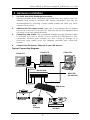
Typical Connection Diagram:
Client PC2
Client PC1
Client PC3
Router/Hub
WAN/DSL
(to Internet)
USB Server
USB Printer
USB
Camera
USB DVD
3