1
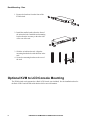
Rack Mounting - Rear
2. Install the smaller bracket from the front of
the unit to the back. Install the rack mounting
bracket from the inventory to the other side
of the rear of the unit.
aem0440a
1. Remove the brackets from the front of the
KVM switch.
3. Slide the switch into the rack. Align the
mounting bracket holes with the holes in the
rack.
aem0441a
4. Secure the mounting brackets to the rear of
the rack.
Optional KVM to LCD Console Mounting
The KVM switch can be mounted to a Rack LCD Console (not included). See the installation sheet for
the Rack LCD Console KVM switch bracket kit for more information.
8
KVM Switches KVM0108A and KVM0116A User Manual