1
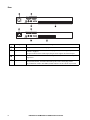
Rear
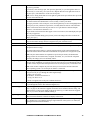
KVM0116A
aem0464a
KVM0108A
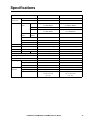
Item
6
Component
Description
1
Power Socket
The power cord to the AC source plugs in here.
2
Chain In/Out Ports When cascading KVM switches, the cables plug in here (see “Tiering multiple KVM
switches” on page 9).
The port on the left is the Chain In port; the port on the right is the Chain Out port.
3
KVM Port Section The Cat 5e/6 cables that link to the KVM adapter cables (which link to the computers)
plug in here.
4
Console Ports
If this is a single station installation, or if this is the first station of a tiered installation,
the keyboard, monitor, and mouse that make up the Local Console plug in here.
Any combination of PS/2 and USB keyboards and mice for the console may be used.
KVM Switches KVM0108A and KVM0116A User Manual