1
6
Use the archive utility to extract the software
update file in the root directory.
Remove the USB flash drive or CD-R from
your computer.
8Product
specifications
English
5
Step 2: Update the software
Note
Warning
•• Specifications and design are subject to change
without notice.
•• If you use a USB flash drive, make sure that
there is no disc in the disc compartment, and
the disc compartment is closed.
1
2
3
Connect the USB flash drive or insert the
CD-R to your home theater.
Switch your TV to the correct source for
your home theater.
Follow the instructions on the TV to
complete the update.
»» When the software update is complete,
the home theater automatically switches
off and restarts. If it does not, disconnect
the power cord for a few seconds, and
then reconnect it.
Note
•• When the software update is in progress, do
not turn off the power, or remove the USB flash
drive or CD-R.
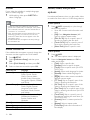
Region codes
The type plate on the back or bottom of the
home theater shows which regions it supports.
Country
DVD
Europe, United Kingdom
Asia Pacific, Taiwan, Korea
Latin America
Australia, New Zealand
Russia, India
China
Media formats
•
DVD-Video, DVD+R/+RW, DVD-R/-RW,
DVD+R/-R DL, CD-R/CD-RW, Audio CD,
Video CD/SVCD, Picture files, MP3 media,
WMA media, DivX media, USB storage
device
EN
19