1
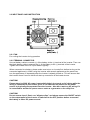
2.2 INPUT PANEL AND INSTRUCTION
2.2.1 FAN
For cooling the inverter during operation
2.2.2 TERMINAL CONNECTOR
Use red battery cable to connect (+) of the battery to the (+) terminal of the inverter. Then use
the black battery cable to connect the (-) of the battery to the (-) terminal of the inverter.
Tighten the screws of the DC input cables regularly.
When connected to a battery, please make sure to turn on inverter first, before turning on the
connected appliance(s). When using the inverter with several appliances at the same time,
turn the appliances on separately after the inverter is already turned on. This will ensure that
the inverter doesn’t have to deliver all start up currents for all the loads at once .
CAUTION!
Please attend to 220V AC power is potentially lethal, don’t work on AC wiring while the
wiring is connected to the inverter (even if it is switched off) unless the DC power
source is physically disconnected from the inverter . Also don’t work on AC wiring if it
is connected to another AC power source such as a generator or the utility line .
CAUTION!
Do not reverse input! Don’t use “alligator-clips” and always ensure the ON/OFF switch
on the output panel of the inverter is switched to the OFF position before connected
the battery or other DC power source!
4