1
Keyboard Command Summary
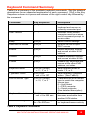
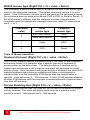
Table 8 is a summary of the available keyboard commands. See the detailed
descriptions for an expanded explanation of each command. [Ctrl] in the Key
Sequence column is a press and release of the right control key followed by
the command.
Command
Reset
Key Sequence
[Ctrl] R
Rom Version
[Ctrl] I
Keep
[Ctrl] K
Send Null to mouse
[Ctrl] N
Enable
[Ctrl} E
Disable
[Ctrl] D
Freeze
[Ctrl] F
Keyboard mode
[Ctrl] M x [Enter]
x = 1, 2, or 3
Typematic Value
[Ctrl] A xxx
xxx = 0 to 127
RS232 Mouse Type
[Ctrl] Q x [Enter]
x = 0, 1, or 2
Keyboard timeout
[Ctrl] H xxx
xxx = 0 to 255 sec.
Screen blanking time
[Ctrl] V xxx [Enter]
xxx = 0to 999 sec.
Description
Resets and enables
keyboard and mouse on
currently connected port
Identifies ROM version,
computer must be at some
sort of command prompt to
receive data
Saves custom settings
Re-sync an out-of-sync
PS/2 mouse
Enable keyboard, monitor,
and mouse at other KVM
stations.
Disable keyboard, monitor,
and mouse at other KVMs
Disable only keyboard and
mouse at the other KVM
stations, not video.
Sets keyboard mode to
mode 1, 2, or 3.
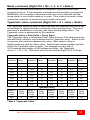
Sets keyboard Typematic
action. (See Table 9)
Translates the KVM mouse
type to match the computer
mouse type.
0 = Auto detect
1 = PS/2 computer
2 = Serial computer
(See detailed description)
Sets time computer
becomes accessible from
another KVM station
Sets time screen blanks with
no keyboard/mouse activity
Table 8. Keyboard Commands
MULTISTATION INSTALLATION AND OPERATIONS MANUAL
15