1
Connecting to a Rose KVM switch
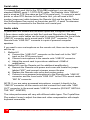
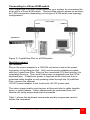
The CrystalView Plus can further enhance your system by connecting the
local unit to a Rose KVM switch. This provides remote access to as many
as 1,000 computers (depending on the type of KVM switch and topology
configuration).
CATx CABLE
LOCAL
REMOTE
KVM SWITCH
Figure 9. CrystalView Plus to a KVM switch
Applying power
(All models)
Plug in the power adapter to a 100/240-volt source and to the power
connector on the Remote Unit. Only use the power adapter provided
with the CrystalView Plus. Boot up the connected CPU and wait for it to
completely boot-up. The Local Units power is supplied from the CPUs
keyboard port. If additional power is required at the local unit due to
extended cable lengths or only passing video through the CrystalView
Plus, connect the optional
+5V DC power adapter to the local units +5V DC power jack.
The video image quality may be poor at this point due to cable lengths,
types, or patch panels. Video adjustments are performed from the
remote unit using simple keyboard commands.
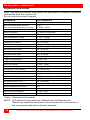
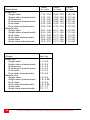
Table 1 shows the keyboard commands and key sequences used to
initiate the command.
CRYSTALVIEW PLUS INSTALLATION AND OPERATIONS MANUAL
17