1
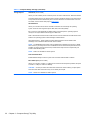
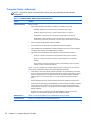
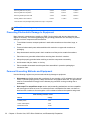
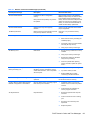
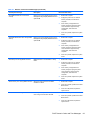
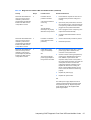
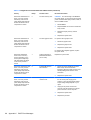
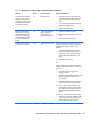
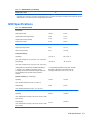
Table C-2 Diagnostic Front Panel LEDs and Audible Codes (continued)
Activity
Beeps
Possible Cause
Recommended Action
Red Power LED flashes five
times, once every second,
followed by a two second
pause. Beeps stop after fifth
iteration but LEDs continue
until problem is solved.
5
Pre-video memory error.
CAUTION: To avoid damage to the DIMMs or
the system board, you must unplug the computer
power cord before attempting to reseat, install, or
remove a DIMM module.
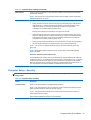
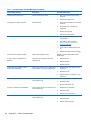
Red Power LED flashes six
times, once every second,
followed by a two second
pause. Beeps stop after fifth
iteration but LEDs continue
until problem is solved.
6
Pre-video graphics error.
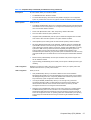
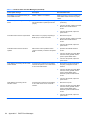
1.
Reseat DIMMs.
2.
Replace DIMMs one at a time to isolate the
faulty module.
3.
Replace third-party memory with HP
memory.
4.
Replace the system board.
For systems with a graphics card:
1.
Reseat the graphics card.
2.
Replace the graphics card.
3.
Replace the system board.
For systems with integrated graphics, replace
the system board.
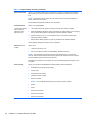
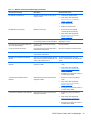
Red Power LED flashes
seven times, once every
second, followed by a two
second pause. Beeps stop
after fifth iteration but LEDs
continue until problem is
solved.
7
System board failure
(ROM detected failure
prior to video).
Replace the system board.
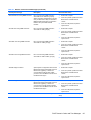
Red Power LED flashes eight
times, once every second,
followed by a two second
pause. Beeps stop after fifth
iteration but LEDs continue
until problem is solved.
8
Invalid ROM based on
bad checksum.
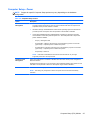
1.
Reflash the system ROM with the latest
BIOS image. See the “Boot Block
Emergency Recovery Mode” section of the
Desktop Management Guide for more
information.
2.
Replace the system board.
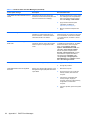
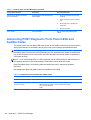
1.
Check that the voltage selector, located on
the rear of the power supply (some
models), is set to the appropriate voltage.
Proper voltage setting depends on your
region.
2.
Unplug the AC power cord from the
computer, wait 30 seconds, then plug the
power cord back in to the computer.
3.
Replace the system board.
4.
Replace the processor.
Red Power LED flashes nine
times, once every second,
followed by a two second
pause. Beeps stop after fifth
iteration but LEDs continue
until problem is solved.
98
9
Appendix C POST Error Messages
System powers on but is
unable to boot.