1
s
USB & Stop Mode
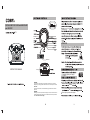
3. Press and hold PLAY/USB for usb playback, the audio tracks
Do not play in very high volume level to avoid damage to your
hearing.
To use AC power
stored in USB stick will be played in sequence
automatically.
USB
4.Press and hold PLAY/USB again for CD playback. The LCD will
wall outlet.
display CD/MP3 playback screen.
RADIO.
5.
in
Tuning dial.
control
total number of tracks and total playback time.
73:15
( In MP3 mode, LCD show total number of tracks only)
on the bottom of
SEARCH TRACKS & FAST FORWARD , REVERSE
on the bottom of the compartment.
turn off the player.
NOTE:
is
distorted.
To play MP3 discs, follow the steps for CD playback
below.The LCD will display the corresponding MP3
Playback screen .
In MP3 Mode, press and hold +10 button to
select the desired folder. The ‘F’ on screen is
short for Folder.
PLAYBACK
CD
Batteries should not be left in the unit if they are
exhausted or if the unit is not to be used for a long
period of time as they may leak and damage the unit.
Battery leakage is not covered under the warranty.
reverse
the track.
4. The track will be played automatically.
TO PLAY A
The first press of +10 will change the track number to 10,
and each press would be the multiple of 10, if the left
tracks are not eough for another multiple of 10, the LCD
will display the last track number.
When the disc has been loaded in the CD compartment, the
tracks will be played automatically.
PLAY/Pause Mode
screen
current
The player
PLAY/USB
resume
NOTE:
and elapsed time.
( Repeat ALBUM in MP3 Mode)
the tracks in sequence.
playback. Press again to.
NO DISC
no disc
Press MODE three times for Random playback.
( Repeat ALL in MP3 Mode)
RANDOM