1
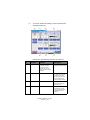
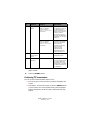
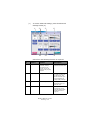
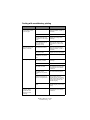
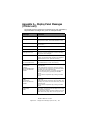
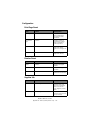
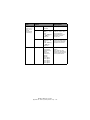
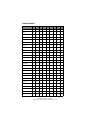
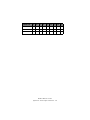
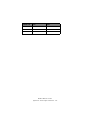
Item
Value
Description
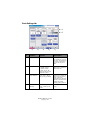
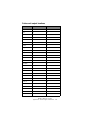
Print Position
Adjust
Duplex X Adjust
0.00
+0.25 – +2.00
-2.00 – -0.25
mm
0.00
+0.01 – +0.08
-0.08 – -0.01in
During the flip-side
printing of duplex
printing, adjusts the
location of the whole
printing image (0.25
mm, 0.01in interval)
perpendicular to the
direction of paper
movement (i.e.
horizontally).
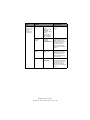
Duplex Y Adjust
0.00
+0.25 – +2.00
-2.00 – -0.25
mm
0.00
+0.01 – +0.08
-0.08 – -0.01
in
During the flip-side
printing of duplex
printing, adjusts the
location of the whole
printing image (0.25
mm, 0.01 in interval)
parallel to the
direction of paper
movement (i.e.
vertically).
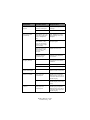
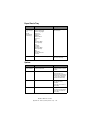
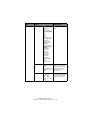
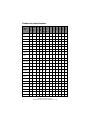
xxxx Darkness
0
+1 – +3
-4 – -1
Adjusts the xxxx
engine density where
xxxx is one of Cyan,
Magenta, Yellow,
Black. Darkest value
is +3.
xxxx Reg Fine
Adjust
0
+1 – +3
-3 – -1
Makes fine
adjustment to image
registration in xxxx
against Black in the
horizontal direction,
where xxxx is one of
Cyan, Magenta,
Yellow.
If the paper
movement direction is
upward, a value set
on the plus side,
means the image
relatively moves
downward.
ES3640e MFP User’s Guide
Appendix B – Menu system (Printer unit) - 183