1
Caution
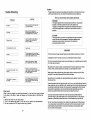
Touble Shooting
Please read and observe all warnings and instructions in this owner's manual
and those marked on the unit. Retain this booklet for future reference.
( ACTION)
(TROUBLE)
Check to ue that the AC power cable
[ No power
Is connected propefly.
Make sura that the equipment I.
connected proper1y. Check to see that
the connected monitor I. turned on
[ No picture
Check to ••• that the video cable Is
connected. Check to lee that the
monitor Is turned on.
[ Stopped pletu ...
[ The playback picture is poor
[
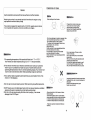
There are two kinds of alarm symbols as follows:
WARNING
The lightning flash with arrowhead symbol within an equilateral
triangle is intended to alert the user to the presence of
"dangerous voltage"within the product's enclosure that may be
of sufficient magnitude to constitute a risk of electric shock to
persons.
CAUTION
The exclamation point within an equilateral triangle is intended
to alert the user to the presence of important operating and
maintenance (servicing) instructions in the literature
accompanying the product.
Clean the disc
WARNING
The color system set by this unit does
not match the color system 01 the monitor.
[ No color
The driver should never operate these products while the vehicle is in motion!
Check the color system of the unit.
Installation of all TV monitors must be out olthe driver's field of vision I
Ajust the video system by pre.sing
the TV system button. (PAL, NTSCj
[ Distored siund
Thl remotl control dOlsn' t work
properly
Remove any obstacl •• betwe.n the
remote control unit and the remote control
s.nsor. Op.rate the remote control
at a shorter distance.
"DISK ERROR'" is displlY on
thl .crlen
Set the power button to OFF and then
blck to ON lltemaUvely, Tum off the
power, disconnect the power plug, and
then reconnect It.
Check point
When a disc is brought from acold environment to a hot one, there may be steam
on the face of the disc, or water will appear on the pickup lens. It will affect the
play.
1. Remove the disc from the DVD player.
2. Turn on the power and leave it on for an hour to vaporize the condensation.
3. You can operate the DVD player without any problem.
16
Do not try and service these products yourself,seek only a qualified service cente
or factory service center.
Be careful not to drop or apply undue pressure to the front panel of your video
monitor.lfthe screen cracks due to misuse yourwarrantly will be void!
Make sure to keep products away from heater ducts or vents and out of direct
sunlight. Do not mount forward of the driver's shoulders.
Be careful not to overload your cigarette lighter plug by adding more than one
device at a time.
Use extra caution with any liquids in your car. If you or your child spill any liquid on
these products, pull your vehicle to the roadside and trun the key off to disconnect
or wipe the products with a towel. Do not operate the equipment until all liquids
have eihter evaporated or you have had the monitor inspected at a service
center by a qualified Technician. Severe harm or death can occurl
Use only a damp cloth to clean the screen and use only purified water on
the cloth.wring out 811 excess water prior to wiping the screen. Do not use any
cleaners or chemicals to clean the screen. In most cases a dry cloth will do!
Do not mount the product where it will obstruct the deployment of the airbag or
in an area where it would affect the vehicular control. Also be careful to avoid
mounting the product where it can become hazardous during sudden stops
or in the event of an accident.