1
QUICK SETUP GUIDE
1. Make sure all items listed on the front of this guide are included in the box.
2. READ SAFETY INSTRUCTION BOOKLET BEFORE USING
THE PRODUCT.
3. MAKE SURE THAT YOU HAVE COMPLETELY CHARGED
BOX CONTENTS
Battery Powered Amplifier
THE BATTERY PRIOR TO FIRST USE FOR MAXIMUM
Power Cable (Standard IEC)
BATTERY LIFE.
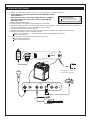
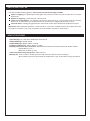
4. Study this setup diagram.
5. Place product in an appropriate position for operation.
6. Make sure all input devices such as microphones,CD players, mp3 players, and linked amplifiers/
PAs are turned off and volume settings are set at "zero"
7. Connect all devices as shown above.
8. Connect the stereo outputs to the power amplifier(s), tape decks, and/or audio sources.
9. Switch everything on in the following order.
audio input sources ( i.e. microphones, instruments, CD/MP3 Players)
last, any amplifiers
10. When turning off, always reverse this operation by.
turming off amplifiers
last, any input devices
AC F US E IN PU T RA NG E
CHARGE
USB/SD
ON
SOUND SYSTEM
BATTERY LEVEL
LINK
OUTPUT
ON
OFF
LOW
1
2
3
OFF
110 -T 75 0m AL 250 V
10 0- 12 0V- 60 Hz 2 0W
23 0- T3 15 mA L 250V
22 0- 24 0V- 50 Hz 2 0W
USB/SD
L
R
To RCA input on additional
(Cable sold separately)
MIC 1 BALANCED
GAIN
INSTRUMENT/MIC 2
GAIN
USB/SD/AUX
GAIN
MASTER
VOLUME
POWER
LEFT
RIGHT
L
R
(Cable sold separately)
OR