1
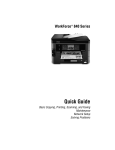
Your WorkForce 545/645
Series
After you set up your WorkForce® 545/645 Series (see the Start Here sheet), turn to this
Quick Guide and your online User’s Guide for instructions on using your product.
Features
Where to find information
Copy, scan, and fax from the easy-to-use
control panel
See this Quick Guide for the basics.
See the online User’s Guide for details.
Process large documents with the 30-page
capacity Automatic Document Feeder
See this Quick Guide for the basics.
See the online User’s Guide for details.
Easy networking—Wi-Fi and Ethernet
See the Start Here sheet and the online
User’s Guide.
Copy files to and from your computer with the
built-in memory card reader
See the online User’s Guide for details.
Wireless printing from mobile devices with
Epson Connect
See www.epson.com/connect.
Note: The illustrations in this manual show the WorkForce 645. The instructions apply
to both the WorkForce 545 and WorkForce 645 unless otherwise noted.
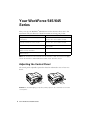
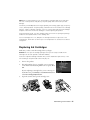
Adjusting the Control Panel
The control panel is adjustable. Squeeze the release bar underneath to raise or lower it as
shown.
Caution: To avoid damaging your product, always squeeze the release bar to lower the
control panel.
2 Your WorkForce 545/645 Series