1
4. Peripheral Installation
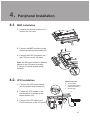
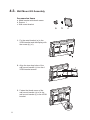
44444 MSR Installation
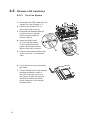
111 Unfasten the thumb screws (x2) to
remove the I/O cover.
222 Connect the MSR module into the
system and fasten the screws (x2).
333 Connect the PS/2 Connector into
the PS/2 port on the I/O panel.
Note: the PS/2 port locates in different
places on the I/O panel according
to the fan or fanless system being
installed.
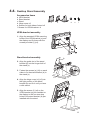
44444 VFD Installation
VFD Accessories
aaa VFD module
bbb VFD metal bracket
(with RJ45 cable)
ccc Screws (x2)
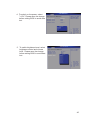
111 Connect the VFD metal bracket
into the system with screws (x2)
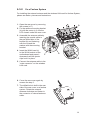
222 Fasten the VFD module to the
metal bracket by fastening the
thumb screws (x2).
333 Connect the VFD cable to the
RJ45 connector on the I/O panel.
a
b
c
10