1
4-5-2. On a Fanless System
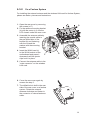
For installing the external antenna and the wireless LAN card for fanless System,
please see below pictures and instructions.
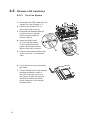
111 Open the rear cover by removing
the screws (x17)
a
222 Fix the antenna mounting bracket
(b) with the screw (x1) onto the
LCD chassis under the rear cover.
333 Assemble the antenna cable by
inserting the coaxial cable to
the pre-drilled hole of the
bracket (b) and fastening
with the nut and the
washer with the mounting
bracket.
444 Insert the WLAN card (c)
to the WLAN socket on the
motherboard and press it
downward until the ejector
clips lock it in place.
c
b
d
555 Connect the antenna cable to the
“main connector” on the wireless
LAN card.
666 Cover the rear cover again by
reverse the step 2.
777 The drilled hole is built-in the rear
side of the rear cover on a fanless
system. Rotate the external
antenna clockwise and fasten to
the connector of internal antenna
cable.
14