1
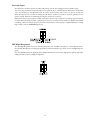
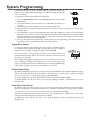
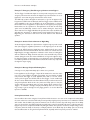
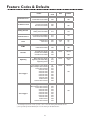
Here are some illustrative examples:
Example 1: Emergency Tone/Emergency Announcement Bypass
073
074
Page
Disabled
076
Night Ring
Disabled
078
Event
Disabled
-
Priority
Enabled
082
Delay
Disabled
-
No Delay
Enabled
081
Event
Tone Trigger 1 Enabled
Enabled/
Disabled
Disabled
070
Tone Trigger 1 Disabled
072
Tone Trigger 2 Disabled
074
Page
Disabled
076
Night Ring
Enabled
079
Mode
Code
Event
Enabled
083
Priority
Disabled
-
Delay
Override
Delay
Disabled
-
No Delay
Enabled
081
Event
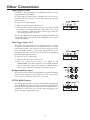
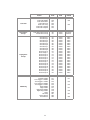
Strobes throughout a facility are to flash whenever a night line rings to provide a visual
alert of the ringing line, regardless of whether or not the night ring tone can be heard.
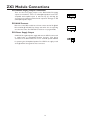
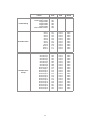
Example 3: Message Playback Following Tone
Enabled/
Disabled
070
073
Tone Trigger 2 Disabled
074
Page
Disabled
076
Night Ring
Disabled
078
Event
Enabled
083
Priority
Disabled
-
Delay
Enabled
080
No Delay
Disabled
-
Event
Disabled
Tone Trigger 1 Enabled
Mode
Override
Code
Delay
A message is to be played immediately after a chime tone is produced.
In this application the Tone Trigger 1 input will be activated to cause the chime
tone (one of the UTI312’s selectable tones). After the tone finishes the AUX
relay contacts will trigger an audio playback device with a 1-second contact
closure pulse. Program the UTI312 with the Tone Trigger 1 event enabled and
all other events disabled. Select the Event-Driven Mode (see below about issue
using Priority-Driven Mode in this case). Select the Delay option so that the
contact will pulse immediately after the event finishes. Now, whenever Tone
Trigger 1 is activated a message will play immediately after the tone stops.
A good way to get the message into the paging system is to use the Override
input if it is available.
071
Tone Trigger 2 Disabled
Example 2: Strobes Flash to Announce Night Ring
Program the UTI312 with the Night Ring event enabled and all other events
disabled. Select the Event-Driven Mode since the strobes are to flash when the
Night Ring line is ringing independent of whatever other events are taking place
with the UTI312. No Delay should be selected so that the AUX relay contacts
activate during the event. The strobes will flash for as long as the night line rings.
If a Page, Tone Trigger or Override page occurs during this event, the Night Ring
tone will stop, but the strobes will continue to flash. The strobes stop only when
the night line stops ringing.
Enabled
Mode
The AUX relay contacts will signal the attenuators to go into the bypass mode.
Program the UTI312 with the Override and Tone Trigger events enabled and all
others disabled. In this case the UTI312 can be in Event-Driven or PriorityDriven Mode since the application only involves the two highest priority inputs.
Nevertheless, set the operation for Priority-Driven mode with the No Delay
option since the AUX relay contacts need to activate during the event. Now,
when either the Tone Trigger OR Override input becomes active the AUX relay
will signal the attenuators to bypass. During normal paging, Tone Trigger 2 or
Night Ring, the attenuators still control the audio level of their associated
speakers.
Override
Code
Delay
The Tone Trigger 1 and Override inputs are used to provide emergency tones and live
emergency announcements and when this happens any local attenuators are to be
bypassed to ensure that emergency announcements can be heard.
Enabled/
Disabled
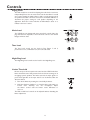
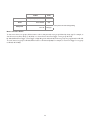
Priority-Driven Mode Issues
Care should be taken when using the Priority-Driven Mode because it can cause some unexpected results. When
the event selected to control the AUX relay is interrupted by a higher priority event that is not enabled, the UTI312
will consider that the AUX relay event has finished even if it hasn't, and the relay will change states. If the Delay
option is selected, then the UTI312 will pulse the AUX relay contacts. If the AUX relay event is still active after the
high priority event is completed, the AUX relay will again activate. This operation can lead to multiple changes in the
relay state (when No Delay is selected) or multiple pulsations of the AUX relay (if the Delay option is selected).
Care should be taken in using the Priority-Driven Mode, especially when low priority events are enabled.
21