1
Contents
Before Use
Precaution................................................. 4
Standard Accessories............................... 6
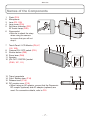
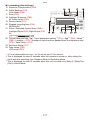
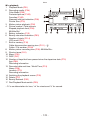
Names of the Components........................ 7
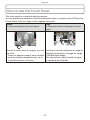
How to Use the Touch Panel...................... 8
Preparation
Charging the Battery............................... 10
•Approximate operating time and
number of recordable pictures.......... 13
Inserting and Removing the Card
(optional) / the Battery......................... 14
About the Built-in Memory / the Card...... 16
Setting Date / Time (Clock Set)............... 18
•Changing the clock setting................ 19
Basic
Recording Sequence............................... 20
Taking Pictures Using the Automatic
Function (4: Intelligent Auto Mode).... 22
•Scene Detection................................ 23
•Tracking moving subjects and focus
(AF Tracking)..................................... 24
•Settings in Intelligent Auto Mode....... 25
Taking Pictures with Your Favorite
Settings (1: Normal Picture Mode)..... 26
•Confirming the recording information
such as focus and shutter speed...... 27
•When the subject is not in focus
(such as when it is not in the center
of the composition of the picture
you want to take)............................... 27
•Preventing jitter (camera shake)....... 28
•Direction Detection Function............. 28
Touching the Screen to Release the
Shutter (Touch Shutter function).......... 29
Touching the Screen to Adjust the Focus
and the Exposure (Touch AF/AE)........ 30
Playing Back Pictures ([Normal Play])..... 31
•Displaying Multiple Screens
(Multi Playback)................................. 32
•Using the Playback Zoom................. 33
Recording Motion Pictures...................... 34
Playing Back Motion Pictures.................. 36
Deleting Pictures..................................... 37
•To delete a single picture.................. 37
•To delete multiple pictures
(up to 50) or all the pictures.............. 38
Setting the Menu..................................... 39
•Calling up frequently used menus
easily (Shortcut setting).................... 41
About the Setup Menu............................. 42
Advanced (Recording pictures)
About the LCD Monitor............................ 47
Taking Pictures with the Zoom................. 48
•Using the Optical Zoom / Using the
Extended Optical Zoom (EZ) /
Using the Intelligent Zoom /
Using the Digital Zoom...................... 48
•Zooming with touch operation........... 50
Taking Pictures Using the Built-in Flash..... 51
•Switching to the appropriate flash
setting................................................ 51
Taking Close-up Pictures......................... 55
•AF Macro........................................... 55
•Macro Zoom...................................... 56
Taking Pictures with the Self-timer.......... 57
Compensating the Exposure................... 58
Taking Pictures While Changing the Skin
Texture (<: Cosmetic Mode)............. 59
Taking Pictures That Match the Scene
Being Recorded (5: Scene Mode).... 60
•Calling up the frequently used scene
quickly (/: My Scene Mode)............ 61
•[Portrait]............................................. 61
•[Transform]........................................ 61
•[Self Portrait]..................................... 62
•[Scenery]........................................... 62
•[Panorama Assist]............................. 63
•[Sports].............................................. 64
•[Night Portrait]................................... 64
•[Night Scenery]................................. 64
•[Food]................................................ 65
-2-