1
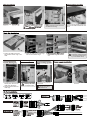
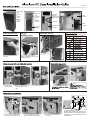
ODD installation
Disassemble the ODD
ODD
ODD
ODD
1. Fasten the HDD screws with
anti-vibration rubber rings to the
HDD.
HDD cage can be
turned 180 degree.
1. Loosing all screws on the
bottom panel, then turn the
HDD cage 180 degree.
2. Secure all screws to fix the
HDD cage.
2. Place the HDD into the HDD cage
with the anti-vibration rings.
Cable management
M/B tray with cable
Note: management clips
Note:
Adding extra M3 screws to secure
the ODD for traveling.
Pull and hold the plastic handle first,
and push the ODD towards the front
panel.
anti-vibration rings fix into the
slot.
Adding another screws on
both sides of HDD brackets
Note: to prevent the HDD loosing
by an accidental bump.
Pre-drilled holes for
water-cooling system
tube
Using the tool to poke the
water holes
Please be careful while
handing to avoid an
incised wound.
1. Push in gently.
2. Fasten four thumb-screws
to secure.