1
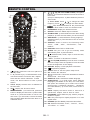
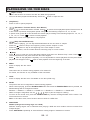
REMOTE CONTROL
6.
12
13
6
22
21
22
19
18
15
4
16
7
8.
9.
10.
17
20
11.
7.
2
25
24
8
26
9
14
29
5
1.
2.
3.
4.
5.
12.
3
23
10
27
11
28
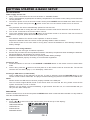
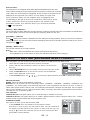
(standby): Switch the unit on or place it in
standby mode.
0 - 9 (number keys): In DVD/VCD/CD mode,
use these buttons to enter the title, chapter,
track and time search selections. In radio
mode, use these buttons to enter a preset
station.
TITLE: Display the title menu if available on
the DVD disc.
3D : Display the 3D sound menu.
MENU/RIPPING: 1) In DVD mode, press this
button to display the disc menu. 2) When PBC
mode is on, press this button to view a VCD
disc menu. 3) In CD mode, Convert CD audio
files into MP3 digital files and save them on a
USB flash drive.
13.
14.
/ / /
(CH-/CH+/TUNE+/TUNE-) Navigation
buttons- 1) Press these buttons to move the cursor in
the menus.
2) Flip or rotate a picture. -3) Move within the picture in
zoom mode.
/
to change the radio
4) Tuner mode: Press
/
to change the radio station.
frequency. Press
/ : Skip backward/forward to the previous/next
chapter in DVD mode or track for CD/VCD mode.
BOOKMARK: Display the bookmark menu.
HD RES: Select the HDMI output resolution.
ZOOM/CLEAR: 1) Select different zoom ratios during
playback. 2) Clear the information you have entered.
ANGLE/PBC: 1) Select different viewing angles (if
available on disc). 2) Turn PBC ON or OFF on a VCD/
SVCD disc.
SOURCE: select a mode in the following order:
“DVD”, “USB”, “AUX”, “FM RADIO”, “AM
RADIO”.
DVD/USB: Select DVD or USB mode.
SLEEP: Set your unit to go into standby mode
automatically after a preset duration.
/ OPEN/CLOSE, STOP,: Open or close the disc,
Stop playback,.
16. - VOL +: Increase or decrease the volume.
15.
17.
18.
19.
20.
21.
22.
23.
24.
25.
26.
27.
28.
29.
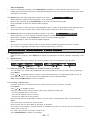
(MUTE)/DIM (DIMMER): Press to mute or restore
the sound output from the speakers/ Press and hold
to dim the brightness of the display.
DISPLAY: Display current playback information.
: Play/Pause playback.
SETUP: Enter or exit the system setup menu.
OK: Confirm the selection.
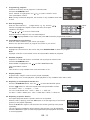
: DVD mode - Fast search backward or forward.
Radio mode – Auto scan.
SUBTITLE: Select a different subtitle language.
AUDIO/FM ST: 1) in DVD mode, select different
languages (if available on the disc). For VCD discs,
this option also enables you to select one of these
audio modes: (“STEREO”,”MONO L”, “MONO R”
and “MIX MONO”). 2) In FM mode, select mono or
stereo.
GOTO: Display the search menu to search for a
specific title, chapter, track or time on a disc.
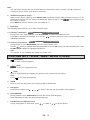
PLAYMODE: Select different play modes: program,
random or repeat.
A-B: Set point-to-point repeat playback or to clear
repeat mode.
EX BASS (EXTRA BASS): Boost the bass effect.
EQ: Select an EQ mode: “FLAT ” , “ R O C K ” , “ P O P ” ,
“CLASSIC” or “JAZZ”.
GB - 5