1
2.
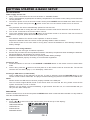
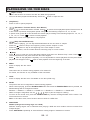
Press
3.
4.
5.
Press
or
to select a new setting, then press OK to confirm the new setting.
Repeat steps 1 to 3 to change any settings.
Press the SETUP button to exit setup.
For more details, please refer to the next chapters.
or
to select different settings in a menu. Press
or OK to confirm the setting.
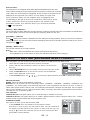
1. SYSTEM SETUP
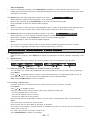
1.1 “SCREEN SAVER”
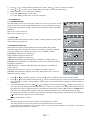
Use this setting to turn the screen saver option on or off. If you turn the screen
saver on, the screen saver image appears when you leave the player in pause
or stop mode more than 3 minutes. It protects the television screen from being
damaged.
On: To turn screen saver on.
Off: To turn screen saver off.
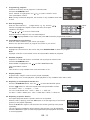
1.2 JPEG TIME
Select the slide show interval (5 SEC, 10 SEC, 15 SEC) between each picture
while playing the picture CD.
1.3 PASSWORD & RATING
Many DVD movie discs contain Motion Picture Association rating codes.
This DVD Player will recognize the codes on these discs, providing a method
to prevent children from viewing films which are not suitable for them.
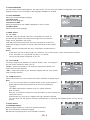
1 (Kid safe): Suitable for all audiences.
2 (G): Suitable for general audiences.
3 (PG): Parental guidance suggested.
4 (PG-13): Parental guidance suggested, unsuitable for children under 13.
5 (PG-R): Parental guidance recommended - brief scenes containing mature
language or situations.
6 (R): Restricted - violence, adult language and situations unsuitable for
young viewers.
7 (NC 17): Adult theme or content, not suitable for children under 17.
8 (Adult): Adult themes, language and nudity. Select this level of control to
switch off parental control.
or
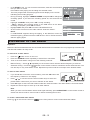
to highlight “Rating”, then press
. Select a parental control level and press OK.
1.
Press
2.
Press
or
to select Password and press . Use the number keys (0-9) to enter the four-digit password
and press OK to confirm. The system is locked again, which means that the parental control function is
switched on.
3.
to highlight “Password” and press . Use the number keys (0In the SYSTEM SETUP menu, press or
9) to enter the four-digit password and press OK to confirm. The system is unlocked, which means that you
can adjust the setup for parental control. If a mistake is made before pressing OK, press the CLEAR button
and enter the 4-digit password again. DVD discs that are rated above the selected level will not play.
To change the password, first unlock the system by entering the old password, then enter the new password.
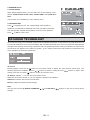
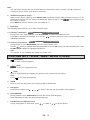
Indicates that the parental lock is NOT active.
The parental lock is active.
Notes:
·
The rating levels are only functional when the parental lock is active.
·
The rating levels can only be changed when the parental lock is not active.
·
If you forget the password, enter “76418” when no disc has been inserted in the player. The factory
password settings will then be restored.
GB - 7