1
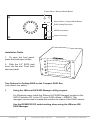
Enclosure Overview
HD0 - HD4
Lock Mechanism
Power LED
HD0 – HD4 Button Functions:
A.
Push-Open Button
Press button for each drive slot to open the front HDD panel.
If the locking mechanism is set to LOCK position, the button
cannot be pressed. Put the locking mechanism to UNLOCK
position to be able to press the push-open button and open the
front HDD panel.
B.
Drive Activity LED
Power LED
Action
Light On
Light On
Light Off
Message
Power starting
System is ready
Power is OFF
Color
Blue
Purple
No
Drive Activity LED
Light On
Light Off
Light On
Flash
Hard drive installed
Hard drive uninstalled
Hard drive fail
Hard drive access
Blue
No
Red
Blue
Power Switch
A.
Power switch / Buzzer disable button
a.
Buzzer disable: press button less than 2 seconds
b.
Power switch: press button over 2 seconds
B.
Reset Device / Change Mode button
a.
Reset Device: press button less than 2 seconds
b.
Change Mode: press button over 2 seconds
www.addonics.com
Technical Support (M-F 8:30am - 6:00pm PST)
Phone: 408-453-6212
Email: www.addonics.com/support/query/