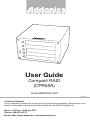
1
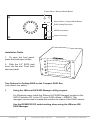
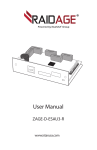
Power Switch / Buzzer Disable Button
Reset Device / Change Mode Button
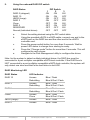
RAID Setting Dip Switch
eSATA Connection
Power Connector
Installation Guide
1. To open the front panel,
press the push-open button.
2. Slide the 2.5” SATA hard
drive into the slot. Push back
the front panel.
Two Options for Setting RAID on the Compact RAID Box
(only select one option)
I.
Using the JMicron HW RAID Manager utility program
For Windows users, install the JMicron HW RAID Manager located on the
SATA Controller CD. In the CD, go to RAID utilities > JMB393. This
manager can be used to create and monitor the status of the RAID volume.
Use the RESERVE DIP switch setting when using the JMicron HW
RAID Manager.
www.addonics.com
Technical Support (M-F 8:30am - 6:00pm PST)
Phone: 408-453-6212
Email: www.addonics.com/support/query/